





In This Article (7 sections)
Anastasiy MagicPicker 10 Introduces Color Areas, Improved Color Harmony, and Advanced Painting Tools
Anastasiy MagicPicker 10 introduces a major update to the professional color selection extension for Adobe Photoshop and Illustrator. Released in October 2026, the software adds Color Areas, Oklab and OKLCH color spaces, improved color harmony controls, a redesigned interface, and new color export options. The update also introduces native Apple Silicon support, making it particularly relevant to digital artists working with modern Mac hardware.
Developed by Anastasiy Safari, MagicPicker provides an alternative to Adobe’s standard color selection interface. It is designed for digital painters, concept artists, illustrators, character designers, and other creative professionals who need precise control over color relationships throughout their projects.
According to CG Channel’s October 6, 2026, coverage, MagicPicker 10 represents the software’s first major update in four years. The release builds on an established collection of painting tools while introducing improvements intended to make color selection more consistent and efficient.
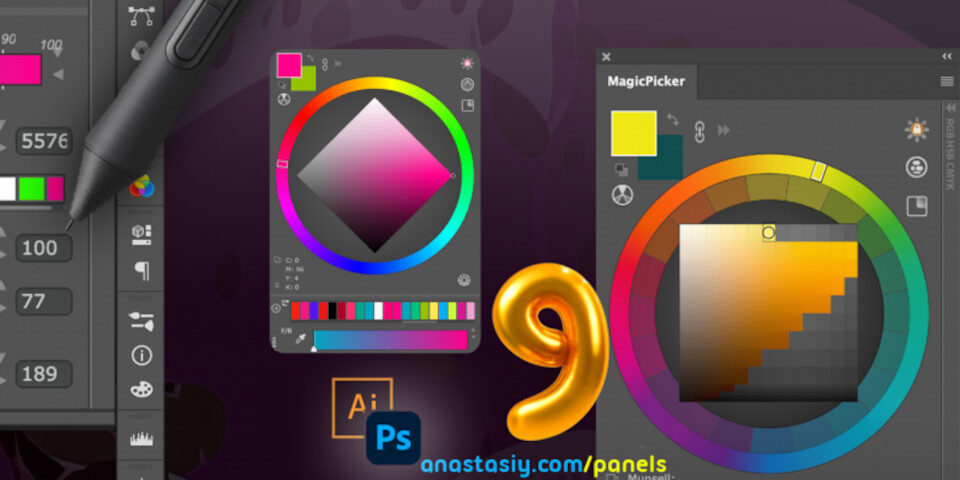
Unlike a conventional RGB picker, MagicPicker combines customizable color wheels, harmony controls, adjustable sliders, color history, and interactive selection tools. These features help artists explore relationships between hues, brightness, saturation, and color temperature without repeatedly opening Adobe’s standard color selection dialog.
The software supports several color systems, including RGB, HSB, HSL, CMYK, Munsell, CIE Lab, Oklab, and OKLCH. It also includes a traditional red, yellow, and blue color wheel, which can be useful for artists familiar with conventional painting theory.
The most significant new feature is Color Areas, which allows users to restrict their color selections to specific regions of a color wheel or color box. Instead of choosing freely from the entire spectrum, artists can define boundaries that help maintain a consistent palette.
According to the developer, Color Areas can be created manually or extracted from an existing image. This makes the feature useful for artists working from approved reference material, established color scripts, or previously completed illustrations.
For example, a concept artist painting an abandoned city at sunset might establish separate color ranges for the environment:
- Background colors: Muted blues and grays for distant buildings and atmospheric depth.
- Sky colors: Controlled orange and lavender tones to establish the sunset.
- Foreground elements: Warmer or more saturated colors to distinguish important objects.
- Accent colors: A limited selection of vivid hues used to direct attention toward focal points.
By working within these ranges, the artist can develop highlights, shadows, and material variations without unintentionally introducing colors that conflict with the intended atmosphere.
Color Areas can also help character designers maintain consistency across costumes, equipment, skin tones, and accessories. Artists working on a series of characters or environments can use restricted palettes to reinforce the visual identity of a larger project.
The feature is particularly valuable during early concept development, when artists may explore multiple lighting arrangements and color variations before settling on a final design.
Instead of manually recreating a palette for every revision, artists can define an appropriate color region and experiment within it.
However, Color Areas does not automatically create successful color harmony. Artists must still consider lighting, value contrast, saturation, composition, and the relationship between focal points and supporting elements. Restricted palettes work best when combined with deliberate artistic decisions rather than treated as absolute limitations.
MagicPicker 10 also introduces improved color harmony controls through a 12 point color selection system. This feature provides convenient access to twelve primary hue positions around the color wheel, allowing artists to explore structured color relationships.
The extension already supports familiar harmony arrangements such as complementary, analogous, triadic, tetradic, and monochromatic color schemes. The new selection system adds another method for exploring these relationships.
An artist might begin with a dominant hue, select a complementary color for contrast, and then use Color Areas to limit the range of available variations.
MagicPicker’s existing Tone Lock functionality can also help preserve tonal relationships when adjusting colors, allowing artists to experiment with different hues without unnecessarily disrupting the overall value structure.
The redesigned interface introduces several usability improvements:
- Resizable color swatches: Foreground and background color previews can be adjusted to a preferred size.
- Improved panel layout: Updated controls provide a more organized color selection experience.
- 12 point color harmony: Artists can access twelve structured hue positions directly.
- Persistent HUD Mode: The floating color picker can remain visible while users continue working.
- Click free color picking: Artists can sample colors through an Alt or Option based workflow.
- Customizable sliders: Users can arrange color controls according to their preferred systems.
- Color Areas: Restricted selection regions help maintain consistent palettes.
- Additional color spaces: Oklab and OKLCH provide more perceptually oriented color adjustments.
The HUD, or heads up display, is particularly useful for artists who want color controls close to their cursor rather than inside a permanently docked panel.
Earlier MagicPicker versions already supported floating color selection, but version 10 improves the experience by allowing the HUD to remain visible when users interact with other parts of Photoshop.
The relevant setting is labeled Hide HUD on click outside. Disabling this option allows the floating picker to remain available while painting.
For artists using graphics tablets or pen displays, this can reduce the need to repeatedly open and close interface elements.
Another improvement is click free color picking. According to Anastasiy, users can activate the feature, hold Alt or Option, move across their artwork, and release the key to select a color.
This can be useful when sampling multiple transitional colors during skin rendering, atmospheric painting, or detailed illustration work.
The extension also supports configurable keyboard shortcuts for adjusting color characteristics, allowing users to customize frequently repeated actions.
Resizable foreground and background swatches provide another practical benefit. Larger color previews make subtle differences in brightness and saturation easier to inspect, particularly when comparing similar tones.
Artists can also configure slider arrangements according to their preferred workflow. A digital painter might prioritize HSB controls, while a graphic designer may prefer RGB or CMYK values. Those exploring perceptual color relationships can incorporate Oklab and OKLCH controls.
Together, these improvements make MagicPicker 10 more adaptable to different creative disciplines while preserving its focus on efficient color selection.
MagicPicker 10 Oklab, OKLCH, CSS Export, and Practical Photoshop Color Workflows
One of MagicPicker 10’s most important technical additions is support for Oklab and OKLCH, two color representations designed to correspond more closely to human visual perception.
Traditional color systems such as RGB, HSB, and HSL remain useful, but their numerical values do not always reflect how people perceive differences between colors.
For example, a bright yellow and a saturated blue may share similar numerical lightness values in certain color systems while appearing noticeably different in brightness.
Perceptual color spaces attempt to make these relationships more consistent.
Oklab represents color through perceived lightness and two opponent color axes. OKLCH expresses related information through lightness, chroma, and hue.
This makes OKLCH particularly useful when artists want to adjust a color’s hue or intensity while maintaining relatively consistent perceived lightness.
The main differences include:
- Oklab: Uses lightness and two color axes to represent perceptual relationships.
- OKLCH: Uses lightness, chroma, and hue, providing a more intuitive arrangement for some creative tasks.
- RGB: Describes color through red, green, and blue components.
- HSB and HSL: Organize color through hue and other characteristics such as saturation, brightness, or lightness.
- CMYK: Represents color through cyan, magenta, yellow, and black components, commonly associated with printing.
For concept artists, these systems offer different ways to approach the same visual problem.
Imagine an illustration containing several objects of different colors under similar lighting conditions. Matching their apparent brightness can be difficult when relying entirely on conventional saturation and brightness controls.
OKLCH provides another way to examine and adjust these relationships, helping artists develop more consistent color variations.
Chroma controls are also useful when creating atmospheric backgrounds or emphasizing important elements. Reducing chroma can make secondary objects appear quieter, while increasing it can help establish visual emphasis.
However, perceptual color models remain approximations. Surrounding colors, contrast, lighting, and display characteristics still influence how a color appears.
Artists must also consider whether selected colors can be reproduced by their intended output devices.
MagicPicker 10 includes warnings for colors outside printable gamuts, helping users identify selections that may not reproduce accurately in print.
This is relevant to illustrators and designers who create artwork for both digital displays and physical products.
Another important addition is CSS and Tailwind color export, which expands MagicPicker’s usefulness beyond traditional illustration.
The developer confirms that users can export selected colors into formats intended for web development workflows.
CSS controls visual presentation in web browsers, including interface colors, typography, spacing, and layout. Tailwind CSS provides a utility based framework for implementing web designs.
A designer creating an illustration or interface concept in Photoshop may want to reuse the same colors in website buttons, navigation elements, backgrounds, or other components.
Traditionally, the designer might copy hexadecimal or RGB values manually and transfer them into a stylesheet.
MagicPicker 10 simplifies this process by providing color export functionality.
The feature can be particularly useful when designers collaborate with frontend developers and need to communicate specific color values accurately.
However, exporting a swatch does not automatically produce a complete design system. A production interface may require separate colors for text, surfaces, interactive states, alerts, and accessibility requirements.
Developers should also inspect exported values to ensure they match their project’s formatting conventions.
Modern CSS supports perceptual color functions such as oklch(), making the relationship between MagicPicker’s new color systems and web design especially relevant.
Nevertheless, the developer’s confirmation of CSS export does not establish that every color will always be exported using OKLCH notation.
The resulting values should be checked in the final browser environment, particularly when using unusual color spaces or highly saturated colors.
Accessibility remains another important consideration. A color combination that appears attractive in an illustration may provide insufficient contrast when used for interface text or important controls.
Consequently, designers should evaluate readability and contrast independently of palette consistency.
For digital painters and concept artists, MagicPicker’s new features can be combined into a practical workflow.
An artist developing a fantasy environment might begin by selecting an overall lighting direction and identifying the dominant color relationships. Color Areas can then restrict the available palette to appropriate regions.
Oklab or OKLCH controls can help refine perceived lightness and color intensity, while harmony tools provide structured relationships between major hues.
The HUD allows the artist to access these controls near the canvas, and click free picking makes it easier to sample existing colors during detailed rendering.
A practical workflow could involve:
- Establishing the dominant palette: Identify the colors that define the environment or character.
- Creating Color Areas: Restrict selection to appropriate portions of the wheel or color box.
- Extracting reference colors: Use existing imagery to establish relevant palette boundaries.
- Adjusting perceptual relationships: Apply Oklab or OKLCH controls when refining lightness and chroma.
- Exploring harmony: Use complementary, analogous, or other structured hue relationships.
- Maintaining value consistency: Combine color selection with Tone Lock and visual value checks.
- Sampling during painting: Use the HUD and click free picking to reduce interruptions.
- Preparing final output: Review color gamut limitations and export values when required.
The goal is not to automate artistic judgment but to make color decisions easier to manage throughout production.
For studio projects, these features may help artists maintain consistency across multiple illustrations while still allowing intentional differences in lighting and mood.
Color Areas can serve as a working reference for approved palettes, although artists should not assume that the extension automatically synchronizes every custom range across projects.
The available documentation confirms manual range creation and image extraction but does not fully describe every possible preset management feature.
Maintaining approved palettes within project documents or style guides therefore remains useful, particularly when multiple artists collaborate.
MagicPicker 10’s broader advantage is that it brings palette control, perceptual color editing, harmony exploration, and color export into a single customizable environment.

Anastasiy MagicPicker 10 Compatibility, Apple Silicon Support, Installation, Pricing, and Upgrade Value
Native Apple Silicon support is one of the biggest technical improvements in MagicPicker 10, particularly for artists using modern Mac computers with M1, M2, M3, or M4 processors.
Older Adobe extensions sometimes depend on technologies originally developed for Intel based systems. On Apple Silicon Macs, these components may require Rosetta translation to operate.
MagicPicker 10 introduces a modern implementation using Adobe’s Unified Extensibility Platform (UXP), allowing the supported version to run natively on Apple Silicon hardware without Rosetta.
This improves architectural compatibility with modern Photoshop installations and reduces dependence on older extension technology.
However, native support does not automatically guarantee substantial performance increases. As of October 8, 2026, the available release information does not provide independently verified benchmarks showing specific speed improvements on individual Apple Silicon processors.
Actual responsiveness also depends on Photoshop document size, active layers, available memory, graphics performance, and other applications running on the computer.
The developer specifies that the native Apple Silicon M version requires Photoshop CC 27.8 or later.
This requirement is important because Photoshop 2026 belongs to version 27, but earlier builds within that generation may not support the required MagicPicker package.
Another limitation affects continuous color selection. According to the developer, real time color picking in the Apple Silicon UXP version is available only through HUD Mode.
Artists accustomed to older panel workflows should consider this difference before upgrading.
MagicPicker 10 also supports Windows and macOS environments, with compatibility information covering Windows 11, Windows ARM, and several older Adobe application releases.
The developer lists support extending from earlier Creative Suite and Creative Cloud versions through the 2026 generation of Photoshop and Illustrator.
However, different application versions may require different extension implementations. A legacy Adobe installation should not be expected to provide the identical features or installation process associated with the modern UXP version.
Before installing MagicPicker 10, users should confirm:
- Adobe application: Verify whether the intended installation is for Photoshop or Illustrator.
- Application version: Check the exact build rather than relying only on the release year.
- Operating system: Confirm compatibility with the installed Windows or macOS version.
- Processor architecture: Select the appropriate package for Intel, Apple Silicon, or Windows ARM hardware.
- UXP requirements: Ensure the application supports the extension architecture being installed.
- Workflow limitations: Review restrictions affecting HUD behavior and real time color picking.
The installation process depends on the package supplied for the user’s system.
Artists should obtain the software through Anastasiy’s official distribution channels and follow the instructions provided with the appropriate installer.
Adobe supports several extension installation methods, including plugins distributed through the Creative Cloud Plugin Marketplace. However, users should follow the developer’s specific instructions rather than assuming every MagicPicker package uses the same installation procedure.
After installation, Photoshop may need to be restarted before the extension becomes available.
Users should then verify that the color wheel appears correctly and that selecting colors updates Photoshop’s active foreground color.
Testing Color Areas, keyboard shortcuts, custom sliders, and HUD functionality before beginning an important project can help identify compatibility problems early.
Artists upgrading from an older version should preserve their license information and record important custom settings.
MagicPicker 10 is paid software, with separate pricing for new purchases and upgrades from earlier versions.
As of October 8, 2026, the official website advertises a promotional new license price of $19, while CG Channel identifies the standard retail price as approximately $29.
Existing MagicPicker customers may qualify for a discounted upgrade priced at $12.99.
The developer provides an eligibility process through which customers can enter their registered email address or serial number to determine whether they qualify for the upgrade offer.
The reported pricing can be summarized as follows:
- New license promotional price: $19.
- Standard retail price: Approximately $29.
- Existing customer upgrade offer: $12.99.
- Purchase model: A one time license rather than a recurring subscription.
- Upgrade eligibility: Verified through the developer’s existing customer process.
These advertised prices may change after promotional periods end, so customers should confirm the amount presented during checkout.
The one time purchase model can be attractive to artists who prefer avoiding additional recurring software subscriptions.
However, users should review licensing terms concerning activation limits, multiple computers, commercial use, and future major version upgrades.
Historical MagicPicker licensing information indicates that updates within a major version have been provided without additional charges, but this does not establish that all future major upgrades will be free.
For professional artists, whether MagicPicker 10 is worth upgrading to depends on their existing workflow.
Concept artists who frequently maintain consistent palettes across environments or characters may benefit significantly from Color Areas.
Digital painters working with complex lighting and color relationships may appreciate Oklab and OKLCH controls, improved harmony tools, and faster access to frequently used colors.
Mac users running compatible Photoshop versions gain the practical advantage of native Apple Silicon operation, while artists using graphics tablets may find persistent HUD functionality and click free picking particularly useful.
Web and interface designers may also benefit from CSS and Tailwind export, especially when transferring colors between Adobe artwork and development projects.
By comparison, users who rarely adjust colors or primarily perform basic photo editing may find fewer reasons to upgrade.
Artists satisfied with MagicPicker 9 should consider whether the new palette controls, compatibility improvements, and interface changes address problems they currently encounter.
For studios, compatibility testing is especially important when different workstations use different Adobe versions, operating systems, or processor architectures.
The main value of MagicPicker 10 is not that it replaces artistic expertise. Instead, it provides tools that help professionals make deliberate color decisions more efficiently.
Color Areas, perceptual color spaces, native Apple Silicon support, improved HUD controls, and CSS export represent the release’s most important improvements.
Together, these changes make MagicPicker 10 a meaningful update for artists and designers who want more control over their palettes and a more flexible color selection workflow.

Frequently Asked Questions (FAQs)
- What is Anastasiy MagicPicker 10 used for?
Anastasiy MagicPicker 10 is a professional color selection extension for Adobe Photoshop and Illustrator. It provides customizable color wheels, harmony tools, color sliders, and interactive picking controls designed for digital painting, illustration, concept art, and graphic design. The software helps artists maintain consistent palettes and explore relationships between colors without repeatedly opening Adobe’s standard color dialog. Version 10 introduces Color Areas, improved HUD functionality, additional perceptual color spaces, CSS export, and native Apple Silicon support, making it particularly useful for professionals working with complex color relationships. - What is the biggest new feature in MagicPicker 10?
The most significant new feature is Color Areas, which allows artists to restrict color selection to specific regions of a color wheel or color box. Users can define these ranges manually or extract them from an existing image. This helps maintain consistent palettes when painting environments, designing characters, or developing multiple illustrations within the same visual style. Instead of repeatedly searching the entire spectrum, artists can explore related colors within established boundaries. The feature supports more deliberate palette management while still allowing artists to make creative decisions about lighting, contrast, and composition. - Does MagicPicker 10 support Photoshop 2026?
Yes. MagicPicker 10 supports Photoshop 2026, although compatibility depends on the exact application build and installation package. The developer specifies that the native Apple Silicon M version requires Photoshop CC 27.8 or later. Because Photoshop 2026 includes multiple version 27 updates, users should confirm their installed build before downloading the extension. Older Adobe installations may require different extension implementations. Checking the developer’s compatibility information helps ensure that important features such as Color Areas, HUD Mode, and color selection controls operate correctly. - Is MagicPicker 10 compatible with Apple M1, M2, M3 and M4 Macs?
MagicPicker 10 includes native Apple Silicon support for compatible M series Mac computers, allowing the modern version to operate without Rosetta translation. This improves compatibility with current Mac hardware and supported Photoshop releases. However, users must meet the developer’s application requirements, including Photoshop CC 27.8 or later for the native M version. The Apple Silicon UXP implementation also limits real time color picking to HUD Mode. Although native operation may improve efficiency, independently verified performance benchmarks have not established specific speed improvements for every processor generation. - What are Oklab and OKLCH in MagicPicker 10?
Oklab and OKLCH are perceptual color spaces designed to represent color relationships in ways that correspond more closely to human visual perception. Oklab organizes color through perceived lightness and two opponent color axes, while OKLCH expresses related information through lightness, chroma, and hue. These systems can help artists make more systematic color adjustments, particularly when maintaining similar perceived brightness across different hues. They are useful for creating consistent palettes, refining color intensity, and developing related variations. However, surrounding colors, lighting, and display characteristics still influence how colors appear. - How does MagicPicker 10 help concept artists create better color palettes?
MagicPicker 10 helps concept artists organize color choices through restricted ranges, harmony controls, perceptual color spaces, and customizable sliders. The Color Areas feature allows artists to establish separate palettes for backgrounds, characters, lighting, and important accent details. This can reduce accidental color variation and make it easier to maintain a consistent visual style across multiple illustrations. Oklab and OKLCH provide additional controls for adjusting perceived lightness and color intensity. These tools support deliberate decisions, although effective composition, lighting, and value contrast still depend on artistic judgment. - Can MagicPicker 10 export colors to CSS and Tailwind?
Yes. MagicPicker 10 includes CSS and Tailwind color export, allowing designers to transfer selected color values into web development workflows. This is useful when colors developed in Photoshop need to be reused in website interfaces, buttons, navigation elements, or other digital components. The export feature reduces the need to manually copy values between applications. However, developers should inspect the generated output to ensure it matches their project’s coding conventions and browser requirements. Accessibility checks, including sufficient text contrast, remain necessary because exporting a visually appealing color does not automatically make it suitable for every interface element. - How much does MagicPicker 10 cost in October 2026?
As of October 8, 2026, Anastasiy’s official website advertises a $19 promotional price for a new MagicPicker 10 license. Independent reporting identifies the standard retail price as approximately $29. Existing customers may qualify for a discounted upgrade priced at $12.99 through the developer’s upgrade eligibility system. The software uses a one time purchase model rather than a recurring subscription. However, promotional prices may change, and customers should verify the final amount during checkout. Licensing conditions for multiple installations and future major upgrades should also be reviewed. - Does MagicPicker 10 support Windows ARM and older Adobe applications?
MagicPicker 10 supports several operating systems and Adobe application generations, including Windows 11, Windows ARM, macOS, Photoshop, and Illustrator. The developer also lists compatibility with older Creative Suite and Creative Cloud releases. However, modern UXP plugins and legacy extension panels use different technologies, so every feature may not operate identically across all supported configurations. Users should select the appropriate installer for their operating system, processor architecture, and Adobe version. Checking the exact application build is particularly important when using Apple Silicon hardware or older Photoshop installations. - Is upgrading from MagicPicker 9 to MagicPicker 10 worth it?
Upgrading may be worthwhile for artists who frequently manage complex color palettes or need improved compatibility with modern hardware. Color Areas, Oklab and OKLCH controls, native Apple Silicon support, persistent HUD functionality, resizable swatches, and CSS export provide meaningful improvements over earlier versions. Concept artists and digital painters may benefit most because they regularly work with related hues, lighting variations, and controlled palettes. However, users satisfied with MagicPicker 9 should consider whether these additions address their existing workflow needs. The upgrade’s value depends on the type of artwork produced, software compatibility, and how frequently advanced color controls are used.

Conclusion
Anastasiy MagicPicker 10 introduces significant improvements to the established color selection extension for Adobe Photoshop and Illustrator. Released in October 2026, the update adds Color Areas, Oklab and OKLCH color spaces, native Apple Silicon support, and a redesigned interface, giving digital artists greater control over their creative workflows.
The new Color Areas feature allows artists to restrict color selections to specific ranges, helping maintain consistent palettes across illustrations, environments, and character designs. Meanwhile, Oklab and OKLCH provide more precise control over perceived lightness, chroma, and hue.
Additional improvements include persistent HUD functionality, click free color picking, resizable swatches, customizable sliders, and compatibility with Windows ARM. CSS and Tailwind export also make the extension useful for interface designers and web development projects.
Although users should check their Photoshop version and installation requirements, MagicPicker 10 offers valuable improvements for concept artists, illustrators, and digital painters. Its strongest advantage is simplifying color management so artists can focus more on creating consistent, visually compelling artwork.
Sources and Citations
- Anastasiy Official Website, MagicPicker 10 Product Page : Provides official information about Color Areas, color wheels, perceptual color controls, interface customization, compatibility, and pricing. MagicPicker 10 Product Page.
- Anastasiy’s Blog, October 2026 : Explains the new Color Areas feature, native Apple Silicon support, HUD improvements, color systems, and Photoshop compatibility requirements. MagicPicker 10 Release Information.
- Anastasiy, MagicPicker 10 Upgrade Information : Details the upgrade offer, twelve point color harmony, click free color selection, CSS export, and other improvements. MagicPicker 10 Upgrade.
- CG Channel, October 6, 2026 : Independently reports on MagicPicker 10’s major features, including Color Areas, perceptual color spaces, Apple Silicon support, and retail pricing. Anastasiy Releases MagicPicker 10.
- Anastasiy, MagicPicker Features Documentation : Explains established features such as Tone Lock, customizable color wheels, HUD controls, sliders, and keyboard shortcuts. MagicPicker Features.
- Anastasiy Tutorials, MagicPicker Knowledge Base : Provides practical guidance on color selection workflows, interface customization, color sliders, and other extension features. MagicPicker Tutorials.
- Adobe Help, Photoshop Plugin Installation : Explains how to install and manage Photoshop plugins through Adobe’s supported installation and management systems. Install and Manage Marketplace Plugins.
- Adobe Help, Photoshop Plugins and Extensions : Describes the differences between modern UXP plugins, traditional extensions, and other supported Photoshop integrations. Photoshop Plugins and Extensions.
- MDN Web Docs, Oklab Color Space : Explains Oklab’s perceptual color representation, lightness controls, and application in modern CSS. Oklab CSS Color Function.
- MDN Web Docs, OKLCH Color Space : Provides technical information about OKLCH lightness, chroma, hue, color gamut, and perceptual color notation. OKLCH CSS Color Function.
Recommendations
- Vivian Kubrick Debunks Eyes Wide Shut Deleted Scenes Theory
- Battlefield 6 2026 Roadmap: More Maps, “Legendary” Battlefield 4 & Battlefield 3 Remakes, and Wake Island’s Return
- Apple TV’s Widow’s Bay is the First Breakout TV Hit of 2026: Why Everyone is Talking About the Horror Comedy
- Pitchify Launches New Service to Connect Developers and Publishers: How Pitch Direct Works
- Pokémon Pokopia Bubbly Basin DLC Release: Date, New Pokémon, and Everything You Need to Know
- Nordic Game 2026 (NG26 Spring): Dates, Venue, Passes, Speakers, Expo & Awards in Malmö
- Subnautica 2 Early Access Roadmap: Co-Op Updates, Sprinting, and More
- Virtua Fighter 6 Leak Explained
- The Future of 3D Modeling: Insights on AI Advancements
- GTA 6 is Already Outselling Everything Else: Why Pre-Orders Are Dominating Gaming



































































































