









In This Article (8 sections)
Apex Compute Introduces Apex Neural Rendering as an Alternative to NVIDIA DLSS
Apex Compute has released a public beta of ANR Frame Generation, the first part of a planned graphics platform called Apex Neural Rendering. Its immediate appeal is the range of hardware it targets. Players using older GeForce and Radeon cards, Intel Arc graphics, or a Steam Deck may gain a way to make motion look smoother in demanding games. Apex Compute has also demonstrated the technology on Apple silicon. In its first comparisons on a GeForce RTX 5090, the company reported that ANR generated frames in less GPU time and used less graphics memory than NVIDIA DLSS Frame Generation. How much of that advantage carries over to older cards and everyday gameplay remains an open question.
Apex Neural Rendering has three components with different jobs. ANR Frame Generation estimates intermediate images between frames rendered by a game. ANR Super Resolution is intended to reconstruct a higher resolution image from a lower resolution input, reducing the work needed to render the original scene. ANR Ray Reconstruction is designed to clean up noisy lighting information from ray tracing, including reflections, shadows, and indirect illumination. As of November 23, 2026, only Frame Generation was available in public beta. The distinction matters when comparing ANR with DLSS, since every published ANR benchmark so far concerns interpolation. Upscaling a moving scene and reconstructing its lighting require separate tests.
A game still has to calculate the geometry, textures, lighting, and movement in its original frames. Frame generation draws on those images and other information exposed by the game to estimate what the scene looked like between them. If a character crosses in front of a building, for example, the system has to place the character in an intermediate position and reconstruct the portion of the building that has just come into view. A good estimate makes the movement look more continuous. A poor one can leave a trace of the character’s earlier position or briefly distort the edge of the building. These errors are easiest to see in motion, particularly around fine details and overlapping objects.
The extra images affect what the player sees between game updates. A title rendering at a stable 60 frames per second could approach 120 displayed FPS with 2X frame generation, allowing for processing overhead. The game engine still handles controller input, mouse movement, physics, and simulation updates at its underlying rates. That difference becomes especially noticeable when the starting point is low. A game running at 20 FPS may look smoother after interpolation while still taking just as long to reflect a change in direction. Competitive players may place greater value on that response time. In a cinematic adventure, racing game, or open world, smoother camera movement may be worthwhile if the original frame rate is already stable.
Apex Compute has focused on keeping interpolation inexpensive enough to run alongside the game. It says the trained network weights for Frame Generation occupy approximately 0.17 MB. That figure describes the stored model. During play, ANR also needs input textures, temporary buffers, and memory for the images it processes. Its measured runtime allocation was therefore considerably larger. For an older GPU, both costs matter. The card must have enough memory left after loading the game’s textures and rendering buffers, and enough processing time between original frames to generate useful intermediate images. Broad hardware support gives more players the opportunity to use ANR, but the RTX 5090 results alone cannot tell a GTX 1650 owner what to expect.

ANR vs NVIDIA DLSS in RTX 5090 Benchmarks and Game Demonstrations
Apex Compute compared ANR with NVIDIA DLSS Frame Generation on a GeForce RTX 5090 at 3840 × 2160. Its timing tests measured the GPU work required per generated frame. At 2X, the company recorded 1.01 milliseconds for ANR and 1.26 milliseconds for DLSS, a reduction of approximately 19.8%. At 4X, the averages were 0.61 and 0.82 milliseconds, respectively, a reduction of approximately 25.6%. The lower per frame figure at 4X should be read alongside the amount of work being done. In that mode the system produces three intermediate images for each original, compared with one at 2X.
| Published measurement | ANR Frame Generation | NVIDIA DLSS Frame Generation |
|---|---|---|
| GPU time per generated frame at 2X | 1.01 ms | 1.26 ms |
| Average GPU time per generated frame at 4X | 0.61 ms | 0.82 ms |
| GPU memory used in the comparison | 214 MB | 562 MB |
| CGVQM-5 image quality score at 2X | 96.59 | 93.66 |
| CGVQM-5 image quality score at 4X | 94.20 | 89.21 |
| CGVQM-5 image quality score at 6X | 93.50 | 87.82 |
The memory comparison reported by TechPowerUp puts the difference at 348 MB, or approximately 61.9% less memory for ANR under the tested conditions. That saving could matter in a game that already uses most of a card’s available VRAM for textures, geometry, ray tracing, and rendering buffers. The timing figures answer a narrower question. They show how long interpolation took on the test GPU. The full delay between pressing a button and seeing the result also includes CPU work, game simulation, rendering queues, frame scheduling, and display processing. A submillisecond improvement in one stage cannot establish the difference in overall response time.
Apex Compute assessed image quality using eight rendered 4K clips and three methods: CGVQM-5, ColorVideoVDP, and peak signal to noise ratio, or PSNR. ColorVideoVDP evaluates perceptual differences from reference footage, while PSNR measures differences in pixel values. The published CGVQM-5 scores favored ANR at all three multipliers. Scores declined for both systems as the multiplier rose, but the gap widened from 96.59 versus 93.66 at 2X to 93.50 versus 87.82 at 6X. The company supplied GPU timings for 2X and 4X, so the 6X quality result does not establish a corresponding speed advantage. Initial reporting also left the exact DLSS version used in the comparison unclear. Model presets, drivers, and game integration can all affect the outcome.
The multiplier determines how much of the sequence depends on interpolation. At 2X, one generated image accompanies each original, meaning half the displayed frames are generated. At 4X, three out of four are generated, or 75%. At 6X, five out of six are generated, approximately 83.3%. With a stable 60 FPS base, the theoretical outputs are 120, 240, and 360 displayed FPS.
Actual output depends on how much GPU time interpolation takes away from ordinary rendering, how the frames are scheduled, and how many the display can show. NVIDIA introduced 6X Multi Frame Generation and dynamic multiplier adjustment through DLSS 4.5 in March 2026 on compatible GeForce RTX 50 series configurations. The multipliers available in ANR likewise depend on the game, integration, and beta configuration.
Apex Compute’s two game demonstrations show why average quality scores tell only part of the story. Its 4X comparison in The Last of Us Part II Remastered features detailed vegetation, damaged buildings, and characters moving against complex backgrounds. As a character passes an object, the generator has to preserve the outline while filling in newly visible scenery.
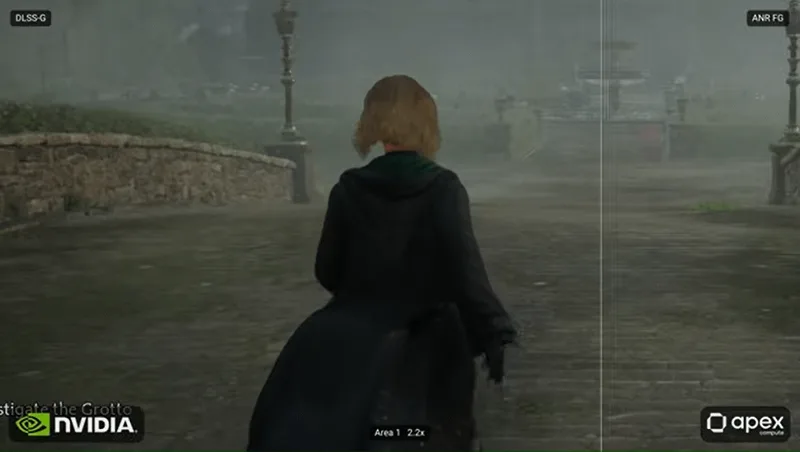
An error can make foliage flicker, duplicate a thin detail, or leave a temporary trail behind the character. The 2X Hogwarts Legacy demonstration presents a different challenge. Architectural patterns need to remain steady while transparent spell effects, particles, and rapidly changing light move through the scene. Both videos isolate generated frames, making differences easier to inspect than in ordinary playback, where original images are interspersed with them.
Some of the most distracting errors can occur in small parts of the picture. A health bar, subtitle, inventory indicator, or targeting reticle should stay legible even while the scenery behind it moves. A generator can reconstruct most of a scene convincingly and still distort a reticle at the moment a player needs it.
A fuller comparison would test these situations at different camera speeds, base frame rates, graphics settings, and locations. It would also measure average and minimum frame rates, the consistency of presentation intervals, power consumption, and input latency. Those results would help establish whether the savings measured on the RTX 5090 produce smoother, more responsive play on cards such as the GTX 1650 and Radeon RX 5500 XT.

ANR Hardware Compatibility, Operating Systems, and Beta Installation
Apex Compute lists GeForce GTX 16 and RTX 20, 30, 40, and 50 series graphics cards as compatible. GTX 16 support is notable because those cards lack the dedicated Tensor Cores found in RTX products. Older RTX owners may also gain an interpolation option, since access to NVIDIA’s own frame generation features has been more restricted by hardware generation than access to DLSS Super Resolution.
On AMD hardware, the documented range includes Radeon RX 5000, 6000, 7000, and 9000 series cards, extending back to an earlier generation of the RDNA architecture. Intel support covers Arc A series and B series products based on Alchemist and Battlemage. Available memory bandwidth, drivers, and the workload of a particular game will influence which settings each card can sustain.
The documented operating systems include Windows 10, Windows 11, Linux, SteamOS through Proton, and macOS 26 or later. Windows offers the most direct route to the current game beta. On Linux and Steam Deck, Proton allows compatible Windows games to run, but the graphics interface and the individual title still determine whether ANR can be used successfully. The Steam Deck also has a tighter processing budget than the desktop hardware used in Apex Compute’s main benchmarks. If a game already occupies most of the GPU, interpolation can lower the base rendering rate. A high multiplier offers little practical benefit once output exceeds what the handheld’s screen can display.
Apex Compute lists Apple silicon beginning with the M1 and has published native Metal measurements from an M2 Max. At 1920 × 1080, it recorded approximately 4.26 ms per generated frame at 2X and 2.52 ms on average at 4X. At 3840 × 2160, those figures rose to 15.66 ms and 9.25 ms, respectively. The increase illustrates how strongly resolution affects the time available to generate each frame. These were native Metal tests, separate from both the RTX 5090 comparison and the Windows game installation process. They demonstrate ANR running on Apple hardware, while support in individual commercial Mac games still depends on an available integration.
The public game beta uses OptiScaler to connect ANR to compatible titles that already expose a suitable frame generation interface. This lets players try the technology without waiting for each developer to add official support. It also means a game update, driver change, graphics modification, or difference between rendering interfaces can affect compatibility. For multiplayer titles, the game’s rules and protections against third party modifications also apply. The project’s GitHub repository provides beta packages, documentation, checksums, and testing resources so users can identify the release they installed and report results that others can reproduce.
As of November 23, 2026, the latest listed release was FG V.B20, published on November 19. The installation method depends on whether the game already uses OptiScaler. The game should be closed before extracting the package and running the installer against the folder containing its executable.
- For a game without OptiScaler, the documented full package is
anr-fg-V.B20-full.zip. For an existing OptiScaler installation, the corresponding package isanr-fg-V.B20-addon.zip. - On Windows, the beta uses
install.cmdand requires the 64 bit Microsoft Visual C++ 2015 to 2022 Redistributable. The removal script isuninstall.cmd. - On Linux or Steam Deck, run
sh install.sh "/path/to/game", replacing the example path with the folder containing the game executable. Apply the Steam launch options printed by the installer. One documented Proton example isWINEDLLOVERRIDES="dxgi=n,b" %command%, while some configurations usewinmm. The removal script isuninstall.sh. - In the game, enable frame generation in the graphics settings. Where several vendor options appear, Apex Compute instructs users to select NVIDIA Frame Generation. That label identifies the interface OptiScaler uses and can also apply when the installed GPU is from another manufacturer.
Recent releases show the work involved in supporting this range of systems. FG V.B19, released on November 17, fixed crashes on processors without AVX2 support, addressed issues in Microsoft Flight Simulator 2020 and Microsoft Flight Simulator 2024, and corrected corrupted visuals in certain Vulkan configurations on AMD graphics.
Apex Compute also reported processing improvements of up to 7% on NVIDIA Blackwell cards and up to 1% on Intel Arc B series hardware. FG V.B20 added support for HDR configurations using an FP16 scRGB backbuffer and improved interpolation of certain colors underneath interface textures. These fixes matter in play because errors in HDR processing can alter brightness and color, while errors around interface elements can make text or indicators difficult to read.

ANR Super Resolution, Ray Reconstruction, and Competition With DLSS, FSR, and XeSS
ANR Super Resolution is intended to improve the frame rate of the original game render. A title targeting 3840 × 2160, for example, could render internally at 2560 × 1440 and reconstruct the 4K output. Calculating fewer pixels can free resources for lighting, geometry, and other effects while giving frame generation a steadier sequence of original images to work with.
The challenge is maintaining fine detail as the camera moves. Distant vegetation, hair, thin geometry, particles, and transparent surfaces can shimmer, blur, or leave trails when reconstruction fails to follow them over time. As of November 23, Apex Compute described Super Resolution as approaching beta, but had given no confirmed public release date or comprehensive comparison with NVIDIA DLSS Super Resolution, AMD FSR Upscaling, or Intel XeSS Super Resolution.
ANR Ray Reconstruction addresses a different source of image degradation. Games using ray tracing have limited time to calculate how light travels through a scene, leaving noise in reflections, shadows, and indirect lighting. Conventional denoisers draw on nearby pixels and information from earlier frames to produce a cleaner result. This can soften fine detail, leave ghost images, or make a reflection change unconvincingly as the camera moves.
Apex Compute intends to use machine learning to recover a more stable lighting result from the available samples. The game must still supply the relevant ray tracing data, and the hardware must be capable of the underlying work. Apex Compute has yet to publish comprehensive figures for the feature’s processing cost, supported interfaces, or reconstruction quality.
AMD and Intel already offer several of the capabilities Apex Compute hopes to bring together. AMD FidelityFX Super Resolution began with spatial upscaling and expanded into temporal reconstruction, machine learning, frame generation, and lighting technologies. Its FSR Redstone family includes FSR Upscaling, FSR Frame Generation, FSR Ray Regeneration, and FSR Radiance Caching. Hardware requirements differ across those features. Machine learning frame generation and ray regeneration have tighter requirements than some earlier FSR implementations, although AMD had expanded machine learning upscaling to additional Radeon generations and selected Ryzen devices by November 2026. ANR’s support for older hardware is most relevant when compared with the requirements of the particular feature a player wants to use.
Intel XeSS 3 combines super resolution, frame generation, and Xe Low Latency. On supported Intel hardware, its multi frame generation can insert up to three images between conventionally rendered frames. Some XeSS features are available on compatible GPUs from other manufacturers, while Intel’s multi frame generation remains hardware specific. Xe Low Latency is particularly relevant to the ANR comparison because it addresses the delay a player feels when acting on what appears on screen. Comparing interpolation times alone leaves out that part of the experience. Established platforms also benefit from development kits and native implementations that allow game developers to test image reconstruction, input response, and frame scheduling together.
Native integration could give ANR more direct access to motion information and let developers control how interfaces are composed over generated scenery. Support in engines such as Unreal Engine or Unity would offer a route beyond individual OptiScaler installations, but Apex Compute has not confirmed a comprehensive engine integration program. The company has also expressed its intention to release ANR source code. As of November 23, the public repository contained documentation, beta downloads, testing resources, and source code for its recording utility. The complete rendering implementation and its eventual licensing terms remained unpublished, leaving open how other developers might inspect, modify, or incorporate it.
For now, ANR’s clearest contribution is a frame generation beta that reaches hardware spanning several manufacturers and generations. Apex Compute’s 4K tests give that beta a concrete starting point: lower measured interpolation time, a 348 MB reduction in runtime memory, and higher image quality scores than the tested DLSS configuration. Independent comparisons on older GPUs and handhelds will show where those gains make the greatest difference during play.
The broader platform will face a different test when Super Resolution and Ray Reconstruction become available. Running all three features together changes the demands on memory, processing time, and frame scheduling. A player ultimately experiences their combined result in the response to an input, the stability of a reflection, and the clarity of a moving scene. That is where ANR’s competitiveness with DLSS, FSR, and XeSS will be decided.

Frequently Asked Questions (FAQs)
- What is Apex Compute ANR?
ANR stands for Apex Neural Rendering, a set of AI graphics technologies from Apex Compute. Frame Generation inserts frames between those rendered by a game to make motion look smoother. Super Resolution reconstructs a higher resolution image from a lower resolution input, while Ray Reconstruction aims to improve lighting produced by ray tracing. ANR targets hardware from NVIDIA, AMD, Intel, and Apple. As of November 2026, only Frame Generation was available in public beta. - Is Apex Compute ANR better than NVIDIA DLSS?
ANR performed better in Apex Compute’s own frame generation tests. At 4K on a GeForce RTX 5090, ANR took about 1.01 milliseconds per generated frame at 2X, compared with 1.26 milliseconds for DLSS. ANR also scored higher on the company’s image quality tests at several multipliers. The exact DLSS version remains unclear, and the results do not establish how the two compare across other games and GPUs or how ANR’s unreleased components perform. - Is Apex Neural Rendering available to download?
Yes. The ANR Frame Generation beta is available from Apex Compute’s GitHub repository. As of November 23, 2026, the latest listed release was FG V.B20, issued on November 19. For a compatible game, use the full package if OptiScaler is absent or the add-on package if it is already installed. Windows users can run the included installation script, while Linux and Steam Deck users have separate shell instructions. - Does Apex Compute ANR work on NVIDIA GTX graphics cards?
Yes. Apex Compute lists the GeForce GTX 16 series as compatible with ANR Frame Generation. These cards lack the dedicated Tensor Cores found in RTX GPUs, so that hardware is not required to run the feature. The company also lists the RTX 20, 30, 40, and 50 series. On older cards, the benefit depends on the game’s starting frame rate, resolution, settings, and how much processing time the GPU spends generating each additional frame. - Does Apex Neural Rendering work on AMD Radeon graphics cards?
Yes. Apex Compute lists the Radeon RX 5000, RX 6000, RX 7000, and RX 9000 series as compatible with ANR Frame Generation, extending support to earlier RDNA cards. Actual performance depends on the card’s architecture and memory bandwidth, its drivers, and the workload of the game. Apex Compute used an RTX 5090 for its published comparison, so those measurements do not establish what frame rates Radeon owners can expect. - Can Apex Compute ANR run on Steam Deck?
Yes. ANR Frame Generation can run in compatible games through Proton, which allows the Steam Deck to run Windows games on Linux. Setup requires the Linux package, the developer’s installation script, and the specified Steam launch options. Compatibility depends on the game’s graphics API and rendering settings. When choosing a multiplier, the practical considerations are how steadily the Deck renders the original frames and how many frames its display can show. - When will Apex Compute ANR Super Resolution be released?
As of November 23, 2026, Apex Compute said Super Resolution was approaching beta but had not announced a public release date. It is designed to reduce GPU workload by letting a game render at a lower resolution and reconstructing the image at a higher one. That could improve the base frame rate before Frame Generation adds frames. Its image quality, performance, and final hardware requirements still await public evaluation. - Does Apex Neural Rendering support 6X frame generation?
Apex Compute has demonstrated 6X frame generation. At that setting, ANR creates five intermediate frames for every frame the game renders. A game rendering at 60 FPS could therefore reach 360 displayed FPS in theory, before processing overhead. Five out of six displayed frames would be generated, while the game’s simulation and input processing would still run at their underlying rates. Access to 6X depends on the game, hardware, and beta configuration. - How much GPU memory does Apex Compute ANR use?
In Apex Compute’s comparison, ANR Frame Generation used about 214 MB of GPU memory. The tested DLSS implementation used 562 MB, a difference of 348 MB, or roughly 62%. Apex Compute’s separate figure of 0.17 MB refers only to the neural network weights. Running the feature also requires memory for textures, buffers, and temporary calculations, so actual usage can vary with resolution, hardware, game integration, and frame generation settings. - Is Apex Compute ANR open source?
Apex Compute plans to release ANR’s source code, but the full rendering implementation was not public as of November 23, 2026. The GitHub repository provides beta downloads, documentation, installation instructions, and testing tools. It also includes source code for the recording utility. Open source status for ANR itself depends on the release of the rendering code under a license that allows others to inspect, modify, and redistribute it.

Conclusion
Apex Compute introduces ANR, its own version of DLSS DLSS technology, at a time when artificial intelligence-assisted graphics rendering is becoming increasingly important to modern gaming. Apex Neural Rendering brings together frame generation, super resolution, and ray reconstruction within a platform intended to operate across NVIDIA, AMD, Intel, and Apple graphics hardware.
The initial frame generation benchmarks suggest that Apex Compute has developed a computationally efficient alternative capable of competing with NVIDIA DLSS in selected image reconstruction tests. Its reported reductions in GPU processing time and memory consumption are particularly interesting for gamers using older graphics cards or systems with limited graphics memory. Support for Windows, Linux, SteamOS, and native Apple Metal testing further demonstrates the company’s cross-platform ambitions.
However, ANR remains a developing technology, and its long-term success will depend on independent performance validation, broader game compatibility, improved stability, and the eventual release of its super resolution and ray reconstruction components. If Apex Compute can deliver these improvements while maintaining its hardware accessibility and processing efficiency, Apex Neural Rendering could become an important competitor in the evolving neural graphics rendering industry.
Sources and Citations
- Apex Compute, Apex Neural Rendering: Official product information covering ANR frame generation, super resolution, ray reconstruction, supported hardware, image quality comparisons, RTX 5090 benchmarks, and Apple Metal performance measurements.
https://apexcompute.com/neural-rendering - Apex Compute, Official ANR GitHub Repository: Primary technical documentation covering beta availability, installation requirements, supported graphics cards, OptiScaler integration, testing tools, and planned source code availability.
https://github.com/apex-compute/ANR - Apex Compute, ANR Frame Generation Beta Releases: Official release notes documenting software updates, HDR compatibility, performance optimizations, bug fixes, installation packages, and the November 19, 2026 FG V.B20 release.
https://github.com/apex-compute/ANR/releases - TechPowerUp, November 12, 2026: Coverage of Apex Neural Rendering’s introduction, company-reported DLSS comparisons, graphics memory consumption, hardware compatibility, and neural network size.
https://www.techpowerup.com/354727/apex-neural-rendering-beats-nvidia-dlss-in-both-image-quality-and-performance - Tbreak, November 13, 2026: Reporting on the ANR Frame Generation beta, support for older graphics hardware, processing efficiency claims, and forthcoming neural rendering components.
https://tbreak.com/apex-neural-rendering-beta-dlss-frame-generation/ - XenoSpectrum, Apex Neural Rendering Frame Generation: Analysis of Apex Compute’s reported GPU processing times, graphics memory requirements, and relative performance differences against NVIDIA DLSS Frame Generation.
https://xenospectrum.com/en/apex-neural-rendering-frame-generation/ - NVIDIA, March 31, 2026: Official announcement explaining DLSS 4.5 Dynamic Multi Frame Generation, 6X frame generation availability, supported graphics hardware, and frame rate targeting.
https://www.nvidia.com/en-us/geforce/news/dlss-4-5-dynamic-multi-frame-generation-6x-mode-released/ - AMD, FSR Technologies: Official documentation explaining AMD FSR Upscaling, Frame Generation, Ray Regeneration, Radiance Caching, and hardware compatibility requirements.
https://www.amd.com/en/products/graphics/technologies/fidelityfx/super-resolution.html - Intel, Xe Super Sampling 3 for Developers: Official technical information covering XeSS Super Resolution, Multi Frame Generation, Xe Low Latency, graphics API compatibility, and supported GPU architectures.
https://www.intel.com/content/www/us/en/developer/topic-technology/gamedev/xess.html
Recommendations
- Why House of the Dragon Season 2 was a letdown
- Assassin’s Creed Codename Hexe Leak Reveals Witch Hunt Story
- EA Sidelines Need for Speed and Burnout as Criterion Focuses Exclusively on Battlefield
- Masters of the Universe Post-Credits Scene Explained: How Many There Are, What They Tease, and What it Means for She-Ra & Skeletor’s Return
- Marvel Studios Lays Off Staff Across Departments: Visual Development Team Among the Most Affected
- The Mound: Omen of Cthulhu Guide to Surviving the Cursed Jungle
- Star Trek Legends will no longer be playable as of September 3, 2026
- Polden Publishing Reaches $7 Million in Revenue After Adding $1 Million in Six Weeks
- Google’s AI Overviews pays ~100 publishers, sums range from $1K to $1M+
- Palo Alto Launches Unit 42 Multi-Model AI Defense Service



































































































