








In This Article (19 sections)
What is the Caddis Motion Graphics Tool and How Does it Work
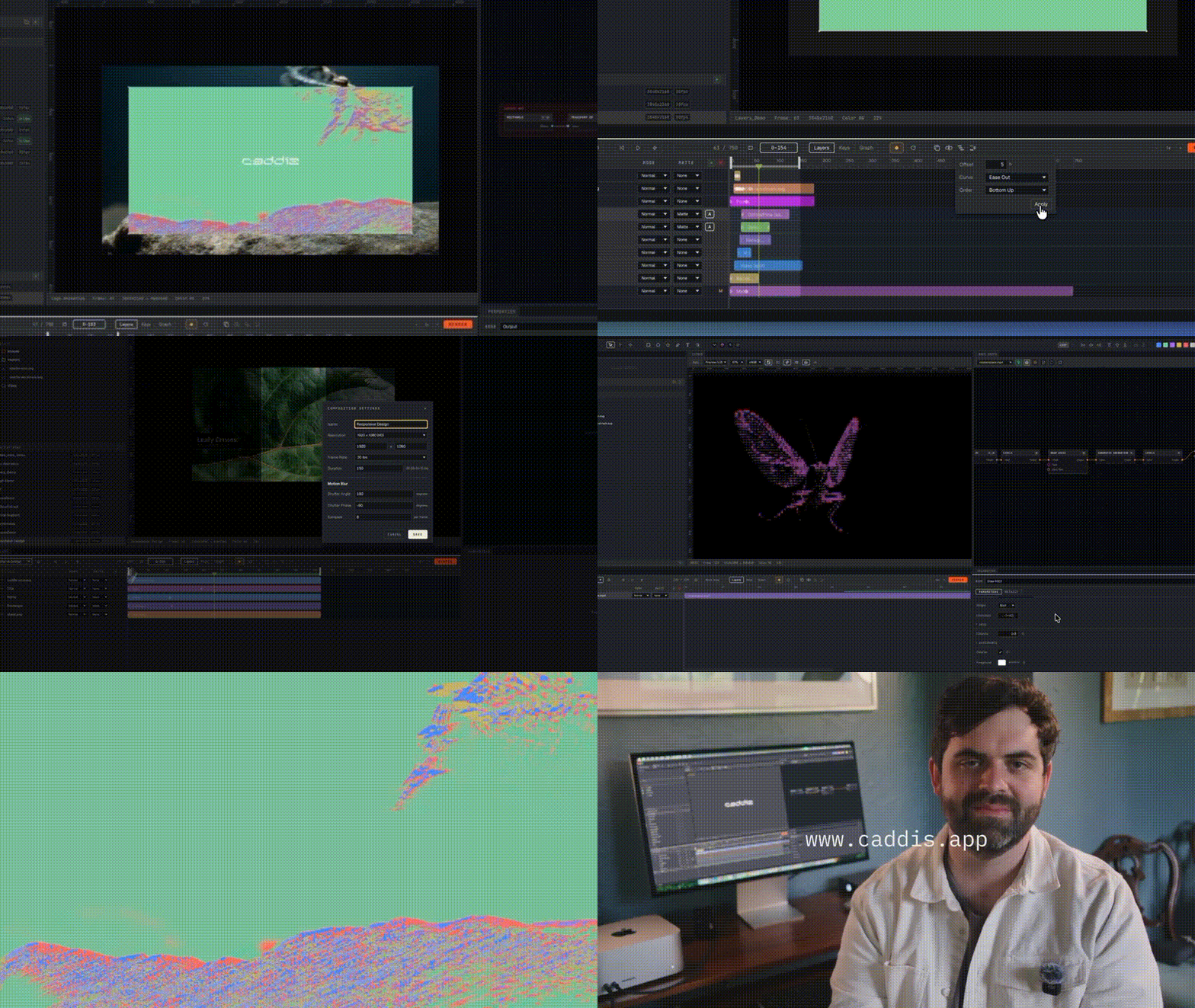
Caddis is a modern motion graphics tool designed as a procedural, node-enhanced alternative to traditional timeline-based editors like Adobe After Effects. It introduces a hybrid workflow where every layer contains its own embedded node graph, allowing artists to build complex animations, effects, and compositing logic inside modular units instead of relying solely on stacked layers and keyframes.
At its core, Caddis rethinks how motion design is structured. Instead of separating compositing, animation, and effects into different rigid sections, it merges them into a unified system. Each layer behaves like a self-contained “mini system” powered by nodes. These nodes can control transformations, timing, effects, masks, and even data-driven animation behaviors.
The main appeal of this system is flexibility. Designers can still think in layers making the transition from Adobe After Effects easier while gaining the procedural advantages typically found in tools like Houdini or node-based compositors. This combination makes Caddis particularly appealing for motion designers who want more control without abandoning familiar workflows.
Because it is currently in free beta, Caddis is rapidly evolving, with frequent updates focused on improving stability, performance, and node functionality. Its growing popularity is driven by the increasing demand for hybrid motion design systems that combine traditional editing intuition with procedural power.
Caddis vs Adobe After Effects: Node Graph per Layer Explained Adobe After Effects
When comparing Caddis with Adobe After Effects, the biggest difference lies in how each system handles structure and complexity.
Adobe After Effects relies on a strictly layer-based timeline system. Each layer contains properties such as position, scale, opacity, and effects applied in a linear stack. While powerful, this approach can become restrictive when dealing with complex procedural animations or deeply nested compositions.
Caddis introduces a different philosophy: instead of applying effects only at the layer level, each layer contains its own internal node graph. This means a single layer can contain multiple procedural chains that define how its content behaves.
In practical terms:
- After Effects uses global effects applied to layers.
- Caddis uses localized node networks inside each layer.
This shift significantly reduces the need for pre-compositions and nested timelines. It also makes complex animations easier to debug because each layer’s logic is self-contained.
The keyword advantage of Caddis as an “Adobe After Effects alternative” comes from this structural improvement. Users familiar with After Effects will immediately recognize the interface, but they will also notice that Caddis reduces dependency on linear stacking and replaces it with modular procedural logic.

How Caddis Brings Node-Based Workflows into a Layer-Based System
Node-based workflows are traditionally found in tools like compositors, 3D software, and procedural generators. However, they often come with a steep learning curve because everything is built from scratch using nodes.
Caddis solves this by embedding node graphs inside each layer, creating a hybrid workflow that feels familiar but powerful.
Each layer in Caddis contains:
- Input nodes (source media, shapes, or generators)
- Processing nodes (effects, transforms, distortions)
- Output nodes (final rendered result for the layer)
This structure allows motion designers to gradually adopt procedural thinking without abandoning traditional editing habits.
For example, instead of stacking multiple effects like blur, glow, and distortion in a linear order, users can branch node chains. This means effects can be applied in parallel, combined conditionally, or driven by external parameters like audio or time.
This system also enables reusable logic. A node graph inside a layer can be duplicated, shared, or repurposed across multiple assets, significantly improving workflow efficiency for larger projects.
Why Caddis is Being Called a New After Effects Alternative
Caddis is increasingly described as a next-generation After Effects alternative due to its combination of familiar interface design and advanced procedural architecture.
Several key reasons explain this classification:
First, it maintains a timeline-based editing environment. Users still animate over time using keyframes, easing curves, and familiar transforms. This lowers the barrier to entry for professionals already trained in traditional motion design software.
Second, it introduces node-level control without forcing a full transition into node-only design. Unlike fully node-based systems, Caddis allows users to mix both paradigms.
Third, it improves scalability. Complex compositions that would normally require multiple pre-comps in After Effects can be managed inside fewer layers, each with internal logic.
Finally, its real-time feedback system makes experimentation faster. Designers can adjust node parameters and immediately see results, which supports iterative creative workflows.
This combination of accessibility and power is why Caddis is being positioned as a serious competitor in the motion graphics ecosystem.
How the Node Graph per Layer System in Caddis Improves Motion Design
The node graph per layer system fundamentally changes how motion design projects are structured.
In traditional workflows, complexity grows horizontally more layers, more pre-comps, more nested compositions. In Caddis, complexity grows vertically within each layer’s node graph.
This provides several major advantages:
- Reduced timeline clutter: Fewer layers are needed to achieve complex results.
- Improved organization: Each layer contains its own logic instead of relying on external dependencies.
- Faster debugging: Designers can isolate issues inside a single node graph.
- Greater procedural control: Animations can be driven by dynamic inputs like noise, data streams, or mathematical functions.
This system also encourages modular thinking. Instead of building entire scenes linearly, artists build reusable motion systems inside layers. These systems can then be duplicated and adapted for different parts of a project.

Caddis Free Beta Download and Installation Guide for Beginners
As of its current development stage, Caddis is available in a free beta format. This makes it particularly attractive for students, indie creators, and professionals exploring new workflows without financial risk.
The installation process typically follows a simple structure:
- Download the beta installer from the official distribution platform.
- Install the application following system-specific instructions.
- Launch Caddis and configure basic project settings.
- Familiarize yourself with the interface, especially the layer panel and node editor.
- Start with sample projects to understand workflow behavior.
Beginners are encouraged to focus on understanding how nodes interact within a single layer before attempting full compositions. This helps build intuition for procedural relationships.
Because it is still in beta, users may encounter occasional bugs or performance inconsistencies. However, this is expected and part of the development cycle.
Step-by-Step Overview of the Caddis Motion Graphics Workflow
The Caddis workflow can be broken down into a structured pipeline that blends traditional motion design steps with procedural enhancements.
- Step 1: Import or create assets
Users begin by importing media such as images, videos, or vector shapes. - Step 2: Create layers
Each asset is placed into a layer, similar to After Effects. - Step 3: Build node graphs inside layers
Instead of applying effects directly, users construct node chains that define behavior. - Step 4: Animate properties
Keyframes are used alongside procedural nodes to drive motion. - Step 5: Refine interactions
Nodes can be adjusted to create complex interactions between effects. - Step 6: Preview in real time
Changes are evaluated instantly, allowing rapid iteration. - Step 7: Render output
Final compositions are exported for use in video, VFX, or digital media.
This workflow maintains familiarity while introducing deeper control over motion behavior.
Procedural Animation in Caddis: How Node Systems Change Editing
Procedural animation is one of the most powerful aspects of Caddis. Instead of manually animating every movement, users can define rules that generate motion automatically.
For example:
- A noise node can create organic movement patterns.
- A time-based node can control cyclical animations.
- A data input node can drive animations based on external values.
This shifts motion design from manual keyframing to system-based design.
The benefit is scalability. Once a procedural system is built inside a layer, it can generate infinite variations of motion without additional manual work. This is particularly useful for UI animations, title sequences, and generative visuals.

Comparing Caddis Workflow to Traditional Timeline-Based Editing
Traditional timeline-based editing relies heavily on sequential keyframes and layered stacking. While effective, it often becomes difficult to manage in large projects.
Caddis replaces this with a dual-layer system:
- Timeline for temporal control
- Node graph for logical control
This separation of concerns makes workflows cleaner and more efficient.
In traditional systems, achieving complex effects often requires:
- Pre-compositions
- Adjustment layers
- Multiple effect stacks
In Caddis, much of this complexity is handled inside a single layer’s node graph, reducing dependency chains.
Best Use Cases for Caddis in Motion Graphics and VFX Projects
Caddis is especially effective in several production scenarios:
- Title sequences and broadcast graphics
- UI/UX motion design
- Procedural animation systems
- Data-driven visualizations
- Lightweight VFX compositing
- Experimental motion art
Its hybrid workflow makes it particularly useful for projects that require both artistic control and technical structure.
Designers working on branding animations benefit from reusable node systems, while VFX artists can leverage procedural effects to simulate complex motion patterns.
Is Caddis Suitable for Professional Motion Designers and Studios
Caddis shows strong potential for professional use, but its suitability depends on production requirements.
For freelance designers and small studios, it offers a powerful alternative to expensive industry-standard tools. Its node-based layer system can significantly speed up iteration and reduce project complexity.
For larger studios, adoption depends on pipeline integration, stability, and compatibility with existing tools. While Caddis is evolving quickly, it may still require time before fully replacing established software in high-end production environments.
However, its hybrid approach makes it an attractive secondary tool in professional pipelines.

Limitations of Caddis in Its Current Beta Stage
As with any beta software, Caddis has limitations that users should consider:
- Occasional performance instability
- Limited third-party plugin ecosystem
- Evolving interface design
- Incomplete documentation in some areas
- Experimental node behavior in advanced systems
These limitations are expected at this stage of development. The beta phase is primarily focused on testing workflow innovation rather than final production polish.
How Caddis Handles Compositing and Visual Effects Pipelines
Caddis approaches compositing through a layered procedural system. Instead of relying heavily on external compositing stages, many effects are handled within node graphs inside each layer.
This includes:
- Color correction
- Blending modes
- Masking systems
- Light and shadow simulation
- Motion blur and temporal effects
By integrating compositing directly into layers, Caddis reduces the need for switching between multiple software tools during production.
This makes it especially useful for lightweight VFX pipelines where speed and flexibility are more important than heavy simulation accuracy.
Integrating Tools Like PixelHair into Broader 3D Motion Pipelines (Blender Workflows)
In modern motion design pipelines, tools often need to work across both 2D and 3D environments. PixelHair can be integrated into broader workflows that include 3D rendering engines like Blender.
For example, designers may use Blender for scene creation and rendering, while using Caddis for post-processing motion graphics and compositing enhancements. PixelHair can be used within this ecosystem to add advanced hair or particle-based motion elements before final compositing.
This hybrid pipeline allows:
- High-quality 3D rendering in Blender
- Procedural motion enhancement in Caddis
- Specialized simulation effects using PixelHair
Together, these tools create a flexible production chain that balances realism and artistic control.

Using the View Keeper to Manage Camera Setups in Blender Alongside Motion Graphics Workflows
Camera management is a critical part of 3D production. The View Keeper helps streamline this process by allowing artists to store, organize, and switch between multiple camera setups efficiently inside Blender.
When combined with motion graphics workflows in Caddis, this creates a powerful cross-platform pipeline:
- Blender handles 3D scene construction and camera animation
- The View Keeper manages multiple cinematic perspectives
- Caddis adds motion graphics overlays, titles, and procedural effects
This integration is particularly useful for cinematic animation, game trailers, and product visualization workflows where multiple camera angles and motion layers are required.
Frequently Asked Questions (FAQs)
- What is Caddis used for?
Caddis is used for motion graphics, animation, and compositing with a hybrid node and layer system. - Is Caddis better than After Effects?
It depends on workflow needs; Caddis offers more procedural control, while After Effects has a more mature ecosystem. - Does Caddis use keyframes?
Yes, it combines keyframes with node-based procedural animation. - Is Caddis free?
Currently, Caddis is available in a free beta version. - Can beginners use Caddis?
Yes, but beginners should start with basic layer and node concepts. - What makes Caddis different?
Its node graph per layer system is the key differentiator. - Can Caddis replace After Effects?
It may replace it in some workflows but is not yet a full industry replacement. - Does Caddis support VFX?
Yes, it supports compositing and basic visual effects workflows. - Is Caddis good for 3D workflows?
Yes, especially when combined with tools like Blender. - Is Caddis production ready?
It is still in beta, so it is not fully production hardened.

Conclusion
Caddis represents a significant shift in motion graphics design by combining familiar layer-based editing with powerful node-based procedural systems. Its “node graph per layer” architecture simplifies complex workflows, reduces dependency clutter, and enables scalable animation design. While still in beta, its potential as a next-generation After Effects alternative is clear, especially for designers seeking flexibility and procedural control.
As the ecosystem evolves and integrates more deeply with 3D pipelines, tools like Caddis alongside complementary solutions such as PixelHair and The View Keeper signal a broader industry shift toward hybrid, procedural-first creative workflows.
Sources and Citations
- Adobe After Effects Official Overview
https://www.adobe.com/products/aftereffects.html - General Node-Based Compositing and Motion Design Principles
https://www.sidefx.com/houdini/ - Blender Documentation (3D Pipeline Integration Concepts)
https://docs.blender.org/manual/en/latest/ - Procedural Animation Concepts in Modern Graphics Tools
https://www.khronos.org/ - Motion Graphics Workflow Best Practices
https://helpx.adobe.com/after-effects/user-guide.html
Recommended
- Assassin’s Creed TV Show Now Filming: 64 AD Time Period, Cast, Director, and Netflix Release Details
- 3D Grease Pencil Tutorial for Blender: How to Create 2D Art in 3D Space Step by Step
- Hades 2: Release Date, Platforms, Gameplay, Characters, and Everything You Need to Know
- Star Wars: Galactic Racer Release Date Seemingly Leaks: Steam Listing Points to October 6, 2026 for the Year’s Most Anticipated Sci-Fi Racer
- Interactive Materials in Unreal Engine: How to Create Dynamic and Responsive Surfaces in Real Time
- Blight: Survival Blends Co-Op Medieval Combat with a Grounded Zombie Plague
- Google Play will let you try a game before you buy it: Game Trials explained (release, supported games, and how it works)
- The Blood of Dawnwalker Studio Uses AI, but There’s No AI Assets in the Game: Rebel Wolves Explains
- After Johnny Cage, Karl Urban Wants To Play Red Dead’s John Marston What It Means for a Red Dead Redemption Movie



































































































