





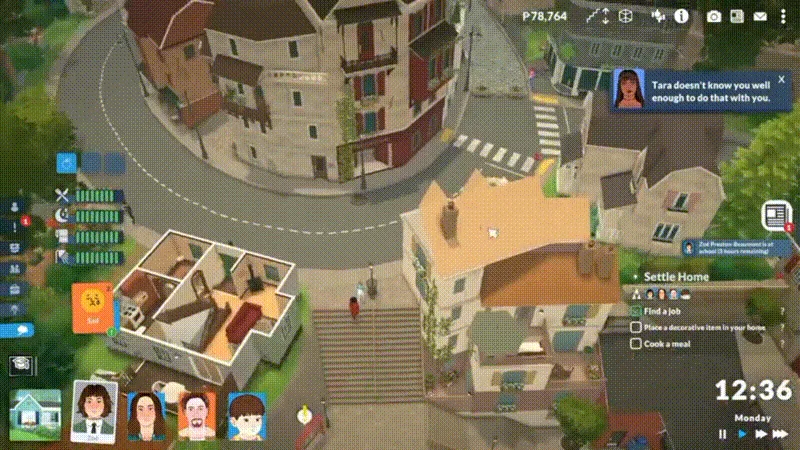
The “Points of View” goal in Paralives is a structured gameplay objective centered around camera manipulation, perspective-based interactions, and character-environment alignment within the life simulation system. In the broader context of Paralives: Points Of View Goal Walkthrough, this mission challenges players to understand how viewing angles influence interaction outcomes, character behavior triggers, and environmental storytelling.
Unlike traditional life-sim objectives that focus purely on tasks or resource management, the Points of View goal emphasizes spatial awareness. Players must position the camera in specific orientations to unlock interactions, reveal hidden prompts, or progress narrative flags. This makes it both a technical and observational challenge.
The objective is often introduced early in gameplay to familiarize users with advanced camera mechanics, including zoom layers, rotational tracking, and perspective-based object discovery. It also serves as a foundation for later gameplay systems that rely on environmental awareness.
Understanding this goal is essential for efficient progression, especially for players aiming to optimize performance or complete Paralives challenges quickly.
In This Article (18 sections)
Paralives Points of View Walkthrough Step-by-Step Guide
The step-by-step walkthrough for the Points of View goal requires careful attention to camera positioning and interaction timing.
Step 1: Enter the designated tutorial or objective zone and activate the mission prompt.
Step 2: Rotate the camera slowly until interactive markers appear on hidden objects.
Step 3: Zoom into environmental elements such as windows, furniture edges, or reflective surfaces.
Step 4: Align the camera angle with highlighted zones to trigger progression checks.
Step 5: Confirm interactions by selecting contextual prompts that appear only at specific viewpoints.
Step 6: Repeat adjustments until all perspective-based objectives are completed.
Each step builds on spatial recognition. The system rewards precision rather than speed, although experienced players can combine both for efficiency. Mastery of this walkthrough significantly improves overall gameplay flow in Paralives: Points Of View Goal Walkthrough scenarios.
How to Start the Points of View Objective in Paralives
Starting the Points of View objective requires accessing either a tutorial mission, character aspiration chain, or world event trigger. Typically, the goal becomes available after basic camera controls are introduced.
To initiate:
- Open the objectives panel
- Select the “Points of View” mission
- Load into the designated environment or lot
- Follow the on-screen camera prompt indicator
Once activated, the system introduces a guided overlay that highlights camera-sensitive areas. These zones are essential for progression and often appear faint until the correct viewing angle is achieved.
Early activation is crucial because many secondary objectives depend on completion of this foundational task. Players who delay engagement may find certain interactions locked until the objective is resolved.
All Requirements to Complete Points of View Goal in Paralives
Completing the Points of View goal requires meeting several structured conditions:
- Full camera rotation capability unlocked
- Ability to zoom between macro and micro environment layers
- Completion of tutorial interaction prompts
- Identification of all viewpoint-triggered objects
- Activation of at least one hidden interaction per zone
In addition, some advanced requirements may include:
- Maintaining stable camera alignment for several seconds
- Discovering hidden environmental cues
- Interacting with objects only visible at specific angles
These requirements ensure that players engage deeply with spatial mechanics rather than relying on static interaction patterns. The design reinforces exploration and observation as core gameplay elements.
Best Strategy to Progress Through Paralives Goals Efficiently
Efficiency in the Points of View goal depends on minimizing unnecessary camera movement while maximizing interaction detection.
The optimal strategy includes:
- Scanning environments in a grid-like camera pattern
- Prioritizing corners and obscured areas
- Using slow rotational movement instead of rapid spinning
- Observing light reflection changes for hidden triggers
- Rechecking previously cleared zones from alternate heights
Advanced players often combine zoom cycling with rotational sweeps to uncover multiple triggers in a single pass. This reduces completion time significantly and is especially useful in speed-focused gameplay styles within Paralives: Points Of View Goal Walkthrough progression paths.
Common Mistakes to Avoid in Points of View Mission
Many players fail the Points of View mission due to avoidable errors:
- Moving the camera too quickly and missing trigger zones
- Ignoring vertical camera angles
- Overlooking subtle environmental cues
- Repeating the same viewing angle without variation
- Failing to zoom into object-level detail
Another major mistake is assuming that all interactions are visible at eye level. In reality, Paralives frequently hides progression triggers above or below standard sight lines.
Avoiding these mistakes dramatically improves completion efficiency and reduces frustration.
How Camera Angles Affect the Points of View Objective
Camera angles are the core mechanic of this objective. The system uses perspective-based detection, meaning that certain interactions only exist when viewed from specific positions.
Key angle types include:
- Top-down angles for spatial scanning
- Eye-level angles for character interaction prompts
- Low angles for under-object discovery
- Tilted angles for reflective or hidden triggers
y=f(θ)+d
This conceptual relationship highlights how interaction availability changes dynamically based on camera rotation (θ). Small shifts in angle can reveal entirely new gameplay elements.
Mastering camera control is therefore essential not just for this mission but for broader gameplay mastery in Paralives.
Using View Keeper in Paralives for Better Gameplay Control
View Keeper is a gameplay feature that allows players to save and recall specific camera positions. In the Points of View goal, this tool becomes extremely valuable.
Benefits include:
- Instant return to successful trigger angles
- Comparison between different viewpoints
- Faster puzzle-solving through saved perspectives
- Reduced need for repetitive camera adjustments
Players often use View Keeper to mark high-value angles where multiple interaction triggers overlap. This significantly improves efficiency and reduces trial-and-error frustration.
In advanced gameplay scenarios, View Keeper becomes a strategic tool for optimizing exploration routes.
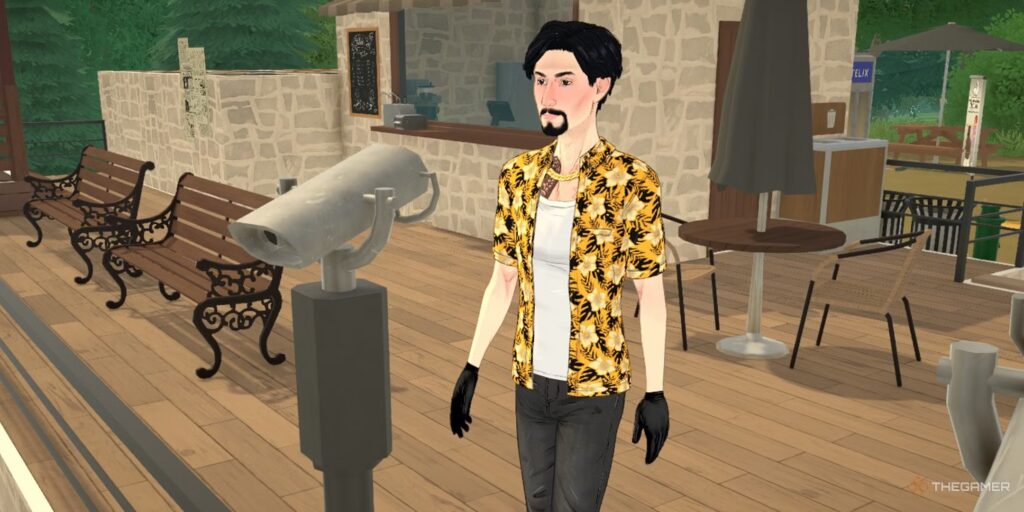
How Pixelhair Customization Impacts Character Progression
Pixelhair customization indirectly influences progression in the Points of View goal by affecting visual clarity and character recognition during camera shifts.
Key impacts include:
- Distinct hairstyles improve character visibility at varying zoom levels
- Reduced visual clutter helps identify interaction prompts faster
- Custom silhouettes assist in distinguishing multiple Sims in crowded scenes
While Pixelhair does not directly alter mission mechanics, it enhances player perception and reduces cognitive load during complex camera movements. This becomes especially important in dense environments where multiple triggers may appear simultaneously.
Best Character Setup for Completing Points of View Faster
Optimizing character setup improves efficiency in completing the Points of View goal.
Recommended setup includes:
- High observation-oriented traits (if available)
- Neutral, uncluttered appearance for visual clarity
- Positioning characters in open environments
- Avoiding overcrowded multi-character scenes during mission execution
Players should also ensure characters remain stationary during camera scanning phases. Movement can disrupt perspective-based triggers and reset interaction conditions.
A stable environment significantly reduces completion time.
Hidden Interactions and Triggers in Points of View Goal
Hidden interactions are a core feature of the Points of View mission. These are not visible under standard camera conditions and require precise positioning.
Common hidden triggers include:
- Objects behind partial obstructions
- Reflections in glass or water surfaces
- Shadow-based interaction zones
- Edge-aligned furniture prompts
- Ceiling or floor-level markers
These interactions often unlock bonus progression or contribute to hidden completion metrics. Players who fully explore these triggers typically achieve 100% mission completion faster.
Troubleshooting Points of View Goal Not Progressing Bug Fixes
If the Points of View goal stops progressing, several fixes can be applied:
- Reset camera to default position and retry scanning
- Reload the lot or environment instance
- Ensure all tutorial prompts have been completed
- Check for missed hidden triggers in corners
- Switch between zoom levels to refresh detection system
In rare cases, progression may stall due to overlapping triggers. Restarting the mission or re-entering the zone usually resolves the issue.
Maintaining systematic camera movement helps prevent most bugs.

Rewards and Unlockables from Completing Points of View
Completing the Points of View goal grants several rewards:
- Camera control enhancements
- Unlockable perspective presets
- Bonus interaction discovery bonuses
- Increased observation skill progression
- Access to advanced environmental storytelling features
These rewards improve long-term gameplay efficiency and enhance player control over simulation environments. They also unlock deeper narrative interactions tied to environmental observation systems.
Advanced Tips for Speedrunning Paralives Points of View
Speedrunning the Points of View goal requires optimized movement and predictive scanning.
Advanced techniques include:
- Pre-scanning environments using diagonal sweeps
- Memorizing trigger zone patterns
- Using View Keeper for instant repositioning
- Prioritizing high-density interaction areas
- Combining zoom jumps with rotational shortcuts
Speedrunners often complete the mission by minimizing redundant camera movement and focusing only on confirmed trigger zones.
Mastery of these techniques significantly reduces completion time in Paralives: Points Of View Goal Walkthrough runs.
Final Completion Checklist for Points of View Walkthrough
Before finishing the Points of View goal, ensure:
- All camera angles have been explored
- Every hidden interaction has been triggered
- Zoom levels were tested across all zones
- View Keeper snapshots are properly used
- No progression prompts remain inactive
A complete checklist ensures 100% mission completion and prevents missed rewards or hidden unlockables.
Frequently Asked Questions (FAQs)
- What is the Points of View goal in Paralives?
It is a camera-based objective focused on perspective-driven interactions and environmental discovery. - How do I start the Points of View mission?
Activate it through the objectives panel after unlocking basic camera controls. - Why is my progress not updating?
You may have missed hidden triggers or not used correct camera angles. - Do camera angles really matter?
Yes, specific interactions only appear at certain angles. - What is View Keeper used for?
It saves and recalls camera positions for efficient progression. - Can Pixelhair affect gameplay?
Indirectly, by improving visibility during camera transitions. - What causes hidden interactions?
Environmental design elements triggered by perspective shifts. - How long does the mission take?
Varies, but typically 10–30 minutes depending on efficiency. - What is the hardest part of the goal?
Finding hidden angle-based triggers. - Is speedrunning possible?
Yes, with optimized camera routing and View Keeper usage.
Conclusion
The Points of View goal in Paralives is a foundational gameplay system that emphasizes spatial awareness, camera control mastery, and environmental interaction discovery. It shifts traditional simulation mechanics into a perspective-driven experience where observation becomes the primary tool for progression. Mastering this objective improves overall gameplay efficiency and unlocks deeper layers of interactive storytelling within the Paralives world.
Sources and Citations
- Source: Paralives Studio, official website providing information about the life simulation game, building tools, character customization and gameplay systems.
Citation: https://www.paralives.com/ - Source: Paralives Studio, official development progress page documenting gameplay systems, technical improvements, development milestones and planned features.
Citation: https://www.paralives.com/development - Source: Paralives Studio, official news page covering developer announcements, gameplay improvements, patch notes and new camera options.
Citation: https://www.paralives.com/news - Source: Paralives Studio, August 24, 2026, Patch Notes 0.1.8 explaining the alternative Classic camera, middle-click rotation, right-click camera movement and interface improvements.
Citation: https://www.paralives.com/news/patch-notes-018 - Source: Paralives Studio, August 24, 2026, New Camera Option announcement introducing alternative camera controls for life simulation players.
Citation: https://www.paralives.com/news/new-camera-option - Source: Paralives Community Wiki, community-maintained reference for character systems, building mechanics, gameplay features and general game information.
Citation: https://paralives.fandom.com/wiki/Paralives_Wiki - Source: Steam, official Paralives store listing documenting gameplay features, accessibility options, camera comfort settings, supported platforms and Early Access information.
Citation: https://store.steampowered.com/app/1118520/Paralives/ - Source: Steam Community, Paralives developer announcements and update history, providing additional references for patches, camera changes and gameplay improvements.
Citation: https://steamcommunity.com/app/1118520/allnews/ - Source: Steam Community, Paralives player discussions covering camera controls, usability, gameplay feedback, technical issues and player experiences.
Citation: https://steamcommunity.com/app/1118520/discussions/ - Source: Game Developer, formerly Gamasutra, professional articles discussing game design, user interfaces, simulation systems, accessibility and player experience.
Citation: https://www.gamedeveloper.com/ - Source: Academia.edu, academic research platform for finding studies on virtual camera systems, camera control, 3D navigation, player interaction and simulation game interfaces.
Citation: https://www.academia.edu/ - Source: Unity Technologies, official Unity Manual explaining camera components, projection settings, rendering and technical foundations relevant to simulation game camera systems.
Citation: https://docs.unity3d.com/Manual/CamerasOverview.html
Recommendations
- ONTOS at Gamescom Opening Night Live August 25: Gameplay Reveal
- Silksong’s Big Pre-Expansion Patch Fixes Its Biggest Launch Failure: Patch 5 Chinese Localization Overhaul Before Sea of Sorrow
- All Horizon Decades Series 2 Challenges And Rewards In Forza Horizon 6
- How to Use MetaHuman Animator: A Step-by-Step Guide for Realistic Facial Animation
- Mortal Shell II Features Adjustable Difficulty Through Equipment
- Major Pokémon Go 10th Anniversary Broadcast Announced: Date, Time, Twitch Drops, and What to Expect
- Battlefield 6 Season 3 Brings Reimagined Golmud Railway Map With Major Gameplay Changes and Train Overhaul Explained
- Ballistic Moon, the Developer Behind the “Until Dawn” Remake, Has Shut Down: What Happened to the Studio and the Future of the Game
- DON’T NOD Enters French Court Protection: Sauvegarde Explained
- Innersloth’s Forest Willard Warns About Bad Indie Publishing Contracts



































































































