









In This Article (9 sections)
Pokémon Go Explorer Gadget Overview, Requirements, and Unlocking
The Explorer Gadget is a built-in Pokémon Go feature that automatically attempts to catch eligible nearby Pokémon with regular Poké Balls and spins nearby PokéStops while the game is closed, minimized, or running in the background. Unlike Pokémon Go Plus+, Pokémon Go Plus, and other supported accessories, it is entirely software-based. Trainers do not need to purchase, charge, pair, or carry a separate device alongside their phone. Once activated, the Explorer Gadget continues performing its supported actions as the Trainer moves through the real world with a compatible mobile device.
The feature is intended to provide passive assistance rather than complete automation. It does not guarantee that every targeted Pokémon will be caught, and it cannot collect resources remotely while the Trainer remains stationary in an area without accessible Pokémon or PokéStops. Players must still travel with their phones or tablets so the game can detect nearby map activity. Pokémon Storage space, Item Bag capacity, the supply of regular Poké Balls, and separate daily catch and PokéStop limits can all restrict how much the Explorer Gadget accomplishes during a session.
A Trainer must reach Level 20 before becoming eligible to use the Explorer Gadget. This is a permanent account-level requirement rather than a paid upgrade, event ticket, Special Research reward, shop purchase, or physical product. However, reaching Level 20 does not guarantee that the feature will appear immediately because it was introduced through a phased rollout. Access may reach some eligible accounts or regions before others, so two Level 20 Trainers may not receive the feature at exactly the same time.
Once access is enabled, the Explorer Gadget should appear in one of two places:
- Near the upper-right side of the Map View when no supported physical accessory is connected
- Inside the Key Items section of the Item Bag
Its placement in Key Items reflects that it is a reusable account feature rather than a consumable object. It does not need to be crafted, purchased with PokéCoins, or earned again after each use. A paired physical accessory can affect whether the shortcut appears on the main map, so Trainers should also check Key Items before assuming the Gadget has not been unlocked.
If an eligible account still cannot find the feature, install the latest version of Pokémon Go and restart the application. Reinstalling the game will not force access when the account has not yet been included in the server-side rollout. Trainers should also check whether Pokémon Go Plus+ or another supported accessory is currently connected because the Explorer Gadget cannot operate at the same time as a physical accessory.

How to Activate and Use the Explorer Gadget in the Background
To activate the Explorer Gadget, open Pokémon Go and enter Map View, then tap its icon in the upper-right corner and select “Use.” The same process can be completed through the Item Bag by opening Key Items, selecting the Explorer Gadget, and tapping “Use.” The Key Items route is especially useful when a physical accessory has been paired with the account and the Explorer Gadget shortcut is not visible on the map.
A paired Pokémon Go Plus+ does not need to be completely removed from the account, but it must be disconnected before the Explorer Gadget can become active. Trainers should decide which system they intend to use before beginning an outing. Official guidance states that connecting a physical accessory while the Explorer Gadget is already active stops the software-based session and prevents the Gadget from being used again until the following day.
Before activating the feature, create space in both Pokémon Storage and the Item Bag and retain a useful supply of regular Poké Balls. The Gadget cannot use Great Balls or Ultra Balls when its standard Poké Ball supply runs out. If the Trainer has no regular Poké Balls when the feature is activated, the Pokémon Go Help Center says the game provides some additional Poké Balls to begin the session. This assistance is not described as an unlimited method of obtaining free balls. Once the available supply is exhausted, automatic catch attempts stop and the game displays an alert.
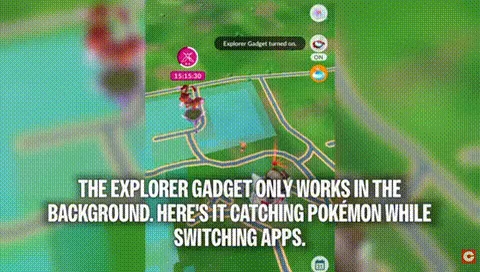
After activation, Pokémon Go can be minimized or closed, and the phone’s screen can be locked. The device must remain powered on, connected, and physically carried by the Trainer. The Explorer Gadget cannot operate normally if the phone is switched off, has no battery, lacks location information, or loses the connection required by the game. Simply closing Pokémon Go without activating the Gadget first does not begin a background session.
Reliable background operation depends on the permissions and power-management rules of the mobile device. Pokémon Go needs location access so it can identify when the Trainer moves within range of Pokémon and PokéStops. Some Android devices aggressively suspend applications after the display turns off, so players may need to allow background activity or exempt Pokémon Go from battery-optimization settings that prevent inactive apps from operating.
The most effective routine is to prepare inventory space, stock regular Poké Balls, activate the Gadget, and then walk at a casual pace through an area containing wild spawns and PokéStops. Very fast travel may reduce useful interactions or trigger Pokémon Go’s ordinary movement restrictions. The feature can be paused or resumed through its icon, allowing Trainers to stop automatic activity temporarily without ending the entire session.
When the walk is finished, reopen Pokémon Go and inspect the Explorer Gadget summary rather than judging the results only from inventory changes. The summary reports the Pokémon successfully caught through the Gadget and the number of PokéStops it spun, providing a clearer record of what happened while the game was inactive.
Automatic Catching, PokéStop Spinning, Ball Rules, and Daily Limits
When the Explorer Gadget detects an eligible nearby wild Pokémon, it automatically uses one regular Poké Ball for a catch attempt. The encounter screen does not open, and the Trainer cannot manually aim, select a berry, create a curveball, or pursue Nice, Great, or Excellent Throw bonuses. A successful attempt places the Pokémon in storage, provided sufficient space remains. An unsuccessful throw can allow the Pokémon to escape, meaning the Gadget should not be trusted with a personally important encounter when manual catching is possible.
The feature includes some protective exclusions. It does not attempt to catch a Pokémon species that has not yet been registered in the Trainer’s Pokédex, reducing the risk that an entirely new Pokédex entry will flee after one unattended throw. Mighty Pokémon are also excluded. However, the protection generally applies at the species level rather than to every separate form. The official Help Center uses Oricorio as an example: once one Oricorio style has been registered, the Gadget can attempt to catch other styles even when those particular forms are missing. A new costume, regional variation, style, seasonal appearance, or gender difference is therefore not necessarily protected.
The Explorer Gadget is designed for eligible nearby wild encounters. It is not described as automatically handling Raid Bosses, research rewards, Team GO Rocket rescue encounters, or Pokémon that require the Trainer to enter a dedicated interaction. A Pokémon absent from the successful-catch summary may also have escaped after a ball was used, so players seeking rare, shiny, or high-value event Pokémon should catch them manually whenever possible.
PokéStop spinning operates as a separate background function. When an eligible stop enters range, the Explorer Gadget spins its Photo Disc and sends the resulting items to the Trainer’s Item Bag. Rewards come from the normal PokéStop item pool and can include Poké Balls, Berries, Potions, Revives, and other standard supplies. Stops can help replace some of the regular Poké Balls consumed by automatic catches, but there is no guarantee that the number obtained will equal the number spent. Recently visited stops must also complete their ordinary cooldown before they can be spun again.
Catching and spinning are separately restricted:
- Full Pokémon Storage prevents additional catches but does not necessarily stop PokéStop spinning.
- A full Item Bag prevents PokéStop rewards but does not necessarily stop catches.
- Running out of regular Poké Balls stops catching even when Great Balls and Ultra Balls remain.
- Reaching the daily catch allowance stops automatic catching for the rest of the day.
- Reaching the daily PokéStop allowance stops automatic spinning for the rest of the day.
- One function can continue after the other has stopped, provided its inventory, supply, and daily requirements remain satisfied.
The Explorer Gadget uses only regular red-and-white Poké Balls. Great Balls and Ultra Balls cannot substitute for them, and failed attempts still consume standard balls. This makes Item Bag preparation important, particularly during walks through areas with many wild encounters but relatively few PokéStops. Difficult or valuable Pokémon are safer to handle manually because the Trainer can use stronger balls, berries, deliberate throws, and available catch bonuses.
The feature also has separate daily limits for successful catches and PokéStop spins. Official Pokémon Go information states that the allowances are based on Trainer level but does not provide a complete public level-by-level table. Current rollout reporting indicates that the allowance may correspond to the account’s current level, meaning a Level 20 Trainer receives up to 20 successful catches and 20 PokéStop spins, a Level 50 Trainer receives 50 of each, and a Level 80 Trainer receives 80 of each. Because rollout rules can be adjusted, the allowance shown inside the game should be treated as definitive for the individual account.
The counters are independent, and reaching one maximum does not consume or cancel the other. Official wording refers to the number of Pokémon the Gadget can “catch,” suggesting that the limit concerns successful catches rather than every detected encounter. Players should still rely on the in-game counter and summary because unattended attempts are not displayed in the same way as manual encounters. Once an allowance is exhausted, that activity remains unavailable until the next daily reset. Pausing the Gadget does not transfer unused capacity to another day, and inventory restrictions can stop a session long before its numerical limits are reached.

Troubleshooting, Accessory Conflicts, and the Explorer Gadget Summary
The most common reason the Explorer Gadget is unavailable is that the account has not reached Trainer Level 20 or has not yet received access through the phased rollout. Another eligible player having the feature does not prove that every Level 20 account should already have it. Updating and restarting Pokémon Go can resolve a local application issue, but it cannot override server-side rollout eligibility.
A connected physical accessory is another frequent cause of problems. The Explorer Gadget and Pokémon Go Plus+ cannot operate simultaneously. The hardware can remain paired to the account, but it must be disconnected before the software-based Gadget is activated. When the main-map shortcut is absent, open the Item Bag and check Key Items after disconnecting the accessory. The map indicator can then be used to confirm which system is currently active.
Trainers should not switch casually between the two systems during the same day. Official guidance states that connecting an accessory while the Explorer Gadget is active ends the Gadget session and prevents it from being used again until the following day. A sensible approach is to choose one system for the intended outing rather than attempting to alternate between software and hardware throughout the walk.
When the Explorer Gadget appears active but is not catching Pokémon, check the following:
- The account still has regular Poké Balls.
- Pokémon Storage has available space.
- The daily catch allowance has not been reached.
- Eligible wild Pokémon are actually appearing nearby.
- The target is not a new Pokédex species or a mighty Pokémon.
- The phone is allowing Pokémon Go to use location and background activity.
- The Trainer is physically moving through an area with map activity.
Great Balls and Ultra Balls do not keep the catch function running when regular Poké Balls are gone. An empty standard-ball supply should produce an alert, while full Pokémon Storage prevents further successful catches from being added.
When automatic PokéStop spinning stops, check Item Bag capacity and the daily spin counter. A full Item Bag prevents the Gadget from depositing rewards even when the Trainer has not reached the daily allowance. The stops must also be within usable range and available under their normal cooldown rules. Automatic catching may continue while spinning is unavailable, provided Pokémon Storage, regular Poké Balls, and the catch allowance remain available.
Background failures can also result from disabled location services, missing background permissions, aggressive battery-saving settings, an outdated version of Pokémon Go, or remaining stationary in an area without eligible encounters. The Explorer Gadget does not generate Pokémon or PokéStops. It can only interact with valid map activity detected as the Trainer explores.
The Explorer Gadget summary can be opened through the Map View icon or the Gadget entry in Key Items. It displays the Pokémon successfully caught by the feature, the total number caught, and the number of PokéStops spun. Caught Pokémon are arranged from newest to oldest, and the list includes only successful catches made through the Explorer Gadget. An escaped Pokémon will not appear as a completed catch.
The summary is also useful for determining why a session stopped. A completed daily counter confirms that additional walking cannot restart that category until the reset. When the counters remain below their limits, the Trainer should investigate inventory capacity, regular Poké Ball supply, permissions, movement, and accessory status. Before transferring unattended catches in bulk, appraise them and review the newest entries because the Gadget may have obtained useful species, Candy sources, rare variants, or Pokémon with strong individual values.
Explorer Gadget vs Pokémon Go Plus+ and the Best Use Cases
The central difference is that the Explorer Gadget is built directly into Pokémon Go, while Pokémon Go Plus+ is a separate rechargeable Bluetooth accessory. The software feature requires no additional purchase, charging, physical controls, or hardware connection. Any eligible Trainer included in the rollout can use it with a compatible phone, making it an accessible option for casual background collection.
Both systems can automatically attempt catches with regular Poké Balls and spin nearby PokéStops while the Trainer is not continuously watching the screen. However, the Explorer Gadget has level-based daily catch and spin allowances, making it best suited to short walks, commutes, errands, shopping trips, and other limited periods of passive activity. Pokémon Go Plus+ is intended for more sustained use and is mainly limited by its battery, connection, the Trainer’s inventory, and Pokémon Go’s broader interaction rules.
Ball flexibility is another important difference. The Explorer Gadget uses regular Poké Balls exclusively. Pokémon Go Plus+ can automatically throw regular Poké Balls and also supports Great Balls and Ultra Balls through configured button-activated throws. It should not be described as automatically using all three ball types in exactly the same way, but its physical controls still provide more choice than the built-in Gadget.
Pokémon Go Plus+ also connects with Pokémon Sleep. It can track sleep through its hardware controls, provides Pikachu sounds and related features, and unlocks Pokémon Go Special Research associated with an encounter with Snorlax wearing a nightcap. The Explorer Gadget does not provide sleep tracking, hardware feedback, Pikachu audio, or the Plus+-related Special Research.
The most appropriate option depends on the player’s routine:
- Explorer Gadget: Best for eligible Trainers who want free, occasional background catching and PokéStop spinning without purchasing hardware.
- Pokémon Go Plus+: Better for dedicated players who frequently use automatic assistance, want longer sessions, prefer physical feedback, need expanded ball controls, or use Pokémon Sleep.
- Manual play: Safest for rare, shiny, unregistered, difficult, or personally valuable encounters because it allows berries, stronger balls, controlled throws, and catch bonuses.
The Explorer Gadget is therefore a useful software-based alternative rather than a complete replacement for Pokémon Go Plus+. Its convenience comes with deliberate restrictions involving Trainer level, phased access, standard Poké Balls, daily allowances, encounter exclusions, and the inability to operate alongside a connected accessory. For casual movement through Pokémon-rich areas, those limitations may be acceptable. Players seeking high-volume collection or the complete Plus+ feature set will receive more flexibility from the physical device.

Frequently Asked Questions (FAQs)
- Is the Explorer Gadget free in Pokémon Go?
Yes. The Explorer Gadget is a free feature built directly into Pokémon Go, so Trainers do not need to purchase Pokémon Go Plus+, pair a Bluetooth accessory, or spend PokéCoins to obtain it. Access depends on reaching the required Trainer level and being included in the phased rollout, which means some eligible accounts may receive the feature later than others. - What level do you need for the Explorer Gadget?
You must be at least Trainer Level 20 before the Explorer Gadget can become available. This is a permanent account requirement rather than an event objective, research reward, or paid upgrade. Reaching Level 20 makes an account eligible, but the feature may not appear immediately if the rollout has not yet reached that account or region. - Does the Explorer Gadget guarantee every catch?
No. The Explorer Gadget makes one automatic catch attempt using a regular Poké Ball, but the throw can fail and allow the Pokémon to escape. It does not use berries, stronger balls, curveballs, or Nice, Great, and Excellent Throw bonuses, so valuable or difficult Pokémon are safer to catch manually whenever the Trainer can open the encounter. - Can the Explorer Gadget catch shiny Pokémon?
It can potentially catch a shiny Pokémon if that encounter is otherwise eligible for automatic catching, but success is not guaranteed. Because the encounter screen does not open during background operation, the Trainer may never know that an escaped Pokémon was shiny. A successfully caught shiny will appear in Pokémon Storage and in the Explorer Gadget’s catch summary, so players should review and appraise unattended catches before transferring them. - Does the Explorer Gadget use Great Balls or Ultra Balls?
No. It exclusively uses regular red-and-white Poké Balls for automatic catch attempts. Even if the Item Bag contains many Great Balls or Ultra Balls, the Gadget will stop catching when the regular Poké Ball supply is exhausted. Pokémon Go may provide some standard balls when the feature is activated with none available, but this is not described as an unlimited source of free Poké Balls. - Does the Explorer Gadget work while Pokémon Go is completely closed?
Yes. After the Explorer Gadget has been activated, Pokémon Go can be minimized or closed and the phone’s screen can be locked while the feature continues operating. The device must remain powered on, carried by the Trainer, connected as required, and able to provide location and background activity. Simply closing Pokémon Go without activating the Gadget first will not begin a background session. - Can the Explorer Gadget catch a Pokémon missing from my Pokédex?
It will not attempt to catch a completely unregistered Pokémon species, helping prevent a new Pokédex entry from fleeing after an unattended throw. However, this protection generally applies at the species level rather than to every separate form. Once one form is registered, the Gadget may attempt to catch another regional form, costume, style, or variation of that species even when that particular version has not been collected. - Why did my Explorer Gadget stop catching but continue spinning PokéStops?
Automatic catching and PokéStop spinning have separate requirements and daily counters. Catching may stop because Pokémon Storage is full, regular Poké Balls have run out, or the daily catch allowance has been reached, while PokéStop spinning can continue if the Item Bag still has space and the spin allowance remains. The reverse can also happen when the Item Bag is full or the daily PokéStop limit has been reached. - Can the Explorer Gadget and Pokémon Go Plus+ run together?
No. The Explorer Gadget and Pokémon Go Plus+ cannot be active at the same time. The Plus+ may remain paired with the account, but its active connection must be ended before the built-in Gadget is used. When the Explorer Gadget shortcut is not visible on the map, disconnect the accessory and check the Key Items section of the Item Bag. - Can I reactivate the Explorer Gadget after switching to Pokémon Go Plus+?
Not during the same day. Official guidance states that connecting a physical accessory while the Explorer Gadget is active ends the software-based session and prevents the Gadget from being used again until the following day. Trainers should therefore decide which option they want for an outing before starting, rather than switching repeatedly between the Explorer Gadget and Pokémon Go Plus+.

Conclusion
The answer to “How does the Explorer Gadget work in Pokémon Go?” is straightforward: it is a free, built-in background assistant that automatically attempts to catch eligible nearby Pokémon with regular Poké Balls and spins nearby PokéStops while the Trainer explores with the game closed or inactive.
It becomes available from Trainer level 20, operates when the screen is locked, and can be paused or resumed from its icon. Its usefulness is controlled by daily catch and PokéStop allowances linked to Trainer level, as well as Pokémon Storage, Item Bag space, and standard Poké Ball availability.
The system protects some important encounters by skipping Pokémon that have not been registered in the Pokédex and mighty Pokémon. Nevertheless, registered species and eligible alternate forms can flee after unsuccessful attempts, so manual catching remains preferable for valuable targets.
The Explorer Gadget offers a practical entry point into passive Pokémon Go play without requiring extra hardware. Pokémon Go Plus+ remains the more capable choice for frequent accessory users, but casual Trainers can now collect additional Pokémon and items during ordinary walks without continuously watching the screen.
Sources and Citations
- Pokémon GO — “The Explorer Gadget Debuts!” — August 13, 2026
Pokémon GO official announcement
This is the primary announcement confirming the phased rollout, Trainer Level 20 requirement, automatic Pokémon catching and PokéStop spinning, regular Poké Ball restriction, level-based daily limits, and interaction with Pokémon GO Plus +. (pokemongo.com) - Pokémon GO Help Center — “What Is the Explorer Gadget?”
Pokémon GO Help Center article
The official support documentation explains how to activate the Explorer Gadget from the Map View or Key Items, background operation, catching and PokéStop summaries, restrictions on unregistered Pokémon, and how it works when a physical accessory is paired. (Niantic Help Center) - Pokémon GO Hub — “Explorer Gadget Officially Debuts in Pokémon GO” — August 13, 2026
Pokémon GO Hub article
This provides detailed analysis of the rollout, including availability for Level 20+ Trainers, the phased launch, the rule that daily Pokémon-catching and PokéStop-spinning limits correspond to Trainer Level, storage restrictions, skipped Pokémon, and comparison with Pokémon GO Plus +. (Pokémon GO Hub) - The Pokémon Company — “Pokémon GO Plus + Official Website”
Pokémon GO Plus + official website
The official product page confirms that Pokémon GO Plus + connects to both Pokémon GO and Pokémon Sleep, can automatically throw Poké Balls and spin PokéStops, supports Great Balls and Ultra Balls, tracks sleep, includes Pikachu voice functions, and provides device specifications and system requirements. (pokemongoplusplus.com) - Pokémon Support — “Pokémon GO Plus + Technical FAQs”
Official Pokémon GO Plus + Technical FAQs
Useful additional official documentation for supported operating systems, battery information, Bluetooth connectivity, Pokémon GO/Pokémon Sleep compatibility and other hardware requirements. (support.pokemon.com)
Recommended
- 007 First Light Demand Concerns Explained: Why IO Interactive’s James Bond Game Isn’t Hitting Wider Audiences, Says Analyst Daniel Ahmad
- Facial Rigging in Blender: Comprehensive Guide for Beginners to Pros
- NFL 2K Revival is Cancelled: Take‑Two Confirms the Non‑Simulation NFL Game Won’t Happen
- Everything Announced at Warframe and Soulframe Fan Event TennoCon 2026: Tau, Brysko, Warsongs, and More
- Activision Confirms Call of Duty Warzone Shutting Down on PS4 and Xbox One: Full Details, Timeline, and What Players Need to Know
- ByteDance Sells Mobile Legends: Bang Bang Creator Moonton to Saudi Arabia’s Savvy Games Group
- Moana 3 is in the Works, According to the Rock: Everything We Know so Far
- Teamfight Tactics: Unreal Engine Demo | State of Unreal 2026
- FBI Investigating Malware on Steam After PirateFi, Chemia, and Other Indie Games Were Found Hiding Malicious Files
- How To Pitch Your Game to Xbox (ID@Xbox Guide by Guy Richards)



































































































