












In This Article (7 sections)
What Is Steam Deck FPS Tracking, How to Check Game Performance, and Which Games Are Supported?
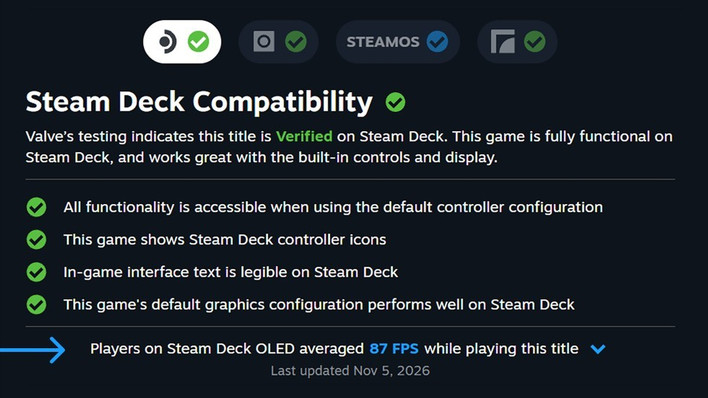
Steam now shows a game’s average FPS on Steam Deck on its store page, introducing a significant improvement to how players evaluate gaming performance before purchasing or downloading titles. Valve announced the Steam Deck Framerate feature on November 10, 2026, before making the information available to everyone through the Steam Store and Steam client on November 11.
The system provides actual frame rate measurements collected from Steam Deck owners who voluntarily share anonymized gameplay performance data. Instead of relying exclusively on compatibility ratings, minimum system requirements, and independent benchmarks, customers can now examine numerical performance statistics directly through Steam. Valve has also introduced a framerate histogram that illustrates how frequently games operate at different frame rates, providing additional information about performance consistency and potential interruptions.
FPS stands for frames per second and represents the number of images a game displays within one second. Higher frame rates generally contribute to smoother animations, greater responsiveness, and improved visual clarity during movement. However, consistency is equally important, particularly in action games and competitive multiplayer experiences. Before the introduction of this feature, Steam customers primarily relied on compatibility classifications to determine whether games could operate on Valve’s handheld system. Although these classifications remain useful, they do not communicate precise performance expectations. A Steam Deck Verified game may not necessarily deliver the performance every player expects, while some Unsupported titles can achieve satisfactory frame rates under particular circumstances.
The feature represents the public stage of a broader performance collection initiative that Valve had been developing throughout 2026. Earlier reports indicated that the company had begun gathering anonymized frame rate measurements from participating users, while performance information was reportedly becoming available to developers by October. The November update extended the usefulness of this information by allowing customers to examine gameplay performance directly before purchasing games. Since the original Steam Deck launched in 2022, compatibility ratings have helped customers navigate thousands of titles primarily designed for desktop computers. Adding measurable performance statistics addresses the growing recognition that technical compatibility and satisfactory gameplay performance are separate considerations.
Checking average Steam Deck FPS does not require purchasing, downloading, or launching a game. Customers can access available performance statistics through the Steam desktop application, Steam Deck interface, or a compatible web browser by following these steps:
- Open Steam and search for the desired game.
- Navigate to the game’s individual Steam Store page.
- Locate the Steam Deck Compatibility section.
- Select the Learn more option to open detailed compatibility information.
- Examine the available average FPS measurements for Steam Deck OLED or Steam Deck LCD.
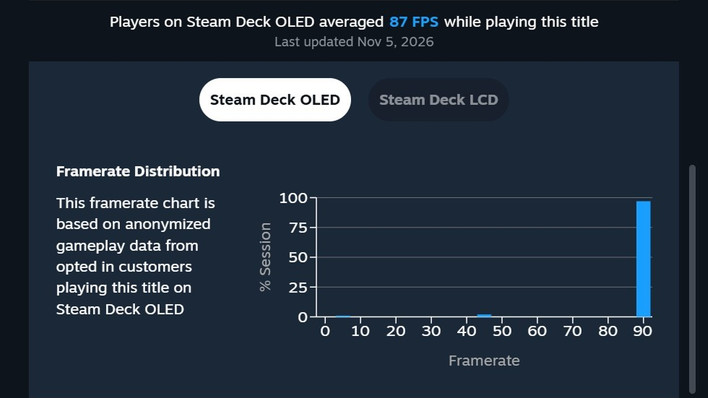
- Expand the framerate histogram to review the distribution of recorded performance measurements.
- Compare the results with your preferred frame rate and gameplay consistency requirements.
Valve has also integrated average FPS information into the Steam Library through the Hardware Compatibility dialog. Existing game owners can therefore investigate performance expectations without returning to the public store listing. Customers should establish personal performance targets when comparing games, as someone comfortable with 30 FPS may evaluate a demanding adventure differently from someone who prefers 60 FPS for action games. Reported averages can change as additional measurements become available and developers introduce performance updates. The absence of FPS information should not automatically discourage a purchase because it may indicate insufficient qualifying data rather than poor compatibility.
Steam Deck FPS tracking is available for eligible titles that have completed compatibility testing and accumulated sufficient qualifying performance measurements. Importantly, the feature is not restricted to Steam Deck Verified games, as titles classified as Playable or Unsupported can also display statistics. Valve indicated that thousands of games already had qualifying data when the feature was announced. Popular releases may accumulate measurements more quickly because they attract larger active communities, while smaller independent titles, newly launched games, and older releases may require additional time. Publishers do not appear to need to conduct independent benchmarks or submit recommended FPS figures because the system relies primarily on qualifying measurements from actual players.
Early reporting demonstrated how the feature can communicate considerable performance differences between games running on identical hardware. Kotaku reported that Final Fantasy VII Rebirth displayed an average of 37 FPS on Steam Deck OLED, while Hades II displayed an average of 88 FPS when the publication examined their listings. These figures represent historical snapshots rather than permanent performance guarantees. Additional gameplay measurements, software updates, and changes in player preferences can influence subsequently displayed averages. Nevertheless, the feature could become particularly valuable for independent titles that rarely receive comprehensive coverage from hardware benchmarking publications.
Steam Deck compatibility classifications remain important when evaluating the new performance information. Valve maintains four principal classifications, each addressing different aspects of the handheld gaming experience:
| Compatibility Rating | Meaning |
|---|---|
| Verified | The game satisfies Valve’s established compatibility requirements and generally operates without significant manual adjustments. |
| Playable | The game can operate on Steam Deck but may require additional configuration or manual intervention. |
| Unsupported | Valve has identified compatibility problems affecting performance, software functionality, controls, or other features. |
| Unknown | Valve has not completed its compatibility assessment for the game. |
Verified status does not guarantee consistent 60 FPS or 90 FPS gameplay. Playable titles may require controller adjustments, touchscreen navigation, or manual text entry through the on screen keyboard while still delivering excellent rendering performance. Unsupported games may experience problems involving software compatibility, anti-cheat systems, or particular gameplay features rather than universally unacceptable performance. Ars Technica highlighted examples including Starfield, Silent Hill 2, and Assassin’s Creed Syndicate, which displayed measurable performance despite their Unsupported classifications. Watch Dogs 2 also demonstrated how satisfactory single player performance can coexist with restrictions affecting multiplayer functionality.
The introduction of average FPS information makes these classifications easier to interpret by distinguishing rendering performance from broader usability concerns. Nevertheless, favorable FPS statistics do not establish that every multiplayer feature, control mechanism, or gameplay mode functions correctly. Compatibility ratings and performance measurements address different questions, and examining both provides a more comprehensive overview of the expected Steam Deck experience.

How Valve Calculates Steam Deck FPS, How Histograms Work, and How OLED and LCD Performance Compare
Valve calculates average Steam Deck performance using anonymized measurements gathered from participating players during qualifying gameplay sessions. Unlike traditional hardware reviews, which generally follow specific testing routes and controlled graphical configurations, Steam incorporates information generated through ordinary gameplay. The resulting statistics reflect a collection of practical player experiences rather than a single standardized benchmarking environment. Valve applies eligibility requirements and filtering procedures to improve the usefulness of these measurements, including considerations involving system frame rate restrictions and invalid samples. However, these measures do not eliminate every variable capable of influencing performance.
Two players using identical Steam Deck hardware may select different graphics presets, rendering resolutions, upscaling configurations, or internal frame rate restrictions. Their gameplay environments may also differ considerably, with one player exploring demanding locations while another spends more time in smaller environments. For example, a hypothetical game could operate near 30 FPS during complicated combat encounters, 45 FPS during ordinary exploration, and 60 FPS in less demanding areas. Its reported average would depend on the distribution and weighting of qualifying measurements. Valve has not publicly documented every mathematical detail behind its consumer performance calculations, including how gameplay sessions of different lengths are weighted.
The accompanying framerate histogram addresses one of the principal limitations associated with relying exclusively on average FPS. Its horizontal axis represents different frame rates, while its vertical dimension indicates the proportion of qualifying measurements associated with those values. A prominent column near 60 FPS suggests that a substantial share of measurements falls around that performance level. Smaller columns at lower values indicate that those frame rates occur less frequently. Two games could both average approximately 45 FPS despite delivering considerably different experiences, with one maintaining measurements between 43 and 47 FPS while another frequently alternates between 30 and 60 FPS.
Players can interpret the main histogram patterns in the following ways:
| Histogram Pattern | Potential Interpretation |
|---|---|
| Narrow distribution around one frame rate | Relatively consistent recorded performance. |
| Broad distribution across several frame rates | Greater variation between gameplay conditions or player configurations. |
| Large concentration near 60 FPS or 90 FPS | Many qualifying measurements approach the corresponding display or frame rate limit. |
| Noticeable columns at substantially lower frame rates | Potential performance drops, demanding gameplay sections, or configuration differences. |
| Separate concentrations around particular frame rates | Possible effects of display synchronization or internal frame rate restrictions. |
These patterns provide valuable context, but a histogram does not preserve the chronological sequence of measurements. It cannot establish precisely when performance drops occurred, how long they lasted, or what caused them. An isolated interruption and a sustained period of reduced performance can produce similar aggregate measurements. Lower frame rate values may also result from intentional restrictions, synchronization behavior, or differences between gameplay environments rather than serious technical problems.
Graphics settings and frame rate limits are particularly important when interpreting Valve’s statistics. Qualifying measurements are collected from Steam Deck devices operating with their default system frame rate limits, which are 90 FPS for Steam Deck OLED and 60 FPS for Steam Deck LCD. This restriction prevents deliberately reduced system performance targets from disproportionately influencing the reported results. For example, including large numbers of measurements from players who intentionally restrict an undemanding game to 30 FPS to conserve battery life could create the misleading impression that the game cannot achieve higher frame rates.
However, Valve does not comprehensively normalize graphics settings selected within individual games. Texture quality, shadow quality, lighting effects, rendering resolution, internal frame rate restrictions, and upscaling technologies can all affect the reported measurements. AMD FidelityFX Super Resolution allows compatible games to render internally at reduced resolutions before reconstructing the final image, potentially improving performance while introducing varying levels of visual compromise. Consequently, two players achieving identical frame rates may experience considerably different graphical presentations.
Vertical synchronization, commonly called VSync, introduces another important consideration. VSync coordinates frame presentation with display refresh cycles to reduce screen tearing. Under certain synchronization conditions, a game that cannot maintain its display’s refresh target may present frames at intervals corresponding to a lower effective frame rate. Valve illustrated this behavior using Steam Deck OLED, where a game unable to consistently maintain 90 FPS may produce measurements concentrated around 90 FPS and 45 FPS. Internal frame rate restrictions can also contribute to unusual distributions. Gaps between histogram columns therefore do not necessarily establish continuous technical instability.
Valve’s reporting system also distinguishes between Steam Deck OLED and Steam Deck LCD. Although both handhelds belong to the same hardware family, their display capabilities and internal hardware differences can influence performance.
| Feature | Steam Deck LCD | Steam Deck OLED |
|---|---|---|
| Maximum display refresh rate | 60Hz | 90Hz |
| Default system frame rate limit for qualifying measurements | 60 FPS | 90 FPS |
| Memory speed | Original memory configuration | Improved memory speed |
| Power efficiency | Original hardware design | Improved efficiency |
| Thermal design | Original cooling configuration | Revised thermal design |
| Elden Ring reported FPS example | 38 FPS | 42 FPS |
The Elden Ring figures were reported by PC Gamer when the publication examined the new feature and represent a historical snapshot rather than guaranteed benchmark results. Steam Deck OLED is not an entirely new performance generation, and its 90Hz display does not mean that every game will achieve 90 FPS. Graphically demanding titles may operate within similar performance ranges on both devices, while less demanding games can take greater advantage of the OLED model’s higher refresh rate. Battery life also remains important because running games at higher frame rates can increase power consumption, while selecting a lower target may extend playing time.
Steam Deck FPS data is most accurate when interpreted as an aggregate representation of qualifying player experiences. Game modifications, external performance tools, software updates, background activity, and changing gameplay environments can influence the results. Steam Deck HQ raised concerns about interpreting aggregated measurements without detailed information about the circumstances under which they were collected. Valve has also not fully disclosed how historical performance measurements are weighted against newer information, meaning recently updated games may benefit from additional investigation through contemporary technical reviews.
Histograms can reveal potential performance interruptions hidden by respectable averages, but they cannot replace detailed frame time analysis. Frame time describes the interval between presented frames, and inconsistent intervals can create noticeable stuttering even when average FPS appears satisfactory. Shader compilation, processor bottlenecks, graphics limitations, asset streaming interruptions, and storage delays can all influence responsiveness. Combining Steam’s averages and histograms with recent gameplay demonstrations or controlled benchmarks provides a broader understanding of community performance alongside more detailed evidence concerning individual gameplay sequences and graphical configurations.

How Steam Collects Anonymous FPS Data, Improves Purchasing Decisions, and Plans to Expand Performance Tracking
Valve’s Steam Deck performance reporting system depends on voluntary participation from customers who agree to share anonymized gameplay measurements. Rather than requiring players to manually submit benchmark results, Steam collects qualifying information during ordinary gaming sessions. Valve has indicated that a substantial proportion of the Steam Deck community participates in the program, providing access to measurements across different genres, technical requirements, and player preferences. This collection method is particularly useful because professional benchmarking publications generally prioritize major releases and popular independent titles, leaving thousands of smaller games without comprehensive handheld performance assessments.
The public statistics are presented as aggregated performance information rather than individual player records. Customers examining a game’s histogram cannot identify which Steam account contributed a particular measurement or associate individual columns with identifiable gameplay histories. However, Valve has not publicly documented every technical detail concerning its internal data processing, retention, aggregation, or statistical architecture. Importantly, contributing performance measurements is separate from accessing publicly available FPS information. Customers who prefer not to participate can still examine the available statistics without sharing their own gameplay data.
Steam users can manage their participation through their account settings. The relevant control is called Anonymous Game Framerate Data and can be accessed through the following steps:
- Open Steam Account Settings.
- Navigate to the Data & Browsing category.
- Locate Anonymous Game Framerate Data.
- Enable the setting to contribute qualifying gameplay measurements.
- Disable the setting if you no longer wish to participate in the optional collection program.
Steam may also display a participation prompt within the Steam Library, allowing eligible customers to select their preference when the feature becomes available through their account or client version. Disabling participation prevents continued voluntary contributions through this particular mechanism but does not remove access to Steam purchases, compatibility classifications, library features, or publicly available FPS statistics. Customers who enable the setting can help improve coverage, particularly for games that currently lack sufficient qualifying measurements.
The introduction of performance statistics represents an important improvement to purchasing decisions for handheld PC gamers. Previously, customers often needed to investigate several independent sources before determining whether a particular game would deliver satisfactory performance on Steam Deck. The new feature makes initial research more accessible, particularly during seasonal sales when players may be comparing several titles simultaneously. Someone interested in fast action games may prioritize consistently high frame rates, while a player who prefers slower narrative adventures may find a lower but stable performance target acceptable.
The information is particularly valuable for customers who use Steam Deck as their primary gaming system and have limited alternatives when a purchased title performs poorly on handheld hardware. Access to FPS measurements before purchasing can reduce uncertainty and help customers identify games that are unlikely to satisfy their preferences. It can also highlight worthwhile titles that might otherwise be overlooked because of an Unsupported classification. Nevertheless, customers should investigate the reasons behind unfavorable compatibility ratings, as strong rendering performance cannot resolve missing multiplayer functionality, incompatible anti-cheat systems, or serious software problems.
The feature could also encourage greater transparency and stronger optimization incentives among developers. When customers can examine actual performance measurements directly through a storefront, technical improvements may become more visible as newer gameplay samples contribute to the reported statistics. Smaller development teams could also benefit from information about actual hardware behavior without requiring extensive internal benchmarking resources. Valve’s approach creates a purchasing environment increasingly informed by measurable gameplay experiences rather than marketing descriptions or broad compatibility classifications alone.
Valve has confirmed that Steam Deck FPS tracking is intended to serve as an initial step toward providing performance information for additional hardware configurations. The company selected Steam Deck because its relatively standardized hardware makes collected measurements easier to interpret. Desktop PC gaming introduces considerably greater complexity because customers use thousands of processor and graphics card combinations, different memory configurations, operating systems, driver versions, and display resolutions. Even two computers using identical graphics cards can produce substantially different results because of processor performance, cooling limitations, memory capacity, and graphical configurations.
A broader desktop performance estimator could potentially allow customers to examine expected FPS according to their graphics cards, processors, rendering resolutions, and other relevant hardware characteristics. Other handheld gaming systems, including the ASUS ROG Ally family and Lenovo Legion Go devices, could also benefit from expanded reporting. However, these systems introduce different hardware architectures and power configurations. Some handhelds permit substantial adjustments to operating power limits, meaning the same device could deliver considerably different performance depending on its selected configuration.
Valve has already introduced anonymous framerate data participation prompts through the desktop Steam Client Beta, establishing an early step toward collecting information from a broader range of gaming hardware. However, collecting measurements and publicly displaying meaningful hardware specific performance estimates represent separate stages of development. As of November 25, 2026, Steam Deck remains the established platform for public FPS reporting, while Valve has not confirmed a release date for desktop estimates or performance tracking across specific additional handheld devices. If successfully expanded, the feature could help customers evaluate whether their computers are likely to meet particular performance expectations before purchasing games.
Frequently Asked Questions (FAQs)
- Does Steam now show average FPS for Steam Deck games?
Yes. Steam introduced average FPS reporting for eligible Steam Deck games in November 2026. Customers can access performance statistics through the Steam Deck Compatibility section on individual store pages. The figures are based on qualifying gameplay measurements voluntarily shared by Steam Deck owners, providing an indication of actual performance rather than theoretical hardware estimates. - How do I check a game’s average FPS on Steam Deck before buying it?
Open the game’s Steam Store page, locate the Steam Deck Compatibility section, and select Learn more. If sufficient qualifying data is available, Steam will display the average FPS and an expandable framerate histogram. Customers can examine both measurements without purchasing or installing the game. - When did Steam introduce average Steam Deck FPS tracking?
The public feature was announced between November 9 and November 10, 2026, depending on regional listings and publication timings. Valve subsequently confirmed that the performance information became available to everyone through the Steam Store and Steam client on November 11, 2026. - Does Steam display separate FPS data for Steam Deck OLED and LCD?
Yes. Valve distinguishes between Steam Deck OLED and Steam Deck LCD because their display capabilities and internal hardware configurations can influence performance. The LCD model supports a maximum refresh rate of 60Hz, while the OLED model supports 90Hz. Separate measurements help customers evaluate games using the hardware they actually own. - Can Unsupported Steam Deck games display average FPS statistics?
Yes. Games classified as Verified, Playable, or Unsupported can display performance information if they satisfy Valve’s data collection requirements. Some Unsupported games may deliver satisfactory rendering performance while experiencing problems with multiplayer functionality, controls, or other features. Players should examine the reason behind the compatibility classification before purchasing. - Why does a Steam Deck game have no average FPS information?
A game may lack FPS statistics because Valve has not collected sufficient qualifying measurements or completed the relevant compatibility assessment. Newly released games, smaller independent titles, and older games with limited active communities may take longer to accumulate enough information. Missing statistics do not automatically indicate poor performance or incompatibility. - Can I disable Steam Deck anonymous FPS data collection?
Yes. Open Steam Account Settings, navigate to Data & Browsing, and locate Anonymous Game Framerate Data. Disabling this setting stops voluntary participation in the relevant performance collection program. Customers can still access public FPS statistics, compatibility ratings, and other Steam services without contributing their own gameplay information. - Does Steam’s average FPS data account for custom graphics settings?
Not comprehensively. Valve filters qualifying measurements according to default system frame rate limits, but individual graphics configurations are not standardized. Differences in rendering resolution, graphics presets, upscaling technologies, and internal frame rate restrictions can influence reported averages. The statistics should therefore be treated as general performance references rather than guaranteed benchmark results. - Does a Steam Deck Verified rating guarantee 60 FPS gameplay?
No. Steam Deck Verified status confirms that a game satisfies Valve’s established compatibility requirements, including controls, display functionality, and general accessibility. It does not guarantee a specific frame rate such as 60 FPS or 90 FPS. Customers should examine the average FPS and histogram separately to determine whether performance meets their expectations. - Will Steam introduce average FPS estimates for desktop gaming PCs?
Valve intends to expand performance reporting beyond Steam Deck and has already introduced anonymous framerate data collection prompts through the desktop Steam Client Beta. However, the company has not confirmed a release date or finalized the supported hardware configurations. Desktop reporting will require additional considerations because of the extensive variety of processors, graphics cards, resolutions, and system configurations.
Conclusion
Steam now shows a game’s average FPS on Steam Deck on its store page, providing greater transparency when evaluating handheld gaming performance before purchasing. The introduction of average frame rate measurements and performance histograms in November 2026 addresses limitations associated with traditional compatibility ratings. Although these statistics help distinguish technical compatibility from actual rendering performance, factors such as graphics settings, synchronization, and gameplay environments can influence the reported results.
Valve’s decision to begin with Steam Deck could establish the foundation for broader performance reporting across desktop computers and other handheld gaming devices. Although the expansion timeline remains unconfirmed, the existing feature improves purchasing decisions, encourages better game optimization, and provides valuable insights into actual gaming performance.
Sources and Citations
- Valve, “Steam Deck Framerate,” November 2026: Official Steam announcement introducing average Steam Deck FPS on store pages and in the Steam client. Valve explains that the figures come from opted-in players, that Verified, Playable, and Unsupported games can qualify, and that the expandable histogram shows how frequently different frame rates occur. Valve also says the feature is a first step toward performance reporting on additional hardware.
Valve: Steam Deck Framerate - Valve, Steam Deck Verified: Official explanation of Valve’s four compatibility categories: Verified, Playable, Unsupported, and Unknown. The page explains that these ratings cover controls, display, seamless operation, and system support rather than guaranteeing a particular FPS target.
Valve: Steam Deck Verified - Valve, Steam Deck OLED Technical Specifications: Official specifications confirm the OLED model’s 1280×800 HDR display, refresh rate of up to 90Hz, 6 nm AMD APU, and 6400 MT/s LPDDR5 memory.
Steam Deck OLED Technical Specifications - Valve, Steam Deck LCD Technical Specifications: Official specifications for the original LCD model confirm its 1280×800 display, 60Hz refresh rate, 7 nm AMD APU, and 5500 MT/s LPDDR5 memory.
Steam Deck LCD Technical Specifications - Steam Dashboard, November 18, 2026: Report on the public rollout explaining where customers can find the new FPS figure, the minimum-data requirement, the 60 FPS LCD and 90 FPS OLED default frame limits used for qualifying measurements, and Valve’s collection of desktop framerate data through the Steam Client Beta.
Steam Dashboard: Steam now shows average Steam Deck framerate - PC Gamer, November 10, 2026: Independent coverage of the rollout explaining that thousands of Verified, Playable, and Unsupported games can display average FPS information. PC Gamer also examined real game listings and compared performance between Steam Deck OLED and LCD.
PC Gamer: Steam now shows Steam Deck frame rates - Ars Technica, November 10, 2026: Analysis of Valve’s FPS data system, including the limits of the Deck Verified label, separate OLED and LCD performance data, anonymized collection, custom graphics-setting variability, VSync, and the potential for broader hardware benchmarking in the future.
Ars Technica: Steam Deck performance gets a reality check with Valve FPS data - Kotaku, November 10, 2026: Coverage describing how Steam now shows average performance beneath Steam Deck compatibility information and how the histogram helps users see both common frame rates and lower-end hitches or stuttering.
Kotaku: Valve improves Steam Deck performance data - HandheldQuest, November 12, 2026: Detailed explanation of the feature’s measurement rules and limitations, including the default 60 FPS LCD and 90 FPS OLED system limits, insufficient-sample cases, in-game graphics settings, VSync-related histogram gaps, and the absence of public data for other handhelds.
HandheldQuest: Steam store pages show average Steam Deck frame rates - Steamworks Development, October 2026: Valve’s developer-side announcement showing that partners were given Steam Deck framerate distribution data before the consumer rollout. The October 21 update expanded access to Playable and Unsupported titles and added filtering for devices not using the default frame limit.
Steamworks Development: Steam Deck Framerate Data - Steamworks Development, Partner Dashboard Documentation: Earlier developer documentation explains the framerate distribution chart, average FPS reporting, and how Valve expected developers to use customer performance information alongside compatibility feedback.
Steamworks Development Announcements - Valve, February 12, 2026 Steam Deck Beta Client Update: Earlier official documentation showing when Valve added the option for users to provide anonymized framerate data. Valve said the information would be stored without connection to the Steam account while retaining hardware-type information to improve compatibility analysis.
Valve: February 12, 2026 Steam Deck Beta Client Update
Recommendations
- Subnautica 2 Early Access Roadmap: Co-Op Updates, Sprinting, and More
- Virtua Fighter 6 Leak Explained
- Best Gaming Headsets for 2026: Top Wireless, Wired, PC, PS5, and Xbox Picks
- Take-Two CEO Comments on Roblox and GTA Explained
- All characters and color variations in Mario Tennis Fever: Full roster, unlocks, and alternate colors
- Assassin’s Creed Black Flag Remake
- How to Make a 3D VTuber Avatar: The Complete Guide for Beginners and Content Creators
- Farm to Table Grow Your Own Food & Make Fine Dishes in Cozy Restaurant Simulator: Complete Gameplay Guide
- Don’t Fret Hits All the Right Notes for a Frightening Survival-Horror Experience
- Assassin’s Creed Black Flag Resynced Post-Game Support Teased Ahead of GTA 6



































































































