



In This Article (9 sections)
All Anomalies in Animal Hospital and How the Night Shift Works
All Anomalies in Animal Hospital are the core threat behind Roblox’s night-shift hospital horror loop. The game places players in a strange animal clinic where the job looks simple at first: check in patients, identify their problems, treat them, and survive until the end of the shift. The danger is that not every patient is a real patient. Some are anomalies hiding behind normal animal bodies, and if players fail to detect them at the front desk, they can later transform, attack patients, trigger death rituals, drain sanity, or create emergencies that can ruin the run.
Animal Hospital officially describes its setup as a night-shift job where the player must treat patients, but “some patients are acting weird.” That short description matters because the entire game is built around observation. A normal patient should be admitted and treated, while an anomaly should be rejected before it enters the hospital. The hardest part is that anomalies do not always reveal themselves in the same way. Some can be spotted with the naked eye, some only appear in the developed photo, and others look normal both in person and in the photo but reveal their real form on the security cameras.
The major anomaly categories in Animal Hospital are visual anomalies, photo anomalies, and security camera anomalies. Visual anomalies are the fastest to identify because they are visible while the patient stands at the check-in window. Photo anomalies require the player to use the front-desk camera and compare the printed photo to the patient’s actual appearance. Security camera anomalies require the player to check the CCTV system and inspect the patient from another angle before allowing them through. According to the Animal Hospital Wiki, appearance anomalies can be identified without equipment, photo anomalies only appear after taking the patient’s photo, and security camera anomalies only show up on the security feed.
A full guide to All Anomalies in Animal Hospital must also include the environmental monsters and hostile creatures that can appear after or during a shift. These are not always patient anomalies in the front-desk sense, but they are part of the same survival system. Bed Monster, Stalker, Hiders, Mass of Eyes, Skinwalker, Head Banger, Tendril, Surgery Monster, and Camera Figure all change how players move through the hospital. TechWiser’s enemy guide lists several of these entities as hostile threats that can attack players, drain sanity, steal items, damage patients, or trigger emergencies.
Animal Hospital is best understood as a horror observation game mixed with a hospital management game. The player’s work has three layers: first, identify whether the patient is normal or anomalous; second, if the patient is normal, send them into the hospital and complete the required treatment; third, survive enemies, emergencies, and sanity-draining events long enough to finish the shift. The game’s main survival resource is sanity. Destructoid’s walkthrough explains that the goal is to survive shifts without letting sanity drop to zero, and that players earn cash at the end of a shift based on performance. That cash can then be used on items that improve survival and treatment efficiency.
The front desk is the main decision point. When a patient arrives, the player should inspect the patient directly, take a photo when needed, check the security cameras when the visible signs are unclear, and then either admit or reject the patient. The rejection system uses the shutters at the reception desk. Destructoid notes that players reject anomaly patients by pressing the Shutters button on the left side of the desk after confirming the anomaly. The shutters lower, the suspicious patient leaves, and a successful rejection increases the anomaly count at the end of the shift.
The patient rooms create the second half of the loop. Normal patients may need basic treatment, X-ray treatment, heart monitor treatment, or surgery. The treatment process matters because admitted anomalies can later reveal themselves inside these rooms. Destructoid’s treatment section explains that basic medical treatment involves analyzing DNA and administering items, while X-ray and heart monitor rooms add minigames, and surgery must be completed within a time limit once it begins. If a player lets an anomaly enter the hospital, that mistake may not become obvious immediately. The run may look safe for a few seconds, then the anomaly may attack or turn into a hostile threat.
The most important rule is simple: never treat a suspicious patient until every available sign has been checked. A patient with three eyes, hollow eyes, sharp teeth, a twitching body, a mismatched face, a static or cursed photo, black eyes on CCTV, a distorted body on CCTV, or a camera-only Skinwalker form should be rejected. A complete Animal Hospital anomaly strategy is built around patience. Look before admitting, compare before trusting, use the camera system before assuming a patient is normal, keep sanity items ready, and learn the difference between unusual animal features and true anomaly signs.

How to Find Visual and Photo Anomalies in Animal Hospital
Finding every anomaly in Animal Hospital Roblox requires a repeatable inspection method. The best method is to use a three-step check for every patient: direct visual inspection, photo inspection, and security camera inspection. Players should only skip later steps when an earlier step clearly proves that the patient is anomalous. If a patient has three eyes, hollow eyes, a distorted grin, sharp teeth, or another obvious sign at the desk, there is no need to waste time studying the photo. Reject the patient immediately.
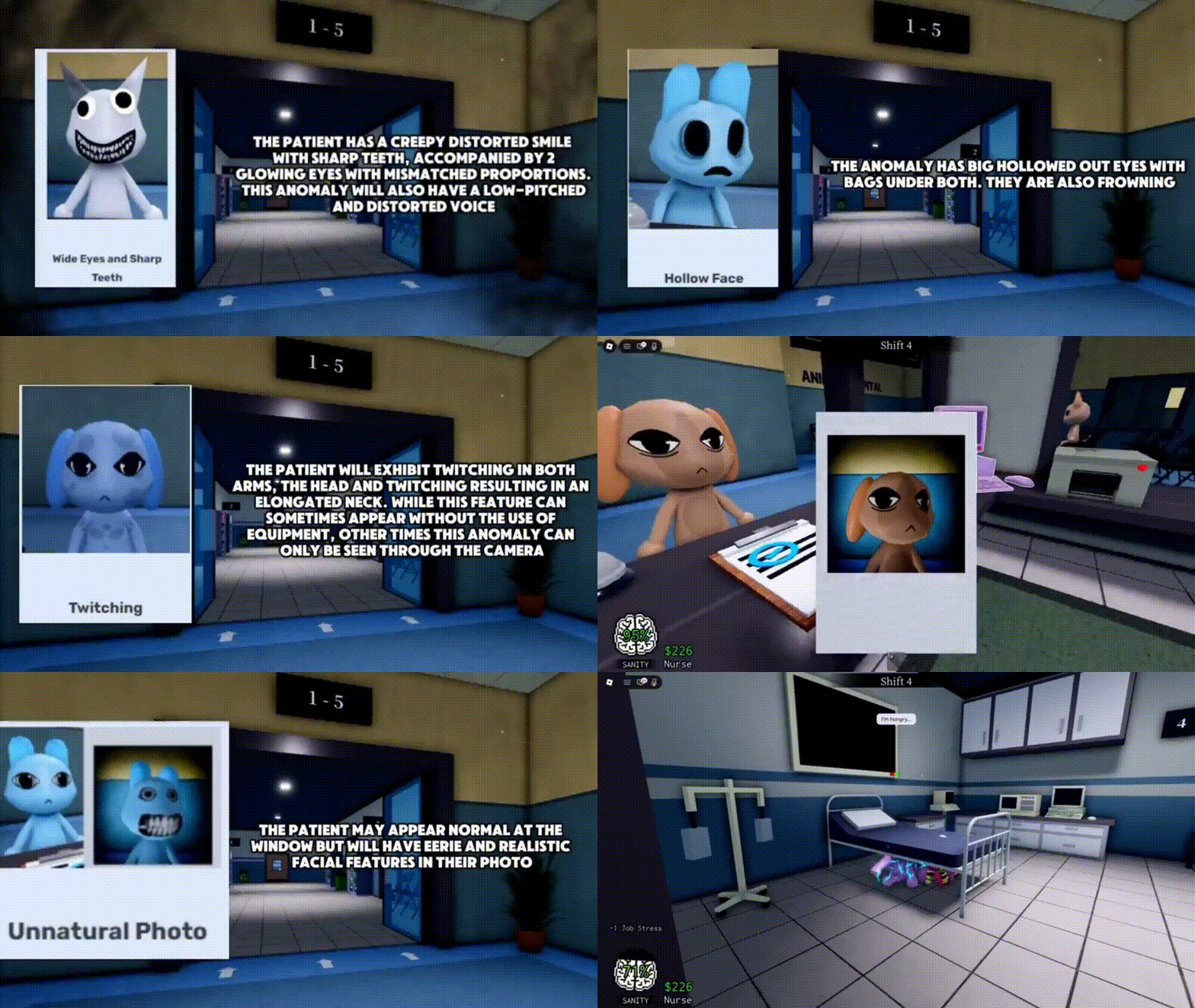
The first step is direct visual inspection. Look at the patient’s eyes, mouth, head movement, face shape, posture, and overall body behavior. Destructoid lists in-person visual anomaly signs such as three eyes, hollow eyes, sharp teeth, realistic teeth, a wide grin, and twitching. The Animal Hospital Wiki adds more detail, including mismatched glowing eyes with sharp teeth, a three-eye anomaly, hollow face, unnatural facial appearance, twitching, and hunched posture. These signs can appear right at the check-in table before the photo step, which makes them the fastest anomalies to catch.
Visual anomalies are dangerous because they often tempt new players to stare too long or second-guess themselves. In most cases, if a patient looks wrong at the desk, the safest decision is to reject immediately. Three Eyes is one of the clearest visual anomalies because a normal animal patient should not have a third eye, especially not glowing red or mismatched eyes. The Wiki notes that the Three Eyes anomaly has three slightly mismatched glowing red eyes and a low-pitched distorted voice. Mismatched Eyes and Sharp Teeth is another immediate rejection sign, with a crooked, distorted smile, sharp teeth, and strange glowing eyes.
Hollow Face can be more deceptive because it may look less dramatic than sharp teeth or extra eyes. The Wiki says Hollow Face appears with dark hollow eyes and twitching, and that during the recovery stage it can guarantee a death ritual, making it important to stay in the room if one gets through. Because of that risk, hollow-eyed patients should be rejected immediately at the desk whenever possible. Unnatural Facial Appearance includes patients whose real face seems replaced by realistic eyes, a drawn-on mouth, or a face that keeps staring at the player as they move. Twitching and Hunched Posture also require careful observation because they can be motion-based and easy to miss during a quick glance.
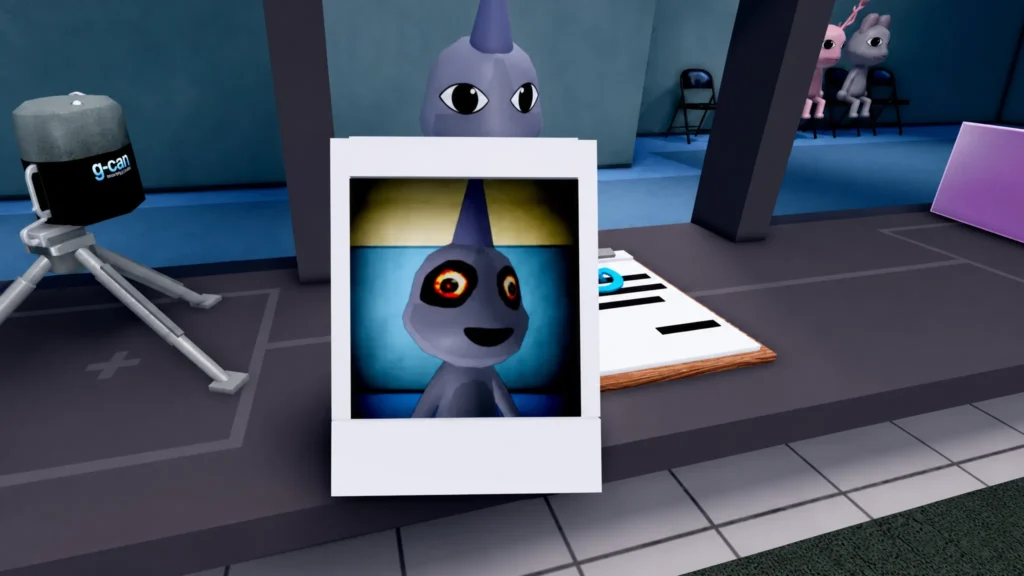
The second step is photo inspection. Photo anomalies are hidden until the player takes a picture of the patient at the check-in window, which makes them one of the most important categories in All Anomalies in Animal Hospital. A patient can look normal in person, then reveal the anomaly through the developed photo. A normal photo should match the patient’s eyes, ears, mouth, colors, and general shape. A suspicious photo may show different eyes, changed ear shape, changed ear color, static, grain, a cursed image, or a failure to process.
Incorrect Photo is the most important photo anomaly to learn. After taking the picture, compare the image with the patient. Check whether the eyes, ears, ear color, and mouth match what is standing in front of you. If the photo shows bear ears instead of rabbit ears, different eyes, or any altered feature, the patient should be rejected.
Static Photo is more complicated because the Wiki notes that static may not always guarantee an anomaly as of a June 22, 2026 change. Because of this, static should be treated as a serious warning sign rather than the only piece of evidence in every possible case. If static appears with changed features, cursed imagery, a distorted face, or other suspicious signs, reject the patient.
Unprocessed Photo is a rare but important case. The Wiki describes it as a photo that does not render and cannot be inspected, while noting that it may rarely be a bug and is considered an anomaly if the next patient’s photo processes correctly. This means the best practical response is to use context.
If only one photo fails and the rest of the system works, treat it as suspicious. Cursed Photos are dangerous because they can cost sanity. Destructoid warns that cursed photos can damage sanity, while the Wiki explains that picking up a cursed photo while it is still processing can cause a ten-point sanity loss, but picking it up after it fully processes does not cause that same loss. Once the photo proves an anomaly, reject the patient and move on.
Security Camera Anomalies and How CCTV Works in Animal Hospital
Security camera anomalies are the most deceptive patient anomalies because they may not appear at the front desk or in the printed photo. The patient can look normal from the reception window, pass the photo test, and still reveal an abnormal form on CCTV. That is why camera checks are essential for full anomaly detection. The camera system is not only for watching enemies. It is part of the patient-screening process, especially when the patient looks normal and the photo does not clearly show an issue.
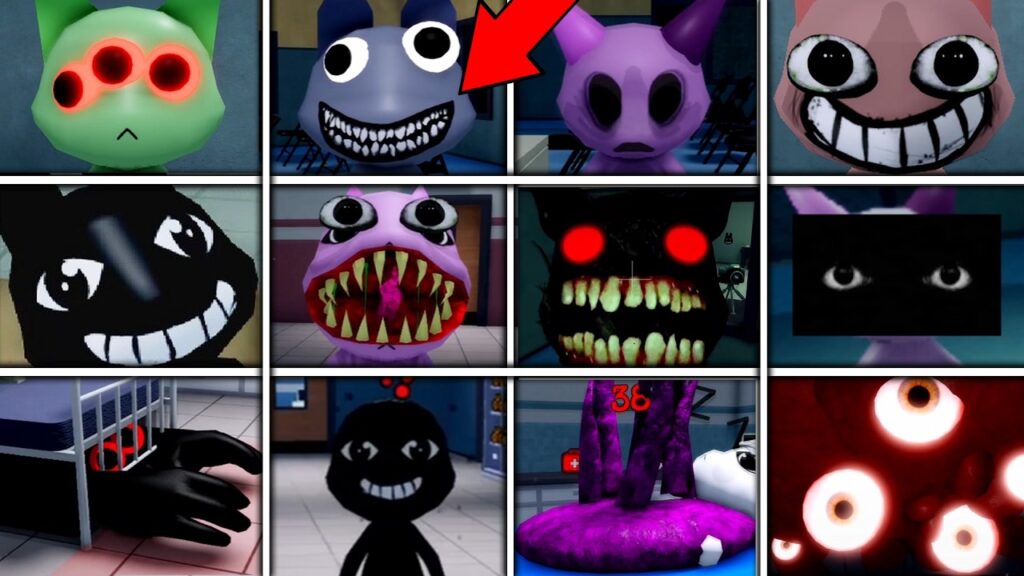
The main security camera anomalies include black eyes, a black obstruction over the eyes, an unnatural or distorted body, staring directly into the camera, a void or completely black body, a disfigured void body, twitching on camera, Skinwalker form on camera, and different ears or horns on camera. The Wiki states that security camera anomalies are only visible when players look at the security cameras, and that the patient may appear normal at the window and in the photo. This makes CCTV the final test before admission when the first two checks do not reveal anything.
Black Eyes is a camera anomaly where the patient’s face is obstructed by a black image of eyes staring at the player. This is not a normal shadow or lighting issue, and it should be treated as a rejection sign. FandomWire also describes a black obstructing eyes anomaly where an image with eyes covers the patient’s face when viewed on CCTV. Unnatural Body is another strong camera-only tell. The patient appears stretched, distorted, or heavily warped on the security feed. The Wiki notes that closing and reopening the camera can make the body shape change every time, and that a player holding the patient’s photo while checking the camera may also see the photo appear stretched and distorted.
Staring at Cameras means the patient looks directly at the CCTV camera at all times, including while walking. A normal patient should not lock unnaturally onto every camera angle. Void or Black Body means the patient appears completely black on the camera feed. Camera-only Twitching is another sign, where the patient twitches only on CCTV and not in person. The Skinwalker camera anomaly is especially dangerous because the patient appears as a Skinwalker only on the security cameras, usually after reaching the check-in spot.
To spot camera anomalies properly, players should use CCTV as an inspection tool rather than a panic button. Start with the lobby or check-in camera because those angles show the patient outside the front-desk view. The Wiki specifically notes that the Skinwalker camera anomaly can be difficult to identify with the check-in camera, so using the lobby camera for a side view can help. This matters because some camera anomalies are body-based rather than face-based. A front-facing angle might hide a distorted torso or unnatural posture.
When checking CCTV, look for three types of changes: face changes, body changes, and behavior changes. Face changes include black eye obstruction, sharp teeth, distorted jaw, different ears, different mouth, and different nose. Body changes include stretched limbs, void-black body, disfigured body, and unnatural proportions. Behavior changes include staring at the camera, twitching only on the feed, or the camera zooming toward a dark figure. Destructoid lists several camera anomaly signs, including a black box over the eyes, heavily stretched limbs, hollow eyes, staring directly at the camera, a completely blacked-out body, twitching, camera zoom toward a dark figure, sharp teeth or distorted jaw, and features that differ from the in-person view.
Security cameras also work as a danger system. For survival, they help players monitor rooms, threats, and events, but the camera feed can become dangerous if a Camera Figure appears. TechWiser explains that Camera Figure appears when viewing a broken CCTV camera and can trigger a jumpscare that causes twenty sanity damage if the player keeps watching. Destructoid also warns that the camera zoom-in toward a dark figure damages sanity and can be fatal if the player does not stop looking at the camera. The best camera habit is short, repeated checking. Open the feed, inspect quickly, switch angles if needed, then close it. Do not stare at a suspicious camera event after you have enough evidence.
How to Reject Anomaly Patients and Recognize All Patient Signs
To reject anomaly patients in Animal Hospital, players use the shutters at the reception desk. Once a patient has been confirmed as an anomaly, press the Shutters button on the left side of the desk. Destructoid explains that lowering the shutters causes the anomaly to leave, and a successful rejection increases the anomaly count at the end of the shift, improving score and cash rewards. The front-desk shutter is the cleanest solution because it prevents the anomaly from becoming a larger problem inside the hospital.
The correct rejection timing is important. If the anomaly is already at the window and you see a clear visual sign, reject immediately. Do not take a photo just to confirm an obvious three-eye, hollow-face, sharp-tooth, or twitching anomaly. Taking extra steps can waste time and may expose you to cursed photos or sanity loss. If the anomaly is camera-only, you may need to wait until the patient approaches the check-in desk before lowering the shutters. Destructoid recommends checking lobby and check-in cameras for camera signs and then hitting the shutter button when the suspicious patient reaches the desk.
If the anomaly gets through, the situation changes. Destructoid notes that missed anomalies can be dealt with using the taser near the cameras, guns, or extra tasers from the shop. If a Skinwalker attacks a patient, players can approach from behind and hold the interaction key. If it attacks the player, they may need to press the interaction key repeatedly while taking sanity damage. Rejecting anomalies is always safer than fighting them later. Weapons and emergency actions are backup plans for mistakes, events, or chaos during later shifts.
Animal Hospital Roblox patient anomaly signs can be divided into direct signs, photo signs, and CCTV signs. Direct signs are visible on the patient’s model at the check-in window. Photo signs appear only after the camera produces a picture. CCTV signs appear only on the security cameras. Direct signs include three eyes, hollow eyes, mismatched glowing eyes, sharp teeth, realistic teeth, wide grin, crooked smile, twitching, hunched posture, hollow face, unnatural facial appearance, and strange body behavior. These are the signs that should train a player’s first reaction. If a patient’s face looks too human, too distorted, too hollow, or too predatory, assume danger until proven otherwise.
Photo signs include mismatched eyes, changed ears, changed ear color, changed mouth, static or grain, cursed imagery, and an unprocessed photo that fails when other photos work normally. The Wiki states that incorrect photo anomalies can include eye appearance, ear shape, and ear color changes. These are comparison-based signs, so the player must remember what the patient looked like before looking at the photo. CCTV signs include black eye obstruction, distorted limbs, unnatural body, staring at cameras, void-black body, disfigured void, camera-only twitching, camera-only Skinwalker appearance, and different ears or horns. The Wiki lists these under security camera anomalies and emphasizes that the patient can look normal in person and in the photo.
Voice can also help. The Wiki notes that some appearance anomalies, including Mismatched Eyes and Sharp Teeth and Three Eyes, are guaranteed to have a low-pitched distorted voice. Sound should not replace visual evidence, but it can reinforce suspicion. The safest beginner rule is that one confirmed anomaly sign is enough. Players do not need three clues before acting. If the photo shows different ears, reject. If CCTV shows the patient as completely black, reject. If the face has three eyes, reject. Hesitation creates risk.
All Creatures and Monsters in Animal Hospital include both patient-based anomalies and environmental enemies that appear around the hospital. The patient-based threat is usually the Skinwalker, which can disguise itself as a patient and become hostile if admitted. The environmental threats include Bed Monster, Stalker, Mass of Eyes, Hiders, Head Banger, Tendril, Surgery Monster, and Camera Figure. The Animal Hospital Wiki’s enemies page lists Bed Monster, Camera Figure, Head Banger, Hiders, Mass of Eyes, Skinwalker, Stalker, and Surgery Monster as enemies. TechWiser’s guide similarly lists Bed Monster, Stalker, Mass of Eyes, Hiders, Skin Walker, Head Banger, Tendril, and Camera Figure, describing them as hostile entities that can attack, drain sanity, steal items, damage patients, or trigger emergencies.

Animal Hospital Monsters, Night Shift Survival Tips, and Beginner Walkthrough
Bed Monster, Stalker, Hider, and Mass of Eyes are among the most important non-patient threats in Animal Hospital because they teach players to control where they look and how they move. These creatures matter because they change the rhythm of the game. A player who only memorizes patient anomaly faces will still fail if they do not understand room hazards. All Anomalies in Animal Hospital includes more than spotting strange faces. It also means surviving the monsters that appear after the hospital opens up.
Bed Monster is a black figure with red eyes that appears beneath patient beds. TechWiser explains that stepping into its red zone causes it to grab players, dealing initial sanity damage and additional sanity damage over time. It can also grab patients and trigger emergencies. The recommended counter is Maple Syrup, which makes it leave when approached correctly.
Destructoid also notes that Bed Monster spawns below beds in medical rooms and disappears if approached with Maple Syrup. Stalker is a tall black bunny-like figure with a toothy smile that can appear around corners. TechWiser says looking directly at it causes sanity damage and recommends avoiding direct eye contact while passing corners. The best response is not to fight it, but to manage your camera angle, keep your view low, move past, and avoid staring.
Hiders are shadowy anomalies that blend into the hospital. TechWiser describes them as appearing in groups of two to five, chasing players who walk directly toward them, dealing sanity damage, and stealing items. They can be escaped by running away for several seconds, and they can also be handled with tools like a taser or fire extinguisher.
Destructoid describes a similar wall anomaly behavior, where threats on walls chase players when close and can steal items or deal sanity damage. Mass of Eyes is a ceiling threat. TechWiser describes it as a mass of eyeballs and flesh that appears on ceilings in patient rooms or the CCTV room, with the warning “Don’t Look Up.” Looking at it causes repeated sanity damage, while Eye Drops can calm it. Destructoid also advises keeping the camera down and avoiding looking up until it disappears.
Animal Hospital night shift survival depends on discipline. The player must balance anomaly screening, treatment work, sanity management, item usage, and enemy response. First, build a front-desk routine. Inspect the patient’s face and body, take a photo if there is no obvious visual anomaly, compare the photo carefully, check the security camera if the patient still looks normal, and reject immediately when any confirmed anomaly sign appears. This simple sequence prevents many Skinwalker problems and keeps the shift from becoming chaotic too early.
Second, protect sanity. Coffee and food are useful because sanity loss can come from many directions, including cursed photos, enemies, Camera Figure, Stalker, Mass of Eyes, Bed Monster, and failed interactions. Destructoid states that players must survive shifts without sanity reaching zero and recommends using coffee and food from the shop to keep it high. Third, carry the right counters. Maple Syrup helps with Bed Monster. Eye Drops help with Mass of Eyes. Coffee helps with Head Banger. A taser or fire extinguisher can help with Hiders. TechWiser lists Maple Syrup for Bed Monster, Eye Drops for Mass of Eyes, Coffee for Head Banger, Taser for Hiders, and Fire Extinguisher for Hiders.
A beginner walkthrough should begin with the first patient interaction. When the patient arrives, stand at the desk and inspect the face. Look for obvious signs such as three eyes, hollow eyes, sharp teeth, distorted smile, unnatural grin, twitching, or hunched posture. If any of these appear, press the shutter button and reject the patient. If the patient looks normal, take a photo, wait for it to develop, and compare it with the patient. If the photo has different eyes, different ears, wrong ear color, a changed mouth, static with other suspicious signs, cursed imagery, or a failed render that appears abnormal, reject the patient.
If the photo looks normal, check the security cameras. Look at the patient from lobby and check-in angles. If the patient has black eye obstruction, stretched limbs, a void body, camera-only twitching, different ears, staring-at-camera behavior, or a Skinwalker form, reject. If nothing is wrong after all three checks, admit the patient and move to treatment. During treatment, follow the room’s required process. Basic rooms use DNA analysis and item administration, X-ray and heart monitor rooms use minigames, and surgery requires focused completion after it starts. Destructoid explains that wrong item administration can kill the patient and cost progress, while surgery must be completed on the spot within the time limit.
When enemies appear, use the correct response. For Bed Monster, use Maple Syrup. For Mass of Eyes, avoid looking up and use Eye Drops if available. For Stalker, avoid direct eye contact. For Hiders, run away or use tools. For Camera Figure, exit the camera feed quickly. For Head Banger, use Coffee. For Tendril, finish surgery instead of shooting or tasing it. The beginner mindset should be steady, not fast. Speed comes after recognition. In the early shifts, focus on learning what normal patients look like so abnormal signs become easier to detect. Once the patterns are familiar, the game becomes less random and more like a checklist.

Frequently Asked Questions (FAQs)
- What is the best beginner strategy for Animal Hospital anomalies?
The best beginner strategy is to use the same routine for every patient: inspect the face and body, take and compare the photo, check the security cameras, then admit or reject. Keep sanity high with food or coffee, carry useful items such as Maple Syrup or Eye Drops when possible, and do not stare at dangerous entities longer than necessary. A steady checklist is safer than rushing. - What are All Anomalies in Animal Hospital?
All Anomalies in Animal Hospital are the suspicious patient signs and hostile entity behaviors that reveal something is wrong in Roblox’s Animal Hospital experience. They include visible patient anomalies, photo-only anomalies, security-camera-only anomalies, and environmental monsters such as Bed Monster, Stalker, Hiders, Mass of Eyes, Skinwalker, Head Banger, Tendril, and Camera Figure. Some anomalies are stopped at the front desk, while others become survival threats during the shift. - How do I know if a patient is an anomaly in Animal Hospital?
A patient is likely an anomaly if they show abnormal signs in person, in their photo, or on CCTV. At the desk, look for three eyes, hollow eyes, sharp teeth, a distorted grin, twitching, hunched posture, or mismatched facial features. In the photo, check for features that do not match the patient’s real appearance. On the security cameras, watch for black eyes, a distorted body, a void body, Skinwalker form, or unnatural staring behavior. - What should I do when I find an anomaly patient?
When you confirm an anomaly patient, use the shutter button at the reception desk to reject them. Do not admit the patient for treatment once you have clear evidence. Rejecting the anomaly early is much safer than letting it enter the hospital, where it may later attack, trigger emergencies, or force you to use weapons and survival items. - Are all anomalies visible at the front desk?
No. Some anomalies are visible in person, but others only appear in the photo or on the security cameras. That is why players should inspect the patient directly, check the photo, and use CCTV before admitting a patient that looks normal. A patient can pass one type of inspection and still fail another. - What are photo anomalies in Animal Hospital?
Photo anomalies are signs that appear only after taking a patient’s picture at the check-in window. They can include different eyes, changed ears, changed ear color, wrong facial features, static or grainy effects, cursed photos, or photos that fail to process abnormally. These anomalies require careful comparison between the patient standing at the desk and the developed photo. - What are security camera anomalies in Animal Hospital?
Security camera anomalies are signs that appear only on CCTV. These include black eye obstruction, distorted or stretched body, staring directly into the camera, void-black body, camera-only twitching, Skinwalker form, and different ears or horns. They are especially dangerous because the patient may look normal in person and in the photo. - What happens if I let an anomaly patient through?
If an anomaly patient gets through, it can later become dangerous inside the hospital. It may turn into a Skinwalker, attack players, attack patients, trigger death rituals, or create emergencies. At that point, players may need tasers, weapons, or interaction prompts to stop the threat, which is why rejecting anomalies at the desk is always the safer option. - How do I deal with Bed Monster in Animal Hospital?
Bed Monster appears under beds and can grab players or patients if they enter its danger zone. The safest counter is Maple Syrup. Approach the danger zone while holding Maple Syrup to make it leave. Approaching without the right item can cause sanity damage and may create a more dangerous situation during treatment. - How do I survive Mass of Eyes?
Mass of Eyes appears on ceilings and punishes players for looking up. When the warning appears, keep your camera down and continue carefully without staring at the ceiling. Eye Drops can help calm it, but avoiding direct sight is the main survival rule. Panic-looking around the room can make the threat worse.

Conclusion
All Anomalies in Animal Hospital are designed around one idea: the player must notice what does not belong. The horror does not only come from monsters chasing players through rooms. It comes from small differences, strange photos, camera-only distortions, and the pressure of deciding whether a patient is safe before the hospital becomes chaotic.
The most important anomaly groups are visual anomalies, photo anomalies, and security camera anomalies. Visual anomalies include obvious signs like three eyes, hollow face, sharp teeth, twitching, hunched posture, and unnatural facial appearance. Photo anomalies include changed eyes, changed ears, static, cursed photos, incorrect features, and unusual processing failures. Security camera anomalies include black eyes, distorted bodies, staring at cameras, void-black forms, camera-only twitching, Skinwalker appearances, and different ears or horns.
The creatures and monsters make the guide deeper. Bed Monster, Stalker, Hiders, Mass of Eyes, Skinwalker, Head Banger, Tendril, Surgery Monster, and Camera Figure all force players to manage sanity, camera direction, room movement, and item counters. The best players do not simply memorize names. They build a rhythm: inspect, compare, verify, reject, treat, survive.
For beginners, the safest approach is to move slowly enough to catch details but quickly enough to keep the shift under control. Reject confirmed anomalies at the front desk. Use cameras intelligently. Avoid unnecessary staring. Keep Maple Syrup, Eye Drops, Coffee, and defensive tools in mind. Once players understand how each anomaly category works, Animal Hospital becomes less confusing and much easier to survive.
Sources and Citations
- Official Roblox – Animal Hospital (Experience Page)
https://www.roblox.com/games/78515283254292/Animal-Hospital - Animal Hospital Wiki – Anomalies
https://animal-hospital.fandom.com/wiki/Anomalies - Destructoid – Complete Animal Hospital Walkthrough Guide [Roblox]
https://www.destructoid.com/animal-hospital-walkthrough-guide/ - TechWiser – Animal Hospital Enemy Guide (All Enemies & How to Beat Them)
https://techwiser.com/all-enemies-in-animal-hospital-and-how-to-defeat-them/ - Animal Hospital Wiki – Enemies
https://animal-hospital.fandom.com/wiki/Enemies - FandomWire – Animal Hospital Anomalies Explained (Camera, Photo & Appearance Guide)
https://fandomwire.com/animal-hospital-anomalies-explained-all-camera-photo-and-appearance-anomalies/
Recommended
- Huge Spoilers Leaked for 007 First Light and Other Games After Ratings Board Breach
- What Are the 7 Basic Camera Movements in 3D Animation? A Complete Guide
- What Is Stop Motion Animation? Why It Was Important to Animation: A Comprehensive History and Impact Guide
- The Carousel Will Return in TFT Set 18: Release Date, Why It Left, and What Changes Next
- 3D Hair Assets for Visual Storytelling and Virtual Identities: Best Practices for Interactive Media, Customization, Fashion, and Digital Twins
- KeyShot releases KeyShot Studio 2026.1: new features, release notes, and system requirements
- Resident Evil Veronica Hits One Million Wishlists and Gets PS5 Pro Optimization



































































































