








In This Article (28 sections)
Arnold 7.4.5 release notes and what’s new in this update
Autodesk has officially released Arnold 7.4.5, a feature update to its production ray-tracing renderer. This release focuses on both creative tools and performance enhancements. Notably, Arnold 7.4.5 introduces new shaders for non-photorealistic (NPR) rendering and point-based effects, while also speeding up volume rendering. In summary, it adds a Line shader for stylized line-work, a Nearest Points shader for point cloud sampling, OpenVDB volume mip-mapping for faster volumetrics, plus updates to lens effects, Cryptomatte masks, Open Shading Language (OSL), USD pipeline integration, and more. This varied feature set makes Arnold 7.4.5 a significant update, improving both artistic capabilities and rendering efficiency.
According to Autodesk’s release notes, Arnold 7.4.5 expands point-based shading workflows and improves volumetric performance on CPU and GPU. It also adds new controls for Cryptomatte (the ID matte system) and lens effects, introduces some API changes and bug fixes, and updates Arnold’s OSL support and USD workflow. Below, we’ll break down all these new features and changes in detail, with guidance on how to use them and what benefits they bring.

How to Download Arnold 7.4.5 from Autodesk Account
- Log in to Autodesk Account: Sign in to the portal.
- Navigate to Updates: Click “View updates (past 30 days)” and filter by Extensions.
- Find Arnold or Host App: Locate Arnold or the specific host application (e.g., Maya) in All Products and Services.
- Select Version and OS: Choose the correct version and operating system.
- Download Arnold Plugin: Locate the plugin under Updates > Extensions (e.g., MtoA 5.5.6 for Arnold 7.4.5) and download.
- Install: Run the installer and follow the prompts.
The Arnold SDK is also available for developers and custom pipeline work, but regular users should use the specific software plugin.
Arnold SDK vs Arnold Plugins: What You Actually Need to Install
- Arnold Integration Plug-ins: Installers for Maya, 3ds Max, Cinema 4D, Houdini, and Katana. These include the Arnold core and are intended for artists.
- Arnold SDK (Arnold Core): A standalone package for developers and technical directors. It is a compressed archive without an installer, used for custom tools or command-line rendering.
Artists should ensure the plugin version matches their host application (e.g., MtoA 5.5.6 for Maya 2024/2025 provides Arnold 7.4.5).

Arnold 7.4.5 Line Shader Explained
The Line shader generates procedural, non-photorealistic (NPR) line-based effects like outlines, contours, and cross-hatching directly within the rendering pipeline. It overlays linework on surfaces based on surface properties and texture inputs. Key attributes include:
- Control over thickness, color, density, and placement.
- Ability to simulate pen-and-ink, pencil hatching, or brush strokes.
- Integration into standard shading networks.
How to Create NPR Hatching and Sketch Renders with the Arnold 7.4.5 Line Shader
- Start with a Base Material: Layer the Line shader on top of a standard surface shader using a mix shader or opacity/emission channels.
- Configure Line Density and Thickness: Use thin lines and high density for hatching.
- Use Noise for Hand-drawn Variation: Connect noise textures to modulate opacity or thickness for an organic look.
- Combine Multiple Line Shaders: Stack shaders at different angles to create complex cross-hatching.
- Lighting and Shading Considerations: Use utility nodes like Ramp, Curvature, or AO to drive line placement based on light or geometry.
How to Create Motion Graphics Line Patterns with Arnold 7.4.5 Line Shader
- Procedural Patterns: Feed the shader procedural textures like grids to create wireframe effects or stripes.
- Animate Parameters: Animate density, color, or thickness for dynamic reveals and audio-reactive visuals.
- Hierarchical Line Designs: Chain multiple shaders to build complex, maze-like, or circuitry designs.
- Outline 3D Forms: Use the shader to create sleek technical blueprints or wireframe transitions.
- Colorful and Glowing Lines: Apply bright colors and route them through emission channels for neon or sci-fi effects.

Arnold 7.4.5 Nearest Points Shader Explained
The Nearest Points shader samples point clouds from OpenVDB files or scene geometry (vertices of meshes, points, or curves). It queries spatial relationships to return data such as:
- The count of points within a search radius.
- The average distance to those points.
- Average values of custom attributes (like color or temperature).
- The average position of the points.
Adjustable parameters include Max Points and Search Radius. This shader is used for proximity-based effects, dynamic connection lines, and procedural animations where shading responds to nearby particle or point data.
How to Use Nearest Points Shader with OpenVDB Points in Arnold 7.4.5
Using the Nearest Points shader with an OpenVDB point cloud allows the use of external point datasets directly in Arnold.
- Prepare an OpenVDB file with points: Export point data as a .vdb file (OpenVDB Points) from tools like Houdini, Bifrost, or Katana. Ensure the point grids have specific names (e.g., “points”).
- Load the VDB in Arnold: Reference the file in the Nearest Points shader using the format
"filepath.vdb:gridname"in the pointcloud name parameter. - Configure shader parameters:
- Set Pointcloud Mode to “file”.
- Set the Pointcloud Name to the filename.vdb:grid string.
- Adjust Max Points and Search Radius to define the query range.
- Use the outputs in your shader: Connect outputs like distance or out_count to other nodes (such as a Ramp) to drive effects like proximity-based glows or visibility.
- Retrieve attributes: Set the output_attribute to a specific name (e.g., “temperature”) to fetch averaged data via out_float or out_rgb.
- Render and iterate: Verify the file path and grid name if the effect does not appear.
This feature is currently CPU-only and does not support driving displacement.
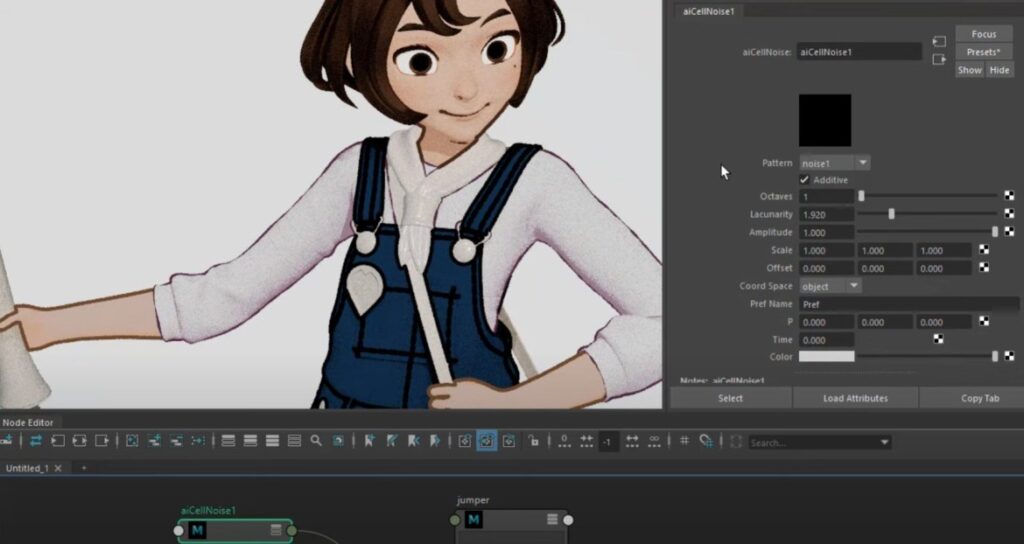
Nearest Points Shader Outputs in Arnold 7.4.5 (distance, count, attributes)
The shader provides several outputs to drive shading networks:
- Count: An integer representing the number of points found within the search criteria.
- Distance: A floating-point output of the average distance to found points. It can be normalized by the search radius.
- Position: A vector output representing the average position (centroid) of the found points.
- Attribute Averages:
- out_float: Average of a float attribute.
- out_rgb / out_rgba: Average of color or multi-float data.
- out_vec / out_vec2: Average of vector attributes.
Count, distance, and position are available by default, while others require an attribute name. Attributes are averaged unless “Average by Max” is enabled.
Arnold 7.4.5 OpenVDB Volume Rendering Speed Improvements
Arnold 7.4.5 introduces performance enhancements for volume rendering:
- Volume Mipmaps (CPU): Supports mipmapped OpenVDB files, allowing the renderer to sample lower-resolution grids for distant or less detailed areas. This can speed up rendering by 1.5× to 5.2×.
- GPU Volume Optimizations: Improvements in memory management and sampling algorithms make volume rendering up to 3.5× faster on the GPU.
- General Sampling: Includes overall optimizations in volume sampling and stepping for CPU.

Arnold 7.4.5 Volume Mipmaps for OpenVDB on CPU
- What are Volume Mipmaps: Downsampled versions of volume data (e.g., 512³ to 256³) used to save computation at different levels of detail.
- How to get them: Mipmaps must be generated during export from software like Houdini.
- Performance: Speed gains are highest when volumes cover a large range of detail relative to the camera.
- Enabling: There is no manual switch; Arnold automatically detects and uses mip levels if present in the VDB file.
- Memory vs Speed: Mipmapped files are larger, but the efficiency often results in overall time savings.
- Quality: Mipmaps may slightly smooth distant details and reduce aliasing in animations.
Arnold 7.4.5 GPU Volume Rendering Performance Improvements
- Optimized Sampling: Enhanced handling of volume data on NVIDIA GPUs results in up to a 3.5× speed increase.
- Reduced Memory for Instances: Efficient memory use for identical volume instances (continued from 7.4.4).
- GPU vs CPU Parity: GPU performance gains currently come from code optimizations rather than mipmaps.
- Practical Effect: Faster IPR responsiveness and final frame renders. Requires updated NVIDIA drivers (minimum 581.42 for Windows or 580.95.05 for Linux).
- GPU Limitations: Supported only on Windows and Linux with NVIDIA Maxwell architecture or newer.
Arnold 7.4.5 Lens Effects Update with Aperture Dispersion
The Lens Effects imager adds a new Aperture Dispersion parameter to the bloom effect.
- Aperture Dispersion: Simulates real-world lens refraction where different wavelengths of light spread differently, creating a rainbow or color fringe at the edges of the bloom.
- Usage: It adds realism to intense highlights, glints, and lens flares by simulating chromatic aberration within the bloom.
- Implementation: To use, enable the Lens Effects imager, select the aperture bloom mode, and adjust the Aperture Dispersion slider. It is best used subtly to maintain a natural appearance.ing artists fine control to mimic real lens camera artifacts inside Arnold, saving time in post-production.

ArArnold 7.4.5 Cryptomatte Instance Masks Setting (Shared vs Separate IDs)
Arnold 7.4.5 provides an update to Cryptomatte to improve the handling of instanced geometry through a new instance masks option.
- Shared IDs (Previous Behavior): All instances of an object share a single Cryptomatte ID, allowing them to be treated as a single entity in compositing.
- Separate IDs: Each instance receives a unique ID, allowing compositors to isolate and tweak individual instances within a scene.
The update includes a toggle, likely found in the Cryptomatte driver or imager settings, to switch between these modes. This provides flexibility for artists to balance manageability and granularity in their AOVs.
Arnold 7.4.5 OSL Updates and Point Cloud Query Functions
Arnold 7.4.5 improves Open Shading Language (OSL) support, making it more robust and feature-complete.
- Point Cloud Query Functions: New OSL functions allow users to programmatically query point clouds, sample OpenVDB point grids, or iterate over nearest points directly in code.
- Consistency: The update aims for better alignment and result consistency between OSL and native Arnold shaders on both CPU and GPU.
- Known Issue: Some point-cloud OSL functions currently miscompile on the GPU in version 7.4.5 and should be tested on the CPU for reliability.
These updates allow technical directors to create custom scattering shaders and specialized geometry queries that go beyond the capabilities of standard nodes.
Arnold 7.4.5 USD Workflow Improvements and Pipeline Notes
Integration with Universal Scene Description (USD) has been refined to reduce friction in animation and VFX pipelines.
- Hydra Delegate Enhancements: Refinements to Arnold’s Hydra delegate improve performance and stability when used as a rendering backend in tools like Houdini Solaris or MayaUSD.
- USD Compatibility: The Arnold USD procedural has been updated for better compatibility with newer USD versions.
- Workflow Streamlining: Improvements have been made to how Arnold reads USD materials and lights, as well as the translation of Arnold-specific features into USD.
Pipeline TDs are encouraged to review matching Arnold USD plugin updates, as these improvements primarily focus on under-the-hood robustness and faster scene initialization.
Arnold 7.4.5 API Changes for Pipeline Developers
Version 7.4.5 includes API updates that may affect custom tools and pipeline integrations.
- Modified API Functions: Signature changes may exist for functions related to volumes (to accommodate mipmaps) or the new shaders.
- New API Additions: Developers can now instantiate nodes for the new Line and Nearest Points shaders and access new enums for Cryptomatte settings.
- Potential Breaking Changes: Community discussions suggest some non-backwards-compatible changes, particularly regarding shader closures or OSL.
Developers should review the “API changes” section of the release notes and recompile custom plugins or procedurals against the 7.4.5 SDK to ensure compatibility and leverage new features.
Arnold 7.4.5 Integration Plugin Versions for Maya, 3ds Max, Cinema 4D, Houdini, and Katana
To access Arnold 7.4.5 features, you must install the matching integration plugin version for your specific host application:
- Maya – MtoA 5.5.6: Includes Arnold 7.4.5 core. Supports Maya 2024, 2025, and potentially 2026. It enables new shaders in the Hypershade and render view.
- 3ds Max – MAXtoA 5.8.5: Provides Arnold 7.4.5 features within the 3ds Max interface.
- Cinema 4D – C4DtoA 4.8.6: Integrates Arnold 7.4.5 with the Cinema 4D material system.
- Houdini – HtoA 6.4.6: Integrates with Houdini nodes and Solaris/USD Hydra contexts.
- Katana – KtoA 4.4.5: The version specifically matching Arnold 7.4.5.
Using mismatched versions (e.g., a 7.4.4 plugin with 7.4.5 core) can lead to errors. Most installers bundle the correct core automatically. Ensure consistency across render farms to avoid mismatched results.

Arnold 7.4.5 System Requirements for Windows, Linux, and macOS
- Windows: Windows 10 or later (64-bit) and Visual Studio 2019 C++ redistributable.
- Linux: 64-bit distribution with glibc 2.17 or higher (e.g., CentOS/RHEL 7, Ubuntu 20.04+) and libstdc++ from GCC 4.8.5 or newer.
- macOS: macOS 11.0 (Big Sur) or later. Supports Intel and Apple Silicon (M1/M2/M3) natively.
- CPU Requirements: x86-64 CPU with SSE4.1 support. Apple M-series runs natively via ARM.
- RAM: 8 GB minimum; 32 GB or more recommended for complex scenes.
- Graphics: Dependent on host application requirements. macOS does not support GPU rendering.

Arnold GPU Requirements for Arnold 7.4.5 (supported OS, NVIDIA, drivers)
- Operating System: Supported on Windows and Linux only.
- GPU Hardware: NVIDIA GPU with Maxwell architecture or newer (e.g., GTX 9xx, 10xx; RTX 20, 30, 40 series; or equivalent Quadro/Tesla). 8GB+ VRAM is recommended.
- NVIDIA Drivers: Version 581.42+ for Windows; 580.95.05+ for Linux.
- Features: Leverages NVIDIA OptiX and RT cores (Turing and later) for best performance. While most features have parity with CPU, some OSL point cloud functions may currently miscompile on GPU.
- Multiple GPUs: Supported, though limited by the GPU with the smallest VRAM.
Arnold 7.4.5 Pricing and Subscription Cost
Arnold is available via subscription, and 7.4.5 is a free update for current subscribers.
- Single-user License: $55 USD monthly or $430 USD annually.
- Software Bundles: Maya and 3ds Max subscriptions include Arnold for interactive rendering, but a separate Arnold license is typically required for unwatermarked batch rendering.
- Educational: Free non-commercial access is available for students and educators.
- Trial: A fully functional 30-day free trial is available.
A single license covers all supported plugins (Maya, Max, C4D, etc.).
Should You Upgrade to Arnold 7.4.5 (compatibility and testing checklist)
Before upgrading, consider the following checklist:
- Compatibility: Verify plugin availability for your DCC version and ensure third-party tools/shaders support 7.4.5.
- New Feature Value: Evaluate if the Line shader, Nearest Points shader, or volume speed improvements are needed for current projects.
- Testing Scenes: Render representative scenes to check for visual consistency. Note that 7.4.x introduced some changes compared to 7.2.
- Breaking Changes: Review release notes for potential default behavior changes, such as the new Cryptomatte instance settings.
- Render Farm Deployment: Update all nodes simultaneously to avoid inconsistent frames.
- Fallback Plan: Keep installers for the previous version (e.g., 7.4.4) in case a rollback is necessary.
- Training: Brief artists on new shader nodes and AOV options to avoid confusion.

Arnold 7.4.5 vs Arnold 7.4.4 Differences
Arnold 7.4.5 introduces several features and performance updates that distinguish it from version 7.4.4:
- New Shaders: 7.4.5 introduces the Line shader and Nearest Points shader for NPR and point-cloud effects. Arnold 7.4.4 lacked these, focusing instead on realistic hair shading modes.
- Volume Rendering: 7.4.5 adds OpenVDB mipmaps (CPU) and GPU speed-ups for volumes. While 7.4.4 improved Global Light Sampling and texture loading, 7.4.5 offers up to 5× faster volume renders on CPU and 3.5× on GPU.
- Lens Effects: 7.4.5 adds Aperture Dispersion to the Lens Effects imager for chromatic bloom effects. 7.4.4 introduced the foundational aperture-shaped bloom mode.
- Hair and Shading: 7.4.4 introduced accurate and adaptive hair shading modes. 7.4.5 maintains these improvements but does not add new hair features.
- Lighting and Materials: 7.4.4 added physically-correct thin-film in OpenPBR and shadow controls for mesh lights. 7.4.5 keeps these intact while focusing on Cryptomatte and OSL improvements.
- Cryptomatte: 7.4.5 adds a toggle for shared vs. separate instance IDs, a workflow option not available in 7.4.4.
- OSL and API: 7.4.5 adds specific point-cloud related OSL functions and fixes, whereas 7.4.4’s updates focused on different internal improvements.
- System Requirements: Requirements remain largely identical, though 7.4.5 documentation notes glibc 2.17+ for Linux (down from a reported 2.28+ in some 7.4.4 notes).
- Performance: 7.4.4 focused on GPU memory for instances and Motion Vector shaders; 7.4.5 carries these forward and adds significant volume rendering speed.
Arnold 7.4.5 Troubleshooting and Known Issues
Users should be aware of the following quirks and limitations in version 7.4.5:
- Nearest Points Shader – No Displacement: The nearest_points shader cannot currently drive displacement maps. Users must use bump mapping or bake the effect as a workaround.
- OSL on GPU Issues: New point-cloud query functions in OSL may miscompile on the GPU. Affected shaders should be rendered on the CPU.
- Performance Expectations: Volume speed-ups require OpenVDB files with pre-generated mipmaps. Mipmapping is most effective for volumes viewed from a distance.
- GPU Memory: High-resolution volumes and textures may trigger “out of memory” errors on the GPU. Users should monitor VRAM via logs and consider switching to CPU for heavy renders.
- Cryptomatte IDs: Changing the instance ID setting mid-production will alter Cryptomatte layers, potentially breaking existing compositing scripts.
- Third-Party Shader Compatibility: Older third-party shaders may trigger warnings in the log if they utilize deprecated functions.
- Interactive Rendering (IPR) Quirks: Arnold may not detect external changes to OpenVDB files during an IPR session without a manual refresh or a minor scene adjustment.
- Error Logs: Users should check the Arnold log/output window for warnings if the Nearest Points shader cannot locate files or attributes.

Frequently Asked Questions (FAQs)
- What is the new Line shader in Arnold 7.4.5 used for?
The Line shader is a new procedural shader that generates line work on surfaces, enabling non-photorealistic, hand-drawn styles. It can create outlines, hatching, and sketch-like strokes directly in the render to achieve pen-and-ink or technical drawing effects without a separate toon process. - Can the Arnold 7.4.5 Line shader produce cross-hatching and sketch effects?
Yes. It simulates cross-hatching by layering multiple line patterns. By combining it with noise or textures, you can create pencil sketch effects with irregular lines. You can use two Line shaders at different angles for cross-hatching and drive thickness with a noise map for a rough sketch style. - What is the Nearest Points shader and how does it work?
The Nearest Points shader finds nearby points from a point cloud (OpenVDB or scene geometry) relative to a shading point and outputs data about them. It returns the point count, average distance, or average of a custom attribute. This allows shaders to react to the presence of particles or points in space. - How do I use Nearest Points with an OpenVDB point file?
Set the pointcloud mode to “file” and enter the path and grid name as “file.vdb:gridname”. Adjust the search radius and max points to control the query. You can then use the shader’s outputs (count, distance, etc.) in your material network. - What outputs does the Nearest Points shader provide?
It provides count (number of points), distance (average distance), position (average centroid), and custom attribute outputs like out_float or out_rgb. To use custom attributes, you must specify the “output_attribute” name. - How much faster are volumes in Arnold 7.4.5 with the new mip-mapping?
CPU speedups range between 1.5× and 5× compared to 7.4.4, depending on the scene. Large volumes or those at a distance benefit most. GPU volume rendering is up to 3.5× faster in certain scenarios due to specific optimizations. - What are volume mipmaps and how do I use them in Arnold?
They are precomputed lower-resolution versions of a volume. Arnold 7.4.5 utilizes them in OpenVDB files to speed up rendering by sampling coarser grids when appropriate. Arnold detects them automatically; you simply provide a mipmapped VDB to the Volume node. - Does Arnold 7.4.5 improve GPU rendering for volumes as well?
Yes, with performance improvements up to 3.5×. While the GPU does not use mipmaps in the same way as the CPU, it benefits from better sampling and memory management on NVIDIA Maxwell or newer cards with recent drivers. - What is Aperture Dispersion in the Lens Effects imager?
It is a new setting that introduces color dispersion to bloom/glare. It simulates the rainbow fringe created by real lenses, adding subtle chromatic separation to bright highlights to make them look more organic. - What changed with Cryptomatte in Arnold 7.4.5 regarding instances?
A new control allows you to choose if instanced objects share the same ID or receive a unique ID per instance. This allows for either a single tag for all instances or separate tags for every distinguishable instance. It is managed via a parameter in the Cryptomatte settings.

Conclusion
Arnold 7.4.5 is a substantial update that enhances the renderer with new creative tools like the Line shader for NPR styles and the Nearest Points shader for procedural effects driven by point clouds. These features allow for complex looks, such as cross-hatched drawings and motion-graphics connections, directly within the 3D application.
The release also focuses on performance and workflow, offering faster OpenVDB volume rendering, realistic aperture dispersion in lens effects, and flexible instance masking in Cryptomatte. These improvements provide significant time savings and streamlined compositing for both studios and solo artists. GPU rendering continues to move toward parity with CPU rendering, leveraging NVIDIA hardware for faster iterations.
From a pipeline perspective, 7.4.5 shows a commitment to industry trends with better USD integration and an updated OSL toolset. While upgrading requires planning for plugin updates and compatibility verification, the benefits in render speed and functionality are significant. Arnold 7.4.5 is a highly recommended upgrade for technical and look-dev artists seeking to push the boundaries of both photorealistic and non-photorealistic rendering.
Sources and Citations
- Autodesk Release Notes – Arnold 7.4.5 Features, https://help.autodesk.com/view/ARNOL/ENU/?guid=arnold_user_guide_ac_release_notes_ac_rn_7450_html
- Autodesk User Guide – Downloading Arnold, https://help.autodesk.com/view/ARNOL/ENU/?guid=arnold_user_guide_ac_installation_ac_installing_arnold_html
- 80 Level News – Arnold 7.4.5, https://80.lv/articles/check-out-new-features-added-in-arnold-7-4-5
- CG Channel – Arnold 7.4.5 Overview, https://www.cgchannel.com/2025/03/autodesk-releases-arnold-7-4-5/
- Digital Production – Arnold 7.4.5 Details, https://digitalproduction.com/2025/03/20/autodesk-arnold-7-4-5-adds-line-and-nearest-points-shaders/
- Autodesk Help – Nearest Points shader, https://help.autodesk.com/view/ARNOL/ENU/?guid=arnold_user_guide_ac_shaders_ac_shaders_nearest_points_html
- Autodesk Help – System Requirements, https://help.autodesk.com/view/ARNOL/ENU/?guid=arnold_user_guide_ac_system_requirements_html
- CG Channel – Arnold 7.4.5 Plugin Versions & Pricing, https://www.cgchannel.com/2025/03/autodesk-releases-arnold-7-4-5/
- Digital Production – Cryptomatte & Lens updates, https://digitalproduction.com/2025/03/20/autodesk-arnold-7-4-5-adds-line-and-nearest-points-shaders/
- Autodesk Forum Snippet – OpenVDB with nearest_points shader, https://forums.autodesk.com/t5/arnold-general-rendering-forum/nearest-points-openvdb-source/td-p/13621456
Recommended
- Best Blender Render Settings: Ultimate Guide to High-Quality Renders Without Wasting Time
- Top Gun Celebrates Its 40th Anniversary With New Limited Edition 4K Steelbook Blu-ray — Release Date, Preorder Details, Specs & Special Features
- Conquest Character Breakdown: Origin, Age, Comics, Invincible Animated Series and More
- Can I Improve My Metahuman in Blender? A Comprehensive Guide
- KeenTools Releases GeoTracker for Houdini in Open Beta: Geometry-Based Object and Camera Tracking Inside Houdini
- Diablo 4’s Cow Level Found at Last: How to Unlock the Secret Portal and Earn the Cow King’s Crown Mythic Unique
- What is the camera’s field of view in Blender?
- Steam Game Adds Playable Tofu Character After Complaints About Female Protagonist — Why Honcho’s “Mr. Tofu” Patch Went Viral
- Heroes of Might and Magic: Olden Era Early Access Release Date, Wishlist Milestone, and What to Expect
- A Star Wars Expansion Is Coming to PowerWash Simulator 2: Everything You Need to Know About the Galactic Cleaning Adventure



































































































