








KeenTools GeoTracker for Houdini open beta: what was released and why it matters
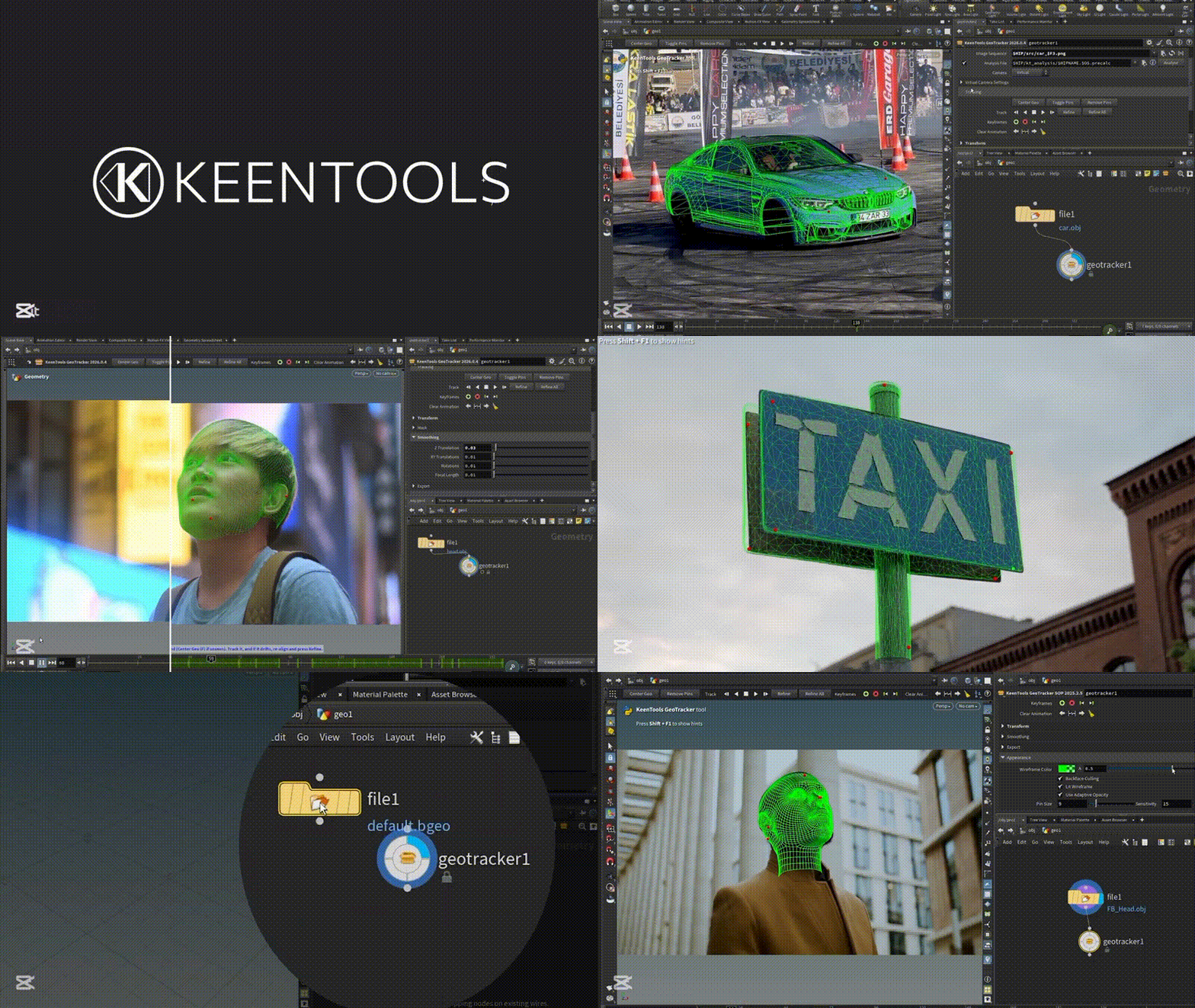
In late April 2026, KeenTools announced GeoTracker for Houdini in open beta as a fully integrated matchmove tool for geometry-based object and camera tracking. The official launch materials position it as a native SOP-node workflow inside Houdini, with support for OBJ and Solaris contexts, camera import and export in both contexts, automatic focal-length estimation, zoom-shot tracking, and direct use of tracked geometry for collider and emitter animation.
Why that matters is simple: until recently, Houdini users commonly solved matchmove work outside the app and then brought cameras or object tracks back in. In July 2025, a SideFX staff reply on the official forum stated that Houdini did not have a native camera tracker and pointed artists to external tools such as PFTrack, SynthEyes, and 3DEqualizer. GeoTracker for Houdini therefore fills a real pipeline gap by bringing geometry-based object tracking and camera recovery directly into the host application.
What is GeoTracker for Houdini (beta) and what it’s used for
GeoTracker for Houdini is a matchmove tool built around geometry-based tracking rather than pure point-cloud solving. The official feature set covers object tracking, camera tracking, 3D layout, simulation-ready collider and emitter animation, head tracking with FaceBuilder-generated heads, focal-length estimation when lens data is unknown, and support for changing focal length during zoom shots. KeenTools also markets it specifically to VFX artists, motion designers, and generalists, signaling a tool designed to lower the friction of everyday tracking tasks rather than only serve specialist matchmove departments.
Geometry-based object tracking in Houdini with GeoTracker (workflow overview)
The core idea behind GeoTracker for Houdini is that motion is recovered from the relationship between 2D footage and a known 3D object or environment model. KeenTools’ Houdini beta page states that a 3D model is required to begin, that more detail usually improves results, and that the model does not have to be perfect; official guidance even notes that simple primitives can still work when precision demands are lower. The same page also says markers are not required, while occlusions and reflections can be handled with surface masks.
Based on KeenTools’ published GeoTracker workflow in Blender and Nuke, the practical production loop is straightforward: bring in or build a model, place it roughly against the plate, pin or align it, create and refine keyframes, use 2D or 3D masking where parts of the object should be ignored, and then finalize the tracked motion for downstream use. KeenTools’ Nuke documentation adds two useful clues about how the wider GeoTracker family works: the tool uses a pin-based placement approach, and it can improve its own result with helper tracks imported from other trackers. That makes the Houdini beta best understood as the Houdini-native version of a mature GeoTracker methodology rather than an entirely separate tracking concept.

Houdini camera tracking with GeoTracker: recover camera motion from footage
GeoTracker for Houdini is not limited to moving objects. KeenTools explicitly says it can recover camera motion by aligning static scene objects or environment models, including LiDAR-style environment data, to footage. The broader GeoTracker documentation explains the same logic in plain terms: when there is a static object in the scene, tracking that object effectively yields a camera track. This is important because many real-world Houdini shots begin with an environment proxy, set scan, or hard-surface element that can anchor a solve even when traditional point-track workflows are inconvenient.
GeoTracker for Houdini OBJ workflow vs Solaris workflow explained
To understand the OBJ-versus-Solaris split, it helps to look at how SideFX defines Houdini’s core contexts. SideFX describes /obj as the top-level object or scene network where geometry objects, cameras, lights, and other scene items are positioned and related hierarchically. SideFX also describes Solaris as Houdini’s USD-based scene-building system, built around LOP networks that accept and modify an incoming USD scene. GeoTracker matters here because KeenTools says the Houdini beta is built as a SOP node that works natively in both OBJ and Solaris and can import or export cameras in both contexts.
In practical terms, the OBJ workflow fits classic Houdini scene assembly, object transforms, and camera work at the object level, while the Solaris workflow fits USD-native layout, lookdev, lighting, and scene-graph-driven pipelines. The value of GeoTracker supporting both is not just compatibility; it means the same tracking logic can live inside either a traditional Houdini scene or a USD-centric production graph without forcing a separate external matchmove step.
Matchmoving in Houdini without app switching (GeoTracker SOP node benefits)
KeenTools repeatedly frames GeoTracker for Houdini around “zero app switching,” and that phrase is not marketing fluff. A native SOP-node tracker means matchmove can happen where the rest of the shot is already being built: inside the same Houdini scene, with the same geometry, the same cameras, and the same procedural context. Because SideFX staff had previously pointed users to external trackers, the SOP-node approach represents a meaningful workflow change for Houdini-centric teams.
The bigger production benefit is that tracking data stops being a handoff problem as early in the process. Instead of solving elsewhere and translating cameras or transforms back in later, artists can solve, inspect, adjust, and immediately continue into layout, FX, or USD-based scene building inside Houdini. That is exactly why the official launch language emphasizes not only object and camera tracking, but also 3D layout and direct use of the result in simulations.

Using GeoTracker for Houdini to create colliders and emitters for simulations
One of the clearest production-oriented differentiators of GeoTracker for Houdini is that KeenTools explicitly presents tracked objects as fast animation sources for FX. The official product page says tracked objects can be turned into colliders and emitters for simulations, and both CG Channel and 80 Level describe that same pipeline benefit in their coverage of the beta.
That makes GeoTracker especially relevant for Houdini users working on shot integration rather than only camera solve delivery. If a live-action prop, hard-surface asset, or environment proxy is tracked accurately enough, it can immediately become downstream simulation-driving geometry inside the same Houdini setup. The result is a tighter bridge between matchmove and FX work than the classic external-solver-then-import pattern.
Focal length estimation in GeoTracker for Houdini (lens data from unknown cameras)
KeenTools states that GeoTracker for Houdini can automatically calculate lens data when camera parameters are unknown. The broader official GeoTracker documentation explains the purpose of that feature more fully: focal-length estimation can help with footage shot on unknown cameras and can also complement camera-tracking results with focal-length settings. In other words, the beta is not assuming perfect onset metadata or a fully documented lens package.
This matters in real production conditions because missing or incomplete camera metadata is common in archival footage, user-generated footage, previz handoffs, on-set test clips, and social-media-derived plates. A matchmove workflow that can estimate focal data from geometry alignment reduces the dependence on perfect camera reports and opens the door to more reliable solves in imperfect source material.
Zoom shot tracking in GeoTracker for Houdini (changing focal length support)
KeenTools’ Houdini beta page says GeoTracker supports zoom tracking and can track focal-length changes automatically. The official GeoTracker documentation for other hosts adds that focal length can be complemented “even if it was changing over the filmed sequence,” which is the essential requirement for shots that do not maintain a single constant lens value from first frame to last.
For Houdini artists, that feature matters because a geometry-based solve can otherwise become much less reliable if the shot changes focal length and the tracking system is forced to pretend the lens stayed fixed. GeoTracker’s advertised zoom support directly addresses that issue, making the beta more relevant for practical production footage instead of only idealized fixed-lens plates.

Head tracking workflow with FaceBuilder + GeoTracker inside Houdini
KeenTools advertises head tracking in the Houdini beta by saying artists can create custom heads in FaceBuilder and then track them as rigid objects in GeoTracker. The important nuance is that, in the currently published product lineup, FaceBuilder exists as a Blender and Nuke tool, not a separate Houdini product page. The working implication is a cross-host setup: build the head with FaceBuilder from photos or images, export the result, bring it into Houdini, and then run the rigid head track inside GeoTracker for Houdini.
That still gives Houdini artists a strong head-tracking option for rigid head motion, especially where an accurate custom likeness is valuable for helmet replacements, head-mounted effects, or rigid 3D attachments. FaceBuilder’s official pages describe its output as ready for pipeline export and explicitly note that FaceBuilder-created heads can be used for head tracking with GeoTracker, which aligns with the workflow GeoTracker for Houdini is now promoting.
GeoTracker for Houdini system requirements (Houdini version, OS, GPU)
The official published system requirements for GeoTracker for Houdini are concise. KeenTools lists Houdini 20.5 or newer, 64-bit Windows, macOS on Intel or Apple Silicon, or Linux, plus “a decent GPU that can handle Houdini.” That wording is broad on purpose: the fetched official page does not publish a detailed vendor, VRAM, or API matrix, so the safest reading is that the plugin follows the practical graphics expectations of modern Houdini workstations rather than imposing an unusually detailed public GPU whitelist.
How to download GeoTracker for Houdini open beta (official download page)
The official download path is the GeoTracker for Houdini product page, where users choose the relevant operating system and Houdini version. KeenTools’ installation instructions say the downloaded package contents should be placed in the Houdini packages directory inside the corresponding user preference folder, creating that folder manually if it does not already exist. The same official instructions also note that macOS users may receive a DMG containing the needed files.
For beta management, KeenTools says each beta version is valid for 30 days, updates must currently be done manually by replacing the previously added files, and there is no beta auto-updater yet. That means the open beta is easy to access, but it should still be treated like active test software rather than a fully automated long-term deployment.

GeoTracker for Houdini tutorials and masterclass resources (how to learn fast)
KeenTools has already released a solid official learning stack for GeoTracker for Houdini. The product page links directly to Quick Start, Deep Dive, and Installation videos, while the official examples page provides downloadable Houdini examples for object tracking, simple camera tracking, zoom camera tracking, object tracking with a pre-tracked camera, and object-and-camera tracking in Solaris. That is a practical learning path because it covers setup, basic operation, advanced study, and project-based breakdowns in sequence.
Beyond those first-party resources, KeenTools maintains a schools-and-courses page for formal education partners, and 80 Level reports that the launch package includes a three-hour masterclass by David Torno. For artists trying to learn fast, the most efficient order is installation first, quick start second, examples third, and the long deep-dive/masterclass last, because that sequence mirrors how the official learning materials are organized.
GeoTracker vs other matchmove tools for Houdini (when to use each)
GeoTracker for Houdini is the strongest fit when the job is already Houdini-centric and geometry-based. If the shot involves an object or environment model that can anchor the solve, if the tracked result needs to become a collider or emitter, or if the team works in both OBJ and Solaris, GeoTracker’s native SOP-node design gives it a clear workflow advantage because the solve stays inside the host.
Nuke’s CameraTracker remains a strong choice when the shot is comp-led and the main requirement is classic 3D camera solving inside NukeX or Nuke Studio. Foundry describes it as an integrated camera-tracking and matchmove node that can automatically track features, add user tracks, mask out moving objects, solve different camera types, and export an animated camera, point cloud, 3D scene, lens distortion, or cards. In short, it is excellent for compositing-first camera solve workflows, but it is still a different host and therefore not a zero-switch Houdini workflow.
PFTrack is the better choice when the project extends beyond straightforward matchmove into broader spatial-data work. The official PFTrack product materials emphasize camera tracking, camera solving, lens calibration, photogrammetry, scene reconstruction, LiDAR integration, and pipeline automation. Its own documentation also lays out dedicated node trees for camera-and-rigid-object solving and for geometry tracking with both static and moving cameras. That breadth makes PFTrack especially strong for facilities that need a standalone matchmove and reconstruction platform rather than an in-host Houdini solve.
SynthEyes and 3DEqualizer remain the specialist standalone choices when the work demands dense dedicated matchmove feature sets. SynthEyes’ official page stresses advanced 3D solving and tracking, camera and object tracking, lens-distortion analysis, machine-learning-assisted tools, and export to Houdini and other DCCs. 3DEqualizer’s official materials emphasize high-end 3D tracking, object and stereo tracking, rotomation, manual intervention for difficult shots, zoom-curve optimization, and extensive lens and survey tooling. Those tools still make sense when the solve itself is the main deliverable and the production expects a dedicated matchmove environment first and DCC integration second. GeoTracker for Houdini does not erase those use cases; it simply gives Houdini artists a far more immediate in-host option than they had before.
GeoTracker for Houdini beta limitations and what to expect in full release
The official limitations of the current beta are fairly clear. Each beta build is valid for 30 days, there is no auto-updater yet, Houdini 20.5 or newer is required, and tracking is geometry-based, so a 3D model is mandatory. KeenTools also notes that better-fitting models improve results and that very high-poly assets can become resource-heavy, although a simple primitive can still be good enough when precision needs are lower.
What to expect in the full release is partly official and partly informed inference. Officially, KeenTools says regular updates will continue until the stable version is ready. As a reasonable inference from KeenTools’ previous GeoTracker rollout in Blender, stable release usually means more workflow polish, extra production conveniences, and a transition from beta testing into a mature product phase rather than a completely different tracking concept. In the Blender case, KeenTools moved from beta to stable after roughly three months and added workflow improvements at stable launch. That does not guarantee the same schedule or packaging for Houdini, but it is the clearest public precedent currently available.

Frequently Asked Questions (FAQs)
- Is GeoTracker for Houdini a native Houdini tool or a separate matchmove application?
It is being launched as a native Houdini workflow. KeenTools describes it as a SOP-node-based tool that works inside Houdini and supports both OBJ and Solaris contexts. - Can GeoTracker for Houdini solve both object motion and camera motion?
Yes. KeenTools explicitly lists both geometry-based object tracking and camera tracking, and says camera motion can be recovered by aligning static objects or environment models in footage. - Does GeoTracker for Houdini require a 3D model?
Yes. The official Houdini beta FAQ says GeoTracker is geometry-based, so a 3D model is required to start tracking. - Can a rough proxy model still work, or does the model have to be perfect?
A better model improves results, but the official FAQ says the model does not have to be perfect and that even a simple primitive can work when precision is not critical. - Does GeoTracker for Houdini support unknown lens data and zooms?
Yes. KeenTools says the beta can estimate focal length when camera parameters are unknown and can also track focal-length changes automatically in zoom shots. - Does FaceBuilder run inside Houdini in this workflow?
The published KeenTools product lineup currently shows FaceBuilder for Blender and FaceBuilder for Nuke, while the Houdini beta page says FaceBuilder-made heads can be tracked in GeoTracker for Houdini. The practical workflow is therefore to build the head in FaceBuilder, export it, and then track it in Houdini. - Can tracked results drive simulations in Houdini?
Yes. KeenTools explicitly says tracked objects can be turned into colliders and emitters for simulations, and industry coverage repeats that same production use case. - Does GeoTracker for Houdini work in both OBJ and Solaris?
Yes. KeenTools says it works natively in both contexts and can import and export cameras in both. SideFX’s own documentation confirms that OBJ and Solaris serve different but complementary scene-building roles in Houdini. - What are the current system and beta-maintenance requirements?
The official requirements are Houdini 20.5 or newer, 64-bit Windows, macOS, or Linux, and a GPU capable of handling Houdini. Each beta version lasts 30 days, and updates are manual because there is no beta auto-updater yet. - What is the fastest official way to learn GeoTracker for Houdini?
The fastest route is the official Installation video, then Quick Start, then the downloadable examples, and finally the Deep Dive or masterclass material. KeenTools links all three starter videos on the product page and provides example projects for the main solve types.

Conclusion
GeoTracker for Houdini is a significant release because it brings a mature geometry-based tracking philosophy directly into Houdini at the SOP level, with support for object tracking, camera recovery, OBJ and Solaris workflows, lens estimation, zoom handling, and immediate FX-oriented use as simulation colliders or emitters.
For Houdini artists who previously had to depend on external matchmove tools, that is the real story of the open beta: less pipeline friction, faster handoff from tracking to shot work, and a far more native path from plate to procedural scene. It will not replace every standalone matchmove package, especially in facilities that need PFTrack, SynthEyes, or 3DEqualizer for specialized lens, survey, LiDAR, stereo, or enterprise workflows, but it does close a longstanding native-tracking gap inside Houdini in a way that is likely to matter immediately for day-to-day production.
Sources and Citations
- KeenTools GeoTracker for Houdini
https://keentools.io/products/geotracker-for-houdini - KeenTools GeoTracker for Blender
https://keentools.io/products/geotracker-for-blender - KeenTools GeoTracker for Nuke
https://keentools.io/products/geotracker-for-nuke - KeenTools FaceBuilder for Blender
https://keentools.io/products/facebuilder-for-blender - KeenTools FaceBuilder for Nuke
https://keentools.io/products/facebuilder-for-nuke - KeenTools Homepage
https://keentools.io/ - KeenTools LinkedIn Launch Post
https://www.linkedin.com/posts/keentools_more-about-our-release-activity-7455576317770674177-IqPU - KeenTools Tutorials, Guides and References
https://keentools.io/help/tutorials-and-guides - KeenTools Schools & Courses
https://keentools.io/help/schools - SideFX Houdini OBJ Documentation
https://www.sidefx.com/docs/houdini/nodes/obj/index.html - SideFX Houdini Solaris Documentation
https://www.sidefx.com/docs/houdini/solaris/index.html - SideFX Forum: Houdini Native Camera Tracker
https://www.sidefx.com/forum/post/447396/ - Foundry Nuke CameraTracker Docs
https://learn.foundry.com/nuke/content/reference_guide/3d_nodes/cameratracker.html - PFTrack Official Product Page
https://www.pftrack.com/ - PFTrack Learning / Workflow Docs
https://pftrack.thepixelfarm.co.uk/documentation/learning_overview.html - SynthEyes Official Product Page
https://borisfx.com/products/syntheyes/ - 3DEqualizer Official Product / Technical Specs
https://www.3dequalizer.com/?item=tech_specs&site=start - 3DEqualizer Technical Specs
https://www.3dequalizer.com/?item=tech_spec&site=start - 3DEqualizer Tech Docs
https://www.3dequalizer.com/?site=tech_docs - CG Channel: KeenTools GeoTracker for Houdini
https://www.cgchannel.com/2026/04/keentools-releases-geotracker-for-houdini-in-free-open-beta/ - 80 Level: KeenTools GeoTracker for Houdini
https://80.lv/articles/keentools-releases-geotracker-for-houdini-in-open-beta
Recommended
- Diverse and Attractive Video Game Characters: Exploring Stellar Blade, Hades, and More
- The Christophers Review (2026): Cast, Plot, Ending Explained & Why Steven Soderbergh’s Art Drama Is a Must-Watch
- The Seven Deadly Sins: Origin — Release Date, Platforms, Gameplay, and What Fans Need to Know
- Forza Horizon 6 Releases Zoomed Out Image of Full Japan Map — Fans Are Trying to Figure Out How Big It Really Is
- Neon Genesis Evangelion Gets Brand New Anime Penned by Nier Automata’s Yoko Taro: What We Know So Far
- Cyberpunk Orion: Everything We Know About CD Projekt Red’s Next Cyberpunk Adventure
- Witcher 3 Director Says His Vampire Game “Couldn’t” Be Made at CD Projekt Red, Highlighting Why Big Studios Avoid Risky Original Games
- Embodiment of Style Received Very Positive Reviews on Steam: Why REPLACED Is Winning Gamers Over
- Crimson Desert and Clair Obscur: Expedition 33 Don’t Copy AAA Games — What The Witcher 3 Director Says Makes Them Stand Out
- Real VR Fishing Launches on Android XR With Hand Tracking: Release Date, Features, Crossplay, and Everything to Know




























































































