





In This Article (9 sections)
Baldur’s Gate 3 True Third Person Camera Mod: What It Is, How to Download, and Install
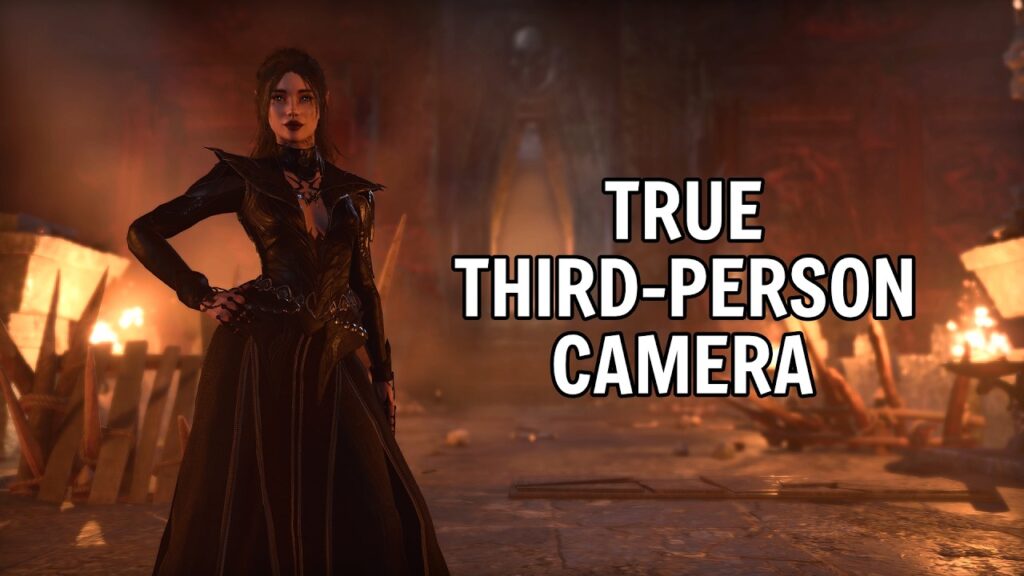
The True Third Person Camera mod for Baldur’s Gate 3 is a fan-made modification that adds a traditional over-the-shoulder viewpoint to the game. Normally, BG3 uses a top-down camera, but this mod positions the camera just behind the player’s character, creating a more cinematic and immersive perspective while keeping the hero visible on screen. The camera remains at a fixed distance behind the character, and during combat or certain actions, it temporarily returns to the standard view before smoothly switching back to third person. The mod builds on existing camera modifications such as Native Camera Tweaks and adds a dedicated toggle for activating the third-person perspective.
To download the mod, visit the Baldur’s Gate 3 section of Nexus Mods and search for “True Third-Person Camera.” Open the mod’s page, select the Files tab, and download the latest available version. You may need to create a Nexus Mods account or log in before downloading. The mod will be provided as a ZIP archive, which should be saved somewhere easy to locate because its contents are required for the installation process.
After downloading the archive, extract it using a tool such as 7-Zip. The extracted files contain numbered folders, including “1 – Main Game Folder Files.” Open that folder and locate the bin folder, then copy the entire folder into your main Baldur’s Gate 3 installation directory, such as C:\Program Files (x86)\Steam\steamapps\common\Baldurs Gate 3. This adds or replaces the required camera DLL files in the game’s native mods folder.
Next, open “2 – BG3 Mod Manager File” from the extracted archive. It contains TrueThirdPersonCameraMCM.pak. If you use a BG3 mod manager such as Vortex, import or drag the .pak file into the manager, move it to the active mods list, and export the load order. Players who do not use a mod manager can skip this step, although some camera settings may require the mod manager component. Once the files have been placed correctly, launch Baldur’s Gate 3 and check whether the third-person camera is active. If it does not work, the first thing to check is whether the bin and .pak files were placed in the correct locations.
Baldur’s Gate 3 True Third Person Camera Mod Creator and Gameplay Experience
The True Third Person Camera mod was created by the modder Relysia, who is credited as the author and uploader on Nexus Mods and in coverage of the modification. Relysia designed the mod as an enhancement to Ersh’s existing Native Camera Tweaks, retaining its features while adding a dedicated over-the-shoulder third-person option. The result gives Baldur’s Gate 3 a perspective that feels much closer to traditional third-person RPGs.
The new viewpoint has been compared to Dragon Age: Origins because it changes the way players experience both exploration and combat. Instead of looking down at the party from above, players see their character and the surrounding environment from behind, creating a stronger sense of scale and immersion. Weapon swings, character animations, nearby enemies, and party members become much more prominent, making the world feel more three-dimensional. The dynamic field of view and other camera adjustments further reinforce the feeling of following a character through the world rather than controlling the party from a distant viewpoint.
Gameplay itself remains fundamentally the same, but the camera follows the character closely from behind as they move, strafe, or change direction. When the character jumps or performs certain actions, such as aiming a spell, the mod can temporarily return to a more distant camera position to make targeting easier before switching back. The camera also adjusts its height when the character crouches or stands, while the dynamic FOV can pull the camera back slightly during running to emphasize movement and speed. This gives exploration and combat a more action-oriented presentation, with enemies appearing larger and more of the immediate action taking place directly in front of the player.
Baldur’s Gate 3 True Third Person Camera Settings and Customization
The True Third Person Camera mod provides extensive customization through the Mod Configuration Menu (MCM), allowing players to adjust the camera to suit their preferred perspective. Important settings include Field of View (FOV), Camera Height, Camera Offset, and Horizontal Tracking Speed, along with options controlling camera behavior during combat and turn-based gameplay. Players can also change the keybind used to toggle the third-person camera, with the default control using Numpad * or a corresponding controller button.
Camera Height determines how high the viewpoint sits relative to the character. Increasing the setting produces a higher, more aerial perspective, while lowering it brings the camera closer to ground level and creates a more intimate over-the-shoulder view. Camera Offset allows players to reposition the camera around the character, including shifting it horizontally or vertically. This can help frame the character, weapon, or surrounding environment more effectively, particularly when different character sizes, armor, or equipment make the default position less suitable.
The FOV setting controls how much of the surrounding environment is visible. Increasing the FOV provides a wider view, allowing players to see more of the environment and nearby enemies, while lowering it creates a narrower, more zoomed-in perspective that can feel more cinematic. The mod also includes a dynamic FOV feature that automatically pulls the camera back slightly when the character runs, emphasizing speed while maintaining awareness of the surroundings. This feature can be enabled or disabled through the settings.
Players can access these options by pausing the game and navigating to Mod Options → True Third-Person Camera. The sliders can be adjusted while playing, allowing users to see the effects immediately and find a suitable combination of height, offset, and FOV. These controls make it possible to frame the character properly, avoid cutting off important parts of the model, and create anything from a closer action-RPG perspective to a slightly wider view that retains more of the surrounding environment.

Baldur’s Gate 3 True Third Person Camera Combat, Movement, and Known Issues
The True Third Person Camera mod works during combat, including turn-based encounters, but it uses automatic camera adjustments to maintain visibility. When combat begins, the camera temporarily switches to a slightly wider view so players can see more of the battlefield and nearby enemies. Once the action settles, it returns to the close third-person perspective. The mod’s update notes describe this as a switch to a “wide view and then back to close view” during combat and turn-based mode. Special actions such as spell targeting can also temporarily return the camera to the normal aiming view. Combat itself remains unchanged, meaning players can still pause, issue commands, and use abilities while viewing their character from over the shoulder.
The mod is also compatible with the WASD Character Movement mod, which the Nexus Mods page recommends using alongside it. WASD Character Movement allows players to control their character directly with the keyboard instead of relying on point-and-click movement, making the third-person perspective feel more natural and closer to a conventional action RPG. PC Gamer has also confirmed the compatibility between the two mods. Players can still use the standard controls if they prefer, but combining the camera with WASD movement provides a more direct way to explore the world and move during gameplay.
Although the mod is generally well made, it has a few known quirks. One reported issue is an occasionally “stuck” camera, which can happen if the free-look key, such as Caps Lock when using the WASD mod, is pressed at the same time as the camera toggle. The MCM menu includes a Fix Stuck Camera button that can restore the normal view. Another edge case can occur when some party members are in combat while others are still exploring, as the camera may not immediately zoom in for characters outside the encounter until combat ends.
Slight jitter or shakiness can also occur with certain settings, but these issues can generally be addressed by adjusting the camera’s tracking speed or FOV. The mod does not have any reported game-breaking problems such as corrupted save files or disabled interface elements, so its known issues are generally minor and manageable.
If the camera feels too jerky during strafing or turning, the Horizontal Tracking Speed setting in the MCM menu can be used to smooth its movement. Lowering the tracking speed makes the camera follow lateral movements more gradually, creating a smoother and more cinematic effect, while increasing it makes the camera stay more tightly connected to the character. Starting with a middle setting and adjusting it until the movement feels comfortable is recommended. A stable frame rate is also important because very low FPS can make camera movement appear choppy even when the mod itself is functioning correctly.
Best Mods to Use With the True Third Person Camera and Is It Worth Installing?
Several other mods can complement the True Third Person Camera. WASD Character Movement is one of the most useful pairings for PC players because it provides direct character movement that suits the over-the-shoulder perspective. Real Time with Pause by Chanka is another option for players who want to push the action-RPG feel further by reducing the emphasis on traditional turn-based pauses. Some players also use Aether’s Immersive UI to reduce HUD clutter, which can be particularly useful when the close camera makes interface elements more noticeable. Players should avoid installing multiple camera mods together, however, because the True Third Person Camera already incorporates the features of Native Camera Tweaks and additional camera modifications could cause conflicts.
For players looking for a fresh way to experience Baldur’s Gate 3, the mod appears to be worth trying. It provides a more cinematic perspective, keeps the custom character visible during exploration and combat, and gives the game a feel that many players compare with older BioWare RPGs such as Dragon Age: Origins. Kotaku’s writer said the mod gave him a reason to replay Baldur’s Gate 3, while DSO Gaming also recommended it to fans of the game.
Players who prefer the default tactical overview may not enjoy the change as much, but the camera can be toggled off whenever necessary. Since the mod can be removed if it does not suit your playstyle, it offers a relatively low-risk way to experience Baldur’s Gate 3 from a completely different perspective.

Frequently Asked Questions (FAQs)
- Will using this mod disable achievements?
No. The True Third Person Camera mod only changes the camera viewpoint and does not modify gameplay content or progression, so it does not disable achievements. You can continue playing with the mod installed while earning Steam or Xbox achievements as normal. - Can I toggle the third-person camera on and off?
Yes. The mod includes a dedicated toggle that lets you switch between the standard camera and the close third-person perspective whenever you want. The default keyboard shortcut is Numpad *, while controller users can hold Triangle on PlayStation or Y on Xbox. This is useful when you need the wider standard view for precise targeting, then want to return to third-person during exploration. - Is this mod available on consoles?
No. The True Third Person Camera mod is designed for the PC version of Baldur’s Gate 3 and cannot be installed on the PlayStation or Xbox versions. Console players therefore cannot use this specific camera modification, even though Baldur’s Gate 3 itself is available on those platforms. - Does this mod work in multiplayer?
It can work in multiplayer, but compatibility depends on the other players using the same required modifications. The camera mod may need to be installed by everyone in the party to avoid differences in how the game handles the modified camera. If you plan to use it in a multiplayer campaign, it is best to make sure everyone has the required files and to back up your save before making changes to the mod setup. - How do I uninstall the mod?
To remove the mod, delete the files it added to your Baldur’s Gate 3 installation. Go to the game’sbin/NativeModsfolder and remove files namedBG3NativeCameraTweaks.dllandBG3NativeCameraTweaks.toml, then remove or disable theTrueThirdPersonCameraMCM.pakfile through your mod manager. After launching the game again, the original camera should be restored. - Can I use other camera angle mods with it?
It is best not to combine this mod with other camera modifications because they can interfere with one another. The True Third Person Camera is designed as a complete camera solution and already retains the features of the older Native Camera Tweaks. Installing additional camera mods could therefore create conflicts or produce unexpected camera behavior. - Will I get motion sickness?
It is possible, particularly because the mod places the camera much closer to the character and uses dynamic movement while running and turning. Players who are sensitive to camera motion can try increasing the FOV or lowering the Horizontal Tracking Speed to make movement feel less abrupt. If the close perspective remains uncomfortable, you can also toggle the mod off and return to the standard camera. - Does it work with a controller?
Yes. The mod supports controller use as well as keyboard and mouse controls. Its default controller toggle uses a long press of Triangle on PlayStation or Y on Xbox, allowing players to switch between camera perspectives without reaching for the keyboard. Keyboard and mouse users can also combine the mod with WASD Character Movement for a more conventional third-person RPG control scheme. - Are there any performance impacts?
Generally, the mod should not cause a significant performance reduction because it primarily changes camera behavior rather than adding demanding graphical effects. Most players should not notice a substantial frame-rate difference from the camera itself. If you do experience slowdown after installing it, checking your graphics settings and overall frame-rate stability can help determine whether the issue is related to the mod or the game’s existing performance. - Where can I get help or report issues?
The Nexus Mods page and its comments section are the main places to look for troubleshooting information and report problems with the mod. Relysia, the mod’s creator, can receive feedback there, while other players may also share solutions to common issues. Reddit and Baldur’s Gate 3 modding communities can provide additional troubleshooting discussions, and the readme included with the mod contains a brief FAQ and setup tips.

Conclusion
The True Third Person Camera mod adds a fresh, immersive viewpoint to Baldur’s Gate 3. It was created by modder Relysia and lets players toggle an over-the-shoulder perspective with adjustable settings. Many players appreciate its Dragon Age–like feel and cinematic look, although some prefer the original view. Installation is straightforward and reversible, so it’s easy to try. Overall, this mod is a well-received community enhancement that offers a novel way to experience BG3. Whether it’s “worth it” will depend on your personal preference for camera style, but with little downside, it’s popular to give it a shot.
Sources and Citations
- Kotaku. New Baldur’s Gate 3 Mod Has Given Me All The Excuse I Need To Play The Game Again.
https://kotaku.com/baldurs-gate-3-third-person-camera-mod-dragon-age-origins-2000719452 - DSO Gaming. Baldur’s Gate 3 Just Got an Over-The-Shoulder Third-Person Camera Mode.
https://www.dsogaming.com/mods/baldurs-gate-3-just-got-an-over-the-shoulder-third-person-camera-mode/ - PC Gamer. Modders Finally Got a High-Quality Third-Person Camera Working in Baldur’s Gate 3 for All You Dragon Age Sickos.
https://www.pcgamer.com/games/baldurs-gate/modders-finally-got-a-high-quality-third-person-camera-working-in-baldurs-gate-3-for-all-you-dragon-age-sickos/ - PC Gamer. The Maker of the Baldur’s Gate 3 Over-the-Shoulder Camera Mod Has Gone to Great Lengths to Demonstrate It’s Not Like Other Third-Person Viewpoint Solutions.
https://www.pcgamer.com/games/baldurs-gate/the-maker-of-the-baldurs-gate-3-over-the-shoulder-camera-mod-has-gone-to-great-lengths-to-demonstrate-its-not-like-other-third-person-viewpoint-solutions/ - Nexus Mods. True Third-Person Camera for Baldur’s Gate 3 by Relysia.
https://www.nexusmods.com/baldursgate3/mods/23959
Recommendations
- The Best Hair Grooming Tools for Unreal Engine
- After More Than 50 Years, Kolchak: The Night Stalker Is Finally Getting an Action Figure (Wandering Planet Toys Kickstarter)
- How to Increase Your Backpacks Inventory Size in Marathon: Best Ways to Get More Slots Fast
- Batman Caped Crusader Season 2 Release Date and New Characters Revealed
- Reforged Studios Acquires Headup, Publisher of Super Meat Boy 3D: What the Deal Means
- Meta Is Reportedly Working on an AI Model of Mark Zuckerberg: The “CEO Clone” Explained
- GTA 5 Actor Ned Luke Celebrates as Swatting Perpetrator Sentenced to 4 Years in Prison: Full Case Details and Reaction
- Dead by Daylight: the Black Banquet Event Guide, Rewards, Mechanics, and Best Strategies
- A Palworld Horror-Themed Dating Sim Spinoff Is on the Way: What We Know About More Than Just Pals
- Ace Combat 8 Wings of Theve Receives New PEGI Rating Ahead of Release



































































































