









In This Article (7 sections)
Xbox Mode Rolls Out to Windows 11 PCs, Laptops, Tablets, and Handhelds
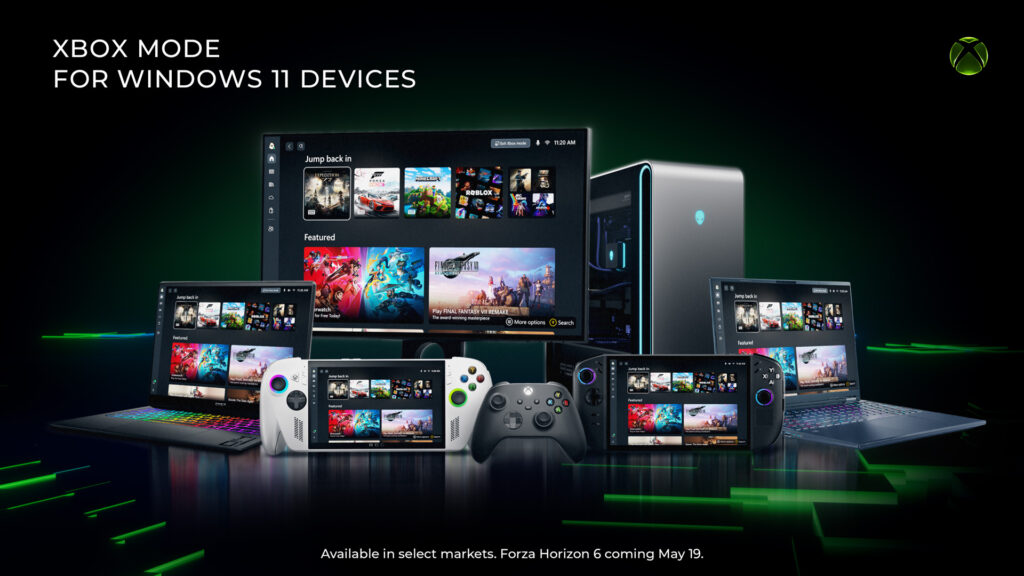
Microsoft has started rolling out Xbox mode to Windows 11 devices, including laptops, desktop PCs, tablets, and gaming handhelds, following its earlier commitment to expand the experience beyond handheld focused hardware. The feature introduces a console inspired, controller first full screen interface built into Windows 11 and closely connected with the Xbox app. Its goal is to make PC gaming feel more like using an Xbox console while retaining the flexibility of Windows underneath.
The public rollout began on April 30, 2026 through a Windows 11 non security preview update. Distribution is gradual, meaning Xbox mode may appear at different times depending on the device and market. Two otherwise similar PCs may therefore receive the feature on different dates.
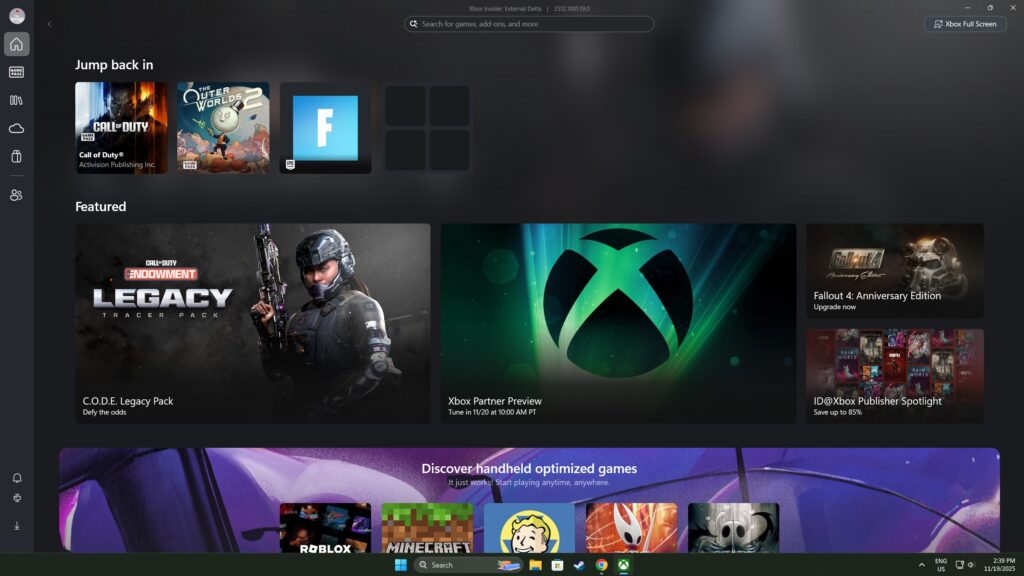
Xbox mode is designed as a dedicated gaming experience that places a chosen gaming home app at the center of a streamlined full screen interface. Recent games and the player’s library become easier to navigate with a controller, while normal desktop complexity and non gaming interruptions are reduced.
Microsoft describes the concept as a lean back and play experience particularly suited to couch gaming, televisions, tablets, touch enabled hardware, and gaming handhelds. These are situations where navigating a conventional Windows desktop with a controller can feel cumbersome compared with a dedicated console interface.
A major part of the experience is controller friendly navigation. Large interface elements, simplified focus states, quick access to recent games, and a one window at a time presentation reduce the need to interact with traditional desktop elements. Applications can also run full screen where possible, helping maintain the console style presentation.
Xbox mode is available on Windows 11 PCs including:
- Desktop computers
- Laptops
- Tablets
- Gaming handheld devices
Windows 11 version 24H2 or later is required, and the feature is limited to supported markets during the rollout period. Microsoft has not provided a definitive launch list covering every market, so actual Windows Update availability remains the most reliable indicator for an individual device.
The April 30 preview update associated with the rollout is KB5083631, covering OS Builds 26200.8328 and 26100.8328 for Windows 11 versions 25H2 and 24H2. Xbox mode is one of the highlighted gaming additions, although the update also contains other Windows improvements and fixes.
To increase the likelihood of receiving Xbox mode as soon as it becomes available:
- Open Settings.
- Select Windows Update.
- Enable Get the latest updates as soon as they’re available.
- Select Check for updates.
- Install the newest available update, including the preview update when offered.
Once Xbox mode becomes available, users on desktops, laptops, and tablets can find its primary configuration area under:
Start > Settings > Gaming > Xbox mode
From there, Xbox mode can be enabled, and users can optionally make it available through Task View as an additional entry point.
Gaming handhelds receive additional options because Xbox mode can function more like the primary interface on those devices. Users can choose a supported gaming home app and enable an option that automatically enters Xbox mode during startup.
Microsoft provides several ways to enter and leave the experience. Win + F11 serves as a direct toggle, while Game Bar can provide another entry point through its settings. Task View can also be used when its Xbox mode option has been enabled, and users can enter through the Xbox app when the feature is active.
Moving back to the regular Windows desktop remains straightforward:
- Press Win + F11 to toggle Xbox mode.
- Use Win + Tab or the Task View button.
- Use Game Bar settings to return to the desktop.
- On supported touch devices, swipe upward from the bottom to access Task View and navigate back to the desktop.
The result is not a replacement for Windows. Xbox mode functions as a gaming focused layer that players can enter when they want a controller driven experience and leave when they need the conventional desktop.

Xbox Mode Game Library, Controller Interface, Steam and Epic Integration
One of the most important aspects of Xbox mode is its aggregated game library concept. Rather than limiting the experience exclusively to Xbox Game Pass and Microsoft Store games, the interface is intended to surface games from multiple PC storefronts and services through one controller friendly environment.
Reported supported sources include Microsoft and Xbox services alongside third party PC storefronts such as Steam and Epic Games Store. This reduces the need to manually move between several launchers every time the player wants to choose a game.
The goal is to make the process closer to a console workflow. Players enter a gaming focused interface, browse their available library, choose a title, and begin playing without spending as much time navigating Windows desktop applications.
That broader scope creates an important distinction between Xbox mode and Steam Big Picture Mode. Both target full screen PC gaming with controller navigation, but they operate at different levels.
The major differences include:
- System integration: Xbox mode is integrated into Windows itself, with entry points such as Win + F11, Game Bar, Task View, and the Xbox app.
- Library scope: Steam Big Picture primarily organizes the Steam ecosystem, while Xbox mode is intended to provide access to games from multiple storefronts and services.
- Device focus: Xbox mode specifically targets desktops, laptops, tablets, handhelds, and living room PC environments.
- Windows integration: Xbox mode changes parts of the shell experience rather than functioning only as a different interface inside an individual game client.
The gaming home app concept also provides additional flexibility. On supported devices, users can select an appropriate gaming launcher to serve as the home experience, allowing the interface to function around the way the individual player organizes their PC gaming library.
Xbox mode also changes how Windows presents applications. The interface favors full screen presentation and simplified switching, often keeping one primary window visible at a time. This helps prevent the normal Windows desktop experience from interrupting controller navigation.
Microsoft’s references to reducing “background distractions” should primarily be understood in this context. On conventional PCs, Xbox mode is largely a user interface and workflow change rather than a universal performance switch that automatically increases frame rates.
The situation is somewhat different on gaming handhelds. When Xbox mode is configured to start automatically, Windows can limit certain background processes to improve the gaming environment. This may influence resource usage, startup behavior, performance, and battery consumption.
The distinction is important:
- Desktop, laptop, and tablet: The largest benefit is simplified navigation, fewer desktop interruptions, and a more console like interface.
- Gaming handheld: The same interface benefits apply, but specific startup settings can additionally reduce background activity.
- Games themselves: Xbox mode does not guarantee higher frame rates or improved graphics simply because it is enabled.
Players should therefore think of Xbox mode primarily as a gaming focused Windows shell with selective resource management advantages rather than a traditional performance mode.
If Xbox mode does not appear after installing Windows updates, several checks can help:
- Confirm the device is running Windows 11 version 24H2 or later.
- Install all available Windows updates.
- Enable Get the latest updates as soon as they’re available.
- Check Start > Settings > Gaming > Xbox mode.
- Confirm that the feature is available in the device’s market.
- Update the Xbox app through Microsoft Store.
- Remember that the feature is being distributed gradually.
Because the rollout is phased, not seeing the feature immediately does not necessarily indicate a problem with the PC. The device may simply not have received the feature enablement yet.
Xbox Mode and Microsoft’s Future Xbox and Windows Gaming Strategy
Xbox mode represents more than a new full screen interface. It fits into Microsoft’s broader effort to bring Windows PC gaming and Xbox closer together without closing the PC ecosystem or forcing players into a single storefront.
The strategy attempts to combine two historically different experiences. Consoles offer simple controller navigation and a clear path from startup to gameplay, while Windows provides flexibility, multiple stores, productivity applications, customization, and access to a much wider range of software.
Xbox mode tries to preserve both advantages. Players can enter a console inspired interface when they want to concentrate on games, then return to the conventional Windows desktop when they need normal PC functionality.
This is particularly important as Windows appears on more gaming focused form factors. A traditional desktop interface works naturally with a keyboard and mouse but can become awkward on a handheld screen or television. Xbox mode provides Microsoft with a way to adapt Windows to those devices without creating an entirely separate operating system.
Controller navigation is central to that approach. Game Bar, Task View, the Xbox app, and the gaming home interface provide ways to move through the experience without constantly reaching for a keyboard or mouse. On touch devices, gestures provide another method for switching between gaming and desktop environments.
The aggregated library concept also reflects Microsoft’s attempt to make Windows itself the gaming destination rather than requiring the Xbox app to become the only store. Steam, Epic Games Store, Game Pass, and other PC gaming services can continue existing while Xbox mode acts as a controller friendly layer above them.
That openness separates the strategy from a conventional console environment. Xbox mode may resemble a console visually and functionally, but the underlying machine remains a Windows PC with access to multiple storefronts and applications.
The feature also reinforces Microsoft’s push to create more consistency between gaming PCs, handhelds, and Xbox. Interface concepts familiar from consoles can increasingly appear across Windows devices, while the desktop remains available whenever the player needs it.
For living room PCs, this creates a more practical couch gaming experience. A Windows machine connected to a television can enter Xbox mode, provide large controller friendly navigation, surface games from several libraries, and reduce the need to interact with small desktop interface elements from across the room.
For tablets and touch enabled hardware, the simplified interface reduces dependence on precise desktop navigation. For handheld gaming PCs, Xbox mode can function much closer to the primary gaming environment, particularly when configured to launch automatically.
Microsoft’s rollout therefore represents another stage in the convergence of Xbox and Windows rather than an attempt to eliminate the distinction entirely. Xbox remains the gaming identity and interface inspiration, while Windows remains the flexible operating system underneath.
The April 2026 expansion to laptops, desktops, and tablets makes that strategy considerably broader. What began as a concept particularly suited to handheld gaming is becoming a general Windows option for players who prefer console style navigation.
The defining idea is straightforward: when users want to work, browse, or manage their PC, they can use the normal Windows desktop. When they want to sit back with a controller and play, Xbox mode provides a dedicated interface designed around that experience.

Frequently Asked Questions (FAQs)
- What is Xbox mode in Windows 11?
Xbox mode is a console inspired, full screen gaming experience built into Windows 11 and optimized for controller navigation. It uses a gaming home app as the main launcher and simplifies the Windows interface so players can browse their library, access recent games, and launch titles without relying heavily on a keyboard and mouse. - What Windows version is required for Xbox mode?
Xbox mode requires Windows 11 version 24H2 or later. The feature is being introduced through newer Windows updates, so having a compatible Windows version does not necessarily mean it will appear immediately because Microsoft is also using a gradual rollout across supported devices and markets. - How do I enable Xbox mode on a desktop or laptop?
Go to Start > Settings > Gaming > Xbox mode, then turn on Enable Xbox mode if the option is available. You can also enable its Task View entry point for another way to access the experience. If the setting is missing, check that Windows is fully updated and that Xbox mode has reached your device and market. - How do I enter or exit Xbox mode quickly?
Press Win + F11 to quickly enter or exit Xbox mode. This shortcut makes it easy to move between the controller focused gaming interface and the normal Windows desktop without navigating through several menus each time you want to change environments. - Can I launch Xbox mode from Game Bar?
Yes. When Xbox mode is enabled and available on your device, you can open Game Bar with Win + G and use its settings to enter the experience. Game Bar provides an alternative to the Win + F11 shortcut and helps keep Xbox mode connected to Windows 11’s existing gaming features. - Does Xbox mode include my Steam and Epic games?
Microsoft and other reporting describe Xbox mode as supporting an aggregated library approach that can surface games from major PC storefronts alongside Xbox experiences. This means the interface is intended to reduce launcher switching while preserving access to different PC stores, although exact integration can depend on installed applications and rollout status. - Does Xbox mode improve FPS or gaming performance on PC?
Not automatically. On normal desktops and laptops, Xbox mode is primarily an interface and usability change designed to reduce distractions and make controller navigation easier. More direct resource management benefits are associated with supported handheld configurations, particularly when Xbox mode is configured to start automatically and limit certain background processes. - Why don’t I see Xbox mode after installing updates?
Xbox mode is being distributed gradually and is limited to supported markets, so installing an update does not guarantee immediate access. Confirm that you are using Windows 11 version 24H2 or later, install the latest updates, update the Xbox app, and check Settings > Gaming > Xbox mode. Your device may still need to wait for Microsoft’s phased rollout. - What update introduced Xbox mode to Windows 11 PCs?
Microsoft lists Xbox mode as part of the April 30, 2026 preview update KB5083631 for Windows 11 versions 24H2 and 25H2. The update expanded the console inspired experience to regular Windows 11 form factors such as desktops, laptops, and tablets through a gradual rollout. - How do I get back to the Windows desktop while in Xbox mode?
You can press Win + F11 to leave Xbox mode directly or use Task View to switch back to the normal Windows desktop. Game Bar settings provide another exit method, while supported touch devices can use Task View gestures to move between the gaming interface, applications, and desktop.
Conclusion
Xbox mode is Microsoft’s most direct step toward a console like, controller first Windows 11 gaming workflow—delivered as a full screen experience that emphasizes simplicity, fast navigation, and an aggregated library concept across PC game sources. The rollout that began on April 30, 2026 via KB5083631 is phased and market limited, so access may vary, but the underlying direction is clear: tighter Xbox + Windows integration that makes Windows feel more “console ready” without giving up PC openness.
Sources and Citation
- Microsoft Support, Windows Gaming: Full Screen Experience: Official documentation explaining Xbox mode, supported Windows 11 versions, controller-optimized navigation, setup instructions, entering and exiting the interface, application behavior, startup settings, and switching between games and desktop applications.
https://support.microsoft.com/en-us/servicing/os/windows/docs/2025/10/windows-gaming-full-screen-experience - Microsoft Support, April 30, 2026: Official KB5083631 preview update release notes confirming Xbox mode availability for Windows 11 versions 24H2 and 25H2, OS builds 26100.8328 and 26200.8328, gradual rollout procedures, supported PC categories, and the Windows + F11 keyboard shortcut.
https://support.microsoft.com/en-us/servicing/os/windows-11/2026/04/april-30-2026-kb5083631-os-builds-26200-8328-and-26100-8328-preview - Xbox Wire, April 30, 2026: Official announcement by Xbox Vice President Jason Ronald confirming the rollout of Xbox mode to Windows 11 desktops, laptops, and tablets in select markets. Explains controller navigation, aggregated game libraries, Xbox Game Pass integration, third-party storefront support, desktop switching, and Windows Update availability.
https://news.xbox.com/en-us/2026/04/30/xbox-mode-pc-windows-11/ - Microsoft Windows Experience Blog, April 30, 2026: Official Windows 11 gaming announcement confirming Xbox mode’s expansion to traditional PCs, its streamlined full-screen interface, controller-focused design, and related ROG Xbox Ally improvements, including Automatic Super Resolution preview support.
https://blogs.windows.com/windowsexperience/2026/04/30/windows-11-pc-gamers-xbox-mode-rolls-out-and-rog-xbox-ally-updates-include-auto-sr-preview/ - Engadget, May 1, 2026: Reports Microsoft’s Xbox mode rollout across Windows 11 PCs, connecting the release to the company’s March 2026 announcement. Discusses the console-style interface, aggregated game library, Xbox Game Bar integration, desktop switching, supported device categories, and phased regional availability.
https://www.engadget.com/2161816/microsoft-xbox-mode-windows-11-rollout/ - Engadget, March 11, 2026: Covers Microsoft’s original announcement that Xbox mode would expand to Windows 11 desktops and laptops in April. Provides background on its introduction through the ROG Xbox Ally, similarities with Steam Big Picture Mode, controller navigation, and Microsoft’s broader PC gaming strategy.
https://www.engadget.com/gaming/xbox/microsofts-full-screen-xbox-mode-will-roll-out-to-windows-11-pcs-in-april-181000289.html - Tom’s Hardware, May 1, 2026: Examines the Xbox mode rollout to Windows 11 desktops and laptops, including the console-style dashboard, consolidated access to Steam, Epic Games Store, Battle.net, and Xbox Game Pass, controller navigation, Windows desktop compatibility, and comparisons with SteamOS and Steam Big Picture Mode.
https://www.tomshardware.com/video-games/xbox/microsoft-begins-rolling-out-xbox-mode-to-windows-11-desktops-and-laptops - PC Gamer, April 30, 2026: Analyzes the arrival of Xbox mode on Windows 11 PCs, emphasizing its user-interface improvements rather than guaranteed frame-rate gains. Discusses controller navigation, the aggregated game library, desktop integration, selective rollout, and potential benefits for couch gaming and handheld-style experiences.
https://www.pcgamer.com/games/the-new-xbox-mode-for-windows-11-has-arrived-but-dont-get-your-hopes-up-for-performance-improvements-its-just-a-new-ui/ - PC Gamer, March 12, 2026: Reports Microsoft’s plans to bring Xbox mode to Windows 11 desktops, laptops, and tablets, discussing its controller-friendly interface, earlier handheld implementation, potential integration with Xbox Game Bar, and comparisons with Steam Big Picture Mode.
https://www.pcgamer.com/hardware/microsoft-is-paving-more-pc-roads-to-project-helix-releasing-a-windows-11-xbox-mode-in-april-for-laptops-and-desktops/ - The Verge, April 30, 2026: Reports the rollout of Xbox mode to Windows 11 PCs, comparing its full-screen Xbox application interface with Steam Big Picture Mode. Explains the feature’s origins on Xbox Ally handhelds, gradual availability, Windows Update requirements, and Microsoft’s effort to unify console and PC gaming experiences.
https://www.theverge.com/news/921582/microsoft-xbox-mode-windows-11
Recommendations
- The Witness Review: Puzzle Masterpiece Explained, Gameplay Breakdown, and Island Mystery Analysis
- Borderlands 4 First DLC Explained: Mad Ellie, C4SH, Release Date, and Why Gearbox Wants Players Back
- Star Wars: Galactic Racer October 2026 Release: Landspeeders, Speeder Bikes and Skim Speeders
- Counter-Strike 2 Slur Tracker Finds 17.6% of Matches Contain Slurs
- All Active Pokémon Champions Mystery Gift Codes and Rewards
- Moss: The Forgotten Relic Review: is Quill’s Non-VR Adventure Worth Playing?
- Gen ATLAS New Trailer Breakdown: Everything Revealed in Fumito Ueda’s Latest Game Showcase
- DoorDash Q3 2026: Why AI Agents Have Generated So Few Orders
- Pope Leo XIV tells Vatican summit AI is a tool, not a person, and decisions affecting human life must never be delegated to it
- Agility Robotics prices $465M SPAC merger with Churchill Capital Corp XI, shares begin trading on Nasdaq November 5 2026



































































































