







In This Article (14 sections)
The Gnomon Workshop Principles of Physics in Action Scenes Maya Tutorial
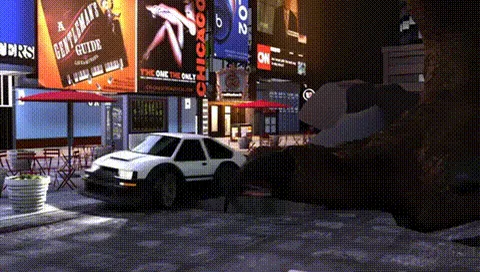
The Gnomon Workshop’s The Principles of Physics in Action Scenes is an intermediate Maya animation course taught by senior animator and tool developer Wolfgang Haas. The workshop provides approximately three and a half hours of high definition training focused on using physical principles to create more believable large scale action for visual effects and game development. Haas draws on experience at studios including Trixter and Scanline VFX, where he worked as an Animation Supervisor and developed internal productivity tools. The central project follows a massive kaiju style creature rampaging through a city, giving students a practical setting for studying scale, weight, inertia, momentum, impact, camera movement, and environmental reactions.
Rather than requiring complicated mathematical calculations, Haas teaches animators in the Gnomon course to recognize how physical forces should appear in motion. Inertia means a massive creature should resist sudden changes in direction, while momentum means its body should continue moving after an impact or major action. Gravity, friction, force, acceleration, and deceleration influence how quickly characters move, stop, turn, jump, and recover.
A giant creature should therefore not stop instantly or change direction with the responsiveness of a small character. Its legs may overshoot, its body may continue traveling after its feet make contact, and its attacks should contain enough follow through to communicate substantial mass. Haas demonstrates how Maya keyframes and animation curves can reproduce these effects manually, allowing artists to control the final performance rather than depending entirely on simulation.
Physical Credibility, Mass, and Scale
Physical credibility in animation does not require every movement to obey reality with scientific precision. The more practical objective is consistency. Viewers should understand where the energy comes from, how it travels through the body, and what consequences follow when that energy reaches another character or object. Anticipation prepares the audience for a forceful action, the main movement delivers it, and follow through shows that the body cannot cancel its momentum immediately. When these stages are missing, even a technically clean shot can feel weightless because the action appears to begin and end without resistance.
Mass in the Gnomon sequence is also communicated through contrast. A kaiju can move quickly, but its speed should be supported by forceful preparation, broad body mechanics, and a convincing recovery. Smaller objects around it can react earlier, travel farther, or change direction more abruptly, creating a visual comparison that makes the creature seem heavier. Buildings, vehicles, dust, and debris therefore do more than decorate the frame. Their timing helps establish how much energy the creature has transferred into the scene. Delaying some reactions by a few frames can make the impact feel as though it is spreading outward rather than occurring everywhere at once.
The Gnomon kaiju sequence provides a particularly useful demonstration of scale. Longer timing, slower changes in direction, sustained momentum, secondary movement, and delayed environmental responses help sell the creature’s enormous size. A heavy punch can continue affecting dust and debris after the fist has moved away, while jumps and landings require sufficient preparation, impact, and recovery to feel physically convincing. Haas also explains how lighter and heavier elements can use different animation curves, with lighter objects responding more sharply while massive objects use longer acceleration and deceleration patterns. Secondary elements such as debris or loose materials can continue moving after the principal body stops, reinforcing the sense that energy has passed through the environment.
Audience, Prerequisites, and Resources
The Gnomon workshop is aimed at animators, character artists, technical directors, and effects artists who already understand Maya fundamentals and want to improve their handling of action sequences. Students should already be comfortable navigating the viewport, setting animation keys, using the timeline, and working with standard animation tools because the course concentrates on physical behavior rather than introductory Maya instruction. The principles are applicable to both film and games. Game engines may calculate gravity or collisions at runtime, while effects pipelines may add simulations after animation, but the original character performance still needs convincing weight, poses, timing, and force.
The course is available through The Gnomon Workshop’s online subscription service and includes project resources for following the demonstrations. Haas provides a custom script for generating spline animation paths, along with practice assets that include a city environment, car, ostrich, and dinosaur rig. These assets are used to illustrate the techniques but are not required for applying the lessons elsewhere. Haas emphasizes that the same principles can be transferred to different characters, creatures, vehicles, environments, and action scenes.

Planning, Camera Work, Spline Animation, Weight, and Momentum in Maya
Haas begins the Gnomon course with planning because believable physical animation depends on understanding the action before detailed keyframing starts. The process includes gathering reference material, studying real movement, establishing the major beats of the sequence, and creating a rough layout of the characters, environment, and cameras. Reference footage can reveal details that are easy to overlook when animating from imagination, including how bodies prepare for force, how momentum travels through limbs, and how long it takes a moving subject to recover after an impact. Establishing these elements early gives the animator a clear blueprint for how the scene should develop.
A productive planning workflow can separate the sequence into increasingly detailed passes. The animator can first identify the purpose of the shot and the main moment of impact, then block the largest poses and camera positions. After the timing is readable, the root movement, center of gravity, limbs, head, tail, and secondary elements can be refined in layers. This prevents the artist from polishing small motions before the overall action works. It also makes physical problems easier to diagnose because each pass answers a specific question about direction, force, balance, or clarity.
Reference is most useful when it is studied rather than copied mechanically. A real animal, athlete, vehicle, or piece of machinery may provide useful evidence about preparation, balance, acceleration, and recovery, even when its size differs greatly from the animated subject. The animator can extract those relationships and exaggerate them to fit a cinematic creature. Slow motion reference can reveal overlaps between body parts, while footage played at normal speed helps determine whether the final action still reads with the intended power and urgency.
Framing Scale Through Shot Layout
Large scale action in the Gnomon project also depends heavily on shot layout. Haas demonstrates how camera placement, perspective, distance, and composition can make the creature’s scale understandable. Wide establishing shots reveal the kaiju in relation to buildings and the surrounding city, while lower angles and closer views can make individual impacts feel more powerful. Moving between wider environmental views and tighter action shots helps maintain both geographical clarity and dramatic intensity. The objective is not simply to show a large creature, but to frame it in a way that allows viewers to feel its relationship with smaller objects, characters, vehicles, and architecture.
Camera animation in the Gnomon course is treated as part of the physical performance rather than an independent layer added afterward. Haas demonstrates techniques such as moving cameras along paths, following targets, panning between subjects, and using Maya’s Graph Editor to control acceleration and deceleration. A camera can be attached to a spline for a sweeping chase movement or directed toward a moving subject while maintaining smooth transitions. Subtle camera shake can increase impact, but the movement needs to remain readable and properly timed with the action. When camera motion responds appropriately to character movement, impacts, and changes of direction, the finished sequence feels more like a deliberately photographed live action scene.
The Graph Editor becomes essential during this refinement because the shape of a curve represents how motion changes over time. A nearly linear section can suggest steady travel, while a broader ease shows gradual acceleration or deceleration. Sharper changes can create snaps and impacts, but using them everywhere makes the performance feel mechanical. Animators can compare the curves of the root, torso, limbs, and camera to prevent all parts from starting and stopping simultaneously. Slight offsets produce overlap and allow force to travel through the body in a more natural sequence.
Spline Paths for Efficient Blocking
Spline animation in the Gnomon course provides another way to establish complex movement efficiently. Haas supplies a script that generates animation paths from curves created in Maya. An animator can draw the desired route through three dimensional space, attach the creature or root control to that path, and quickly establish the broad trajectory before refining individual poses. Once the overall travel has been established, timing can be adjusted through keyframes and animation curves while additional body rotations, limb movements, and physical reactions are layered on top. This approach is especially useful during blocking because it separates the problem of where a character travels from the more detailed question of how the body behaves while following that route.
Spline paths accelerate blocking, but the path alone cannot provide convincing body mechanics. A character attached too rigidly to a curve may look as though it is being pulled through space. The animator still needs to establish banking, leaning, foot placement, counter-rotation, and changes in the center of gravity. The path supplies the broad route, while keyed offsets and layered controls give the movement intention. This distinction is especially important when a creature turns sharply, climbs, jumps, or collides with an obstacle.
Weight Momentum and Environmental Impact
Weight and momentum are then refined through timing, spacing, acceleration, and follow through. Heavy characters should generally require more time and force to start or stop moving, while lighter objects can react more quickly. Haas shows how longer and gentler animation curves can communicate substantial mass, whereas sharper curves suggest lighter or more responsive movement. The same principle applies to attacks and thrown objects. A powerful kaiju strike needs sufficient preparation, travel, impact, and recovery to suggest the force behind it, while a heavy thrown object should follow a trajectory consistent with its perceived weight and velocity.
These decisions also affect interaction with the environment. Massive characters should appear capable of pushing through or disturbing lighter objects, while impacts should produce believable secondary reactions in debris and surrounding elements. Even without performing detailed numerical calculations for mass and velocity, animators can use observation and carefully controlled curves to imply those forces. The result is action that feels physically grounded while remaining sufficiently exaggerated for cinematic storytelling.

Maya Deformation Finaling, Custom Rigs, Expressions, and Production Animation Workflows
Once the principal animation in the Gnomon project is established, Haas moves into deformation finaling and the smaller details that help transform a functional action scene into a polished production shot. Deformation work concerns the way animated models bend, compress, stretch, flex, and react to forces. A creature landing after a jump may need additional body compression, muscle response, skin movement, or subtle follow through to communicate the impact. Similar principles can be applied to objects that bend, break, shake, or react when struck, as demonstrated through The Gnomon Workshop training.
In Maya, this finishing process can involve adjusting blend shapes, skinning behavior, deformers, rig controls, and shot specific corrections. Haas demonstrates through The Gnomon Workshop how these tools can support the main physical performance rather than competing with it. Squash and stretch can make an impact more readable, while subtle body deformation can reinforce the transfer of force through a creature. Environmental elements can receive additional motion where necessary, and fast movements can be refined so their silhouettes and timing remain understandable. The goal is to add enough physical detail to strengthen realism without introducing unnecessary movement that distracts from the primary action, a principle emphasized by The Gnomon Workshop.
Finaling benefits from repeated checks at full speed, in silhouette, and from the intended camera. A deformation that looks impressive in a close viewport inspection may be invisible in the final composition, while a small problem in the outline of a limb may weaken the entire pose. Reviewing the shot without distracting textures or effects can expose sliding contacts, abrupt stops, uneven arcs, and unwanted changes in volume. These checks help determine which corrections genuinely improve the physical performance and which details merely add complexity.
Custom Rigs and Expressions for Efficient Finaling
Efficiency is another major part of Haas’s Gnomon workflow. He demonstrates how small custom rigs and expressions can automate repetitive animation tasks and free the artist to spend more time on creative decisions. A simple rig might control a specific mechanical behavior such as wheel rotation, foot movement, or a repeated secondary action. Expressions written through Maya scripting can connect attributes, repeat movements, or cause one control to respond automatically to another. These solutions do not need to become large technical systems. Even a small automated setup can remove considerable manual work when the same adjustment would otherwise need to be animated repeatedly across many frames, making the workflow presented by The Gnomon Workshop particularly useful for production animation.
Custom rigs and expressions are most effective when they remain understandable and adjustable. Automation should remove predictable repetition without taking control away from the animator. A wheel rotation setup, for example, can provide a useful starting relationship between distance and rotation, but the artist may still need controls for slipping, braking, impact, or stylized timing. Building those exceptions into a compact setup makes the tool useful across more shots and reduces the risk that automation will create motion that is physically consistent but dramatically wrong.
The supplied spline script reflects the same production philosophy taught by The Gnomon Workshop. Rather than manually positioning a character through every stage of a complex route, the animator can establish the path rapidly and then dedicate more attention to timing, weight, poses, and interaction. Haas’s background in animation supervision and productivity tool development is particularly relevant here because the course does not treat realism and efficiency as separate goals. Better tools allow animators to spend more time evaluating the quality of the motion itself, which is a central idea behind The Gnomon Workshop approach.
Applying Gnomon Principles Across Film and Game Production
These techniques apply across both visual effects and game production. Film animators may create physically convincing character motion before effects teams add destruction, particles, rigid body simulation, or other secondary systems. Game animators may need to produce manually keyed attacks, locomotion, cinematic sequences, and creature performances that will later interact with engine physics. In either case, simulation alone cannot compensate for an animation that lacks convincing weight and intent, reinforcing the production principles taught by The Gnomon Workshop.
For game production, these Gnomon principles can improve more than cinematics. Attacks, traversal actions, hit reactions, creature locomotion, and transitions all need readable preparation and recovery, even when gameplay requires faster timing than film. The animator may compress reality to preserve responsiveness, but consistent arcs, weight shifts, and follow through can still make the action feel grounded. In visual effects work, the same decisions give downstream simulation and compositing teams a stronger performance to build around because the source animation already communicates where the forces originate and how they should affect the scene.
The broader lesson of The Principles of Physics in Action Scenes is that strong action animation comes from combining observation, planning, physical understanding, efficient Maya workflows, and careful finaling. Haas demonstrates through The Gnomon Workshop how layout, camera work, spline paths, animation curves, deformation, custom rigs, and expressions can work together to support one central objective: making exaggerated cinematic action feel physically believable.

Frequently Asked Questions (FAQs)
- What is the Gnomon Workshop physics tutorial by Wolfgang Haas about?
It is a Maya animation course titled The Principles of Physics in Action Scenes that teaches artists how to apply real world physics concepts to convincing action sequences. Wolfgang Haas uses a large scale kaiju scene to demonstrate weight, inertia, momentum, force, and believable movement, helping animators make exaggerated cinematic action feel physically grounded. - Who is Wolfgang Haas and what is his background?
Wolfgang Haas is a senior animator, rigger, and tool developer with professional visual effects experience. He has worked at studios including Trixter and Scanline VFX, where he became an Animation Supervisor and helped develop internal productivity tools. His combination of animation and technical experience allows him to teach both creative movement principles and practical Maya workflows. - What does the tutorial cover and how long is it?
The tutorial provides more than three hours of intermediate Maya training focused on creating and refining a large action sequence. It covers scene planning, shot layout, camera animation, spline based animation, believable weight and momentum, deformation finaling, and the creation of small rigs and expressions that can automate repetitive animation tasks. - Who is the tutorial intended for?
It is primarily intended for intermediate Maya animators, character artists, technical artists, and VFX professionals who already understand Maya’s basic tools. Students should be comfortable navigating the software, setting keyframes, working with the timeline, and controlling animated rigs. It is particularly useful for artists working on film, games, or effects heavy action sequences. - Do I need to understand advanced physics or math to follow the tutorial?
No. Haas focuses on the practical effects of physics rather than requiring students to work through complicated equations. Concepts such as inertia, momentum, gravity, and force are demonstrated through animation examples, showing how they influence timing, acceleration, stopping distance, impacts, and follow through. - What tools and resources does the tutorial include?
The workshop includes the video lessons along with practical resources for following the demonstrations. Haas provides a Maya script for generating spline animation paths, while the project examples use assets including city buildings, a car, an ostrich, and a dinosaur rig. The techniques are not limited to those assets and can be applied to other characters, creatures, vehicles, and environments. - Can these techniques be used for game development?
Yes. The physics based animation techniques apply to both visual effects and game development. Even when a game engine handles gravity, collisions, and other physical calculations, animators still need to create convincing poses, timing, weight, momentum, and reactions. The methods can therefore improve character attacks, locomotion, creatures, cinematics, and other manually animated sequences. - How does the course help with camera animation?
The course demonstrates how camera movement can reinforce the scale, speed, and impact of an action scene. Haas covers techniques such as moving cameras along paths, following animated subjects, and refining motion curves for smoother acceleration and deceleration. Camera placement and shot composition are also used to make large creatures feel appropriately massive while keeping fast action understandable. - What is the cost and where can I watch this tutorial?
The course is available through The Gnomon Workshop’s online subscription platform. Access requires a subscription, with the provided pricing listed at around $57 per month or $499 per year. Subscribers can stream the course, access its accompanying resources, and use the wider Gnomon Workshop training library. - Why are physics principles important in animation?
Physics principles make animated movement more believable because they help determine how objects and characters should respond to mass, speed, gravity, force, and changes in direction. A massive creature should take longer to accelerate or stop, while a powerful impact should create convincing follow through and secondary movement. Applying these principles gives animation a stronger sense of weight and makes even exaggerated action feel more natural.

Conclusion
Wolfgang Haas’s Maya tutorial on physics in action scenes offers animators a detailed guide to making animated action more realistic. It combines theoretical concepts (like inertia and momentum) with practical Maya techniques (shot planning, camera moves, spline paths, and rigging). The course is well structured for intermediate users and even provides scripts and example assets to learn from. By the end, students should be able to plan an action sequence, animate it in Maya, and refine it with physics based detail. Overall, this Gnomon Workshop tutorial is a valuable resource for any Maya animator looking to infuse real world physics into their work.
Sources and Citations
- The Gnomon Workshop: Official Training Library is the platform’s main catalogue for professional digital-art education. It offers more than 1,500 hours of expert-led training across concept art, 3D modeling, animation, visual effects, game art, texturing, lighting and other production disciplines. (The Gnomon Workshop)
- The Gnomon Workshop: Latest Workshop Releases collects newly published video tutorials and information about the artists who created them. It is the most useful official page for tracking recent additions covering software and disciplines such as Houdini, Maya, Unreal Engine, compositing, animation, matte painting and character creation. (The Gnomon Workshop)
- The Gnomon Workshop: Introduction to Houdini: Fluids is an intermediate workshop taught by visual-effects artist David Silberbauer. Across eight lessons and approximately four hours and 37 minutes, it covers FLIP-fluid simulation, DOP and SOP workflows, whitewater, ocean tanks, fluid meshing, Solaris scene assembly, lighting and final rendering with Karma. (The Gnomon Workshop)
- The Gnomon Workshop: Official Newsletter allows subscribers to receive information about newly released workshops, special offers and training from entertainment-industry artists. It is the official mailing-list source for ongoing additions and promotional updates from The Gnomon Workshop. (The Gnomon Workshop)
Recommendations
- Pokemon Pokopia Withered Wastelands Guide: How To Increase The Humidity, Trigger Rain, And Rescue Onix
- Skibidi Brainrot with Metahuman: How to Recreate Viral Trends Using Unreal Engine 5
- CD Projekt Red Shuts Down Witcher 4 Expansion Hopes as Multiple Projects Move Forward
- LEGO Announces A Mario Minifig Is Coming: First Official Super Mario Minifigure Revealed for 2027 Sets
- Valor Mortis Preview: A First-Person Soulslike Where You Die Again and Again in Napoleon’s Army
- The SEC Plans to Relieve Companies from Mandatory Quarterly Reports: What It Means for Investors and Businesses
- Unturned Source Code Released to the Public: Everything You Need to Know
- How to Create a Hyper Realistic Metahuman in Unreal Engine 5: Complete Workflow Guide
- Deep3DStudio 3D Scanning and Photogrammetry: Services Overview and Top Alternatives
- Netflix Joins Blender: What Netflix Animation Studios Funding Means for Blender and the Community



































































































