








In This Article (15 sections)
Huion Kamvas 22 Gen 3 Features, Price and Value in 2026
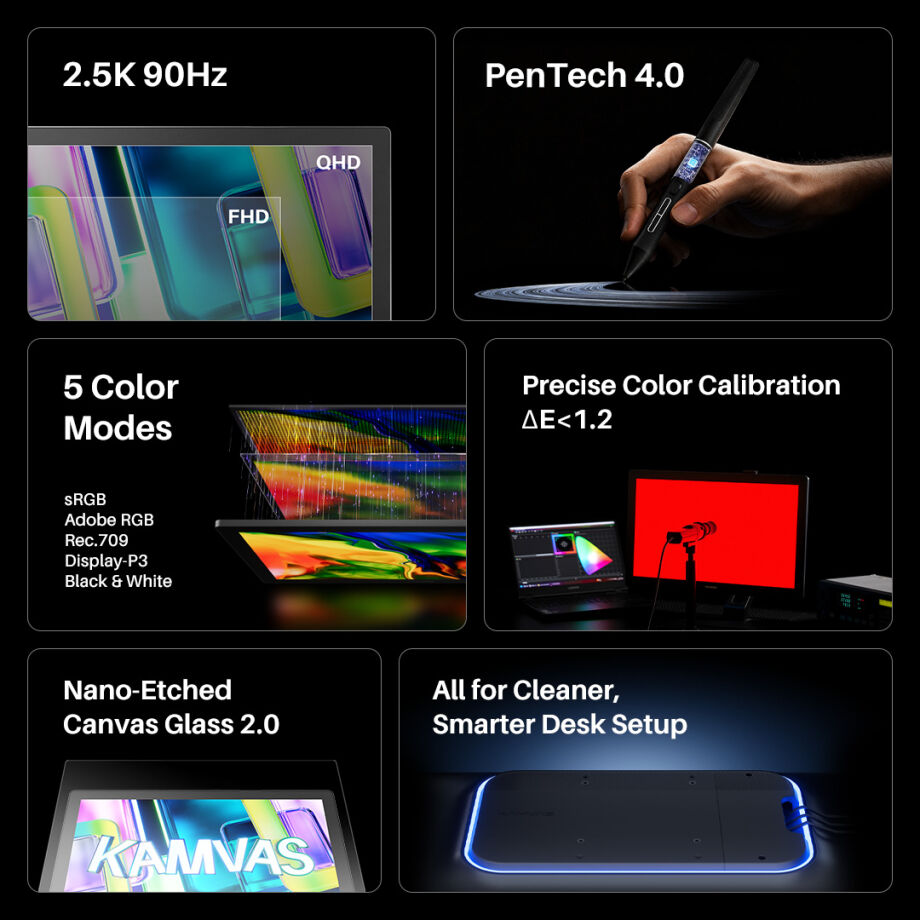
The Huion Kamvas 22 Gen 3 is a 21.5 inch creative pen display launched on March 3, 2026, as the successor to the earlier Kamvas 22 and Kamvas 22 Plus. Its major upgrades include a 2560 × 1440 QHD display, 90Hz refresh rate, PenTech 4.0 stylus technology, 16,384 pressure levels, full lamination, Canvas Glass 2.0, factory colour calibration and multiple professional colour modes.
Huion also increased pixel density from 102 PPI on its Full HD predecessors to 137 PPI, giving artists more usable workspace and sharper interface elements on roughly the same screen size. The combination of QHD resolution and 90Hz motion addresses two common limitations of older affordable 21 to 22 inch pen displays, which were often restricted to Full HD and 60Hz.
Huion lists the Kamvas 22 Gen 3 at a regular US price of $599, although actual pricing varies by region and promotion. In August 2026, Huion’s US pen display collection showed a discounted price of around $569, while a recent Amazon promotion reported by Creative Bloq reduced it to $539. Because those discounts can change, the $599 MSRP remains the more reliable figure for judging its long term market position. That pricing places the display between inexpensive Full HD drawing tablets and substantially more expensive professional alternatives.
For digital artists, illustrators, animators, 3D sculptors and video editors, the Kamvas 22 Gen 3 offers a large drawing surface that can also function as an additional computer monitor without reaching the four figure prices associated with some premium pen displays. Artists moving from a screenless graphics tablet or a smaller 12 to 16 inch display gain considerably more working space, while Kamvas 22 Plus owners benefit from the sharper QHD panel, 90Hz refresh rate and newer pen technology.
Independent Testing and Buying Considerations
Independent testing supports that mid range positioning. Creative Bloq gave the Kamvas 22 Gen 3 an 8/10 score, praising its sharp QHD screen, responsive pen experience and comparatively premium construction while identifying the lack of touch input and an included shortcut remote as disadvantages. In a later August 2026 article, the same reviewer noted that the display remained part of their daily setup after testing, with the spacious 21.5 inch workspace proving particularly useful in applications such as Photoshop.
The value proposition still depends on the user’s priorities. The Kamvas 22 Gen 3 is not a standalone tablet and requires connection to a computer, while touch input and built in shortcut keys are absent. Its 8 bit, 250 nit panel is also not designed for HDR focused work, and the 3.6kg weight makes it better suited to a permanent desk setup than frequent travel. Users who need 4K resolution, touch gestures, very high brightness, professional HDR monitoring or strong portability will need to consider other options.
At its $599 MSRP, the Huion Kamvas 22 Gen 3 is best understood as a feature rich mid range pen display rather than a budget entry level model. Its strongest qualities are the large QHD workspace, smoother 90Hz presentation, newer PenTech 4.0 stylus system and improved colour handling, making it a compelling option for creators who want a substantial desktop drawing display without moving into much more expensive professional territory.

Huion Kamvas 22 Gen 3 Display, PenTech 4.0, Color Accuracy and Price
The Huion Kamvas 22 Gen 3 uses a 21.5 inch IPS panel with a 2560 × 1440 QHD resolution and a 16:9 aspect ratio. Huion also markets the resolution as 2.5K. Compared with a 1920 × 1080 display, it provides approximately 78 percent more pixels and raises pixel density from roughly 102 PPI to 137 PPI.
That gives artists sharper line work, clearer interface text and more room for layers, toolbars, timelines, references and the artwork itself. QHD does not reach the fine detail of a 4K panel, but it offers a substantial improvement over 1080p without demanding as much graphics performance or interface scaling. Creative Bloq found the screen noticeably crisp during testing, with both text and drawn lines avoiding the softness that can appear on larger Full HD pen displays.
The main display specifications include:
- Refresh rate: 90Hz
- Typical brightness: 250 nits
- Contrast ratio: 1000:1
- Response time: 14ms
- Color depth: 16.7 million colors on an 8 bit panel
- Active drawing area: Approximately 475.4 × 267.4mm
The 90Hz refresh rate allows the panel to update up to 90 times each second, compared with 60 times on many traditional drawing displays. This can make cursor movement, canvas navigation, zooming and rapid strokes appear smoother, with Huion claiming up to a 50 percent improvement in display smoothness and line rendering speed compared with 60Hz models. The refresh rate should not be confused with the stylus report rate, which Huion specifies at more than 260 PPS. Both contribute to responsiveness, but real world latency also depends on the connected computer, operating system, creative software, brush settings and project complexity.
Color Performance, Calibration and Canvas Glass
Color performance is another major part of the display. Huion specifies a gamut volume above 130 percent sRGB and provides calibrated modes covering 99 percent sRGB, 99 percent Rec.709, 90 percent Adobe RGB and 94 percent Display P3, alongside a black and white viewing mode. Each unit is factory calibrated to an advertised average Delta E below 1.2 and ships with an individual calibration report. Creative Bloq measured a Delta E of approximately 0.90 on its review unit, while Digital Camera World considered the screen suitable for a broad range of photography and creative work.
The sRGB and Rec.709 modes are well suited to illustration, web graphics, standard video work and general digital content, while Display P3 provides broader coverage for modern wide gamut workflows. The 90 percent Adobe RGB figure may be less suitable for print specialists who need near complete Adobe RGB coverage, and professionals doing color critical work should still perform their own calibration because some variation between individual displays is possible. The 250 nit brightness and 8 bit color depth also make it clear that the Kamvas 22 Gen 3 is intended for drawing, editing, photography and general creative production rather than professional HDR mastering.
The panel uses fully laminated Canvas Glass 2.0 with a nano etched anti glare surface. Full lamination reduces the apparent gap between the stylus tip and the pixels beneath it, helping the cursor feel more directly connected to the pen. The etched surface adds friction intended to produce a more natural drawing sensation, while Huion says the revised glass also reduces the sparkle effect that can appear on heavily textured anti glare displays.
PenTech 4.0 Stylus and Tilt Recognition
Pen input comes from the battery free PW600L stylus using PenTech 4.0. It supports 16,384 pressure levels, compared with the 8,192 levels of the PW517 bundled with the Kamvas 22 Plus. Compatible creative applications can translate that pressure into changes in line width, opacity, brush size or sculpting intensity. The larger pressure figure does not mean the pen will automatically feel twice as precise in normal use, since initial activation force, pressure curves, brush settings, cursor alignment and artist technique remain equally important. PenTech 4.0 also reduces tip movement and improves alignment when the stylus is tilted, which may be more noticeable during light strokes and gradual tapers.
Additional pen specifications include:
- Initial activation: Low force requirement
- Maximum pressure adjustment: Approximately 200g to 500g
- Tilt recognition: ±60 degrees
- Pen resolution: 5080 LPI
- Report rate: Above 260 PPS
- Center accuracy: ±0.3mm
- Side controls: Three programmable buttons
Tilt recognition allows compatible brushes to respond to the angle of the stylus, making effects such as pencil shading and angled brush strokes feel more natural. The three programmable controls can also be assigned to commonly used commands through Huion’s driver.
Physical Design, Stand, Mounting and Price
The complete display measures approximately 527.7 × 324.7mm and weighs 3.6kg with the included stand. Thickness varies from about 16 to 36.7mm depending on the section measured. The preinstalled stand adjusts between 20 and 80 degrees, while a standard 100 × 100mm VESA mounting pattern allows the display to be attached to compatible monitor arms or third party stands.
Huion lists the Kamvas 22 Gen 3 at a regular US price of $599, although promotional pricing can reduce the actual street price. At that standard price, it combines a large QHD laminated drawing surface, smoother 90Hz presentation, PenTech 4.0 input, factory calibrated color modes and flexible mounting options for considerably less than several premium large format alternatives.

Huion Kamvas 22 Gen 3 for Digital Art, Animation, 3D Modeling and Video Editing
The Huion Kamvas 22 Gen 3 is particularly well suited to digital art and illustration because its 21.5 inch active workspace, QHD resolution, full lamination and PenTech 4.0 stylus give artists a large surface for drawing directly over the image. At roughly 137 PPI, the screen provides significantly more working space and sharper detail than a comparable 1080p 22 inch display, making it easier to keep palettes, layers, references and artwork visible at the same time. For comics, concept art, digital painting and detailed line work, the combination of 16,384 pressure levels and ±60 degree tilt support can improve control over ink brushes, pencils, airbrushes and textured painting tools when the software supports those inputs.
The display also suits 2D animation because animation software benefits from both drawing space and smooth interface feedback. QHD resolution gives artists more room for the canvas, timeline, layer controls and reference windows, while the 90Hz refresh rate makes cursor movement, timeline scrubbing and canvas navigation appear smoother than on a conventional 60Hz panel. It does not increase the frame rate of the animation itself, but it can make the working experience feel more responsive. Pressure sensitivity is equally useful for frame by frame work where expressive strokes and variable line weight matter.
The main workflow limitation for illustration and animation is the lack of built in shortcut buttons or an included shortcut controller. Artists who frequently use undo, brush size changes, canvas rotation, modifier keys and similar commands may therefore want to keep a keyboard or separate remote nearby. The Kamvas 22 Gen 3 also has no internal computing hardware, so rendering, playback, onion skinning, compositing and complex animation performance depend entirely on the connected Windows, Mac or compatible Android device.
3D Modeling, Video Editing, and Color Precision
For 3D modelling and sculpting, the Kamvas 22 Gen 3 works best as a direct manipulation surface rather than as a graphics workstation. Pressure sensitive input can make sculpting, texture painting, masking and similar tasks feel more natural than using a mouse, while the 21.5 inch QHD screen leaves useful space for a 3D viewport, brushes, materials and object hierarchies. The higher resolution also makes smaller topology and surface details easier to inspect than on a 1080p display of similar size. However, Blender, Maya, ZBrush and other 3D applications still rely on the host computer for viewport performance, rendering and simulations because the Kamvas itself contains no CPU or discrete GPU.
Video editing is another practical use case, particularly for editors who perform masking, rotoscoping, frame by frame retouching or graphics work. Digital Camera World found photo and video editing on the display comfortable and intuitive, especially when making precise adjustments directly over the image. Its 99 percent Rec.709 mode is useful for mainstream SDR video workflows, while the QHD resolution provides enough room for timelines and editing controls. The 90Hz refresh rate can make interface movement and timeline navigation smoother, although it has no effect on the frame rate of the final exported video.
Colour performance is strong enough for a wide range of creative work, with factory calibration targeting an average Delta E below 1.2 and an individual calibration report included with each unit. The calibrated Rec.709 mode makes the display useful for standard video editing, while its broader gamut modes also support illustration, photography and general content creation. However, the 250 nit brightness, 8 bit panel and lack of a professional HDR reference specification mean the Kamvas 22 Gen 3 should not replace a dedicated mastering monitor for high end colour critical work. Editors can comfortably use it for cutting, masking, graphics and Rec.709 oriented production while relying on a specialist calibrated display for final HDR or broadcast approval when necessary.
Huion Kamvas 22 Gen 3 Compatibility, Setup and Comparison With Kamvas 22 Plus, Wacom and XP Pen
Huion officially supports Windows 7 or later, macOS 10.15 or later, and compatible Android devices running Android 6.0 or later. Support depends on the available ports and current driver requirements, so users with older operating systems should check Huion’s latest specifications before purchasing.
The Kamvas 22 Gen 3 supports two main connection methods:
- USB C: A full-featured USB C to USB C cable carries the video signal and pen data, while the display uses a separate power connection. The host port must support USB 3.1 Gen 1 and DisplayPort 1.2 Alt Mode.
- HDMI and USB: Computers without compatible USB C video output can use HDMI for the display signal, USB A to USB C for pen data, and the external power connection.
A full-featured USB C cable is included. The rear of the display also has a recessed cable area and cover panel that help organize the USB, HDMI, and power connections on a permanent desk setup.
Android compatibility requires a device with suitable USB C video output. The phone or tablet generally cannot provide enough power for the display, so the Kamvas still needs its external power supply. Huion recommends devices with desktop interfaces such as Samsung DeX because a standard mirrored phone layout can be difficult to use on a 21.5-inch screen. The Kamvas 22 Gen 3 is not a standalone Android tablet and must remain connected to another device running the creative software.
The adjustable stand arrives preinstalled and supports angles from approximately 20 to 80 degrees. This allows users to work at a lower drawing angle or position the display more upright for editing. A 100 × 100mm VESA mount is also available for compatible monitor arms.
After connecting the display, users should install Huion’s current driver, calibrate the cursor, adjust pen pressure, and assign the stylus buttons. Driver and firmware updates are available through Huion’s support system.
Kamvas 22 Gen 3 vs Kamvas 22 Plus
Compared with the Kamvas 22 Plus, the Gen 3 provides several important upgrades:
- Resolution increases from 1920 × 1080 to 2560 × 1440.
- Pixel density rises from approximately 102 PPI to 137 PPI.
- Refresh rate increases from 60Hz to 90Hz.
- The PW517 PenTech 3.0 stylus is replaced by the PW600L PenTech 4.0 pen.
- Pressure sensitivity increases from 8,192 to 16,384 levels.
- Weight decreases from approximately 3.9kg with the stand to 3.6kg.
The higher resolution provides more workspace and sharper interface elements, while the 90Hz refresh rate and updated pen system improve visual and input responsiveness. However, the Gen 3 is not superior in every display specification. The Kamvas 22 Plus was advertised with a 140% sRGB gamut volume and a 1200:1 contrast ratio, compared with more than 130% sRGB and a 1000:1 contrast ratio on the Gen 3.
The newer model instead emphasizes structured color management. It has a factory Delta E below 1.2 and calibrated modes for sRGB, Rec.709, Adobe RGB, and Display P3. Its main advantages over the Kamvas 22 Plus are therefore resolution, refresh rate, pen technology, and calibrated color modes rather than a wider advertised gamut or higher contrast.
Wacom and XP Pen Competitor Comparison
The current Wacom Cintiq 24 is a larger premium alternative. Wacom lists it at $1,299.95 in the United States, compared with the Kamvas 22 Gen 3’s regular price of $599. It has a 23.8-inch 2560 × 1440 display, bonded etched glass, and the Wacom Pro Pen 3 with 8,192 pressure levels. The Huion delivers the same QHD resolution class at less than half the listed price, although the products differ in size, pen ecosystem, and market positioning.
Wacom also offers the Cintiq 24 Touch for $1,499.95. Its 10-finger touch support allows two-handed zooming, rotation, and panning, which the Kamvas 22 Gen 3 does not provide. Artists who rely heavily on touch gestures may therefore find the more expensive Wacom model better suited to their workflow.
The XP Pen Artist Pro 22 Gen 2 is a closer specification rival. It has a 21.5-inch 2560 × 1440 fully laminated display, 16,384 pressure levels, 99% sRGB, 99% Adobe RGB, and 94% Display P3 coverage. It is also Calman verified with a Delta E below 1 and includes an ACK05 wireless shortcut remote. Its main disadvantage is the 60Hz refresh rate, compared with 90Hz on the Huion.
The best choice depends on the user’s priorities. The Huion Kamvas 22 Gen 3 combines QHD resolution, a 90Hz refresh rate, updated pen technology, and strong overall value. The XP Pen offers wider specified Adobe RGB coverage and an included shortcut controller, while the Wacom Cintiq 24 provides a larger premium alternative with optional touch support at a substantially higher price.

Frequently Asked Questions (FAQs)
- Is the Huion Kamvas 22 Gen 3 a standalone tablet? No. It requires a Windows PC, Mac or compatible Android device to function. The Kamvas 22 Gen 3 is a pen display rather than a self contained drawing tablet, meaning it does not have its own operating system, processor or internal computer for running creative applications. Your drawing software runs on the connected device, while the Kamvas serves as the display and pen input surface.
- Does the Huion Kamvas 22 Gen 3 support touch? No. Huion does not list finger touch support for the Kamvas 22 Gen 3. This means gestures such as pinch to zoom, two finger rotation and touch based panning are unavailable. These actions instead need to be performed using the pen, keyboard shortcuts, controls within the creative application or an optional shortcut controller.
- Is the Huion Kamvas 22 Gen 3 4K? No. The display has a native resolution of 2560 × 1440 QHD, which is commonly marketed as 2.5K rather than 4K. On its 21.5 inch screen, this works out to approximately 137 PPI, providing more detail and workspace than a comparable Full HD display without reaching the pixel density of a 4K panel.
- Does the Huion Kamvas 22 Gen 3 have 16,384 pressure levels? Yes. The included PW600L PenTech 4.0 stylus supports 16,384 pressure levels, allowing compatible creative software to respond to subtle differences in how firmly the pen is pressed against the screen. It also supports ±60 degree tilt, which can be used by compatible brushes and applications to produce more natural drawing and shading effects.
- Does the Huion Kamvas 22 Gen 3 work with a Mac? Yes. Huion provides macOS support for the Kamvas 22 Gen 3, allowing it to be used with compatible Mac computers after the required driver is installed. However, users should check Huion’s latest driver compatibility information for their exact macOS version before buying the display or installing a major operating system update.
- Can the Huion Kamvas 22 Gen 3 connect to Android? Yes, provided the Android device has compatible USB C video output. The Kamvas still needs an external power source because the Android connection alone does not remove its power requirement. Huion recommends phones that support a desktop mode for a more practical experience, since this provides an interface better suited to working on a large external pen display.
- Does the Huion Kamvas 22 Gen 3 include an adjustable stand? Yes. An adjustable stand is preinstalled and allows the display angle to be set between 20 and 80 degrees, giving users flexibility to choose a comfortable drawing or viewing position. The Kamvas 22 Gen 3 also supports 100 × 100mm VESA mounting for users who prefer to attach the display to a compatible monitor arm or alternative stand.
- Can the Huion Kamvas 22 Gen 3 use one USB-C cable? A full featured USB C connection can carry the display and data signals between the Kamvas 22 Gen 3 and a compatible computer or device, reducing the number of connection cables needed for those functions. However, the pen display still requires power, and the USB C port on the connected device must support the necessary video output standard for the connection to work properly.
- Is the Huion Kamvas 22 Gen 3 good for professional video editing? It can be useful for professional editing tasks where direct pen control is valuable, including masking, retouching and other precise adjustments. Its display is also suitable for SDR workflows based around Rec.709, but the 250 nit brightness and 8 bit panel mean it should not be treated as a replacement for a dedicated HDR reference monitor when performing high end HDR mastering or critical finishing work.
- Is the Huion Kamvas 22 Gen 3 better than the Kamvas 22 Plus? For most new buyers, the Kamvas 22 Gen 3 offers the stronger overall specification. It upgrades the display from Full HD to QHD, increases the refresh rate to 90Hz and introduces PenTech 4.0 with 16,384 pressure levels. However, the older Kamvas 22 Plus still offers competitive colour gamut and contrast specifications, so existing owners who are satisfied with its 1080p resolution may not gain enough from these improvements to justify upgrading.
Conclusion
The Huion Kamvas 22 Gen 3 is one of the clearest examples of how mid-range pen displays have improved in 2026. Its 21.5-inch QHD screen solves the pixel-density limitations associated with older Full HD 22-inch models, while 90Hz refresh provides noticeably smoother movement without forcing users into the premium prices associated with many 120Hz, 165Hz or 4K professional displays.
PenTech 4.0, 16,384 pressure levels, ±60-degree tilt, full lamination and Canvas Glass 2.0 give illustrators and painters a capable drawing experience. Factory calibration, 99% sRGB, 99% Rec.709, 90% Adobe RGB and 94% Display P3 modes expand its usefulness beyond illustration into photography, animation, video editing and design.
The limitations are easy to identify: there is no touch input, no built-in shortcut-key bank, no bundled shortcut remote, no standalone computing capability and no professional HDR-oriented display specification. Its large physical footprint also makes it unsuitable for creators who move between locations frequently.
At its $599 regular US price, and especially when discounted below that level, the Huion Kamvas 22 Gen 3 offers a particularly strong balance of size, resolution, refresh rate, pen performance and colour accuracy. It is best for creators who prioritise a spacious desktop canvas and direct pen input over portability, touch gestures and ultra-premium display specifications.
Sources and citations
- XP-Pen — Artist Pro 22 (Gen 2) Official Store/Specifications: The store listing additionally confirms the 60Hz refresh rate, 2560×1440 resolution, 99% sRGB, 99% Adobe RGB and 94% Display P3 coverage, 16,384 pressure levels, USB-C/HDMI connections and included Wireless Shortcut Remote with Bluetooth receiver. (XP-Pen)
XP-Pen Artist Pro 22 Gen 2 Store and Full Specifications - Huion — Kamvas 22 (Gen 3) Official Product Page: This is the primary specification source for the 21.5-inch QHD 2560×1440 display, 90Hz IPS panel, 250-nit brightness, 8-bit/16.7-million-color output, PenTech 4.0 PW600L stylus, 16,384 pressure levels, 527.7 × 324.7 × 16–36.7 mm dimensions, 3.6 kg weight, HDMI and USB-C connectivity. (Huion)
Huion Kamvas 22 (Gen 3) Official Product Page - Huion Support — Kamvas 22 (Gen 3) FAQs: Huion’s support documentation covers the improvements over the Kamvas 22 and Kamvas 22 Plus, including the move from FHD to QHD, 90Hz refresh rate, PenTech 4.0, 16,384 pressure levels, ΔE <1.2 factory calibration, sRGB/Adobe RGB/Rec.709/Display P3 modes and Canvas Glass 2.0. It also covers USB-C and HDMI setup, Android connections, the 100×100 mm VESA mount, included stand and OS compatibility. (HUION)
Huion Kamvas 22 Gen 3 FAQs - Huion — “Huion Sets New 22-Inch Industry Benchmark with Launch of Kamvas 22 (Gen 3),” March 3, 2026: This is Huion’s official launch announcement. It confirms the March 3, 2026 launch, describes the model as its next-generation 21.5-inch pen display and explicitly positions it as the successor to the Kamvas 22 and Kamvas 22 Plus. (Huion)
Huion Sets New 22-Inch Industry Benchmark with Launch of Kamvas 22 Gen 3 - Creative Bloq — “Huion Kamvas 22 (Gen 3) review: redefines what we can expect from a mid-range drawing display,” March 3, 2026: The hands-on review praises the sharp 2.5K screen, 90Hz responsiveness, PenTech 4.0 drawing experience, metal construction, built-in adjustable stand and etched laminated glass. It also identifies important compromises, particularly no touch support, no built-in shortcut keys and no included Quick Key remote. (Creative Bloq)
Creative Bloq Kamvas 22 Gen 3 Review - Creative Bloq — “A drawing tablet I use every day just got a $60 discount,” August 11, 2026: This is the later real-world follow-up from Ian Dean. He says the Kamvas 22 Gen 3 remained on his desk for daily use as both a drawing tablet and second monitor, highlighting its spacious 21.5-inch QHD screen, fluid 90Hz performance, metal body and etched glass while again noting the lack of touch controls and an included shortcut remote. (Creative Bloq)
Creative Bloq August 2026 Kamvas 22 Gen 3 Follow-Up - Digital Camera World — “Huion Kamvas 22 (Gen 3) review: a large pen display that won’t break the bank”: This independent hands-on review assesses the tablet for photo editing, video editing, illustration, 3D work and other larger creative workflows. Reviewer James Abbott found photo and video editing comfortable and intuitive and described the pen response as smooth thanks to the 90Hz display and 16,384 pressure levels. The review also discusses its large desk footprint, 3.6 kg weight, colour performance and lack of an included controller. (Digital Camera World)
Digital Camera World Huion Kamvas 22 Gen 3 Review - Huion — Kamvas 22 Plus Official Specifications: Huion’s official predecessor page confirms the generational comparison figures: 21.5-inch 1920×1080 Full HD display, 140% sRGB colour gamut volume, 1200:1 contrast ratio, up to 250 cd/m² brightness, 8,192 pressure levels and 3.9 kg weight with stand. This makes the Gen 3’s jump to QHD, 90Hz and 16,384 pressure levels particularly clear. (Huion)
Huion Kamvas 22 Plus Official Specifications - Wacom — Cintiq 24 Official Store: Wacom lists the current Cintiq 24 with a 23.8-inch 2560×1440 2.5K display, etched anti-glare glass, Pro Pen 3 with 8,192 pressure levels, 100% sRGB coverage, 12 ms response time, VESA support and adjustable stand. The U.S. store currently lists it at $1,299.95, making it useful as the premium comparison. (Wacom eStore)
Wacom Cintiq 24 Official Store - Wacom — Cintiq 24 Touch Official Store: The Touch version adds 10-finger multi-touch controls to the 23.8-inch 2.5K Cintiq configuration. Wacom’s U.S. store currently lists the Cintiq 24 Touch at $1,499.95. (Wacom eStore)
Wacom Cintiq 24 Touch Official Store - XP-Pen — Artist Pro 22 (Gen 2) Official Product Page: XP-Pen confirms the competing model’s 21.5-inch 2560×1440 QHD display, Calman verification, 99% Adobe RGB coverage, ΔE <1 colour accuracy, X3 Pro stylus with 16,384 pressure levels and ACK05 Shortcut Remote. (XP-Pen)
XP-Pen Artist Pro 22 Gen 2 Official Product Page
Recommended
- Best Jackdaw Upgrades In Assassin’s Creed Black Flag Resynced
- Blender Smooth Hair Curves Geometry Nodes Preset
- How to Create Metahuman Child Characters and Convert MakeHuman Models to Metahuman in Unreal Engine 5
- Best Cameras for Faceware Studio, Live, Analyzer & Retargeter – Budget to Pro Guide
- Castlevania: Belmont’s Curse Is Not a Roguelike, Konami Confirms
- Naughty Dog’s State of Play No-Show Sparks Concern as Fans Fear Intergalactic: The Heretic Prophet Is Still Years Away From Release
- Final Fantasy Resonance Pixel Trailer Showcases Stunning HD-2D Art Ahead of Its October 2026 Release
- Mina The Hollower Combat Guide: 6 Essential Tips for Winning More Battles
- Palworld’s Official Card Game Presents First Booster Pack Dawn of Palpagos Ahead of July 30 Release



































































































