







In This Article (14 sections)
OpenAI ChatGPT for Teens and How It Works
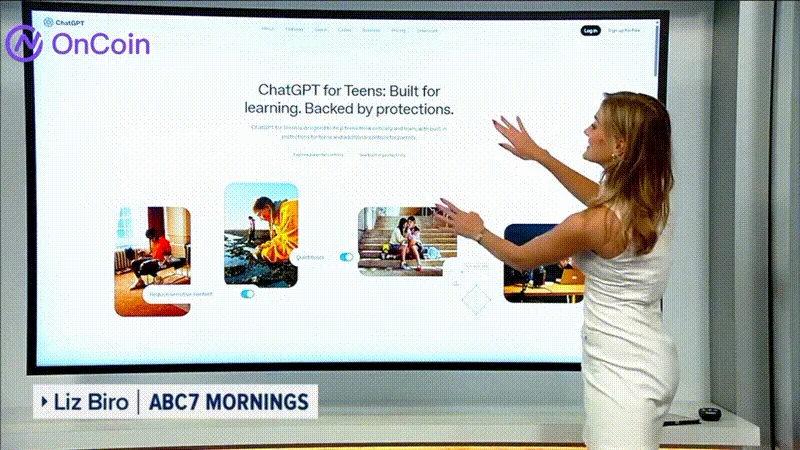
OpenAI ChatGPT for Teens is an age appropriate ChatGPT experience created primarily for users aged 13 to 17. Rather than operating as a completely separate chatbot, it uses the same general purpose conversational technology as ChatGPT while applying additional protections and product behavior for users under 18. These additions include age prediction routing, teen specific onboarding, quiet hours, study focused tools, balanced use reminders, sensitive content safeguards and optional parental controls. OpenAI describes it as the same capable ChatGPT adapted to support learning, creativity and everyday life with stronger protections.
The experience is not limited to completing homework. Teens can use ChatGPT to explain difficult concepts, brainstorm projects, practise skills, create quizzes, explore interests, organize ideas and work through problems. Learning features may include starter prompts, Study Mode, step by step guidance, follow up questions, knowledge checks and homework reminders that direct students toward understanding a subject rather than simply copying an answer.
ChatGPT may also remind teens that they are interacting with an artificial intelligence system, encourage them to take breaks during extended use and warn them to check images for private information before uploading them. These measures are intended to make the service useful without encouraging overreliance or presenting the model as a human friend, teacher or authority.
OpenAI began rolling out the dedicated teen experience on August 18, 2026, for eligible users on free and paid personal ChatGPT plans. Availability is expanding globally, although the timing and individual features may vary by region. Eligible users do not need to download a separate application or manually activate the experience. An account may enter the teen experience based on its declared age, a verified age or OpenAI’s age prediction system. When age prediction indicates that an eligible account may belong to someone under 18, ChatGPT can automatically apply the additional safeguards, although some users may not immediately see every teen specific feature while the rollout continues.
The experience is intended to preserve access to learning, creativity and everyday assistance while providing stronger protections around sensitive subjects. However, it does not make ChatGPT infallible, replace parental guidance or turn the platform into a school approved academic source. Families and students should continue to verify important answers, protect personal information and involve qualified adults when dealing with medical, mental health, legal or safety concerns.
ChatGPT for Teens also does not change OpenAI’s minimum age requirements. A person must be at least 13, or meet the higher minimum age required in their country, to use the service. Users under 18 must also have permission from a parent or legal guardian. The teen experience should therefore be understood as a more protected version of ChatGPT for eligible adolescents, not as permission for children below the applicable minimum age to create accounts.
What Is OpenAI ChatGPT for Teens and How Does It Work?
OpenAI ChatGPT for Teens is an age appropriate ChatGPT experience designed primarily for users aged 13 to 17. Rather than operating as a completely separate chatbot or application, it uses the same general purpose conversational technology as ChatGPT while applying additional protections and product behavior for eligible users under 18. These additions include age prediction routing, teen specific onboarding, quiet hours, study focused tools, balanced use reminders, sensitive content safeguards and optional parental controls. OpenAI describes the experience as the same capable ChatGPT adapted to support learning, creativity and everyday life with stronger protections for younger users.
OpenAI began rolling out the dedicated teen experience on August 18, 2026, across eligible free and paid personal ChatGPT plans. The rollout is global, although availability and access to individual features can vary by region and may develop in stages. Eligible users do not need to download a separate application or manually activate the experience. An account may be placed in the teen experience based on the age declared by the user, a verified age or OpenAI’s age prediction system. When age prediction indicates that an eligible account may belong to someone under 18, ChatGPT can automatically apply the additional teen protections.
The experience is designed to preserve access to learning, creativity and everyday assistance rather than limiting ChatGPT to homework. Teens can use it to explain difficult concepts, brainstorm projects, practise skills, create quizzes, explore interests, organise ideas and work through problems. Learning features may include starter prompts, Study Mode, step by step guidance, follow up questions, knowledge checks and homework reminders that encourage students to understand a subject instead of simply copying an answer.
ChatGPT may also remind teens that they are interacting with an artificial intelligence system, encourage breaks during extended sessions and warn them to check images for private information before uploading them. These measures are intended to make the product useful without encouraging overreliance or presenting the model as a human friend, teacher or unquestionable authority.
ChatGPT for Teens does not make the system infallible, replace parental guidance or turn its responses into school approved academic sources. Students and families still need to verify important information, protect personal details and involve qualified adults when dealing with medical, mental health, legal or safety concerns. The experience also does not change OpenAI’s minimum age requirements. A person must be at least 13, or meet the higher minimum age required in their country, to use the service, and anyone under 18 must have permission from a parent or legal guardian. ChatGPT for Teens should therefore be understood as a more protected experience for eligible adolescents, not as permission for children below the applicable minimum age to create accounts.
How ChatGPT for Teens Uses Age Prediction and Routes Under 18 Accounts
Age prediction routing is the process through which ChatGPT estimates whether an account may belong to someone under 18 and directs an eligible account into the teen experience. The word “routing” does not mean the account is transferred to another company or isolated in an entirely separate application. Instead, ChatGPT applies the product behavior, safeguards and feature limits considered appropriate for a teen account. OpenAI can use more than one source of age information, including the age associated with the account, an age established through verification or an estimate produced by the age prediction system. Age prediction functions as an additional safety check even when a date of birth was supplied during account creation.
This additional check matters because self declared dates can be wrong, incomplete or deliberately inaccurate. A user could enter an adult birth date despite being under 18, while an adult could accidentally enter incorrect information. Age prediction gives the platform another way to identify an account that may require stronger protections. According to OpenAI, the system can evaluate account linked signals such as the general topics discussed, the times of day the service is used, patterns concerning how and when the account is used and the length of time the account has existed. OpenAI identifies these as examples rather than a complete list of the signals that may be considered.
OpenAI has not publicly disclosed a precise formula, score threshold, model architecture or weighting for each signal. It would therefore be inaccurate to claim that one late night session, one homework question or one youthful topic automatically classifies an adult as a teen. The documented system considers different account linked signals, and the final estimate may reflect their combined pattern. The system may still classify an account as potentially belonging to someone under 18 even if a date of birth was previously entered because OpenAI characterizes prediction as an extra safety check. When the platform is uncertain, the company’s announced approach has generally been to favor the more protective under 18 experience.
Age prediction is different from checking a government identity document. Prediction estimates an age category from available account signals, while verification asks a third party provider to evaluate evidence such as a live selfie or government issued identification. Prediction is intended to apply safeguards without requiring every user to submit identity documents, while verification can correct a mistaken classification or satisfy requirements that apply in particular jurisdictions. This design creates an unavoidable accuracy tradeoff.
A system that aggressively detects possible teen users may place some adults into the protected experience, while a less cautious system could fail to identify teens who entered inaccurate information. OpenAI says it is monitoring the rollout and working to improve prediction accuracy over time, but it does not claim that the process is perfect.
When ChatGPT predicts that an eligible account may belong to someone under 18, it can automatically apply the ChatGPT for Teens experience without requiring the user to opt in. The account is not automatically suspended merely because the system predicts a younger age. The user can continue accessing ChatGPT for learning, creative work and everyday questions, but the service may handle sensitive topics more cautiously, reduce exposure to certain forms of content and limit some features or interactions.
Depending on availability and region, the experience can also include learning prompts, balanced use reminders and other age appropriate interface features. OpenAI also states that it will not display advertisements in an account placed in the teen experience through age prediction routing.
The reduced content areas documented by OpenAI include graphic violence or gore, risky viral challenges, sexual or romantic roleplay, violent roleplay, extreme beauty standards, unhealthy dieting and body shaming. These protections do not mean that every legitimate discussion of violence, relationships, health or body image is prohibited. A teen may still need factual information for education, personal safety or support. The intended difference is that ChatGPT should respond in a safer, developmentally appropriate manner and avoid encouraging harmful conduct.
Reduce Sensitive Content is enabled by default while teen protections apply, and the teen cannot independently turn off the setting. A linked parent or guardian may be able to manage that specific safeguard, but disabling it does not convert the account into a standard adult account. Other age based restrictions, product limits and safety systems can remain active. If an adult is routed into the teen experience by mistake, the adult can verify their age and request removal of the protections. If verification confirms that the account should remain in ChatGPT for Teens, the safeguards may remain active or be restored.
The routing decision is protective rather than conclusive proof of a person’s biological or legal age, and OpenAI acknowledges that age prediction can make mistakes. The process also involves personal data considerations because the estimate is based on signals associated with an account. OpenAI says users can raise questions or objections about the use of their data for age prediction by contacting its privacy team. An adult who does not want continued age prediction on the account can complete Persona verification, after which OpenAI states that it will no longer run age prediction on that account.
How Quiet Hours, Study Hours and Safety Protections Work in ChatGPT for Teens
Quiet Hours allow a linked parent or guardian to schedule periods when a teen cannot use ChatGPT, including ChatGPT Work. The feature is optional and has no scheduled hours by default. To configure it, the parent or guardian opens ChatGPT Settings, selects Parental controls and chooses the linked teen under Family members. The parent can then turn on Quiet Hours and select a start time and end time. More than one time block can be added, allowing a family to establish separate periods for sleep, school, meals or device free routines.
Quiet Hours must be managed through Settings and cannot be changed through an ordinary ChatGPT conversation. This restriction reduces the chance of a schedule being altered casually through a prompt. The teen also cannot change settings controlled by the linked parent or guardian while the accounts remain connected. Families should choose schedules that reflect the teen’s genuine needs rather than treating the feature as a universal substitute for discussion. An overnight block can discourage late night use, while a block during class hours may support a school’s device rules. Multiple blocks can protect different parts of the day.
Quiet Hours and Study Hours are both scheduling tools, but they serve different purposes. Quiet Hours restrict access, while Study Hours guide the learning experience. When a scheduled Quiet Hours period begins, the linked teen cannot use ChatGPT, including ChatGPT Work. Study Hours do not block access. Instead, eligible new conversations in the main ChatGPT experience begin in Study Mode during the scheduled period. Study Mode encourages active learning through guiding questions, hints, scaffolding, knowledge checks and step by step reasoning.
According to OpenAI’s parental control documentation, Study Hours do not apply to GPT or Project conversations. They also do not force every existing chat to change immediately because some settings apply only to new conversations, allowing an existing conversation to continue with its earlier configuration. The distinction can be understood by asking two questions: Quiet Hours determine when ChatGPT should be unavailable, while Study Hours determine when new educational conversations should begin in a learning focused format. A family could therefore use Quiet Hours overnight and Study Hours during an afternoon homework period without creating a conflict.
Neither feature guarantees healthy technology habits on its own. Quiet Hours cannot govern every device or AI service, while Study Hours cannot ensure that every generated explanation is accurate. Their value comes from supporting clear household expectations and giving teens a more structured starting point for responsible use. Quiet Hours affect access rather than the style of ChatGPT’s answers, while Study Hours influence the educational format of eligible conversations without preventing the teen from using the service.
These scheduling tools form part of a broader set of protections within ChatGPT for Teens. The experience combines model behavior, product settings, content safeguards, reminders and optional family controls. OpenAI’s Under 18 Principles state that the model should prioritize teen safety, encourage real world support, treat teens in a developmentally appropriate manner and remain transparent about expectations. The principles are intended for users aged 13 to 17 and were developed with input from external experts.
The model is instructed to take additional care in higher risk areas such as self harm and suicide, sexualized or romantic roleplay, explicit or graphic content, dangerous activities, harmful substances, body image, disordered eating and requests to keep unsafe behavior secret. The goal is not merely to refuse content. Where appropriate, ChatGPT should redirect the conversation, provide safer information and encourage the teen to involve a trusted person or qualified professional.
Product protections include Reduce Sensitive Content, which is enabled by default for teen accounts. ChatGPT for Teens may also provide break reminders, cues identifying ChatGPT as an AI system, privacy reminders before some image uploads and learning focused prompts. Optional parental controls allow a linked adult to manage selected settings. Depending on current availability, these controls can include sensitive content reduction, model training participation, saved memory references, Voice Mode, image generation, Study Mode, Study Hours, Quiet Hours and certain ChatGPT Work capabilities. Enabling or managing one of these features does not remove the safety rules that otherwise apply to the teen account.
There are also policy level protections. OpenAI prohibits the exploitation, endangerment, grooming and sexualization of minors. These rules apply beyond the teen interface and form part of the company’s broader usage policies. However, the combined protections cannot eliminate every risk. Language models can misunderstand context, provide incorrect information or respond inconsistently. Safeguards may miss a concern, and a teen may encounter unsafe material elsewhere. ChatGPT for Teens should therefore be treated as one layer in a broader system that includes digital literacy, family communication, school policies and access to human support.
How ChatGPT for Teens Uses Age Prediction and Applies Under 18 Protections
Age prediction routing is the process through which ChatGPT estimates whether an account may belong to someone under 18 and directs an eligible account into the teen experience. Routing does not mean that the account is transferred to another company or isolated in a separate application. It means ChatGPT applies the product behavior, safeguards and feature limits considered appropriate for a teen account. OpenAI can use several sources of age information, including the age associated with the account, an age established through verification or an estimate produced by its age prediction system.
Age prediction acts as an additional safety check even when a date of birth was supplied during account creation, since self declared dates can be incorrect, incomplete or deliberately inaccurate. A user could enter an adult birth date despite being under 18, while an adult could accidentally provide incorrect information.
OpenAI’s age prediction system evaluates signals associated with an account to estimate whether the user may be under 18. According to OpenAI, examples can include the general topics discussed, the times of day the service is used, patterns involving how and when the account is used and the length of time the account has existed. These are examples rather than a complete list. OpenAI has not publicly disclosed the precise formula, score threshold, model architecture or weighting assigned to each signal.
It would therefore be inaccurate to claim that one late night session, one homework question or one youthful topic automatically causes an adult to be classified as a teen. The documented system considers different account signals, and its estimate may be based on their combined pattern.
Age prediction is different from checking a government identity document. Prediction estimates an age category using available account signals, while verification asks a third party provider to evaluate evidence such as a live selfie or government issued identification. Prediction allows ChatGPT to apply safeguards without requiring every user to submit identity documents, while verification can correct a mistaken classification or satisfy requirements that apply in particular jurisdictions. The system may classify an account as potentially belonging to someone under 18 even when a date of birth was previously entered because OpenAI describes prediction as an extra safety check. When the platform is uncertain, the company’s announced approach has generally been to apply the more protective under 18 experience.
This cautious design creates an unavoidable accuracy tradeoff. A system that actively attempts to identify possible teen users may place some adults into the protected experience, while a less cautious system could fail to identify teens who entered inaccurate information. OpenAI acknowledges that age prediction can make mistakes and says it is monitoring the rollout while working to improve accuracy over time. The routing decision is therefore a protective estimate rather than conclusive proof of a person’s biological or legal age.
When ChatGPT predicts that an eligible account may belong to someone under 18, it can automatically apply ChatGPT for Teens without requiring the user to opt in. The account is not automatically suspended and remains available for learning, creative work and everyday questions. Depending on availability and region, ChatGPT may handle sensitive subjects more cautiously, reduce exposure to certain content and limit some features or interactions. The teen experience can also provide learning prompts, balanced use reminders and other age appropriate interface features. OpenAI states that advertisements will not be displayed in an account placed in the teen experience through age prediction.
The sensitive content areas identified by OpenAI include graphic violence or gore, risky viral challenges, sexual or romantic roleplay, violent roleplay, extreme beauty standards, unhealthy dieting and body shaming. These protections do not prohibit every legitimate discussion involving violence, relationships, health or body image. A teen may still need factual information for education, safety or personal support. The intended difference is that ChatGPT should respond in a safer and developmentally appropriate way without encouraging harmful conduct.
Reduce Sensitive Content is enabled by default while the teen protections apply, and the teen cannot independently turn it off. When the account is linked to a parent or guardian, the adult may be able to manage that particular safeguard. Disabling it does not convert the account into a standard adult account because other age based restrictions, product limits and safety systems may remain active. An adult who is incorrectly routed into ChatGPT for Teens can complete age verification and request the removal of the protections. If verification confirms that the account should remain in the teen experience, the safeguards may remain active or be restored.
Age prediction also raises personal data considerations because the estimate is based on signals linked to an account. OpenAI says users can contact its privacy team with questions or objections concerning the use of their data for age prediction. An adult who does not want the system to continue running age prediction on the account can complete Persona verification. OpenAI states that it will stop running age prediction on the account after verification.
ChatGPT Quiet Hours, Study Hours, Parental Controls and Teen Safety Protections
Quiet Hours allow a linked parent or guardian to schedule periods when a teen cannot use ChatGPT, including ChatGPT Work. The feature is optional and does not have any scheduled restrictions by default. To configure it, the parent or guardian opens ChatGPT Settings, selects Parental controls, chooses the linked teen under Family members, turns on Quiet Hours and selects a start and end time. More than one time block can be added, allowing a family to establish separate periods for sleep, school, meals or device free routines.
Quiet Hours must be managed through Settings and cannot be changed through an ordinary ChatGPT conversation. This restriction reduces the likelihood that a schedule could be casually altered through a prompt. The teen also cannot change settings controlled by the linked parent or guardian while the accounts remain connected. Families can select schedules that match the teen’s actual needs rather than treating the feature as a universal substitute for communication. An overnight block can discourage late night use, while a block during class hours may support school device rules. Multiple blocks can protect different parts of the day.
Quiet Hours and Study Hours are both scheduling tools, but they serve different purposes. Quiet Hours restrict access, while Study Hours guide how the learning experience begins. During Quiet Hours, a linked teen cannot use ChatGPT or ChatGPT Work. During a scheduled Study Hours period, eligible new conversations in the main ChatGPT experience begin in Study Mode instead of being blocked. Study Mode encourages active learning through guiding questions, hints, scaffolding, knowledge checks and step by step reasoning.
According to OpenAI’s parental control documentation, Study Hours do not apply to GPT or Project conversations. They also do not force every existing chat to change immediately because some settings apply only to new conversations, allowing an existing conversation to continue under its previous configuration. Quiet Hours therefore answer the question, “When should ChatGPT be unavailable?” Study Hours answer the question, “When should new educational conversations begin in a learning focused format?” A family could schedule Quiet Hours overnight and use Study Hours during an afternoon homework period without creating a conflict.
Neither feature guarantees healthy technology habits by itself. Quiet Hours cannot control every device or artificial intelligence service, while Study Hours cannot guarantee that every generated explanation will be accurate. Their value comes from supporting clear household expectations and giving teens a more structured foundation for responsible use.
ChatGPT for Teens combines model behavior, product settings, content safeguards, reminders and optional family controls. OpenAI’s Under 18 Principles state that the model should prioritize teen safety, encourage real world support, respond in a developmentally appropriate manner and remain transparent about expectations. These principles are intended for users aged 13 to 17 and were developed with input from external experts.
The model is instructed to take additional care when responding to higher risk subjects such as self harm and suicide, sexualized or romantic roleplay, explicit or graphic material, dangerous activities, harmful substances, body image, disordered eating and requests to keep unsafe behavior secret. The intended response is not always a simple refusal. When appropriate, ChatGPT should redirect the conversation, offer safer information and encourage the teen to involve a trusted person or qualified professional.
Product safeguards include Reduce Sensitive Content, which is enabled by default for teen accounts. ChatGPT for Teens may also provide break reminders, notices identifying ChatGPT as an artificial intelligence system, privacy reminders before certain image uploads and prompts designed to encourage learning. Optional parental controls allow a linked adult to manage selected settings. Depending on current availability, these controls can include sensitive content reduction, participation in model training, saved memory references, Voice Mode, image generation, Study Mode, Study Hours, Quiet Hours and certain ChatGPT Work capabilities. Enabling a feature does not remove the safety rules that otherwise apply to the teen’s account.
OpenAI’s broader usage policies also prohibit the exploitation, endangerment, grooming and sexualization of minors. These rules extend beyond the teen interface and form part of the company’s general safety policies. However, the combined protections cannot eliminate every risk. Language models can misunderstand context, provide incorrect information or respond inconsistently, and safeguards may fail to recognize a concern. A teen may also encounter unsafe material through other services. ChatGPT for Teens should therefore be treated as one part of a broader safety system that includes digital literacy, family communication, school policies and access to support from real people.
How ChatGPT for Teens Handles Sensitive Content, Parental Controls, and Safety Notifications
ChatGPT for Teens handles sensitive content by applying stronger caution to areas that may be harmful or developmentally inappropriate. OpenAI specifically identifies graphic content, viral challenges, sexual or romantic roleplay, violent roleplay, extreme beauty ideals, unhealthy dieting, and body shaming as areas where exposure may be reduced. The approach is contextual because a request for a graphic violent fantasy scene is not the same as a student asking about a historical conflict, just as a request that promotes starvation is different from a teen asking how to find evidence based help for an eating disorder. The system is intended to distinguish harmful encouragement from legitimate education, safety information, or support.
For potentially dangerous requests, the model may decline to provide actionable instructions, redirect the user toward safer alternatives, or explain the risks in age appropriate terms. In conversations involving emotional distress, it may encourage the teen to contact a trusted adult, professional, or crisis resource. The Under 18 Principles emphasize real world support because an AI system cannot physically intervene, diagnose a condition, or replace a dependable human relationship.
The safeguards also address relational behavior by seeking to avoid sexualized roleplay, inappropriate romantic engagement, and requests that encourage a young user to hide unsafe behavior from trusted adults. This is important because conversational AI can appear socially responsive even though it has no feelings, genuine awareness, or personal relationship with the user.
Reduce Sensitive Content is only one part of the wider protection system. A linked parent may be able to turn off that particular setting, but doing so does not remove the account’s remaining teen protections or the policies that continue to apply. This distinction prevents families from assuming that one toggle controls the entire age appropriate experience.
Linking a parent or guardian account through ChatGPT parental controls does not give that adult access to the teen’s conversations, chat history, or real time activity. The controls are designed to manage selected settings and schedules rather than create a surveillance dashboard. A linked adult can configure the available features, but cannot open the teen’s transcripts through the parental control connection. This privacy boundary is significant because teens may use ChatGPT to explore sensitive questions, and automatic parental access to every message could discourage honest help seeking. However, privacy does not mean absolute secrecy.
OpenAI processes content and related account data under its privacy policy, enforces its usage rules, and may issue limited safety notifications in specified high risk circumstances. A parent can also discuss responsible AI use with the teen and ask the teen to share a conversation voluntarily, but complete transcript access is not a standard power given to the linked adult.
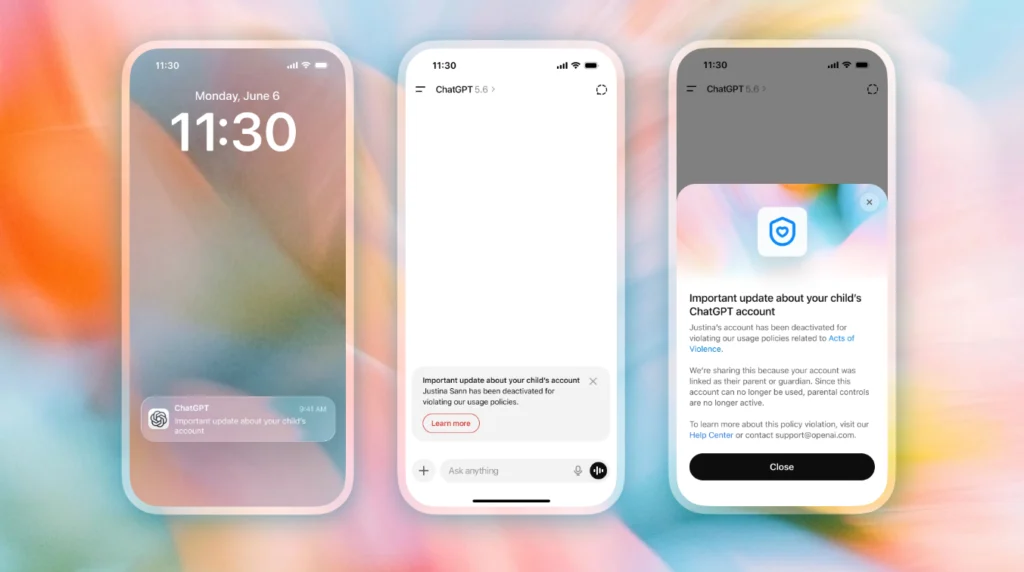
ChatGPT teen safety notifications are alerts that may be sent to a linked parent or guardian in limited situations involving a serious concern. They are enabled by default when the adult and teen link their accounts. OpenAI’s documentation identifies two examples: a notification may be sent after specially trained reviewers identify a serious self harm concern, or when the teen’s account is deactivated because of conversations relating to acts of violence under OpenAI’s usage policies. OpenAI has also announced work on notifications related to eating disorders, although the availability and scope may depend on the rollout status.
Serious self harm concerns are reviewed by specially trained reviewers before a notification is sent, although review processes connected to account deactivations may differ. This human review layer is intended to reduce the chance that an automated signal alone immediately produces a family alert. A notification may include a brief description of the category of concern, relevant information about an account action, and support resources. Depending on the adult’s contact details and settings, the alert may arrive by email, text message, or push notification. It does not include the teen’s conversation, transcript, or full chat history.
These notifications are not continuous monitoring, a diagnostic service, or a guaranteed emergency warning system. OpenAI warns that the process may not identify every concern and does not replace qualified care or emergency services. A parent who receives an alert should check on the teen, listen without judgment, and help the teen contact a trusted adult, professional, or crisis service. Immediate danger requires contacting the appropriate local emergency services.
Either the parent or guardian or the teen can begin the account linking process, but linking requires an invitation and acceptance. Simply knowing another person’s email address or phone number does not silently provide access to that person’s account.
- A parent or guardian can open Settings, choose Parental controls, select Add family member, and send an invitation using the teen’s phone number or email address. The teen receives a link by text or email and may also see a notification inside ChatGPT. After the teen accepts, the adult can choose the teen’s name under Family members and manage the available settings.
- A teen can open Settings, select Parental controls, choose Invite a parent, and send the invitation by phone or email. After the adult accepts, the linked parent or guardian appears under Family members. The teen can review which controls are enabled but cannot change settings managed by the adult.
One parent or guardian can link accounts with multiple teens, but each teen can be linked to only one parent or guardian at a time. Either person may unlink the accounts whenever they choose. If the teen unlinks the accounts, the parent or guardian is notified. Once the accounts are unlinked, the adult can no longer manage the teen’s settings or receive safety notifications for that account. The connection is therefore a management arrangement based on consent rather than shared account ownership. It does not merge chat histories, reveal account credentials, or authorize transcript monitoring.
How Adults Can Correct ChatGPT Teen Routing Through Persona Age Verification
An adult who is incorrectly placed in ChatGPT for Teens can verify their age to request the removal of the teen protections. OpenAI does not describe this only as a traditional written appeal because age verification is the primary correction route. The adult signs in to ChatGPT on the web, opens Settings, selects Account, and chooses Verify age before following the Persona verification process. If Persona confirms that the user is 18 or older, ChatGPT removes the teen protections, although the change may take a short time to apply fully.
If the verification result indicates that the account should remain in ChatGPT for Teens, the protections may remain or be restored. Users can also contact OpenAI’s privacy team with questions, objections, or requests involving age prediction. An adult does not have to complete verification merely to continue using ChatGPT under the teen safeguards. Verification is needed when the adult wants those protections removed or when a separate legal requirement in the user’s location requires proof of age.
Persona is the external provider described by OpenAI for verifying the age of an adult who wants to leave an incorrectly applied ChatGPT for Teens experience. Depending on the person’s country, Persona may request a live selfie, government issued identification, or both. A live selfie uses a phone or webcam to capture an image in real time. When identification is required, accepted documents may include a passport, driver’s licence, national identity card, or another government issued document available in the user’s country. Persona may compare the selfie with the photograph on the document and check the recorded date of birth.
The identification should clearly show the user’s name, date of birth, and photograph. OpenAI’s instructions state that identification numbers, such as a national identification number, do not need to remain visible and may be covered before the document is uploaded. OpenAI says it does not receive the uploaded identification document or selfie. Persona provides only the information needed to determine the correct account experience, such as confirmation that the person is at least 18 or age related information such as a date of birth. According to OpenAI’s help documentation, Persona deletes the uploaded identification document or selfie within seven days after verification.
After successful adult verification, the teen protections are removed, and OpenAI says it will no longer run age prediction on that account. Verification therefore serves two purposes: correcting an inaccurate routing result and replacing future age inference with verified information. However, the procedure and provider may differ when verification is legally required in certain jurisdictions. OpenAI’s separate help materials describe processes specific to some locations that may involve other approved providers and deadlines. Users should follow the instructions displayed in their own account rather than assuming that every age check uses Persona or follows the same procedure.

How ChatGPT for Teens Handles Sensitive Content, Privacy, and Safety Notifications
ChatGPT for Teens applies stronger caution to content that may be harmful or developmentally inappropriate. OpenAI specifically identifies graphic content, viral challenges, sexual or romantic roleplay, violent roleplay, extreme beauty ideals, unhealthy dieting and body shaming as areas where exposure may be reduced. However, the approach is contextual. A request for a graphic violent fantasy scene is not treated in the same way as a student asking about a historical conflict, while a request that promotes starvation is different from a teen seeking evidence based help for an eating disorder. The system is intended to distinguish harmful encouragement from legitimate education, support and discussion.
For potentially dangerous requests, the model may decline to provide actionable instructions, explain the risks in age appropriate terms or redirect the user toward safer alternatives. In conversations involving emotional distress, it may encourage the teen to contact a trusted adult, qualified professional or crisis resource. The Under-18 Principles emphasize real world support because an AI system cannot physically intervene, diagnose a condition or replace a dependable human relationship. The safeguards also address relational behavior by seeking to avoid sexualized roleplay, inappropriate romantic engagement and requests that encourage a young person to hide unsafe behavior from trusted adults. This distinction matters because conversational AI can appear socially responsive even though it has no feelings, personal relationship or genuine awareness.
Reduce Sensitive Content is only one part of the wider safety system. A linked parent or guardian may be able to turn off that particular setting, but doing so does not remove the account’s other teen protections or any applicable usage policies. This prevents families from assuming that a single parental control determines the entire age appropriate experience.
Linking a parent or guardian account also does not allow the adult to read the teen’s conversations, chat history or real time activity. OpenAI’s parental controls are designed to manage selected features and schedules rather than create a surveillance dashboard. A linked adult can configure the available settings but cannot open conversation transcripts through the parental control connection. This privacy boundary is significant because teens may use ChatGPT to explore sensitive questions, and automatic parental access to every message could discourage honest help seeking. However, this privacy does not mean absolute secrecy.
OpenAI still processes conversations and related account data under its privacy policy, enforces its usage rules and may send limited notifications in specified high risk circumstances. A parent may also ask the teen to share a conversation voluntarily, but complete transcript access is not a standard power granted through account linking.
Teen safety notifications are alerts that may be sent to a linked parent or guardian in limited situations involving a serious concern. They are enabled by default when the accounts are linked. OpenAI’s documentation identifies two examples: a notification may be sent after specially trained reviewers identify a serious self-harm concern, or when the teen’s account is deactivated because of conversations involving acts of violence under OpenAI’s usage policies.
OpenAI has also announced work on notifications connected to eating disorders, although the exact availability and scope may depend on the rollout status. Serious self-harm concerns are reviewed by specially trained reviewers before an alert is sent, while review processes connected to account deactivations may differ. This human review layer is intended to reduce the likelihood that an automated signal alone immediately produces a family notification.
A notification may include a brief description of the category of concern, relevant information about an account deactivation and support resources. It does not include the conversation, chat transcript or complete chat history. Depending on the adult’s contact information and settings, an alert may arrive by email, text message or push notification. These alerts are not continuous monitoring, a diagnostic service or a guaranteed emergency warning system.
OpenAI warns that the process may not detect every concern and cannot replace qualified care or emergency services. A parent who receives an alert should check on the teen, listen without judgment and help them contact a trusted adult, professional or crisis service. When there is immediate danger, the appropriate local emergency services should be contacted.
How Parent and Teen Account Linking, Age Appeals, and Persona Verification Work
Either the parent or guardian or the teen can begin the account linking process, but the connection requires an invitation and acceptance. Simply knowing another person’s email address or phone number does not provide silent access to that person’s account. A parent or guardian can complete the process by following these steps:
- Open Settings and select Parental controls.
- Choose Add family member.
- Send an invitation using the teen’s phone number or email address.
- Wait for the teen to accept the link received by text message, email or an in product notification.
- Select the teen’s name under Family members to manage the available settings.
A teen can instead open Settings, select Parental controls, choose Invite a parent and send an invitation using the adult’s phone number or email address. After the adult accepts, the linked parent or guardian appears under Family members. The teen can review which controls are enabled but cannot change settings managed by the adult. One parent or guardian can link accounts with multiple teens, but each teen can be connected to only one parent or guardian at a time.
Either person can unlink the accounts whenever they choose. When the teen ends the connection, the parent or guardian is notified. Once the accounts are unlinked, the adult can no longer manage the teen’s settings or receive safety notifications for that account. Linking is therefore a consent based management connection rather than shared account ownership. It does not combine chat histories, reveal account credentials or authorize transcript monitoring.
An adult who is incorrectly placed in ChatGPT for Teens can request the removal of the teen protections by verifying their age. OpenAI does not describe this solely as a traditional written appeal because the main correction method is age verification. The adult signs in to ChatGPT on the web, opens Settings, selects Account and chooses Verify age. The user then follows the Persona verification process.
If Persona confirms that the person is at least 18, ChatGPT removes the teen protections, although the change may take a short time to apply fully. When verification indicates that the account should remain in ChatGPT for Teens, the protections may remain active or be restored. Users can also contact OpenAI’s privacy team with questions, objections or requests involving age prediction.
An adult is not required to verify their age merely to continue using ChatGPT with the teen safeguards enabled. Verification is necessary when the adult wants those protections removed or when a separate location specific legal requirement requires proof of age. The procedure and verification provider may differ in jurisdictions with mandatory age checks. OpenAI’s general age prediction documentation describes Persona as the provider used to correct inaccurate teen routing, while separate verification notices may direct users to another approved service. Users should therefore follow the instructions displayed in their own account rather than assuming that every age check follows the same process.
Persona is a third party provider that may request a live selfie, government issued identification or both, depending on the user’s country. A live selfie is captured through a phone or webcam. When identification is required, accepted documents may include a passport, driver’s licence, national identity card or another government issued document available in the user’s country. Persona may compare the selfie with the photograph on the document and check the recorded date of birth. The identification should clearly show the user’s name, date of birth and photograph, but identification numbers, including national identification numbers, may be covered before the document is uploaded.
OpenAI states that it does not receive the uploaded identification document or selfie. Persona provides only the information needed to determine the appropriate account experience, such as confirmation that the user is at least 18 or age information such as a date of birth. According to OpenAI’s help documentation, Persona deletes the uploaded identification or selfie within seven days after verification. After successful adult verification, the teen protections are removed and OpenAI says it will no longer run age prediction on that account.
Verification therefore corrects an inaccurate routing result and replaces future age estimates with verified age information. This Persona process should still be distinguished from mandatory age checks required under local law, which may involve other providers, procedures or deadlines. The instructions displayed for the particular account and jurisdiction should be treated as authoritative.
Frequently Asked Questions[FAQs]
- What age group is ChatGPT for Teens designed for?
ChatGPT for Teens is designed primarily for users aged 13 to 17, although the minimum age for using ChatGPT can differ depending on the laws and requirements of the user’s country. Under OpenAI’s terms, anyone younger than 18 must also have permission from a parent or legal guardian to use the service. - Does a teen need to activate ChatGPT for Teens manually?
No. The teen does not normally need to find a separate setting or manually switch to the experience. ChatGPT can apply it automatically when the age provided on the account, an age confirmed through verification or the age prediction system indicates that the account likely belongs to an eligible user under 18. - Does Quiet Hours shut down the teen’s entire phone or computer?
No. Quiet Hours only restrict access to ChatGPT and related ChatGPT services, including ChatGPT Work, during the periods selected by the parent or guardian. It does not lock the teen’s phone, computer or tablet, and it cannot block unrelated applications, games, websites or online services. - Can a teen disable Quiet Hours without the parent knowing?
A teen cannot directly change Quiet Hours or other parental control settings managed through a linked parent or guardian account. Either the teen or the parent can unlink the connected accounts, but the parent or guardian receives a notification if the teen chooses to unlink, preventing the change from happening without their knowledge. - Can age prediction determine a person’s exact age?
No. OpenAI describes age prediction as a system that estimates whether an account may belong to someone under 18. It is intended to help decide whether teen protections should be applied, not to identify a user’s exact birthday or reliably calculate a precise age from their account activity. - Will an adult lose access to ChatGPT after being misclassified as a teen?
Ordinarily, no. The adult’s account should remain active, but it may temporarily operate under the teen experience with additional safeguards and feature restrictions. An adult who believes the classification is incorrect can complete age verification to confirm eligibility for the standard adult experience and request the removal of those added protections. - Does Persona send a copy of an adult’s ID to OpenAI?
OpenAI says it does not receive the actual identification document or selfie submitted during the verification process. Persona handles the uploaded material and provides OpenAI with the age related result needed to determine which account experience should apply. According to OpenAI, Persona deletes the uploaded ID or selfie within seven days after verification. - Do ChatGPT safety notifications include conversation transcripts?
No. A safety notification may explain the general type of concern, describe an action taken on the account or provide relevant support resources. However, it does not give the parent or guardian access to the teen’s conversation transcripts, complete chat history or real time ChatGPT activity. - Is Study Hours the same as blocking ChatGPT during homework?
No. Study Hours do not prevent the teen from opening or using ChatGPT. Instead, eligible new conversations started during the scheduled period begin in Study Mode, encouraging a more structured and learning focused experience. Quiet Hours are the separate control used to block access to ChatGPT during selected times. - Can ChatGPT for Teens replace a teacher, counselor or parent?
No. ChatGPT for Teens can help explain educational topics, support studying and provide general information or guidance, but it is not a substitute for a qualified teacher, counselor, healthcare professional or responsible adult. It also cannot replace trusted personal relationships, professional intervention or emergency services when immediate or specialized help is needed.

Conclusion
OpenAI ChatGPT for Teens introduces a layered approach to adolescent AI use. Age-prediction routing helps identify accounts that may require stronger protections, while Persona verification gives adults a way to correct mistaken routing. Quiet Hours can establish access boundaries, Study Hours can encourage active learning and linked parental controls can manage selected features without exposing private transcripts.
The most important limitation is that safeguards reduce risk rather than eliminate it. Age prediction can be wrong, notifications may miss serious concerns and ChatGPT can generate inaccurate information. Families should use the controls as part of an ongoing conversation about privacy, academic honesty, healthy screen habits and when to seek human help.
For students, the system is most valuable when used as a learning partner rather than an answer machine. Asking for explanations, practice problems, feedback and guided reasoning can strengthen understanding. Copying responses without checking them can produce factual errors and undermine genuine learning.
OpenAI ChatGPT for Teens is therefore best understood as a more protective version of a powerful general-purpose AI tool. Its quiet hours, age prediction and safety features create useful boundaries, but sound judgment, credible sources and real-world relationships remain essential.
Sources and Citation
- OpenAI — Introducing ChatGPT for Teens: Built for Learning, Backed by Protections — Published August 18, 2026. Covers ChatGPT for Teens, age-appropriate safeguards, learning features and parental controls.
- OpenAI Help Center — ChatGPT for Teens — Covers eligibility, rollout, features, parental controls, privacy and what happens when an account holder turns 18.
- OpenAI Help Center — Age Prediction in ChatGPT — Explains age prediction, under-18 safeguards and age verification.
- OpenAI Help Center — Managing Parental Controls in ChatGPT — Covers parental-control features, privacy, unlinking and the transition when a teen turns 18.
- OpenAI Help Center — Reduce Sensitive Content in ChatGPT — Explains how the setting works for teen accounts and parents/guardians.
- OpenAI Help Center — What Changes When a ChatGPT User Turns 18 — Explains the transition from the teen experience to adult settings and the effect on parental controls.
- OpenAI — Our Approach to Age Prediction — Published January 20, 2026; explains the age-prediction system and its use in applying age-appropriate safeguards. The page also includes an August 25, 2026 rollout update.
- OpenAI — Updating Our Model Spec With Teen Protections — Published December 18, 2025; introduces the Under-18 Principles and explains the model-behavior protections for teens.
- OpenAI — Terms of Use — The current Terms of Use page confirms an effective date of January 1, 2026.
- OpenAI — Privacy Policy — Official OpenAI Privacy Policy page for the applicable privacy terms.
Recommendations
- Best Drag Cars in Forza Horizon 6 for Maximum Straight-Line Speed
- How to Add Realistic Dust, Hair, and Surface Imperfections in Blender to Increase Scene Realism
- Sniper Elite Studio Has No Plans to Use Generative AI in Games, but the Conversation “Should Be More Nuanced,” Says CEO Jason Kingsley
- Genshin Impact Complete Beginner Guide: Explore Teyvat Through the Travelers’ Journey
- Guns of Eschaton Release News: Souls-Like FPS Western Game Coming to PC, PS5, and Xbox Series X|S Explained
- Schrödinger’s Cat Burglar Explained: Puzzle Game with Cat Riddles, Gameplay Mechanics, and Strategy Guide
- Underrated Magic Mythic Card Sees Massive Price Spike After Secrets of Strixhaven Commander Release
- Instead of Waiting to Bleed Out, Downed Runners Can Now Help Teams Exfiltrate in Marathon – New Update Explained
- Warhammer 40,000: Dark Heresy Surpasses 800,000 Steam Wishlists Ahead of Release
- Darwin’s Paradox Release Date Trailer (State of Play 2026): April 2, 2026 Launch, Demo Details, Community Reactions, and Everything We Know so Far



































































































