




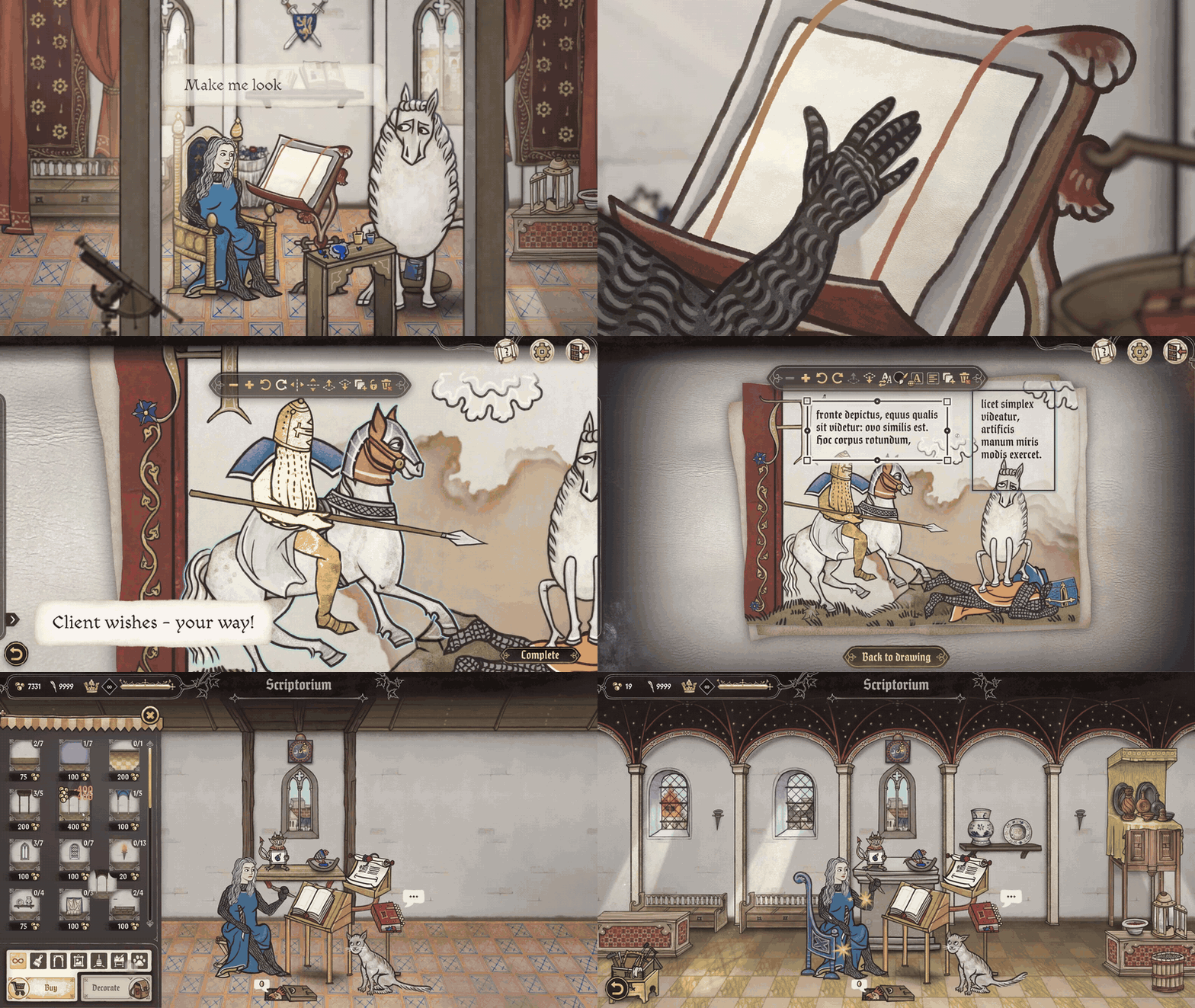
Scriptorium: Master of Manuscripts is the newly released illustration sandbox game built around a medieval manuscript workshop, but its appeal is broader than the premise suggests. Developed by Yaza Games and published by Mythwright, it launched on Steam for PC on April 16, 2026, framing itself as a cozy single-player simulation where commissions, workshop upgrades, and freeform creation all revolve around illuminated art.
What makes the game notable is that it is not a freehand painting app and not an AI image generator. Official materials describe a curated manuscript-making toolkit: parchment choices, drag-and-drop medieval imagery, period-style lettering, workshop progression, and export tools for printing or social sharing. That combination is why Scriptorium: Master of Manuscripts has quickly become a point of interest for cozy-game players, creative hobbyists, tabletop players, and medieval-art fans alike.

What Is Scriptorium: Master of Manuscripts Illustration Sandbox Game?
Scriptorium: Master of Manuscripts is a cozy single-player simulation about managing a medieval scriptorium, taking commissions, illustrating parchment pages, and personalizing a workshop over time. The developer’s official site describes it as a game about creating manuscripts, writing stories, fulfilling requests from quirky characters, and using both a story-driven mode and a relaxing sandbox option to celebrate creativity at your own pace.
Official FAQ materials go a step further and argue that the game is not merely a “graphical manuscript editor.” Alongside composition tools, it includes character setup, clients, workshop decoration, relationship-building, and a progression loop designed to reward creativity rather than speed or competition. The same FAQ also says the project was built to lower the barrier to entry so even non-gamers can enjoy decorating medieval parchments.
In practical terms, that means Scriptorium sits somewhere between a cozy management sim and a medieval design tool. The official store page emphasizes “friendly tools,” drag-and-drop artwork, and a pressure-free atmosphere, while the demo page repeats that it is a relaxing creative space with no timers and no pressure.
Scriptorium Master of Manuscripts Release Date, Platform, and Price Details
Official launch-week announcements and the current store page agree on the key launch facts: Scriptorium: Master of Manuscripts released on April 16, 2026, and at launch it was available only on PC via Steam. In the studio’s April 15 launch guide, the developers also said other platforms such as MacOS were not confirmed and would only be revisited later if plans changed.
The same official launch guide listed the base price as $14.99 USD, €14.99 EUR, £12.99 GBP, 49.99 PLN, and 55.00 CNY, with regional pricing adjustments for other currencies. The Steam store snapshot used for this article also showed a 20% introductory discount, taking the U.S. price from $14.99 to $11.99, with the offer ending April 30.
That makes the pricing strategy part of the game’s positioning. The developers explicitly said they wanted Scriptorium to feel affordable and manually adjusted regional prices instead of relying only on default conversion logic. For a niche creative game launching into a crowded PC market, that is a meaningful practical detail, not just a marketing footnote.

Why Scriptorium Uses 1000+ Hand-Drawn Assets Instead of AI Art
Official materials describe the asset count in two slightly different ways, and that distinction matters if accuracy is the goal. The main Steam store page says the composition screen uses a library of “1000+ pictures based on real medieval art,” while the April 15 official launch guide says the full game contains “over 2000 drawable assets” across almost 50 parchments. The safest reading is that 1000+ is the conservative headline figure for picture content, while the broader in-game toolset rises above 2000 when all drawable elements are counted together.
The studio has been unusually explicit about why this material is not AI-generated. In official community posts, the developers call Scriptorium “100% human-made,” say it was built by artists, developers, and medievalists, and describe a strict “zero-tolerance” policy for generative AI in both art and text. A separate launch post also tied that principle to the game’s identity by saying its “human-made art matters.”
That choice matters aesthetically as well as ethically. Because the game is trying to echo real manuscript imagery, consistency of line, silhouette, humor, and decorative logic matters; a curated hand-drawn library gives the studio much tighter control over that visual language than a generative system would. The result is a creation tool that behaves more like a deliberately assembled medieval art kit than a prompt-driven image engine.
Scriptorium Master of Manuscripts Gameplay Explained: Story Mode vs Sandbox Mode
Story Mode is the structured half of Scriptorium. On the official Steam page, the developer says you create your own character, take commissions from prestigious patrons, illustrate everything from battles and romances to maps and blackmail notes, and gradually shape a larger royal drama through those requests. The official FAQ reinforces that Story Mode is “at the very heart” of the game and says it is built around quirky clients, workshop growth, and a sense of creative progression.
Sandbox Mode removes that structure. Official store copy describes it as blank parchment, the entire library of medieval assets, and no clients or commissions, while the launch guide says everything is unlocked from the start. In the same post, the studio even compared it to a “Medieval Photoshop or Canva,” which is a revealing shorthand for how freely the mode is meant to function.
The practical difference, then, is not that one mode is creative and the other is not. Both are creative. The difference is whether the game gives you a brief, a customer, and a progression objective, or whether it gives you a blank page and total freedom. Official launch materials add that Story Mode contains 70 commissions, so the structured side is much larger than a lightweight tutorial track.
How the Scriptorium Sandbox Mode Works Like a Medieval Canva Tool
The official comparison to Canva is not just a cute phrase. In Sandbox Mode, you begin with a blank parchment, then choose how to compose a page by placing pre-made elements directly onto it. The Steam store and demo pages both describe a workflow based on selecting parchment, dragging and dropping imagery, and arranging text and decoration rather than painting every line from scratch.
That makes the game behave like a layout-and-composition tool more than a brush engine. The official FAQ says the text editor lets you write full sentences, choose fonts, change sizes, and move text fields freely around the page, while the post-launch update also confirms simple computer-style actions such as copy and paste. In other words, the sandbox is medieval in aesthetic vocabulary, but modern in interface logic.
The analogy has limits, though, and those limits are central to the game’s identity. A modern design platform usually starts from neutral vector shapes and endless brand kits; Scriptorium starts from manuscript-inspired graphics, parchment textures, marginalia, initials, and period-style lettering. Its freedom happens inside a historical visual language, not outside one.

Features of Scriptorium Master of Manuscripts: Art Tools, Assets, and Customization
The composition screen is the game’s creative core. Official store materials say players can choose light and dark parchments in many shapes and sizes, drag and drop artwork directly onto the page, and use a library of medieval-inspired imagery that includes beasts, bugs, princes, paupers, faces, clothing, expressions, vegetation, and decorative marginalia. The demo page repeats that same structure in simplified form for new players.
Text is not an afterthought. The store page says players can add text using medieval fonts adorned with ornate uppercase letters, and the FAQ says a proper text editor is already implemented, with font choices, size controls, and movable text fields. Post-launch community notes further confirm that ornate initials were fast-tracked into a hotfix after launch, meaning typography is being treated as a meaningful part of the creative toolkit rather than mere decoration.
The rest of the feature set extends well beyond page design. Official materials describe character selection, client commissions, workshop decoration, and a no-hard-asset-limit philosophy, although the studio warns that extremely crowded pages may trigger performance warnings on some PCs. This makes Scriptorium both a cozy progression game and an unusually flexible medieval illustration sandbox.
How to Create Medieval Manuscripts in Scriptorium Step by Step
The game’s own materials make the basic creation loop surprisingly clear.
- Choose how you want to play. Story Mode gives you commissions and progression, while Sandbox Mode gives you immediate access to a blank parchment and free creation without clients.
- Pick your parchment and page format. The official store and demo pages say you choose from multiple parchment shapes, shades, and sizes before you start placing elements.
- Build the image by dragging and layering assets. Official descriptions repeatedly emphasize direct drag-and-drop placement of medieval-inspired elements onto the page.
- Add lettering and finishing detail. The FAQ says you can write full sentences, adjust font size, move text fields, and use medieval fonts; post-launch notes add that ornate initials are now live in a hotfix.
- Deliver, save, or export the result. Story Mode pages can be sent to clients, while finished works can be exported as image files optimized for printing and sharing. The FAQ also says multi-page books are not assembled directly in-game at launch, but pages can be exported separately and combined into one PDF afterward.

How to Design Maps, Letters, and Fantasy Art in Scriptorium Sandbox Mode
Official examples from the store and demo pages show the intended creative range very clearly: letters and invitations, illustrated quotes, tarot cards, stickers, coloring pages, desktop wallpapers, fantasy maps, tabletop RPG props, pop-culture recreations, and memes are all called out as plausible outputs. Third-party launch coverage from 80 Level repeats the same flexibility and notes that players can either recreate historical manuscripts or invent their own designs from scratch.
For maps and letters specifically, the game’s design logic favors composition over drawing skill. You are choosing page format, placing decorative elements, arranging figures and symbols, and fitting text into a manuscript-style layout. For fantasy art, the official asset descriptions matter: the library includes creatures, people, vegetation, clothing, and odd decorative pieces, which means the “art” often comes from layering and recombining readable fragments into something new rather than painting a scene manually.
That is a big reason the sandbox can feel unusually accessible. You do not need illustration training to make something legible and stylish; instead, you need taste, arrangement, and a feel for how medieval pages balance text, borders, initials, and playful images. The game’s official description is essentially promising composition literacy rather than drawing mastery.
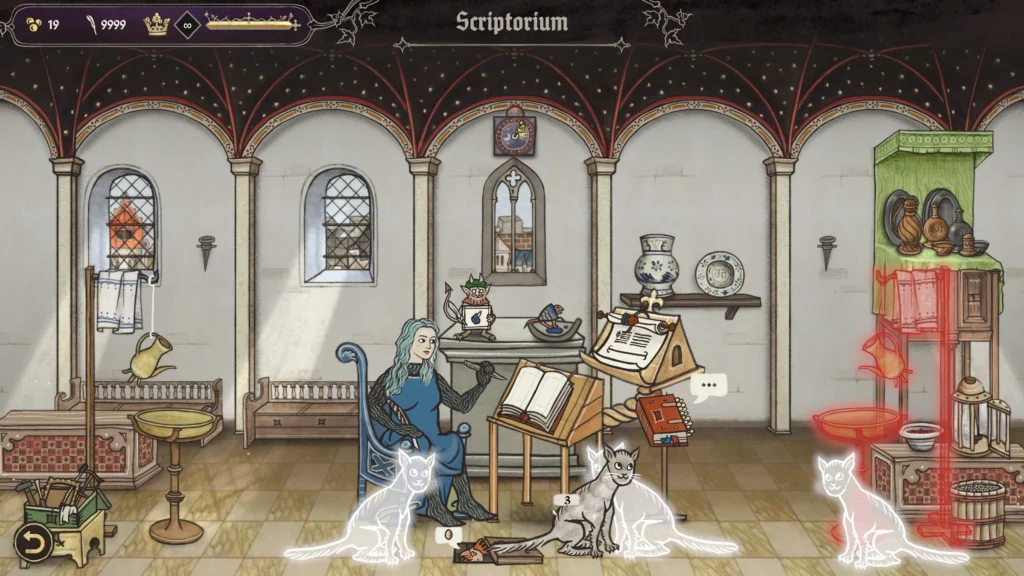
Scriptorium Workshop Customization: Pets, Decorations, and Upgrades Explained
The workshop is not just a background menu. Official Steam materials say that money earned from commissions can be spent on furniture, lighting, tapestries, flowers, windows, columns, and carpets, turning the room into an extension of the player’s creative identity. Independent launch coverage from MonsterVine and GamesRadar reported the same broad set of decorations.
Pets are part of that customization loop as well. The official store page says you can keep a pet companion ranging from a cat to a dog or even a tiny dragon, and recent coverage echoed the same options. That matters because Scriptorium is positioning its workshop as a “cozy” space in the contemporary game-design sense, not just a medieval job site.
The important design consequence is pacing. Story Mode gives you commissions and earnings, and those earnings feed workshop decoration, which in turn reinforces the feeling that your manuscript practice is growing into a lived-in creative studio. That loop is part of why the game reads as a simulation rather than only a sandbox editor.
Can You Export and Share Your Artwork from Scriptorium Master of Manuscripts?
Yes. Official store materials say Scriptorium is built for sharing, with exports as PNG files optimized for printing and social sharing, and the official FAQ similarly says exported creations can be saved in an easy-to-share image format suitable for both online posting and printing. The FAQ also explicitly says you can print artworks for uses such as bookmarks or coloring sheets.
There is, however, one important post-launch nuance. On April 22, the studio said the broader sandbox gallery system was still in active development and would let players create many separate works, save them, and return to them later; until that larger update lands, export and sharing are already available, but long-term sandbox work management is still being improved. That distinction helps explain why some early users praised the sandbox while also asking for stronger save-and-return tools.
Rights are also worth reading carefully. The current FAQ says non-commercial use is allowed and specifically welcomes educational and cultural institutions using works for non-profit purposes, but it says commercial use is not allowed. The April 22 community update partly softens that by saying non-commercial use is fine now and inviting users with commercial plans to contact the studio while a revised policy is being worked on. The cautious interpretation today is simple: sharing is clearly supported, but commercial reuse still needs direct clarification from the developer.

Best Tips for Beginners in Scriptorium Master of Manuscripts
Based on the official feature set and the first wave of player feedback, the strongest beginner strategy is to treat Scriptorium like a design workflow rather than a score chase. Use Story Mode first to learn how briefs, commissions, and workshop progression work, then move into Sandbox Mode once you understand how medieval layouts, assets, and lettering fit together.
A second useful habit is to make your big composition decisions early. The official pages emphasize parchment choice, page size, and drag-and-drop placement, so deciding the canvas first tends to make the rest of the page easier to balance. The same logic applies to text: learn the text editor early, use the ornamental initials, and do not treat lettering as something you add only at the end.
Three practical tips stand out from the official post-launch notes. First, export milestone versions of anything you really like, because the more elaborate sandbox gallery/save-return system is still in development. Second, do not overcrowd a page just because there is no hard asset limit; the studio warns that very dense compositions may stress some systems. Third, if you are undecided about buying the full game, the demo remains available and is specifically intended as a way to practice the mechanics.
Scriptorium Master of Manuscripts Review Scores and Early Player Reactions
The strongest current reception signal is on Steam itself. When the full store page was checked for this article, it showed “Very Positive” overall reviews from 492 purchaser reviews, with 533 total reviews listed, 526 positive and 7 negative. The studio’s own April 22 “one week” update, posted earlier than that store snapshot, said the game had already cleared 400 reviews with a 98% positive rating.
The demo has also performed strongly. The current demo page shows 235 total reviews with 98% positive and 23 recent reviews at 86% positive, while the March 2 official Next Fest update said the demo had reached 176 reviews with 175 positive responses, or about 99.43% positive at that earlier point. That matters because it suggests enthusiasm existed before release and was not created only by launch-week novelty.
On critic aggregators, the picture is still sparse rather than negative. Metacritic listed the game with no critic reviews and no settled user score yet, marking both as effectively TBD at the time of research. That means the current public picture is being shaped far more by direct player response and preview coverage than by a formal review average.
The tone of those early reactions is fairly consistent. A February preview praised the presentation, colorful old-world look, and well-written dialogue, while a detailed early Steam review said the writer spent hours in the sandbox and loved that side of the game even while wanting stronger save/edit tools. The developer’s April 22 update also confirmed that a hotfix had already added ornate initials and that a larger content update with quality-of-life improvements and new commissions was already in active development.
Is Scriptorium Master of Manuscripts Worth Playing for Creative Gamers?
Yes, for the right audience, the answer is already leaning strongly toward yes. Official and independent descriptions line up on the same strengths: pressure-free creation, a deep manuscript-inspired asset library, workshop personalization, and a split between guided commissions and unrestricted sandbox play. If you value creativity, mood, historical flavor, and shareable outputs more than challenge-heavy systems, Scriptorium is doing exactly what it claims to do.
The clearest caveat is that it is still a new release refining some workflow details. Early users have specifically asked for better save-and-return support for sandbox creations, and the studio has publicly said that a fuller sandbox gallery system is being developed. So the game is already compelling as a creative toy and cozy sim, but the post-launch roadmap matters if you want more robust long-term project management.
For creative gamers, though, that caveat may not be a deal-breaker. The central appeal is already here: you can make beautiful, silly, historically flavored pages without needing to draw from scratch, and the community response suggests many players quickly understand that appeal once they start arranging assets on parchment.
Games Like Scriptorium: Best Cozy Simulation and Art Sandbox Alternatives
If you want games with similar historical or manuscript DNA, the closest starting points are Inkulinati, Pentiment, and Kingdom Come: Deliverance. Official FAQ materials say Scriptorium shares a manuscript universe and some assets with Inkulinati, while the developer also cites Pentiment and Kingdom Come: Deliverance as visual or tonal inspirations.
If you are more interested in the cozy creative-tool side, the official inspirations and recommendation lists point to Animal Crossing: Happy Home Designer, Sticky Business, Potion Craft: Alchemist Simulator, Tiny Glade, A Little to the Left, and House Flipper 2. Those are not manuscript games, but they overlap with Scriptorium in design mood: arrangement, decoration, low-pressure creation, and tactile visual satisfaction.
That official comparison list is useful because it reveals what Scriptorium actually is. It is not trying to be a historically strict simulation, nor a demanding art suite, nor a management sim in the heavy-economy sense. It is aiming for the sweet spot where cozy progression, toy-box creativity, and a vivid aesthetic theme all reinforce one another.
How Scriptorium Blends Medieval History with Creative Freedom
Historically, a scriptorium was a writing room used in monastic communities for copying manuscripts, and scriptoria were important institutions in the Middle Ages. Encyclopedic references also note that not all workers were monks; lay scribes and illuminators often reinforced clerical labor, which means manuscript production was already both artistic and workshop-based in the historical record.
Illuminated manuscripts were handwritten books decorated with gold, silver, bright colors, elaborate designs, and miniature pictures. Britannica also notes that medieval production often distinguished between those who illustrated relevant scenes and those who supplied the decorative work spilling into initials, margins, and borders. That division maps surprisingly well onto Scriptorium’s gameplay, where text, page design, ornament, and imagery all matter at once.
The game’s humor is historically grounded, too. Getty materials on medieval marginalia describe playful, absurd, and sometimes irreverent creatures and scenes in manuscript borders, explaining that these images could joke about central themes or comment on human behavior. The developer’s own site explicitly says its games are inspired by real-life medieval marginalia and points to the era’s sword-wielding rabbits, dogs with spears, and trumpet-in-bottom grotesques as authentic historical inspiration rather than modern invention.
That is why Scriptorium’s freedom does not feel detached from history. It does not merely put a medieval skin on a generic editor. Instead, it translates the actual visual logic of marginalia, initials, decorated books, and workshop production into a modern cozy sandbox, letting players improvise within a real historical tradition of beauty, satire, monstrosity, and ornament.

Frequently Asked Questions (FAQs)
- Is Scriptorium a sequel to the studio’s earlier medieval strategy game?
No. The developer describes it as a completely different experience in the same manuscript universe, with some shared art direction and assets, but designed around creativity and relaxation rather than strategy. - Is there a free demo?
Yes. The demo released on February 23, 2026, and official launch posts say it remained available after release so players could try the mechanics before buying the full game. - Is Scriptorium Early Access or a full release?
It is a full release, not an Early Access launch. The official FAQ says there were no plans for Early Access and that the demo was the last stop before full 1.0 release. - Can you write full sentences and customize fonts?
Yes. The current FAQ says the game has a proper text editor with multiple medieval fonts, adjustable sizes, and freely movable text fields, and post-launch community notes confirm copy-and-paste support plus the addition of ornate initials in a hotfix. - Can you make multi-page books or PDFs?
Not directly as a single in-game bound book workflow at launch. The official FAQ says you can create pages separately, export each one as an image, and then combine them into a multi-page PDF with another tool afterward. - Can you export and share artwork outside the game?
Yes. Official store and FAQ materials say finished works can be exported in an easy-to-share image format, specifically as PNG files optimized for printing and social sharing. - Can exported art be used commercially?
The safest answer right now is: treat the default rule as non-commercial use only unless you have direct approval. The FAQ says commercial use is not allowed, while the April 22 community update says the developer is working on an updated policy and invites users with commercial plans to contact the studio. - Is there multiplayer or co-op?
There are no plans for native multiplayer. The official FAQ says the game is designed as a single-player experience, though players may experiment with the platform’s Remote Play feature to work on manuscripts together. - Are Mac, Linux, or console versions confirmed, and is it playable on handheld PC hardware?
At launch, the game is officially available only on PC Steam. The developer says Mac and Linux are not promised yet, though they may be revisited later, and the same launch guide says the game is already playable on Steam Deck even if it is not yet fully tailored or verified there. - Is post-launch support already happening?
Yes. The studio’s April 22 update says a hotfix has already shipped, a larger content update is in development, new commissions and quality-of-life changes are planned, and a fuller sandbox gallery/save-return system is being worked on.

Conclusion
Scriptorium: Master of Manuscripts succeeds because it understands that medieval art can be both scholarly and playful. Official sources present it as a cozy simulation, an art sandbox, and a workshop progression game all at once, while launch-week data shows strong player approval and unusually clear enthusiasm for its hand-made visual identity.
For anyone searching for a reliable answer on the Scriptorium: Master of Manuscripts newly released illustration sandbox game, the core verdict is straightforward: it is already a distinctive and highly promising PC release for creative players, especially those who enjoy historical aesthetics, low-pressure design tools, and shareable outputs. The main cautions are not about concept or art direction; they are about post-launch workflow polish, particularly sandbox saving and long-form project management, both of which the developer is already addressing publicly.
Sources and Citations
- Official Steam community news and announcements
https://steamcommunity.com/app/3119540/allnews/ - Scriptorium launch/pricing announcement
https://steamcommunity.com/app/3119540/allnews/ - One Week of Scriptorium post-launch update
https://steamcommunity.com/app/3119540/allnews/ - Metacritic review aggregator page
https://www.metacritic.com/game/scriptorium-master-of-manuscripts/ - SteamDB Scriptorium page / review and player data
https://steamdb.info/app/3119540/ - GameSpew preview/reception coverage
https://www.gamespew.com/2026/02/scriptorium-master-of-manuscripts-is-slick-beautiful-and-so-much-fun/ - Digitally Downloaded release coverage
https://www.digitallydownloaded.net/2026/04/scriptorium-master-of-manuscripts-launches-in-two-weeks.html - GamesPress launch press release
https://www.gamespress.com/Create-Medieval-Masterpieces-in-SCRIPTORIUM-MASTER-OF-MANUSCRIPTS-Out- - Getty — The Medieval Scriptorium
https://www.getty.edu/art/exhibitions/scriptorium/ - British Library — Ludicrous figures in the margin
https://www.bl.uk/stories/blogs/posts/ludicrous-figures-in-the-margin
Recommended
- The Animal Crossing Where Villagers Bully You Is Now (Unofficially) Available On PC: How It Works, Download Guide, and What’s Different
- Netflix Joins Blender: What Netflix Animation Studios Funding Means for Blender and the Community
- Overwatch Reveals Its Newest Hero Look as Fans Guess Hero 51’s Identity
- In This Skyrim Mod, You Have to Debate Dragons to Kill Them: How Blurbs’ Twitch Chat Dragon Debates Work
- Halo Campaign Evolved Master Chief DLC Requires Fanta Soda Despite No MTX Shop
- Faces of Death Review: Is the 2026 Horror Reboot Worth Watching?
- Marathon Is Embracing The Jank: Duos Mode Comes To Perimeter As A Limited-Time Test
- The Devil In Me Game Dev Celebrates Star’s Win At The Oscars: Jessie Buckley’s Best Actress Victory Explained
- How to Add Realistic Dust, Hair, and Surface Imperfections in Blender to Increase Scene Realism


























































































