









In This Article (8 sections)
Steam Deck vs Nintendo Switch 2 Comparison: Which Is Worth Buying?
If the question is simply “Steam Deck vs Nintendo Switch 2 which handheld is worth buying,” the most accurate answer in mid-2026 is that the Nintendo Switch 2 is the better buy for most mainstream players, while the Steam Deck OLED is the better choice for existing PC gamers and enthusiasts. Nintendo’s handheld is lighter, simpler, cheaper in the U.S. at launch pricing, and built around a plug-and-play experience for both handheld and docked gaming. Valve’s machine, meanwhile, is a more open handheld PC with a richer OLED display, deeper control customization, desktop mode, and access to a much broader Steam library, but it is also more expensive and less straightforward to use.
For overall value, the Nintendo Switch 2 has the broader appeal. Nintendo launched it in the U.S. at $449.99 and has announced that the MSRP will increase to $499.99 on September 1, 2026. By comparison, Valve’s official Steam Deck OLED pricing starts at $789 for the 512GB model and $949 for the 1TB version following the company’s May 2026 price update.
On entry cost alone, the Switch 2 is the more accessible option. The Steam Deck OLED still makes a compelling case for players who already own a large Steam library, as Valve positions it as a portable gaming PC rather than a closed console. Its Deck Verified program also gives users access to a much wider software library than traditional console ecosystems. In practical terms, the Switch 2 wins for affordability and convenience, while the Steam Deck OLED stands out for ecosystem flexibility and game library depth.
The hardware comparison is more balanced than it first appears. The Steam Deck OLED features a 7.4-inch 1280 × 800 HDR OLED display with up to a 90Hz refresh rate, 1,000 nits of peak HDR brightness, and excellent contrast. The Nintendo Switch 2 counters with a larger 7.9-inch 1920 × 1080 LCD that supports HDR10 and variable refresh rates of up to 120Hz in handheld mode. As a result, the Steam Deck OLED delivers deeper blacks and more vibrant contrast, whereas the Switch 2 offers a larger display, a sharper native resolution, and a higher maximum refresh rate.
Which screen is better ultimately depends on personal preference: players who prioritize OLED image quality and PC-style display controls may prefer the Steam Deck, while those who value a bigger, sharper display are likely to favor the Switch 2. Nintendo also has the advantage in portability, with the system weighing about 534g with the Joy-Con 2 controllers attached, compared to roughly 640g for the Steam Deck OLED.
Price remains one of the biggest differences between the two handhelds. Even after Nintendo’s planned price increase to $499.99, the Switch 2 remains significantly less expensive than the Steam Deck OLED, whose official pricing starts at $789 for the 512GB model and reaches $949 for the 1TB version. The cost difference becomes even more noticeable when ongoing services are considered.
Nintendo requires a Switch Online membership for many online features, with a standard 12-month individual plan priced at $19.99 or $34.99 for a family plan in the U.S., while Expansion Pack memberships cost $49.99 for individuals and $79.99 for families. Steam, by contrast, does not require a platform-wide subscription for online access, although certain individual games may have their own subscription requirements.

Steam Deck vs Nintendo Switch 2 performance, game library, and overall gaming experience
Steam Deck OLED and Nintendo Switch 2 are built around very different design philosophies. Steam Deck OLED uses a 6nm AMD APU with a Zen 2 CPU, 8 RDNA 2 compute units, 16GB of LPDDR5 RAM, and a native 800p display. Nintendo Switch 2 uses a custom NVIDIA processor and is designed to output up to 4K at 60fps in TV mode or up to 120fps at 1080p or 1440p in supported modes. Rather than chasing the same hardware goals, each system is optimized for a different type of player.
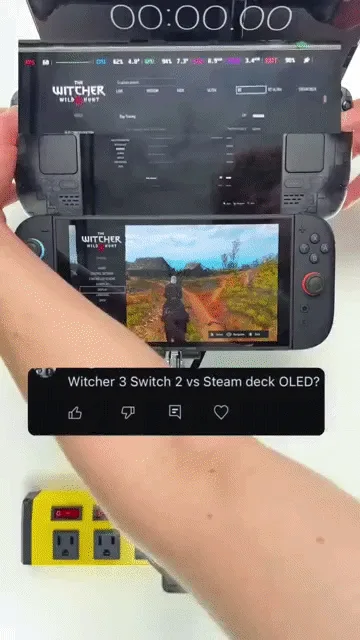
In real-world gaming, the answer is not as simple as one handheld being universally faster than the other. Testing summarized by The Verge from Digital Foundry found that Cyberpunk 2077 performed better on Switch 2 when docked, while Steam Deck held up better in handheld mode during that comparison. The result highlights how performance depends on factors such as resolution targets, power limits, and platform-specific optimization. Switch 2 is generally the stronger plug-and-play performer for well-optimized console releases, while Steam Deck gives players greater control through adjustable graphics settings, frame rate caps, and other PC-style performance options.
The biggest advantage for Nintendo Switch 2 is its exclusive game lineup. Nintendo positions titles such as Mario Kart World, Donkey Kong Bananza, and FromSoftware’s The Duskbloods as exclusive experiences that cannot be played on Steam Deck. For buyers interested primarily in Nintendo’s first-party games, Steam Deck is not a replacement.
Steam Deck’s strength is the size and continuity of its game library. Valve allows users to access their existing Steam libraries, with every reviewed game displaying a compatibility badge to indicate how well it runs on the handheld. That gives Steam Deck access to modern PC releases, decades of older PC games, and an enormous indie catalog. While Switch 2 also benefits from backward compatibility with many original Nintendo Switch titles, its overall software library is far more curated than the open Steam ecosystem.
The difference becomes even clearer when looking at the overall user experience. Valve markets Steam Deck as a true PC, with support for Bluetooth accessories, external displays through USB-C, KDE Plasma desktop mode, and extensive control customization. Users can treat it like a portable computer, install software, connect peripherals, and fine-tune their gaming experience.
Nintendo Switch 2 takes the opposite approach by prioritizing simplicity and ease of use. Features such as GameChat, GameShare, the dedicated C button, and Nintendo’s family-oriented parental controls are designed to make the console straightforward to use and easy to share with others. As a result, Switch 2 feels more like a polished consumer appliance, while Steam Deck feels like a highly flexible handheld PC.
The same contrast carries over into docked play. Nintendo Switch 2 was designed from the beginning as a hybrid console, making the transition between handheld and TV gaming seamless. Official specifications support up to 3840 × 2160 at 60fps in TV mode, along with 120fps output at 1080p and 1440p in supported modes, giving it a natural advantage as a living-room gaming system.
Steam Deck can also be docked through its USB-C connection, which supports video output, audio, and external peripherals. However, Valve notes that using the Docking Station does not improve gaming performance. Docking primarily expands connectivity rather than increasing frame rates or graphical quality. In practice, Steam Deck offers greater versatility for users who want a portable PC that can connect to larger displays, while Nintendo Switch 2 delivers the smoother and more console-like docked gaming experience.
Steam Deck vs Nintendo Switch 2 battery life, storage, and gaming experience
Battery life, storage, and the kinds of games you want to play all have a major impact on whether the Steam Deck OLED or Nintendo Switch 2 is the better fit. On paper, the Steam Deck OLED has the advantage in battery life, with Valve rating it for roughly 3 to 12 hours of gameplay, while Nintendo rates the Switch 2 for about 2 to 6.5 hours. That higher maximum gives the Deck more flexibility during lighter workloads, older games, or when players lower graphics settings to extend playtime.
Real-world testing, however, tells a more nuanced story. In a controlled Hitman: World of Assassination battery test by Tom’s Guide, the Nintendo Switch 2 lasted about 2 hours and 40 minutes, while the Steam Deck OLED lasted around 2 hours and 9 minutes under comparable conditions. In practice, the Steam Deck offers greater potential for maximizing battery life through settings adjustments, but the Switch 2 can be surprisingly efficient when running games specifically optimized for its hardware.
Storage is another area where the two systems take very different approaches. Steam Deck OLED is available with either 512GB or 1TB NVMe SSD storage and supports expansion using widely available UHS-I microSD cards. Nintendo Switch 2 includes 256GB of internal UFS storage and supports game storage expansion only through microSD Express cards of up to 2TB, while older non-Express microSD cards can be used only for screenshots and videos.
That difference also affects long-term costs. Standard UHS-I microSD cards for the Steam Deck are common and relatively affordable, whereas Switch 2 owners who outgrow the built-in 256GB must purchase newer, faster microSD Express cards to install additional games. As a result, although the Steam Deck costs more upfront, expanding storage on the Switch 2 can become more expensive over time.
The best choice also depends on the types of games you play. For indie games, the Steam Deck has the stronger overall appeal thanks to Valve’s official compatibility system, Steam Deck top-played charts, and access to a massive PC library filled with indie titles, early-access releases, strategy games, and smaller projects that may never launch on Nintendo hardware. Its OLED display also enhances the look of pixel-art and stylized games.
AAA gaming is more evenly divided. If your priority is Nintendo exclusives and first-party games that are carefully optimized for dedicated console hardware, the Switch 2 is the better option. If you value access to a much larger PC game library and keeping your existing Steam purchases across future hardware, the Steam Deck comes out ahead. Valve does note, however, that not every desktop PC game delivers an ideal handheld experience, with some titles requiring manual setup or having compatibility limitations.
For family gaming, the Nintendo Switch 2 remains the stronger choice. Nintendo designed the platform around detachable Joy-Con 2 controllers, local multiplayer, GameShare support for selected titles, comprehensive parental controls, and a Nintendo Switch Online family plan that supports up to eight accounts. The overall experience is easier to share, easier to understand, and better suited to households with players of different ages.
The Steam Deck can also serve families well through Steam Families, which supports up to six members and shared game libraries. However, it is generally a better fit for households where everyone is already comfortable with PC gaming, controller customization, and occasional compatibility troubleshooting. For simple plug-and-play multiplayer and family-friendly gaming, the Switch 2 still holds the advantage.

Steam Deck vs Nintendo Switch 2 controls, online features, travel, and final buying decision
The differences between the Nintendo Switch 2 and Steam Deck extend well beyond performance. Their controls, online services, portability, and overall user experience reflect two very different design philosophies. Nintendo’s Joy-Con 2 controllers introduce several meaningful hardware upgrades, including built-in mouse sensors, a new C Button, magnetic attachment, HD Rumble 2, and integrated GameChat support.
These additions make the Switch 2 especially well suited for social gaming, local multiplayer, and hybrid console play. Steam Deck, however, offers more versatile controls for demanding PC games, with full-size thumbsticks, four rear grip buttons, capacitive sticks, gyro controls, and dual haptic trackpads. Those trackpads are a genuine advantage for strategy games, CRPGs, city builders, and other PC-focused titles that feel less comfortable on a traditional console controller.
The two systems also take very different approaches to online services. Nintendo has expanded its online ecosystem, but many multiplayer features require a Nintendo Switch Online subscription. GameChat’s free access period ended on March 31, 2026, and Nintendo Switch Online costs $19.99 per year for an individual membership in the United States, while the $49.99 Expansion Pack adds classic game libraries, selected DLC, and Zelda upgrade-pack benefits.
Steam, by comparison, does not require a platform-wide subscription for online play. Creating a Steam account is free, subscriptions are limited to individual games where applicable, and Steam Families provides household game-sharing features. For players who prefer not to pay an ongoing platform fee just to access online functionality, Steam Deck offers a more consumer-friendly approach.
Portability is another area where each device appeals to a different audience. For most travelers, the Nintendo Switch 2 is the easier recommendation because it weighs about 534g with the controllers attached, has a smaller footprint, and is designed to switch seamlessly between handheld, tabletop, and docked play. It is the handheld that fits more naturally into everyday travel and casual gaming sessions.
Steam Deck is a better travel option for a more specific type of user: someone who wants a portable gaming PC with advanced input options, quick suspend and resume, and access to an existing Steam library while away from home. Valve also includes a carrying case with Deck models, although the device remains noticeably larger and heavier than Nintendo’s handheld.
Ultimately, the buying decision depends on what kind of player you are. Nintendo Switch 2 is the better fit for players who value Nintendo exclusives, couch co-op, lighter hardware, seamless docked gaming, and a lower upfront cost. Steam Deck OLED is the stronger option for existing PC gamers who want the flexibility of an open handheld PC, advanced controls with trackpads, and access to a massive Steam library, even if that comes with a steeper learning curve and a bulkier device.
For the average buyer in 2026, the Nintendo Switch 2 is the stronger overall recommendation thanks to its lower price, ease of use, family-friendly design, and exclusive game lineup. For dedicated PC gamers with an established Steam library, however, the Steam Deck OLED remains one of the most compelling handheld gaming PCs available.

Frequently Asked Questions
- Is Steam Deck OLED more powerful than Nintendo Switch 2?
Not in a simple universal sense. Steam Deck OLED offers the flexibility of a handheld PC, allowing you to adjust graphics settings, install different software, and fine-tune performance for individual games. Nintendo Switch 2, on the other hand, benefits from hardware designed specifically for its games. Third-party testing summarized by The Verge found that Switch 2 can outperform the Steam Deck in some docked scenarios, while the Steam Deck can have the advantage in certain handheld comparisons depending on the game and settings used. - Which handheld has the better screen?
Steam Deck OLED has the better display technology thanks to its OLED panel, which delivers deeper blacks, stronger contrast, and significantly brighter HDR highlights. Switch 2 counters with a larger 7.9-inch 1080p display that supports variable refresh rate (VRR) up to 120Hz, making it sharper and smoother in supported games. Which is better depends on whether you value OLED image quality or a larger, faster screen. - Which one is cheaper to buy right now?
In U.S. MSRP terms, Nintendo Switch 2 is the more affordable option. It launched at $449.99 and Nintendo has announced that the price will increase to $499.99 on September 1, 2026. Valve’s official pricing for the Steam Deck OLED starts at $789 for the 512GB model and rises to $949 for the 1TB version, making it a noticeably larger investment. - Does Nintendo Switch 2 have backward compatibility?
Yes, but not perfectly. Nintendo confirms that Switch 2 can play compatible physical and digital Nintendo Switch games, allowing players to keep much of their existing library. However, some games are not fully compatible, and certain titles or features may still require the original Switch Joy-Con controllers or other older accessories to function correctly. - Does Steam Deck support all Steam games?
No. While thousands of Steam games run well on the Steam Deck, not every PC game is optimized for handheld play. Some titles may have control issues, poor performance, or unsupported features. Valve’s Deck Verified and compatibility badge system helps players quickly see whether a game is fully supported, playable with minor compromises, or not recommended on the handheld. - Which handheld is better for children and family play?
Nintendo Switch 2 is the better choice for most families. Features like detachable Joy-Con 2 controllers, GameShare, parental controls, and Nintendo’s family membership options make local multiplayer and family gaming simple to set up. Steam Deck can certainly be used by families, but its PC-style interface and greater level of customization make it less beginner-friendly. - Which one is better for indie games?
Steam Deck is usually the stronger choice for players who primarily enjoy indie games. It has access to the enormous Steam library, where many indie titles launch first and frequently receive deep discounts during Steam sales. Valve’s compatibility ratings also make it easier to identify which indie games will provide a smooth experience on the handheld. - Which handheld has better battery life?
Officially, Steam Deck OLED has the wider battery-life range, with Valve estimating around 3 to 12 hours depending on the game, compared to Nintendo’s 2 to 6.5 hours for Switch 2. In practice, battery life varies greatly by workload. For example, Tom’s Guide found Switch 2 lasting longer than Steam Deck OLED during one controlled Hitman: World of Assassination test, showing that real-world results depend heavily on the game being played. - Do you need a subscription for online play?
On Nintendo Switch 2, yes for many online multiplayer features and games. Nintendo also places GameChat behind a Nintendo Switch Online subscription. On Steam Deck, creating and using a Steam account is free, and there is no platform-wide multiplayer subscription. Any recurring fees are usually tied to individual games or services rather than Steam itself. - Which handheld is better for travel?
Nintendo Switch 2 is generally the better travel companion because it is lighter, more compact, and easier to carry for long trips. It also offers convenient local multiplayer with detachable controllers. Steam Deck is better suited to travelers who specifically want portable PC gaming, access to their existing Steam library, customizable controls, and features like trackpads for PC-focused games.

conclusion
Steam Deck vs Nintendo Switch 2 is not really a battle between equals with identical priorities. It is a battle between two excellent handhelds built for different people. Nintendo Switch 2 is the better all-round recommendation because it blends portability, first-party games, family usability, and hybrid TV play at a far lower cost than Steam Deck OLED. Steam Deck OLED remains the better specialist machine for PC gamers who value freedom, compatibility breadth, customizable controls, and the ability to treat a handheld like a real computer. In 2026, the smartest simple verdict is this: buy Switch 2 for mainstream gaming, buy Steam Deck OLED for portable PC gaming.
sources and citation
- Nintendo Switch 2 Technical Specifications
https://www.nintendo.com/us/gaming-systems/switch-2/tech-specs/
Official specifications covering the display, processor, storage, ports, battery, video output, audio, networking, dimensions, and weight. - Nintendo Switch 2 System Features
https://www.nintendo.com/us/gaming-systems/switch-2/features/
Official overview of handheld, tabletop, and TV modes, 256GB storage, 4K output support, display features, and Nintendo Switch game compatibility. - Nintendo Switch Game Compatibility With Nintendo Switch 2
https://www.nintendo.com/us/gaming-systems/switch-2/transfer-guide/compatible-games/
Official compatibility guidance for physical and digital Nintendo Switch games, including titles that require original Joy-Con controllers. - Nintendo Switch 2 Transfer and Online-Service Guide
https://www.nintendo.com/us/gaming-systems/switch-2/transfer-guide/
Confirms that existing Nintendo Switch Online memberships continue working on Switch 2 and explains account, save-data, and system-transfer options. - Nintendo Switch 2 FAQ
https://www.nintendo.com/us/gaming-systems/switch-2/faq/
Official answers covering accessory compatibility, Joy-Con 2, GameChat, storage, accounts, games, and system functionality. - Nintendo Switch 2 GameChat
https://www.nintendo.com/us/gaming-systems/switch-2/features/gamechat/
Official explanation of voice chat, screen sharing, video chat, group size, camera support, and Nintendo Switch Online requirements. - Nintendo Switch 2 GameShare
https://www.nintendo.com/us/gaming-systems/switch-2/features/gameshare/
Explains how compatible games can be shared locally or through GameChat so other players can participate without owning separate copies. - Nintendo Switch 2 Accessories
https://www.nintendo.com/us/gaming-systems/switch-2/accessories/
Official pages for Joy-Con 2, the Switch 2 Pro Controller, camera, dock, carrying cases, and other accessories. - Nintendo Switch 2 Free Game Updates
https://www.nintendo.com/us/gaming-systems/switch-2/transfer-guide/games-with-free-updates/
Lists compatible Switch games receiving visual, performance, HDR, and GameShare improvements on Switch 2. - Steam Deck Official Product Page
https://store.steampowered.com/steamdeck
Official Valve page covering Steam Deck models, controls, display, battery range, storage, SteamOS, docking, and hardware features. - Steam Deck OLED Official Product Page
https://store.steampowered.com/sale/steamdeck_2023
Official specifications for the Steam Deck OLED, including its 7.4-inch HDR OLED display, 90Hz refresh rate, 50Wh battery, Wi-Fi 6E, and storage options. - Steam Deck Verified Documentation
https://www.steamdeck.com/en/verified
Official explanation of the Verified, Playable, Unsupported, and Unknown compatibility categories used for Steam Deck games. - Steam Deck Verified Library Tool
https://store.steampowered.com/news/app/1675180/view/3113679892632291880
Valve’s announcement explaining how users can check the Steam Deck compatibility status of games already in their libraries. - Steam Deck Software and Troubleshooting Guide
https://help.steampowered.com/en/faqs/view/7DD4-C618-182E-0E49
Official Steam Support documentation covering SteamOS, game compatibility, Deck Verified ratings, updates, software behavior, and troubleshooting. - Steam Deck Basic Use and Troubleshooting
https://help.steampowered.com/en/faqs/view/69E3-14AF-9764-4C28
Official support guidance for system updates, restarting, recovery procedures, charging, controls, and common hardware or software problems. - Steam Deck Support Hub
https://help.steampowered.com/en/wizard/HelpWithSteamDeck
Valve’s official support portal for personalized Steam Deck assistance, repairs, purchases, account issues, and troubleshooting. - The Verge – How the Nintendo Switch 2 Stacks Up to the Steam Deck
https://www.theverge.com/tech/642866/nintendo-switch-2-steam-deck-lcd-oled-comparison-specs-price
Comparison of display specifications, pricing, storage, battery estimates, controls, portability, and hardware differences between Switch 2 and both Steam Deck models. - The Verge – Switch 2 vs. Steam Deck OLED Performance
https://www.theverge.com/news/703058/steam-deck-vs-switch-2-power-performance
Performance testing and analysis comparing handheld and docked behavior, frame rates, power consumption, efficiency, and battery results. - Tom’s Guide – Switch 2 vs. Steam Deck OLED Battery Test
https://www.tomsguide.com/gaming/handheld-gaming/nintendo-switch-2-vs-steam-deck-oled-battery-test-theres-a-clear-winner-and-its-not-the-gaming-handheld-i-expected
A controlled Hitman: World of Assassination test in which Switch 2 lasted approximately 2 hours and 40 minutes, compared with about 2 hours and 9 minutes for Steam Deck OLED. - PC Gamer – Switch 2 vs. Steam Deck Comparison
https://www.pcgamer.com/hardware/handheld-gaming-pcs/switch-2-versus-steam-deck/
Compares performance, displays, battery behavior, controls, game libraries, operating systems, and the overall value of Nintendo and Valve’s handhelds. - PC Gamer – Nintendo Switch 2 Review
https://www.pcgamer.com/hardware/nintendo-switch-2-review/
Includes hands-on performance, display, comfort, software, and battery testing, along with comparisons to Steam Deck and other handheld systems.
Recommendations
- The Most-Played Game at the June 2026 Steam Next Fest is BOMBANANA: How an Indie Demo Took over Steam
- Preorders for the Minecraft Dungeons 2 Deluxe Edition Are Live (Price, Platforms, and Bonuses)
- Firebreak is Not Shutting Down, Remedy Says: Why FBC: Firebreak Servers Are Staying Online (Even After the Final Update)
- Best 10 Water Simulation Add-ons in Blender: Everything You Need to Know Before You Install
- The Last of Us Part 2’s Major Death Was “Controversial Internally Too,” Former Naughty Dog Dev Says
- PlayStation Fans Fear Pricey Ports as Microsoft Lists Call of Duty Black Ops 1 and 2 for $40 Each
- Zelda: Ocarina of Time Teaser Sparks “Hire this Man” Meme Trend as Fans Roast Realistic Link and Star Fox Remake Style
- Star Wars Writers Say Lucasfilm Keeps Blocking Mara Jade’s Return — What We Know So Far
- How to Light Lanterns in The Adventures of Elliot: The Millennium Tales, Faie Ignite Guide
- Endorphin 3D Animation Tutorial: NaturalMotion Behavioral Physics Workflow (DMS + FBX Export)



































































































