









In This Article (16 sections)
Businesses in ChatGPT: November 2026 Launch, Business Hub Registration, and Verified Company Profiles
OpenAI launched Businesses in ChatGPT in beta on November 10, 2026, giving companies a way to verify their business profiles, manage public information, provide current product details, and understand how customers discover them through ChatGPT. The program introduces Business Hub, where authorized representatives can claim company listings, update business information, and review engagement reports. Eligible U.S. ecommerce retailers and online service providers can also create Business Agents that answer customer questions directly inside ChatGPT. The experience allows someone researching a product or service to discover a business in a ChatGPT answer, open its profile, examine relevant details, and choose whether to speak with the company’s AI representative.
The distinction between ChatGPT’s independent answers and a company’s Business Agent is important. A customer looking for a birthday present might ask ChatGPT to compare several toy retailers, open one company’s profile to examine its delivery and return policies, and then ask the retailer’s agent whether a particular game supports two players. ChatGPT provides the initial comparison, while the branded agent answers questions using information supplied by the business. The company can review aggregated discovery and engagement information without receiving access to the customer’s original ChatGPT conversation or individual exchanges with its agent. Claiming a business profile also does not guarantee that ChatGPT will recommend the company or rank its products more prominently.
Businesses in ChatGPT is designed for eligible companies with websites operating in supported ChatGPT markets where the required verification processes are available. However, the ability to claim a profile and the ability to publish a Business Agent have different eligibility requirements. The initial Business Agent rollout is limited to eligible U.S. ecommerce and online service companies. A retailer outside the United States may therefore be able to verify its business information and review available website engagement metrics without being eligible to publish an agent. Businesses do not need to purchase advertising or sign an Enterprise agreement to claim an eligible profile.
Claiming a Business Profile and Verification Process
To claim a company, an authorized representative signs in to ChatGPT, opens Business Hub from the sidebar, and searches for the business by name. The representative should carefully confirm that the correct listing has been selected, particularly when several companies share similar names or a parent organization manages multiple brands. OpenAI treats distinct brands as separate profiles even when they have common ownership.
The verification process may involve several steps:
- Find the business: Search Business Hub and select the correct company listing.
- Confirm business ownership: Complete an available verification method, such as a code delivered by business email, text message, or automated telephone call.
- Verify a website domain: Where available, add the supplied TXT record to the company’s DNS configuration and return to ChatGPT to complete the check.
- Complete identity verification: Use Persona when required to establish the representative’s identity and authority to act for the company.
- Submit supporting information: Provide registration documents or other requested evidence when necessary.
- Await approval: OpenAI reviews the claim and communicates its decision or requests additional information.
Persona verification may require official identification, business registration information, or evidence of the representative’s authority. When a business operates under a trading name different from its registered legal name, the legal information should match its official documents. Approval unlocks the verified profile badge and management capabilities such as publishing profile updates. The blue check identifies a business whose representative has completed verification, but it does not independently guarantee the accuracy of every price, promotion, qualification, or service claim the company provides.
Eligibility also depends on the type of business. OpenAI’s setup guidance distinguishes online businesses from physical locations. An eligible online company that cannot find an existing listing may be offered the option to create a new profile. Local stores and restaurants can currently claim only existing U.S. listings. Representatives must also have genuine authority to manage the business. An agency can act for an authorized client, but simply operating a fan page or selling another manufacturer’s products does not establish ownership. If someone else has already claimed the correct profile, Business Hub provides a Dispute ownership process. Creating a duplicate listing is not an acceptable alternative because it could produce conflicting information for customers.
Shopify Merchant Verification and Catalog Integration
Shopify merchants have an additional verification route. They can begin in Business Hub, choose the Shopify connection option, select Connect Shopify, review the requested permissions, and sign in to their store. Alternatively, they can open the ChatGPT Business app inside Shopify’s administration interface, select Get started, sign in to the appropriate ChatGPT account, and confirm their matching business listing. Shopify’s guidance directs merchants to complete Persona verification before gaining full profile management access.
The Shopify integration also reduces the need to maintain separate product inventories. Eligible products may already appear in ChatGPT through Shopify Catalog, which supplies information such as prices and stock availability. Connecting the merchant’s store allows that catalog to support its business profile. Installing the ChatGPT Business app is optional for product discovery, but it provides additional management capabilities, customer insights, and access to agent setup for eligible U.S. merchants. Shopify’s existing agentic storefront knowledge base does not automatically connect to the ChatGPT business profile or agent, so merchants may still need to provide information about exchange policies, warranties, and product comparisons separately.
Managing Business Profile Details and Product Feeds
Verified businesses can update several categories of public information, including their website, description, business category, logo, cover image, and delivery or return policies. Supported profile information may also include contact details, business addresses, opening hours, and service areas where relevant. These fields help customers understand whether a business can meet their particular requirements. For example, a furniture company might ship small items nationally while delivering assembled tables only within its home city. Its delivery policy should distinguish those services rather than giving customers the impression that every item qualifies for nationwide delivery.
OpenAI reviews submitted profile changes, and updates may take time to appear in listings or ChatGPT answers. Because ChatGPT can also use outside sources, companies should keep their public websites consistent with the details provided through Business Hub. If a retailer changes its return period or introduces an exception for personalized products, updating both its profile and published policy information helps reduce conflicting answers.
Verified retailers can also provide product feeds containing current prices, availability, images, and product details. Business Hub supports CSV uploads that follow OpenAI’s feed specification, along with hosted feeds accessible through a direct file address. A website homepage or ordinary collection page is not equivalent to a hosted product feed. Connected Shopify merchants can use their existing catalog.
Product variants should be represented accurately. A backpack available in canvas for $60 and waterproof fabric for $80 may require separate rows identifying each variant’s price and stock status. Related products can share a group identifier while maintaining distinct item identifiers and product links. Stock and promotional changes must also be reflected in the feed. A preorder date does not automatically make an item available when release day arrives, and an expired sale price should be updated so shoppers are not directed toward offers that no longer exist.

ChatGPT Business Agents: Eligibility, Setup, Customer Conversations, and Sponsored Experiences
Business Agents are available in the initial beta to eligible U.S. ecommerce retailers and online service businesses with verified profiles and websites. Shopify is one supported integration, but eligible companies using other ecommerce platforms can also participate. Verification alone does not guarantee Business Agent eligibility. OpenAI considers the business’s industry, intended use, and compliance with its agent policies. Claiming a local business listing, for example, does not automatically qualify that business to publish an agent. OpenAI has expressed plans to expand availability to additional markets and categories, but the November announcement did not provide specific expansion dates.
Business Agents are intended to answer company specific questions using approved business information. An online retailer might use an agent to explain product dimensions, compare available options, or clarify warranty conditions. An online service provider could use one to describe subscription tiers, explain public booking policies, or direct customers toward relevant service pages. However, agents cannot be configured to provide advice requiring professional licensing, invent credentials, guarantee outcomes, or misrepresent their authority. Even a verified company may have a proposed agent rejected if its intended behavior does not comply with OpenAI’s requirements.
Creating Business Agents and Supplying Information
After approval, a business can open its profile in Business Hub and create an agent or review a draft generated during Shopify setup. The company supplies the facts the agent should know and instructions governing how it responds. These serve different purposes. Product specifications and policies establish the factual basis of answers, while response guidelines determine how the agent should communicate and handle customer questions.
For example, a luggage retailer could provide information about suitcase dimensions, available replacement parts, and warranty coverage. Its instructions might tell the agent to ask which airline the customer uses before discussing cabin baggage requirements. This distinction helps the business diagnose incorrect responses. An inaccurate warranty explanation may require better source information, while an answer that fails to ask about the airline may require revised behavioral instructions.
Businesses should test the agent before publication using questions that expose exceptions or ambiguous policies. Asking whether a suitcase can be returned and then whether the same policy applies after personalizing it with embossed initials can reveal whether the agent understands an important limitation. A fluent response that overlooks the personalization exception could mislead a customer about a refund the retailer does not offer. OpenAI’s policy places responsibility on businesses for the information and instructions they supply.
Publishing Agents and Starting Customer Conversations
The final publication step is separate from profile verification. A verified business can maintain its public profile, connect product information, and test an agent privately before making the agent available to customers. Selecting Publish activates the customer facing experience. For newly created profiles that require Persona verification, approval may automatically publish the profile itself, but the agent remains unavailable until it is separately published.
Once active, customers can open a business profile from a ChatGPT answer and select Start chat to begin a conversation with the company’s agent. Shopify also allows merchants with published agents to obtain a shareable link for their websites, social media accounts, or other customer communication channels. This gives existing customers a direct route to the branded conversation without first discovering the retailer through a new ChatGPT recommendation.
The distinction between the original ChatGPT conversation and the Business Agent remains visible throughout the experience. A general question comparing several retailers belongs to ChatGPT’s independent recommendation process. A question about which of one retailer’s backpacks includes a removable hip belt can be answered by that company’s agent using its own product information. The branded conversation identifies the business speaking through the agent and makes clear that the representative is AI rather than a human employee.
The verified badge and agent label communicate separate information:
- Verified business badge: Indicates that an authorized representative completed the required business verification.
- Business Agent label: Identifies the conversation as an AI representative speaking on behalf of a particular company.
- Business information: Provides the products, policies, and other details used to answer company specific questions.
- Website destination: Allows customers to continue to the merchant’s own website when they need additional information or want to complete a purchase.
The current Business Agent beta focuses on informational assistance rather than replacing a company’s transaction systems. An agent may explain a delivery policy or direct a customer to a tracking page, but it cannot independently retrieve the status of an individual order. Similarly, a service provider’s agent may describe booking terms and link to the appropriate page without completing a reservation itself. Purchasing products, accessing private order details, and processing transactions remain responsibilities of the business’s existing customer systems. An agent also does not automatically inherit capabilities from a separate ChatGPT plugin operated by the same company.
Sponsored Agents Setup and Campaign Integration
OpenAI also introduced sponsored Business Agents as conversational destinations for eligible ChatGPT advertising campaigns. These experiences are labeled as sponsored and appear separately from ChatGPT’s independent answers. Customers may choose to start a conversation about the advertised offering or visit the advertiser’s website. The sponsorship label identifies the commercial placement, while the original ChatGPT response remains separate from the advertiser’s messages.
Sponsored agents require separate setup through Ads Manager. During the November beta, Business Hub and Ads Manager do not automatically synchronize agent settings. An advertiser may reuse product information and response guidelines from an existing business agent, but it must test and publish the sponsored version separately. If a company changes a material policy, such as introducing a return fee, it should update the relevant information in both systems to avoid inconsistent answers.
Publishing a sponsored agent does not automatically activate advertising spending. An advertiser with access must select an eligible campaign using the conversion optimization objective, enable agent chats, choose the published agent, and save the campaign settings. Once the campaign runs, Ads Manager reports activity such as impressions and clicks. OpenAI says the campaign’s existing billing settings apply, with no additional fee for each message exchanged between the customer and sponsored agent.

ChatGPT Business Hub Insights: Mentions, Website Clicks, Discovery Topics, and Customer Privacy
Business Hub provides verified companies with aggregated information about how customers encounter their businesses through ChatGPT. Its Insights section reports activity over the previous 28 days, allowing companies to examine mentions, website clicks, and discovery topics. These metrics help businesses understand their visibility without providing access to individual conversations. Their definitions also matter because a brand being discussed in ChatGPT does not necessarily generate the same metric event as a customer opening its profile or selecting a link to its website.
A mention is measured differently for online companies and local businesses. For an online business, ChatGPT must reference the company’s website for the event to count. The brand may appear by name in an answer without generating a recorded mention if the website is not referenced. For a local business, displaying the location in results can count even when the user does not open the listing. A company operating both an online store and physical branches should therefore avoid treating those two mention categories as identical measures of audience exposure.
Engagement Metrics and Discovery Topics
Website clicks measure instances in which a customer selects a link leading to the company’s website. This indicates that someone took an additional step toward the business, but it does not establish that the destination page loaded successfully, that a purchase occurred, or that the visit generated revenue. OpenAI’s launch demonstration also included profile views, which represent another stage of customer engagement. Someone might open a business profile, read its return policy, and leave after obtaining the information they needed without visiting the website.
A blank reporting field should not automatically be interpreted as zero activity. Search Engine Roundtable’s Barry Schwartz documented verifying a business through DNS on launch day and initially seeing no data. OpenAI explains that missing metrics can reflect reporting thresholds, information still being collected, or unavailable reporting. These possibilities have different meanings from a confirmed count of zero, so businesses should avoid drawing definite conclusions from an empty dashboard.
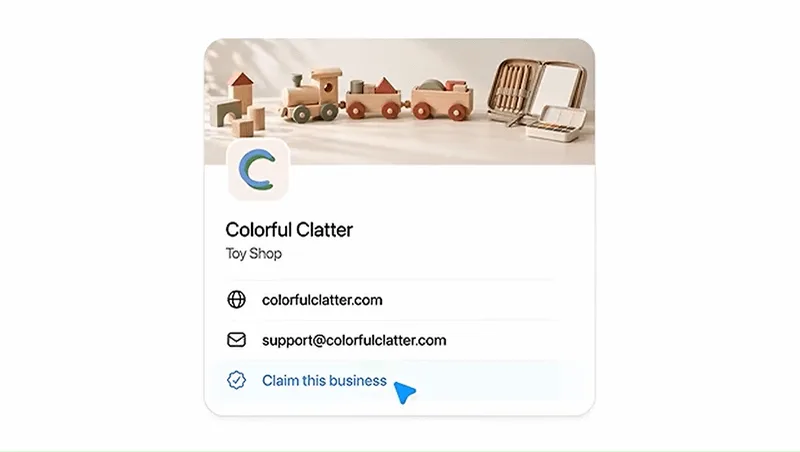
Discovery topics provide additional context by grouping recurring themes associated with answers in which a company appears or its website is referenced. In OpenAI’s fictional Colorful Clatter toy shop example, those themes included affordable activities for children, gifts, and toy shops in San Francisco. The information can help a business understand the kinds of questions or shopping situations associated with its visibility.
For example, a retailer appearing frequently in gift related contexts could examine whether its product pages clearly state recommended ages, the number of players supported, and whether batteries are included. A business appearing in local shopping discussions could check that pickup hours, location information, and service areas are easy to find. These improvements can help customers evaluate the business using accurate public information.
Limitations and Customer Privacy Boundaries
However, discovery topics do not reveal what individual customers intended or ultimately did. A recurring gift related topic does not prove that a particular customer planned to purchase a present, chose the business over competitors, or completed an order. Similarly, mentions and clicks are useful engagement indicators but cannot independently establish sales performance. Businesses need their own transaction and website information to evaluate what happens after a customer reaches their systems.
OpenAI states that businesses do not receive individual prompts, private ChatGPT conversations, or transcripts of customer exchanges with Business Agents. The reporting system provides aggregate activity when applicable thresholds are met. A business can supply the information used by its agent without gaining access to a complete inbox of customer questions. The same principle applies to sponsored Business Agents, where advertisers may receive aggregated information about frequently discussed subjects but cannot read individual customer chats.
A separate distinction applies when customers deliberately provide contact information for an authorized follow up. OpenAI’s business terms distinguish aggregate analytics from lead information that users choose to share and authorize OpenAI to pass to a company. Its agent policy permits optional follow up through approved features and limits the information an agent may request. Sharing contact details for a specific purpose does not grant the business access to the surrounding conversation. The existence of these provisions also does not mean every Business Agent supports a contact collection feature.
Customer interactions can therefore involve different information boundaries:
- General ChatGPT conversation: The business cannot read the customer’s private prompts or original discussion.
- Business Agent conversation: The business supplies agent information but does not receive individual conversation transcripts.
- Business Hub Insights: The company receives available aggregated metrics and discovery themes.
- Authorized lead information: Contact details may be shared when the customer deliberately provides them and authorizes the transfer through an approved feature.
- Merchant website: The company receives information customers submit directly through its own checkout, support, or account systems.
These boundaries allow customers to move between independent product discovery, branded informational assistance, and a company’s own website while understanding that each interaction serves a different purpose.
Profile Verification and Business Preparation
Businesses in ChatGPT also separates profile verification from commercial promotion. Claiming a company and maintaining accurate details does not require purchasing advertising, and OpenAI says verification does not guarantee higher placement in recommendations. Unclaimed businesses can still appear in relevant answers because ChatGPT continues making its own comparisons. A verified profile provides an authorized representative with a way to correct information and supply more useful details, but it does not make the company’s products automatically more suitable than competing alternatives.
For businesses evaluating the November 2026 beta, the most practical opportunities involve maintaining accurate public information, providing reliable product data, and making company specific answers easier for customers to obtain. Business Agents extend that experience for eligible U.S. companies, while Insights offers aggregated information about discovery and website engagement. The effectiveness of these features depends on clear policies, current product details, accurate agent instructions, and a consistent distinction between independent ChatGPT recommendations and information supplied by businesses themselves.

Frequently Asked Questions (FAQs)
- Does a company need to buy ChatGPT Ads before it can claim its profile?
No. Eligible businesses can claim and verify their profiles without purchasing advertising or opening an Ads Manager account. Once verification is completed, authorized representatives can manage public business information and access available Business Hub insights. Advertising is a separate option for companies that want to run sponsored campaigns. - What happens if a company discovers that somebody else claimed its listing?
An authorized representative can open the existing business profile and select Dispute ownership from the options menu. OpenAI then directs the claimant through a process to establish their authority over the business. Shopify merchants may also begin this process when an existing claimed listing appears during store setup. Creating a duplicate profile is not the appropriate solution. - Can a company invite an agency to help manage its Business Hub account?
Yes. The administrator responsible for the business can invite authorized teammates or an agency to help manage its Business Hub presence. Each invited person uses their own ChatGPT account rather than sharing the administrator’s credentials. When the claim is managed through an organizational workspace, applicable membership and permission requirements may limit which invitations can be issued. - Can a merchant use a Business Agent without moving its store to Shopify?
Yes. Shopify is one supported integration, but eligible U.S. online retailers and service providers using other platforms can also create Business Agents. Those merchants can supply product information through Business Hub, including supported product feeds. Shopify primarily simplifies verification and catalog connections for stores already operating on its platform. - Does a new business profile go live at the same time as its agent?
Not necessarily. Business profiles and Business Agents have separate publication requirements. When Persona verification is used to create a new profile, OpenAI says approval automatically publishes that profile. However, an eligible business must still review and explicitly select Publish for its agent before customers can start branded conversations with it. - Can a customer use a Business Agent to check where an order is?
Not in the initial beta. A Business Agent can explain delivery policies, provide general shipping information, and direct customers to the merchant’s order tracking or support page. It cannot independently retrieve an individual order’s status. The company must continue using its existing customer account, tracking, or support systems for that information. - Why might a brand appear in a ChatGPT answer without gaining a mention in Business Hub?
For online businesses, Business Hub counts a mention when ChatGPT references the company’s website. An answer may discuss the brand by name without including that reference, meaning the event does not qualify under the metric. Local businesses use a different definition, where displaying a location in search results can count even if the customer does not open its profile. - Does verifying a profile improve the company’s ranking in ChatGPT recommendations?
OpenAI does not guarantee improved rankings, additional sales, or more frequent recommendations after verification. The main benefit is allowing an authorized business representative to provide accurate company information, policies, and product details. ChatGPT continues making independent recommendations and may include competitors or businesses that have not claimed their profiles. - Can customers reach a Shopify merchant’s agent directly from social media?
Yes. Shopify says merchants with published Business Agents can obtain shareable links to their branded conversations. These links can be placed on social media profiles, websites, or other customer communication channels. Customers can then open the agent directly without first discovering the merchant through a separate ChatGPT answer. - Does sponsoring an agent let the advertiser read a customer’s questions?
No. Advertisers do not receive individual Business Agent conversations, customer prompts, or complete chat transcripts. Where available, Ads Manager can provide aggregated information about frequently discussed topics or questions. This allows advertisers to identify recurring customer interests without gaining access to the private wording of individual conversations.

Conclusion
Businesses in ChatGPT gives companies a direct way to manage the information customers need when making purchasing decisions. A retailer can clarify product availability, delivery locations, return conditions, and exceptions for personalized items, making those details easier to find through its verified profile. For eligible U.S. businesses, a published Business Agent extends that experience by allowing customers to ask specific questions about products and services without leaving ChatGPT. These features help businesses provide more accurate information while giving customers additional opportunities to evaluate their options before visiting a company’s website or completing a purchase.
The distinction between independent recommendations and business supplied information remains central to the experience. ChatGPT can compare companies and products independently, while a clearly labeled Business Agent provides answers on behalf of one organization. Sponsored Business Agents offer an additional, separately identified advertising experience through which customers can choose to engage with an advertiser. Meanwhile, Business Hub provides companies with aggregated information about mentions, website clicks, and discovery topics without exposing individual customer conversations or agent chat transcripts. Together, these capabilities connect business discovery, verified company information, and customer engagement while maintaining separate boundaries between independent recommendations, paid promotions, and private conversations.
Sources and Citations
- OpenAI, November 10, 2026: OpenAI’s official launch announcement introduces Businesses in ChatGPT in beta, including Business Hub, verified business profiles, aggregated engagement insights, product information management, and Business Agents. OpenAI initially described Business Agents as available to eligible U.S. ecommerce and online service businesses, with a November 19 update expanding eligibility beyond the U.S. OpenAI
OpenAI: Introducing Businesses in ChatGPT - OpenAI Help Center, Setting Up Your Business on ChatGPT: The official setup guide explains how businesses claim profiles, complete verification, update public information, connect product feeds, and manage their presence in Business Hub. It also covers product feeds and other profile management capabilities. OpenAI Help Center
OpenAI Help Center: Setting Up Your Business on ChatGPT - Shopify Help Center, Selling on ChatGPT: Shopify’s documentation explains how eligible products can appear in ChatGPT through Shopify Catalog, how merchants can claim their ChatGPT business profile, use the ChatGPT Business app, manage Business Hub information, and create Business Agents. Shopify also notes that the app is optional for basic product discovery. Shopify Help Center
Shopify Help Center: Selling on ChatGPT - OpenAI Developers, Product Feed Specification: OpenAI’s Agentic Commerce documentation describes how structured product feeds supply prices, availability, seller information, variants, and other catalog data to ChatGPT. It supports delivery through file upload, hosted URLs, and SFTP. OpenAI Developers
OpenAI Developers: Product Feed Specification - OpenAI, Businesses in ChatGPT Policy: The policy requires businesses to manage only profiles they own or are authorized to represent, keep information accurate and current, avoid duplicate or fake profiles, and comply with OpenAI’s other applicable policies. OpenAI
OpenAI: Businesses in ChatGPT Policy - OpenAI, Business Agents Policy: The policy requires Business Agents to represent eligible businesses honestly, clearly identify themselves as AI acting for the company, and comply with applicable OpenAI policies. It also governs the information, links, forms, instructions, and tools businesses provide to their agents. OpenAI
OpenAI: Business Agents Policy - OpenAI, Businesses in ChatGPT Terms: OpenAI’s terms govern Business Hub, business listings, Business Agents, product feeds, customer data, verification, and publication. They distinguish claiming a listing from publishing an agent and state that publication of a Business Agent does not itself authorize paid advertising. OpenAI
OpenAI: Businesses in ChatGPT Terms - OpenAI Help Center, Sponsored Business Agents in Ads Manager: The official guide explains how eligible advertisers can build, test, and publish sponsored agents, attach them to eligible conversion campaigns, and review campaign reporting. It also states that advertisers do not receive individual agent chats or transcripts and that agent conversations are not billed separately from the campaign. OpenAI Help Center
OpenAI Help Center: Setting Up a Sponsored Business Agent - Search Engine Roundtable, November 10, 2026: Barry Schwartz documented the Business Hub launch, including business verification by phone, text, or DNS, as well as reporting for mentions, profile views, website clicks, and discovery topics. His launch day test also showed that a verified profile could initially display no data. Search Engine Roundtable
Search Engine Roundtable: Businesses in ChatGPT Business Hub Live With Click Data - PPC Land, November 11, 2026: PPC Land examined the new Business Hub metrics in detail, including mentions and website clicks, while emphasizing that prompts and customer chats remain hidden from businesses. It also covers Business Agents and their relationship with ChatGPT advertising. PPC Land
PPC Land: Businesses Gain ChatGPT Click and Mention Counts - Reuters, November 10, 2026: Reuters independently reported OpenAI’s launch of business profiles, Business Hub, aggregated engagement insights, product feeds, Business Agents, sponsored agents, and the privacy distinction preventing businesses from accessing individual customer conversations. Investing.com Canada
Reuters Coverage via Investing.com
Recommendations
- Where Winds Meet, Official Imperial Palace Gameplay Trailer Explained: Release Date, Story, Combat Details & Everything We Know
- Diablo 4 3Rd Anniversary Event: Goblins, Massive XP Boost, Free Cosmetics, and Full June 2–9 Celebration Guide
- IO Interactive and Build A Rocket Boy End MindsEye Partnership as Hitman Crossover DLC Is Canceled
- All Anomalies in Animal Hospital Guide: Every Roblox Anomaly Explained
- Every Release Date from Every Event at Summer Game Fest 2026
- First Gameplay Trailer of Silent Hill: Townfall: It’s a First-Person Game and Everything We Know (2026)
- Best New Anime to Watch Right Now: Spring 2026 Picks
- Switch 2 Software Update Adds “Handheld Mode Boost” for Old Games – Performance Upgrade Explained
- We Build LEGO Winnie the Pooh: A 100th Anniversary Set Worth the Hype for Disney and LEGO Fans
- Echoes of Aincrad: Complete Guide to Growth Points (Best Stat Builds & Leveling Tips)



































































































