









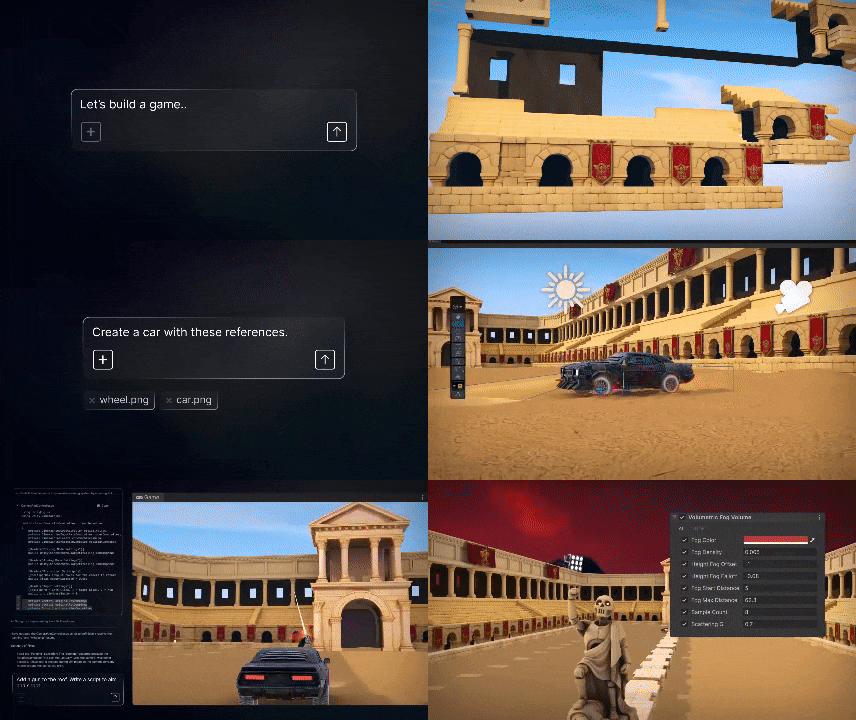
Official documentation from shows that Unity AI has moved from earlier beta waves into a public open beta for Unity 6, combining an in-Editor assistant, asset generators, AI Gateway support for third-party agents, and a Unity MCP Server for external AI clients. The practical takeaway is that Unity AI is no longer a concept preview: it is now a documented, installable workflow inside current Unity 6 releases, with plan-based credits, cloud-linked project requirements, and package-level setup steps that teams can follow today.
Unity AI Open Beta for Unity 6 Explained
Unity AI open beta for Unity 6 explained means understanding Unity AI as a suite rather than a single feature. Unity’s current product and documentation pages describe four major surfaces around the beta: the in-Editor Assistant for contextual help and action-taking, Generators for creating assets, AI Gateway for running supported third-party coding agents inside the Editor, and Unity MCP for exposing Unity to external AI clients. Unity’s release page also frames Unity AI as a beta capability available in the Unity 6.3 LTS line, not a disconnected experimental add-on.
What makes the beta notable is its project awareness. Unity’s product materials say the assistant is grounded in project context, while the manual and Assistant documentation show that it can inspect scenes, assets, scripts, console messages, and profiler data, then respond either with explanation or with controlled changes depending on mode and permission settings. That combination is the real shift from a simple chat panel to a workflow assistant embedded in the Unity Editor.
Unity AI Open Beta Release Date and Official Announcement Details
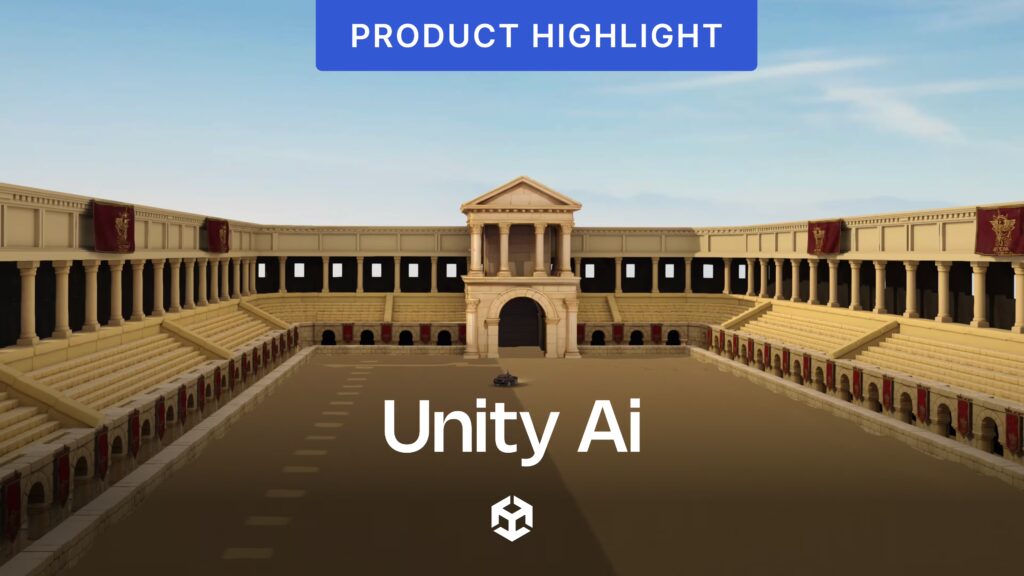
Unity AI open beta release date and official announcement details are now clear. The official Unity Discussions announcement was posted on May 1, 2026, stating that Unity AI Beta was available for all developers on Unity 6 and above. The same day, Unity Support published an “open beta user guide” explaining the access path, requirements, and tier-based credit provisioning.
The May 2026 launch sits inside a longer rollout timeline. Unity first introduced Unity AI in the Unity 6.2 beta announcement on May 15, 2025, presenting it as the successor to Muse Chat and an integrated Editor workflow for assistance and generation. Unity’s broader Unity 6 release materials later described Unity AI as available in beta in Unity 6.3 LTS, which is why the feature now appears less like a limited preview and more like a public beta embedded in the mainstream Unity 6 release family.
Unity AI Beta 2026 Roadmap: What Features Are Expected Next
Unity AI Beta 2026 roadmap: what features are expected next cannot be stated as a fixed public shipment calendar from the sources available here, because Unity’s dashboard documentation references a roadmap link but the public roadmap details are not fully visible in parsed form.
Still, the direction of travel is unusually clear from the current package documentation: Unity is already documenting reusable local skills, custom tools, profiler analysis, checkpoints and rollback, Figma-to-UI generation, 3D object generation, external MCP tooling, and deeper third-party agent routing through AI Gateway. Those documentation footprints strongly suggest the next stage of the beta is broader workflow automation, richer integrations, and a wider range of asset-generation and UI-authoring flows rather than a narrow focus on chat alone.
A practical reading of the roadmap, based on current official documentation rather than speculation, is that Unity AI is expanding in three directions at once: more in-project autonomy through Ask, Plan, and Agent workflows; more generator coverage through 2D, audio, material, terrain, cubemap, and 3D-object creation; and more interoperability through AI Gateway, MCP servers, and custom skills or tools. That is the clearest evidence-based picture of what “expected next” means in the 2026 beta phase.
How to Join the Unity AI Assistant Open Beta Test
How to join the Unity AI Assistant open beta test is simpler now than it was during earlier beta waves because the service is no longer presented as invite-only. Unity’s May 1, 2026 announcement says the beta is available for all developers on Unity 6 and above, and the official support guide turns that into a concrete sequence: install the Assistant package, accept the in-Editor terms, provision credits in the Unity Cloud Dashboard, make sure an organization owner or manager enables Assistant and Generators, then open AI > Assistant in the Editor.
One detail worth noting is Unity’s current naming inconsistency in the cloud interface. The open beta guide tells users to go to Unity AI > Manage Points to provision credits, while the credit-check article tells users to go to Unity AI > Manage Credits to see the available balance. In practice, both sources describe the same cloud-side credit management flow, so teams should look for either “Manage Points” or “Manage Credits” terminology inside the Unity AI area of the dashboard.
Unity AI System Requirements: What Unity Version You Need
Unity AI system requirements: what Unity version you need are documented in a few slightly different ways, so the safest interpretation matters. Unity’s marketing FAQ says Unity AI requires Unity 6.0 and up, plus AI package installation, accepted terms, and a project linked to Unity Cloud. But the current Assistant installation docs narrow the supported baseline to Unity 6.0.60f1 or Unity 6.3 and later, and the May 1, 2026 open beta support guide simplifies that further to Unity Editor 6.3 or newer.
For teams that want the least ambiguous setup, the safest current requirement is Unity 6.3+ with a cloud-linked project and accepted AI terms. If a team is pinned to an older Unity 6 LTS patch, the package docs indicate 6.0.60f1 can still be viable for Assistant-related workflows, but Unity’s own launch-day support article points first-time open beta users to 6.3+. External Unity MCP clients also require Unity 6 with the Assistant package installed, so MCP does not serve as a backdoor for older Editor generations.
How to Link a Unity Project to Unity Cloud for Unity AI Beta
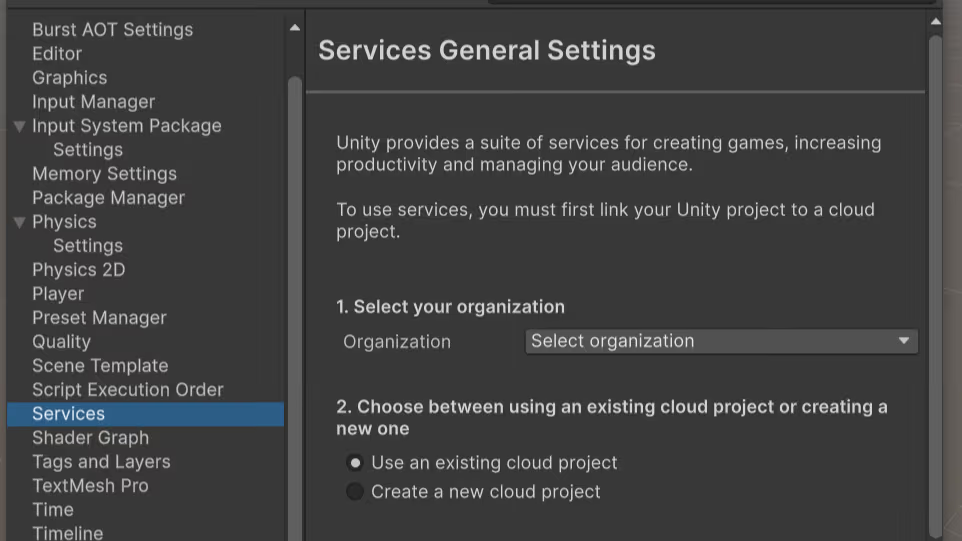
How to link a Unity project to Unity Cloud for Unity AI Beta is a mandatory part of setup, not an optional extra. Unity’s Editor and cloud docs say you must sign in to the Unity Hub, open the project, go to Edit > Project Settings > Services, and then either link the local project to an existing cloud project or create a new cloud project from that Services panel. Unity’s AI menu documentation also lists the cloud link as a prerequisite for using Unity AI features in the Editor.
This step affects more than access. Unity Support documents a specific failure mode where the Editor can display an “insufficient AI Manage Points” message even when credits are available, simply because the project is linked to the wrong organization. In other words, correct cloud linkage is both an access requirement and a troubleshooting checkpoint for teams that believe their plan or credit balance should already enable the beta.
How to Install the Unity AI Assistant Package in Unity 6
How to install the Unity AI Assistant package in Unity 6 is straightforward once the project meets the version and cloud requirements. The package name is com.unity.ai.assistant, and Unity’s package manual says the path is Window > Package Manager > Add > Add package by name, followed by AI > Assistant after installation. Unity’s product page also says many users can install through the AI button at the top of the Editor.
If the AI menu is not visible, Unity’s Editor manual says to right-click an empty area of the toolbar and enable Services > AI. On first use, users must read and accept the AI terms inside the AI menu, after which the Editor exposes options such as Open Assistant and Generate New. That means package installation is only part of setup; the visible AI menu and its click-through terms are part of activation as well.
Unity AI Assistant Features for Game Development in the Editor
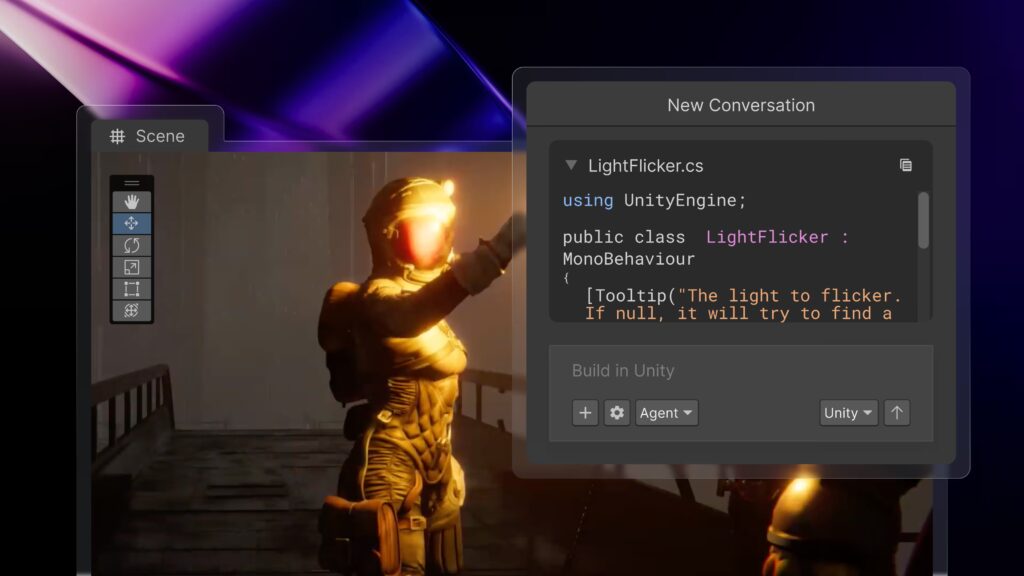
Unity AI Assistant features for game development in the editor go well beyond documentation lookup. Unity’s current docs describe an Assistant that can answer project-specific questions, suggest code and settings, inspect scenes and assets, help debug console errors, and perform approved changes directly in the project. The attach workflow lets developers bring GameObjects, assets, components, and console messages into a conversation so the assistant can analyze or manipulate them with context.
The feature set also reaches into production tasks that are unusually specific for a built-in Editor assistant. Unity documents profiler analysis from inside Assistant, and it now documents UI creation from design links in , where Assistant can import design data, collect referenced assets, and generate Unity UI files. That places the Assistant closer to a workflow surface for implementation, debugging, and content creation than a general-purpose chatbot.
Unity AI “agentic Assistant” Meaning: What Tasks it Can Automate
Unity AI “agentic assistant” meaning: what tasks it can automate becomes easier to understand when read through Unity’s mode system. Assistant supports Ask mode for explanation and analysis without project changes, Plan mode for producing a structured implementation plan before any write operations, and Agent mode for directly creating, modifying, or deleting project content according to permission settings. Unity explicitly describes Agent mode as suitable for direct setup, fixes, and automation.
In practice, “agentic” means the tool can move from advice to execution while still preserving human checkpoints. Plan mode saves a plan into Assets/Plans as a Markdown file, requires approval before implementation, and then hands execution to Agent mode. Unity also documents automatic checkpoints and restore capability, which give developers a rollback mechanism when experimenting with Assistant-led changes. Combined with reusable skills and custom tools, that gives the Assistant a real task-execution model rather than a text-only help mode.
Unity AI vs Unity Muse Chat: What Changed and What Replaced It
Unity AI vs Unity Muse Chat: what changed and what replaced it is one of the most important transition questions. Unity’s 2025 Unity 6.2 beta announcement explicitly said Assistant replaces Muse Chat, while current Muse Chat package docs say Unity Muse was retired on October 1, 2025 and is being replaced by Unity AI in Unity 6.2 and later. Unity’s current FAQ goes further by saying Muse is a deprecated product and Unity AI is a new offering built on third-party models rather than the older Unity-first-party Muse approach.
The bigger change is not just branding. Muse Chat was primarily a conversational help layer, whereas Unity AI now combines the Assistant with Generators, AI Gateway, and Unity MCP. There is also a subtle timeline nuance: Unity’s 2025 beta launch originally described Unity AI as replacing both Muse and Sentis, but Unity’s current FAQ now says Sentis remains active as the runtime engine for neural network inference. So the cleanest current statement is that Muse Chat was replaced by Assistant inside Unity AI, while Sentis continues as a separate runtime ML path.
Unity AI Generators: Animation, Materials, Sprites, Sounds, and Textures
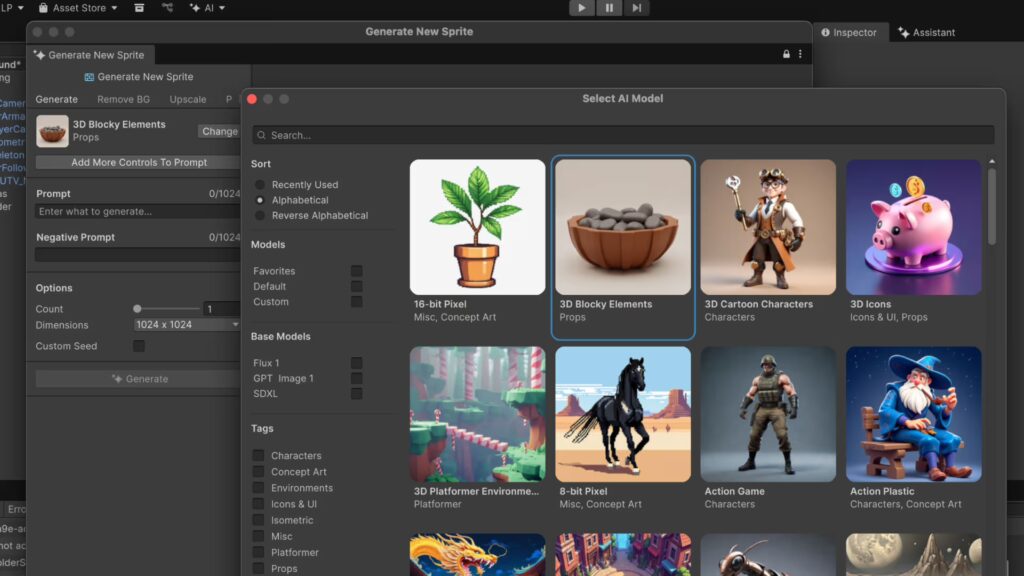
Unity AI Generators: animation, materials, sprites, sounds, and textures are the beta’s content-creation side. Unity’s current Generator docs describe Sprite Generator, Texture2D Generator, Sound Generator, Animation Generator, Material Generator, Terrain Layer Generator, and even a 3D Object Generator in the broader toolset. The core promise is prompt-driven creation inside the Editor, with generated assets landing in the project for preview, refinement, and use in scenes or pipelines.
Under the hood, the generator categories are already fairly specialized. Animation Generator supports text-to-motion and video-to-motion workflows; Sound Generator supports prompt-based creation, reference-based variation, and microphone recording; Material Generator works with physically based rendering properties; and Assistant can call Generator workflows directly from natural-language prompts without forcing users to switch windows first. That design reduces context switching for prototyping while still allowing refinement in dedicated Generator windows when teams need more control.

Unity AI Gateway: Connecting Third-Party AI Tools Inside Unity
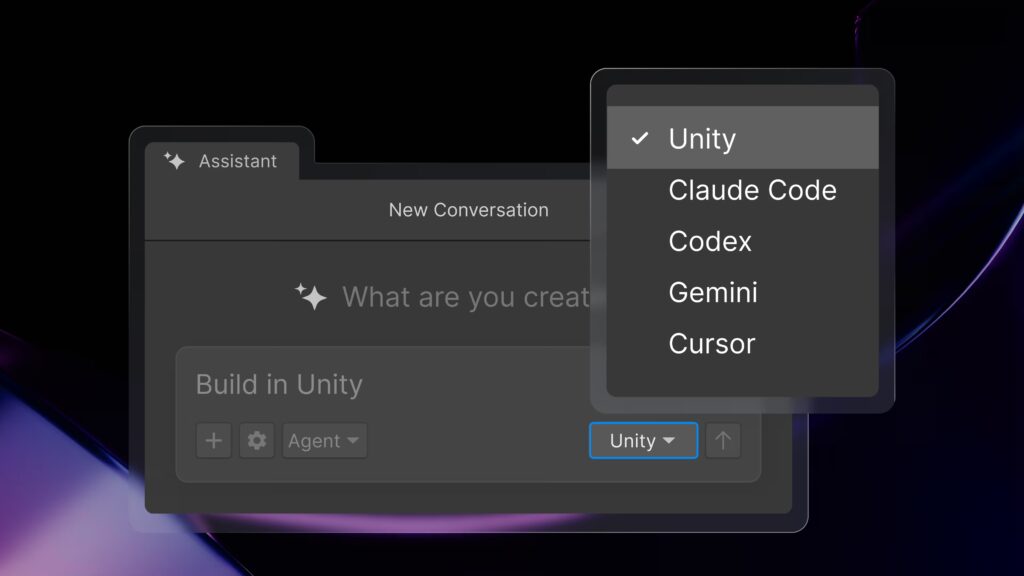
Unity AI Gateway: connecting third-party AI tools inside Unity is Unity’s bring-your-own-agent layer. The Gateway overview says it adds an agent selector to Assistant so supported third-party coding agents can run inside the Unity Editor using the developer’s own provider credentials. Current Gateway setup docs list examples such as Claude Code, Gemini, and Codex, and note that supported agent versions include Claude Code 2.1.45+ and Cursor CLI 2026.02.13+, while Codex CLI and Gemini CLI use Unity-bundled versions.
The most important pricing detail is that AI Gateway does not consume Unity credits when it routes prompts to a third-party agent, but that does not necessarily make it free on every plan. Unity’s product and pricing pages show that Personal users access AI Gateway through the Unity AI trial or paid Unity AI subscription, while Pro and Enterprise include Gateway access in the paid plan. So “no credits consumed” is true for Gateway usage itself, but “plan access still required” is also true.
Unity MCP Server and MCP Client: What They Do and How They Work
Unity MCP Server and MCP Client: what they do and how they work are easier to separate when treated as two different directions of traffic. In Unity’s MCP overview, Unity acts as the MCP server that exposes Unity tools to external AI clients such as Claude Code or Cursor. The external tool starts Unity’s local relay binary, which talks to the Unity Editor through the MCP bridge and exposes built-in or custom tools over the open Model Context Protocol.
Unity’s MCP client behavior is different. In the Assistant-side MCP documentation, Unity can also connect outward to third-party MCP servers running on the local machine, letting Assistant use external tools such as Git utilities, file tools, or custom automation services. Unity’s own docs are explicit that the MCP Servers page under AI > MCP Client is for servers that Assistant connects to, while the Unity MCP Server page is for the MCP endpoint that Unity exposes to outside clients. That server/client distinction is one of the most important architectural details in the current beta.
Security and control are built into that setup. Direct external MCP client connections require user approval in Project Settings and are remembered across sessions once approved, while AI Gateway connections are automatically approved. Unity also documents tool-level enable or disable controls, bridge start and stop controls, and concurrent MCP connections based on subscription tier.
Unity AI Pricing and Credits: Free Trial vs Subscription Cost
Unity AI pricing and credits: free trial vs subscription cost are now documented clearly enough for current planning. For Free, Personal, and Student users, Unity’s open beta guide says the entry point is a 14-day free trial with 1,000 credits and a credit card requirement. After the trial, the service automatically renews at $10 per month for 1,000 credits per month unless canceled before expiry. Unity’s cancellation article confirms that the trial becomes paid automatically unless “Cancel free trial” is used before the deadline.
Credits are governed by specific beta terms. Unity’s legal terms say credits are non-refundable except where required by law, do not roll over into the next subscription period, and expire at the end of the applicable period. Unity also says additional credit bundles can be purchased separately when needed, but the publicly available pages used here do not provide a single stable bundle price table for the open beta, so the safest current statement is simply that top-up bundles exist and are sold separately.
From a budgeting standpoint, the dashboard is also part of the pricing model. Unity’s usage documentation says organizations can monitor point consumption by action type, with breakdowns such as Ask, Run, Sound, Image, Material, Animation, and Code. A separate support article says users can view their current balance in Unity AI > Manage Credits, which is the practical place to verify whether a team is approaching its monthly cap.
Unity AI for Unity Personal vs Pro vs Enterprise: What’s Included
Unity AI for Unity Personal vs Pro vs Enterprise: what’s included is now mostly a question of credits, access path, and MCP concurrency. Unity Personal offers a free base Editor tier, but Unity AI access sits behind the Unity AI trial and then the low-cost monthly Unity AI subscription. That Personal AI entitlement includes 1,000 monthly credits for Unity’s AI agents, one concurrent MCP Server connection, and AI Gateway access.
Unity Pro includes Unity AI in the paid plan rather than requiring a separate low-cost upgrade path. Unity’s pricing page says Pro includes 2,000 monthly credits per seat for Unity’s AI agent, three concurrent MCP connections, and AI Gateway access. That makes Pro the first tier where Unity’s own agentic assistant, Gateway, and official MCP tooling are bundled directly into the core subscription rather than trialed separately.
Unity Enterprise pushes those beta entitlements further. The pricing page says Enterprise includes 3,000 monthly credits per seat, five concurrent MCP connections, and AI Gateway access, with custom overall plan pricing handled through sales. Unity Industry is documented with the same AI allowance and MCP concurrency as Enterprise, but because this comparison is centered on Personal, Pro, and Enterprise, the clearest pattern is simple: credits and concurrent MCP capacity increase as teams move up the plan ladder.
Frequently Asked Questions (FAQs)
- Is Unity AI still a closed beta or invite-only program?
No. Unity’s official May 1, 2026 announcement says Unity AI Beta is available for all developers on Unity 6 and above, which is the defining change from earlier limited-access testing. - Do Unity Personal users have to pay after the free trial ends?
Yes. Unity’s open beta guide says the 14-day free trial converts to a $10-per-month plan for 1,000 credits unless canceled, and Unity’s subscription support article says trial users must cancel before expiry to avoid automatic transition to paid billing. - Does AI Gateway consume Unity credits?
No. Unity’s product FAQ says using a third-party agent through AI Gateway does not consume Unity credits, because those requests are routed through the external provider credentials you configure. - Does the Unity MCP Server require a Unity AI subscription on Personal?
Yes. Unity’s product FAQ says Personal users need a Unity AI trial or subscription for MCP Server access, while Pro, Enterprise, and Industry include MCP access in their paid seats. - Can Unity AI be used on an existing Unity project?
Yes, provided the project is on a supported Unity 6 build, linked to Unity Cloud, and has the Assistant package installed. Unity’s product FAQ says existing Unity 6 projects are supported, while the open beta guide and installation docs narrow the safest current version baseline to 6.3+ or 6.0.60f1+ depending on package path. - Do you have to link the project to Unity Cloud to use Unity AI Beta?
Yes. Unity’s AI menu docs and cloud-project docs both list cloud linkage as a prerequisite, and this is also the first thing to verify if the Editor reports missing AI points despite an available balance. - What package do you install for the Assistant?
The current documented package name is com.unity.ai.assistant, installed through Package Manager with “Add package by name.” - Can an organization disable Generators while keeping Assistant enabled?
Yes. Unity’s dashboard settings documentation says Assistant and Generators are controlled separately at the organization level, so admins can disable asset generation without disabling the in-Editor assistant. - Does Unity use prompts and outputs to train models by default?
No. Unity’s FAQ says user data is not used to train AI models by default, and the dashboard settings reference says the “Improve Unity AI models” setting is off by default and must be explicitly enabled to allow broader model-improvement usage. - How do you check how many Unity AI credits are left?
Unity Support says to open Unity AI in the cloud dashboard and go to Manage Credits. Unity’s usage documentation also shows that organizations can review point consumption by action type over time.
Conclusion
Unity AI’s open beta is best understood as Unity’s attempt to merge three previously separate ideas into one production-facing workflow for Unity 6: context-aware assistance inside the Editor, prompt-based asset generation inside the project pipeline, and direct interoperability with outside AI agents through AI Gateway and MCP. The safest current access path is Unity 6.3+, a cloud-linked project, the com.unity.ai.assistant package, accepted AI terms, and plan-based credit provisioning through the Unity dashboard. For teams deciding whether to test it now, the core differentiator is not just chat or generation in isolation, but the fact that Unity AI can inspect real project context, propose plans, perform approved actions, and bridge to outside tools from within existing Unity workflows.
Sources and Citations
- Unity AI’s Open Beta Now Live for Unity 6
https://discussions.unity.com/t/unity-ai-s-open-beta-now-live-for-unity-6/1718560 - Getting started with Unity AI: open beta user guide
https://support.unity.com/hc/en-us/articles/48060149523476-Getting-started-with-Unity-AI-open-beta-user-guide - Unity Plans & Pricing
https://unity.com/products - Unity AI feature page and FAQ
https://unity.com/features/ai - Unity Manual: Unity AI
https://docs.unity3d.com/6000.4/Documentation/Manual/unity-ai.html - Access Unity AI features from the AI menu
https://docs.unity3d.com/6000.3/Documentation/Manual/ai-menu-access.html - Assistant package documentation
https://docs.unity3d.com/6000.3/Documentation/Manual/com.unity.ai.assistant.html - Generators package documentation
https://docs.unity3d.com/Packages/com.unity.ai.assistant%402.7/manual/about/overview.html - AI Gateway documentation
https://docs.unity3d.com/Packages/com.unity.ai.assistant%402.7/manual/integration/ai-gateway-intro.html - Unity MCP documentation
https://docs.unity3d.com/Packages/com.unity.ai.assistant%402.7/manual/integration/unity-mcp-overview.html - Unity Dashboard AI settings
https://docs.unity.com/cloud/en-us/UnityAI/dashboard - Muse Chat deprecation source
https://docs.unity3d.com/Packages/com.unity.muse.chat%401.1/manual/editor-chat.html - Unity 6.2 beta announcement
https://discussions.unity.com/t/unity-6-2-beta-is-now-available/1639999
Recommended
- Duskbloods is still coming this year, exclusive to Nintendo Switch 2 — 2026 release update + everything we know about The Duskbloods
- Character Creator and Blender Workflow: How to Seamlessly Integrate Your 3D Pipeline
- Pragmata: The Kotaku Review — Release Date, Gameplay, Length, and Verdict
- The Christophers Review (2026): Cast, Plot, Ending Explained & Why Steven Soderbergh’s Art Drama Is a Must-Watch
- Forza Horizon 6 Limited Edition Xbox Wireless Controller and Headset Reportedly Leaked
- How to Fix Missing Textures/ (or Linked) Files Detected in Blender: A Complete Troubleshooting Guide
- Top Places to Buy 3D Hair Assets: Best Marketplaces and Solutions
- How do I export a camera from Blender to another software?Resident Evil: Requiem Sold 5 Million Copies in Five Days — Capcom Confirms Record-Breaking Launch
- Dark Horse’s The Lord of the Rings Animated Figure Set Celebrates the Classic 1978 Film With Frodo, Aragorn, and Samwise




























































































