








In This Article (30 sections)
Importing Hair from Blender to Unreal Engine 5 Using Grooms or Mesh Cards
Unreal Engine 5 supports two main methods for importing hair from Blender: strand-based grooms (Alembic) and polygonal hair cards (FBX). Grooms preserve individual strands for high realism in cinematics or MetaHumans, while hair cards utilize low-poly mesh strips for better real-time performance in gameplay.
Importing Blender Hair as a Groom (Alembic)
To use grooms, enable the Groom plugin and “Support Compute Skin Cache” in UE5 Project Settings. In Blender 3.3+, prepare hair using particles or curves, apply scale, and export as an Alembic (.abc) file with “Export Hair” checked. In Unreal, import the file to create a Groom Asset and a Skeletal Mesh Binding Asset to ensure the hair tracks character movement properly via a Groom Component in the character Blueprint.
Importing Blender Hair as Mesh Cards
Hair cards are preferred for real-time efficiency. In Blender, generate flat UV-unwrapped strips manually or via add-ons and assign opacity maps. Export as an FBX—either as a Static Mesh or a Skeletal Mesh if physics are required. In Unreal, enable “Import Normals” to maintain shading and apply a hair material. Cards are attached to the head bone via sockets or as part of the main skeletal mesh.

How to Use Particle Hair from Blender in Unreal Engine Using Hair Cards or Grooms
Blender’s legacy Particle Hair and new Geometry Node-based Hair Curves (Blender 4.0+) can both be used. For grooms, export parent strands as Alembic; Unreal handles children interpolation via its LOD system. For cards, convert particles to curves or meshes to create geometry, then apply textures or bake orthographic views of the hair to create diffuse and alpha maps.
What is the Best Way to Do Hair in Unreal Engine from Blender for Real-Time Performance?
Hair cards are best for high-frame-rate games. Grooms are ideal for high-end hardware or cinematics. A hybrid approach uses grooms for LOD0/LOD1 and hair cards for distant LODs. Grooms offer superior realism and physically-based shading but are GPU-intensive. Cards offer better performance and artistic control but require complex texture work and can suffer from alpha sorting issues.
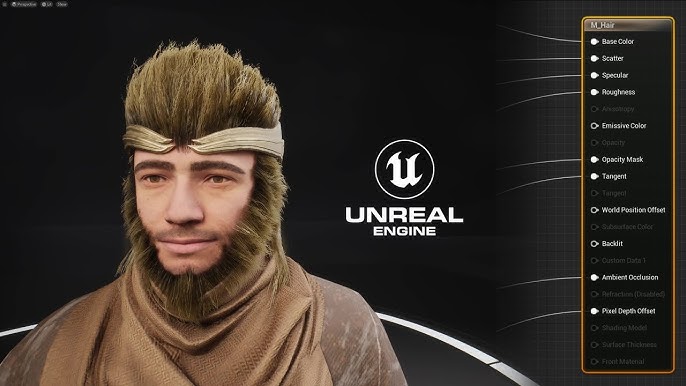
How to Make a Hair Material in Unreal Engine 5 Using the Marschner Model
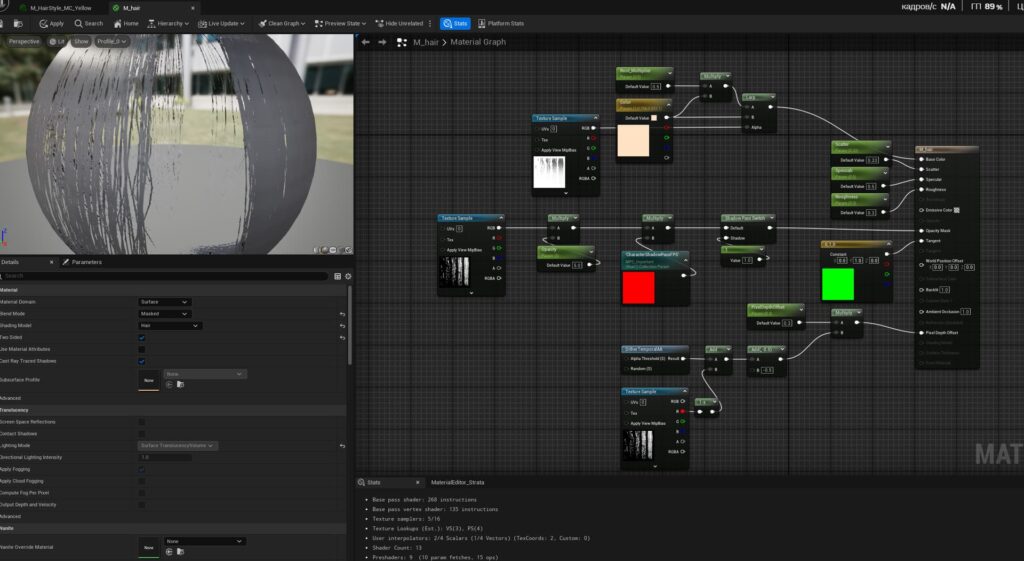
UE5 uses the Marschner model for realistic hair, featuring dual specular highlights and internal scattering. In the Material Editor, set the Shading Model to “Hair.” Use a Base Color gradient (roots to tips), set Roughness between 0.3 and 0.5 for highlight control, and provide a Tangent map for hair cards (grooms calculate tangents automatically). Use “Masked” blend mode with dithering for cards to manage opacity.
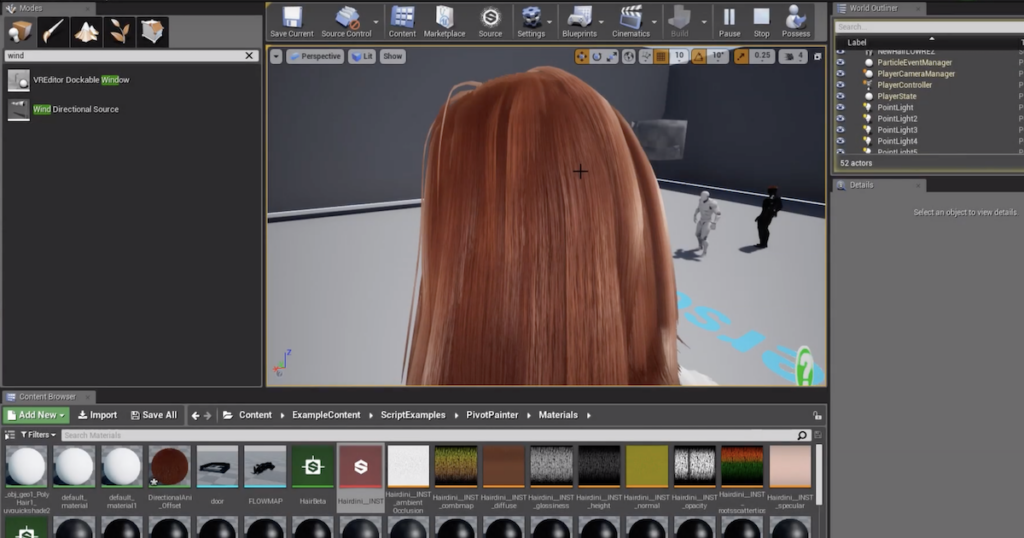
Creating Anisotropic Hair Shading in Unreal Engine 5 for Realistic Light Flow
Anisotropic highlights follow the hair’s flow. This requires a Tangent vector; for cards, this is provided via a Tangent Map where RGB values encode direction. Transmission should be enabled on light sources to allow light to pass through strands for a soft glow when backlit.
How to Make Custom Hair Textures for Unreal Engine 5 in Blender or Substance
Textures like Alpha, Diffuse, Normal, and Tangent maps are essential. In Blender, render hair patches orthographically to create these maps. In Substance Designer, use procedural nodes to generate tileable hair textures. Ensure alpha maps are high-resolution and disable sRGB upon import into Unreal to maintain data integrity.
How to Render Hair Properly in Unreal Engine 5 with Translucency and Depth Sorting
To avoid sorting issues, use the “Masked” blend mode with a “Dither Temporal AA” node. This simulates transparency without the ordering artifacts of the “Translucent” blend mode. For grooms, adjust r.HairStrands.ComposeAfterTranslucency to 0 if translucent objects behind the hair are rendering incorrectly.
Fixing Transparency Issues in Unreal Engine Hair Materials (alpha Sorting and Dithering)
Resolve sorting by using dithered Masked materials or adjusting “Translucency Sort Priority” for elements like eyelashes. To prevent distant flickering, disable mipmaps on alpha textures or use a “DistanceToCamera” node to fade thin strands. For complex setups, a two-pass material (Masked for bulk, Translucent for wisps) can be used.
What is Mizu Hair in Unreal Engine and How Do You Integrate it with Characters?
Mizu Hair is a community-created shader providing pre-tuned anisotropic reflections and dual-lobe specular highlights. It is integrated by migrating the .uasset into a project, applying it to a hair mesh, and using material instances to adjust parameters like color and roughness.
Setting up Real-Time Hair in Unreal Engine 5 with Chaos or Legacy PhysX
UE5 uses the Chaos physics engine. For grooms, enable “Enable Simulation” in the Groom Component and use a Groom Simulation Asset to define stiffness and damping. For hair cards, use Chaos Cloth by painting weights in the Skeletal Mesh Editor. Legacy PhysX-based HairWorks is no longer supported in UE5.
How to Simulate Hair Physics in Unreal Using Chaos Groom or Physics Assets
Strand physics are handled via GPU-driven Chaos Groom simulation, utilizing guide strands for efficiency. Mesh hair can use Physics Assets (rigid body chains for bones) or Chaos Cloth (for continuous card bending). Collision is managed via the character’s Physics Asset capsules.
How to Solve “Can’t Import Hair Mesh – More Bones than Allowed” in Unreal Engine
This error occurs when a mesh exceeds 255 bones or has more than 8 influences per vertex. Fix this by simplifying the rig in Blender, merging strand bones, using the “Only Deform Bones” export setting, or splitting the hair into multiple meshes. Alternatively, use grooms or cloth to bypass bone limits entirely.
Best Workflow for Fur and Strand Hair Rendering in Unreal Engine 5 for Animals or Stylized Characters
For animals, use grooms for high-fidelity fur and binding them to the skeletal mesh. For stylized characters, use low-strand-count grooms with high clumping or hair cards with custom shaders. A hybrid approach—grooms for hero shots and cards or shells for body fur—optimizes performance.
How Final Fantasy-Style Hair is Rendered in Unreal: Modular Grooms + Marschner Shaders
This style uses modular pieces (bangs, side locks, ponytails) as separate groom or card assets. This allows for specific physics settings (e.g., stiff spikes vs. swaying ponytails). The Marschner shader provides the signature vibrant, silky shine through dual-lobe specular highlights and anisotropy.
How to Attach Hair to the Same Skeleton as the Character in Unreal Engine 5
Hair can be skinned to the character skeleton in Blender and exported as one FBX. For modular setups, import hair as a separate skeletal mesh and use “Set Leader Pose Component” (formerly Master Pose) to sync animations. Grooms are attached via a Groom Component and require a Binding Asset to follow the skeletal mesh.
Modular Hair Systems with Independent Skeletons
Unreal Engine allows hairstyles to be split into modular pieces, such as bangs or ponytails, each with its own skeleton. This is implemented by adding multiple SkeletalMeshComponents to a character Blueprint and attaching them to the head bone socket using “Snap to Target” rules. This setup enables independent physics per piece via Chaos Cloth or physics assets, allowing different parts to move with unique damping or stiffness. Benefits include easier customization for MMO-style systems and avoiding high bone counts in a single skeleton. Performance can be managed by limiting the number of components or merging static pieces, and inter-hair collision can be handled through invisible collision shapes if necessary.

Simulating Hair Physics via Chaos Groom and Physics Assets
UE5 offers Chaos Groom for strand-based hair and physics assets for skeletal or card-based hair. For strands, import an Alembic groom, add a Groom Component, and use a Groom Simulation Asset to control mass, stiffness, damping, and gravity. For skeletal chains, create a Physics Asset with rigid bodies and constraints. Hair cards can be simulated using Chaos Cloth by painting weights from the scalp (0) to the tips (1) and adjusting bending stiffness. While Grooms are GPU-accelerated, physics assets and cloth use the CPU. A hybrid approach can be used to combine fine strands with cloth-based bulk hair.
Fixing Transparency, Alpha Sorting, and Flickering
To resolve alpha sorting and flickering, use Masked Blend Mode with the DitherTemporalAA node, which allows hair to utilize the depth buffer like a solid object. For translucent materials, adjust the Translucency Sort Priority and set the pass to “After DOF” to prevent depth of field issues. Flickering can be mitigated by increasing texture resolution, adjusting mip bias, or using Temporal Super-Resolution (TSR). For grooms, the console command r.HairStrands.ComposeAfterTranslucency 0 can fix sorting issues with other translucent objects.
Unreal Engine 5 Hair Shader Tutorial
An optimized hair shader uses the Hair Shading Model for Marschner-based lighting. Key inputs include Tangent or flow maps for anisotropic highlights, melanin-based Specular and Roughness, and Opacity masks for cards. Enable “Two-Sided” rendering and use Pixel Depth Offset to blend hair into the scalp. For backlighting, the Hair Shading Model provides natural transmission, which can be enhanced with Scatter Tint. Optimization involves using Material Instances and creating simplified LOD materials that disable expensive features like anisotropy or Pixel Depth Offset at a distance.

Troubleshooting Glossiness and Alpha Flicker
Overly plastic-looking hair is fixed by increasing Roughness to 0.4–0.5 and reducing Secondary Specular or Scatter intensity. To combat alpha flicker, enable “Dithered LOD Transition” and “Preserve Alpha Coverage” in texture mip settings. High-quality TSR or Temporal AA helps stabilize sub-pixel strands. Shadow noise can be reduced by disabling Contact Shadows or increasing shadow resolution. For backface issues, enable “Two-Sided Normal” to ensure consistent lighting on the reverse side of hair cards.
Showing a Cursor or Crosshair in Hair-Based Projects
Displaying UI elements is independent of hair rendering because UMG widgets are rendered in screen space above 3D geometry. Hardware cursors are enabled via the Player Controller using bShowMouseCursor. For aiming, a UMG Widget with a centered reticle should be added to the viewport. If visibility issues occur, check for post-processing or input mode conflicts (e.g., SetInputModeGameAndUI), and ensure the cursor is not obscured by custom full-screen shaders.
Using PixelHair for Groom Imports from Blender
PixelHair by Yelzkizi offers pre-made 3D hair assets for Blender that are optimized for Unreal’s groom system. The workflow involves exporting the hair from Blender as an Alembic (.abc) file with “Export Hair” enabled to include necessary attributes like strand UVs. In Unreal, you create a Groom Binding for the skeletal mesh and apply a hair material. These assets are compatible with MetaHuman shaders and support Chaos physics for dynamic motion, offering a production-ready solution for high-fidelity hair.

Previewing Hair Dynamics with the View Keeper
The View Keeper is a Blender add-on that assists in camera management for pre-visualizing hair dynamics. It allows creators to save multiple camera perspectives to check for hair clipping or facial obstruction during animation blocking. These cameras can be exported to Unreal’s Sequencer to ensure that the Chaos physics simulation looks correct from the intended cinematic angles. This iterative process helps refine hair properties and camera framing before final rendering.
Conclusion: Building a Full-Featured Real-Time Hair System
A comprehensive hair system integrates Blender-authored assets (grooms or cards) into Unreal Engine 5 using a robust pipeline. This involves using the Marschner-based Hair shading model, implementing dithered masking for performance, and applying Chaos Groom or Cloth physics for movement. Optimization is achieved through LOD strategies and Material Instances. By addressing common shader artifacts and using tools like PixelHair or The View Keeper, developers can create realistic, dynamic hair suitable for both gameplay and high-end cinematic sequences.
Frequently Asked Questions (FAQs)
- Can I use Blender’s new Hair Curves (Geometry Nodes) to export hair to Unreal Engine 5?
Blender’s Hair Curves can be exported as Alembic caches in Blender 3.3+, which Unreal imports as Groom assets with the Groom plugin enabled. Use a scalp UV map or Interpolate node for root binding. Hair Curves offer better control in Blender, with Unreal treating them like particle hair for simulation. - Hair cards vs Groom strands: which is better for performance in a game?
Hair cards are more performance-efficient, using fewer polygons and faster masked materials compared to GPU-intensive groom strands. Grooms offer superior realism with LOD options but are heavier. Use cards for broad hardware support or multiple characters; grooms suit optimized hero characters on high-end systems. - My hair groom imported from Blender is missing in Unreal or parts are invisible. What went wrong?
Disable children particles in Blender’s export, ensure correct Alembic curve data, apply proper scale, and select “Import Groom.” Verify the material isn’t hiding strands and check Groom asset bounds. Re-export with Blender’s Alembic Hair settings to fix import errors. - How do I attach a groom to a MetaHuman?
Import your Alembic groom, create a Groom Binding asset targeting the MetaHuman’s face mesh, and assign it to a Groom Component in the MetaHuman Blueprint. Disable default hair if needed. The groom will integrate with MetaHuman physics for seamless movement. - The hair on my character looks fine in editor but in-game it’s flickering and has jagged edges. How can I fix that?
Use Temporal Anti-Aliasing (TAA) or TSR to smooth edges, enable Dither Opacity Mask, and set hair opacity texture to “Alpha Coverage” for better mipmaps. Enable Dithered LOD Transition and avoid low resolutions. Thicker strands in lower LODs can reduce subpixel flicker. - My character’s hair has physics, but sometimes during animations the hair clips through the body or flies upward unnaturally. How do I improve the hair collision?
Ensure the character’s Physics Asset has capsules for collision areas, increase Groom’s Collision Radius, and enable continuous collision. Lock roots with stiff constraints, increase simulation Substeps, and add dampening to joints. Adjust gravity or drag to prevent unnatural upward motion. - Is it possible to make hair react to wind or forces in Unreal Engine?
Groom hair reacts to movement and gravity but requires Chaos Wind fields or Niagara forces for wind simulation, applied via Blueprints or experimental APIs. Cloth-based hair cards can use standard Wind settings in Chaos Cloth. Wind effects need custom setup for grooms until official features are added. - My Unreal hair looks different than my Blender hair – colors are off and detail is lost. Why?
Ensure textures import with sRGB enabled and match lighting conditions between Blender and Unreal. Increase strand count or disable children export for detail retention. Adjust mipmaps to “Sharpen” and tweak hair shader scatter to align Unreal’s rendering with Blender’s appearance. - How many strands can Unreal Engine 5 handle in a groom?
Target 50k strands for real-time performance, with LODs reducing to 20k or 5k at distance; 200k is cinematic. Decimate strands/segments in the Groom Editor and monitor performance stats. Keep under 100k for hero characters on high-end PCs/consoles to maintain 60 FPS. - What’s the best way to create hair textures for cards if I can’t model them?
Render Blender particle hair to transparent textures or use procedural tools like Substance Designer’s HairTG for realistic strand textures. Apply to planes in Unreal with hair shaders for anisotropic highlights. Generate normal maps to add volume, ensuring style-consistent, high-quality alpha textures.

Conclusion
Designing and implementing a realistic, real-time hair system in Unreal Engine 5 is undoubtedly one of the more complex challenges in 3D graphics, but it’s achievable with the right approach and tools. By starting in Blender – a familiar environment for sculpting and grooming hair – we can craft high-quality hairstyles or leverage asset libraries like PixelHair to jumpstart the process.
From there, Unreal Engine’s groom importer and hair shading model take over, giving us physically-plausible lighting and efficient simulation through Chaos physics. We’ve learned how crucial it is to consider each aspect: geometry (strands vs. cards), materials (Marschner dual highlights and anisotropy), physics (Chaos Groom vs. cloth simulation), and optimization (LODs, dithering, bone limits). We addressed common pitfalls and solutions along the way, so a developer or artist following this guide won’t have to reinvent the wheel – they can avoid known issues like transparency sorting or overdraw inefficiencies by applying the techniques discussed.
In closing, real-time hair is a blend of art and tech. It requires artistic finesse (to style and texture hair appealingly) and technical rigor (to make it run smoothly in engine). With UE5 and modern hardware, what was once only possible in pre-rendered cinematics is now within reach for interactive applications. A full-featured hair system isn’t built in a day, but with continuous iteration – previewing in tools like The View Keeper, adjusting in Blender, fine-tuning in Unreal – we can achieve stunning results.
Each project might introduce its own wrinkles (a unique art style, performance constraints, etc.), but the foundation laid out here is broad enough to adapt. By understanding the why (physics, shading, performance costs) behind each guideline, one can troubleshoot new problems that arise.
Ultimately, the reward is well worth it: characters that truly come to life with flowing locks or fur that reacts to their movements and the world around them. It adds immersion and polish that players and viewers might not consciously articulate but certainly feel. Armed with the knowledge from this research, you are equipped to implement a hair system in Unreal Engine that is both beautiful and robust, using Blender assets as the creative springboard. It’s a synthesis of powerful software and techniques – a marriage of Blender’s creation strengths with Unreal’s real-time muscle – culminating in digital hair that looks and behaves like the real thing, all running live in your scene. Happy hair creation!

Sources and Citations
- Yelzkizi — “Blender to Unreal Engine Groom Workflow.”
- Source: Yelzkizi Blog
- Link: https://yelzkizi.org/blender-to-unreal-engine-groom-workflow/
- Epic Games — “Shading Models in Unreal Engine — Hair Shading Model.”
- Source: Unreal Engine Documentation
- Link: https://dev.epicgames.com/documentation/en-us/unreal-engine/shading-models-in-unreal-engine#hair
- Epic Games — “Photorealistic Character.”
- Source: Unreal Engine Documentation
- Link: https://dev.epicgames.com/documentation/en-us/unreal-engine/photorealistic-character?application_version=4.27
- Epic Developer Community Forums — “What are the bone limitations in UE4?”
- Source: Unreal Engine Forum
- Link: https://forums.unrealengine.com/t/what-are-the-bone-limitations-in-ue4/276483
- Epic Developer Community Forums — “Anisotropic hair shader / tangent map usage discussion.”
- Source: Unreal Engine Forum
- Link: https://forums.unrealengine.com/search?q=anisotropic%20hair%20shader%20tangent%20map
- Yelzkizi — “Exporting Blender Hair to Unreal Engine 5.”
- Source: Yelzkizi PixelHair Guide
- Link: https://yelzkizi.org/exporting-blender-hair-to-unreal-engine-5/
- Yelzkizi — “PixelHair Roll Hair Curves Guide.”
- Source: Yelzkizi PixelHair Guide
- Link: https://yelzkizi.org/pixelhair-roll-hair-curves-guide/
- Epic Developer Community Forums — “FF7 Remake hair cards discussion.”
- Source: Unreal Engine Forum
- Link: https://forums.unrealengine.com/search?q=FF7%20Remake%20hair%20cards
- Epic Games — “Groom Quick Start.”
- Source: Unreal Engine Documentation
- Link: https://dev.epicgames.com/documentation/en-us/unreal-engine/groom-quick-start-in-unreal-engine
- Epic Developer Community Forums — “Groom translucency issues and ComposeAfterTranslucency fix.”
- Source: Unreal Engine Forum
- Link: https://forums.unrealengine.com/search?q=ComposeAfterTranslucency%20groom%20translucency
- Yelzkizi — “PixelHair.”
- Source: Yelzkizi Project Page
- Link: https://yelzkizi.org/pixelhair/
- Blender Artists — “PixelHair hair asset library discussion.”
- Source: Blender Artists Forum
- Link: https://blenderartists.org/search?q=PixelHair%20hair%20asset%20library
Recommendations
- How to Sculpt in Blender: The Ultimate Beginner‑to‑Pro Guide for 3D Sculpting
- The Seven Deadly Sins: Origin — Release Date, Platforms, Gameplay, and What Fans Need to Know
- Intergalactic Reveal Trailer Breakdown: First Look at Naughty Dog’s Sci-Fi Epic “The Heretic Prophet”
- Artemis II Crew Watched Project Hail Mary in Quarantine Before Launch Astronaut Jeremy Hansen Gives Ryan Gosling a Thumbs Up Halfway to the Moon
- Call Of Duty’s Iconic Ghost Shows Up In New Fanta Ad, Making People Wonder About 2026’s Call Of Duty
- The Expanse: Osiris Reborn Devs Admit Generative AI Is Being Used, but Claim Everything Is Still ‘100 Percent Human Made’
- Redefining Representation: Authentic Black Hairstyles in Video Games
- Helldivers 2: Comprehensive Guide to Gameplay, Features, Factions, and Strategies
- How to Use Film Grain: A Complete Guide to Achieving a Cinematic Look
- How to Convert a Real Human to Metahuman Using Photogrammetry: Complete Workflow Guide for Unreal Engine 5



































































































