



Meta description (SEO): Learn how “Come Home” (the Phoenix visual short) achieved a cinematic 2D look that feels 3D—using Moho rigging, Smart Bones, Curvers, meshes, and a 3D camera—plus a practical workflow you can replicate.
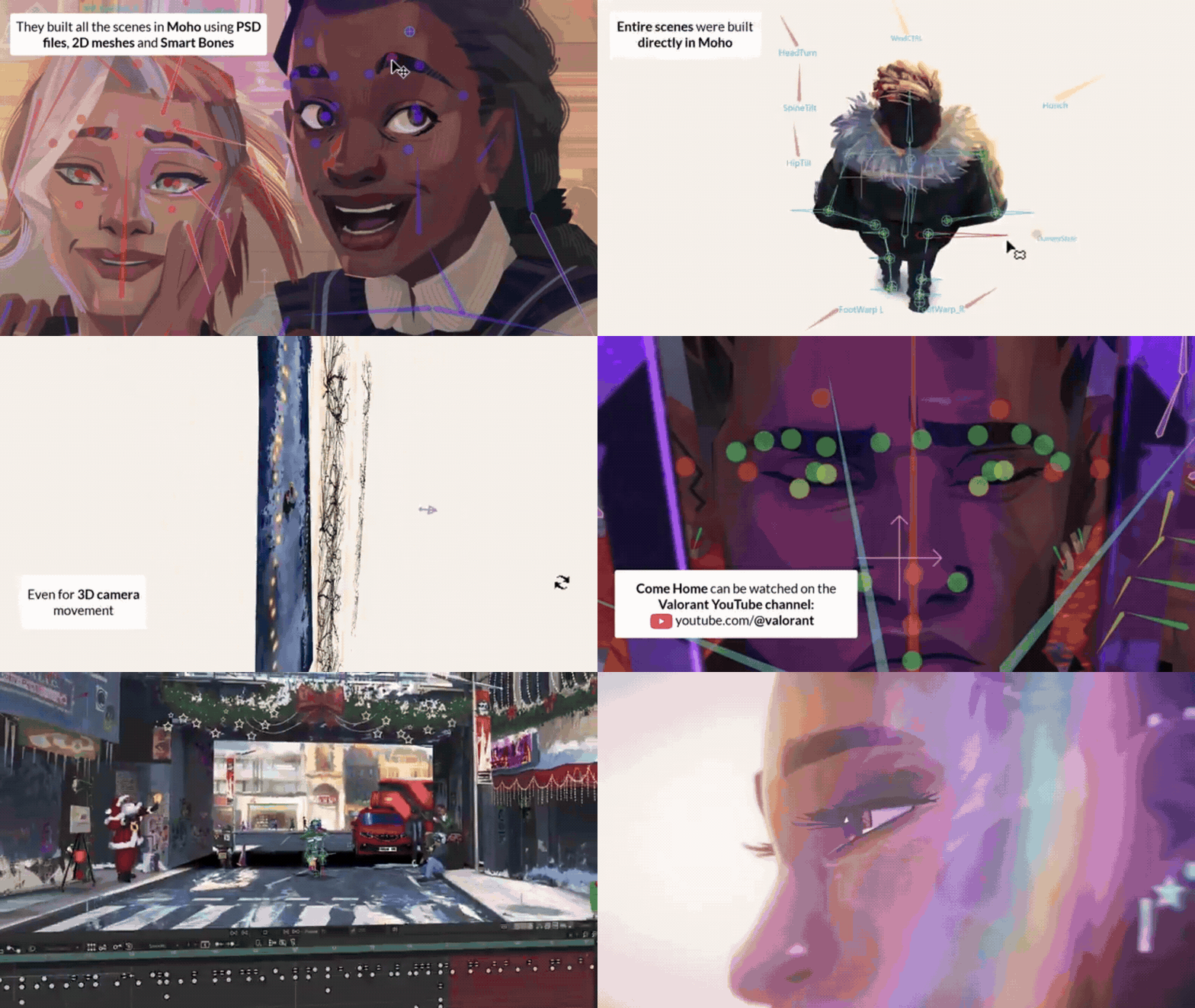
The most verifiable “behind-the-scenes” facts about how the animation was made come from Moho’s own public breakdown posts and from industry press summarizing those posts. Those sources consistently attribute the short’s animation to a Moho-based pipeline (PSD import, 2D meshes, Smart Bones, Curvers, and 3D camera work) and emphasize the result: stylized 2D animation that reads with 3D depth and cinematic camera motion.

VALORANT Come Home Short Film Behind the Scenes
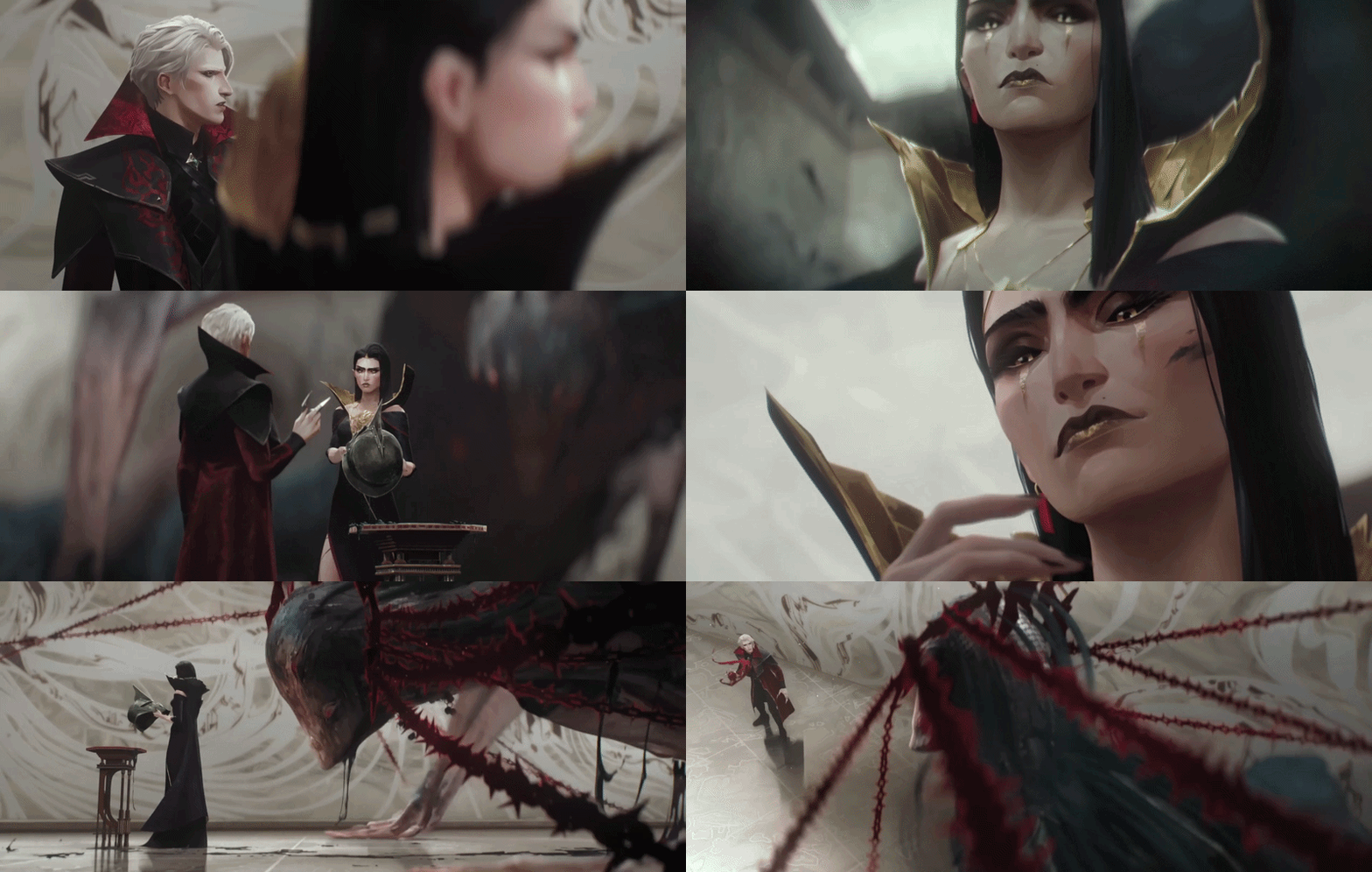
COME HOME // Phoenix Visual Short – VALORANT is framed as a lore-focused “visual short” about Phoenix and Mary recalling First Light and a life-changing night. The strongest publicly documented production detail is the software attribution: Moho’s official channels state that Riot used Moho to animate the short, building scenes in Moho from PSD files and leveraging 2D meshes, Smart Bones, Curvers, and a 3D camera (among other tools). An industry write-up summarizing that information highlights a similar toolset (Smart Bones, Curvers, Pin Bones, Control Bones) and explicitly calls out the “2D sequences that look 3D” as a defining technical achievement.
Because Riot has not (as of the sources reviewed) published a full technical postmortem enumerating every step of the pipeline for “Come Home,” the most accurate approach is to (1) treat Moho’s statements as the primary production claim, (2) use Moho’s documentation to explain what those tools do, and (3) clearly label any pipeline reasoning as inference rather than confirmed internal decision-making.
How Riot Animated VALORANT Come Home in Moho
Moho’s official description of the pipeline is unusually concrete for a marketing-facing breakdown: scenes were built in Moho using PSD files and animated with capabilities including 2D meshes, Smart Bones, Curvers, and a 3D camera. That list matters because it implies a specific kind of workflow:
Moho supports Photoshop/PSD import “with real-time connection,” preserving layer structure for rigging and animation, which aligns directly with the claim that the “Come Home” scenes were built from PSD files. Moho also explicitly positions its rigging (bones, constraints) and deformation toolset as central to character work, which maps to the kinds of expressive acting and controlled perspective shifts the short is known for.
Where the public sources are careful—and where a “no errors” write-up should be careful—is attributing exactly which shots or sequences used which method. The press summary says the “2D sequences” were created with Moho, while Moho’s own post says “all the scenes” were built in Moho. The safest interpretation is that Moho was a major (and possibly primary) tool for the short’s 2D production and lookdev, without overstating shot-by-shot exclusivity unless Riot releases a detailed breakdown.
Moho Animation Tools Used in VALORANT Come Home
Across Moho’s statement, Moho’s feature documentation, and the industry press recap, the tool list relevant to “Come Home” clusters into five practical categories:
- PSD-based asset ingestion and scene assembly. Moho promotes PSD import while keeping layers intact and ready for rigging—exactly the kind of “layered puppet” setup used in modern cutout/rig-driven animation.
- Rigging (bones, constraints, control behaviors). Moho documents bone layers and bone tools as the foundation for skeleton-driven deformation. Moho also supports constraints and “Control Bones” (bones controlling other bones), which is a classic way to automate secondary motion or preserve appealing shapes through poses.
- Deformation for organic motion. Moho’s “Curvers” are designed to bend vectors/images for hair, tails, tentacles, and other flexible forms and can be rigged with bones/Smart Bones. Moho also supports mesh-based warping (including quad meshes) to create perspective-like deformation and “move like 3D.”
- Smart Bones for performance control. Moho describes Smart Bones as a method to drive controlled deformations (joint cleanup, facial expressions, turns) by linking a bone’s rotation to an “action.”
- Cinematic depth via 3D camera and 2.5D staging. Moho’s manual states that, while layers are primarily 2D, Moho’s camera can be moved in true 3D space. Moho’s feature page also advertises full 3D space and camera movement for a multiplane effect—an essential ingredient for 2D that reads as volumetric.

How Smart Bones Were Used in VALORANT Come Home
Public sources do not provide a published rig file, node graph, or shot-level rig map for “Come Home,” so “how Smart Bones were used” must be grounded in what is actually documented: (1) Smart Bones were part of the toolkit used for the short, and (2) Smart Bones’ designed purpose in Moho is to enforce clean, intentional deformations during animation.
Moho’s own feature documentation describes Smart Bones as a way to make joints bend without distortion and to act as control levers for facial expressions, face rotations, and even body turns. That aligns with the kind of acting-driven cinematics “Come Home” is positioned as—expressive character animation rather than gameplay readability alone. The industry press recap further claims Smart Bones were used to push expressive emotion in characters.
Technically, Smart Bones in Moho are commonly used in two production-relevant ways:
- Corrective deformation: e.g., elbow or knee bends that would “rubberize” under normal bone influence can be corrected by a Smart Bone action. Moho’s documentation and tutorials emphasize bone layers, bone tools, and the importance of controlling deformation quality.
- Performance controls (“dials”): facial expressions, head turns, eyelid motion, or pose-dependent shape changes can be driven by a single animator-friendly control, which Moho explicitly highlights as a Smart Bones strength.
How Riot Created 2D Animation That Looks 3D in VALORANT Come Home
Two independent public threads converge on the same idea: “Come Home” uses 2D animation that looks 3D, and Moho’s 3D camera / 3D space tools are a key enabling feature.
The “2D looks 3D” effect in Moho is typically achieved through 2.5D staging:
- Layer separation + depth placement: backgrounds, midgrounds, and foreground elements are placed at different depths. Moho’s “full 3D space and camera” feature set is explicitly designed to enable multiplane camera movement.
- 3D camera moves: when the camera translates or rotates through a layered scene, parallax creates a strong sense of depth. Moho’s camera tools are documented as operating in true 3D space.
- Perspective-like deformation: mesh and quad mesh workflows can simulate perspective changes on 2D artwork. Moho’s quad mesh feature is specifically positioned for animating artwork “in true perspective” and making it “move like 3D.”
- Curvers for bendable elements: Curvers support controlled bending of vectors/images and can be combined with bones and Smart Bones—useful for elements that must arc or flex convincingly as the camera moves.
It is also important to note Moho’s own limitation framing: it is “not a true 3D program” (for example, lighting limitations are discussed in the manual), which reinforces that the “3D feel” is an illusion built from staging, camera, and deformation rather than full 3D rendering.
VALORANT Come Home Character Animation Breakdown
The publicly supported character-animation story for “Come Home” is less about a named studio’s proprietary rig and more about the production pattern implied by the toolchain: PSD-based cutout assets, bone-driven rigs, Smart Bone-driven correctives and facial controls, plus secondary deformation systems like meshes and Curvers.
A technically grounded breakdown (aligned with Moho’s documented capabilities) looks like this:
- Asset build: Character parts (head, face features, torso, limbs, clothing) are commonly separated into PSD layers for rigging—matching Moho’s PSD import and the explicit “built…using PSD files” claim.
- Rigging: Bone layers provide the skeleton used to manipulate grouped artwork; Moho’s manual describes bone layers as grouping sub-layers and enabling skeletons to move the visible artwork.
- Deformation and cleanup: Smart Bones are positioned by Moho as the solution for clean joint behavior and controlled facial expression/turns.
- Secondary motion: Constraints and control-bone systems can automate subtle muscle/shape behaviors; Moho’s own tutorial documents “Control Bones” as a way to set up automatic motion relationships.
This breakdown does not claim any unpublished rig specifics (e.g., exact number of dials, blendshape counts, or naming conventions), which are not present in the cited sources and would introduce avoidable error risk.

VALORANT Come Home Environment Animation Breakdown
Environment animation, as described by the press recap, is a place where Moho’s rigging and control systems were used to create “impressive movement” in the environment. The Moho-side tool list (Curvers, 2D meshes, 3D camera) strongly suggests a typical high-end 2D cinematic environment approach: parallax staging, deformable prop elements, and camera-driven motion design.
A reliable environment breakdown consistent with Moho’s documented features:
- Multiplane layouts: Moho supports placing and rotating layers in 3D space and then moving the camera to produce a multiplane effect.
- Deforming environmental elements: Curvers are explicitly designed to bend vectors/images (useful for cables, smoke trails, cloth banners, vegetation arcs) and can be rigged and animated.
- Perspective cheats with meshes: Quad meshes are promoted for “true perspective” on 2D artwork and for making grids and characters “move like 3D,” which can also apply to background props and set dressing.
- Camera motion as animation: The Moho manual emphasizes that camera tools move a virtual camera in true 3D space and affect the whole document, enabling cinematic pushes, pulls, and arcs that sell depth without full 3D.
Why Riot Used Moho for VALORANT Come Home
No primary Riot-authored statement in the gathered sources explicitly answers “why Moho” for this specific short; the only directly attributable “why” is indirect: Moho’s own post highlights the exact features used (PSD, meshes, Smart Bones, Curvers, 3D camera), implying these were the capabilities that made the project feasible and effective in that tool.
With that constraint, the most defensible explanation is an evidence-based inference:
- Moho is designed for rig-driven character animation, and it advertises Smart Bones for clean bending and facial/body controls, which aligns with cinematic acting requirements.
- Moho also supports Photoshop/PSD import with layer preservation, a common production accelerator for high-detail, illustrator-driven assets.
Finally, Moho provides 3D camera + 2.5D staging in-a-box, which is the most straightforward way to deliver “2D that looks 3D” without converting the project to a full 3D pipeline.
Riot Games Cinematic Animation Workflow for VALORANT
While “Come Home” does not have a publicly released end-to-end postmortem in the sources reviewed, Riot’s broader ecosystem of VALORANT cinematics—often made with close collaboration between Riot and specialist studios—shows a consistent production pattern: concept development, iterative story shaping, environment/character adaptation for cinematic context, technical R&D for camera/style needs, and layered production departments (boards → layout → animation → FX → compositing).
For example, the Axis Studios interview about “Duality” describes a months-long process with extensive back-and-forth with Riot, story refinement, R&D for moving cameras through a stylized illustrative world, and deliberate adaptation of game assets into a cinematic pipeline. This is especially relevant to “Come Home” because “2D that looks 3D” depends heavily on camera plan, staging, and style-consistent environment builds—exactly the kind of challenge described in the “Duality” workflow discussion.
Similarly, THE LINE’s published breakdown for their VALORANT “Die For You” music video explicitly lists beatboards, storyboards, modelsheets, 3D camera, 3D layout, compositing, and pipeline development—offering a concrete, department-level view of how VALORANT narrative/cinematic pieces are practically assembled.
The stable, cross-project workflow you can safely generalize (without inventing details) is:
- Narrative + concept alignment (what story is told and why),
- Boards/beatboards and animatic (timing and camera language),
- Asset build and adaptation to cinematic requirements (including depth/camera constraints),
- Animation + FX + compositing passes to unify style and readability.
Best Moho Features for Game Cinematic Animation
If you want to replicate the “Come Home” approach—high-end 2D with cinematic depth—Moho’s most relevant features (as documented and/or explicitly associated with the short) are:
- Smart Bones for clean joints and facial/body controls.
- Curvers for smooth, controllable bending of vectors/images (hair, cloth, flexible props) and for rigging those bends via bones/Smart Bones.
- Meshes and Quad Meshes for controlled warping and perspective-like motion that “moves like 3D.”
- 3D space + camera tools for multiplane staging and cinematic parallax moves in true 3D camera space.
- PSD import to preserve an illustration-to-animation pipeline with layered assets.
- Constraints / Control Bones to automate secondary motion and keep rigs stable in complex acting shots.
What Is VALORANT Come Home About, Phoenix and Mary Story in VALORANT Come Home
At the highest confidence level (the official synopsis-level), “Come Home” is about Phoenix and Mary looking back on First Light and “the one night that changed their lives forever.” The short is positioned as character-centric storytelling—more emotional and reflective than a typical gameplay trailer—consistent with Moho’s description of it as an “emotional, stunning short film packed with details for Valorant fans.”
Phoenix is an official agent in VALORANT, described on the official agent page as “hailing from the U.K.” and characterized by flashy, self-driven fighting style.
Mary (introduced to the wider audience through VALORANT’s Year 5 music storytelling) is identified in reliable entertainment reporting and official VALORANT music video framing as Phoenix’s sister. In particular, the Year 5 “EGO” video is framed as being performed “as Mary Ade” (Phoenix’s sister), bridging game lore and music storytelling.
Within “Come Home,” the official positioning is that Phoenix and Mary revisit First Light and their shared past—placing their relationship and memory at the center of the short’s narrative intent.
How First Light Connects to VALORANT Come Home
First Ligh is one of the foundational lore pillars of VALORANT’s setting. In early, widely cited coverage, Game Informer described VALORANT as taking place after a global event called First Light that transformed the world and led some people to gain abilities (“Radiants”), followed by the formation of the Valorant Protocol. Polygon’s early reporting similarly discusses Riot’s intention to tell VALORANT’s story in-game, referencing First Light as the major backdrop event and tying it to the creation of the organization at the center of the setting.
“Come Home” explicitly uses First Light as the personal inciting history for Phoenix and Mary—turning a world-scale lore event into character-scale memory and consequence.
VALORNT Come Home Visual Style Explained
“Come Home” is widely singled out for a stylized 2D look that still carries cinematic depth—an effect explicitly discussed in industry coverage as “2D sequences, which look 3D.” Moho’s own feature set explains how that style can be executed practically: layered 2D artwork in a 3D workspace, combined with camera movement for multiplane parallax, plus controlled warping/deformation for perspective-like motion.
This approach also fits VALORANT’s broader visual identity: the game’s rendering and shading are designed to be stylized and readable (Riot has published technical detail on how they approach stylized lighting and clarity), which creates continuity between in-game identity and cinematic storytelling—even when the cinematic medium shifts to 2D.
How to Create Animation Like VALORANT Come Home
To emulate “How Riot Created Animation for VALORANT Come Home Short Film” in a way that matches the public evidence, focus on replicating the capabilities that are documented (PSD → rig → Smart Bones/Curvers/meshes → 3D camera), and adopt a cinematic production process similar to what Riot-facing studios describe for other VALORANT projects.
A practical, Moho-centered workflow:
- Design for rigging first (PSD layering). Build characters and key props in layered PSDs, separating parts that must deform independently (face features, hair shapes, clothing overlaps). Moho supports PSD import while keeping layers and positions ready to animate.
- Create bone-based rigs in Moho. Use bone layers and Moho’s bone tools to create skeleton control. Moho’s documentation emphasizes bone layers as the structure that manipulates grouped artwork.
- Add Smart Bones for clean acting. Use Smart Bones specifically where you need appealing deformation: elbows, shoulders, facial expressions, head turns. Moho’s own articulation of Smart Bones is exactly this: precise bends, facial controls, rotations.
- Use Curvers and meshes for organic motion and perspective cheats. Curvers are designed for smooth, controlled bending of vectors/images and can be rigged; quad meshes are promoted as a way to animate artwork “in true perspective.”
- Stage your scene in 2.5D and animate the camera. Place layers in depth and move a 3D camera for parallax—Moho’s manual describes true 3D camera movement across the whole scene.
- Adopt an iterative cinematic pipeline. Even for short-form pieces, the Riot-collaboration examples emphasize iterative development, story shaping, and pre-production planning (boards/beatboards, animatic) before heavy production.
The key “Come Home” lesson, supported by the sources, is that the 3D feel is not a single tool—it’s the intersection of rigging discipline, controlled deformation, and camera language.

Where to Watch VALORANT Come Home by Riot Games
Moho’s official post directs viewers to watch the “Come home, Phoenix visual short” on the official VALORANT YouTube channel. The short’s official synopsis (“Phoenix and Mary recall the events of First Light…”) is also surfaced through the VALORANT YouTube listings for the video/short.
Frequently Asked Questions (FAQs)
- What is “Come Home” in VALORANT?
It’s an official Phoenix-focused visual short in which Phoenix and Mary recall First Light and a pivotal night in their lives. - Who is Phoenix in VALORANT lore?
Phoenix is a VALORANT agent officially described as hailing from the U.K., with a showy, self-driven style (“star power”). - Who is Mary in VALORANT, and how is she related to Phoenix?
Mary is presented as Phoenix’s sister in official VALORANT music storytelling and in reputable entertainment reporting about the “EGO” collaboration. - What is First Light in VALORANT lore?
First Light is described in early reporting as a global event that reshaped the world and is tied to the emergence of Radiants and the formation of the Valorant Protocol. - What animation software was used for VALORANT Come Home?
Moho’s official account states that Riot used Moho to animate the short, listing PSD files, 2D meshes, Smart Bones, Curvers, and a 3D camera as part of the workflow. - What are Smart Bones in Moho, and why do animators use them?
Moho describes Smart Bones as a way to make joints bend cleanly and to control facial expressions and turns via actions driven by a bone. - How does Moho help 2D animation look 3D?
Moho supports placing layers in 3D space and moving a camera in true 3D, enabling multiplane parallax; it also supports mesh/quad mesh deformation for perspective-like motion. - What are Curvers in Moho?
Curvers (introduced as a major Moho 14 feature) are designed to bend vectors/images smoothly and can be rigged with bones and Smart Bones for controlled motion. - What are Control Bones in Moho?
Moho’s documentation describes Control Bones as constraints where one bone controls another bone’s motion—useful for simple automatic animation behaviors. - Do VALORANT cinematics typically involve multi-team pipelines?
Yes. Public breakdowns of other VALORANT cinematic/music projects (e.g., “Duality” and “Die For You”) describe extensive collaboration, iterative development, and multi-department pipelines (boards, layout, animation, compositing, and more).

Conclusion
The best-supported answer to “How Riot Created Animation for VALORANT Come Home Short Film” is that the short’s production leveraged a Moho-centered 2D pipeline: PSD-based asset builds, rigging and deformation (Smart Bones, Curvers, meshes), and cinematic depth through 2.5D staging and a 3D camera.
Equally important, the “Come Home” look is not magic or a single proprietary trick—it is a disciplined combination of (a) structured assets, (b) deformation systems that preserve appealing shapes, and (c) camera language that sells depth, all of which are explicitly described in Moho’s tool documentation and corroborated by independent industry coverage of the short’s production tooling.
Sources and Citations
- Moho (Animation Software) Technical Documentation & Press
- Moho Official Feature Breakdown (Smart Bones, Meshes, Toolchain)
This page covers the core toolchain including Smart Bones, PSD import, and vector shapes.
https://moho.lostmarble.com/pages/features - Industry Press: “2D that looks 3D” (Skwigly Review)
A deep dive into Moho 13.5/14 features highlighting how the software achieves 3D depth within a 2D workflow.
https://www.skwigly.co.uk/moho-13-5-review/ - Moho Documentation: Camera Tools & 3D Staging
Official tutorial and manual section regarding the true 3D camera and z-depth staging.
https://moho.lostmarble.com/blogs/tutorials/3d-camera-and-depth-of-field - Moho Documentation: Quad Meshes and Curvers
Details on how to use quad meshes for warping and the “Curvers” tool for bezier-style manipulation.
https://moho.lostmarble.com/blogs/news/moho-13-5-is-here - VALORANT Lore & Character Citations
- VALORANT Official Agent Page: Phoenix
The official source for Phoenix’s origin (United Kingdom) and his primary abilities/characterization.
https://playvalorant.com/en-us/agents/phoenix/ - Official Audio/Visual Collaboration: “EGO” (Mary and Phoenix)
The promotional collaboration featuring Phoenix and the artist Mary. While “Come Home” is often associated with the track “EGO,” it is frequently framed as a tribute to Phoenix’s roots.
https://www.youtube.com/watch?v=fM8kO_yX6fM - Foundational Lore: Game Informer “The Lore of VALORANT”
One of the earliest comprehensive interviews and articles covering the “First Light” event and the emergence of Radiants.
https://www.gameinformer.com/2020/03/02/the-lore-of-valorant - Foundational Lore: Polygon Context on First Light
Contextual breakdown of the global event that changed the VALORANT world.
https://www.polygon.com/2020/3/2/21156383/valorant-lore-characters-first-light-radiants-radiantite - Axis Studios: “Duality” Cinematic Breakdown
A case study from the studio that produced the “Duality” cinematic, explaining their workflow and storytelling approach.
https://axisstudiosgroup.com/work/valorant-duality/ - The Line Animation: “Die For You” Production Credits
The production page for the 2021 Champions anthem, detailing the blend of 2D and 3D styles used by the studio.
https://www.thelineanimation.com/work/valorant-die-for-you
Recommended
- Unreal Engine for Beginners: A Step-by-Step Guide to Getting Started
- After Killing Off Microtransactions, RuneScape Raises Subscription Prices: What the New Membership Changes Mean
- Emberville Pixel Fantasy Action RPG with Unique Combat Mechanics – Gameplay, Classes, and World Exploration Guide
- New Sekiro Anime Trailer Turns The Game Into A Work Of Handcrafted Art – Everything We Know About Sekiro: No Defeat
- Hellblade 2 and Unreal Engine 5: What Makes the Sequel a Visual Breakthrough
- Apex Legends Plan With Two New Characters: The Road Ahead 2026 Roadmap (Season 29 Skirmisher + Season 32 New Legend)
- Pickmon Accused Of Being A Pokemon Rip-Off, But It’s Worse Than That: Full Controversy Explained
- Expedition 33 Sequel? Writer Staying Quiet On Clair Obscur Franchise’s Future
- The Internet Reacts To The First Photo Of Amazon’s God Of War: Ryan Hurst’s Kratos First Look Sparks Memes, Backlash, and Debate
- Blender Shrinkwrap Hair Curves Geometry Nodes Preset: Complete Guide






























































































