



In This Article (7 sections)
Zelda Ocarina of Time Switch 2 Remake: Visual Redesign and Resolution
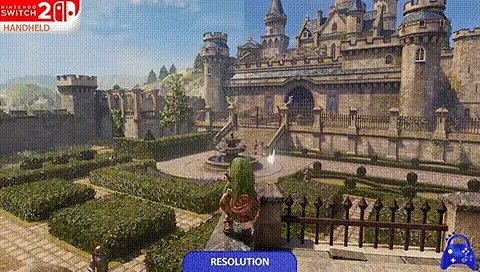
The Ocarina of Time remake on Switch 2 delivers its clearest image when docked, while handheld play preserves the same 60 FPS target with a lower resolution range and some visual adjustments. Nintendo released the remake on November 5, 2026, with support for TV, tabletop, and handheld play. This comparison covers findings from the launch period available as of November 7, 2026. The rebuilt presentation includes new visuals, enhanced controls, revised camera movement, voiced cutscenes, and orchestral music. Both operating modes retain that presentation, making the choice primarily about image clarity and portability.
Nintendo’s developers describe an artistic approach built around believable environments and distinctive, expressive characters. Art director Aya Shida explains that puppetry and practical effects inspired the team’s attempt to create a tangible fantasy world. Clothing, tree bark, and architecture contribute to the impression that Hyrule is inhabited, with recognizable materials and textures. The goal was to preserve familiar characters and the emotional impression of memorable locations while rebuilding their appearance with modern tools. The remake therefore interprets remembered Hyrule through character and atmosphere rather than straightforward photorealism.
The generational comparison involves a broader transformation than the differences between docked and handheld play. Launch coverage commonly cites approximately 20 FPS for the original N64 release, 30 FPS for Ocarina of Time 3D, and a 60 FPS target for the Switch 2 remake. Using those figures, the new target is three times the original’s and twice the 3DS version’s. Regional behavior and individual sequences still matter when discussing the older releases. Greater technical capability also leaves room for artistic preference, since some players may favor the original’s simpler imagery or the 3DS presentation.
Firsthand reviews describe substantial improvements to environmental detail and lighting. Dexerto highlights grass, wildflowers, mossy surfaces, and richer scenery across familiar locations. Cubed3 reports stronger illumination and shadowing in enclosed areas, including Navi casting light onto nearby surfaces. Dexerto also describes dust catching the light, atmospheric dungeon effects, and deeper shadows in unsettling spaces. These changes communicate depth, materials, and mood, but do not establish which rendering techniques produce every effect. Global illumination broadly describes how indirect light is represented, and the available sources do not justify treating the lighting as proof of hardware ray tracing.
These improvements become easier to assess when large shapes and fine surface details are considered separately. A substantial doorway, a character’s posture, or the outline of the Great Deku Tree can remain easy to recognize even when smaller decorative features become softer. Dense leaves, stitching, thin railings, and tiny highlights place different demands on image quality because they occupy fewer pixels.
This helps explain why handheld play can preserve the overall impression of a location while presenting its smallest features less clearly. For a useful comparison, examine both the scene as a whole and a few representative details, then return to ordinary play. Enlarging a small crop reveals technical differences, but its importance depends on whether that difference remains distracting at a normal viewing distance. The most visible imperfection in a magnified image is not necessarily the feature that most influences the experience.
John Linneman’s Digital Foundry technical review, published on November 4, 2026, is the main technical reference for this comparison. Its chapters cover the original game, the 3DS adaptation, the Switch 2 visual overhaul, image processing, resolution, lighting, environmental detail, and performance. Relevant sections begin at approximately 13:06 for engine technology and FSR, 14:24 for docked and portable resolution, and 26:59 for frame rate testing.
The numerical findings discussed here come from published summaries of that review, rather than independent measurements for this article. Nintendo Life, Cubed3, and Dexerto provide additional firsthand observations about softness, lighting, and both play modes. Publications repeating Digital Foundry’s measurements do not constitute separate benchmarks, so the strongest assessment combines those figures with firsthand impressions and moving comparisons.
The reported resolution ranges describe a changing rendering workload rather than a fixed specification maintained throughout the adventure. Their upper limits represent maximum observed resolutions, and the evidence does not establish how much time either mode spends at a particular resolution. Pixel counts illustrate differences in available image information, although more pixels do not produce an equivalent percentage improvement in perceived quality. At standard 16:9 dimensions, the modes compare as follows:
- Docked mode: Approximately 1080p to 1440p. A 1920 × 1080 image contains about 2.07 million pixels, while 2560 × 1440 contains about 3.69 million. The higher resolution provides approximately 78 percent more pixels for edges and small details, although this does not mean the final image looks 78 percent better.
- Handheld mode: Approximately 720p to 1080p. A 1280 × 720 image contains about 0.92 million pixels, compared with 2.07 million at 1920 × 1080. This gives 1080p 2.25 times the pixel count at 720p. The console’s built in display has a physical resolution of 1920 × 1080, so images rendered below that resolution must be scaled to fill it.
The overlap between the two resolution ranges also needs careful interpretation. Both include 1080p, but that does not establish that the two modes render the same scene at that resolution simultaneously. One mode might reach it under a different workload or camera angle from the other. Even matching pixel dimensions would leave room for differences in filtering, object detail, and processing.
Equally, comparing the highest docked measurement with the lowest handheld measurement describes the widest reported separation, rather than a difference maintained throughout the game. Players should therefore understand the ranges as a summary of observed rendering behavior. A sustained comparison of the same route would be needed to establish how frequently the advantage becomes large or small. The available figures support docked play’s general clarity advantage without assigning it a constant visual improvement in every location.
Rendering resolution, the dimensions of an upscaled image, and the HDMI output sent to a television are separate stages. A TV identifying an incoming signal as 4K does not establish that the game rendered its world natively at 3840 × 2160. Nintendo lists output up to 4K at 60 FPS as a console capability, rather than a specification guaranteed for every game. For this remake, published measurements support describing docked rendering as dynamic resolution up to approximately 1440p. Additional output scaling should be considered separately from the resolution at which the scene was originally rendered.
Screen size and viewing distance influence how noticeable these differences become. A smaller portable display can make compromises less apparent without eliminating them. Equally sized screenshots shown side by side also fail to reproduce the experience of viewing a television and the console screen from their usual distances. Differences in brightness, color reproduction, and dark tones can further change how the lighting appears. A photograph comparing the screens may therefore reflect display characteristics as well as differences in the game’s rendering settings.
Nintendo specifies a 7.9 inch LCD display for Switch 2, with HDR10 support in addition to its 1080p resolution. The remake’s official product page also lists HDR output. These capabilities introduce another layer to the comparison because resolution concerns spatial detail, while HDR concerns the presentation of brightness and color. A darker corridor looking more dramatic on one display does not, by itself, demonstrate a different lighting system in the game.
Television characteristics, room lighting, and display settings can influence that impression. When judging the two modes, look for visible detail within shadows and bright effects as well as overall brightness. A more vivid picture is not automatically a more accurate representation of the rendered scene. Likewise, a television’s sharpening control can emphasize boundaries without restoring information missing from a lower resolution frame. Consistent viewing conditions help separate the remake’s rendering differences from the behavior of the screens displaying them.

Handheld Image Quality, Dynamic Resolution, and FSR Upscaling
Nintendo Life’s firsthand review identifies occasional handheld softness and shimmering during camera movement, particularly in distant details. Character outlines and background scenery provide useful reference points: Link’s silhouette may look clear in a still image while small features behind him become less stable during movement. A thin branch or blade of grass can occupy only part of a pixel, and changes in viewpoint alter its contribution to neighboring pixels, potentially producing flickering.
This is a general explanation consistent with the reported symptoms, rather than a complete diagnosis of the rendering pipeline. Geometry, textures, lighting highlights, and image processing can all influence the result. The remake can therefore contain richer vegetation than earlier versions while exhibiting occasional instability in how that detail appears.
Still images and moving footage answer different questions here. A screenshot is useful for examining a roofline, a character outline, or the definition of a distant wall, but it cannot show whether those features remain stable across successive frames. A slow camera sweep makes changes in fine detail easier to notice, while ordinary traversal shows whether they remain distracting during play.
Comparisons should use matching viewpoints and similar movement because a different angle can alter reflections, surface visibility, and the amount of foliage on screen. Video compression is another consideration: it can soften detailed scenery or introduce its own visible artifacts. An online clip with unclear grass does not isolate the game’s rendering as the cause. The strongest visual evidence combines clear captures with enough uninterrupted movement to establish whether an apparent issue belongs to one frame or persists through the scene.
Published technical findings identify more aggressive level of detail transitions and lower quality texture filtering in handheld mode. Level of detail, or LOD, changes an object’s complexity with distance, allowing a simpler representation when finer features occupy little screen space. More aggressive transitions can simplify objects sooner without necessarily making them disappear at a shorter distance.
A building might remain visible while losing smaller structural details. Texture filtering concerns how surface images are sampled, especially at an angle. Microsoft’s general documentation explains that anisotropic filtering improves angled surfaces, such as paths stretching away from the camera. A softer path does not prove that the game substitutes a source texture with a lower resolution, since filtering, internal resolution, and viewing angle can all affect its appearance.
Nintendo’s art discussion adds a further distinction between deliberate scenery design and rendering compromises. Shida explains that the team concentrated detail in places players can explore, while treating inaccessible scenery differently and emphasizing recognizable landmarks. That means a simplified distant feature should not automatically be interpreted as a handheld downgrade.
The relevant question is whether the same feature changes between modes when viewed from an equivalent position. Compare the same stage of the adventure, too, since this story deliberately presents Hyrule across different time periods. A valid technical comparison needs to hold the world state steady before attributing differences to the hardware configuration. This protects the distinction between scenery constructed to guide attention and detail reduced to keep rendering costs manageable.
Dynamic resolution changes the number of pixels rendered as the workload varies, helping the game meet its frame time target. Unity’s documentation describes the general technique as scaling render targets to reduce GPU work, although this does not establish that the remake uses Unity or its implementation.
Turning the camera toward dense scenery could prompt a resolution reduction to lower the cost of operations involving pixels, followed by an increase when more processing capacity becomes available. The approach cannot correct every slowdown, because loading or game logic delays may persist even when fewer pixels are rendered. Nintendo has not publicly detailed the complete resolution control algorithm, including its thresholds or adjustment speed. The reported ranges describe observed results without revealing every engine decision.
Interface clarity can also be misleading when estimating the resolution of the world behind it. A game can compose menus, icons, and text separately from its main scene, allowing those elements to remain crisp while the environment becomes softer. AMD’s FSR integration guidance places interface rendering after the upscaling stage, although that recommendation does not establish the remake’s exact arrangement.
Clear text beside a softer background would therefore be compatible with several internal rendering resolutions. Conversely, text that feels difficult to read on a portable screen may be physically small rather than poorly resolved. For this comparison, environmental edges and surfaces are more informative than the sharpness of a menu alone. Readability should still be assessed separately because a technically crisp interface can feel less comfortable when the screen is farther away.
FSR 1.0 is AMD’s first generation FidelityFX Super Resolution technology, identified in launch coverage as part of the remake’s image processing. This spatial upscaler enlarges the current frame without using previous frames or motion vectors as reconstruction inputs. AMD describes two principal stages: edge adaptive upscaling, called EASU, and sharpening, called RCAS.
These enlarge an image rendered at a lower resolution while attempting to preserve clearly defined edges, but cannot guarantee recovery of fine detail poorly represented in the original frame. AMD’s integration guidance specifies that the input should already be well antialiased, helping explain the reported combination of FSR and SMAA. FSR 1 does not imply frame generation, and features associated with later FSR technologies should not be assumed to apply. Its presence also does not explain every aspect of performance.
SMAA stands for Subpixel Morphological Antialiasing and addresses edge treatment. Its research describes a technique that detects and processes image patterns such as diagonal lines and sharp geometric features while seeking to preserve sharpness. A diagonal sword must be represented on a pixel grid, which can create a stepped appearance without suitable treatment.
Antialiasing reduces those artifacts, while upscaling increases image dimensions, so the processes solve related but distinct problems. Combining them does not produce a result identical to rendering every detail at the higher resolution from the beginning. SMAA also names a family of techniques, including variants with additional sampling or temporal reprojection, so the label alone does not establish the exact implementation. The practical test is how coherently edges and small features hold together during movement.
Sharpening is best understood as a change in how strongly existing boundaries stand out. It can make an enlarged image appear more defined, but it cannot reliably reconstruct the original shape of every leaf or restore lettering that was never adequately captured in the source pixels. Strong edge contrast can also draw attention to instability already present in fine scenery. This does not establish that the remake uses excessive sharpening; it explains why apparent crispness and dependable detail are different qualities.
When comparing docked and handheld captures, check whether a surface reveals more coherent structure, rather than merely stronger outlines. A pleasing image needs enough definition to communicate materials while keeping their appearance consistent as Link and the camera move. That balance matters more during sustained play than a single exceptionally sharp frame.
Coverage of the reviewed launch release identifies SMAA and FSR 1 rather than NVIDIA DLSS. Switch 2 nevertheless supports DLSS, with NVIDIA confirming that its custom processor includes Tensor Cores for features powered by AI. Hardware support does not mean every game automatically uses those capabilities.
DLSS Super Resolution combines information from multiple images rendered at lower resolutions, motion information, and feedback from earlier frames, giving it a different reconstruction approach from FSR 1. This distinction does not establish how a hypothetical DLSS version would look or perform, since an actual implementation would need testing. Nintendo’s reasons for selecting the reported approach remain unconfirmed, making explanations involving cost, development time, or performance speculative. The launch findings do not determine what a future update might introduce.
The practical value of these technologies ultimately depends on the finished presentation. A player sensitive to flickering foliage may notice a different weakness from someone who primarily studies character faces or distant architecture. Neither response can be settled by the name of the upscaler alone. Judge the image in the situations that matter most: navigating a room, following movement during combat, and surveying an outdoor area. These reveal how clarity and stability work together under ordinary conditions. They also give the reported handheld compromises a useful scale, showing whether a difference is a minor background distraction or something that repeatedly draws attention away from the adventure.

Performance, Loading, and Choosing Between Docked and Handheld Play
Both docked and handheld play retain the same 60 FPS target, with Cubed3 describing consistently smooth performance in either configuration. At 60 FPS, a new frame is scheduled approximately every 16.67 milliseconds, compared with approximately 33.33 milliseconds at 30 FPS. These intervals help explain why a stable 60 FPS presentation can make movement and animation appear more continuous.
They do not represent complete input latency, which also depends on controller communication, game processing, display behavior, and other stages. Frame pacing matters because unevenly delivered frames can feel less smooth despite producing the same average. A useful comparison considers consistency and isolated interruptions alongside the FPS figure. The evidence does not identify a sustained performance advantage large enough to make docked play necessary for smooth combat or exploration.
The screen’s refresh rate is a separate specification from the game’s frame rate. Switch 2’s built in display supports a variable refresh rate up to 120 Hz, but that capability does not turn this remake’s reported 60 FPS target into 120 FPS gameplay. A display refreshing more frequently can still show the same game frame more than once. Variable refresh can help coordinate display updates with frame delivery within its supported operating range, but it does not create missing simulation steps or new rendered detail. Players should therefore evaluate the smoothness actually delivered by the game rather than infer a performance mode from the panel’s specifications. The available evidence supports the same target in both configurations.
Launch technical coverage describes only very small interruptions associated with loading against otherwise highly consistent performance. A brief hitch momentarily disrupts frame delivery, while sustained slowdown affects a longer sequence and changes the feel of play more persistently. A short interruption may barely alter an average measured over several minutes despite being noticeable, and an isolated dip does not establish that the whole game is unstable.
Nintendo’s developer interview confirms that the remake retains separate maps for major areas instead of becoming a completely seamless world. Ordinary transitions between those areas should therefore be distinguished from unexpected gameplay interruptions. Published reports do not provide a complete dataset covering hitch frequency across every route and dungeon, leaving exact minimum frame rates or interruption counts unsupported.
For a closer comparison of interruptions, the most informative evidence would follow the same route through several representative situations. A quiet room, a transition between areas, and a scene containing several moving elements can reveal different demands on the engine. Repeating the route helps distinguish a consistent problem from an isolated interruption. Software version and testing conditions also matter when comparing launch observations with later footage. Without equivalent conditions, one unusually smooth clip and one visibly interrupted clip cannot establish a general difference between modes. The published findings provide a useful launch assessment, while their limits should guide how precisely that assessment is described.
Docked play is the stronger choice when maximum image clarity matters most. Its higher reported resolution range provides more information for distant scenery, narrow edges, and small environmental details. Players who stop to examine architecture or study their surroundings may appreciate those advantages, particularly on a large screen. Handheld play offers the convenience of continuing the same adventure on the console’s display while preserving the 60 FPS target. Its compromises primarily concern image clarity, detail transitions, and filtering, with visibility depending partly on sensitivity to softness and shimmering. For players focused on exploration and dungeon progression, portability may be more valuable than additional detail.
The revised controls and dungeon presentation also give image clarity a practical context. Nintendo’s developer interview explains that Link now has a dedicated jump command, can dash by holding the Roll Attack button, and benefits from freely controlled camera movement. The developers also adjusted navigation within dungeons. In the Water Temple, easier item toggling reduces interruptions, while some walls use lattice structures that reveal neighboring rooms and help players understand the surrounding space.
These changes encourage players to examine the rebuilt environments from different angles. Higher docked clarity can help when studying distant features, but the navigational improvements belong to the remake itself and remain part of the handheld experience. This distinction matters when deciding how to play: the portable presentation reduces some visual precision while retaining the design changes intended to make movement and exploration easier to follow.
Tabletop play provides another practical arrangement for the same adventure. Nintendo lists it alongside TV and handheld support, allowing players to use the console’s screen while holding the controllers separately. This can make controller position and screen position easier to adjust independently. It does not provide the physical screen size of a television, so placing the console farther away may make small interface elements or environmental details harder to inspect. A useful choice therefore considers posture and viewing distance alongside resolution. Someone who prefers a separate controller may find tabletop play comfortable for a short session, while another player may prefer holding the screen closer for dungeon exploration and reading dialogue.
Battery endurance is a separate part of the portable comparison. Nintendo gives an approximate general range of 2 to 6.5 hours for Switch 2 and explains that actual duration depends on the game and usage conditions. That range should not be presented as a measured runtime for Ocarina of Time. A reliable estimate would require a controlled session with the brightness, connectivity, sound setup, and starting battery condition recorded. The shared 60 FPS target alone says little about how long a charge will last. For players planning a lengthy session away from power, their own typical settings and access to charging matter more than an unsupported runtime estimate attached to the remake.
Comfort also changes which technical advantage is most useful. A television can make fine environmental cues physically larger, while handheld play lets players adjust the screen’s distance directly. Neither arrangement guarantees that every detail will be easier to recognize, since the distance from the player and the clarity of the image work together. Try a familiar room and a brief outdoor route in both configurations, then consider whether the visual differences remain noticeable once attention returns to exploration. This is especially useful for players who alternate between short portable sessions and longer evenings at home. The preferred setup can follow the kind of session being played rather than become a permanent choice for the entire adventure.
The expanded soundscape gives that choice more substance. Nintendo’s sound director describes a soundtrack containing more than 150 pieces, with instrumentation adjusted to preserve the character of quieter locations as well as support larger scenes. The developers also discuss environmental sounds such as water, insects, and birds. These details help communicate the atmosphere of Hyrule even when the screen is small. A comparison focused exclusively on resolution can overlook that part of the remake’s presentation. Listening in a quieter environment can make subtle sounds easier to notice, while a suitable speaker setup can give the music and surrounding ambience more space. The practical aim is to hear the details that complement the rebuilt scenery.
Audio provides another consideration when choosing a setup. A suitable television and speaker arrangement can take advantage of the game’s 5.1 channel surround support. Nintendo’s sound director also recommends headphones for appreciating environmental audio, giving handheld players another way to experience the rebuilt atmosphere. Neither configuration needs to be treated as the only correct way to play. Switching between them allows players to prioritize visual clarity, convenience, or their preferred listening setup as circumstances change.
Frequently Asked Questions (FAQs)
- What resolution does Ocarina of Time run at when docked on Switch 2?
Published launch analysis reports a dynamic rendering range of approximately 1080p to 1440p in docked mode. This means the game does not appear to run at one fixed internal resolution at all times. Instead, it can raise or lower the resolution depending on how demanding a scene is, helping it stay closer to its performance target. Because 1440p is the reported upper limit, it should not be described as the resolution used throughout the entire game. It is also important to separate the game’s internal rendering resolution from the signal sent to the TV. A television may show a 4K input because the console is outputting a 4K signal, but that does not mean the game itself is rendering every scene natively at 4K. - What is the handheld resolution of the Ocarina of Time Switch 2 remake?
The reported handheld rendering range is approximately 720p to 1080p. Like docked mode, handheld play appears to use dynamic resolution, meaning the internal resolution can change depending on the scene’s workload. Less demanding areas may render closer to the top of the range, while heavier scenes may drop lower to help preserve performance. The Switch 2’s handheld screen remains 1920 × 1080 regardless of the game’s internal resolution. If a scene is rendered below 1080p, the image has to be scaled up to fill the display. This can make outlines, distant scenery, textures, and small environmental details look softer than they would at a native 1080p. Since available reporting does not confirm how often each resolution is used, handheld mode should not be described as consistently native 1080p. - Does the remake run at 60 FPS in both modes?
Both docked and handheld modes target 60 FPS, and firsthand reviews describe gameplay as consistently smooth in each mode. A 60 FPS target means the game aims to display a new frame roughly every 16.67 milliseconds, which helps camera movement, combat, and animation feel more responsive than a 30 FPS presentation. However, a 60 FPS target is not the same as proof that every single frame is delivered perfectly in all situations. Launch technical coverage mentions occasional small loading hiccups, which are brief interruptions rather than evidence of widespread frame-rate problems. Overall, players can expect a broadly smooth 60 FPS experience in both modes, but the available reports do not prove that the frame rate is perfectly locked at every moment. - Does Ocarina of Time Switch 2 use NVIDIA DLSS?
The reviewed release is reported to use SMAA anti-aliasing and FSR 1 upscaling rather than NVIDIA DLSS. Although Switch 2 hardware supports DLSS, that does not mean every game must use it. Developers can choose different image-processing methods depending on their goals, engine setup, performance budget, and visual preferences. FSR 1 is a spatial upscaling technique, meaning it works mainly from the current rendered frame. DLSS Super Resolution, by contrast, uses temporal reconstruction, drawing on information from multiple frames and motion data. That difference matters, but it does not automatically prove how a DLSS version of this specific game would look or perform. Unless Nintendo or the developers explain the choice directly, claims about why DLSS was not used should be treated as speculation. - Is FSR 1.0 the same as frame generation?
No, FSR 1.0 is not the same as frame generation. FSR 1.0 is an upscaling technology. It takes a frame that has already been rendered at a lower resolution and enlarges it for display, using processing intended to improve sharpness and preserve visible edges. Frame generation is a separate technique that creates additional in-between frames to increase the apparent frame rate. FSR 1.0 does not do that. It does not create new animation frames, and it does not turn a lower frame rate into 60 FPS. Therefore, the remake’s reported use of FSR 1 means the game is using upscaling, not generated frames, to support its presentation. - Why does foliage sometimes shimmer?
Foliage is often difficult to render cleanly because it contains many thin details, such as grass blades, leaves, and branches. These small shapes may cover only part of a pixel, especially when they are far from the camera. As the camera moves, those tiny details can shift between pixels, creating a flickering or shimmering effect. Nintendo Life’s firsthand review notes instability in some distant details, particularly during handheld play. Lower rendering resolution can make this more noticeable because there are fewer pixels available to represent fine edges. Upscaling, anti-aliasing, texture detail, lighting highlights, and the geometry of the foliage itself can also play a role. Since the available reporting does not isolate one single cause, the shimmer should be described as a visible issue without blaming it entirely on one rendering technique. - Are handheld textures completely different from docked textures?
The available findings do not prove that handheld mode uses a completely separate set of texture assets. Instead, published technical coverage points to lower-quality texture filtering and more aggressive level-of-detail transitions as part of the handheld mode’s visual adjustments. Texture filtering affects how surfaces look when viewed at an angle or from a distance. For example, a road, wall, or floor stretching away from the camera may look softer if filtering quality is reduced. Level of detail, often shortened to LOD, changes how complex objects appear at different distances. In handheld mode, objects may simplify sooner or lose smaller details earlier than they do in docked mode. Combined with the lower resolution range, these changes can make handheld visuals look less crisp without proving that the actual texture artwork is entirely different. - Does the remake have ray-traced lighting?
The available sources do not establish that the remake uses hardware ray tracing. Reviews describe improved illumination, stronger shadows, and effects such as Navi casting light onto nearby surfaces. Those observations show that the lighting presentation has been upgraded, but they do not confirm the exact rendering method behind it. Modern games can create convincing lighting through many different techniques, including baked lighting, screen-space effects, traditional shadow maps, probes, or other real-time systems. Terms like improved lighting or global illumination do not automatically mean ray tracing is being used. For that reason, it is fair to say the remake has enhanced lighting, but hardware ray tracing should remain unconfirmed unless more specific technical evidence or developer confirmation becomes available. - Is handheld performance worse than docked performance?
The published findings do not show a major sustained frame-rate disadvantage in handheld mode. Both handheld and docked modes target 60 FPS, and firsthand reviews describe the game as consistently smooth in both configurations. This suggests that handheld play remains a fully viable way to experience the game. The main handheld compromises appear to involve image quality rather than overall fluidity. Handheld mode reportedly uses a lower resolution range, reduced texture filtering, and more noticeable level-of-detail transitions. These changes can make the image softer or less detailed, especially in distant scenery, but they do not necessarily mean the game runs worse. Occasional loading hiccups prevent a claim of perfect consistency, yet the available evidence does not suggest that docking is required for smooth combat, exploration, or general play. - Which mode is best for a first playthrough?
Docked mode is the better choice if your main priority is seeing the visual overhaul as clearly as possible. Its higher reported resolution range can make distant scenery, architecture, character outlines, and environmental details appear sharper, especially on a larger display. If you want the most polished-looking presentation for a first playthrough, docked mode is likely the stronger option. Handheld mode is still a good choice if convenience and portability matter more to you. It keeps the same 60 FPS target, so the game should still feel smooth, even if the image can look softer and some fine details are less stable. The best approach may be to use both modes: play docked when you want the clearest presentation, and switch to handheld when portability makes it easier to continue the adventure.
Conclusion
The Zelda Ocarina of Time Switch 2 remake delivers its clearest presentation when docked, while handheld mode preserves the same adventure with some visible compromises. The higher docked resolution range gives fine details and distant scenery a stronger presence, particularly on a large screen. Handheld play reduces resolution and adjusts some detail settings while retaining the same 60 FPS target. However, pixel counts alone cannot capture the full difference, since texture filtering, detail transitions, and image stability during movement also shape the presentation. The reported loading hiccups deserve consideration, but the available findings do not establish a major sustained performance disadvantage for portable play.
The choice ultimately depends on how and where players want to experience the rebuilt Hyrule. Docked mode is the stronger option for appreciating its architecture, environmental detail, and visual transformation. Handheld mode makes that world more convenient to explore, with its smaller display affecting how noticeable the compromises become. Players sensitive to softness or shimmering may prefer a television, while those who value portability can still expect broadly consistent performance. Switching between the two offers the most flexible approach, allowing the remake’s visual overhaul and portable convenience to complement each other throughout the adventure.
Sources and Citations
- Nintendo, The Legend of Zelda: Ocarina of Time official product page: Nintendo confirms the remake is exclusive to Nintendo Switch 2, released on November 5, 2026, and supports TV, tabletop, and handheld modes. The listing also confirms surround sound support and the game’s rebuilt presentation. 任天堂ホームページ
- Official Ocarina of Time Switch 2 listing
- Digital Foundry, November 4, 2026, John Linneman technical review: Digital Foundry is the primary technical source behind the reported resolution and frame-rate findings. Nintendo Everything and Nintendo Life summarize the analysis as 1080p–1440p dynamic resolution when docked, 720p–1080p in handheld, SMAA with FSR 1, more aggressive handheld LOD settings, reduced texture filtering, and a highly stable 60 FPS target. Nintendo Everything
- Watch the Digital Foundry tech review
- Nintendo Everything, November 4, 2026: Nintendo Everything provides a concise published summary of Digital Foundry’s findings. It specifically reports FSR 1 instead of DLSS, SMAA, docked resolution up to about 1440p, handheld scaling between 720p and 1080p, and more aggressive handheld LOD and texture-filtering compromises. Nintendo Everything
- Zelda: Ocarina of Time remake frame rate and resolution analysis
- Nintendo Life, November 4, 2026, Digital Foundry summary: Nintendo Life corroborates the same technical ranges and reports that the remake consistently hits 60 FPS, with only very small loading hiccups. It also notes shimmering and handheld image-quality compromises. Nintendo Life
- Nintendo Life Digital Foundry coverage
- Nintendo Life, Ocarina of Time review: Nintendo Life’s firsthand review praises the visual overhaul but specifically notes overly smooth distant visuals and some shimmering, which supports the article’s discussion of handheld softness and small-detail instability. Nintendo Life
- Nintendo Life Ocarina of Time review
- Cubed3, November 6, 2026, Ocarina of Time review: Cubed3 reports a consistent locked 60 FPS in both docked and handheld modes and highlights the remake’s improved global illumination, shadows, particle effects, and Navi’s local lighting. It says handheld mode makes only small visual concessions. Cubed3
- Cubed3 Ocarina of Time review
- Dexerto, November 4, 2026: Dexerto’s review provides firsthand descriptions of the visual overhaul, including dense foliage, moss, wildflowers, atmospheric fog, dust catching light, deeper shadows, richer environments, and highly detailed character materials. Dexerto
- Dexerto Ocarina of Time remake review
- Nintendo, Ask the Developer Vol. 24, Part 2, November 2, 2026: Director HokWai Ng and art director Aya Shida explain the remake’s visual philosophy: “the visuals may change, but the experience does not.” The team describes rebuilding familiar locations using modern technology while preserving players’ memories and the original game’s character. 任天堂ホームページ
- Ask the Developer Vol. 24, Part 2
- Nintendo, Ask the Developer Vol. 24, Part 4, November 3, 2026: Nintendo’s developers discuss the expanded soundtrack, environmental audio, fully voiced cutscenes, and 5.1-channel surround sound. Sound director Masato Ohashi recommends headphones for appreciating directional ambient sound in handheld play. 任天堂ホームページ
- Ask the Developer Vol. 24, Part 4
- Nintendo Switch 2 Technical Specifications: Nintendo confirms the system’s handheld display is 1920×1080 and that TV mode supports video output up to 3840×2160 at 60 FPS, with 120 FPS available at 1080p and 1440p. This supports the article’s distinction between console output capability and a game’s actual internal rendering resolution. 任天堂ホームページ
- Nintendo Switch 2 technical specifications
- AMD GPUOpen, FidelityFX Super Resolution 1: AMD confirms that FSR 1 is a spatial upscaler, using the current anti-aliased frame rather than previous frames or motion vectors. Its two main stages are EASU for edge-adaptive upscaling and RCAS for sharpening. AMD also explicitly separates FSR 1 from newer frame-generation technologies. AMD GPUOpen
- AMD FidelityFX Super Resolution 1 overview
- AMD / Microsoft FSR 1 integration documentation: The integration guidance states that FSR 1 expects an already anti-aliased input and is suitable for dynamic-resolution workflows. This supports the article’s explanation of why SMAA and FSR 1 can be used together rather than being competing techniques. Microsoft Learn
- AMD FSR 1 technical documentation
- NVIDIA, April 3, 2025, Nintendo Switch 2 DLSS announcement: NVIDIA confirms that Switch 2’s custom processor contains Tensor Cores supporting DLSS and RT Cores for ray tracing. This establishes hardware capability, but not that Ocarina of Time actually uses DLSS. NVIDIA Blog
- Nintendo Switch 2 Leveled Up With NVIDIA AI-Powered DLSS and 4K Gaming
- NVIDIA, DLSS Technology: NVIDIA’s documentation explains that DLSS Super Resolution is an AI-based reconstruction technology that uses lower-resolution rendered frames together with temporal and motion information. That makes it technically distinct from FSR 1’s purely spatial approach.
- NVIDIA DLSS technology overview
- Jorge Jimenez et al., “SMAA: Enhanced Subpixel Morphological Antialiasing”: The original research describes SMAA as an image-based post-processing antialiasing technique designed to improve edge detection, diagonal lines, sharp geometric features, and silhouette reconstruction while preserving sharpness. Wiley Online Library
- SMAA research and implementation resources
- Unity, Introduction to Dynamic Resolution: Unity’s documentation explains the general principle of dynamic resolution: reducing render-target resolution under heavier GPU load to help maintain a stable frame rate, then increasing it again when more GPU capacity is available. This is useful background for understanding the reported variable-resolution ranges, but it does not establish that Nintendo’s remake uses Unity. Unity Documentation
- Unity dynamic resolution documentation
- Microsoft Learn, Anisotropic Texture Filtering: Microsoft explains that anisotropic filtering improves how textures appear on surfaces viewed at steep angles. This supports the article’s explanation that reduced filtering quality can make paths, floors, and other receding surfaces appear softer without proving that completely different texture assets are being used. Microsoft Learn
- Microsoft anisotropic texture filtering documentation
- GamesRadar+, November 4, 2026: GamesRadar summarizes Digital Foundry’s historical comparison, reporting that the original N64 game targeted about 20 FPS and could dip toward 16 FPS, the 3DS remake ran at 30 FPS, and the Switch 2 remake delivers a highly stable 60 FPS with only occasional minor loading hiccups. GamesRadar+
- Ocarina of Time: 20 FPS on N64 vs 60 FPS on Switch 2
Recommendations
- Subnautica 2 Early Access Roadmap: Co-Op Updates, Sprinting, and More
- Virtua Fighter 6 Leak Explained
- Best Gaming Headsets for 2026: Top Wireless, Wired, PC, PS5, and Xbox Picks
- Take-Two CEO Comments on Roblox and GTA Explained
- All characters and color variations in Mario Tennis Fever: Full roster, unlocks, and alternate colors
- Assassin’s Creed Black Flag Remake
- How to Make a 3D VTuber Avatar: The Complete Guide for Beginners and Content Creators
- Farm to Table Grow Your Own Food & Make Fine Dishes in Cozy Restaurant Simulator: Complete Gameplay Guide
- Don’t Fret Hits All the Right Notes for a Frightening Survival-Horror Experience
- Assassin’s Creed Black Flag Resynced Post-Game Support Teased Ahead of GTA 6



































































































