




Introduction
If you’ve ever wondered how to sculpt in Blender, this definitive guide will take you from the basics to advanced techniques. Sculpting in Blender is like shaping digital clay – instead of painstakingly moving individual vertices, you push and pull the mesh with intuitive brush strokes. Blender’s Sculpt Mode lets artists create complex organic shapes and detailed models in a fluid, artistic way that traditional polygon modeling can’t easily achieve.
In recent years, Blender’s sculpting toolkit has grown immensely powerful, making it a viable alternative to dedicated sculpting software for many projects. Whether you’re a complete beginner or an experienced 3D professional, this guide will help you master Blender’s sculpting features, optimize your workflow, and bring your creative visions to life.

Blender’s sculpting system is feature-rich and accessible. It supports multi-resolution mesh editing, dynamic topology sculpting, voxel remeshing, symmetry tools, masking and more – everything you need to go from a rough block-out to a polished high-resolution model. In the sections below, we’ll start with how to get set up and understand the basic tools. Then we’ll delve into sculpting techniques, advanced features like Dynamic Topology and Voxel Remesh, and best practices honed by industry professionals. By the end, you’ll have a solid grasp of sculpting in Blender and how to integrate it into a professional 3D workflow.
Getting Started: Setting Up Blender for Sculpting
- Entering Sculpt Mode: Select a mesh and switch to Sculpt Mode via the 3D Viewport header mode menu, activating sculpt-specific tools and a circular brush cursor. Start with simple objects like the default cube or UV sphere to explore brush effects.
- Scene and Mesh Preparation: Apply object scale (Ctrl+A ➜ Apply Scale) in Object Mode for predictable brush behavior. Enable X-axis symmetry in Sculpt Mode’s sidebar for bilateral models to mirror strokes, saving time.
- Recommended Hardware and Settings: A graphics tablet is recommended for pressure sensitivity, enhancing detail control. Enable “Emulate 3 Button Mouse” in User Preferences for navigation without a middle mouse button. Use MatCap shading (matte gray/clay) to better visualize surface forms. Save frequently due to high memory demands of detailed sculpting.
Blender Sculpting Tools and Brushes Overview
- Draw/Clay Brushes: Draw raises surfaces to add volume; Clay Strips applies broader, flatter strokes for roughing out forms. Invert with Ctrl to subtract material.
- Crease Brush: Carves sharp grooves for wrinkles or separations, ideal for fine details.
- Smooth Brush: Blends surfaces to remove lumps, accessible by holding Shift with any brush for polishing.
- Grab/Elastic Deform: Grab drags vertices to adjust proportions; Elastic Deform preserves volume for softer shape changes, useful early on.
- Flatten/Fill/Scrape: Flatten levels surfaces, Scrape reduces elevated areas, and Fill builds up low areas, suitable for hard-surface or planar details.
- Inflate/Blob: Inflate expands surfaces uniformly; Ctrl inverts to pinch inward, good for bulging or contracting forms.
- Mask (and Box/Lasso Mask): Masks protect areas (shown as dark gray), allowing isolated sculpting. Box/Lasso tools mask broad sections; masked geometry can be hidden for access to inner areas.
Brush settings like Radius (F key), Strength (Shift+F), and Falloff adjust size, intensity, and edge softness. Advanced options like Auto Smooth and Topology Automasking support complex projects but start with basics.
Basic Sculpting Techniques and Workflow
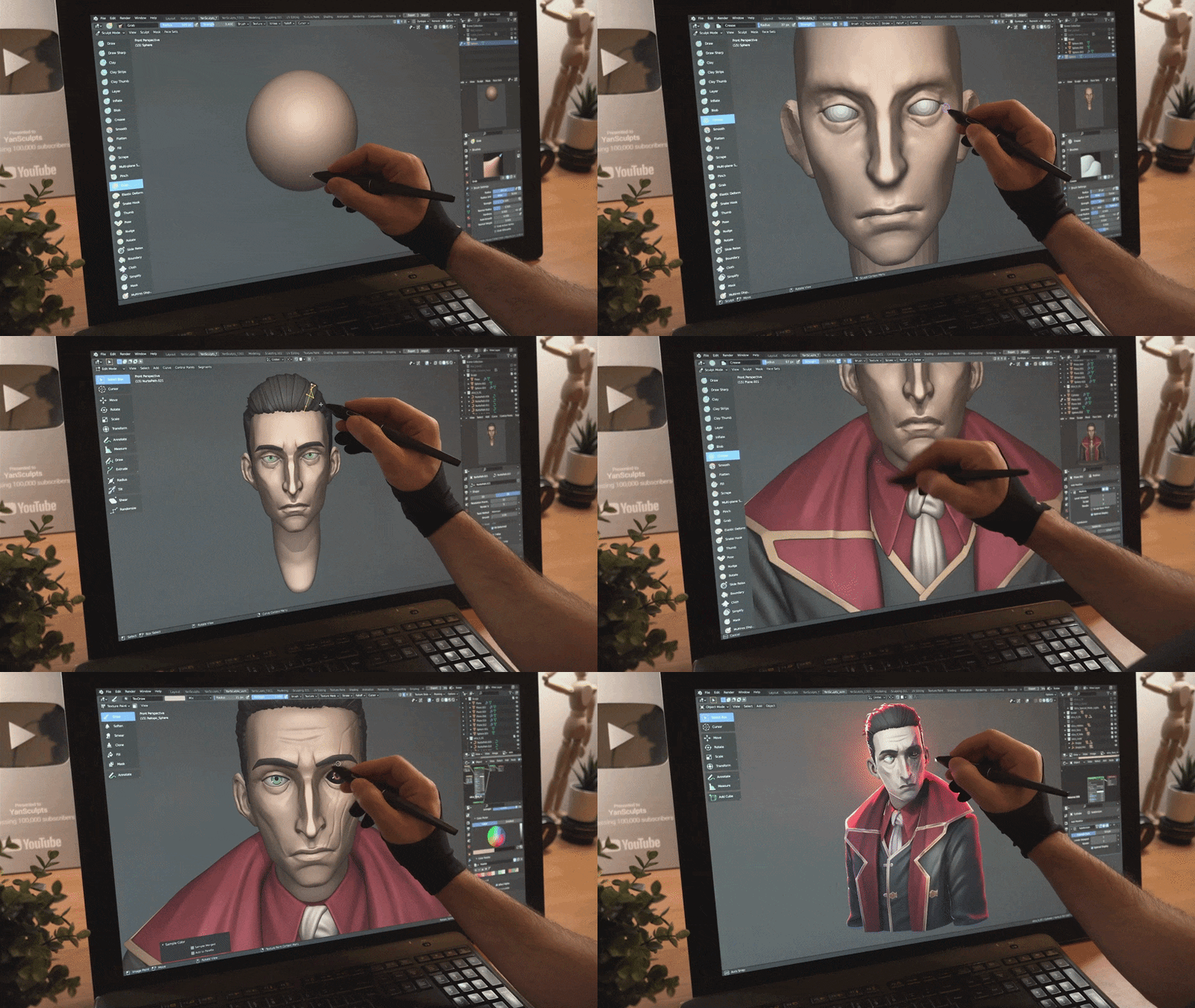
- Block Out the Basic Forms: Start with simple geometry (e.g., sphere for head, cylinders for limbs) to establish proportions, joining or remeshing later for a unified mesh.
- Use Symmetry and Big Brushes: Sculpt symmetrically with large brushes for broad shapes, using Grab/Elastic Deform to adjust proportions while checking all angles.
- Refine Secondary Shapes: Use smaller brushes (Clay, Crease) for muscular or facial details. Apply Voxel Remesh (Ctrl+R) to unify topology for consistent detailing.
- Add Fine Details: Increase resolution (via Multires or Dyntopo) for wrinkles, pores, or carvings using Crease, Draw Sharp, or Inflate brushes. Use alpha textures for patterns and save backups.
- Smooth and Polish: Use Smooth brush (Shift) lightly to blend irregularities, and Flatten/Scrape for crisp planes, avoiding over-smoothing to preserve forms.
- Review Silhouette and Proportions: Check the model’s outline from multiple angles, tweaking with Grab for final adjustments. Disable symmetry for slight asymmetry if needed.
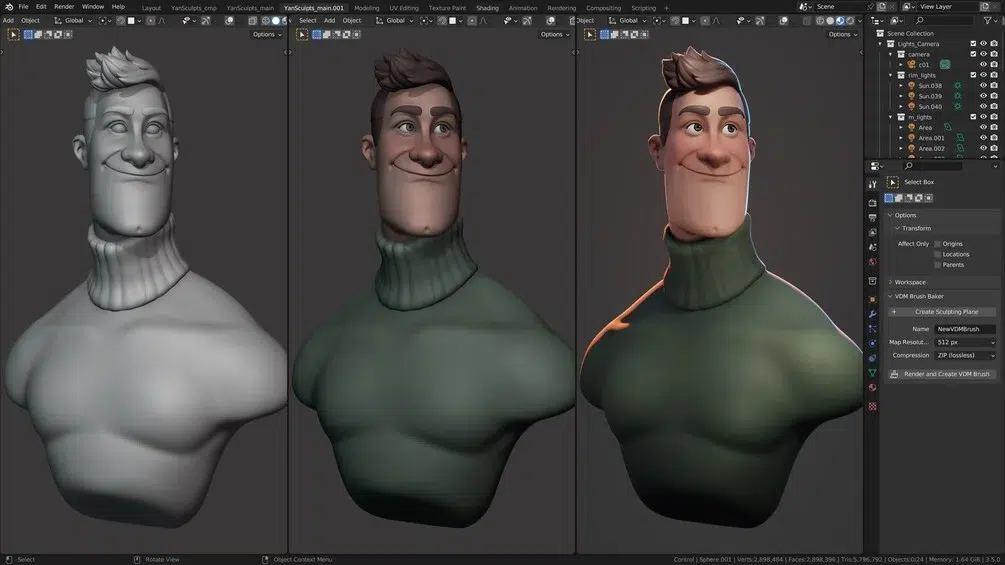
This staged approach ensures progressive detailing, prioritizing major forms before fine details to avoid proportion issues.
Advanced Sculpting Features: Dynamic Topology, Remeshing, and Multiresolution
- Dynamic Topology (Dyntopo): Subdivides mesh locally under the brush, ideal for concepting and localized detail. Offers creative freedom but may produce uneven topology, requiring retopology for animation.
- Voxel Remesher: Rebuilds mesh into uniform quads, used mid-sculpt to unify parts or clean topology. Provides even surfaces but may lose fine details if voxel size is too low.
- Multiresolution Modifier: Enables non-destructive subdivision for sculpting at varying detail levels, preserving a low-poly base for animation or baking. Best for production but subdivides uniformly, increasing poly count globally.
Combine these for workflows: Dyntopo for early concepting, Voxel Remesh to unify, then Multires for final details on a retopologized mesh. Additional tools include:
- Face Sets: Group faces for hiding/masking, aiding management of dense meshes.
- Pose Brush: Simulates armature-like posing for quick limb or head adjustments.
- Cloth Brush: Mimics cloth simulation for wrinkles or drapery, with gravity/collision settings.
- Auto-Masking and Automasking by Topology: Restricts brush effects to connected geometry or specific areas, enhancing precision.
- Mesh Filters: Apply global adjustments (e.g., Relax, Inflate) to unmasked areas for broad fixes.
Start with core brushes and remeshing, adopting advanced tools as projects demand.

Best Practices and Pro Tips for Blender Sculpting
- Always Apply Scale: Ensure object scale is (1,1,1) to avoid brush or remeshing issues.
- Start Low, Then Increase Resolution: Begin with low-poly meshes, adding geometry only for finer details to maintain performance and clean forms.
- Use Symmetry – Until It’s Time Not To: Enable symmetry for efficiency, disabling later for realistic asymmetry using Re-symmetrize if needed.
- Isolate and Hide Parts: Use masking/face sets to hide unneeded areas, improving access and performance.
- Sculpt with MatCaps and Perspective: Use clay MatCap and perspective view for accurate form visualization, toggling to ortho for proportion checks.
- Save Versions or Use Shape Keys: Save milestones or use shape keys to store sculpt stages for easy reversion.
- Leverage Reference Images: Use image planes or meta-rigs to ensure authentic proportions and forms.
- Know When to Stop Sculpting: Reserve fine details (e.g., pores) for texture maps in games to avoid unnecessary geometry.
- Use Proper Topology for Hard Surfaces: Combine Flatten/Crease brushes with remeshing or modeling for crisp mechanical shapes.
- Optimize for Performance: Hide unused mesh parts, lower Multires/Dyntopo detail, disable modifiers, or split objects to manage high poly counts.
These habits prevent issues like lumpy sculpts or slowdowns, enhancing efficiency and artistry.

From Sculpt to Production: Workflow Integration
- Retopology for Animation/Games: Retopologize high-poly sculpts for clean, low-poly meshes using Shrinkwrap, Poly Build, or add-ons like RetopoFlow for animation or game compatibility.
- Baking Details to Maps: Bake normal, ambient occlusion, or displacement maps from high-poly sculpts to low-poly models for efficient detail in games/animation.
- Multires Reprojection: Project high-res sculpt details onto a retopologized mesh with Multires for continued detailing with clean topology.
- Texture Painting and Vertex Paint: Paint directly on sculpts for concept art or bake vertex colors to textures for low-poly assets.
- Decimation and 3D Printing: Use Decimate or Voxel Remesh to simplify sculpts for 3D printing, ensuring watertight meshes with the 3D Print Toolbox.
- Integrating with Other Software: Export/import OBJ/FBX for workflows with tools like ZBrush, supporting displacement map sharing or high-poly refinement.
Sculpting integrates into workflows like Sculpt → Retopo → UV → Bake → Rig/Animate for games/animation, or Sculpt → Decimate → Print for 3D printing, with Blender handling all stages.

Conclusion
Blender’s sculpting tools blend accessibility with advanced capabilities, enabling artists to create from simple props to complex characters. Beginners should start with basic sculpts, learning brushes and workflows, while leveraging community resources. Advanced users can explore Dyntopo, Voxel Remesh, and Multires for professional pipelines. Sculpting balances creativity and technique, allowing artists to shape imaginative designs with practice and persistence.

Frequently Asked Questions (FAQ)
- Do I need a graphics tablet to sculpt in Blender, or can I use a mouse?
A mouse works for basic sculpting, but a graphics tablet with pressure sensitivity enhances control for fine details, recommended for serious sculpting. - How does Blender’s sculpting compare to ZBrush?
ZBrush handles higher poly counts and has specialized features, but Blender’s free, integrated suite with voxel remesh and cloth brush is powerful for most needs, closing the gap. - My sculpt in Blender is getting very slow. How can I improve performance?
- Hide unused mesh parts with masking/face sets.
- Lower Dyntopo/Multires detail for broad changes.
- Disable unnecessary modifiers and use Solid shading.
- Remesh/decimate dense areas.
- Upgrade CPU/RAM or use the latest Blender version for optimizations.
- What is Dynamic Topology and when should I use it versus Voxel Remesh or Multires?
- Dyntopo: For concepting with localized detail, allowing messy topology.
- Voxel Remesh: Mid-stage to unify parts or clean topology.
- Multires: For production with clean base topology, ideal for final detailing.
- My brush strokes look jagged/blocky. How do I get smooth strokes and fine detail?
- Increase mesh resolution via subdivision, Dyntopo, or Multires.
- Adjust Dyntopo Detail Size or add Multires levels.
- Ensure Smooth Shading and tweak brush falloff for smoother strokes.
- When should I consider retopology, and can Blender do it?
Retopologize for animation/game models needing clean deformation or UVs. Blender supports manual retopo (Shrinkwrap, Poly Build) or add-ons like Quad Remesher. - Can I sculpt hard-surface models in Blender, or is sculpting only for organics?
Hard-surface sculpting is possible using Flatten, Crease, Trim tools, or Booleans, often combined with modeling for precision, ideal for concepting or wear details. - The mirrored side of my sculpt looks off or has glitches – what happened?
- Ensure applied scale and centered origin.
- Fix divergent topology with Symmetrize or Voxel Remesh.
- Check Symmetry settings and normals for glitches.
- Are there any add-ons or resources that can help with Blender sculpting?
- Built-in: LoopTools, Bool Tool, 3D Print Toolbox.
- Paid: RetopoFlow, Quad Remesher for retopology.
- Community: Blender Manual, Blender Cloud, CG Cookie, YouTube tutorials, alpha brush libraries, and forums like Blender Artists.
- What are some common mistakes to avoid when learning to sculpt in Blender?
- Avoid detailing too early; focus on major forms first.
- Use varied brushes, not just one.
- Reference images for authenticity.
- Manage topology to avoid stretching.
- Work at proper scale.
- Save versions, avoid over-relying on undo.
- Balance polycount for creativity and performance.
Citation
- Blender Sculpting Docs (Blender Manual — Sculpting): docs.blender.org sculpting index.
- Official Blender: blender.org.
- ZBrush (Maxon): maxon.net ZBrush.
- RetopoFlow (retopology add-on):
- Legacy URL you listed (redirects): blendermarket.com RetopoFlow.
- Current storefront: Superhive RetopoFlow.
- Quad Remesher (Exoside): Quad Remesher for Blender.
- Poly Haven (free textures / HDRIs / assets): polyhaven.com.
- CG Cookie (Blender tutorials): cgcookie.com.
- Blender Artists Community: blenderartists.org.
- Multiresolution Modifier (Blender Manual): docs.blender.org multiresolution modifier.
- Blender Cloud (training & assets):
Recommended
- VTuber Model Guide: Everything You Need to Know About Creating and Using VTuber Avatars
- Blender Trim Hair Curves Geometry Nodes Preset: Comprehensive Guide for 3D Hair Grooming
- The Outer Worlds Mods – Best Mods, Installation Guide, and Community Insights
- Where to Stream Every LEGO Movie Online in 2026 (Updated Streaming Guide by Country)
- How do I make the camera follow a character in Blender?
- What is the “Lock Camera to View” feature in Blender?
- What’s New in Blender 4.4: A Comprehensive Overview of Features and Improvements
- Hellblade 2 and Unreal Engine 5: What Makes the Sequel a Visual Breakthrough
- Create Your Own Metahuman in Unreal Engine 5: Step-by-Step Tutorial for Beginners
- Endorphin 3D Animation Tutorial: NaturalMotion Behavioral Physics Workflow (DMS + FBX Export)































































































