




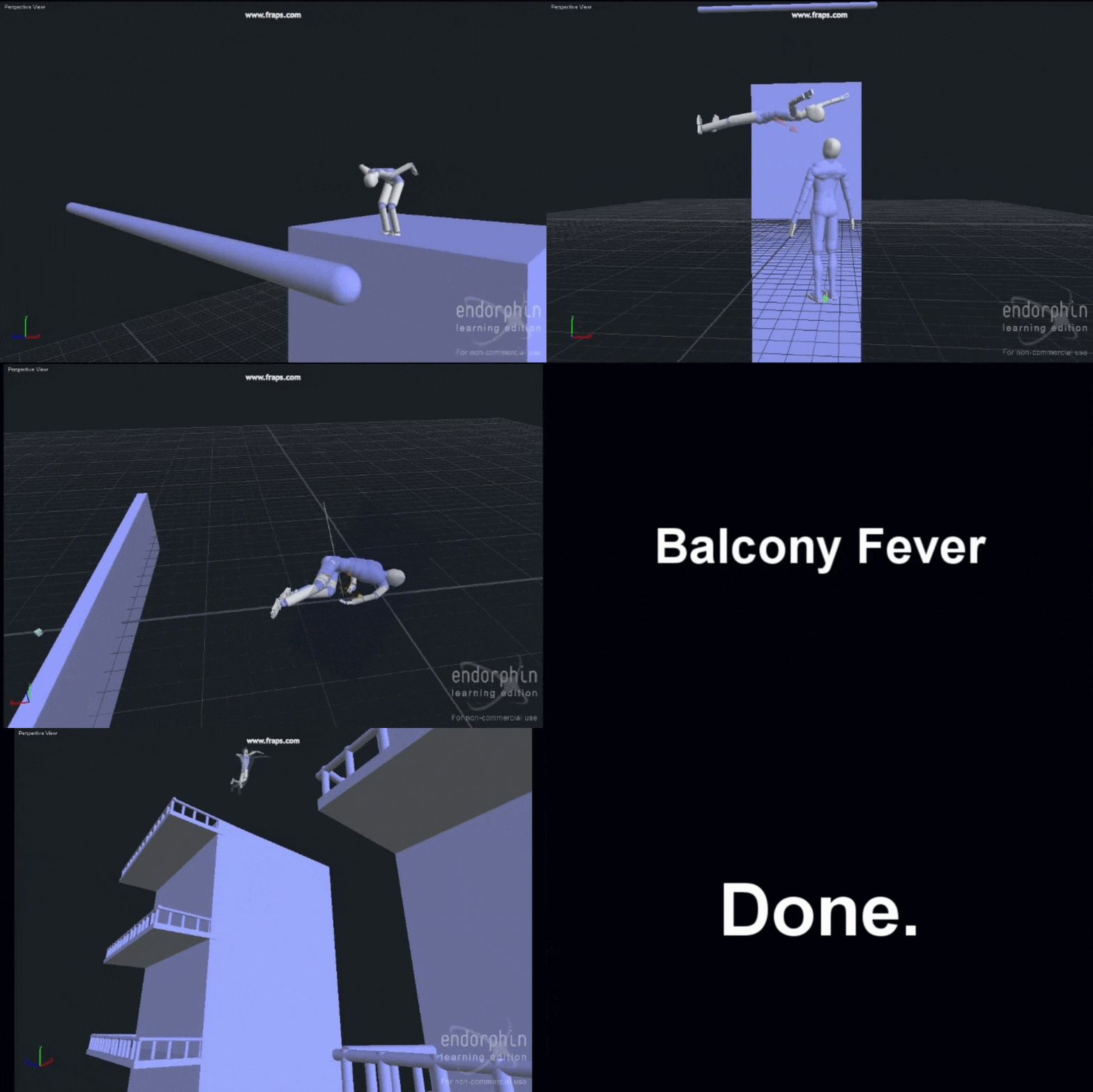
Endorphin is a groundbreaking 3D character animation software by NaturalMotion that introduced Dynamic Motion Synthesis (DMS) – a technology blending physics and AI to create realistic, physics-based character animation. Unlike traditional keyframing or motion capture, Endorphin characters essentially animate themselves through simulated biomechanics and adaptive behaviors.
In this tutorial-style overview, we explore Endorphin’s behavioral physics workflow in depth and how to integrate its results into modern pipelines (like exporting FBX to Maya, Blender, etc.). We’ll cover what Endorphin is, how its DMS and adaptive behaviours work, using ragdoll physics for stunts, scheduling behaviors on the timeline, blending simulation with animation, exporting motion data, and pipeline integration (including a Maya plugin and Blender workflow). We also discuss the status of Endorphin today (learning edition limitations and discontinuation) and highlight modern alternatives (such as Cascadeur, Blender’s physics, and game engines). Finally, we touch on Blender add-ons PixelHair and The View Keeper for enhancing final renders. Let’s dive in!
What is Endorphin 3D animation software?
Developed by NaturalMotion in the mid-2000s, Endorphin is a 3D animation package that pioneered “virtual stuntman” technology. Unlike traditional methods using predefined clips, it uses physics and artificial intelligence to simulate a character’s body and “brain.” This allows for realistic, complex stunt sequences—as seen in films like Troy and Poseidon—where digital doubles interact chaotically with their environment.
The software relies on its Dynamic Motion Synthesis (DMS) engine to produce motion on the fly based on biomechanics. Characters respond realistically to forces and collisions in real time, effectively animating themselves. Endorphin is a stand-alone, Windows-based tool that outputs motion data for export to other 3D software for rendering. It is best described as behavioral physics animation software that creates lifelike, physics-driven performances more easily than manual keyframing.

Dynamic Motion Synthesis (DMS) explained in Endorphin
DMS is NaturalMotion’s procedural animation technology. It simulates a character’s muscles, joints, and balance using an AI-driven motor control system analogous to a nervous system. Rather than playing back recorded data, movements are computed based on research into human and animal biomechanics, neural networks, and artificial evolution.
In practice, a character dropped into a scenario (such as an explosion) will instinctively stumble or flail to catch its balance. Because it is a simulation, the motion is unique every time. This approach drastically reduces production time, as animators do not need to keyframe every nuance of a physical interaction. DMS essentially allows animators to act as directors, adjusting parameters in real time to see immediate, physically plausible results.
Endorphin Adaptive Behaviours and behavioral animation explained
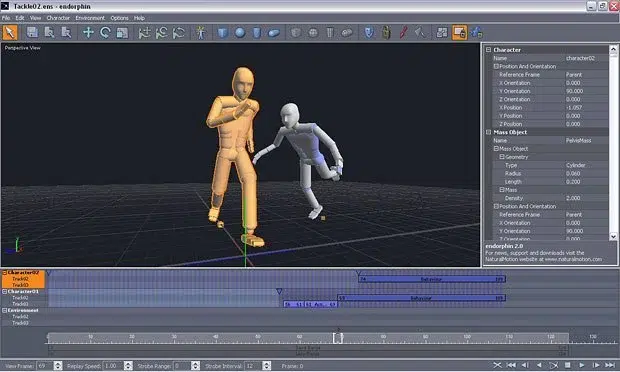
Endorphin features Adaptive Behaviours, which are AI-driven action modules that allow characters to react autonomously to their surroundings. This “behavioral animation” means characters respond contextually; for example, two characters placed near each other might automatically initiate a tackle because they were assigned an “Attack” behavior, not because they were manually animated to do so.
These behaviors act as AI controllers that imitate instinctive responses, such as bracing for a fall or diving from an explosion. They use simulated senses to detect objects and trigger motor actions via DMS. Animators can layer and parameterize these behaviors—such as adjusting the “urgency” of a tackle—to create complex, unscripted-looking interactions with minimal manual effort.
Endorphin ragdoll physics for realistic stunts, falls, and impacts
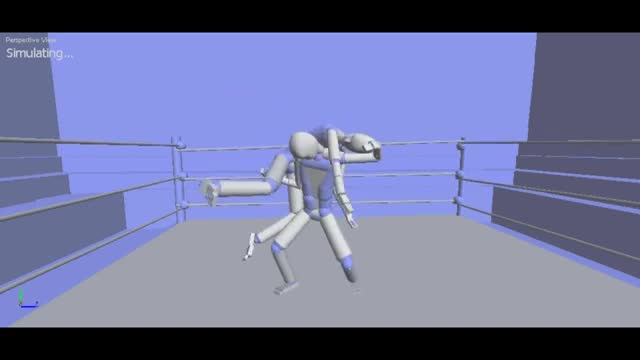
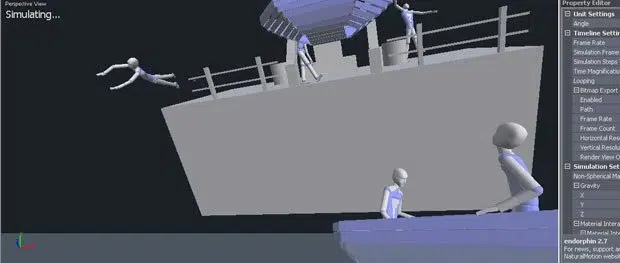
Endorphin uses a full-body physics rig with defined masses and joint limits to treat characters as virtual stuntmen. This is ideal for dangerous sequences, such as the capsizing ship in the film Poseidon, where digital doubles tumble and collide with debris.
While standard ragdolls go limp, Endorphin allows for controlled ragdoll behaviors, where a character might still try to protect its head or reach out during a fall. Because the simulation models mass and momentum, every impact is unique and carries convincing weight. This capability allows VFX houses to achieve high-level stunts and disaster scenes by simply adjusting physics parameters like joint stiffness and friction.
Endorphin vs motion capture: when physics-based animation works better
While motion capture (mocap) is superior for subtle human nuances and emotions, Endorphin excels in extreme or dangerous scenarios that are impractical for live actors. Unlike the fixed performance of mocap, Endorphin characters are interactive; they can dynamically adjust their movements if an obstacle in the environment changes.
The two methods are often used together in a hybrid workflow. An animator might use mocap for a character’s standard run cycle and then let Endorphin’s physics take over the moment an explosion occurs. This provides authentic human movement for acting and authentic physics for high-impact reactions.
How to set up custom characters and skeletons in Endorphin
Endorphin supports custom skeletons and rigs, allowing users to import their own models via formats like FBX or BVH. The setup process involves:
- Importing the Skeleton: Using Character Edit Mode to map custom bones.
- Defining Physical Properties: Assigning collision shapes (capsules, boxes) and mass to each bone.
- Joint Limits: Defining how far joints can bend based on anatomical data to ensure realism.
- Mapping to the “Brain”: Identifying which bones represent the head, spine, and limbs so AI behaviors apply correctly.
- Calibration: Running test simulations to adjust mass distribution, friction, and bounciness.
The software includes tools like the Mirror tool and Character Scale tool to streamline this process, ensuring that custom hero characters from programs like Maya or 3ds Max can utilize Endorphin’s full physics and behavior library.
How to build environments, collisions, forces, and constraints in Endorphin
Endorphin allows for the creation of environment elements and physical events to ensure simulations occur in a plausible world. This involves setting up collision objects, forces, and constraints.
- Building the Environment: The Environment Builder creates collision surfaces using simple shapes (planes, boxes) or complex imported geometry (OBJ, FBX). Objects have editable parameters like mass, friction, and bounce. Scripts were available to import entire environments from Maya or 3ds Max.
- Forces and Impacts: The Force tool applies directed impulses to specific body parts at scheduled times on the timeline. This triggers events like explosions, punches, or car impacts. Characters also respond to gravity and the movement of animated collision objects, such as a moving vehicle.
- Props and Constraints: Props like weapons or helmets are rigid objects attached to a character’s bone via constraints. If a character drops a prop or ragdolls, the prop is simulated as a separate physics object.
- Setting Physical Parameters: Tuning material settings like friction and elasticity defines how characters interact with the ground. High-frequency simulation modes can be used to improve collision accuracy for fast impacts.

How to schedule behaviours and events on the Endorphin timeline
Endorphin uses an event-based timeline (Time Bar) to schedule behaviors, forces, and events. Animators place “Events” on tracks to control when specific actions begin or end.
- Multi-Track Timeline: Multiple tracks organize events for different characters or categories. This allows for layering and prioritization; for example, an upper-body “wave” behavior can blend with a lower-body “walk” behavior.
- Behavior Scheduling: Adaptive behaviors are treated like clips with specific start and end points. A character can be sequenced to run, trip, fall, and get up in one continuous, physically realistic simulation.
- Forces and Collision Events: Impact forces and constraint changes (like detaching a prop or severing a limb) are scheduled as flags on the timeline.
- Previewing and Iteration: The timeline supports scrubbing and an interactive strobe preview for fast iteration. Animators can adjust event timing and immediately observe the physical outcome.
Endorphin Active Animation and Motion Transfer Events workflow
These features allow traditional animation data (FBX, BVH) to be injected into the physics simulation, enabling a hybrid workflow between choreographed moves and reactive physics.
- Motion Transfer Events: This event maps external animation onto a simulated character at a specific frame. The character executes the prescribed animation from its current pose and physical state.
- Active Animation Events: This drives a character’s muscles using animation data as a target while the simulation remains active. It allows a character to follow a walk cycle while simultaneously responding to external forces or “stumble” behaviors.
- Hybrid Workflow: Animators can start with a motion-captured run, switch to physics for a fall, and use Active Animation to transition into a pre-animated “get-up” motion. This ensures the character performs directed actions without looking “drunk” or purely random.
Endorphin Dynamic Blending for smooth transitions between animation and simulation
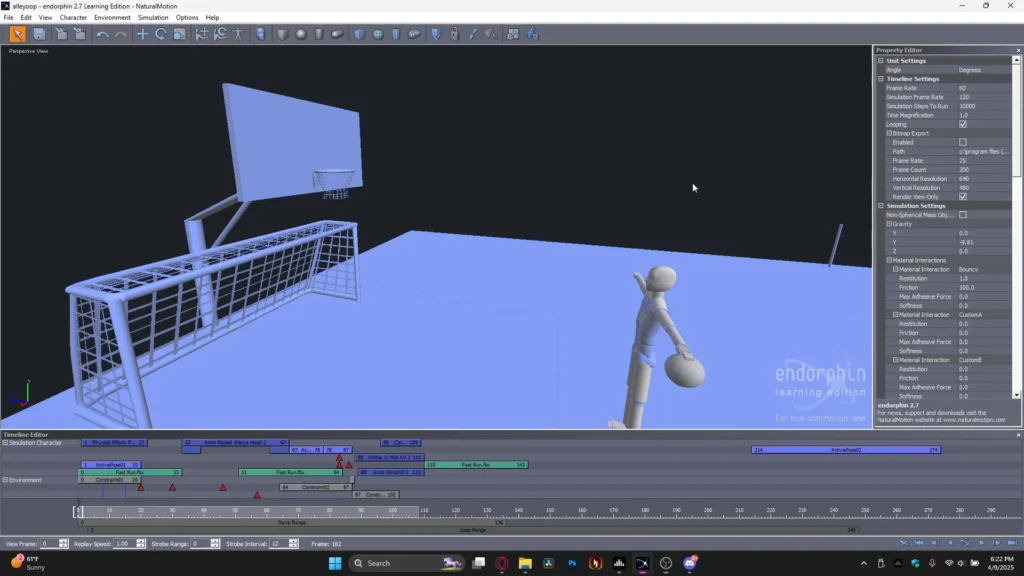
Dynamic Blending manages the transition between “following an animation” and “full physics ragdoll” to prevent jarring, abrupt shifts in movement.
- Seamless Transitions: When an explosion hits a running character, Dynamic Blending gradually transitions the character from the run cycle into a ragdoll state over several frames.
- Recovery Blending: When moving from a fall back into a “get-up” animation, the system moves the ragdoll pose to the starting pose of the animation clip smoothly.
- Technical Implementation: The system interpolates bone rotations between the simulated trajectory and the target animation data. This allows studios to integrate simulated physics into animated shots without visible seams, ensuring a continuous performance.
EEndorphin export formats and pipeline integration (FBX, BVH, XSI, Vicon)
Endorphin was designed to integrate into professional production pipelines by exporting motion data to other 3D software like Maya, 3ds Max, or game engines. It supports several industry-standard formats:
- FBX (.fbx): A primary exchange format that bakes simulation into skeletal keyframes for use in Maya, Max, or Blender.
- Biovision BVH (.bvh): A common motion capture format representing skeletal hierarchy and joint rotations in plain text.
- Acclaim ASF/AMC (.asf / .amc): Standards used by Acclaim motion capture systems.
- Softimage dotXSI (.xsi): Direct support for Softimage|XSI users to facilitate round-tripping animations.
- Vicon V / VST (.v, .vst): Formats associated with Vicon systems, allowing Endorphin to enhance or generate physics on top of captured data.
- 3ds Max .csm: Character Studio Marker format for users of Max’s Character Studio.
- AVI files: Video previews for quick review of simulation results.
A typical pipeline involves simulating in Endorphin, exporting the motion via FBX or BVH, and importing it into a DCC app to apply the animation to high-resolution rigs. This workflow is flexible, allowing motion to be retargeted from a simple Endorphin dummy to a detailed character model. Two-way motion flow is also possible by importing existing animations into Endorphin for physical interaction before exporting the final result.

Endorphin to Maya workflow using the Maya control panel plugin
Introduced in version 2.7, the Maya Control Panel plugin streamlined the connection between Endorphin and Autodesk Maya, automating the process of driving custom rigs with simulated data.
- Install the Endorphin Control Panel in Maya: Adds dedicated tools to the Maya interface.
- Generate Endorphin Skeleton in Maya: Spawns a compatible template skeleton (standard biped) within the Maya scene.
- Match to Custom Rig: Users map the Endorphin skeleton joints to their custom rig joints (e.g., “Maya Rig left thigh = Endorphin Rig left thigh”).
- Export/Send to Endorphin: The proportion-matched skeleton is sent to Endorphin for simulation.
- Simulate in Endorphin: Behaviors and forces are applied to the skeleton.
- Import Animation back to Maya: The resulting motion is brought back through the plugin and applied directly to the Endorphin skeleton driving the custom rig.
- Further Maya Editing: Animation can be baked onto the rig for final refinements like finger or facial animation.
While cutting-edge in 2006, the plugin was limited to older versions of Maya (up to version 8) and required a hardware dongle. Modern workflows typically favor standard FBX exports and Maya’s internal retargeting tools.
Endorphin Learning Edition features and motion export limitations
The Endorphin Learning Edition (eLE) was a free version released to students and hobbyists to provide a functional training environment without a time limit.
- Features: Access to the full suite of simulation tools, including Dynamic Motion Synthesis, adaptive behaviors, active animation, and custom character setup. It included full documentation and sample files.
- Limitations: The primary restriction was that motion file export was disabled. Users could not save to FBX or BVH to move animations into other software, preventing the eLE from being used in commercial production.
- Commercial Use: The license strictly prohibited commercial projects, even if a workaround for exporting was found.
- Content: eLE versions corresponded with major releases like 2.5 and 2.7, providing the same feature set as the paid versions within the standalone environment.

Is Endorphin discontinued and what versions are still used today?
Endorphin is officially discontinued. NaturalMotion ceased support and sales of the software following its acquisition by Zynga in 2014, shifting focus toward mobile games and integrated middleware like Euphoria.
- Final Version: Endorphin 2.7.1 (released circa 2006) was the last official update.
- Legacy Support: The software was designed for Windows 2000/XP; while it may run on newer systems via compatibility modes, there are no modern updates.
- Current Usage: It is virtually non-existent in professional pipelines because licenses can no longer be legally acquired. Hobbyists occasionally use the Learning Edition for educational purposes.
- Successors: While Endorphin as a standalone tool is dead, its core technology lives on in Euphoria, a runtime engine used by developers like Rockstar Games for titles such as Grand Theft Auto. However, Euphoria is a private middleware and not a consumer animation tool.
Best alternatives to Endorphin for physics-based character animation (Cascadeur, Blender, game engines)
With Endorphin discontinued, several modern solutions have emerged to handle physics-based character animation.
- Cascadeur: Developed by Nekki, this is the closest spiritual successor to Endorphin. It is a standalone tool designed for “stuntman” animations, using an intuitive physics-based workflow. Unlike Endorphin’s strictly simulation-driven approach, Cascadeur allows animators to pose keyframes while the software suggests physically plausible in-betweens based on center of mass and momentum. It offers greater artistic control and exports to FBX.
- Blender (with Physics or Add-ons): While not an out-of-the-box equivalent, Blender’s Bullet physics engine can handle ragdoll simulations. Users can manually attach rigid bodies and constraints to a character rig. Third-party tools like Ragdoll Dynamics (also available for Maya) provide a more professional interface for integrating physics directly into the animation timeline.
- Game Engines (Unity & Unreal): Animators often use these engines as a “poor man’s Endorphin” by recording real-time ragdoll simulations. Unreal’s Take Recorder or Unity’s timeline tools allow physics-driven impacts and falls to be baked into animation data. While optimized for speed, they generally lack Endorphin’s high-level AI behaviors like active recovery.
- Autodesk Maya or MotionBuilder: Professional plugins like Ragdoll Dynamics bring Endorphin-like capabilities directly into Maya, allowing for controllable limits and blending between physics and keyframes. MotionBuilder offers basic ragdoll joints but lacks advanced AI behavior modules.
Endorphin to Blender workflow for final shots, lighting, and rendering
For those using legacy copies of Endorphin, Blender serves as an ideal environment for final lighting, shading, and rendering.
- Animate/Simulate in Endorphin: Create the simulation using behaviors and forces until satisfied with the motion.
- Export the Animation (FBX/BVH): Export the skeletal data. FBX is preferred for Blender as it bakes the simulation into keyframes. (Note: The Learning Edition cannot perform this step).
- Import into Blender: Bring the FBX armature into the scene.
- Retargeting or Skinning: * Retargeting: Use add-ons like Rokoko or Auto-Rig Pro to transfer the Endorphin bone motion to a custom Blender rig.
- Direct Skinning: Bind your high-quality character mesh directly to the imported Endorphin skeleton.
- Adjust and Clean: Refine the animation using Blender’s F-Curve or NLA editors to fix issues like foot sliding.
- Add Environment and FX: Set up high-quality models and supplemental physics (cloth, smoke, or rigid body props) that react to the character’s motion.
- Lighting and Rendering: Apply professional shaders (like skin or hair) and use Blender’s Cycles or Eevee engines for final output.
PixelHair realistic hair assets for Blender character animation
PixelHair is a library of nearly 200 professional hair grooms created by Isaac Yelzkizi, designed to bypass the difficult process of manual hair creation in Blender and Unreal Engine.
- Realistic Hair Grooms: Assets are built using Blender’s native hair systems, offering convincing volume and flow.
- Hair Cap and Easy Attachment: Each style includes a 18k polygon hair cap with a Shrinkwrap modifier, allowing the hair to be fitted to any character head shape with a few clicks.
- Highly Customizable: Since they use native systems, animators can still comb, sculpt, or recolor the hair to suit specific artistic needs.
- Geometry Nodes Support: Updates include integration with Blender’s newer Geometry Nodes workflow for procedural styling and better performance.
- Unreal Engine / MetaHuman Compatibility: Styles can be exported as Alembic grooms or hair cards for use with Unreal’s MetaHuman system.
In an Endorphin-to-Blender pipeline, PixelHair allows physics-driven body motion to be complemented by realistic secondary hair movement.

The View Keeper Blender camera management for multi-shot animation renders
The View Keeper is a Blender add-on that simplifies managing multiple camera angles within a single scene, eliminating the need for dozens of separate camera objects.
- Unlimited Camera Records: Stores multiple positions, rotations, and lens settings (focal length, DOF) on a single camera object.
- Instant Switching: Allows animators to jump between saved shots (e.g., Wide Shot to Close-Up) with one click.
- Unique Render Settings per View: Each saved view can have its own resolution (e.g., 16:9 for YouTube and 9:16 for Instagram), file format, and output path.
- Batch Rendering: Automatically renders all or selected camera views sequentially, saving significant time during the final production phase.
- Scene Organization: Reduces clutter by centralizing all “virtual cameras” into one manager, ensuring visual consistency across different shots.
Frequently Asked Questions (FAQs)
- What type of animation is Endorphin used for?
Endorphin is used for creating physics-based character animations, specifically high-impact actions like stunts, falls, and fights. It simulates characters as “virtual stuntmen,” making it ideal for scenarios that are difficult to animate by hand or dangerous for live actors. Driven by simulation involving physics and AI, characters respond naturally to forces and collisions in real time, reducing the time required to animate complex physical behaviors. - Is Endorphin 3D animation software still available or free to use?
Endorphin is discontinued and no longer officially supported or sold. The final version (2.7) was released in 2006, and NaturalMotion stopped offering it in 2014. While a free Endorphin Learning Edition (eLE) existed for non-commercial use, it lacked the ability to export animations to other software. There is currently no official way to acquire a full, working copy for production; users must rely on modern alternatives. - What is Dynamic Motion Synthesis (DMS) in Endorphin?
Dynamic Motion Synthesis (DMS) is a proprietary technology that merges real-time physics simulation of biomechanics with AI motor control. It simulates a character’s body and “nervous system,” allowing it to move autonomously in response to stimuli rather than playing back recorded data. This results in interactive characters that can naturally balance, stumble, or flail when pushed. - What are Adaptive Behaviours in Endorphin?
These are pre-built, AI-driven “contextual movements” that allow characters to react automatically to their environment. Examples include grabbing objects, bracing for impact, or tackling another character upon contact. These behaviors allow the simulation to handle the details of an action based on environmental sensing, significantly reducing manual keyframing. - How does Endorphin differ from motion capture animation?
Motion capture (mocap) records real human movement to create a fixed, non-interactive animation. Endorphin generates unique, reactive movement through simulation. While mocap is superior for nuanced acting and dialogue, Endorphin excels at dangerous stunts and unpredictable physical interactions. The two can be used together, blending mocap for planned movements and Endorphin for reactive physics. - Can Endorphin export animations to other software like Maya or Blender?
The full version of Endorphin supports exporting skeleton motion via standard formats such as FBX, BVH, XSI, and Vicon. This allowed it to fit into professional pipelines where animations were simulated in Endorphin and then rendered in DCC tools like Maya or Blender. The Learning Edition, however, is export-disabled. - What replaced Endorphin, or what are some alternatives now that Endorphin is discontinued?
Several modern tools cover the ground previously held by Endorphin:- Cascadeur: A physics-based character animation software that offers significant animator control.
- Ragdoll Tools: Plugins like Ragdoll Dynamics for Maya and Blender provide integrated physics simulation.
- Game Engine Physics: Unreal Engine and Unity can record and export ragdoll simulations.
- Euphoria: NaturalMotion’s real-time engine used in games like GTA IV, though it is not a standalone consumer tool.
- Did any famous games or movies use Endorphin?
Endorphin was utilized in major mid-2000s projects. Films like Troy (2004) and Poseidon (2006) used it for battle scenes and realistic disaster stunts. In the gaming industry, it contributed to titles like Tekken 5 and Metal Gear Solid 4 for ragdoll effects and cinematics before developers shifted toward real-time engines like Euphoria. - What is PixelHair for Blender, and how can it help my animation projects?
PixelHair is a collection of ready-made, realistic hair grooms for Blender and Unreal Engine. It allows animators to apply professional-quality hairstyles—complete with fitted scalp caps—without grooming from scratch. Because these assets are compatible with Blender’s native hair system, they can be simulated for secondary motion, enhancing the overall realism of a physics-based animation. - What does The View Keeper add-on do in Blender, and why is it useful for animations?
This add-on manages multiple camera angles within a single camera object. It allows users to store views (transforms and lens settings) and switch between them with one click. It supports unique render settings per view and batch rendering, simplifying the workflow for multi-shot sequences and keeping the scene organized.
Conclusion
Endorphin pioneered the marriage of physics and AI, allowing animations to emerge from simulations. Although discontinued, its influence persists in modern tools like Cascadeur and real-time game engines. By utilizing contemporary successors and supplemental assets like PixelHair and The View Keeper, animators can continue the legacy of the “virtual stuntman” to create physically authentic and visually compelling results.
Sources and Citations
- NaturalMotion technology overview (DMS / “virtual stuntmen”)
- GameDeveloper (Gamasutra) – “NaturalMotion Ships Endorphin 2.5 Learning Edition” (2005)
- Computer Graphics World – “NaturalMotion endorphin used to create realistic chaos in Poseidon” (2006)
- HighQualityTextures – Endorphin 2.0 feature summary
- Weltenbauer (NaturalMotion) – Endorphin 2.7 spec sheet (PDF)
- Endorphin (Software) – Wikipedia
- Endorphin community – AVTPro on the Endorphin 2.7 Maya Control Panel plugin
- CG Channel – Cascadeur physics-based animation tool (2019)
- FlippedNormals – PixelHair (product page)
- Superhive (BlenderMarket) – The View Keeper (Lite) product description
Recommended
- PixelHair on Stylized Characters in Blender: Achieving Studio-Quality Hair with Ease
- How to Use Clothes for MetaHuman in Animation: Best Tools, Techniques, and Workflows in Unreal Engine 5
- Blender Camera Angles: Capturing the Perfect Shot with The View Keeper
- High-Level Metahuman Mocap Workflow: Professional Techniques for Unreal Engine 5 Animation
- Closure of Midsummer Studios: What Happened to Jake Solomon’s Burbank Life Sim
- How do I set up a scene with multiple cameras in Blender?
- Metahuman Animator: How to Animate Realistic Characters in Unreal Engine 5
- What is the difference between Perspective and Orthographic Camera in Blender?
- Clair Obscur: Expedition 33 – Sales Milestones, Developer Insights, and Community Reactions
- The Original Final Fantasy 7 Gets a New Re-release for PC on Steam: New Features, Free Upgrade, and Known Issues


























































































