








S&box is an upcoming open-source game creation platform and engine by Facepunch Studios, known as the spiritual successor to Garry’s Mod. It is built on a heavily modified version of Valve’s Source 2 engine with a modern C# layer, and is officially slated for release on Steam in April 2026. S&box (pronounced “sandbox”) aims to empower creators of all skill levels to build, mod, and publish games easily – providing an intuitive editor, rapid iteration tools, and a robust framework for both single-player and multiplayer experiences.
In this comprehensive guide, we’ll explore what S&box is, how it differs from Garry’s Mod, and dive deep into its features: from using Source 2 and C# scripting to visual tools, asset workflows, level design, networking, and beyond. We’ll also cover how to get S&box, contribute to its open-source codebase, and eventually monetize or even export your games as standalone titles. Whether you’re a curious beginner or a seasoned modder, S&box offers a next-generation sandbox where your game ideas can come to life with minimal friction. Let’s break down everything you need to know to hit the ground running with the S&box open-source game creation platform.
whS&box Open-Source Game Creation Platform
S&box is a modern game engine and platform created by Facepunch Studios to simplify game building, making it as accessible as modding. It provides a unified ecosystem for creating, testing, and sharing games. Users can browse community-made content in-app, similar to Garry’s Mod or Roblox. It utilizes Valve’s Source 2 engine for low-level systems but uses a high-level C# 14 (.NET 10) framework for game logic. Key features include real-time code hotloading and a scene-based workflow similar to Unity or Godot. As an open-source, MIT-licensed project often called “Garry’s Mod 2,” it supports a wide range of genres and allows creators to modify the engine’s C# source.
Is S&box Really Open Source and What License Does it Use
S&box’s engine code is open source under the MIT License, released on GitHub in November 2025 to encourage community transparency and contribution. While Facepunch’s C# code (editor UI, networking, components) is free to use and modify without royalties, the engine still relies on Valve’s closed-source Source 2 binaries for low-level functions. These native binaries are distributed under a separate S&box EULA, meaning they cannot be reused outside of S&box. Some third-party libraries also maintain their own permissive licenses.
S&box vs Garry’s Mod: What’s New and What’s Similar
S&box is the spiritual successor to Garry’s Mod, maintaining the sandbox spirit while upgrading to Source 2 technology. Unlike GMod, which was a modded game, S&box is a full engine/platform hybrid. Major changes include switching from Lua to C# for more robust scripting and replacing fragmented tools with an all-in-one Editor. S&box uses a GameObject-Component model and a cloud-based asset delivery system instead of the Steam Workshop. Most significantly, S&box allows creators to export projects as standalone games on Steam without royalties and offers a “Play Fund” for monetization.

How S&box Uses Source 2 and What Parts are Not Included
S&box runs on the Source 2 runtime for rendering, physics (Rubikon), and audio, but wraps these in managed C# code. While Facepunch open-sourced their C# layers, Valve’s proprietary C++ source code for the core engine remains closed. S&box integrates Valve tools like Hammer and ModelDoc into its interface but does not bundle proprietary assets from other Valve games. Facepunch modified the engine architecture to allow for a unified editor process and a custom asset pipeline, but the engine still requires proprietary Valve binaries to function.
How to Download S&box and Get Access on Steam
Currently in beta, S&box can be accessed by logging into the official website via Steam and using the “give-me-that” page to add the S&box Editor to a Steam library for free. A public Steam store page exists with a planned release date of April 2026. The platform requires a 64-bit Windows 10/11 OS and modern GPU. Once claimed, users install both the game runtime and the Editor through Steam, receiving frequent updates directly through the client.
S&box GitHub Repository: What’s Inside and Who it’s For
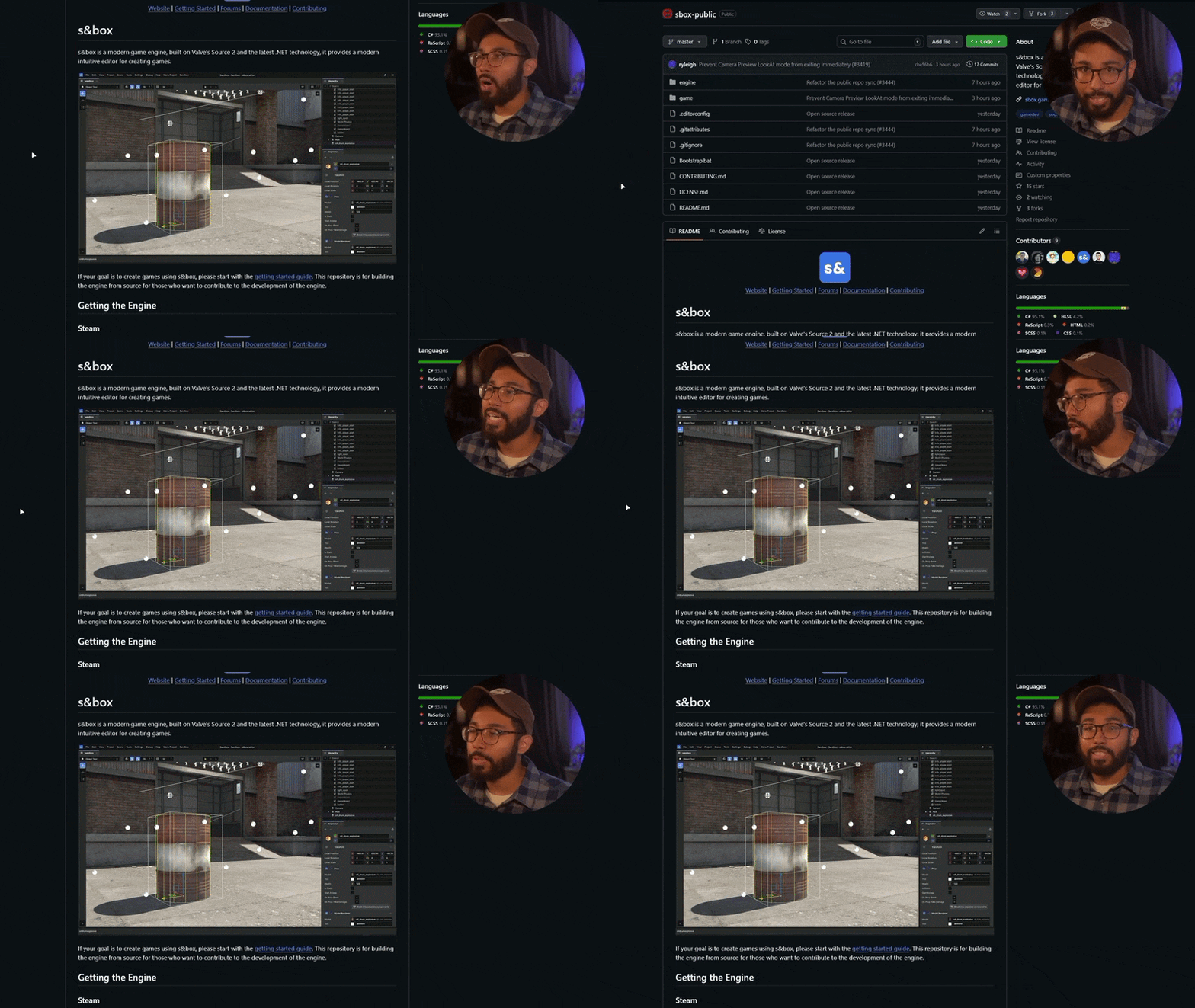
The facepunch/sbox-public repository contains the C# source code for the engine and editor. It is intended for advanced developers and engine contributors rather than general game creators, who can simply use the Steam binaries. The repo allows developers to fix bugs, submit pull requests, and learn how systems like networking or UI are implemented. While the C# code is MIT-licensed, the repository does not include the native Source 2 binaries, which must be fetched via a bootstrap script.
How to Build S&box From Source (sbox-public) for Contributors
Building S&box requires Git, Visual Studio 2026, and the .NET 10 SDK on Windows. After cloning the repo, users run a Bootstrap.bat file which downloads necessary Source 2 binaries and third-party libraries before compiling the C# projects. Developers can then modify the engine via the Visual Studio solution and run the custom editor from the generated binaries. Currently, the build process is only officially supported on Windows due to the underlying Source 2 dependencies.

S&box Editor Overview: Scene System, UI, and Live Iteration
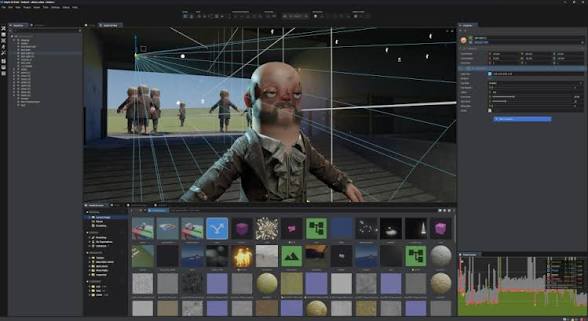
The S&box Editor features a modern layout with a 3D viewport, hierarchy, and inspector. It uses a Scene system where GameObjects are built using modular Components. A major highlight is the hotloading system, which allows C# code changes to be applied in-game nearly instantly without restarting. The UI framework is based on Razor (HTML/CSS/C#), and the editor integrates Hammer for environmental level design. This unified environment allows for real-time playtesting and rapid asset iteration through an integrated Asset Browser.
s&S&box Scripting with C#: Beginner Workflow and Project Structure
Scripting in S&box uses C#, a beginner-friendly language supported by templates like the “Minimal Game” project. Projects are structured around a .sbproj file, with specific folders for code, assets, scenes, maps, and ui. Developers write C# classes as modular components—such as a SpinComponent—which can then be attached to GameObjects within the editor. The editor features deep integration with IDEs like Visual Studio 2022, allowing for real-time hotloading where code changes are applied instantly without restarting the game. This workflow facilitates rapid iteration, supported by a high-level API and the ability to use source control like Git for collaboration.
S&box Networking and Multiplayer: Built-in Features Creators Use
Multiplayer functionality is integrated by default using a simplified server-client architecture. Developers can create networked entities and synchronize variables across clients using attributes like [Net] or [Sync]. S&box handles complex tasks like replication, interpolation, and lag compensation automatically. For testing, the editor allows launching multiple game instances on a single machine. The platform also supports dedicated servers via sbox-server.exe and utilizes Steam networking for connectivity. High-level features include built-in voice chat, party systems, and the ability for clients to own and simulate specific objects to reduce latency.
S&box Visual Scripting Tools: ActionGraph and ShaderGraph Basics
S&box provides two node-based visual tools for non-coders and artists. ActionGraph is used for gameplay logic, allowing creators to connect event, function, and logic nodes to define game flows without writing code. ShaderGraph is a visual shader editor for creating complex materials and post-processing effects, producing efficient HLSL/Vulkan code once compiled. Both tools share a consistent interface and can interoperate with C# scripts. These systems lower the barrier to entry, enabling artists to create unique visual effects and designers to prototype interactions rapidly.
S&box Asset Workflow: Cloud Assets and Importing Custom Content
The platform features a built-in Cloud Asset Library (formerly asset.party) that allows developers to drag assets directly into their scenes from an online repository without manual downloads. Creators can also upload their own assets to the cloud for community use. For custom content, S&box utilizes ModelDoc for importing meshes (FBX, OBJ) and setting up physics, and the Material Editor for textures. The workflow supports external asset packs, such as PixelHair for realistic hair grooms and the View Keeper Blender addon for camera management, allowing for high-quality visual polish with minimal effort.
S&box Level Design Tools: Hammer Editor Workflow and Tips
S&box includes the Source 2 version of the Hammer Editor, which features mesh editing, advanced terrain sculpting, and progressive light builds. While .vmap files handle static geometry and entities, they are integrated into S&box via the scene system. Hammer in S&box is moddable, allowing for custom C# tools and primitives. Design tips include blocking out levels first, using prefabs for modularity, and placing reflection probes for accurate lighting. This workflow combines the precision of brush-based modeling with the dynamic flexibility of S&box’s component-based architecture.
How to Publish and Share Games in S&box
Publishing is a one-click process that uploads the game and its assets to the sbox.game platform. Games are listed in an in-app browser where players can instantly join without manual mod installation. Updates are pushed seamlessly through the editor, ensuring players always have the latest version. Creators can tag games by genre and view performance metrics. While initially shared within the S&box ecosystem, a future standalone export feature is planned. The platform also includes a “Play Fund” to reward creators based on player engagement.
Can You Make Standalone Commercial Games with S&box?
S&box aims to allow creators to export their projects as standalone commercial games on Steam with no royalties or engine fees. While the open-source MIT license covers the C# engine code, the Source 2 binaries remain under the S&box EULA. This feature, expected to arrive after the initial April 2026 launch, will allow developers to brand games as their own and sell them independently. This provides a professional path for community creators to transition into full-time indie development without rebuilding their projects in a different engine.
S&box Pricing and Release Timeline: What We Know for April 2026
S&box is set for a planned release in April 2026 on Steam. While an official price has not been finalized, expectations lean toward a low one-time purchase or a free-to-play model, with no recurring subscriptions. The engine remains free for developers under an MIT license. The platform is viewed as a multi-decade project that will coexist with Garry’s Mod. Recent updates in early 2026 have focused on performance optimization and UI polishing in preparation for the transition from the developer preview to a public Steam launch.
S&box System Requirements and Supported Platforms
S&box is a modern engine requiring more power than its predecessor. As of 2026, Windows 10/11 (64-bit) is the only officially supported operating system. While there is no native Linux or Mac version, Linux users can potentially run the game via Proton.
- Processor (CPU): Minimum requirements include an Intel Core i5-7500 or AMD Ryzen 5 1600. For optimal performance in the editor and complex simulations, an Intel Core i7-9700K or AMD Ryzen 7 3700 is recommended.
- Memory (RAM): A minimum of 8 GB is required, though 16 GB is recommended for a stable experience with the editor. 32 GB is ideal for professional developers.
- Graphics (GPU): A discrete DX11/Vulkan capable card is necessary. Minimum: NVIDIA GTX 1050 / AMD RX 570 (4GB VRAM). Recommended: NVIDIA RTX 2060 / AMD RX 6600 XT (8GB VRAM). Integrated graphics are generally insufficient.
- Storage: The base installation requires at least 12 GB, but 50 GB of SSD space is recommended to accommodate cached community assets and game projects.
- VR Support: S&box supports PC VR through OpenXR, compatible with Valve Index, Oculus/Meta Quest (via Link), and HTC Vive. This requires at least the recommended GPU specs.
- Connectivity: A broadband internet connection is mandatory for on-the-fly asset streaming and multiplayer connectivity.

Frequently Asked Question (FAQs)
- What is S&box and how is it related to Garry’s Mod?
S&box is a new open-source game creation platform and engine by Facepunch, serving as the spiritual successor to Garry’s Mod. Built on the Source 2 engine with C# scripting, it transitions from being a modded game (like GMod) to a full engine where users build standalone-quality games. While it carries over the sandbox DNA, it offers a powerful editor and significantly more flexibility for developers. - Do I need to know how to code to make games in S&box?
No, you do not necessarily need to code. S&box provides visual scripting tools like ActionGraph for logic and ShaderGraph for materials, allowing you to create behaviors by connecting nodes. While beginners can start with these tools and templates, learning C# is recommended to unlock the platform’s full potential, especially since hotloading provides instant feedback. - Is S&box really open source, and can I use its code for my own projects?
Yes, the S&box engine code is open source under the MIT License and available on GitHub. You can view, modify, and fork the C# source code for your own projects without royalties or paywalls. However, the proprietary Source 2 binaries from Valve remain closed-source and are governed by a separate EULA. - How do I get access to S&box? Is it in beta or released?
As of April 2026, S&box is releasing on Steam. During development, it was accessible via a “give me that” link on the official website. Now, it can be installed directly through its Steam store page. Depending on the final launch strategy, it may be a paid title or free-to-play. - How does multiplayer work in S&box? Do I need to set up servers?
Multiplayer is integrated at the engine level, handling entity replication and variable syncing automatically. Users can host “listen servers” for friends, join games via a built-in browser, or run headless dedicated servers for persistent communities. Steam Networking (UDP) is used to simplify connectivity, and the editor allows for local multiplayer simulation for testing. - What kind of games can I make with S&box? Are there limits to genre or style?
S&box is highly flexible and general-purpose. It supports shooters, sandbox builders, puzzle games, and horror experiences. While optimized for 3D, it can handle 2D platformers and includes built-in OpenXR support for VR. More complex genres like RPGs or RTS games can be made by scripting custom systems or using community frameworks. - How does the Play Fund work for monetization?
The Play Fund rewards creators based on player engagement metrics, such as total playtime. This fund is supported by cosmetic sales and platform revenue, allowing developers to earn a monthly payout without charging players directly. Creators can also sell cosmetic items like skins and hats through the Steam Workshop. - Can I use assets from other games or import Content from Garry’s Mod?
You cannot use copyrighted assets from other games for public downloads. While S&box uses different technology than GMod (C# and Source 2 vs. Lua and Source 1), assets can be ported with effort using tools like Hammer 2 and ModelDoc. There is no one-click converter, so GMod addons must be recreated. - What are the hardware requirements for S&box (and does it run on Linux)?
S&box requires a 64-bit Windows 10/11 PC. Minimum specs include a 4-core CPU, 8 GB RAM, and a GTX 1050; recommended specs include a 6-8 core CPU, 16 GB RAM, and an RTX 2060. While there is no native Linux client, it can be run via Proton on Steam, though official support is currently limited to Windows. - How do I publish my game or addon for others to play?
Publishing is handled through the S&box Editor’s built-in feature, which packages and uploads projects to the cloud. Once published with a title and description, the game is instantly discoverable via the in-game “Games” page. Updates are pushed by incrementing the version and republishing, ensuring a seamless live-service experience for players.

Conclusion
S&box marks a significant evolution in sandbox gaming, transitioning from a “modded game” into a full-fledged, open-source engine and platform. By combining the power of Source 2 with the accessibility of C# scripting and a frictionless cloud asset system, it empowers everyone from hobbyists to professional indie teams.
The platform provides a clear professional path, allowing creators to move from playful community prototypes to standalone commercial releases on Steam without royalties. As of April 2026, S&box is ready to welcome a new generation of creators to a collaborative environment where the only limit is their imagination. Whether remaking classics or inventing new genres, the community now has a modern, high-performance canvas to build the future of user-generated content.
Sources and Citations
- Facepunch Studios – S&box Official Update (Open Source Announcement, Nov 26, 2025)
S&box is now an open source game engine - Facepunch Studios – S&box GitHub Repository (README and License)
Facepunch/sbox-public on GitHub
LICENSE.md - Facepunch Studios – S&box Documentation
S&box Docs – About
S&box Docs – First Steps - Facepunch Studios – Official S&box Site Features Page
S&box Official Site - Wikipedia – S&box Article
S&box – Wikipedia - PC Gamer – Interview/Article (Nov 28, 2025)
Garry’s mod successor s&box goes open source and even opens up the finances, Garry says: “Valve gave me my chance, I’m already rich, I don’t want to f*ck anyone over” - S&box Forum/Blog – “Give Me That” July 2024 Update
July Update – Give Me That - Steam Store Page – S&box on Steam
S&box on Steam - Reddit AMA / Facepunch FAQ – S&box FAQ (Feb 2024, updated Sep 2025)
S&box FAQ - Host Havoc Blog – “S&box Update Guide: Steam Release Plans” (Jan 28, 2026)
S&box Update Guide: Latest Features, Steam Release Plans, and More
Recommended
- How to Add Realistic Dust, Hair, and Surface Imperfections in Blender to Increase Scene Realism
- Shinji Mikami Establishes High-Profile Game Development Studio Unbound: What We Know About the New AAA Original IP
- All Shared Watch Rewards and Event Details in ARC Raiders (Feb 10–24, 2026) — Merits, Reward Track, and Fastest XP Farms
- How to Create Metahuman Child Characters and Convert MakeHuman Models to Metahuman in Unreal Engine 5
- Devil May Cry Characters Guide: Meet the Heroes, Villains, and Icons of the Series
- Blender Multi-Camera Rendering: A Step-by-Step Guide with The View Keeper
- The Fastest Way to Groom Short Hair for Game Characters
- Hair20K vs PixelHair: Comparing High-Fidelity 3D Hair Datasets for Machine Learning, Simulation, and Production Use
- How to Create Your Own Metahuman in Unreal Engine 5: Complete Step-by-Step Guide
- Saving and Switching Blender Camera Angles with The View Keeper
























































































