








Hair modeling is a challenging frontier in computer graphics and AI, requiring rich datasets for training neural networks on strand-based reconstruction, simulation, and generative grooming. Two prominent resources have emerged: Hair20K, a large-scale 3D hair dataset for machine learning and AI training, and PixelHair, a high-fidelity library of 3D hair grooms designed for Blender and Unreal Engine workflows. This article provides a deep technical comparison of Hair20K and PixelHair – examining their structure, fidelity, ease of integration, and suitability for machine learning (ML), physics simulation, and production pipelines. We clearly distinguish verified facts from observational insights to help you evaluate each dataset’s trustworthiness and utility.
What is Hair20K and how is it structured for 3D hair geometry ML learning?
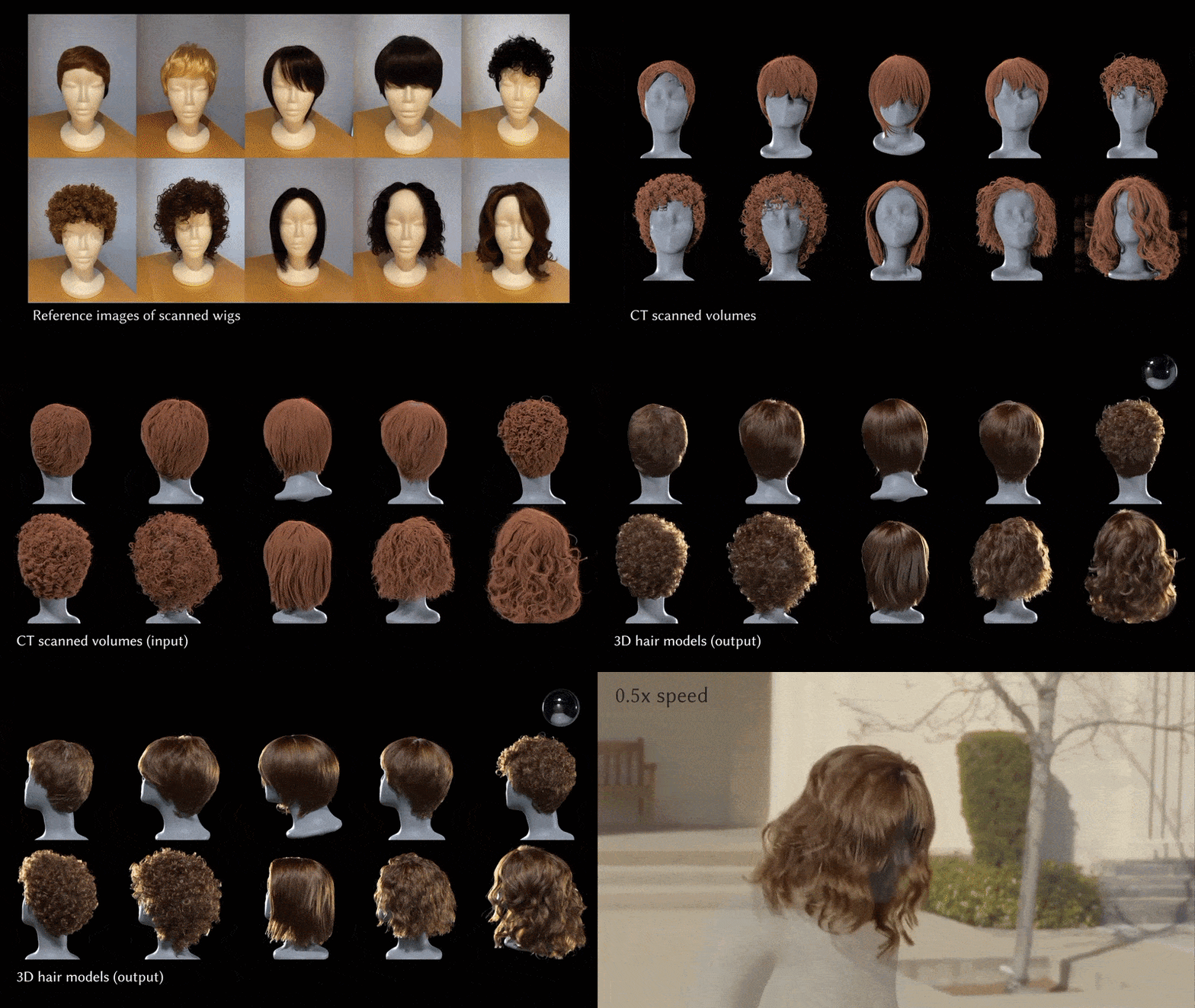
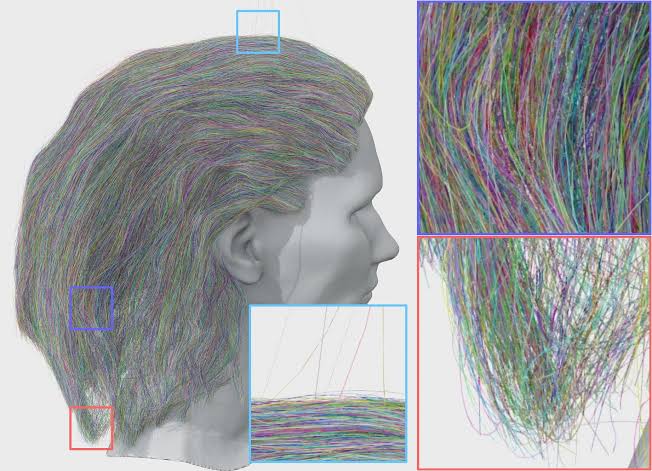
Hair20K is a 2024 academic dataset with ~21,054 strand-based hairstyles, created by augmenting 343 captured models to support hair modeling research like PERM and HairNet.
- Strand-Based Geometry: Each hairstyle contains ~10,000 strands as polylines with uniform segments, offering detailed data for ML tasks like reconstruction. This explicit strand representation serves as ground truth for training precise hair models. It’s designed for fine-grained geometry analysis.
- Standardized Alignment: Hairstyles are aligned to standard head models, ensuring positional consistency across the dataset. This reduces variability, aiding models in learning hair geometry in a unified frame. It simplifies integration with template heads.
- Categorization and Variation via Blending: With 10 categories, new styles are generated by blending hairstyle pairs, expanding to over 21,000 samples. This provides diversity and labeled styles for conditional learning. It enhances style exploration in ML.
- Uniform Sampling and Data Format: Strands are uniformly sampled and stored in a custom .data format, requiring parsing but ensuring consistency. This format efficiently encodes geometry for research purposes. It supports standardized ML consumption.
- Intended Use: Hair20K is for non-commercial research under an academic license, restricting commercial applications. It fosters algorithm development in academic hair modeling contexts. Its focus is on advancing research, not production.
How Hair20K compares to PixelHair for fidelity, grooming quality, and simulation-readiness
Hair20K and PixelHair differ in fidelity, grooming quality, and simulation-readiness due to their creation methods and purposes.
- Modeling Fidelity: Hair20K’s scan-derived and blended models ensure anatomical accuracy but may include artifacts. PixelHair’s artist-crafted fidelity offers realistic details like flyaways, often exceeding Hair20K’s quality. This makes PixelHair visually superior.
- Grooming Quality and Variety: Hair20K’s blending provides many styles but misses braids or tight coils. PixelHair includes curated styles like braids and dreadlocks, ensuring authentic diversity. It outperforms Hair20K in style coverage.
- Strand Structure and Optimization: Hair20K’s equal strand treatment results in heavy, unoptimized data. PixelHair’s guide-child hierarchy optimizes memory and adjustability for efficiency. This suits performance-critical applications better.
- Simulation-Readiness: Hair20K’s raw data lacks grouping, requiring preprocessing for simulation. PixelHair’s structured grooms integrate easily with physics engines for real-time use. It’s more practical for dynamic applications.
- Visual Realism (Shading): Hair20K lacks shading, appearing synthetic without extra work. PixelHair’s tuned materials deliver photorealistic rendering out-of-the-box. This enhances its visual appeal significantly.
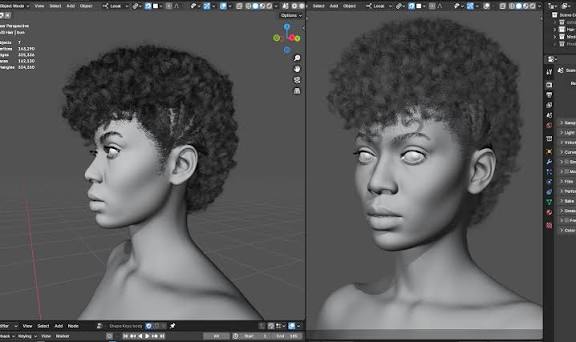
Why PixelHair is better suited for Blender and Unreal Engine ML workflows than Hair20K
PixelHair excels in Blender and Unreal Engine ML workflows due to its compatibility and integration ease.
- Blender Integration: As a native Blender asset, PixelHair’s .blend files enable instant use with minimal setup. It attaches seamlessly to characters, unlike Hair20K’s parsing needs. This speeds up Blender workflows.
- Unreal Engine Workflow: PixelHair supports UE grooming with clear export processes, integrating effortlessly. Hair20K requires complex conversions to fit UE, slowing progress. PixelHair is more efficient for UE tasks.
- Use in ML Data Generation: PixelHair’s structure simplifies synthetic data creation in Blender and UE for ML. It outpaces Hair20K, which demands heavy preprocessing for similar results. This accelerates dataset preparation.
- Interactive and Real-Time ML Loops: PixelHair’s UE compatibility supports real-time ML testing in interactive settings. Hair20K’s static data and licensing limit such use, favoring PixelHair. It’s ideal for dynamic workflows.
Using Hair20K for deep learning and generative hair modeling: strengths and gaps
Hair20K has strengths and gaps for deep learning and generative hair modeling, tied to its academic design.
Strengths of Hair20K for ML
- Large Scale and Diversity: With over 21,000 hairstyles, Hair20K offers a vast corpus for data-intensive models. Its blended diversity exposes models to varied shapes for generative tasks. This scale boosts training robustness.
- Strand-Level Ground Truth: Detailed 3D strand coordinates provide precise ground truth for supervised learning. This supports accurate reconstruction and geometry generation training. It ensures reliable model evaluation.
- Augmentation and Categories: Ten categories enable style-specific generation, with blending offering a style continuum. This enhances conditional learning and creative flexibility. It’s valuable for diverse outputs.
- Academic Accessibility: Free for research, Hair20K lowers barriers for academic experimentation under its license. It encourages innovation in hair modeling studies. It’s widely available to researchers.
Gaps and Limitations of Hair20K for ML
- Limited Hairstyle Types: Missing styles like braids bias models toward common shapes, limiting generalization. Additional data is needed for broader coverage. Its focus narrows real-world applicability.
- Synthetic Blending Artifacts: Blending introduces unnatural features that models may mislearn as valid. These artifacts can lead to unrealistic outputs without filtering. Real hair data could help.
- Lack of Textures and Color Variation: Offering only geometry, Hair20K lacks color or texture for appearance tasks. This requires separate shading solutions, limiting realism. It’s a gap for visual applications.
- Preprocessing Overhead: Raw strand data needs extensive preprocessing like conversion and normalization. This slows workflows and adds technical burden. Custom scripting is often required.
- No Human Head/Face Context: Without a head model, rendering or simulation requires extra alignment steps. This complicates realistic hair-head integration. It hinders practical use.

Why production and research pipelines prefer PixelHair over datasets like Hair20K
PixelHair is preferred in production and research pipelines for its practical advantages.
- Ready for Production Use: PixelHair’s quality and commercial license suit production, unlike Hair20K’s research restriction. Its documentation ensures reliability for professional use. This meets legal and technical needs.
- Time Efficiency and Cost: PixelHair reduces grooming time, cutting labor costs versus Hair20K’s preprocessing. Its ready-to-use design benefits teams without artists. This efficiency aids tight deadlines.
- Research Prototyping and Validation: PixelHair’s realism supports prototyping and validating algorithms to production standards. It’s ideal for testing high-fidelity models, unlike Hair20K’s training focus. This ensures practical results.
- Consistency with Pipeline Tools: PixelHair integrates smoothly with Blender and UE, minimizing risks. Its format aligns with pipelines, unlike Hair20K’s standalone data. This streamlines cross-department work.
- High-Impact Visuals for Presentations: PixelHair’s photorealistic renders enhance demos, impressing stakeholders. Hair20K needs extra effort for similar visuals, lagging behind. This boosts presentation credibility.
- Community and Updates: PixelHair’s active updates adapt to new tools, unlike Hair20K’s static nature. This ensures ongoing support and relevance. It’s future-proof for evolving needs.
Integrating PixelHair grooms into AI pipelines for strand-aware training
PixelHair integrates into AI pipelines for strand-aware training via its high-quality grooms.
- Direct Geometry Extraction: Strands can be extracted via Blender’s API or Alembic for ML geometry tasks. This supports detailed strand-level feature training. It connects assets to datasets.
- Strand-Level Annotations: PixelHair’s grooms allow strand labeling or grouping for supervised learning. This aids tasks like section identification or guide prediction. It leverages natural hierarchy.
- Synthetic Image Generation for Vision Tasks: PixelHair generates realistic synthetic images for vision model training. Its fidelity ensures good generalization to real data. This suits detection or segmentation.
- Physics and Simulation Data: Compatibility with physics engines creates simulation data for dynamic models. This trains neural simulators with realistic motion. It’s key for hair dynamics.
- Hybrid Human-AI Grooming: PixelHair enables AI-assisted grooming, adjusting guides for new styles. This supports neural generative design in DCC tools. It enhances interactive flexibility.
- Evaluation and Benchmarking: PixelHair benchmarks ML models with its high-quality targets. Its groomed strands set a standard for fidelity assessment. This ensures production-level accuracy.
Evaluating Hair20K’s mesh-based structures vs PixelHair’s optimized strand-based hair groom
Hair20K and PixelHair differ structurally, affecting their workflow suitability.
- Hair20K: Strand Data in a File (Not an Active Groom): Hair20K’s static geometry offers fidelity but no procedural control. It needs preprocessing for tools or simulations, suiting offline use. This limits interactive flexibility.
- PixelHair: Optimized Groom Procedural: PixelHair’s procedural grooms use guides for dynamic strand generation. This optimizes memory and enables real-time tweaks, ideal for creation. It’s highly adaptable.
- Memory and Performance: Hair20K’s explicit strands are memory-heavy, while PixelHair’s design is light until rendering. This favors PixelHair for performance-critical tasks. Hair20K fits batch processing.
- Mesh vs Curve vs Volume Representations: Hair20K’s polylines contrast with PixelHair’s convertible grooms. PixelHair’s versatility meets diverse needs, unlike Hair20K’s fixed format. It supports multiple use cases.
- Comparison of “Meshiness”: Hair20K lacks a scalp mesh, complicating simulation, while PixelHair includes one. This enhances PixelHair’s realism and usability. Hair20K needs extra setup.
- Optimized Strand Parameters vs Raw Coordinates: PixelHair’s parametric strands allow easy edits, unlike Hair20K’s static data. This suits iterative design over fixed training data. PixelHair is more flexible.
- Evaluating Which Is “Better”: PixelHair excels in interactive production with optimization. Hair20K suits offline training with raw detail. Choice depends on project goals.
How to convert PixelHair into voxelized or spline data for ML training
PixelHair can be converted into voxelized or spline data for ML training via multiple methods.
- Direct Spline (Curve) Extraction: Strands export as curves via Blender or Alembic for sequence models. This suits predicting strand paths with PixelHair’s geometry. It’s a direct data source.
- Voxelization of Hair: Strands convert to a 3D grid, marking hair occupancy for volumetric models. This trains 3D CNNs or implicit fields with spatial data. It captures hair distribution.
- Spline Control Points as Sequence Data: Resampling strands into sequences suits RNNs or transformers. This enables learning strand shapes or dynamics easily. It’s structured from curves.
- Point Cloud Conversion: Sampling points along strands creates clouds for models like PointNets. This unstructured format fits classification or segmentation tasks. It’s highly flexible.
- Volume Rendering for 2D ML: Rendering to images or density fields supports image-based training. This aids tasks like translation with PixelHair’s realism. It links 3D to 2D inputs.
Combining Hair20K and PixelHair to create hybrid datasets for learning + rendering
Combining Hair20K and PixelHair leverages their strengths to create hybrid datasets excelling in ML training and rendering realism.
- Augmenting Hair20K’s Geometry with PixelHair’s Realism: Hair20K’s strand models can be regroomed using PixelHair’s high-quality assets to match their shapes. Artists can manually or algorithmically comb PixelHair to resemble Hair20K styles, transferring authenticity with enhanced fidelity. A subset (e.g., 1% of Hair20K) can create a high-quality validation set or fine-tune generative models.
- Using PixelHair to Expand Style Coverage of Hair20K: Adding PixelHair’s unique styles (e.g., braids) to Hair20K’s 21,000 samples creates a hybrid dataset with broader coverage. This union (e.g., 50 PixelHair styles) enhances model generality by introducing high-fidelity exemplars. Diffusion models benefit from PixelHair’s detailed strands, improving fine detail generation.
- Rendering Hair20K with PixelHair Materials: Importing Hair20K strands into Blender and applying PixelHair’s tuned shaders enhances rendering realism. PixelHair’s lighting setups ensure consistent, photorealistic outputs for vision model training. This render-domain hybrid combines Hair20K’s geometric variety with PixelHair’s visual quality.
- Mixing in Simulation Scenarios: Combining Hair20K’s varied styles with PixelHair’s challenging ones (e.g., braids) creates a comprehensive motion dataset for physics ML. Simulating both datasets (Hair20K with basic rigging, PixelHair natively) tests diverse scenarios. This ensures robust simulation models handling complex dynamics.
- Hierarchical Training: Coarse vs Fine: Training a model on Hair20K for coarse shapes, then refining with PixelHair for detail, leverages both datasets. A diffusion model generates rough geometry from Hair20K, then a second stage refines it using PixelHair pairs. This coarse-to-fine approach balances diversity and fidelity.
- Validation and Calibration: Using Hair20K for training and PixelHair for validation tests model generalization to high-quality hair. PixelHair’s detailed styles expose weaknesses (e.g., handling curls), guiding improvements. This hybrid strategy benchmarks performance against production standards.
Training CNNs or diffusion models: when to start and upscale with PixelHair
Hair20K and PixelHair can be used in complementary phases to train CNNs or diffusion models for hair generation.
- Initial Training (Hair20K as the Base): Hair20K’s large, diverse dataset is ideal for initial training to learn general hair features. Diffusion models grasp coarse structures and style distributions from its 21,000 samples. This builds a robust foundation for shape differentiation.
- Upscale/Refinement Training (Introduce PixelHair): Fine-tuning with PixelHair’s high-fidelity samples enhances detail after Hair20K training. PixelHair’s groomed styles teach models to generate crisp strands and complex patterns. This mirrors super-resolution techniques, sharpening outputs.
- Curriculum Learning Approach: Starting with Hair20K’s simpler data, then progressing to PixelHair’s detailed styles, implements curriculum learning. Early training learns basic geometry; later stages handle realistic shading cues. This prevents overwhelming models with initial complexity.
- When to Transition: Switch to PixelHair when Hair20K training metrics stabilize (e.g., loss plateaus). Fine-tune with PixelHair for a few epochs, using techniques like lower learning rates to avoid overfitting. Mixing 80% Hair20K and 20% PixelHair maintains diversity.
- Diffusion Model Specifics: A base diffusion model trained on Hair20K generates coarse geometry, followed by a secondary stage using PixelHair for detail. This two-stage process conditions on rough outputs to produce high-fidelity strands. It supports text-to-hair or image-to-hair tasks.
- CNN Example (Hair Segmentation to Strands): Train a CNN on Hair20K-rendered segmentations to predict strands, then fine-tune with PixelHair’s realistic renders. PixelHair’s scenes enhance robustness to real-world inputs. This improves precision in strand alignment.
- Preventing Catastrophic Forgetting: Mitigate overfitting to PixelHair by regularizing with Hair20K weights or multi-task learning. Batch mixing (e.g., including Hair20K samples) preserves diversity during fine-tuning. This ensures generality alongside detail.
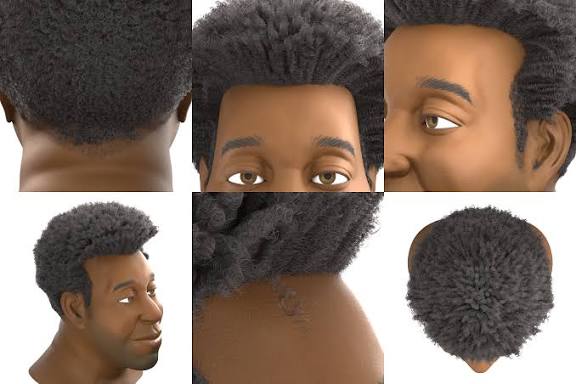
Case studies: stylized and afro-texture representation in PixelHair vs Hair20K
PixelHair and Hair20K differ significantly in handling stylized and afro-textured hair, as shown in two case studies.
- Stylized Hair Case Study: Hair20K’s realistic, blended styles lack stylized hair (e.g., anime spikes). PixelHair’s artist-crafted assets can include or be sculpted into stylized variants, supporting creative styles. For animation AI, PixelHair’s grooming tools enable custom stylized datasets.
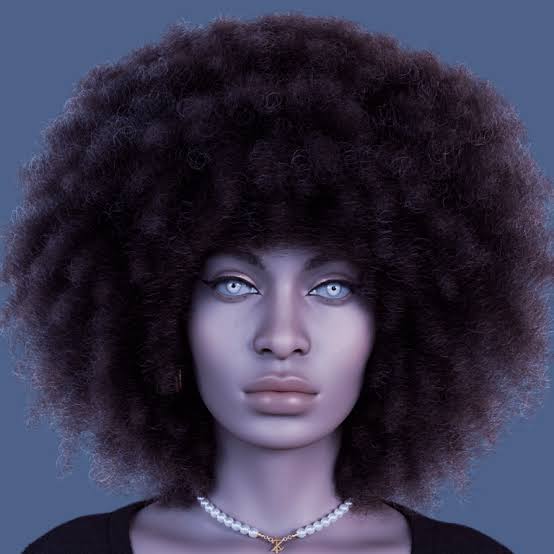
- Afro-Textured Hair Case Study: Hair20K minimally covers afro-textured styles like braids or afros, lacking structured patterns. PixelHair offers detailed braids, dreadlocks, and afros with accurate geometry and hairlines. It’s essential for authentic avatar generation for diverse populations.
- Quality of Representation: PixelHair’s afro styles simulate density and light scattering, with explicit braid geometry. Hair20K’s approximations (e.g., clumped strands) lack such fidelity. PixelHair provides true exemplars for realistic training outcomes.
- Data Bias and Fairness: Relying on Hair20K risks bias against afro-textured hair due to underrepresentation. PixelHair’s inclusion mitigates this, improving model fairness for diverse users. It ensures accurate handling of culturally significant styles.
Export pipelines: from PixelHair Blender grooms to Unreal Engine or training frameworks
PixelHair’s export pipelines are streamlined compared to Hair20K for Unreal Engine and ML frameworks.
- PixelHair Blender -> Unreal Engine (UE) Groom Pipeline: Export PixelHair as Alembic (.abc) from Blender, applying shrinkwrap and adjusting strand steps. Import into UE as a Groom asset, attach to characters, and enable physics. This well-documented process ensures real-time compatibility.
- PixelHair Blender -> Other Platforms: Export to Maya or Unity via Alembic or FBX (for mesh-based hair cards). Unity may require conversion to hair cards using Blender tools. PixelHair’s flexibility supports diverse engine pipelines.
- Export to Training Frameworks: Convert PixelHair geometry to tensors via Alembic or render images (e.g., PNGs) for ML frameworks like PyTorch. Blender scripts can automate data generation for large datasets. This bridges 3D assets to ML inputs.
- Automating PixelHair Export for ML: Use Blender’s command-line mode to render or simulate PixelHair styles, creating image or temporal datasets. Automation streamlines large-scale data generation. PixelHair’s structure simplifies this process.
- Comparing to Hair20K Export: Hair20K requires parsing .data files and manual scalp integration for Unreal export. PixelHair’s pre-fitted scalp and groom structure reduce setup effort. It’s more efficient for engine pipelines.
- Round-trip and Conversion: Convert PixelHair to Hair20K’s .data format or vice versa for hybrid datasets. This involves custom exporters or importing Hair20K as curves in Blender. Such conversions enable dataset enrichment.
- Multi-Format Support: Export PixelHair to Alembic for Unreal, glTF for web, or JSON for ML from Blender. This multi-format versatility supports diverse project needs. Hair20K lacks a unified source for such flexibility.
Augmenting limited hairstyles in Hair20K with better quality variation using PixelHair
PixelHair enhances Hair20K’s variation, addressing its limited style diversity from interpolations.
- Adding New Categories: Injecting PixelHair’s braids or afros adds new style categories to Hair20K. Even a few samples expand the model’s style space, enabling new outputs. This acts as dataset-level augmentation.
- Quality Boost for Existing Styles: PixelHair’s detailed styles (e.g., layered wavy hair) improve Hair20K’s similar categories. Models learn finer details like wispy ends from PixelHair exemplars. This enhances output quality within classes.
- Stylistic Variation: PixelHair’s artistic elements (e.g., hair clips, shaved patterns) introduce stylistic diversity. These augment Hair20K’s uniform styles, broadening model creativity. It enriches short or patterned hair categories.
- Data Augmentation via PixelHair Parameter Tweaks: Tweak PixelHair’s strand count, thickness, or length for controlled variants. This generates natural intraclass variation, unlike Hair20K’s static samples. It mimics real-world styling differences.
- Augmenting Rendering Quality for Data: Randomize PixelHair’s hair colors or shaders for diverse rendered images. This exposes models to varied appearances, unlike Hair20K’s uniform renders. It improves visual robustness.
- Hybrid Outputs: Combine Hair20K’s long hair with PixelHair’s braids in one sample for richer styles. Blender enables such creative combinations for training. This produces complex, mixed hairstyles.
- Consideration of Limits: Balance PixelHair’s small sample size with oversampling or weighted losses to ensure impact. Normalize formats for consistency in hybrid datasets. Careful integration maximizes augmentation benefits.

Texture and shader quality: why PixelHair outperforms Hair20K in realism and shading
PixelHair’s superior texture and shading enhance realism compared to Hair20K’s raw geometry.
- Hair Strand Material: PixelHair’s tuned Blender shaders mimic real hair optics with highlights and translucency. Hair20K lacks materials, rendering flat and plasticky without manual setup. PixelHair achieves near-photorealistic results.
- Texture vs Procedural Variation: PixelHair’s shaders apply per-strand color variation for natural patterns. Hair20K requires manual randomization for similar effects, lacking built-in variation. PixelHair’s setup simplifies realistic rendering.
- Scalp and Root Shading: PixelHair’s scalp mesh and baby hairs ensure seamless hair-skin transitions. Hair20K’s strands lack scalp textures, appearing artificial without extra work. PixelHair’s integration enhances realism.
- Shadows and Lighting Fidelity: PixelHair’s optimized hair BSDF renders efficiently with realistic shadows. Hair20K’s dense strands may cause rendering artifacts without optimization. PixelHair’s pipeline is superior for fidelity.
- Dynamic Effects (Wetness, Wind): PixelHair’s shaders support wet or wind effects, adjusting sheen dynamically. Hair20K requires external simulation and generic shaders for such effects. PixelHair’s flexibility enhances visual realism.
- Consistent Results Across Platforms: PixelHair’s materials translate well from Blender to Unreal, ensuring consistent realism. Hair20K requires platform-specific shader setup, increasing effort. PixelHair’s tested pipeline is reliable.
Dataset licensing: Hair20K’s academic limitations vs PixelHair’s ML training and production-ready terms
Licensing differences impact Hair20K and PixelHair’s use in ML and production pipelines.
- Hair20K Licensing (Academic-Only): Hair20K’s non-commercial license restricts use to academic research, prohibiting profit or distribution. Companies cannot use it in products or commercial R&D without separate agreements. It’s safe only for pure research.
- PixelHair Licensing (Commercial-Friendly): PixelHair offers Personal, Freelance, Studio, AI Training, and AI Commercial licenses for varied uses. The AI licenses allow model training and commercialization with proper upgrades. This supports production and R&D flexibility.
- Differences in Philosophy: Hair20K protects data from commercial use, common for academic datasets. PixelHair’s paid licenses enable monetization with clear terms. PixelHair’s flexibility contrasts with Hair20K’s restrictions.
- Consequences for ML Pipeline Choices: Hair20K’s license limits commercial ML pipelines, risking legal issues. PixelHair’s AI licenses allow training and productization, fitting industry needs. It’s viable for companies and collaborations.
- Attribution and Sharing: Hair20K requires paper citations and prohibits sharing. PixelHair’s licenses focus on preventing asset redistribution, allowing model training. PixelHair’s terms are clearer for AI use.
- Updates and Support: PixelHair’s licenses include updates, expanding the dataset over time. Hair20K, as a static academic release, lacks updates. PixelHair’s ongoing support enhances long-term value.
Simulating physical hair dynamics: which dataset provides better base geometry?
PixelHair’s structured geometry outperforms Hair20K for physical hair simulation.
- Hair20K Base Geometry for Simulation: Hair20K’s ~10,000 detailed strands are computationally heavy, lacking guide hair identification. Clustering is needed for simulation, but realistic scan-based shapes aid plausibility. It requires preprocessing for practical use.
- PixelHair Base Geometry for Simulation: PixelHair’s guide-child structure optimizes simulation with sparse, artist-defined guides. Clean root positions and logical partitioning preserve style features. It’s pre-optimized for stable, real-time dynamics.
- Dynamic Realism: PixelHair’s strand thickness and tapering ensure realistic mass distribution for simulation. Hair20K lacks thickness data, risking inaccurate physics without manual assignment. PixelHair’s model is physically coherent.
- Machine Learning for Physics: PixelHair’s guides suit neural network inputs for learned simulators, unlike Hair20K’s dense strands. Its compact representation simplifies ML training. It’s ideal for physics modeling.
- Edge Cases: Hair20K’s wild strand placements may test simulator robustness but are impractical. PixelHair’s curated geometry avoids unstable configurations, ensuring reliability. It prioritizes practical simulation scenarios.
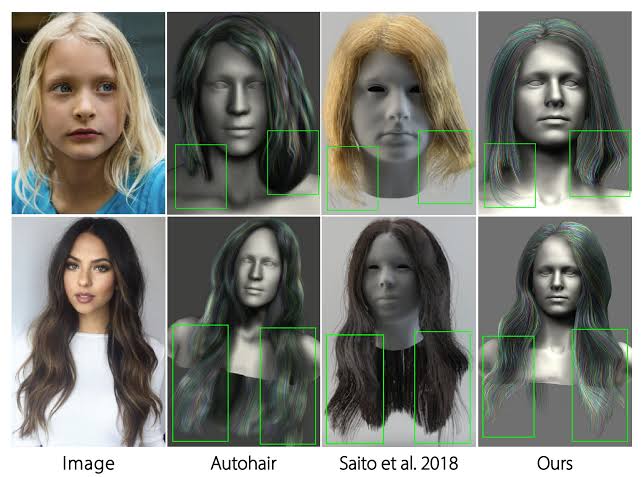
Which dataset supports ML training on digital humans: PixelHair’s real-time edge
PixelHair’s real-time compatibility enhances ML training for digital humans.
- Real-Time Compatibility: PixelHair’s optimized grooms work in Unreal for real-time applications like games. Training on PixelHair ensures models handle engine-compatible hair. Hair20K’s heavy data requires simplification for real-time use.
- Integration with Digital Human Frameworks: PixelHair fits MetaHuman workflows, aligning with digital human aesthetics. Hair20K needs conversion to match such frameworks, increasing effort. PixelHair’s compatibility streamlines integration.
- Training Data in Context: PixelHair on MetaHumans generates realistic training renders for digital human tasks. Hair20K’s geometry requires extra styling for coherence. PixelHair’s renders minimize domain gaps.
- Real-Time Performance for ML Inference: PixelHair’s engine-ready grooms enable real-time hairstyle generation by ML models. Hair20K outputs need conversion for engine use, adding complexity. PixelHair simplifies deployment.
- Edge in Real-Time Physics Learning: PixelHair’s Unreal physics data trains ML models for lightweight dynamics. Hair20K’s full simulation is impractical for real-time, requiring reduction. PixelHair’s data matches deployment needs.
- LOD (Level of Detail) and Scalability: PixelHair’s LOD support aids training for varied distances, unlike Hair20K’s single high-res format. Unreal’s automatic LODs enhance scalability. PixelHair’s approach is ML-friendly.
Where PixelHair fits in ML/AI research
PixelHair bridges computer graphics and AI, enhancing various research areas.
- Bridging Computer Graphics and AI: PixelHair provides production-quality assets for AI, aligning research with CG standards. It supports neural rendering or synthesis with realistic data. This closes the gap between fields.
- Generative Modeling Research: PixelHair’s structured grooms inspire models outputting guide-based hair. Its high-fidelity data pushes generative model quality. It serves as both training data and a target.
- Neural Simulation and Control: PixelHair’s styles enable research on neural physics or hair control. It provides realistic testbeds for animation or style-switching experiments. Researchers avoid grooming expertise barriers.
- Transfer Learning and Domain Adaptation: PixelHair’s realistic renders reduce the synthetic-to-real domain gap for adaptation. It supports hair segmentation or reconstruction research. Its quality aids knowledge transfer.
- Benchmarking and Evaluation: PixelHair’s curated styles can form benchmark datasets for hair tasks. A set of diverse renders tests reconstruction algorithms. It’s more manageable than Hair20K for curation.
- Human-in-the-Loop AI and Creativity Tools: PixelHair supports AI-assisted grooming tools in Blender, suggesting style variations. It provides data for creative AI research. Such tools enhance artist workflows.
- Hair Appearance Models: PixelHair’s known materials enable research on hair reflectance estimation. Its renders train networks to predict shader parameters. This advances inverse rendering studies.
Conclusion: why ML training pipelines should incorporate PixelHair
PixelHair’s inclusion in ML pipelines enhances quality, deployability, and robustness.
- High-Fidelity Learning: PixelHair’s realistic grooms train models to produce intricate, high-quality hair outputs. It sets a high standard, unlike Hair20K’s average blends. This elevates model performance.
- Better Generalization to Real-World/Production: Training with PixelHair ensures models handle production scenarios like game characters. Hair20K’s synthetic data may not translate well. PixelHair bridges to real applications.
- Seamless Pipeline Integration: PixelHair’s compatibility with Blender and Unreal simplifies data generation. It reduces preprocessing compared to Hair20K, saving time. This lets engineers focus on modeling.
- Strand-Level Awareness and Precision: PixelHair’s strand-based data encourages strand-aware architectures. Models learn precise hair structures, unlike volumetric approaches. This yields physically grounded results.
- Robustness and Edge Cases: PixelHair’s diverse styles (e.g., afros) make models robust to varied inputs. Hair20K lacks such coverage, risking bias. PixelHair ensures inclusive outputs.
- Licensing Peace of Mind: PixelHair’s AI licenses allow commercial use, unlike Hair20K’s academic restrictions. This enables productization without legal concerns. It’s essential for industry pipelines.
- Positive Impact on Results and Productivity: PixelHair’s quality data speeds convergence and reduces post-processing. Models achieve satisfactory results faster than with Hair20K. This shortens development cycles.
Frequently Asked Questions (FAQs)
- What are Hair20K and PixelHair in simple terms, and how do they differ?
Hair20K is a research-only dataset of ~21,000 3D hairstyles, generated from 343 real samples, represented as strand data for academic use. PixelHair is a smaller, artist-crafted library of high-quality 3D hair assets for Blender/Unreal Engine, designed for production with AI training support. The main difference is Hair20K’s large, raw dataset versus PixelHair’s polished, production-ready assets. - Which one is better for training AI models – Hair20K’s huge dataset or PixelHair’s high fidelity?
Hair20K’s large dataset is ideal for initial AI training to learn diverse hair shapes, while PixelHair’s high-quality assets are better for fine-tuning realistic outputs. Academic projects may prefer Hair20K for its volume; production models need PixelHair for polish. Advanced pipelines often use both, starting with Hair20K and refining with PixelHair. - Can PixelHair be used to train machine learning models legally?
Yes, PixelHair offers AI Training and AI Commercial licenses, allowing legal use for training ML models and commercial products. Hair20K is restricted to non-commercial research, prohibiting its use in commercial model training. PixelHair’s licensing ensures compliance for ML applications. - How do I import and use Hair20K and PixelHair in Blender or Unreal Engine?
Hair20K requires custom scripts to import its .data files into Blender as curves or particles, needing further conversion for Unreal via Alembic. PixelHair is plug-and-play, appending .blend files in Blender with pre-set particle systems and exporting as Alembic for Unreal’s Groom asset. PixelHair’s documentation simplifies the process, unlike Hair20K’s technical, DIY integration. - How many hairstyles are in each, and what types?
Hair20K contains 21,000+ hairstyles, covering short, medium, long, straight, wavy, and curly styles, but lacks complex braids or updos. PixelHair offers dozens of diverse styles, including ponytails, buns, braids, cornrows, dreadlocks, and afros. PixelHair provides more varied and detailed styles compared to Hair20K’s standard variations. - Is PixelHair suitable for physical simulation (does it move?), or is it just static?
PixelHair supports physics simulation in Blender (hair dynamics/cloth sim) and Unreal (Chaos physics for grooms), enabling realistic movement. Hair20K strands can be simulated but require manual physics setup and strand reduction. PixelHair’s guide-based structure makes simulation easier and more efficient. - Can I use Hair20K or PixelHair to create new hairstyles that aren’t in the dataset?
Hair20K limits new styles to interpolations of its 21,000 pre-generated hairstyles, requiring technical blending. PixelHair allows creative editing in Blender, enabling users to modify or combine grooms (e.g., adding braids) to create new styles. PixelHair’s licensing and tools offer greater flexibility for designing unique hairstyles. - Which dataset is better for representing curly or afro-textured hair?
PixelHair excels with dedicated assets for afro-textured hair, including tight curls, cornrows, box braids, and locs, capturing authentic patterns. Hair20K includes some curls but lacks tight afro curls or braids due to its blending-based generation. For curly or afro-textured hair, PixelHair is the better choice for quality and accuracy. - How do the two datasets handle hair color and shading?
Hair20K lacks inherent color or shading, requiring users to apply materials manually. PixelHair includes a Principled Hair BSDF in Blender for realistic highlights and natural colors, adjustable to any shade. PixelHair’s artist-defined shading offers superior realism compared to Hair20K’s user-dependent setup. - If I’m developing a game or app with virtual characters, which dataset should I use for hair – Hair20K or PixelHair?
PixelHair is ideal for games, offering production-ready, licensed assets for direct use in Blender/Unreal with diverse styles. Hair20K’s non-commercial license and raw data require extensive processing, making it unsuitable for consumer products. PixelHair saves time and ensures high-quality visuals for virtual characters.

Conclusion
In this deep dive, we compared Hair20K and PixelHair across every important dimension – data structure, fidelity, usage in ML, simulation, and practical deployment. Hair20K offers an unparalleled volume of strand data for academic research, making it a powerful resource for training models in the laboratory setting on the basics of hair geometry. PixelHair, on the other hand, brings the polish, structure, and realism of production-quality hair to the table, proving itself indispensable for advanced machine learning workflows that aspire to real-world impact. It excels in areas Hair20K cannot: ready integration with tools, support for complex styles, shading realism, and legal clearance for commercial use.
For the cutting-edge AI developer or researcher, the synergy of both is gold – Hair20K to learn the broad strokes and PixelHair to nail the fine details. But when it comes to deploying solutions – whether it’s a state-of-the-art hair reconstruction network or a digital human in a game – PixelHair emerges as the critical ingredient that transforms experimental models into production-ready systems. It ensures that our neural networks don’t just understand hair in theory, but master it in practice – strand by strand, style by style, in all its simulated, rendered, and beautifully groomed glory.
Sources and Citations
- Yelzkizi — PixelHair Tutorials & Documentation – Easy Steps — best match for your “Introduction & Benefits” source. The indexed snippet describes it as the intro/docs page and mentions real-world accuracy, render optimization, and time savings.
- Yi Zhou et al. — Hair20K: A Large 3D Hairstyle Database — official project page. It states 21,054 hairstyles, about 10,000 strands per model,
.datastorage, and augmentation from 343 USC-HairSalon models. - Yelzkizi — AI Training License Agreement for PixelHair — direct training-license page. For the “commercial use of trained models” part of your note, the paired page is PixelHair AI Commercial License.
- Yelzkizi — Exporting PixelHair From Blender To Unreal Engine — direct Blender-to-Unreal export tutorial.
- Yelzkizi — Dressing MetaHumans In UE5: Clothes, Physics & Easy … — this matches the blog reference you listed. For the specific PixelHair-in-Unreal hair-dynamics claim, the more direct source is Use PixelHair on any Metahuman or custom character in Unreal.
- Long et al. — TANGLED: Generating 3D Hair Strands from Images with Arbitrary Styles and Viewpoints — this is the comparison-paper source behind your Hair20K subset note. In the HTML version’s Table 1, Hair20K is listed at 3,715 cleaned/verified items. HTML version with Table 1.
- Yelzkizi — How to use PixelHair on any custom Character in Blender — best match for the
.blend/append workflow citation. The indexed snippet explicitly says the asset is a Blender.blendfile containing the hairstyle. - Yelzkizi — Hair Particles (optimizations) — direct source for parent hairs/guides and child hairs.
- Hair20K — Terms of Use — same page as #2; the “Terms of Use” section says the data are for internal, non-commercial research/evaluation/testing only and may not be redistributed.
- Yelzkizi — PixelHair: Ultimate Blender 3D Hair Grooming Pack — the clearest separate benefits-focused page I found for your “Benefits Summary” citation. A docs-only alternative is to reuse #1.
Recommended
- Cyberpunk 2077 Hair Mods: Top Custom Hairstyles, Installation Guides, and Community Favorites
- Managing Blender Scenes with Multiple Cameras Using The View Keeper
- How do I simulate a GoPro-style camera in Blender?
- Blender Multi-Camera Rendering: A Step-by-Step Guide with The View Keeper
- How do I create a depth map using the Blender camera?
- How to Make Blender Hair Work with Unreal Engine’s Groom System
- Camera View Preservation in Blender: Why Use The View Keeper?
- Best 3D Sculpting Software: Top Tools for Digital Artists
- Why PixelHair is the Best Asset Pack for Blender Hair Grooming


















































































