






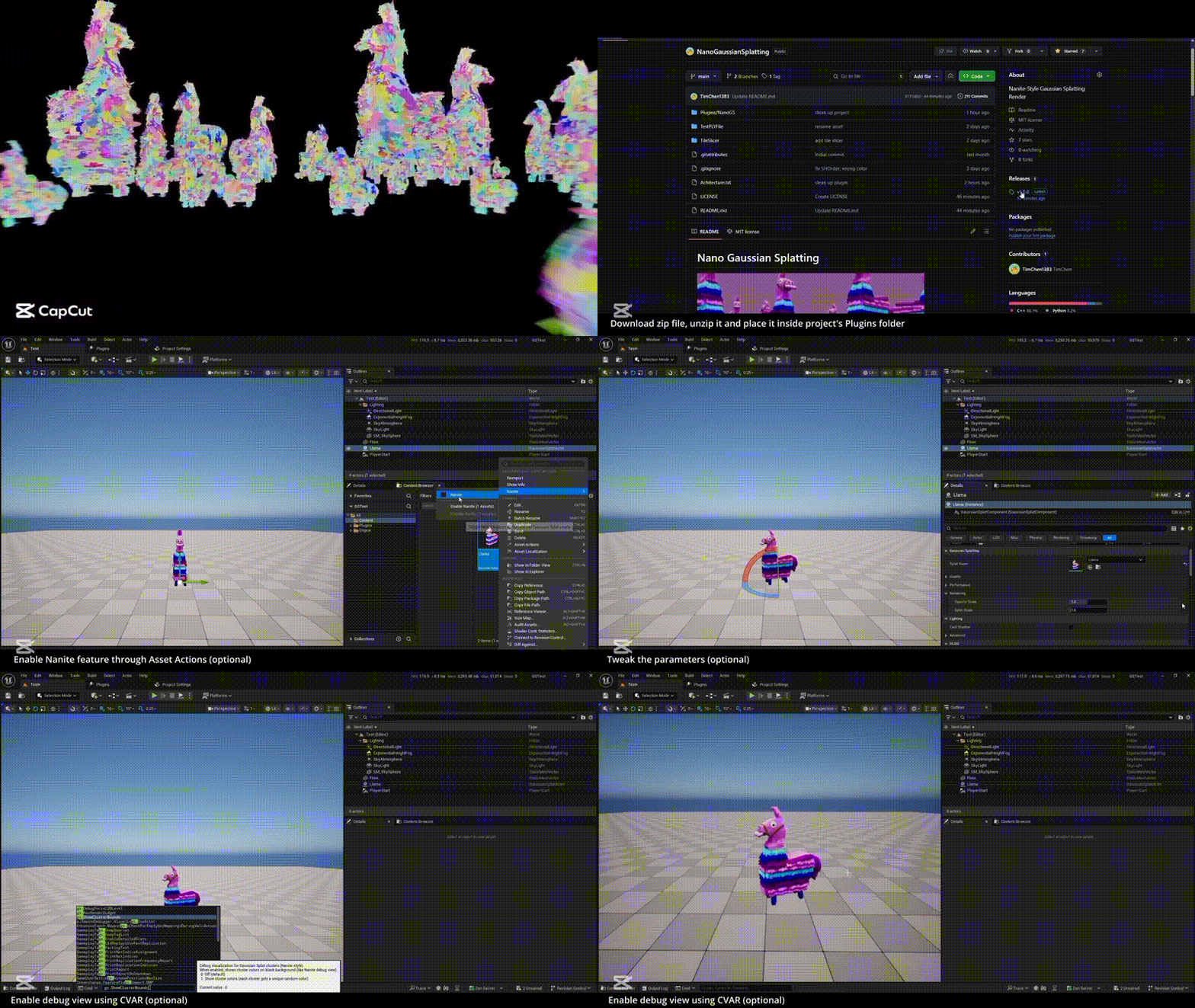
NanoGS: High-Performance 3D Gaussian Splatting for Unreal Engine 5
NanoGS is a free, open-source Unreal Engine 5 (UE5) plugin designed to import and render massive 3D Gaussian Splat (3DGS) point clouds with high efficiency. Developed by VFX artist Tim Chen, the plugin serves as an optimization layer similar to Epic Games’ Nanite, enabling the real-time display of photorealistic captured scenes that would typically overwhelm GPU resources.
What are 3D Gaussian Splats and Why They Matter in UE5
3D Gaussian Splatting is a method of representing 3D scenes using millions of tiny, volumetric “fuzz” discs called Gaussians instead of traditional polygonal meshes. Each splat contains data for position, orientation, scale, color, and transparency.
- Photorealism: Unlike traditional point clouds, splats overlap and blend, creating continuous, soft textures and fine details that match the original photography.
- Efficiency: 3DGS can be trained from images in minutes and rendered at 100+ FPS, offering a faster alternative to Neural Radiance Fields (NeRFs).
- Workflow Integration: For UE5 creators, 3DGS allows for the direct use of environment scans (VFX backdrops or architectural sets) without the need for complex mesh optimization, UV unwrapping, or retopology.
- View-Dependency: Splats use spherical harmonics to store how color changes based on the viewing angle, naturally handling reflections and transparency.
NanoGS Nanite-Style LOD Clusters Explained
NanoGS achieves performance scaling by organizing splats into a hierarchical cluster tree, a technique directly inspired by Nanite’s treatment of high-poly meshes.
- Clustering on Import: The plugin spatially groups nearby splats into “leaf clusters” (typically ~64 splats). These are then merged into parent clusters, creating a multi-level hierarchy.
- LOD Splats: Each parent cluster generates a single “LOD splat” that approximates all its children.
- Performance Gains: When the camera is far away, the engine draws a few simplified cluster splats rather than millions of individual points. This allows NanoGS to handle scenes with 10+ million splats by only processing the high-detail data where the player is currently looking.

Screen-Space Error LOD Selection
To decide which level of detail to display, NanoGS uses Screen-Space Error (SSE) logic. This system ensures visual accuracy by evaluating how a cluster appears from the camera’s perspective.
- Error Metrics: Each cluster has a precomputed error value representing the visual difference between the approximation and the full detail.
- Acceptable Thresholds: At runtime, the plugin calculates the cluster’s size on screen. If the error is below a user-defined pixel threshold, the simplified cluster is used. If it exceeds the threshold, the system “refines” the view by drawing the more detailed child clusters.
- Smooth Transitions: NanoGS supports LOD blending to prevent “popping” as the camera moves, ensuring that detail appears seamlessly as you approach an object.
Reducing VRAM Usage for Large Scenes
NanoGS utilizes several strategies to keep GPU memory consumption manageable:
- Data Compression: Splat attributes are quantized and packed. Positions use 16-bit values, rotations are packed into 4 bytes, and scales are stored in 8-bit log-space, allowing a splat to be represented in as little as 16 bytes.
- Splat Compaction: The plugin only allocates buffers for “active” splats—those that pass the culling and LOD tests—rather than the entire dataset.
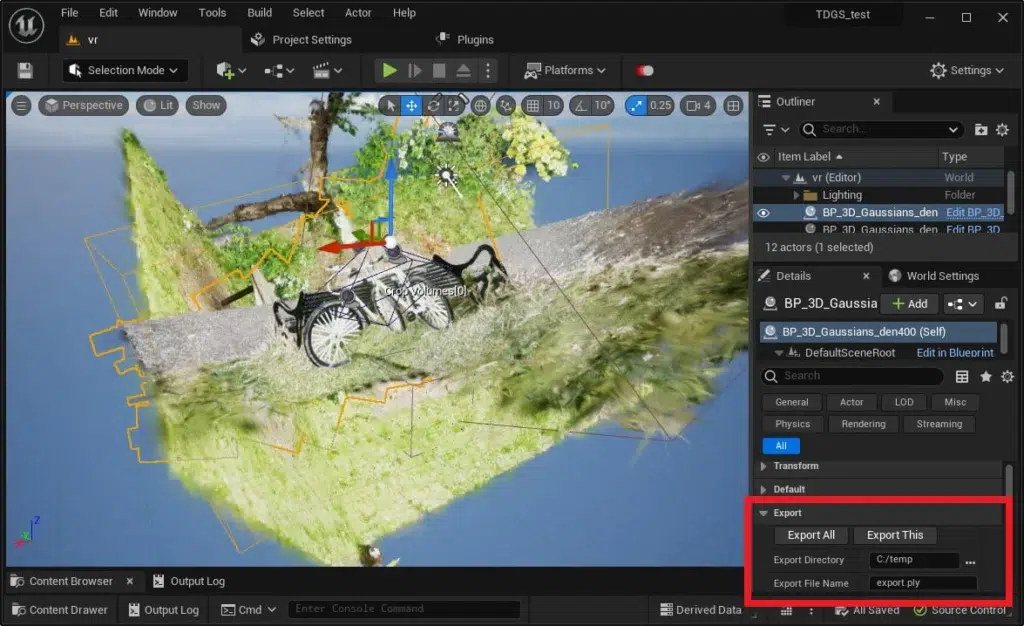
- Global Shared Buffers: Instead of each asset creating its own memory pool, a Global Accumulator manages shared GPU buffers for sorting and drawing across all splat instances in a scene.
- Render Budgets: Users can set a
gs.MaxRenderBudgetto cap the total number of splats rendered, ensuring the engine does not exceed the hardware’s VRAM limits.
GPU Sorting for Millions of Splats
Because splats are transparent, they must be sorted and rendered in the correct order (typically back-to-front) to blend colors accurately. NanoGS handles this through a high-speed GPU pipeline:
- GPU Radix Sort: The plugin uses a GPU-accelerated radix sort that processes millions of splats in milliseconds. This is significantly faster than CPU-based sorting.
- Compaction Before Sort: By running a “CompactSplats” shader first, the engine only sorts the visible subset of the scene, drastically reducing the computational overhead.
- Accurate Blending: Full sorting prevents visual artifacts like “popping” or incorrect transparency layers, which are common in unoptimized splat renderers.
In terms of timeline, given how fast interest in splatting is growing (SIGGRAPH 2023 to now a number of tools), it’s likely that in the next year we’ll see significant refinements. Possibly an update to coincide with Unreal Engine 5.8 or 5.9 if those come in late 2026, and adding user-requested features.
Where to track new releases: Summing up, the best direct source is:
- GitHub NanoGaussianSplatting (watch for releases).
- Tim Chen’s LinkedIn (he posted the original announcement).
- Possibly Twitter (X) if he or others share news (search #NanoGS or #GaussianSplatting occasionally).
- Unreal Engine forums (Rendering section) – often someone will post “NanoGS updated!” if something big happens.
- The 80.lv article suggests following the developer on LinkedIn for more projects, which implies that’s a good channel for news from him.
Also, join any Unreal or real-time graphics communities discussing this – they will share knowledge of updates. RadianceFields.com is covering a lot of NeRF/splat stuff (as evidenced by their article), so they may continue to post news on advancements in this area.
Finally, since NanoGS is free and open, if development ever slows from the original author, the community might maintain it for new engine versions (like how some plugins get community forks). So even in worst case, I’d expect it to remain usable in some form.
The roadmap likely involves:
- Short-term: bug fixes, UE version support,
- Medium-term: performance tuning, possibly minor features or editor improvements,
- Long-term: maybe bigger features (if feasible) like supporting 4D playback or relighting or integration with whatever Epic might do in this space.
Stay plugged in on the channels above to ensure you know when NanoGS gets even more powerful or easier to use. The technology is moving fast, and with the enthusiastic response it got, you can expect it’s not the last we’ve heard of Gaussian splatting in UE – NanoGS will either keep leading or inspire official engine features down the line.

Frequently Asked Questions (FAQs)
- What do I need to run NanoGS and can it work on my hardware?
NanoGS requires Unreal Engine 5.6 or newer and a Windows 64-bit PC. Because the plugin relies heavily on compute shaders, you need a GPU capable of DirectX 12 or Vulkan. While there is no specific CUDA requirement (it works on both NVIDIA and AMD), a modern mid-to-high-tier gaming GPU with at least 8GB of VRAM is recommended for complex scenes. It is not compatible with integrated graphics, mobile devices, or older versions of UE5/UE4. For the best visual results, ensure Temporal AA is enabled in your project settings. - How do I create or obtain a 3D Gaussian Splat (.ply) file to use with NanoGS?
Splat files are generated via photogrammetry or NeRF (Neural Radiance Field) pipelines rather than being modeled by hand. Common methods include:- Photogrammetry Software: Tools like RealityCapture or Kiri Engine can export dense point clouds that can be converted.
- NeRF-to-Splat Conversion: Training a NeRF using multi-view photos and then using exporters from platforms like Nerfstudio to produce a PLY file.
- Luma AI: Using the Luma app to capture a scene and exporting the resulting point cloud/splat data from their web interface.
- Specialized Tools: Using MLSLabs or various community Blender add-ons to process video sequences into Gaussian data. Once you have a PLY file containing position, color, and covariance data, you simply import it into Unreal Engine via the NanoGS plugin.
- Does NanoGS support real-time lighting and shadows on the splats?
No. NanoGS renders splats using baked lighting captured at the time of the original scan. Splats act like emissive or translucent surfaces; they do not receive shadows from Unreal lights, nor do they cast dynamic shadows onto other geometry. They are currently best suited for static background elements where consistent, “pre-lit” lighting is acceptable. - Can NanoGS be used in VR or for high-frame-rate applications?
It is possible but challenging. VR requires extremely high, stable frame rates (typically 90 FPS per eye). Because rendering millions of translucent splats twice is taxing, you must aggressively optimize by:- Using
MaxRenderBudgetto limit the active splat count. - Increasing the LOD threshold to drop distant detail.
- Testing on high-end hardware like an RTX 3080 or better. While not the primary use case, it can be used to enrich VR backgrounds if the complexity is kept low.
- Using
- How is NanoGS different from Nanite, and does it replace Nanite for point clouds?
NanoGS does not replace Nanite; they handle different data types. Nanite is for polygonal meshes (triangles), while NanoGS is for Gaussian splats (point-based primitives). NanoGS is “Nanite-style” because it adopts similar hierarchical clustering and LOD logic for points that Nanite uses for meshes. You should use them complementarily: Nanite for traditional geometry and NanoGS for scanned volumetric environments. - How many splats can NanoGS handle, and what performance can I expect?
Most users report smooth performance with 1 to 5 million active splats on mid-to-high-end GPUs. Some high-end setups (RTX 4090) may handle tens of millions. Performance is driven by the number of visible splats; thanks to NanoGS’s culling, you rarely render the entire dataset at once. On an RTX 3080, you can generally expect 30–60 FPS at 1080p for a multi-million splat scene. - What’s the difference between a Gaussian Splat and a regular point in a point cloud?
A regular point is a zero-dimensional dot with a single position and color. A Gaussian Splat is a volumetric, oriented primitive—essentially a “fuzzy” 3D ellipse.- Coverage: Splats have a radius and transparency falloff, allowing them to overlap and form solid-looking surfaces without gaps.
- Anisotropy: Splats can be stretched or flattened (like a pancake) to better represent the orientation of a wall or floor.
- Fidelity: While regular point clouds often look “holey” or noisy, Gaussian splats produce photorealistic results that match the quality of high-end radiance fields.
- Can I edit or modify a Gaussian Splat asset after importing?
Editing within Unreal is very limited. You can move, rotate, and scale the entire asset, but you cannot “erase” specific points or repaint colors inside the engine. All fine-grained editing (such as removing unwanted objects from a scan) must be done in external software like CloudCompare before importing. To see changes, you must update your source PLY and use the “Reimport” function in UE5. - Are there alternatives to NanoGS for rendering Gaussian splats in Unreal?
Yes, including:- Xverse/Luma AI Plugins: These often use Niagara to render points. They are easier to set up but typically struggle with performance and visual quality on large datasets.
- Volinga: A commercial plugin that offers relighting features but is proprietary.
- MLSLabs: A high-performance, CUDA-based open-source renderer that requires NVIDIA hardware. NanoGS is currently favored by many for being free, open-source, and highly optimized for large-scale cross-hardware performance.
- What is PixelHair and how does it relate to Unreal Engine 5?
PixelHair is a library of hundreds of professional-grade 3D hair assets created by Isaac Yelzkizi. While unrelated to Gaussian splatting, it is another tool used to achieve high realism in UE5.- Integration: These assets can be imported into Unreal as Groom assets (Alembic) for high-end strand simulation or as hair cards for better game performance.
- Workflow: It allows artists to skip the complex process of grooming hair from scratch by providing production-ready styles that can be attached to MetaHumans or custom characters.
Conclusion
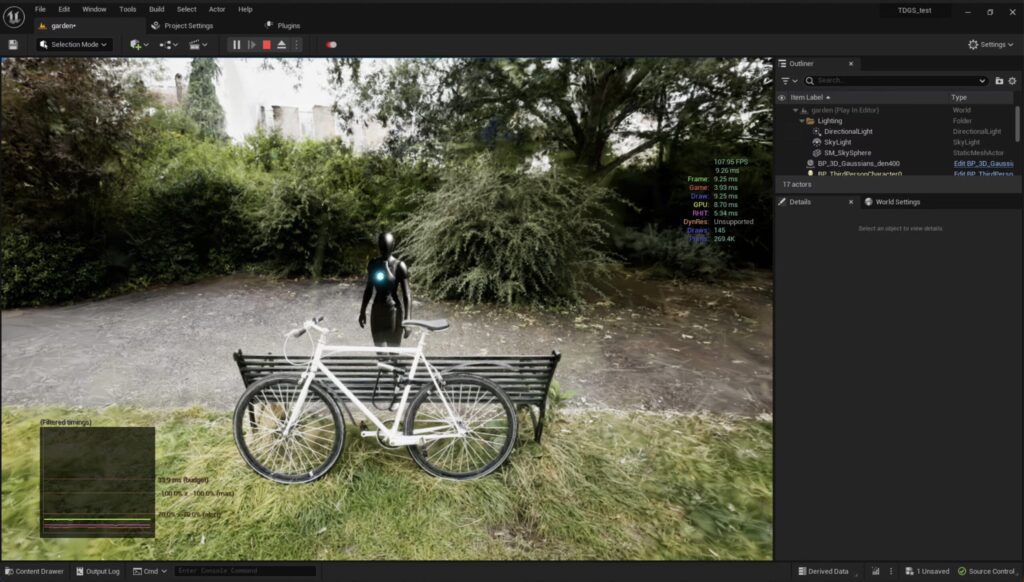
Gaussian splatting has emerged as an exciting new way to bring real-world complexity into Unreal Engine, and NanoGS demonstrates just how powerful this technique can be when paired with Nanite-style optimizations. By using NanoGS, developers and artists can integrate photorealistic 3D scenes captured from reality directly into UE5 – scenes that would be impractical to recreate with traditional modeling. We’ve seen how NanoGS efficiently handles millions of splats through clustering, screen-space LOD selection, and GPU sorting, making real-time rendering of dense point-based environments feasible.
That said, it’s important to approach this technology with the right expectations. Gaussian splat assets in Unreal behave more like static, pre-lit backdrops than fully interactive objects. They deliver unparalleled detail and authenticity in visuals, but they don’t respond to dynamic lights or physics and require thoughtful optimization for best performance. By adhering to best practices – slicing large datasets, tuning LODs, and using the available console settings – users can navigate these limitations and achieve smooth performance even with massive scenes.
The combination of NanoGS for environments and other cutting-edge tools (like PixelHair for characters) highlights a broader trend: the real-time industry is rapidly embracing hybrid approaches that leverage real-world data and advanced algorithms to leapfrog traditional content creation hurdles. We are essentially blurring the line between captured reality and game content. NanoGS is a prime example, allowing a level of environmental fidelity previously seen only in offline renders or neural renderings, now available interactively in Unreal Engine.
As we move forward, we can anticipate even more integration of these techniques. The roadmap for NanoGS hints at ongoing improvements and perhaps features like splat simplification or deeper engine integration. It’s conceivable that Epic Games could take inspiration from NanoGS and eventually support point-based scene representations at the engine level. For now, however, NanoGS has carved out its niche by enabling “Nanite for point clouds” in UE5 – and it’s available for everyone to try, tweak, and build upon.
NanoGS empowers Unreal Engine users to use 3D Gaussian splats effectively, turning gigabytes of scan data into gorgeous real-time visuals. It bridges the gap between experimental graphics research and practical Unreal Engine workflows, all while maintaining an easy-to-use plugin format. Whether you’re a VFX artist dropping a real location into a virtual set, a game developer prototyping a level from photogrammetry, or an archiviz specialist showcasing a site’s surroundings, NanoGS opens up new possibilities.
Just remember to leverage it where it excels – static detail and authenticity – and to remain mindful of its current limits. Paired with smart planning and complementary tools, NanoGS can help deliver breathtaking, richly detailed worlds in Unreal Engine 5 that were once thought impossible to run in real time.
Sources and Citations
- 80 Level – Amber Rutherford, “Free Nanite-Style Tool To Render 3D Gaussian Splats In UE5” (March 20, 2026).
https://80.lv/articles/free-nanite-style-tool-to-render-3d-gaussian-splats-in-ue5 - CG Channel – Jim Thacker, “NanoGS puts ‘Nanite-style’ Gaussian splatting in UE5” (March 19, 2026).
https://www.cgchannel.com/2026/03/free-plugin-nanogs-puts-nanite-style-gaussian-splatting-in-unreal-engine/ - Radiance Fields – Michael Rubloff, “NanoGS Brings Nanite-Style Gaussian Splatting to Unreal Engine 5” (March 19, 2026).
https://radiancefields.com/nanogs-brings-nanite-style-gaussian-splatting-to-unreal-engine-5 - GitHub – TimChen1383, “NanoGaussianSplatting” README / repo.
https://github.com/TimChen1383/NanoGaussianSplatting - Unreal Engine Forums – anddy, “Gaussian Splatting options” (reply dated February 27, 2026, within the thread).
https://forums.unrealengine.com/t/gaussian-splatting-options/1907745 - PlayCanvas Forum – RDorociak, “Loading Gaussian Splats edited with SuperSplat into Unreal Engine 5” (Nov. 18, 2025) — this is the verified RDorociak follow-up thread tied to the older “[SOLVED] …” discussion.
https://forum.playcanvas.com/t/loading-gaussian-splats-edited-with-supersplat-into-unreal-engine-5/41321 - Medium – Shanmuka Sadhu, “Paper Insights: 3D Gaussian Splatting for Real-Time Radiance Field Rendering.”
https://medium.com/@shanmuka.sadhu/paper-insights-3d-gaussian-splatting-for-real-time-radiance-field-rendering-036ddd9989cd - AWS Spatial Computing Blog – Stanford Lee, Dario Macagnano, and Eric Cornwell, “3D Gaussian Splatting: Performant 3D Scene Reconstruction at Scale” (Aug. 27, 2024).
https://aws.amazon.com/blogs/spatial/3d-gaussian-splatting-performant-3d-scene-reconstruction-at-scale/ - LinkedIn – Tim Chen, “Introducing NanoGS…” post announcing NanoGS and its features.
https://www.linkedin.com/posts/tim-chen-00b299158_introducing-nanogs-the-nanite-style-gaussian-activity-7440177600167202816-1cXq
Recommended
- How to Convert Hair Curves and Geometry Nodes to Mesh in Blender: A Complete Workflow Guide
- How to Build an RPG Character Creator Using MetaHuman in Unreal Engine 5
- PixelHair on Stylized Characters in Blender: Achieving Studio-Quality Hair with Ease
- Achieving a Painterly Look in Blender: Techniques to Make 3D Animations Appear Hand-Painted
- The Sims 4 Will Open an Official Marketplace to Let Content Creators Sell Mods: Release Date, “Moola” Currency, and Maker Program Explained
- Riot Games Downsizing the 2XKO Development Team: February 2026 Layoffs, Official Update, and What’s Next
- AI in Game Development (2026): Wins, Losses, and How to Use AI for Critique & Feedback
- How do I set up a scene with multiple cameras in Blender?
- Oscars 2026: Everything You Should Know (98th Academy Awards Date, Host, Nominees, and How to Watch)
- In 2025, Vietnam Residents Spent $825 Million on Mobile Games: Key Market Trends and 2026 Outlook


























































































