









Arnold 7.5.1 introduces a new cloud-rendering tech preview called Flow Render alongside renderer-side changes that matter in day-to-day production: custom AOV writes inside volume shader networks, MikkTSpace tangent-space normal mapping support, and measurable CPU-render optimisations on Windows.
Release and feature overview

Arnold 7.5.1 release notes and new features
Arnold 7.5.1.0 is shipping through Arnold integration plugins as a feature update that bundles three standout items: a Flow Render cloud-rendering tech preview, expanded AOV capabilities for volumes, and MikkTSpace normal mapping support.
In addition to those headline changes, Autodesk’s published release notes for integrations based on 7.5.1.0 also describe Windows CPU rendering optimisations (with “most, though not all, scenes” seeing faster renders), and a broader set of shader, USD, API, and bug-fix changes typical of a point release.
From a practical production perspective, Arnold 7.5.1’s value proposition splits into two tracks: (1) short-term “overflow” rendering via a limited, subscription-gated cloud preview; and (2) core renderer upgrades that affect consistency (normal mapping across DCCs) and compositing flexibility (volume AOV output).
What is Flow Render in Arnold 7.5.1
Flow Render is a cloud-based rendering service integrated into Arnold host plugins. Autodesk describes it as a way to render more efficiently by using cloud technology so local desktop resources are freed up for other work.
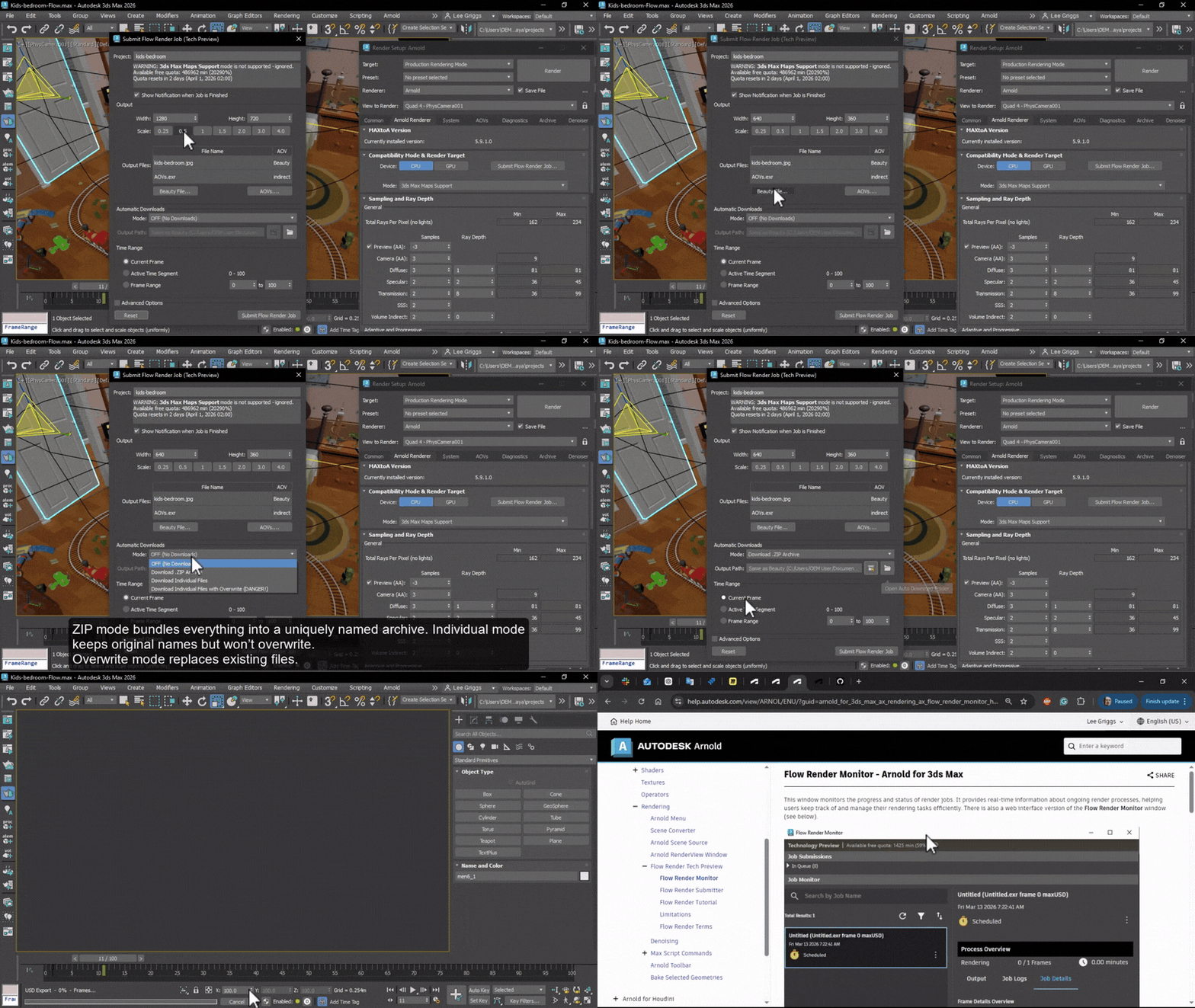
In the integrations where documentation is available, Flow Render is presented as a “Tech Preview” exposed through the Arnold menu: users submit new jobs via a submitter window and track progress via a monitor window.
Industry reporting on the release also positions Flow Render primarily for freelancers and indie artists who want to avoid tying up local machines while rendering, while noting that it is still preview-stage and that key service limits shape realistic usage.
How to get 40 hours of free Arnold cloud rendering per month
During the Flow Render tech preview, Autodesk states it is providing 2,400 minutes of rendering time per user, per month, for Arnold users to test and evaluate the service—equivalent to 40 hours per month.
Eligibility is subscription-based. Flow Render’s terms state it is only available if there is a subscription to Maya 2026, 3ds Max 2026, Arnold 2026 or newer, and that Flow Render requires sign-in with an Autodesk account.
Operationally, access is through the host plugin UI: the Flow Render plug-in is shipped with MtoA (Maya integration) and Flow Render is shipped with MAXtoA (3ds Max integration).
Because this is a tech preview, the terms explicitly reserve Autodesk’s right to change or rescind the number of tasks, processing time, and task storage entitlement at any time, with or without notice.

Flow Render limitations: 10 simultaneous tasks and 12-hour cap
Flow Render’s published limitations include a hard cap of 10 tasks executing simultaneously and no prioritisation between jobs/tasks.
Separately, Flow Render’s terms define “Processing Time” for a task and state it shall not exceed twelve (12) hours; if processing exceeds 12 hours, the task will not be completed.
Other operational constraints called out in official limitations include a maximum single file size of 5 GB, which can become a gating factor for heavy USD/ASS exports or texture-heavy scenes.
Is Flow Render CPU-only or GPU rendering
Flow Render cloud rendering is CPU-only in the current tech preview: “GPU rendering is not supported” and “the scene is always rendered on CPU.”
This CPU-only constraint is also consistent with external coverage describing Flow Render as CPU-based cloud rendering during the preview period.
For teams or freelancers who rely on Arnold GPU (for interactive lookdev or specific GPU-accelerated workloads), this means Flow Render is not a drop-in replacement for GPU-based local rendering or GPU-based third-party farms in its current preview form.
Which Arnold host apps support Flow Render (Maya, 3ds Max, Houdini, C4D)
Flow Render documentation is published for multiple Arnold host integrations and shows it integrated into each host’s Arnold menu and workflow, including Maya, 3ds Max, and Cinema 4D.
Release coverage for Arnold 7.5.1 states that render jobs can be submitted to the cloud from Arnold’s host applications, with the noted exception (at the time of reporting) of Katana, and lists updated integrations alongside the release (3ds Max, Cinema 4D, Houdini, Katana, Maya).
Flow Render’s terms also explicitly reference availability in the context of subscriptions to Maya and 3ds Max (among others), reinforcing that Flow Render is designed as a cross-host service rather than being exclusive to a single DCC integration.

How to monitor Flow Render jobs (Flow Render Monitor and web dashboard)
Within host integrations, Flow Render Monitor is the primary UI for tracking jobs. Autodesk describes it as a window that monitors progress/status with real-time information, including job lists, filtering/sorting, per-frame state, thumbnails, and access to render logs.
Flow Render Monitor defines common job states—Created, Scheduled, Computing, Cancelled, Completed, Failed—and supports control actions like cancelling running jobs, downloading outputs/logs for completed jobs, and deleting completed jobs (which removes outputs from download availability).
A browser-based monitor is also available. Autodesk’s documentation states the job monitor can be accessed via a web interface (the Flow Graph Engine Monitor) using an Autodesk account, but also notes that downloads are not currently available from the web interface.
Flow Render missing features: OCIO configs and third-party plugins
Flow Render’s limitations explicitly state that custom OCIO configurations are not supported in the current tech preview.
Third-party Arnold plugins are also not supported; Autodesk provides “Yeti” as an example of a third-party plugin that will not work with Flow Render at this stage.
There are additional pipeline-impacting limitations listed by Autodesk, including a maximum single file size of 5 GB and the absence of job/task prioritisation, which can affect production scheduling and automated render-queue strategies.
Rendering pipeline improvements in Arnold 7.5.1
Arnold 7.5.1.0 removes a long-standing compositing limitation by enabling the aov_write_rgb, aov_write_float, and aov_write_rgba shader nodes inside volume shader networks—matching behaviour already available for surface shaders. Previously, custom AOV writes in volume contexts were “silently ignored.”
Autodesk’s release notes describe the implementation detail: the volume raymarcher now collects AOV closures at each step and integrates them using Beer–Lambert weighting to produce physically consistent AOV outputs.
The update supports both flat image formats (including EXR and TIFF) and deep EXR outputs for these volume AOVs. Autodesk also quantifies a performance trade-off, noting approximately a 16% overhead with two active volume AOVs at fine step sizes (step_size=0.01).

Arnold 7.5.1 MikkTSpace normal map support
Arnold 7.5.1.0 introduces a new tangent_space_type option for the normal_map shader that adds MikkTSpace support. In Autodesk’s description, standard preserves previous behaviour, while mikk mode evaluates normal maps using MikkTSpace tangents for more consistent shading across applications.
MikkTSpace itself is widely used in normal-map baking and rendering workflows: the reference implementation describes it as “a common standard for tangent space used in baking tools to produce normal maps,” and Unity’s documentation notes the algorithm is used by many 3D modelling packages, normal mapping tools, and graphics engines.
For texturing pipelines, this matters because mismatched tangent basis between baker and renderer is a well-known cause of shading seams or “off” normal response when assets move between DCCs and engines. Autodesk’s goal with MikkTSpace support is explicitly consistent shading across applications when tangents/bitangents are generated using MikkTSpace in DCC tools.
Arnold 7.5.1 Windows CPU rendering performance improvements
Autodesk states that CPU renders on Windows have been optimised in Arnold 7.5.1.0, and that most (though not all) scenes show faster render times.
In published examples, Autodesk reports speedups versus 7.5.0 on several benchmark scenes, including 1.16× (OpenPBR shader ball), 1.08× (gtc-robot), 1.07× (Disney cloud), and 1.04× (ALab), with at least one example unchanged (Intel jungle ruins at 1.00×).
The practical implication is not that every project will render “X% faster,” but that Windows CPU optimisation is a stated focus of this release and can provide meaningful wall-time savings at scale when rendering large frame counts or iterative lookdev tests on CPU.
Integration plugin updates for Arnold 7.5.1
MAXtoA 5.9.1.0 is a feature release dated 25 March 2026, and Autodesk states it uses Arnold 7.5.1.0.
The MAXtoA 5.9.1.0 release notes directly tie Arnold 7.5.1.0’s headline features to the plugin release: Flow Render tech preview availability (including 2,400 minutes per user per month), custom AOVs for volume shaders, MikkTSpace normal mapping support, and Windows CPU rendering optimisation.
MAXtoA’s Flow Render Submitter documentation indicates that cloud submission can use different export paths with different trade-offs (MaxUSD for efficiency but limited feature support, ArnoldUSD for broader support with slower export, and ASS for “absolute 100% Arnold compatibility” intended for debugging, with ASS mode not supporting animation).

MtoA 5.6.1 update for Arnold 7.5.1
Release coverage for Arnold 7.5.1 lists an updated Maya integration plugin version, naming MtoA 5.6.1 as the corresponding update supporting the new Arnold 7.5.1 features.
The same reporting notes that users of certain newly released DCC versions may need to download updated Arnold integrations separately because bundled plugins may lag behind the newest Arnold update at release time.
Where Flow Render usage is concerned, Autodesk’s documentation confirms that the Flow Render plugin is shipped with MtoA and is enabled via the host’s plugin system if the menu is not visible, reinforcing that Flow Render enablement is handled at the integration/plugin level rather than as a standalone renderer application.
HtoA 6.5.1 update for Arnold 7.5.1
Release coverage for Arnold 7.5.1 lists an updated Houdini integration plugin version, naming HtoA 6.5.1 as the corresponding update supporting Arnold 7.5.1’s new features.
In that same coverage, Flow Render is described as being accessible via Arnold host apps (with an exception noted for Katana at the time), positioning Houdini as part of the intended multi-host Flow Render footprint during the tech preview.
Because Flow Render is governed by service-side limits (task caps, time caps, storage windows) and integration-side feature gaps (for example, no custom OCIO configs, no third-party plugins), studios and freelancers should validate end-to-end Houdini scene portability through the Flow Render pipeline before committing to it for deadline-critical delivery.
Cost–benefit and practical guidance
Flow Render is best understood as a constrained, subscription-gated overflow option rather than a full replacement for local hardware or third-party farms. The preview period includes 2,400 minutes (40 hours) of cloud rendering per user per month, which is meaningful for tests, client-approval stills, lookdev iterations, or short sequences—but is unlikely to cover continuous production rendering for long-form animation or VFX.
Where Flow Render becomes attractive for freelancers is in time-management and concurrency: it offloads CPU rendering to the cloud and can run multiple tasks at once (up to 10 simultaneous tasks), potentially keeping a workstation available for interactive work while renders execute remotely.
Where local hardware remains decisive is in three documented Flow Render constraints: CPU-only rendering (no GPU rendering), a strict 12-hour per-task processing cap, and a maximum single file size of 5 GB. Scenes that rely on Arnold GPU, very heavy frames that may exceed 12 hours, or pipeline packages that exceed file-size limits are structurally ill-suited to Flow Render in its current form.
Flow Render’s current limitations around colour management and plugins matter disproportionately in freelance pipelines because freelancers often rely on bespoke OCIO configurations for consistent client delivery and may depend on third-party host plugins (for example, grooming tools). With custom OCIO configs and third-party Arnold plugins (example: Yeti) explicitly not supported, many real-world scenes will require modification or local rendering to maintain parity.

10 Frequently Asked Questions (FAQs)
- What does “40 hours free cloud rendering” actually mean in Flow Render?
Autodesk states Flow Render provides 2,400 minutes of rendering time per user per month during the tech preview, widely described as 40 hours per month. - Who is eligible to use Flow Render during the tech preview?
Flow Render’s terms state it is only available to users with a subscription to Maya 2026, 3ds Max 2026, Arnold 2026 or newer. - Can the free quota, task count, or storage limits change?
Yes. Flow Render’s terms explicitly state Autodesk may change or rescind the number of tasks, processing time, and task storage at its discretion at any time. - How many Flow Render tasks can run at the same time?
The published limitations list a maximum of 10 tasks executed simultaneously. - Is there a maximum duration for a single Flow Render task?
Yes. The terms state task processing time shall not exceed 12 hours; tasks exceeding 12 hours will not be completed. - Does Flow Render support GPU rendering?
No. Autodesk’s limitations state GPU rendering is not supported and scenes are always rendered on CPU. - How are Flow Render jobs monitored?
Jobs are monitored in the Flow Render Monitor window inside host integrations, and can also be viewed via a web-based monitor (Flow Graph Engine Monitor). - Can rendered frames be downloaded from the web monitor?
Not currently. Autodesk states no downloads are available from the web interface at this time, while downloads of outputs/logs are available through the in-app monitor for completed jobs. - Does Flow Render support custom OCIO colour management configurations?
No. Autodesk’s limitations explicitly state custom OCIO configs are not supported. - Do third-party Arnold plugins work with Flow Render?
No. Autodesk’s limitations state third-party Arnold plugins are not supported and provides Yeti as an example.
Conclusion
Arnold 7.5.1’s most visible change is the Flow Render tech preview—an integrated cloud rendering path that provides a monthly pool of free processing time during testing, monitored through both in-app tooling and a web dashboard. However, its practical scope is defined by strict, documented constraints: CPU-only execution, a 10-task concurrency cap, a 12-hour per-task cap, a 5 GB maximum single file size, and missing pipeline features like custom OCIO configs and third-party plugin support.
For production workflows, the most durable “what’s new” items are inside the renderer itself: volume shader networks can now write custom AOVs in a physically consistent way (including deep EXR), and MikkTSpace support reduces cross-application normal-map mismatches—while Windows users may see tangible CPU render speedups depending on scene characteristics.
Sources and Citations
- https://help.autodesk.com/view/ARNOL/ENU/?guid=arnold_for_3ds_max_5910_html
Autodesk Help Documentation – MAXtoA 5.9.1.0 (Arnold 7.5.1.0 features, Flow Render tech preview, free render minutes, volume AOVs, MikkTSpace, Windows CPU speedups) - https://help.autodesk.com/view/ARNOL/ENU/?guid=arnold_for_3ds_max_5910_html#flow_render_tech_preview
Autodesk Flow Render Documentation – Tech Preview overview, submission workflows, monitoring tools, and usage limits (including free minutes and service constraints) - https://www.cgchannel.com/2026/03/autodesk-releases-arnold-7-5-1-with-free-cloud-rendering/
CG Channel – Arnold 7.5.1 overview, Flow Render (40 free hours), limitations, plugin updates (MtoA 5.6.1, HtoA 6.5.1), and host app submission notes - https://www.cgchannel.com/2026/03/autodesk-releases-arnold-7-5-1-with-free-cloud-rendering/
CG Channel – Flow Render positioning, limits (12-hour cap, CPU-only rendering, task limits), and renderer-side upgrades in Arnold 7.5.1 - https://mikkelsen3d.blogspot.com/p/mikktspace.html
MikkTSpace Reference – Definition and standard tangent space method used across tools and engines
Recommended
- The Outer Worlds 2 – Release Date, Platforms, Gameplay, Story, and Everything We Know
- How to Make Gen Z Slang Meme Videos with MetaHuman: Brainrot, Sigma, and Gooning-Style Content for Social Media
- Legacy Of Kain Fans Can Now Preorder A Stunning Map Of Nosgoth (Dark Horse Direct Fine Art Print)
- Castlevania: Belmont’s Curse is a New Castlevania Game Coming in 2026 — Release Date, Trailer, Platforms, Story & Gameplay
- How to Use Clothes for MetaHuman in Animation: Best Tools, Techniques, and Workflows in Unreal Engine 5
- New Invincible Season 4 Trailer Teases the Debut of Ultimate Viltrumite Villain Thragg
- Family Guy Stewie Spinoff Series Greenlit for 2 Seasons: Release Date, Plot, Cast, and Everything We Know
- How to Use Film Grain: A Complete Guide to Achieving a Cinematic Look
- Blender Multi-Camera Rendering: A Step-by-Step Guide with The View Keeper
- Epic Games Acquires Meshcapade: What the Deal Means for Fortnite, Unreal Engine, and MetaHuman























































































