








In This Article (19 sections)
Adobe Photoshop 27.7 Release Date and Full Update Overview
Adobe Photoshop 27.7 represents a major incremental update in the Photoshop ecosystem, continuing Adobe’s transition toward an AI-assisted, cloud-connected creative workflow. While Adobe typically rolls out Photoshop updates through Creative Cloud rather than standalone announcements, version 27.7 is positioned within the broader Photoshop 2025–2026 update cycle, focusing heavily on generative AI tools, performance optimization, and workflow automation.
This release builds on the foundation of Photoshop 27.x updates, which introduced tighter integration with Adobe Firefly, improved neural filters, and expanded generative fill capabilities. Photoshop 27.7 refines these systems further, improving stability and enhancing precision in AI-driven editing tasks.
The update is primarily targeted at professional photographers, digital artists, UI/UX designers, and content creators who rely on fast, non-destructive editing workflows. Adobe’s focus with this version is to reduce manual editing time while increasing creative control through AI-assisted features.
Key areas of the update include:
- Enhanced generative AI editing tools
- Improved object manipulation controls
- Better reflection and glare removal systems
- Expanded Firefly integration
- Performance and GPU optimization improvements
- Workflow enhancements for text and layout editing
Overall, Photoshop 27.7 is structured as a refinement release rather than a complete overhaul, but its AI improvements significantly impact day-to-day creative workflows.
What’s New in Adobe Photoshop 27.7
Photoshop 27.7 introduces several new tools and refinements designed to streamline editing processes and improve automation accuracy.
One of the most notable additions is the enhancement of generative editing features, allowing users to create or modify image elements with higher contextual accuracy. This includes better understanding of lighting, shadows, and perspective when generating or modifying image content.
Additional updates include:
- Smarter subject selection with improved edge detection
- Faster preview rendering for AI-generated content
- Improved layer-based generative workflows
- Enhanced content-aware fill reliability
- Better handling of complex backgrounds and textures
Adobe has also improved collaboration between traditional editing tools and AI tools. Users can now seamlessly switch between manual brush-based editing and generative AI adjustments without breaking workflow continuity.
Another key improvement is responsiveness. Photoshop 27.7 reduces lag during high-resolution editing tasks, especially on systems using modern GPUs with AI acceleration capabilities.

Photoshop 27.7 AI Features Explained
Artificial intelligence is the core of Photoshop 27.7, with Adobe Firefly-powered tools becoming more deeply integrated into the software’s core functionality.
AI features in this version focus on three main areas:
- Generative content creation
- Intelligent object manipulation
- Automated image correction
Generative tools allow users to expand, modify, or replace image elements using text prompts. The system interprets prompts more accurately in Photoshop 27.7, producing more realistic and context-aware outputs.
Object manipulation AI now includes better spatial understanding. This means objects added to a scene are automatically adjusted for perspective, lighting, and shadow consistency.
Automated correction tools now handle tasks such as:
- Color balancing across uneven lighting conditions
- Skin tone correction in portraits
- Noise reduction in low-light images
- Texture refinement for high-detail imagery
These improvements reduce reliance on manual correction layers, making Photoshop more accessible for beginners while still maintaining depth for professionals.
How to Use the New Rotate Object Tool in Photoshop 27.7
The Rotate Object Tool in Photoshop 27.7 introduces a more intuitive method for adjusting object orientation within a scene while maintaining environmental consistency.
To use the tool effectively:
- Select the object using the Object Selection Tool
- Activate the Rotate Object function from the transform options
- Adjust rotation using the contextual bounding controls
- Enable AI alignment to automatically match lighting and perspective
- Confirm transformation to apply changes non-destructively
Unlike traditional rotation tools, this feature uses AI to ensure that rotated objects maintain realistic shadows and lighting direction. This is especially useful in product mockups, advertising compositions, and 3D-like visual edits.
The tool also includes smart edge blending, which helps prevent visible cutouts or unnatural seams after rotation adjustments.
Photoshop 27.7 Reflection Removal Feature Guide
The Reflection Removal feature in Photoshop 27.7 is designed to eliminate unwanted reflections from glass, water, and glossy surfaces using AI-driven image reconstruction.
This tool works by analyzing multiple visual layers within an image to distinguish between primary subjects and reflected light patterns.
Steps to use reflection removal:
- Open the image containing reflective surfaces
- Select the Reflection Removal tool from the filter menu
- Highlight the reflective area
- Adjust intensity sliders for subtle or aggressive removal
- Apply AI reconstruction processing
The system reconstructs hidden details behind reflections using predictive image modeling. While results vary depending on image complexity, Photoshop 27.7 significantly improves accuracy compared to previous versions.
This feature is particularly useful for:
- Real estate photography
- Automotive photography
- Product photography
- Street photography through glass surfaces

Adobe Photoshop 27.7 Generative Fill Improvements
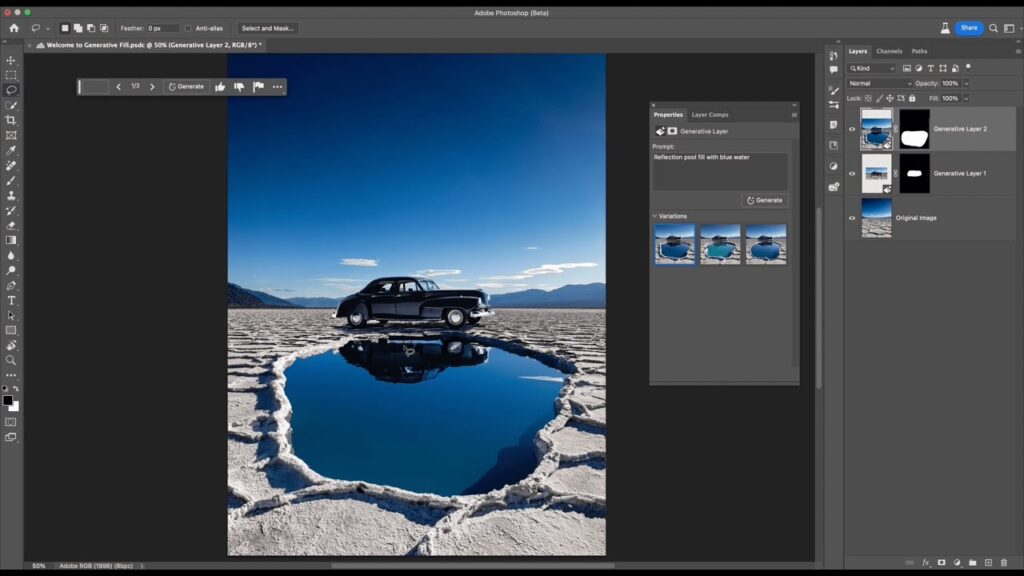
Generative Fill in Photoshop 27.7 receives one of the most substantial upgrades in this release cycle. The feature now produces more coherent and context-aware results when extending or modifying images.
Key improvements include:
- More accurate texture continuation
- Better object boundary detection
- Reduced visual artifacts in generated regions
- Improved prompt interpretation
- Faster generation times
Generative Fill now better understands scene depth, meaning it can extend backgrounds while preserving realistic spatial relationships. For example, extending a landscape horizon or filling missing architectural sections produces more natural results.
Additionally, Photoshop 27.7 reduces inconsistencies in repeated patterns, which was a limitation in earlier versions of generative tools.
Best New Photoshop 27.7 Features for Photo Editing
Photoshop 27.7 introduces several features that directly benefit professional photo editing workflows.
The most impactful include:
- AI-enhanced subject selection
- Improved lighting correction tools
- Advanced noise reduction filters
- Enhanced skin retouching algorithms
- Better dynamic range balancing
Portrait photographers benefit from more natural skin smoothing and blemish removal that preserves texture detail. Landscape photographers gain improved color grading tools that maintain realism while enhancing vibrancy.
The update also improves batch processing efficiency, allowing editors to apply consistent adjustments across multiple images with reduced processing time.
Photoshop 27.7 vs Photoshop 27.6 Differences and Upgrades
The transition from Photoshop 27.6 to 27.7 is defined more by refinement than radical change, but several key differences stand out.
Major differences include:
- Improved AI accuracy in generative tools
- Faster rendering speeds for high-resolution files
- Enhanced reflection removal capabilities
- More stable layer handling in complex projects
- Better GPU optimization for modern hardware
Photoshop 27.6 introduced foundational generative AI improvements, while 27.7 focuses on precision, stability, and usability. Users upgrading from 27.6 will notice smoother performance and fewer artifacts in AI-generated outputs.
Adobe Firefly Integration in Photoshop 27.7
Adobe Firefly continues to play a central role in Photoshop’s AI ecosystem, and version 27.7 strengthens this integration further.
Firefly integration allows Photoshop to:
- Generate image content from text prompts
- Expand image backgrounds intelligently
- Match lighting and style across edits
- Assist in design composition tasks
In Photoshop 27.7, Firefly models are more tightly embedded into core editing functions, meaning AI tools no longer feel like separate plugins but rather native features.
This integration improves workflow consistency and reduces the need to switch between external AI tools and Photoshop.
Photoshop 27.7 System Requirements for Windows and Mac
Photoshop 27.7 continues Adobe’s trend toward higher system requirements due to increased AI processing demands.
Typical requirements include:
Windows:
- Windows 10 or later (64-bit)
- Multi-core Intel or AMD processor with 64-bit support
- 16 GB RAM minimum (32 GB recommended)
- Dedicated GPU with DirectX 12 support
- 8 GB+ available storage
macOS:
- macOS Monterey or later
- Apple Silicon or Intel processor
- 16 GB RAM minimum
- Metal-compatible GPU
- SSD storage recommended
AI features perform significantly better on systems with dedicated GPUs or Apple Silicon chips due to hardware acceleration support.
How Dynamic Text Works in Photoshop 27.7
Dynamic Text in Photoshop 27.7 introduces responsive typography behavior that adapts to layout changes automatically.
This feature allows text elements to:
- Resize based on canvas scaling
- Adjust spacing dynamically
- Reflow based on object positioning
- Maintain readability across design variations
Dynamic Text is especially useful in UI/UX design, advertising layouts, and social media content creation where multiple format versions are required.
The system also integrates with AI layout suggestions, helping designers optimize text placement automatically.

Photoshop 27.7 Generative AI Credits Explained
Adobe’s generative AI tools operate on a credit-based system, and Photoshop 27.7 continues this structure.
Generative AI credits are used when:
- Creating images from text prompts
- Using Generative Fill
- Expanding image backgrounds
- Performing AI-based object generation
The number of credits required depends on:
- Image resolution
- Complexity of the prompt
- Type of generative operation
Users on premium Creative Cloud plans typically receive higher credit allocations, while free-tier or basic plans may have limited access.
Adobe has optimized credit usage in Photoshop 27.7 to reduce unnecessary consumption during minor edits.
Adobe Photoshop 27.7 Performance and Stability Improvements
Performance optimization is a major focus in Photoshop 27.7, particularly for AI-heavy workflows.
Improvements include:
- Faster startup times
- Reduced memory usage during large file editing
- Better GPU utilization
- Fewer crashes during multi-layer operations
- Improved cache management
These enhancements are particularly noticeable when working with large PSD files, high-resolution RAW images, or AI-generated content layers.
Stability improvements also reduce freezing during generative operations, making the software more reliable for professional production environments.
How to Update to Adobe Photoshop 27.7
Updating to Photoshop 27.7 is done through Adobe Creative Cloud.
Steps include:
- Open Adobe Creative Cloud desktop app
- Navigate to the “Updates” section
- Locate Photoshop
- Click “Update” next to version 27.7
- Wait for installation to complete
It is recommended to back up important projects before updating to avoid compatibility issues with older plugins or custom scripts.

Is Adobe Photoshop 27.7 Worth Upgrading To
Photoshop 27.7 is particularly valuable for users who rely heavily on AI-powered editing tools. The improvements in generative fill, object manipulation, and reflection removal make it a strong upgrade for professionals.
For casual users, the upgrade still provides benefits in performance and usability, but the most significant gains are in advanced creative workflows.
Key upgrade advantages:
- Better AI accuracy
- Faster processing speeds
- Improved stability
- Enhanced creative automation
Overall, the update is recommended for most users, especially those working in commercial design, photography, or digital content production.
Frequently Asked Questions (FAQs)
- What is Photoshop 27.7?
Photoshop 27.7 is an updated version of Adobe Photoshop focusing on AI enhancements, performance improvements, and workflow optimization. - Is Photoshop 27.7 free?
No, it is available through Adobe Creative Cloud subscription plans. - What is new in Photoshop 27.7?
New AI tools, improved generative fill, reflection removal, and better performance are key additions. - Does Photoshop 27.7 use AI?
Yes, it integrates Adobe Firefly and generative AI features extensively. - Can Photoshop 27.7 remove reflections?
Yes, it includes an AI-based reflection removal tool. - Is Photoshop 27.7 better than 27.6?
Yes, it improves speed, stability, and AI accuracy over 27.6. - What are generative AI credits?
They are usage units required for AI-powered image generation features. - Does Photoshop 27.7 work on Mac?
Yes, it supports macOS including Apple Silicon devices. - What GPU is needed for Photoshop 27.7?
A DirectX 12 or Metal-compatible GPU is recommended. - Is Photoshop 27.7 good for beginners?
Yes, AI tools make editing easier, but advanced features still support professionals.

Conclusion
Adobe Photoshop 27.7 represents a significant refinement in Adobe’s AI-driven creative ecosystem. By enhancing generative tools, improving performance, and integrating Firefly more deeply into core workflows, the update strengthens Photoshop’s position as an industry-standard creative platform. While not a complete redesign, its incremental improvements collectively deliver a more efficient, intelligent, and stable editing experience suitable for both professionals and advanced hobbyists.
Sources and Citations
- Adobe Photoshop Official Overview
https://www.adobe.com/products/photoshop.html - Adobe Creative Cloud Updates
https://www.adobe.com/creativecloud.html - Adobe Firefly AI Information
https://www.adobe.com/sensei/generative-ai/firefly.html - Adobe Help Center: Photoshop System Requirements
https://helpx.adobe.com/photoshop/system-requirements.html - Adobe Blog: Photoshop Feature Updates
https://blog.adobe.com/
Recommendations
- Saros: How to Get the “Fall from Grace” Trophy (Environment Kill Guide + Best Setup)
- Improving Blender Rendering: How The View Keeper Makes Rendering a Fun Experience
- UK Advertising Standards Authority bans Call of Duty: Black Ops 7 “Airport Security” commercial for “trivialising sexual violence”
- Fresh Crimson Desert Update Filled With New Quality-Of-Life Improvements (Patch 1.01.00) — Faster Fast Travel, Better Controls, New Mounts
- Blender Studio Releases Its First 4K HDR Short Film “Singularity”: Full Breakdown of the Cinematic Space Adventure
- Everplay (Team17 Parent Company) Reports 10% Gross Profit Rise in 2025: Full-Year Results, Revenue, and Outlook
- Invincible Season 4 Animation Error Sparks Fan Debate
- Supercell Acquires Metacore: What the Merge Mansion Deal Means for Mobile Gaming
- Intergalactic: The Heretic Prophet – Release Date, Story, Cast, Gameplay, and Everything We Know
- Avatar: Fire and Ash Digital Release Date Confirmed After $1.5 Billion Box Office Run



































































































