





In This Article (8 sections)
Best Passing Settings And Passing System In College Football 27
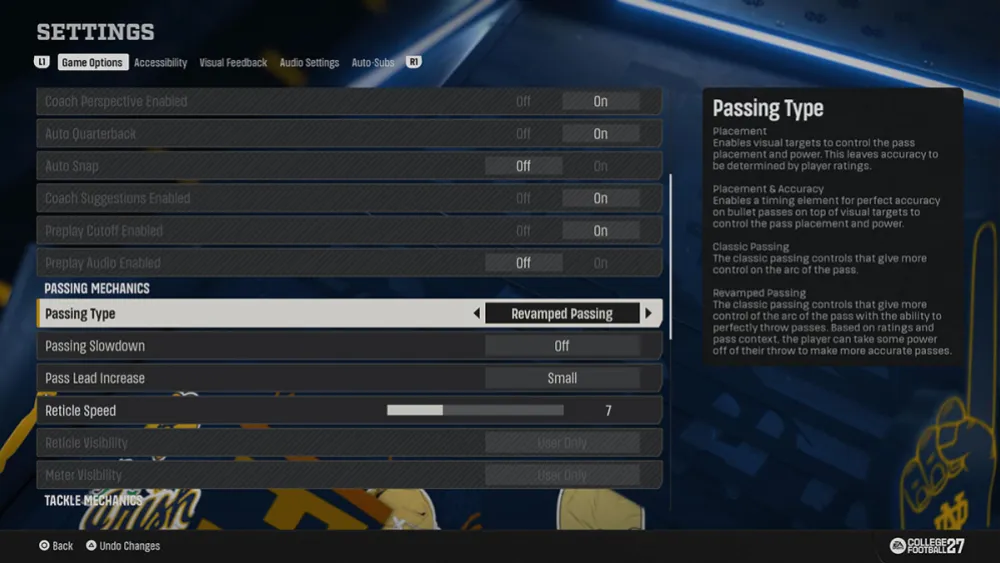
The best overall passing setup in College Football 27 for most players is Placement & Accuracy as the passing type, Passing Slowdown Off, Pass Lead Increase Small, Reticle Speed 10 as the safest baseline, and both Reticle Visibility and Meter Visibility set to User Only. That recommendation reflects the clearest consensus across major early guides.
GameSpot recommends that exact setup with Reticle Speed at 10, while Athlon Sports, citing early-access settings from former NFL quarterback Kurt Benkert, suggests an almost identical configuration with Reticle Speed at 12. Taken together, the practical sweet spot is between 10 and 12, with 10 serving as the cleaner default for most players and 12 acting as the faster competitive option once you are comfortable with free-form passing.
If you want the single best passing type in College Football 27, Placement & Accuracy has the highest overall ceiling because it combines pass placement, power control, free-form tools, and a perfect-accuracy mechanic on bullet throws when your release is timed correctly. Operation Sports describes it as the version where user input takes priority over player ratings, while CFB.FAN notes that it is probably the most popular choice among competitive players.
It is also the game’s most advanced precision-passing system, keeping the placement and power control of the standard Placement style while adding a timing mechanic that rewards accurate execution. Operation Sports explains that it retains the core features of Placement passing while enabling perfect-accuracy bullet throws, and CFB.FAN adds that many players refer to these successful timed releases as “blue passes.” In practice, this system rewards mechanics, timing, and disciplined targeting more than the more ratings-driven passing options.
For Reticle Speed, 10 remains the best universal starting point because it is quick enough to move the reticle accurately without making small stick movements overly sensitive. GameSpot explicitly recommends 10, Athlon Sports prefers a slightly faster setting of 12, and CFB.FAN suggests that players who are new to free-form passing begin around 7 before gradually increasing it. The simplest approach is to start at 10, lower it to 7 if you regularly over-aim passes, and only move toward 12 after your reticle movement feels deliberate and consistent rather than rushed.
The best Pass Lead Increase setting for most situations is Small. GameSpot recommends Small specifically for Placement & Accuracy, Athlon Sports uses the same option in its competitive day-one setup, and CFB.FAN explains that Pass Lead Increase controls the maximum amount of pass lead or free-form displacement you can apply during a throw. Small strikes the best balance because it allows you to lead receivers effectively without making routine slants, digs, and out routes unnecessarily difficult. Although the Large setting can help with more aggressive back-shoulder throws or tight sideline passes, it also increases the chance of user error, making Small the safer and more consistent choice for the majority of players.

Choosing The Right Passing System And Situational Settings In College Football 27
The biggest difference between Classic Passing and Placement & Accuracy comes down to control versus simplicity. Classic Passing is the traditional, HUD-light system that relies more on your quarterback’s ratings and left-stick lead, with CFB.FAN noting that free-form passing is disabled. Placement & Accuracy, on the other hand, provides visual feedback, free-form control, and a timed perfect-release mechanic that gives players much greater influence over ball placement. If you prefer a simpler, old-school passing experience with less on-screen information, Classic Passing remains a solid choice. However, if you want the strongest passing tools, greater precision, and the highest skill ceiling against tougher defenses, Placement & Accuracy is the superior option.
Understanding the passing meter is equally important because it determines both throw trajectory and timing. According to Operation Sports, lightly tapping the meter produces a lob pass, charging it to roughly 40–50 percent creates a touch pass, and holding it beyond 50 percent results in a bullet pass. With Placement & Accuracy, releasing the meter in the green zone creates a perfect bullet throw, indicated by a dark-blue success marker. CFB.FAN similarly explains that the “blue pass” indicator appears after a perfect-accuracy bullet throw. Rather than being a simple visual effect, the passing meter is your primary tool for deciding whether a pass should float over defenders, be layered into coverage, or be fired through a tight passing window.
The ideal settings also depend on your experience level and whether you primarily play offline or online. For beginners, the best choice comes down to whether you want the easiest learning curve or the best long-term development. Operation Sports recommends Revamped Passing for new players because it is the default system and features a more forgiving passing meter while still giving players meaningful control.
GameSpot, however, argues that Placement & Accuracy works well for both beginners and experienced players once the settings are simplified. A practical progression is to start with Revamped Passing if you struggle with basic throws, then transition to Placement & Accuracy using Small Pass Lead Increase and a Reticle Speed between 7 and 10 as your confidence improves.
For online games, consistency matters more than anything else. The most reliable competitive setup is Placement & Accuracy, Passing Slowdown Off, Pass Lead Increase Small, Reticle Speed between 10 and 12, and both Reticle Visibility and Meter Visibility set to User Only. This closely matches the strongest competitive recommendations from GameSpot and Athlon Sports while also fitting College Football 27’s faster offensive pace. EA’s Gameplay Deep Dive explains that streamlined pre-play adjustments and route-concept macros are designed to help players make quicker decisions with fewer inputs. In competitive online play, success comes from fast processing, predictable ball placement, and eliminating avoidable mistakes rather than relying on flashy mechanics.
Best Passing Settings, Controls, And Accuracy Tips In College Football 27
The ideal passing settings depend on the type of throws you make most often, but Placement & Accuracy remains the strongest overall option for both deep and short passing. For deep passes, the best setup is Placement & Accuracy with Small Pass Lead and Reticle Speed 10 to 12. The real difference comes from choosing the correct throw type. CFB.FAN notes that Revamped Passing gives players greater control over lob and touch passes downfield, making it a viable niche choice for players who rely heavily on fades and deep crossing routes.
Even so, Placement & Accuracy remains the better recommendation because it allows you to free-form passes away from defenders without relying on aggressive pass lead values. EA’s Gameplay Deep Dive also confirms that offensive Custom Adjustments include options such as Go Vertical, Smart Routes, and Double Moves, all of which naturally support deep-shot concepts.
For short passing, Placement & Accuracy is still the preferred option, but it works best with Pass Lead Increase set to Small and a slightly slower Reticle Speed between 7 and 10. Short passing punishes over-leading much more than deep passing because the throwing windows are tighter and the release must match defensive leverage almost instantly. EA’s offensive preset macros include Slants, Mesh, and Outs, which form the foundation of efficient chain-moving passing attacks. Keeping pass lead conservative and using a calmer reticle speed helps place the ball on the receiver instead of leading it into underneath defenders.
Using the correct quarterback controls is just as important as choosing the right settings. According to Operation Sports, a quick tap of the receiver button throws a lob pass, holding the button to roughly 40 to 50 percent power throws a touch pass, and holding it beyond 50 percent power throws a bullet pass. You can throw a high pass by holding LB/L1, while RealSport101’s control guide lists R3/Right Stick press as Throw Ball Away and identifies LT/L2 as the input used for Free Form on Placement. Operation Sports also notes that double-tapping the receiver button performs a pump fake.
Improving passing accuracy comes down to matching the throw type to the coverage rather than simply throwing to the intended receiver. Use lob passes when a receiver has clearly beaten the defense over the top, touch passes when the ball needs to be layered over underneath defenders, and bullet passes only when the passing lane is open enough to justify the extra velocity.
Placement & Accuracy further rewards good timing by introducing a perfect-release window for bullet passes, although Operation Sports points out that the size of the green release window is influenced by your quarterback’s ratings and abilities. Accuracy also improves when you reduce self-inflicted mistakes by keeping Pass Lead Increase on Small, avoiding excessively fast reticle speeds until you are comfortable with the system, and practising the passing controls until each throw type becomes second nature.
How To Master Passing And Fix Bad Throws In College Football 27
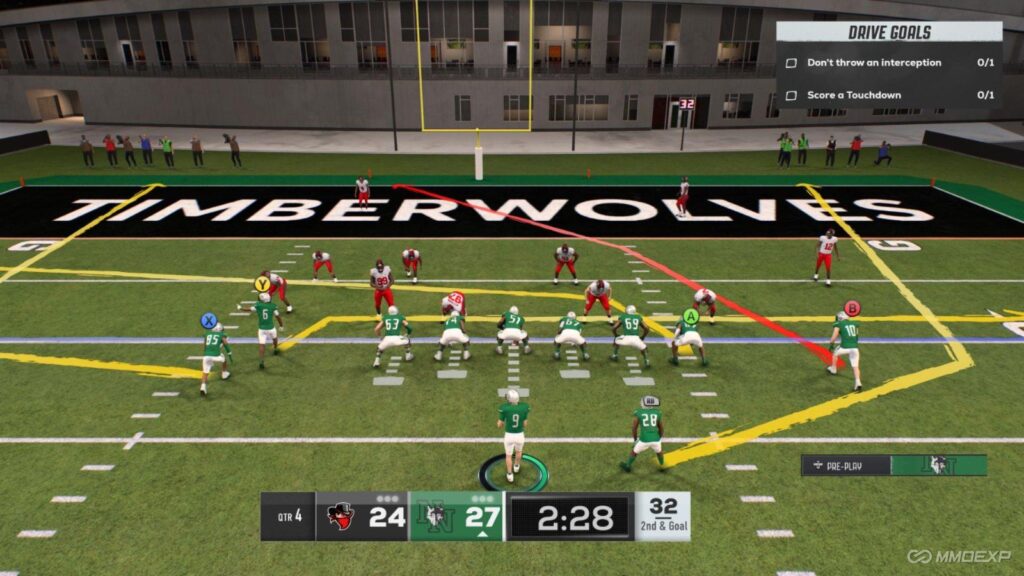
Mastering passing in College Football 27 starts with repetition, but it ultimately comes down to making better decisions before and after the snap. RealSport101 recommends spending time in Practice Mode to adapt to the rebuilt control layouts, while EA’s Gameplay Deep Dive explains that College Football 27 places a greater emphasis on faster pre-play offensive adjustments through Custom Adjustments and preset route concepts.
As you become more comfortable with throw timings, the next step is learning when to call concepts like Mesh, Outs, Slants, Smart Routes, and Go Vertical based on the defensive coverage. You can then add Timing Based Catching to gain more control at the catch point, a system EA says rewards the correct read, accurate ball placement, the right catch type, and precise release timing.
If you’re struggling with inaccurate passes, the cause is usually one of three things: too much pass lead, using the wrong throw power, or making the decision too late. CFB.FAN explains that larger Pass Lead Increase settings allow more aggressive ball placement, but they also make it much easier to miss your target. Operation Sports also notes that many players accidentally hold the pass button too long, turning what should have been a lob or touch pass into a bullet throw.
The quickest way to improve accuracy is to reduce unnecessary variables. Lower your reticle speed if you tend to over-flick the stick, switch Pass Lead Increase back to Small, and throw the ball away with R3 or the Right Stick press when your read is covered instead of forcing risky throws into traffic. Consistently making the right read, choosing the correct throw type, and avoiding unnecessary risks is what separates competent passers from players who can consistently move the ball against strong defenses.
Frequently Asked Questions
- What is the fastest way to improve passing in College Football 27?
The quickest way to improve is to spend time in Practice Mode, learn when to use lob, touch, and bullet passes, and keep your passing settings simple while building muscle memory. Once those fundamentals become consistent, you can gradually add free-form passing and more advanced techniques without overwhelming yourself. - What is the best passing type in College Football 27?
The best all-around passing type is Placement & Accuracy because it combines ball placement control, free-form passing, and perfect-accuracy bullet timing. While it takes more practice than the other systems, it gives you the most control over where the ball goes, making it the strongest option for both offline play and competitive matchups once you learn the timing. - Is Revamped Passing better for beginners?
For many true beginners, yes. Operation Sports describes Revamped as a great starting point because it still gives players manual control without requiring them to manage the full Placement & Accuracy system. It is easier to pick up, although most experienced players eventually move to Placement & Accuracy for its higher skill ceiling and greater precision. - What is the best Reticle Speed in College Football 27?
Reticle Speed 10 is the best starting point for most players because it provides a balanced mix of speed and accuracy. If you are still learning free-form passing, lowering it to 7 can make the reticle easier to control, while experienced players who want faster reactions often increase it to around 12. - Should Pass Lead Increase be Small, Medium, or Large?
Small is the best default setting because it provides enough control to lead receivers without making overthrows and inaccurate passes more common. Medium and Large can be useful in certain situations, but they also require much more precise stick movement and timing to avoid costly mistakes. - What does a blue pass mean in College Football 27?
In community shorthand, a blue pass refers to a perfect-accuracy bullet throw in Placement & Accuracy. It happens when you release the passing meter during the ideal timing window, giving the quarterback the most accurate version of that throw while reducing the chance of unnecessary misses. - How do you throw a lob pass in College Football 27?
You throw a lob pass by quickly tapping the intended receiver’s button instead of holding it. Lob passes travel higher through the air and are most effective for deep routes, fades, or situations where you want the receiver to run underneath the football. - How do you throw a touch pass in College Football 27?
You throw a touch pass by giving the receiver button a short hold, usually around the 40 to 50 percent power range. This creates a throw that is higher than a bullet pass but faster than a lob, making it ideal for fitting the ball over linebackers and in front of defensive backs. - How do you throw a bullet pass in College Football 27?
You throw a bullet pass by holding the receiver button beyond 50 percent power. In Placement & Accuracy, releasing during the green timing window produces a perfect bullet pass, helping you deliver fast, accurate throws on slants, curls, and other quick-developing routes. - Is Classic Passing still good in College Football 27?
Yes, especially for players who prefer a more traditional football game experience. Classic Passing removes the free-form mechanics and relies more on quarterback ratings and basic pass leading, making it simpler to use, but it does not offer the same level of precision or advanced control as Placement & Accuracy.
conclusion
The best passing settings in College Football 27 are not mysterious. The current evidence points to Placement & Accuracy as the strongest overall passing type, Small as the safest and smartest Pass Lead Increase, and Reticle Speed 10 as the best baseline for most users, with 7 better for beginners and 12 better for advanced online players. Revamped remains a legitimate beginner-friendly alternative, and Classic still suits players who want a stripped-down, ratings-led feel. But if the goal is to improve accuracy, sharpen timing, and hit more consistent deep throws, Placement & Accuracy with disciplined reticle and lead settings is the best place to start and the best system to grow into.
sources and citation
- EA SPORTS College Football 27 Controls (Official Help Center)
- EA SPORTS College Football 27 – Gameplay Deep Dive (Official)
- EA SPORTS College Football 27 – Official Tips Hub (EA Help)
- GameSpot – Best Passing Settings To Use In College Football 27 (July 7, 2026)
- Operation Sports – College Football 27 Passing Types Explained (July 8, 2026)
- Operation Sports – College Football 27 Pass Mechanics Guide (July 8, 2026)
- Athlon Sports – Best College Football 27 Settings (Featuring Kurt Benkert Recommendations)
- CFB.FAN – Best Passing Settings Explained (July 4, 2026)
- RealSport101 – College Football 27 Controls Guide: How to Master Offense and Defense
Recommendations
- Dragon Ball Z Xenoverse 3 Preview: Everything We Know About the New Dragon Ball Era
- Blizzard Responds to Overwatch 10Th Anniversary Event Backlash Explained
- Monopoly: Star Wars Heroes vs. Villains Switch 2 Port Explained, Release Date, Gameplay, Characters, and What the Humorous FPS Twist Means
- Steam Adds New Customization Tools for Developer & Publisher Pages: What’s New in Creator Home v2
- Camera Movements: A Complete Guide to Cinematic Motion in Film and Video
- RapidPipeline Twin Studio: New Desktop App Turns Complex CAD and Engineering Data into Production-Ready Digital Twins
- Miya Cech Toph Avatar: the Last Airbender Contacts Vision Restriction Explained
- eFootball Official Just Watching Trailer Reveals Konami’s Push to Turn Viewers Into Players
- INFERIUS Blends Dante’s Inferno with Lovecraftian Horror in a First-Person Roguelike
- Can I Improve My Metahuman in Blender? A Comprehensive Guide



































































































