








In This Article (8 sections)
Claude Tag in Slack Overview and Launch Context
Anthropic’s launch of Claude Tag marks a notable shift in how enterprise AI is being embedded into daily work. Announced on June 23, 2026, the new product is not just another chatbot placed inside Slack. It is a shared, channel-based AI agent that can be tagged into team conversations, use organization-approved tools, remember relevant context over time, and continue working asynchronously after the initial request. Anthropic is positioning it as the next evolution of Claude in Slack and as an extension of its broader agentic product strategy, which already includes Claude Code for engineering work and Claude Cowork for multi-step knowledge work.
As of June 25, 2026, the service is in beta for Claude Team and Claude Enterprise customers. It launches first in Slack and is intended to expand to other work surfaces over time. Anthropic’s own product teams reportedly use an internal version extensively, and the company says 65% of its product team’s code is already created through its internal workflow. Independent reporting from Reuters also confirms the launch date, beta status, and Anthropic’s plans to broaden the rollout beyond Slack.
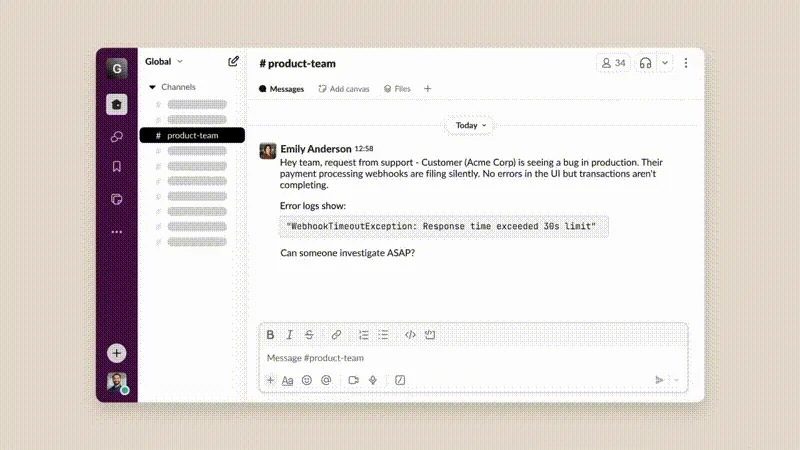
The Slack-based agent allows teams to bring AI assistance into a channel by tagging @Claude. Once invoked, it takes on the task within that thread, breaks it into stages, works through it using the tools and access configured for that channel, and posts its results back into the same conversation. Rather than functioning as a traditional one-to-one assistant, Anthropic describes it as a new way for entire teams to collaborate with Claude.
A key difference in this implementation is its focus on shared team context. The AI can be granted access to selected channels, tools, data sources, and even codebases, allowing anyone in an authorized channel to delegate work while continuing with other tasks. It is designed to operate within the team’s existing discussions, approvals, documents, and operational workflows instead of requiring users to switch to separate chat windows.
Anthropic’s offering is best understood as a channel-native AI agent rather than a direct message-first assistant. In Slack channels, it operates under its own service accounts instead of impersonating an individual user. Anthropic refers to this approach as “agent identity.” This allows the assistant to post as the Claude app in Slack, use service accounts in connected systems, and keep its permissions limited to the workspace or channel where it has been configured.
This design distinguishes the product from earlier AI assistants that simply inherited a single user’s permissions. Anthropic argues that user-based permissions become impractical in collaborative environments where multiple people interact with the same AI in a shared thread and where the agent may continue working long after the original requester has left. The system therefore shifts the permission model from “what can this user do?” to “what can this AI agent do within this workspace or channel?”
The service is also part of Anthropic’s broader strategy to build workplace AI agents capable of performing complete tasks rather than simply responding to prompts. Claude Code is Anthropic’s agentic coding system that can read codebases, make changes, run tests, and deliver committed code. Claude Cowork serves as the company’s desktop agent for non-technical, multi-step knowledge work across files, applications, and documents. Anthropic describes its new Slack-based product as “the beginning of an evolution of Claude Code,” making the technology more proactive and better suited for full-team collaboration.
This broader vision matters because the system combines the execution capabilities of an AI agent with the transparency of a shared group chat. Anthropic’s earlier Slack integration centered on Claude in direct messages, threads, and an assistant panel. The latest release expands that model into a persistent, shared workspace where an entire channel can assign work to the AI, monitor its progress, and benefit from contextual memory that carries forward over time. Slack has likewise positioned this approach as part of an emerging “agentic” era of workplace collaboration.

Collaboration Model and Channel Workflows
Claude Tag is designed around a collaborative, channel-first workflow that treats AI as a shared teammate rather than a private assistant. Inside Slack channels, Claude Tag starts when someone mentions @Claude in a message requesting a task. According to Anthropic, each Claude Tag thread runs as a working session in an Anthropic-hosted ephemeral sandbox. The request is submitted from Slack, the work is completed in the sandbox, and the finished result is returned to the same Slack thread. During execution, Claude posts a progress checklist so everyone in the conversation can follow what it is doing instead of waiting without visibility.
Once a thread is active, the session belongs to the thread rather than the person who started it. Team members can continue directing Claude by replying within the same thread without mentioning @Claude again. Claude acknowledges the task, works in the background, updates its progress checklist, and posts the final output when the work is complete. This shared workflow allows anyone in the channel to see what Claude is doing and continue the conversation from where another teammate left off, making collaboration feel similar to delegating work to a colleague instead of opening a private AI chat.
Using @Claude in Slack is intentionally straightforward. Users can mention Claude in a channel, a thread, or a direct message. In channels, Claude operates using the organization’s configured agent identity, while direct messages use the individual’s Claude account along with their personal connectors and credentials. An @Claude mention guarantees a response in channels where Claude Tag has been added. Claude may also respond automatically without a mention if it determines that a reply is appropriate, and after a thread has been activated, it can continue following the conversation without requiring additional mentions. However, editing an existing message to add @Claude later does not trigger a response; the mention must be included when the message is originally sent.
Claude Tag’s feature set combines shared visibility, long-term memory, initiative, and asynchronous execution. Anthropic describes @Claude as “multiplayer,” meaning a single Claude instance serves the entire channel rather than an individual user. The AI can learn over time, automatically gather context from permitted Slack channels and connected data sources, proactively keep teams informed when ambient behavior is enabled, and schedule tasks that continue over hours or even days.
Anthropic also emphasizes channel-level customization. Workspace owners can configure connections, plugins, skills, and custom instructions for different scopes, while channel members can shape Claude’s behavior through saved prompts and channel memory. This creates a Slack AI agent that is centrally managed but also adapts to each team’s workflows and conventions over time.
The collaborative design has practical workflow benefits across organizations. Teams can transform discussion threads into documentation, assemble project information from multiple systems, reproduce software bugs, create pull requests, answer data-related questions, and maintain project visibility where work is already happening. Anthropic’s documentation consistently highlights channel-based workflows such as triage, project tracking, monitoring, and documentation instead of isolated one-off conversations, reinforcing Claude Tag’s role as a shared AI teammate embedded directly into everyday team collaboration.

Claude Tag Shared Context, Security, Permissions and Admin Controls
Claude Tag’s context model is shared, but it is not unlimited. Anthropic explains that memory belongs to the Slack channel rather than the individual user. Public channels automatically contribute to workspace memory, allowing decisions and information recorded in one public channel to help Claude respond more effectively in other public channels within the same workspace. Private channels operate differently: they can read from workspace memory while in use, but any information they save remains isolated within their own private memory store.
This shared channel context allows Claude to build a broader understanding of an organization’s work across public channels while maintaining clear privacy boundaries. Anthropic states that externally shared Slack Connect channels are always disabled for Claude Tag. Channels that include guests are also excluded by default unless an administrator explicitly enables Claude within those channels.
Anthropic provides extensive administrative controls over Claude Tag, with Primary Owners and Owners having the highest level of authority. According to Anthropic’s documentation, only these roles can configure Claude Tag’s access and channels, while Admins can view settings but cannot complete the initial setup. Owners determine who can use Claude, which channels it can access, which version of the Slack experience is enabled for different workspaces, and how much spending is permitted.
Member access can be configured in several ways. Organizations can allow anyone in the Slack workspace to use Claude, restrict access to members of the connected Claude organization, or limit access through custom roles. Anthropic notes that custom role-based restrictions are available on Enterprise plans, while Team plans can restrict access only through membership. Owners can also mute Claude within a thread, remove it from a channel, disable it for a specific scope, detach access, delete a bundle, or uninstall the integration entirely.
Administrative oversight extends beyond configuration into monitoring and governance. Anthropic says administrators can review, edit, and delete Claude Tag’s stored memory, inspect audit logs that record both scheduled and one-time tasks, and review network calls made using the agent’s identity. This level of auditability provides organizations with visibility into Claude’s activities, including what actions it performed, where those actions occurred, and which connected services were involved.
Claude Tag’s data access model is designed with multiple layers of control. Anthropic states that permissions can be configured at the organization, workspace, and private-channel levels, with inheritance between those scopes. Public channels inherit workspace-level permissions, while private channels can be granted additional repositories or credentials without exposing them to the rest of the workspace. This structure helps organizations separate sensitive departments such as engineering, legal, sales, and analytics while maintaining appropriate access controls.
The platform’s security architecture is intentionally restrictive. According to Anthropic’s security documentation, Claude operates within an isolated sandbox hosted on Anthropic infrastructure. The sandbox does not store credentials, and all outbound network traffic is denied by default. Instead, requests pass through an Agent Proxy that injects credentials from a separate credential store only when a request matches administrator-defined rules. Any requests directed to unauthorized hosts are automatically blocked. By default, Claude can read and post only in Slack channels where it has been added and can search public Slack channels by keyword, but it cannot access external systems unless an Owner explicitly configures those connections.
Anthropic also separates Slack conversations from Claude’s own chat history. Conversations initiated through Slack do not appear in Claude’s web chat history, and conversations started in the Claude web application cannot be accessed from Slack. If the Slack integration is disconnected or the app is uninstalled, Anthropic states that Slack-side conversations are automatically deleted from Claude within 30 days, while Slack itself continues to retain conversation data according to the organization’s existing retention policies.

Claude Tag Automation, Enterprise Deployment, and Strategic Impact
Claude Tag is designed to go beyond the capabilities of a traditional Slack assistant by supporting automation, continuous monitoring, and enterprise-scale deployment. According to Anthropic’s routines documentation, users can assign Claude “standing work” from any Slack channel where it has access. These routines include scheduled jobs, channel monitoring, pull request tracking, and recurring status updates, all of which operate using the same channel permissions as a manually typed request.
This allows teams to automate repetitive work without constant prompting. For example, Claude can review open discussion threads every weekday, monitor announcement channels for important updates, follow a pull request until its status changes, or publish recurring summaries at scheduled intervals. Any member of the channel can later view, modify, or disable these routines as needed. Anthropic’s use-case library also highlights recurring dashboard checks, proactive investigation of alerts, and scheduled reporting of business or operational metrics, making Claude Tag suitable for ongoing workflow automation rather than one-time interactions.
Another major capability is Claude Tag’s optional ambient monitoring mode. Anthropic describes this as a proactive feature that keeps users informed about information it determines is relevant. Instead of waiting for direct prompts, Claude can identify important updates from Slack channels and connected tools, follow up on unresolved discussions, and notify teams when conversations or tasks have stalled.
This ambient behavior naturally extends to operational monitoring. Anthropic’s documentation includes examples such as watching system monitors and alerts, checking dashboards on a schedule, and beginning diagnostic investigations before anyone explicitly requests assistance. As a result, Claude Tag functions much closer to an always-on operational teammate than a conventional reactive chatbot.
Claude Tag is currently available in beta for Claude Team and Claude Enterprise customers. Anthropic announced the beta on June 23, 2026, and both Anthropic’s launch announcement and Reuters confirmed the initial rollout. Anthropic’s Help Center also states that the previous Claude in Slack integration will automatically transition to the Claude Tag experience on August 3, 2026, providing a defined migration timeline for existing users.
Enterprise deployment requires several prerequisites. Anthropic’s setup documentation specifies that a Claude organization Owner must initiate the setup process, while a Slack workspace administrator must install and pair the application. Team plan customers must also load usage credits before channel-based routines can run. Anthropic recommends testing Claude Tag in a private Slack channel before expanding deployment across a wider organization. Slack’s Marketplace listing and Anthropic’s earlier Slack integration documentation further indicate that the app is intended for paid Slack plans and requires workspace administrator approval before individual users can access it.
Compared with traditional Slack bots, Claude Tag represents a significant shift in capability. Conventional Slack bots are generally event-driven applications that rely on Slack’s Events API to receive callbacks when predefined events occur. They typically respond to specific commands or triggers and are designed to perform narrowly defined tasks.
While Claude Tag appears as a Slack bot within the interface, its underlying architecture is considerably more advanced. It functions more like a governed AI agent by running workloads inside an Anthropic-hosted sandbox, maintaining shared channel and workspace memory, supporting persistent long-running routines, operating through service-account identities, and allowing permissions to be managed at the organization, workspace, and private-channel levels. Anthropic’s glossary specifically distinguishes Claude Tag from the earlier Claude in Slack experience by highlighting its persistent thread sessions, shared memory, automated routines, and proactive capabilities, positioning it as a more autonomous collaboration platform rather than a simple command-driven chatbot.

Frequently Asked Questions
- Is Claude Tag the same as the older Claude in Slack app?
No. Anthropic’s help center describes Claude Tag as the next generation of Claude in Slack. While the older Slack experience focused mainly on helping individual users with conversations and tasks, Claude Tag is designed to function more like an AI teammate. It can remember context across multiple days, schedule follow-up work, proactively check in when needed, and collaborate with everyone in a shared Slack channel instead of only responding to one person at a time. - Can anyone in a Slack channel use Claude Tag?
Usually yes, but only if the Claude app has been added to that channel and the organization’s administrators have not restricted access. Anthropic allows workspace owners to choose whether everyone in the workspace can use Claude Tag, only members of their Claude organization can access it, or only users with specific custom roles on Enterprise plans. This gives organizations flexibility to control who can interact with the AI. - Does Claude Tag work in direct messages as well as channels?
Yes, but it behaves differently depending on where it is used. In Slack channels, Claude Tag operates under the organization’s shared service-account identity so everyone collaborates with the same assistant. In direct messages, it works through the individual user’s personal Claude account, using that person’s own connectors, permissions, and credentials instead of the shared organizational setup. - Can Claude Tag access private channels?
Yes, provided a workspace owner grants access and adds Claude Tag to the private channel. Anthropic also allows private channels to have their own separate credentials and repository connections beyond the workspace defaults. Their memory, tools, and connected resources remain isolated, helping ensure that information from private discussions is not shared with public channels or unrelated teams. - Can Claude Tag work in Slack Connect channels shared with other companies?
No. According to Anthropic’s documentation, Claude Tag does not support externally shared Slack Connect channels. This restriction is built into the service and cannot currently be changed through configuration, so organizations cannot enable Claude Tag in those cross-company shared workspaces. - What happens when Claude Tag hits a spend limit?
Anthropic says that if a request would exceed a configured spending limit, Claude Tag simply declines the task instead of stopping halfway through. The user who made the request receives a notification in the Slack thread explaining why it could not continue. Administrators can then increase the spending limit if appropriate, and organizations can also configure overall budgets, per-channel limits, and spending alerts to help control costs. - Does Claude Tag keep memory after a task ends?
Yes. Claude Tag is designed to retain channel memory and conversation transcripts so it can continue building on previous discussions instead of starting from scratch each time. Public channel memory can help provide context across other public channels within the same workspace, while private channel memory remains separate to preserve privacy and prevent confidential information from being shared elsewhere. - Can teams automate recurring work with Claude Tag?
Yes. Anthropic’s routines feature allows teams to automate many repetitive tasks directly from Slack. This includes scheduling recurring reports, monitoring channels for specific events, following pull requests, posting regular status updates, and running other scheduled workflows. Team members can later review, modify, pause, or remove these routines as their needs change. - What data can Claude Tag reach by default?
By default, Claude Tag can read and post messages only in the Slack channels where it has been added, and it can search public Slack channels by keyword when permitted. It does not automatically gain access to external services such as GitHub, databases, APIs, cloud storage, or data warehouses. Those integrations must be intentionally connected and configured by an administrator with the appropriate permissions. - Who can set up Claude Tag for an organization?
Anthropic says that only a Primary Owner or Owner of the Claude organization can configure Claude Tag’s organizational access, permissions, and available channels. In addition, a Slack workspace administrator is generally required to install the Claude app and complete the connection between Slack and the Claude organization, ensuring both platforms are configured correctly before employees can use the service.

Conclusion
Claude Tag is Anthropic’s attempt to turn Slack from a place where teams discuss work into a place where a governed AI agent can actively participate in it. The product combines channel-native invocation, shared thread visibility, channel and workspace memory, agent identity, routines, ambient follow-up behavior, and owner-level security controls. That combination is what separates it from a standard Slack chatbot or a purely personal AI assistant.
For enterprises, the significance is not only the feature list but the operating model. Claude Tag suggests that the next phase of workplace AI will be collaborative, scoped by channel, audited by design, and capable of working asynchronously across tools and time. In that sense, Anthropic has not merely launched a Slack integration. It has launched a new template for how workplace AI agents may be deployed inside team communication systems.
Sources and citation
- Anthropic, June 23, 2026 — “Introducing Claude Tag”: Primary launch announcement introducing Claude Tag as a collaborative AI teammate in Slack. Explains channel tagging, shared context, persistent memory, proactive updates, asynchronous task execution, administrator permissions, and its initial Team and Enterprise beta availability.
- Citation: Anthropic – Introducing Claude Tag Anthropic
- Anthropic — Claude Tag Product Overview: Official product page describing Claude Tag’s capabilities, including shared channel work, memory across conversations, proactive actions, routines, customizable identities, connected tools, and organizational governance.
- Citation: Anthropic – Claude Tag Claude by Anthropic
- Anthropic — Claude Tag Documentation: Overview: Official technical documentation explaining how Claude Tag works, its Slack integration, supported workflows, and core concepts.
- Citation: Claude Documentation – Claude Tag Overview Anthropic+1
- Anthropic — Claude Tag Administrator Setup Guide: Official setup instructions for pairing a Slack workspace, provisioning Claude’s identity, connecting tools and repositories, configuring channel access, and setting organizational spending limits.
- Citation: Claude Documentation – Administrator Setup Claude Help Center+1
- Anthropic, June 24, 2026 — “Agent Identity in Claude Tag: A New Access Model for Autonomous, Team-Wide AI”: Explains Claude’s separate agent identity, workspace-level permissions, credential management, and how access is scoped for shared team environments.
- Citation: Anthropic – Agent Identity and Access Model Claude by Anthropic+1
- Anthropic — Claude Tag Security and Data Documentation: Official guidance on data access, channel boundaries, credentials, permissions, and organizational security controls.
- Citation: Claude Documentation – Security and Data Claude Help Center+1
- Anthropic — Claude Tag Memory Documentation: Explains how Claude retains useful context across tasks, how memory is scoped to workspaces and channels, and how administrators can review or manage stored information.
- Citation: Claude Documentation – Memory Claude Help Center+1
- Anthropic — Claude Tag Proactivity and Routines Documentation: Covers proactive channel participation, follow-ups, scheduled tasks, and recurring work that Claude can perform without requiring a fresh mention each time.
- Citation: Claude Documentation – Proactivity and Routines Claude by Anthropic+1
- Anthropic — Claude Tag Customization and Governance Documentation: Guidance on customizing Claude’s behavior, instructions, connected tools, identities, channel access, and administrative controls.
- Citation: Claude Documentation – Customization Claude Academy+1
- Anthropic Help Center, September 24, 2026 — “What Is Claude Tag?”: Official user and administrator guidance explaining Claude Tag’s features, access controls, billing, memory, activity logs, privacy, and the transition from the earlier Claude in Slack experience. It confirms that the migration took place on August 3, 2026.
- Citation: Anthropic Help Center – What Is Claude Tag? Claude Help Center+1
- Anthropic — Claude Tag Migration Guide: Instructions for administrators moving from the earlier Claude in Slack integration to the new Claude Tag experience.
- Citation: Claude Documentation – Migration from Earlier Claude in Slack Claude Help Center+1
- Slack Marketplace — Claude by Anthropic: Official app listing identifying Anthropic as the developer and describing Claude’s Slack capabilities, permissions, deployment options, security information, and data-handling arrangements.
- Citation: Slack Marketplace – Claude Slack Marketplace
- Slack Help Center — “Use Claude in Slack”: Official instructions for installing Claude, starting direct messages, adding it to channels, mentioning it in conversations, and understanding its context limits. It also explains the August 3, 2026 transition to Claude Tag.
- Citation: Slack – Use Claude in Slack Slack
- Slack Developer Documentation — “The Events API”: Technical documentation explaining how Slack apps and bots receive events through HTTP endpoints or Socket Mode, subscribe to selected events, and respond to workspace activity.
- Citation: Slack Developer Docs – Events API Slack Developer Docs
- Slack — “Slack Connect Guide: Work with External Organizations”: Official documentation covering shared channels, external organizations, guest access, app visibility, and collaboration permissions. Useful for understanding the implications of using AI assistants in channels containing external participants.
- Citation: Slack – Slack Connect Guide Slack
- Anthropic — Claude Tag API Documentation: Technical reference for managing Claude Tag’s Slack workspaces and channels programmatically, including access settings, permissions, and administrative controls.
- Citation: Anthropic – Claude Tag API Claude Platform Docs
- Reuters, June 23, 2026 — “Anthropic Launches Claude Tag in Slack with Plans for Wider Rollout”: Independent launch coverage confirming the Slack integration, beta availability, collaborative agent functionality, persistent context, proactive updates, and administrator-controlled permissions.
- Citation: Reuters – Anthropic Launches Claude Tag Reuters
- ITPro, June 2026 — “Meet Claude Tag, Anthropic’s New AI Teammate That Works in Slack”: Additional reporting on Claude Tag’s workplace automation, shared channel context, proactive behavior, connected tools, administrator controls, and replacement of the previous Claude Slack application.
- Citation: ITPro – Meet Claude Tag IT Pro
Recommendations
- Firearms expert Jonathan Ferguson on the most common gun mistakes in games (Oct 15)
- Roblox: Grow a Garden 2 Megaphone & Sound ID Code List (2026 Working Music & Meme IDs Guide)
- GTA 6 GameRoll Leak: Jason and Lucia Names Confirmed, Other Claims Unproven
- Michael Jackson Movie Reportedly Ends During Bad Tour After Child Abuse Allegations Were Cut and $15 Million Reshoots Changed the Third Act
- Dinolords Trailer Breakdown: the Medieval Strategy Game with Dinosaurs Explained
- Meccha Chameleon: 25 Best Places To Hide (All Top Spots and Routes)
- CD Projekt RED Gamescom 2026 REDstreams Will Spotlight The Witcher 3: Songs of the Past
- Slow Horses Season 6 Episode 4 Review: Shocking Death Explained
- How to Enter Room 207 in 007 First Light & Complete the “Do Disturb” Challenge (Full Stealth Guide)



































































































