










Blackmagic Design released DaVinci Resolve 21 in public beta on April 14, 2026, and positioned the update around three major pillars: a new Photo page for still-image workflows, a new generation of AI-assisted tools, and broad workflow changes across editing, grading, VFX, audio, subtitles, and media management. Official product materials describe the release as delivering over 100 motion graphics effects, 50 new features, and hundreds of quality-of-life improvements.
That makes DaVinci Resolve 21 more than a routine version bump. It expands Resolve from a video-first finishing platform into a more complete stills-and-motion environment, especially for creators who want image management, grading, compositing, audio, and delivery inside one application instead of splitting those tasks across multiple apps.

DaVinci Resolve 21 public beta release date and official announcement
The official Blackmagic Design press release is dated April 14, 2026, and states that DaVinci Resolve 21 public beta is available for download immediately from the company website. The same announcement says the release would be demonstrated at NAB 2026, underscoring that this was a flagship launch rather than a minor maintenance update.
The official positioning is consistent across Blackmagic’s product pages: DaVinci Resolve 21 is framed as a major update built around the new Photo page, AI tools such as IntelliSearch and CineFocus, Cut and Edit page improvements, Color page grading changes, Krokodove integration in Fusion, and Fairlight workflow upgrades.
As of the current support-center search results, Blackmagic’s download catalog surfaces both DaVinci Resolve 21 Public Beta 1 and DaVinci Resolve Studio 21 Public Beta 1, confirming that the rollout is still in beta rather than a final stable public release.
How to download DaVinci Resolve 21 public beta for free
Blackmagic’s official download page routes users through a simple web form, then offers installers for Mac OS X, Windows, Linux, and iPad. The page labels the process “Start Your Download Here,” requires basic registration details, and then exposes platform-specific download buttons.
For users specifically looking for the beta build rather than the generic product landing page, the support center is the clearest path because its search results identify the current beta packages by name. At the time of review, those results list both the free DaVinci Resolve 21 Public Beta 1 and the paid DaVinci Resolve Studio 21 Public Beta 1.
The same official download flow also confirms that Blackmagic continues to distribute Resolve directly rather than through a subscription storefront, and the download page explicitly markets the software with “No Monthly Subscriptions,” “No Ads,” and “No User Tracking.”
What is new in DaVinci Resolve 21 public beta
At a high level, DaVinci Resolve 21 adds the Photo page, introduces a new AI toolset that includes IntelliSearch, CineFocus, face and skin tools, expands Cut and Edit page keyframing and graphics support, improves Color page trim and node workflows, integrates Krokodove into Fusion, and adds Fairlight folders for audio organization. Blackmagic summarizes the update as bringing over 100 motion-graphics effects, 50 new features, and hundreds of workflow improvements.
The launch is also broader than the headline features suggest. The New Features Guide documents background rendering for intensive operations, searchable Preferences and Project Settings, dynamic project switching for multi-user projects, up to 3x faster file syncing to Blackmagic Cloud, and a large codec update that includes Canon CR3, Fujifilm RAF, Apple ProRAW, improved Nikon NEF and Sony ARW handling, HEIF encode support, and additional HDR and delivery options.
The practical takeaway is that DaVinci Resolve 21 is both a workflow release and a category-expansion release. It does not just add tools; it changes what Resolve is for, especially by turning still-image grading and library management into native parts of the app.
DaVinci Resolve 21 free vs Studio version differences
Blackmagic’s official product page still divides Resolve into two versions. The free version supports virtually all 8-bit video formats up to 60fps at Ultra HD 3840 x 2160, and Blackmagic says it includes multi-user collaboration and HDR grading.
DaVinci Resolve Studio includes everything in the free version, then adds the DaVinci AI Neural Engine, dozens of extra Resolve FX, temporal and AI spatial noise reduction, text-based editing, Magic Mask, film grain, optical blur, support for 10-bit video up to 120fps, and resolutions beyond 4K. Blackmagic lists Studio at $295 on the current product pages.
In practical terms, the free version remains unusually capable, especially for editors, colorists, and photographers who want the new Photo workflow without immediately paying for Studio. Studio becomes the stronger choice when the workflow depends on AI Neural Engine features, heavier noise reduction, advanced effects, higher-bit-depth footage, or beyond-4K finishing. That conclusion follows directly from Blackmagic’s own version split.
DaVinci Resolve 21 Photo page explained
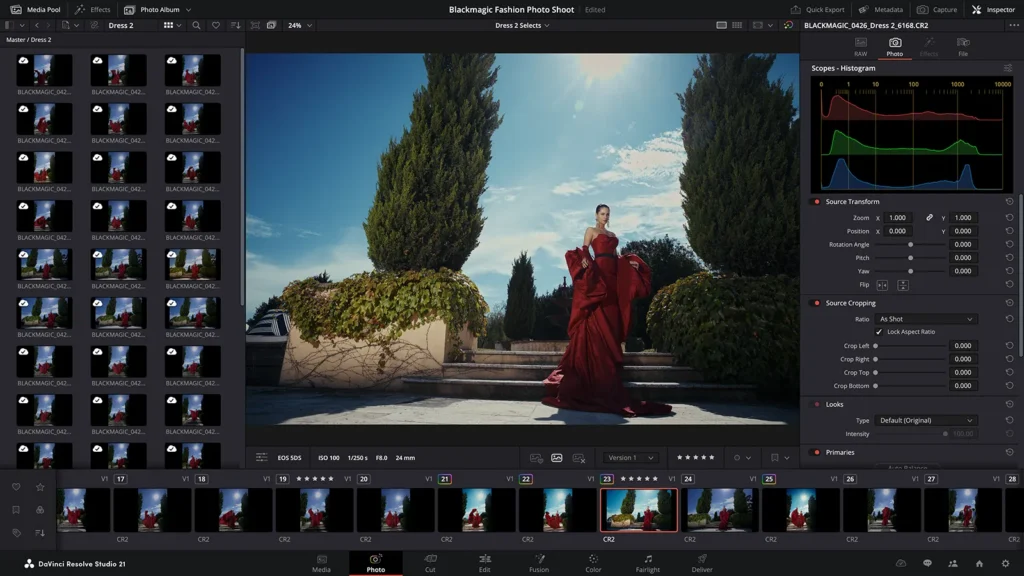
The Photo page is the centerpiece of DaVinci Resolve 21. Blackmagic describes it as a fully integrated still-image workflow that lets users import and manage photographs on a dedicated page, then move seamlessly into the Color page for node-based grading. In other words, the stills workflow is no longer a workaround inside Resolve; it is now a first-class page in the application.
Its structure is closer to a hybrid of a photo library, a color-prep page, and a launch point into Resolve’s deeper pages. The New Features Guide describes a stills-focused Media Pool, album-based organization, single-view and Lightbox viewing modes, favorites, rejects, version selection, ratings, EXIF visibility, and album-centric workflows that can pass full-resolution stills into the Cut, Edit, Color, and Fusion pages.
The import model is also broader than a folder-only workflow. Blackmagic’s official documentation says the Photo page can import individual files, folders, Apple Photos items on macOS, Lightroom catalogs, and even Blackmagic Cloud folders. That matters because it reduces migration friction for photographers who already have organized libraries elsewhere.
DaVinci Resolve 21 photo editing features for photographers
Blackmagic clearly wants photographers to view Resolve 21 as more than a video app with image support. Official materials specifically highlight launch support for files from Canon, Fujifilm, Nikon, and Sony, along with Apple iPhone ProRAW. Blackmagic also says photo processing occurs at source resolution up to 32K or over 400 megapixels, with familiar controls such as white balance, exposure, color, and saturation available from the start.
The more distinctive features arrive after those basics. Blackmagic says the Photo page supports non-destructive reframing and cropping, node-based grading, primary corrections, curves, qualifiers, Power Windows, professional scopes, Resolve FX, Open FX plug-ins, LUT workflows, and AI-assisted subject selection through tools such as Magic Mask and UltraSharpen. That gives photographers access to the same visual language Resolve users already employ on motion projects.
For library and shooting workflows, Resolve 21 adds albums, batchable RAW setting adjustments, Lightbox viewing, keywording, rating systems, favorites, rejects, and camera tethering. Blackmagic says users can connect Canon or Sony cameras for live capture, control parameters such as aperture, shutter speed, ISO, exposure compensation, and focus, and even use overlays to match compositions during a shoot. The beta notes in the New Features Guide also clarify that, at least in the current beta, tethered live capture support is limited to Canon and Sony.
Delivery is also built into the workflow. Blackmagic says Quick Export and Deliver-page photo exports are GPU accelerated, and the Photo page supports export formats including JPEG, PNG, HEIF, and TIFF. Combined with Blackmagic Cloud collaboration, that makes the Photo page a serious attempt at end-to-end stills handling rather than a grading-only feature.

DaVinci Resolve 21 still image editing vs Lightroom and Photoshop
Against Lightroom, Resolve 21 now checks many of the expected workflow boxes. Official materials and early reporting show that it supports image import, Apple Photos and Lightroom ingestion, ratings, favorites, keywords, album organization, Lightbox browsing, non-destructive edits, tethered capture, batch adjustments, and fast exports. In other words, Resolve 21 is no longer missing the core catalog-and-develop layer that kept many photographers from considering it seriously.
Against Photoshop, the comparison is more philosophical than literal. Blackmagic’s own Photo page copy emphasizes that Resolve’s node-based workflow goes beyond the “layer-based approach of conventional photo applications,” which means it is stronger at structured grading logic, repeatable look building, and shared adjustments across albums. But that does not automatically make it a drop-in substitute for every traditional pixel-layer retouching workflow. Early hands-on coverage from photography outlets described the beta as powerful and promising, but also said the learning curve is steep and that the toolset is not yet as versatile or immediately useful for every photo-first user.
The strongest case for Resolve 21, then, is not that it instantly eliminates Lightroom and Photoshop for all photographers. It is that it gives hybrid creators, colorists, and stills-and-motion teams a more unified alternative to apps from Adobe, especially when matching looks between RAW photos and graded video matters more than preserving a legacy photo-only workflow.
DaVinci Resolve 21 AI tools and what they do
AI is one of the defining themes of DaVinci Resolve 21. Blackmagic’s product pages call out IntelliSearch, CineFocus, facial refinement tools, slate-reading, sharpening, and motion cleanup as major additions, while the product comparison page also reminds buyers that the Studio version is where the DaVinci AI Neural Engine officially lives. That matters because many of the most advanced automation features in Resolve have historically depended on the Neural Engine.
The new AI tools serve different parts of the workflow. IntelliSearch is designed for content search by people, objects, faces, and spoken words. AI Speech Generator turns text into voice using Blackmagic voice models or a short voice sample. CineFocus simulates focal-point changes and depth-of-field adjustments, including rack-focus-style keyframing. Face Age Transformer adds or removes age-related facial detail. Face Reshaper changes tracked facial proportions. Blemish Removal reduces skin imperfections while preserving texture. Slate ID extracts metadata from slate frames. UltraSharpen selectively increases detail. Motion Deblur rebuilds frames to reduce blur artifacts.
Blackmagic also extends some of this AI capability into still-image work. The New Features Guide says several AI tools, including IntelliSearch and Motion Deblur, can be used on images in the Photo page, and Blackmagic’s Photo page materials add Magic Mask and UltraSharpen to the still-photo workflow. That gives Resolve 21 an unusually direct bridge between photo edits and video AI tools.
IntelliSearch in DaVinci Resolve 21 explained
IntelliSearch is Blackmagic’s new AI-assisted content search system. On the official What’s New page, Blackmagic says it can analyze media and let users search for people, objects, individual faces, and keywords in dialog, with results returned as whole clips in the Media Pool for faster editing and organization. The company also says the same plain-language approach can search photo libraries across a project.
The setup is more involved than a simple text box. The New Features Guide says IntelliSearch requires downloading an AI model from the Extras Download Manager, then analyzing media in the Media Pool before searches can be run. Blackmagic provides two operating modes, Faster and Better, with the guide explaining that Better takes longer to analyze footage but can return more accurate results.
Once configured, IntelliSearch is flexible. Blackmagic documents optional face identification during analysis, transcript-only search for exact spoken phrases, metadata search across specific fields, and a Smart Bin shortcut that can convert search criteria into persistent filtered bins. The guide summarizes the search field as broad enough to accept an object, a person, a color, a camera number, or a line of dialog.
DaVinci Resolve 21 Cut page and Edit page improvements
Blackmagic’s Cut and Edit updates are mostly about speed and control rather than radical redesign. The official What’s New page highlights new keyframe easing options, loop and ping-pong behaviors, simultaneous multi-clip keyframe adjustment, normalized curve zoom, and four-point Bezier easing for more advanced retiming. Blackmagic also says Fusion effects can now be tweaked directly in the keyframes and curves editors on the Cut and Edit pages, which reduces page switching for common motion-graphics tasks.
Graphics support is stronger too. Blackmagic added native support for OGraf HTML graphics and Lottie animations on macOS and Windows, so .json and .lottie assets can be dropped straight into the Media Pool or timeline as animation clips with transparency. The company also added a multi-language spell checker for text elements, font-browser improvements, emoji support, and better Text+/MultiText handling.
The rest of the editing improvements are small but practical. IntelliScript now supports Final Draft and plain-text screenplay imports for automated timeline assembly. The Edit page can display frames, subframes, or audio samples in the timecode area. The Tracks Index can now show or hide tracks directly. Editors can also modify EDL clip names in the Edit Index without leaving the page.
DaVinci Resolve 21 Color page new features and grading updates
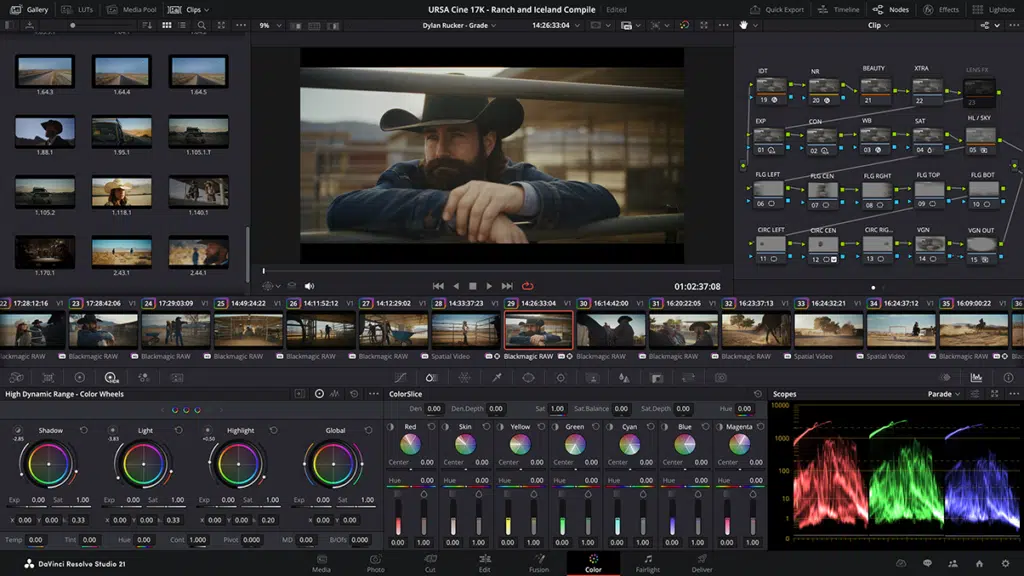
The Color page update is centered on better multi-deliverable grading. Blackmagic’s new MultiMaster Trim Manager lets colorists create multiple HDR and SDR trim passes from a single timeline, using the main node graph as the hero grade and layering output-specific trims on top for deliverables such as HDR 1000 and SDR Rec.709. That is a meaningful workflow upgrade for facilities finishing multiple versions from one master.
Blackmagic also improved isolation workflows. The new Magic Mask render-in-place path lets users render Magic Mask results as an external matte node, turning AI masking into a reusable alpha source for grading and effects while reducing processing overhead during active work.
Node organization is another major theme. Resolve 21 adds clip-group grade versioning, a new layer-list representation of the node graph, and up to eight node-stack layers instead of four. The new layer-list view is designed to make larger graphs easier to read, lock, bypass, relabel, and manage.
For stills and color-managed workflows, Blackmagic also added Adobe RGB colorspace and gamma support for the Photo page, a new Aurora preset and Fade Rolloff controls in Film Look Creator, HDR Vivid workflow improvements, and better ACES AMF sidecar handling. Those changes matter because they strengthen the Color page’s relevance not only for cinema and HDR finishing, but also for photography and multi-format color pipelines.
DaVinci Resolve 21 Fusion page new tools and workflow upgrades
Fusion receives one of the broadest technical updates in Resolve 21. Official materials say Blackmagic integrated the Krokodove toolset directly into Fusion and Resolve’s effects ecosystem, substantially expanding the built-in motion-graphics and compositing toolkit. Blackmagic’s summary page describes this as over 70 new graphics additions, while the detailed guide characterizes the integration as more than 100 new motion-graphics effects and tools.
Macro building is also much more workflow-friendly. The New Features Guide says the Macro Editor now includes a live Inspector preview, drag-and-drop control ordering, nested disclosures, separators, and a Copy Macro function that lets artists test unfinished macros directly in the node tree without a save-import loop. Blackmagic also lets finished macros be saved as Edit templates for Cut and Edit pages.
Audio-driven animation is newly native. Blackmagic’s Fairlight Animator modifier connects Fusion controls to Fairlight audio analysis, allowing levels from timeline clips or Media Pool sources to drive numerical parameters automatically. For template builders and title artists, that opens a faster path to music-reactive or speech-reactive motion graphics.
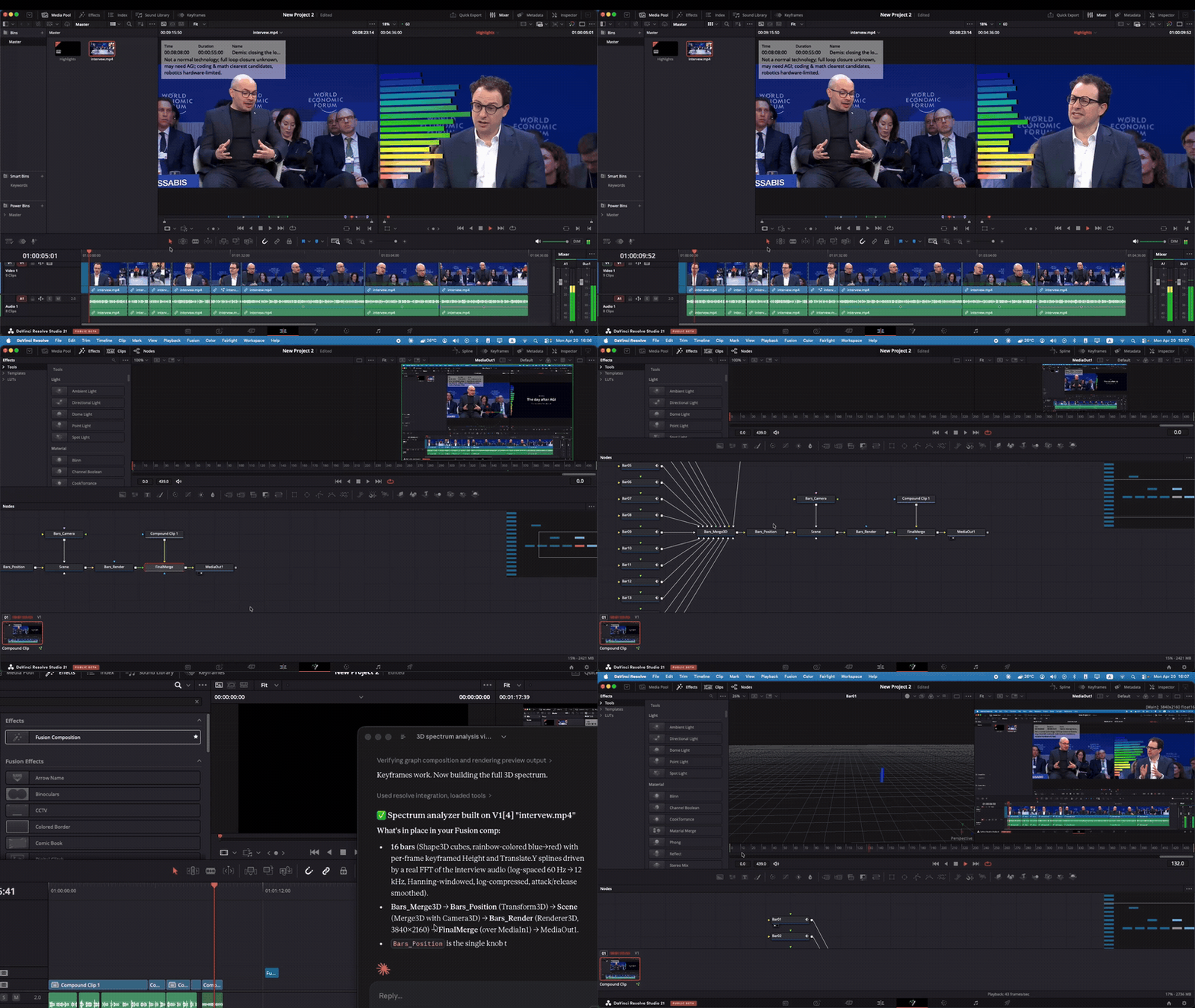
Blackmagic also advanced Fusion’s 3D and USD environment. The update brings USD SDK 25.11 with Hydra 2.0 for the Storm renderer, adds 3D matte-object and texture controls, and introduces uProjector and uCatcher tools for projecting imagery onto USD geometry and converting those projections into usable textures. Additional workflow gains include clip names on MediaIn nodes, undocked keyframe and spline editors, faster Relight and Depth Map tools, remote monitoring for Fusion previews, and a new AI-powered SpeedWarp retiming node.

DaVinci Resolve 21 Fairlight audio improvements explained
Fairlight’s headline update is folder-based track management. Blackmagic now lets users assign audio tracks to folders, collapse them into composite views, solo or mute entire groups at once, and even nest folder tracks up to three levels. For larger documentary, narrative, or broadcast sessions, that is a meaningful navigation and timeline-density improvement.
Resolve 21 also improves clip-level audio shaping. Blackmagic added 6-band Clip EQ across the Cut, Edit, and Fairlight pages, and introduced EQ Match and Level Matcher so clips can be shaped against reference material more quickly and intercut more consistently. The new Chain FX feature allows users to bundle groups of plug-ins into reusable effect chains with presets.
Even navigation got attention. The New Features Guide says pressing the C key on the Fairlight page now snaps the playhead to the pointer position, matching the Edit page behavior and speeding up movement inside longer timelines. That is a small change, but exactly the kind of muscle-memory improvement that matters in daily audio work.
DaVinci Resolve 21 media management and subtitle workflow updates
Resolve 21 improves media organization in ways that touch both video and stills. Blackmagic added star-rating and tagging columns in the Media Pool, made ratings available to still photos from multiple Photo page controls, introduced Smart Bin views to the Cut page, and allowed per-bin persistence for thumbnail, list, and metadata views. These changes make culling and filtering more consistent across pages.
Blackmagic also expanded asset-management utilities. The New Features Guide says Media Pool bins can now be exported as PDF contact sheets, and custom metadata fields can be reused as Smart Bin criteria, clip filters, data burn-ins, and naming tags. Together, those features make Resolve 21 more suitable for assistant-editor and post-supervision workflows that rely on metadata discipline rather than purely visual browsing.
Subtitle workflows are meaningfully better too. Blackmagic added find-and-replace inside the Subtitle Inspector, making it possible to search and replace across an entire subtitle track. It also added word-timing analysis for manually entered or imported captions, which means word-level highlighting no longer depends entirely on captions generated inside Resolve itself.
Is DaVinci Resolve 21 public beta worth installing right now
For existing Resolve users, hybrid creators, and color-focused photographers, the answer is often yes. The Photo page is a genuinely significant addition, the AI toolset is broader and more useful than a gimmick feature dump, and the Cut, Color, Fusion, Fairlight, and media-management updates all solve real workflow problems. Early hands-on coverage also suggests the biggest gains will come for users who already think in Resolve’s editing and grading vocabulary and now want their stills workflow in the same environment.
For production-critical systems, the answer is more cautious. Blackmagic itself is still labeling the release as a public beta, and early photo-focused testing described the new stills workflow as promising but imperfect, with a notable learning curve and some practical limitations for photographers whose preferred cameras or established app habits do not map neatly into Resolve yet.
The most defensible recommendation, therefore, is that DaVinci Resolve 21 public beta is worth installing now for evaluation, look development, and secondary-workflow experimentation, but not yet the automatic choice for every mission-critical production environment. The value is already obvious. The risk profile is still beta.

Frequently Asked Questions (FAQs)
- When was DaVinci Resolve 21 officially announced?
Blackmagic Design’s official announcement is dated April 14, 2026, and it says the public beta was available immediately from the company website. - Is DaVinci Resolve 21 public beta free to download?
Yes. Blackmagic offers a free DaVinci Resolve 21 build and a paid DaVinci Resolve Studio 21 build, and the support-center search results currently surface both beta packages. - Does the free version include the new Photo page?
Blackmagic markets DaVinci Resolve 21 itself as the all-in-one app that now includes photo editing, while Studio adds AI Neural Engine features and other higher-end extras. That means the Photo page is part of the Resolve 21 platform, not a Studio-only concept. - Can DaVinci Resolve 21 import Lightroom catalogs?
Yes. Blackmagic’s Photo page documentation says users can import from Lightroom, and the New Features Guide specifically lists “Import from Lightroom” as a Photo page import option. - Can DaVinci Resolve 21 import Apple Photos libraries?
Yes, with an important detail: official documentation says Apple Photos import exists, and the New Features Guide specifies “Import from Photos” on macOS. - Which cameras support tethered capture in the beta?
Blackmagic’s promotional material centers tethered capture on Canon and Sony, and the beta notes in the New Features Guide say that only Canon and Sony are currently supported for tethered live capture in this beta. - What can IntelliSearch search for?
Blackmagic says IntelliSearch can search by objects, people, faces, and dialog keywords, and the guide adds that searches can also target transcript-only content, metadata fields, colors, camera numbers, and specific lines of dialog. - What are the standout new AI tools in DaVinci Resolve 21?
The most prominent additions are IntelliSearch, AI Speech Generator, CineFocus, Face Age Transformer, Face Reshaper, Blemish Removal, Slate ID, UltraSharpen, and Motion Deblur. Blackmagic also extends some AI features into still-photo workflows. - Is DaVinci Resolve 21 already a true Lightroom and Photoshop replacement?
Not for everyone. Resolve 21 now covers much more of the cataloging, RAW, grading, masking, and export workflow, but early reviews still describe it as a powerful hybrid alternative rather than a universal one-for-one replacement for every traditional photo-only workflow. - Should professional users install DaVinci Resolve 21 public beta on a main production machine?
A cautious approach is more defensible. The release is still labeled as a public beta, and early testing suggests it is compelling enough to evaluate now but not automatically the safest choice for every production-critical system.

Conclusion
DaVinci Resolve 21 public beta is a consequential release because it expands Resolve in two directions at once. First, it makes still-image work native through the new Photo page, bringing RAW handling, library tools, albums, tethering, and node-based grading into the main application. Second, it deepens Resolve’s existing strengths with new AI tools, better Cut and Edit control, stronger Color workflows, a materially upgraded Fusion toolset, and more scalable Fairlight and media-management features.
The result is not that Resolve 21 instantly replaces every Lightroom, Photoshop, or facility-grade finishing workflow. The result is that Blackmagic has made Resolve a much more credible all-in-one platform for hybrid creators and post teams who want consistent color language, fewer app handoffs, and increasingly intelligent search and automation tools. In public beta form, that makes DaVinci Resolve 21 one of the most ambitious post-production releases of the year.
Sources and Citations
- Blackmagic Design announcement
https://www.blackmagicdesign.com/media/release/20260414-01 - Official DaVinci Resolve download page
https://www.blackmagicdesign.com/event/davinciresolvedownload - Blackmagic Design Support Center / beta listings
https://www.blackmagicdesign.com/support - DaVinci Resolve 21 New Features Guide PDF
https://documents.blackmagicdesign.com/SupportNotes/DaVinci_Resolve_21_New_Features_Guide.pdf - The Verge — DaVinci Resolve 21 photo tools vs Lightroom/Photoshop
https://www.theverge.com/tech/911635/blackmagic-design-davinci-resolve-21-photo-page-raw-support - Digital Camera World — DaVinci Resolve 21 still photo support
https://www.digitalcameraworld.com/photography/photo-editing/the-color-grading-tool-used-by-hollywood-now-supports-still-photos-and-its-free-davinci-resolve-21-works-with-both-photos-and-videos - Fstoppers — DaVinci Resolve 21 Photo Page review/analysis
https://fstoppers.com/reviews/adobe-should-be-worried-davinci-resolve-21-just-launched-photo-page-901652 - Engadget — DaVinci Resolve 21 hands-on
https://www.engadget.com/apps/davinci-resolve-21-hands-on-a-viable-lightroom-alternative-for-casual-users-160520123.html - Newsshooter — DaVinci Resolve 21 Photo Page preview
https://www.newsshooter.com/2026/04/21/blackmagic-design-davinci-resolve-21-photo-page-preview-nab-2026/
Recommended
- Screamer Review: What It Is, How It Works, and Why It Still Scares People Online
- Palworld Horror-Themed Dating Sim Spinoff Is Real: What We Know About More Than Just Pals
- Michael Jackson Movie Reportedly Ends During Bad Tour After Child Abuse Allegations Were Cut and $15 Million Reshoots Changed the Third Act
- How do I make the camera follow a path in Blender?
- How to Render Anime Style Art in Blender: A Complete Guide for Stylized 3D Renders
- Optimizing Blender Camera Settings with The View Keeper Add-on
- Capcom Addresses The Street Fighter 6 Incest Storyline Fans Have Been Losing Their Minds Over
- PlayStation Portal Guide (2026): Setup, Remote Play Tips, Cloud Streaming, and Troubleshooting



























































































