







In This Article (12 sections)
Forza Horizon 6 PC System Requirements (Official Overview)
Forza Horizon 6 is designed for high scalability, supporting everything from older handhelds to high-end enthusiast rigs. The game aims for a stable 60 FPS on modest systems while offering advanced features like ray-traced reflections, global illumination, and support for ultrawide monitors and uncapped framerates. It utilizes the latest upscaling technologies, including Nvidia DLSS 4, AMD FSR 3/4, and Intel XeSS 2.1.
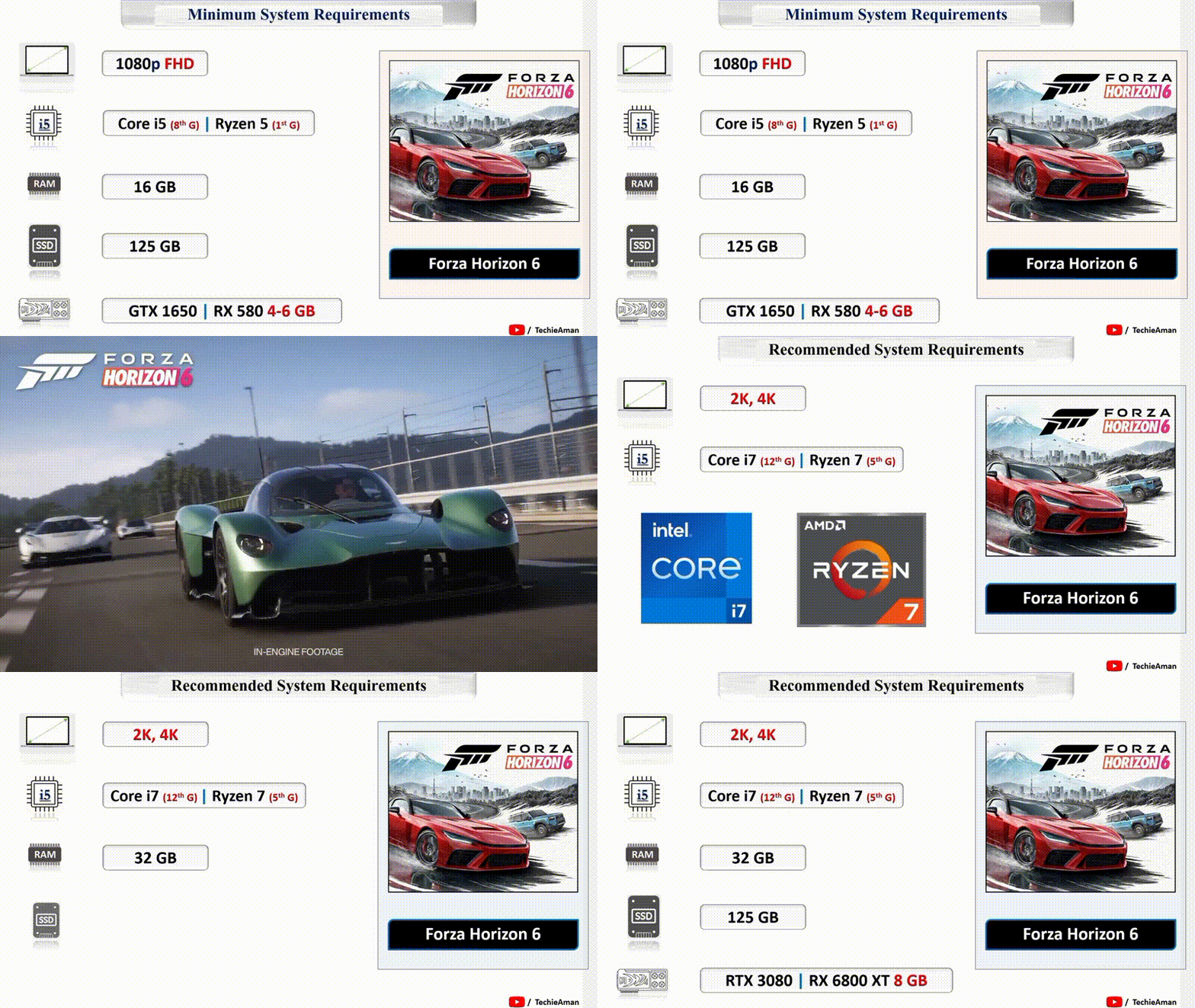
Forza Horizon 6 Minimum PC Specs (1080p | 60 FPS | Low Settings)
The minimum requirements target a playable 1080p experience on Low presets. A 6-core CPU is the baseline requirement.
- OS: Windows 10 22H2 (build 19045) or higher (64-bit)
- CPU: Intel Core i5-8400 OR AMD Ryzen 5 1600
- Memory: 16 GB RAM
- GPU: Nvidia GeForce GTX 1650, AMD Radeon RX 6500 XT, OR Intel Arc A380
- DirectX: Version 12
- Storage: SSD required
- Network: Broadband Internet connection
Forza Horizon 6 Recommended PC Specs (1440p | 60+ FPS | High Settings)
The recommended tier is the “sweet spot” for most gamers, targeting 1440p resolution at High settings.
- OS: Windows 10 22H2 or higher (64-bit)
- CPU: Intel Core i5-12400F OR AMD Ryzen 5 5600X
- Memory: 16 GB RAM
- GPU: Nvidia GeForce RTX 3060 Ti, AMD Radeon RX 6700 XT, OR Intel Arc A580
- DirectX: Version 12
- Storage: SSD
CPU Requirements and Best Processors
Forza Horizon 6 is well-optimized and generally more GPU-bound at higher resolutions. A modern 6-core processor is sufficient for most users.
- Baseline: A 6-core CPU is required; older 4-core CPUs fall below the official minimum.
- High Frame Rates: For 120 FPS or ultrawide gaming, an Intel Core i5-13600K or AMD Ryzen 7 7800X3D provides the necessary overhead.
- Extreme Tier: The highest settings list an Intel Core i7-12700K or AMD Ryzen 7 7700X. A Core i9 is not strictly necessary.

GPU Requirements and Best Graphics Cards
Graphics requirements vary significantly based on the desired resolution and ray tracing features:
- 1080p High: Upgrading to an RTX 3060 or RX 6600 provides a comfortable experience.
- 4K Ultra (No RT): Requires high-end cards like the Nvidia RTX 4070 Ti or AMD RX 7900 XT.
- 4K Extreme RT: This tier is future-proofed for next-gen hardware like the RTX 5070 Ti or RX 9070 XT. Current flagships like the RTX 4090 will likely require DLSS 4 or FSR 3/4 to maintain 60 FPS with full Ray Tracing.
RAM Requirements: Is 16GB Enough?
The minimum RAM requirement has doubled from the previous title.
- 16 GB: The baseline and recommended amount for 1080p and 1440p gaming.
- 24–32 GB: Recommended for Extreme and Extreme RT tiers to handle 4K textures and heavy multitasking.
- Note: 8 GB systems are no longer supported and will likely face crashes or severe stuttering.
SSD Requirement: Storage Type and Install Size
For the first time in the series, an SSD is mandatory due to the asset-dense representation of Japan and Tokyo.
- Why SSD: Mechanical HDDs cannot stream data fast enough for the dense game world, leading to texture pop-in and stuttering.
- Type: SATA SSDs meet the requirement, but NVMe SSDs are recommended for the Extreme tier for seamless streaming.
- Install Size: Expect a footprint of 100–130 GB, with additional space needed for expansions.
Windows Requirements: Windows 10/11 Version Needed
The game requires a modern, 64-bit environment to support DirectX 12 libraries.
- Windows 10: Must be version 22H2 (build 19045) or newer.
- Windows 11: Fully supported; ensure all cumulative updates are installed.
- Unsupported: Windows 7 and 8.1 are not supported as they lack DirectX 12 Ultimate capabilities.
In summary, running FH6 via Game Pass on PC means:
- Update your Windows to meet the OS requirement (Win10 22H2 or Win11).
- Meet the hardware specs (16GB RAM, etc.). If not, consider an upgrade or plan to use cloud streaming as a fallback.
- Use the Xbox app to download and launch the game. Pre-install if possible.
- Enjoy on release day just as any purchaser would – Game Pass doesn’t limit any features; you get the full Standard Edition experience with online multiplayer, cross-play, etc.
Summary of spec differences:
- CPU: FH6 expects ~2018 or newer 6-core CPU for min (vs FH5 could run on 2014-era quad-core for min). Recommended jumped from entry 6-core/4-core to high-clock 6-core.
- GPU: FH6 min GPU similar class as FH5’s recommended GPU (GTX 1650 ~ GTX 970/1070 in between). FH6 recommended GPU is ~2x FH5’s in performance (3060 Ti vs 1070).
- RAM: doubled from 8→16GB minimum.
- Storage: SSD required for FH6, was optional for FH5 (but FH5 players know it ran much better on SSD). So now it’s mandatory.
- Other features: FH6 adds real-time ray tracing during gameplay, which FH5 didn’t have (only in photo mode). That alone pushes requirements up for those who enable it. FH6 also supports frame generation tech (DLSS FG, FSR 3) to help meet those high-end demands – something irrelevant to FH5.
Now that we’ve covered everything about Forza Horizon 6’s PC specs, you should have a clear idea of how to get your system ready for the upcoming ride. From making sure you have enough RAM and an SSD, to considering a GPU/CPU upgrade if you want to crank up the settings, preparation is key.
Whether you’re optimizing a current rig, building a new one, or simply updating drivers and Windows, a little tune-up will ensure you hit the roads of Japan with no technical pit stops. Forza Horizon 6 is raising the bar, but with the tips and information above, you’ll be well-equipped to meet those demands and fully enjoy what this next chapter of the Horizon Festival has to offer.

Frequently Asked Questions (FAQs)
- Can I run Forza Horizon 6 on 8GB of RAM?
No. 8GB of RAM is below the minimum requirements. The game requires at least 16GB of system RAM to accommodate its expansive open world and detailed assets. Attempting to run it on 8GB will likely result in the game refusing to launch or crashing due to memory exhaustion. Upgrading to 16GB (dual-channel 2×8GB sticks) is highly recommended for smooth performance. - Does Forza Horizon 6 support ray tracing during gameplay on PC?
Yes. Unlike its predecessor, Forza Horizon 6 features ray-traced reflections and global illumination during actual gameplay on PC. This is enabled via the “Extreme RT” preset. Because ray tracing is demanding, the use of upscaling technologies like DLSS 4 or FSR 3 with frame generation is suggested to maintain 60+ FPS at 4K resolution. Players can disable these features to prioritize higher frame rates. - Is 4GB of VRAM enough for Forza Horizon 6 at low settings?
4GB of VRAM meets the absolute minimum requirement. GPUs such as the GTX 1650, RX 6500 XT, and Arc A380 can handle the game at 1080p on Low settings. However, 4GB can become a bottleneck if texture quality or resolution is increased, leading to stutters. While 4GB works for minimum specs, 8GB of VRAM is considered the safer amount for consistent performance. - Will my laptop with an RTX 3060 Laptop GPU and 16GB RAM run FH6?
Yes. A gaming laptop with an RTX 3060 Mobile GPU, 16GB of RAM, and a modern 6-core CPU meets the recommended specification bracket. You can expect to achieve approximately 60 FPS at 1080p High or 1440p Medium settings, especially with DLSS enabled. Users should ensure the game is installed on an SSD and monitor thermals during long sessions to prevent throttling. - Do I need Windows 11 to play Forza Horizon 6?
No. Windows 11 is not required, but Windows 10 users must be on version 22H2 (build 19045) or higher. Both operating systems support the DirectX 12 Ultimate API used by the game. Windows 7 and 8 are not supported. - How will Forza Horizon 6 perform compared to Forza Horizon 5 on the same PC?
Forza Horizon 6 is more demanding than its predecessor. Hardware that achieved 60 FPS on High settings in FH5 may require lower settings or produce lower frame rates in FH6. For example, FH6 requires 16GB of RAM and an RTX 3060 Ti to match the performance bracket previously occupied by 8GB of RAM and a GTX 1070. - Is Forza Horizon 6 playable on the Steam Deck or other handhelds?
Yes, but with reduced settings. The Steam Deck can target 30–40 FPS at native 800p resolution on Low settings. The ASUS ROG Ally, featuring the Z1 Extreme APU, can likely reach 60 FPS on Low at 720p–1080p using FSR upscaling. These devices meet the core requirements of 16GB RAM and an SSD. - Does FH6 require an internet connection on PC (always-online)?
An internet connection is not required for single-player gameplay once the game is installed and updated. However, a connection is necessary for:- Initial installation and activation.
- Downloading the day-one patch.
- Accessing online features like multiplayer (Horizon Life), convoys, leaderboards, the Auction House, and user-created content.
- What graphics settings should I lower first if I need more FPS?
To boost performance, adjust these “heavy hitter” settings first:- Ray Tracing: Turning this off provides the largest performance gain.
- Shadows and Reflection Quality: Lowering these can net a 5–10% improvement.
- Shader Quality: Reducing this significantly boosts FPS at the cost of lighting fidelity.
- Upscaling: Enabling DLSS or FSR on “Quality” mode can improve FPS by 20–30%.
- Ambient Occlusion: Lowering SSAO from Ultra to High/Medium saves frames.
- Will my progress carry over between Xbox and PC versions of FH6? Yes, through cross-save support, provided you stay within the Microsoft ecosystem.
- Microsoft Store/Xbox App and Xbox Console: Saved progress synchronizes seamlessly via the Xbox cloud.
- Steam Version: Progress is saved to the Steam Cloud and does not synchronize with the Xbox/Microsoft Store versions. Multiplayer cross-play is supported across all platforms regardless of where the save data is stored.

Conclusion
Forza Horizon 6 is gearing up to be one of the standout racing titles of 2026, and being prepared on the PC side will ensure you enjoy every mile to the fullest. In this article, we covered how the game’s PC system requirements have scaled up from its predecessor and what that means for your hardware. The official specs reveal a game that is ambitious but also optimized – it will run on a wide range of rigs thanks to scalable settings and the inclusion of cutting-edge features like DLSS 4 and FSR 3 for boosting performance. At the same time, to unlock the very best experience (4K, ultra settings, ray tracing), you’ll need a correspondingly powerful setup.
Key takeaways:
- Meet or exceed the minimums: 16 GB of RAM, a 6-core CPU, and an SSD are absolute must-haves. These will give you a baseline 1080p60 experience and ensure the game loads and streams properly. If you haven’t upgraded from 8GB RAM or still run games off an HDD, now’s the time – not just for FH6, but many modern titles.
- Aim for recommended for a smooth ride: The recommended spec (e.g., Core i5-12400F + RTX 3060 Ti) is tuned for 1440p 60fps at high settings. Hitting this level means you’ll likely enjoy FH6 at its “best value” configuration – great visuals and solid performance. If your current PC meets or slightly exceeds this, you’re in good shape. If not, consider the upgrade tips we provided (for instance, moving from a GTX 1660 to an RTX 3060 Ti, or from a Ryzen 2600 to a Ryzen 5 5600) to bridge that gap.
- Utilize PC-specific features: Horizon 6 on PC comes with perks like an uncapped framerate, ultrawide monitor support, and user-adjustable graphics settings. Don’t hesitate to tweak settings to your liking – if you have extra headroom, maybe you push for 90 or 120 fps; if you need more fps, leverage those upscalers (DLSS/FSR) and graphics options to optimize performance. As we discussed, settings like shadows, reflections, and shaders can be tuned for big performance returns.
- Plan for the future: The bump in specs from FH5 to FH6 signals where games are headed. Investing in 32GB RAM or a GPU with >8GB VRAM might not only help FH6 (especially if you run Extreme settings), but also future-proof you for upcoming titles. Likewise, a strong PSU and cooling will support potential upgrades down the line. Essentially, building your PC with FH6’s upper range in mind (if budget allows) means you’ll be ready for other advanced games in 2026 and beyond.
- Check your PC against our build guides: We provided both a budget build and a high-end build outline. See where your system falls. Maybe you already have something close to the high-end – then you can expect ultra-smooth gameplay with everything maxed. If you’re closer to the budget build or below it, use our suggestions to prioritize upgrades: for example, an SSD and more RAM offer huge quality of life improvements and are relatively affordable upgrades that directly align with FH6’s requirements.
In the end, Forza Horizon 6 promises to be an amazing open-world racing experience on PC, delivering the series’ trademark gorgeous graphics and smooth performance across a wide spectrum of hardware. Whether you’re cruising with a gamepad on your living room PC or pushing the limits with a racing wheel and triple-monitor setup, knowing your system’s strengths (and perhaps shoring up any weaknesses now) will pay off on launch day. With the release date set and the specs in hand, you have all the info needed to get your PC “race-ready.”
So tune up those PCs, clear some drive space, and maybe upgrade that GPU driver while you’re at it. Japan’s breathtaking roads – from Tokyo’s neon-lit highways to Mount Fuji’s winding passes – await you. Here’s to hitting the Horizon Festival in style and performance – see you at the starting line on May 19, 2026!

Sources and Citations
- PC Gamer – “The Forza Horizon 6 system requirements are in and it’s good news for older PCs and handhelds”
https://www.pcgamer.com/games/racing/the-forza-horizon-6-system-requirements-are-in-and-its-good-news-for-older-pcs-and-handhelds/ - Traxion.GG – “Forza Horizon 6 minimum system requirements”
https://traxion.gg/forza-horizon-6-system-requirements-reveal-top-spec-ray-tracing-tier/ - Overclock3D – “Is your PC ready for Forza Horizon 6? PC Requirements Released”
https://overclock3d.net/news/software/is-your-pc-ready-for-forza-horizon-6-pc-requirements-releases/ - Overclock3D – “Here’s what you need to run Forza Horizon 6 on PC”
https://overclock3d.net/news/software/heres-what-you-need-to-run-forza-horizon-6-on-pc/ - TechSpot – “Forza Horizon 6 PC requirements include the Intel Arc B390 iGPU”
https://www.techspot.com/news/111059-forza-horizon-6-pc-requirements-include-intel-arc.html - Digital Trends – “Forza Horizon 5 performance guide: best settings for high FPS”
https://www.digitaltrends.com/computing/forza-horizon-5-best-settings-performance-guide/ - Reddit – r/ForzaHorizon thread on FH6 vs FH5 specs
https://www.reddit.com/r/ForzaHorizon/comments/1s3dw9s/pc_system_requirements_for_forza_horizon_6/ - Official Forza Support FAQ (March 25, 2026)
https://support.forzamotorsport.net/ (official support hub — FH6 FAQ is hosted/updated here) - Xbox.com announcement – “Forza Horizon 6 – Available May 19th on Xbox and with Game Pass”
https://www.xbox.com/en-US/games/forza-horizon-6 - Forza Forums discussion – FH6 optimization / handheld scalability
https://forums.forza.net/t/forza-horizon-6-pc-specs-performance-targets-and-features/806615
Recommended
- Devil May Cry Anime on Netflix: Release Date, Storyline, Cast, and What to Expect
- Musgrave Texture Removed in Blender 4.1 – Workarounds and Alternatives
- The Debate Over Arcane’s Animation Style
- Wanderstop Developer Ivy Road Is Shutting Down: Why the Studio Closed
- How to Craft Improved Fins in Subnautica 2 (Blueprint, Materials, and Fastest Route)
- Idris Elba Says He Was Never in the Race to Play James Bond
- EVE Online Studio Goes Indie in “New Era” Rebrand: Fenris Creations, Google DeepMind AI Partnership, and What It Means for EVE Online
- The House of Hikmah Guide: Beginner Tips, Puzzle Mechanics, Story Themes, and How Long It Takes to Beat
- Crimson Desert Reveals Console Specs, Some Compromises on PS5 Explained