






In This Article (17 sections)
What is the FrameRef Reference Board App and What Does it Do
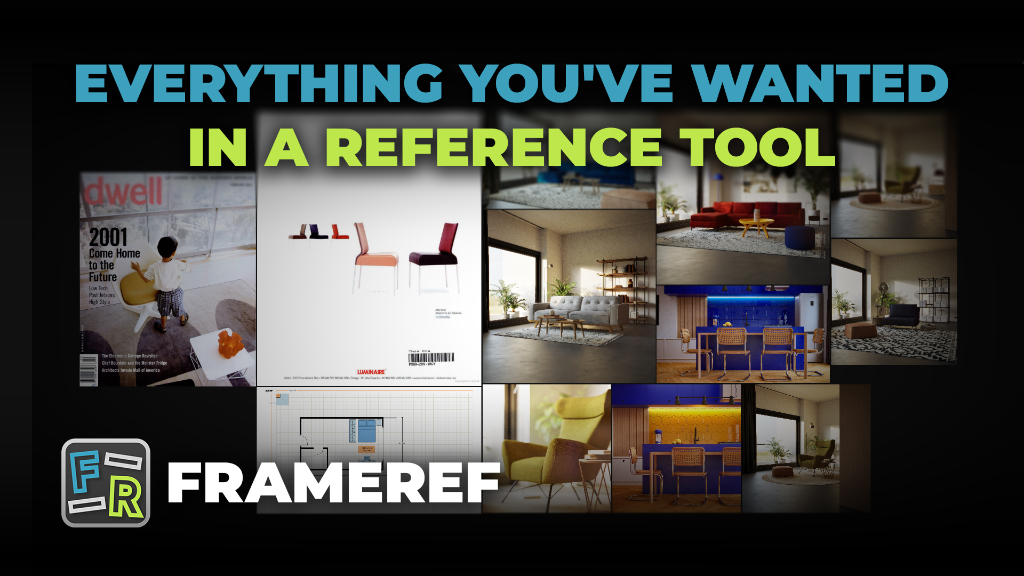
FrameRef is a standalone application designed for creative professionals to organize visual inspiration on an infinite virtual canvas. It consolidates images, videos, GIFs, and PDFs into a single workspace, eliminating the need to toggle between folders and browsers. Key aspects include:
- Target Audience: Concept artists, 3D modelers, photographers, and designers.
- Core Function: It acts as a “persistent visual scratchpad” that can float over other creative software (like Photoshop or Blender), keeping references visible during the workflow.
Polygonflow FrameRef App: How it Relates to the Dash Unreal Engine Plugin
FrameRef originated as an internal feature of Dash, a world-building plugin for Unreal Engine. Polygonflow extracted this image board component to create a dedicated, more affordable standalone tool.
- Independence: Unlike Dash, FrameRef does not require Unreal Engine to run.
- Proven Tech: Because it stems from a mature plugin, the application features a stable and professional-grade toolset from its initial release.
FrameRef Supported Formats: Images, Videos, GIFs, and PDFs on One Canvas
The app distinguishes itself through broad format support, allowing diverse media to exist side-by-side:
- Static Media: Standard images (JPEG, PNG, TIFF, BMP, WebP).
- Documents: Multi-page PDF files.
- Motion Media: Animated GIFs and full video files.
- Unified Hub: All formats are treated equally on the canvas, removing the need for separate media players or document readers.

FrameRef Infinite Canvas Reference Board: How the Workspace Works
The workspace is an infinite canvas with no fixed boundaries, allowing users to arrange hundreds of items.
- Navigation: Users can freely pan and zoom. Panning and focus controls allow for quick navigation across large, dense boards.
- Layout: The canvas is a minimal, distraction-free sandbox with no enforced rules, supporting both structured grids and freeform collages.
How to Import Reference Images into FrameRef from Files, Browser, and Clipboard
FrameRef offers several seamless import methods to maintain creative flow:
- Drag-and-Drop: Directly from local file explorers or web browsers (ArtStation, Pinterest, etc.).
- Clipboard: Users can paste images (Ctrl+V) directly from screenshots or other apps.
- Direct URLs: Copying and pasting a media link will prompt the app to fetch the content automatically.
How to Drag and Drop YouTube Videos into FrameRef
A standout feature is the ability to embed online video content directly:
- Supported Platforms: YouTube, X (Twitter), and Twitch.
- Integrated Downloader: FrameRef fetches the video from the URL and places a playable object on the canvas.
- Workflow: This eliminates the need to keep browser tabs open for motion references or tutorials.

FrameRef Video Reference Tools: Playback Controls, Trimming Clips, and Capturing Frames
Videos in FrameRef are “first-class citizens” with dedicated tools:
- Playback: Standard scrub, play/pause, and volume controls.
- Trimming: Users can set in/out points to isolate specific segments (e.g., a 10-second animation loop).
- Frame Capture: A single click captures a high-resolution still from the video and places it as an image on the board for closer study.
FrameRef Always on Top Mode: Keeping References Visible While You Work
To prevent window-switching, FrameRef includes an “Always on Top” toggle.
- Function: This forces the FrameRef window to float above all other software (ZBrush, Maya, etc.).
- Customization: The window can be resized or positioned to act as a peripheral guide, functioning like a physical reference sheet pinned to a monitor.
FrameRef Organization Features: Tagging, Grouping, Snapping, and Grid Alignment
To manage large collections, the app provides several organizational tools:
- Tagging: Assign keywords to filter and search for specific subsets of references.
- Grouping: Cluster items together to move or transform them as a single unit.
- Snapping: Optional grid and element snapping to ensure clean, professional layouts.
FrameRef Annotation Tools: Notes, Text Labels, Arrows, Shapes, and Drawing
FrameRef functions as an active ideation space with built-in markup tools:
- Text & Labels: Place notes directly on the canvas near relevant images.
- Visual Markup: Use arrows, lines, and basic shapes (circles/rectangles) to highlight relationships or specific details.
- Freehand Drawing: Scribble or sketch directly on the canvas to outline forms or jot down quick ideas.
FrameRef Non-Destructive Transforms: Crop, Rotate, Flip, and Scale References
All manipulations in FrameRef are non-destructive, meaning the original file remains untouched:
- Transformations: Users can scale, rotate, and flip (mirror) images or videos.
- Cropping: Focus on specific details by hiding the rest of the image; this can be reset at any time to show the full original.
How to Export a FrameRef Board or Selection at Full Resolution
Users can convert their digital boards into shareable assets:
- Full Resolution: Exports use the original source quality, ensuring no pixelation.
- Flexible Scope: Users can export the entire infinite canvas or just a specific selection/cluster of items as a PNG or JPEG.
How FrameRef Boards Are Saved: Standard Media Files Plus a JSON Data File
Unlike apps that use a single proprietary binary file, FrameRef saves boards in an open format:
Longevity: This approach prevents “proprietary lock-in,” ensuring assets remain accessible even without the application.to your specific workflow needs: if you need dynamic content and richer organization, FrameRef wins out; if you need ultimate simplicity, cross-platform right now, and a pay-what-you-want model, PureRef remains a solid pick.
Media Folder: The images, videos, and PDFs are saved as standard, accessible files in a project folder.
JSON File: A human-readable text file acts as a “blueprint,” storing positions, sizes, tags, and annotations.
In summary, FrameRef’s main alternatives are PureRef and BeeRef for similar functionality, Eagle for heavy asset management with tagging, Milanote (or other online tools like Miro/FigJam) for collaboration, and a few niche apps for specific needs (like VizRef on iPad). Many artists might use a combination: e.g., PureRef/BeeRef when on Linux or for quick tasks, FrameRef for advanced boards with video, and Milanote when sharing with clients. The best choice depends on whether you prioritize features like video support, tagging, offline speed, collaboration, or platform compatibility.
Given the landscape, FrameRef finds a sweet spot by introducing new capabilities (videos, tagging) while keeping a one-time purchase model. But it’s always wise to evaluate a couple of these tools to see what fits your personal workflow. The good news is most of these have free versions or trials, so you can test PureRef’s simplicity versus FrameRef’s features, for example, and proceed with what makes you most productive.

Frequently Asked Questions (FAQs)
- Is FrameRef free to use?
FrameRef offers a free 30-day trial with all features unlocked. After 30 days, you need to purchase a license to continue using it. The license is a one-time purchase (perpetual) for $19 USD as the launch price. In short, it’s free to try for a month, and then it’s a paid app (with a relatively low one-time cost). - What operating systems does FrameRef support?
As of the initial release, FrameRef is available on Windows only. Polygonflow has stated that versions for macOS and Linux are in development and planned for future release. So currently Windows users can run it natively; Mac and Linux users will need to wait for official support (or use workarounds in the meantime). - Can FrameRef import YouTube or online videos as references?
Yes. One of FrameRef’s unique features is the ability to import online videos. You can paste or drag a YouTube, Twitch, or Twitter (X) video URL directly into FrameRef, and the app will download and display the video on your canvas. You can then play the video inside FrameRef, trim it, and even capture still frames from it. This eliminates the need for external video players or manual downloading when using video references. - Does FrameRef support collaborative boards or cloud syncing?
No, not at this time. FrameRef is currently designed for a single user on a local machine. Boards are saved locally (as media files + a JSON layout file). There’s no built-in cloud sync or multi-user collaboration feature in version 1.0. If you need to share a board with someone, you would have to send them the board files (or export an image of the board). Collaborative online tools like Milanote or Miro would be alternatives for shared boards. Polygonflow’s roadmap hasn’t highlighted collaboration yet, focusing first on core features and cross-platform support. - How does FrameRef handle saving and file formats?
FrameRef saves boards by storing the original media files and a JSON data file in a folder. It does not use a proprietary single-file format. For example, if you make a board, FrameRef will save each image, GIF, video, PDF in its original format, and create a .json file that records the arrangement (positions, tags, notes, etc.). This means your references remain easily accessible outside the app, and the board’s structure is documented in plain text. It’s a transparent system, no locked-in binary project file. - Can I use FrameRef and PureRef together or import PureRef boards into FrameRef?
FrameRef and PureRef are separate programs and don’t have a direct import/export compatibility for whole boards (as of now). You cannot open a .pur PureRef board file in FrameRef, because FrameRef expects its own JSON format. However, you can of course manually recreate a board by dragging the same images into FrameRef. Using them together concurrently is possible (they won’t conflict), but generally redundant. Many artists will choose one workflow or the other for a given project. If you have existing PureRef boards, you might keep PureRef for those, and start new projects in FrameRef to take advantage of its features. - Does FrameRef allow me to take notes or draw on my reference board?
Yes. FrameRef includes a variety of annotation tools. You can add text notes and labels on the canvas, draw arrows and lines, create basic shapes, and use a freehand pen to draw or highlight directly on the board. These annotations stay as part of your board (not affecting the original images). It’s great for writing ideas or marking specific details on your references. In comparison, PureRef also has a note and drawing feature, but FrameRef provides a more comprehensive set (including things like arrows and multiple shapes). - Will FrameRef slow down or crash with lots of high-resolution images?
FrameRef is designed to handle large boards smoothly, it’s built with GPU acceleration for performance. Users have reported that it provides a fluid experience even with many items. Of course, extremely massive boards (hundreds of super high-res images or long videos) could tax any system. But FrameRef’s architecture should cope better than older tools. It also helps that it keeps original files separate, so it’s not trying to load an entire huge file into RAM at once beyond what’s needed. That said, always save your work regularly. FrameRef 1.0 is new, so if there are memory leaks or issues, they might be addressed in updates. But generally, it’s built to manage visual assets efficiently, likely better or on par with PureRef (which can sometimes lag on huge boards). - Does FrameRef integrate with any 3D or design software (like a plugin)?
No, FrameRef is a standalone application. It does not have direct integration or plugins for other software. For example, it doesn’t sync with Blender or Unreal Engine automatically, nor does it have an API announced for other apps. It’s meant to run alongside your other programs, providing references in an overlapping window. Polygonflow’s other product Dash was an Unreal plugin, but FrameRef itself is separate. The always-on-top mode is the main way it “integrates” into your workflow, by floating over whatever software you’re using. There’s also no indication of version control or pipeline integration features (e.g., it’s not going to link assets into Maya or anything like that). It’s simply a visual reference tool. - What are some alternatives if FrameRef doesn’t meet my needs?
If FrameRef isn’t the perfect fit, there are a few alternatives:- PureRef:the well-known, free/donationware reference board app, great for basic image boards (no video support, but very effective for images), works on all desktop OS.
- BeeRef: an open-source PureRef-like tool that’s cross-platform and free, with similar features and ongoing development.
- Eagle App: a more advanced asset manager (paid) with tagging and browsing, good if you need to organize thousands of images and videos in a library format.
- Milanote or Miro: web-based moodboard and whiteboard tools, useful for collaborating with others online and making pretty boards (though they aren’t floating windows).
- VizRef (iPad): if you work on an iPad, VizRef lets you create reference boards on your tablet while you draw.
Each tool has its own strengths, so the choice depends on whether you prioritize offline use, video support, collaboration, or advanced organization. Some artists even use more than one tool for different jobs.

Conclusion
FrameRef is an exciting addition to the artist’s toolkit in 2026, bringing modern capabilities to the age-old task of collecting inspiration and reference materials. By allowing images, videos, GIFs, and PDFs to live together on an infinite, user-friendly canvas, FrameRef modernizes the concept of a reference board and caters to the needs of concept artists, 3D modelers, illustrators, and designers alike. It builds upon the foundation laid by tools like PureRef, but pushes further with features like direct YouTube video embedding, in-app video playback and frame capture, tagging for organization, and a robust set of annotation tools, all while keeping the software lightweight and accessible (thanks to GPU-acceleration and a very affordable price point).– ×1
The workflow improvements FrameRef offers can be significant: imagine working on a digital painting with a panel of curated images and video clips always on top of your canvas for instant reference. No more switching windows or squinting at a second monitor; FrameRef keeps your inspiration visible and interactive as you create. Its non-destructive transforms and high-resolution export mean you can present reference boards professionally or adapt them as your project evolves, without re-gathering assets repeatedly.
In the end, whether you choose FrameRef or another solution, what matters is that your workflow for handling references becomes efficient and enjoyable, leaving you more time and headspace to focus on creating. FrameRef’s emergence is a positive development for creatives, and it’s certainly worth trying out to see if it elevates your inspiration game. Happy moodboarding!
Sources and Citations
- CG Channel. FrameRef Is a Neat New Reference Board for 3D and Concept Work.
https://www.cgchannel.com/2026/02/frameref-is-a-neat-new-reference-board-for-3d-and-concept-work/ - CGPress. Polygonflow Releases FrameRef Reference Board Tool.
https://cgpress.org/archives/polygonflow-releases-frameref-reference-board-tool.html - Digital Production. Frame Ref Tidies Your Reference Mess.
https://digitalproduction.com/2026/02/05/frame-ref-tidies-your-reference-mess/ - Polygonflow. FrameRef Official Website & Documentation.
https://frameref.app/ - Polygonflow. FrameRef Documentation.
https://polygonflow.notion.site/frameref-documentation - Kosmik Blog. 7 Best PureRef Alternatives in 2025.
https://www.kosmik.app/blog/pureref-alternatives - Libre Arts. Introducing BeeRef – Free/Libre Reference Image Viewer.
https://librearts.org/2021/07/beeref-reference-viewer/ - Yelzkizi. PixelHair.
https://yelzkizi.org/pixelhair/ - Yelzkizi. The View Keeper.
https://yelzkizi.org/the-view-keeper/
Recommended
- Dogpile Coming to Nintendo Switch and Mobile: Release Window, Gameplay Features, and New Update Details
- Witchspire: How to Get Silver, Best Silver Ore Locations and Farming Route
- It’s Official: KPop Demon Hunters is Going on a World Tour, Full Details, Cities, Cast, and What Fans Can Expect
- Devil May Cry’s Dante – Complete Character Guide and Breakdown
- Cinder City PC Requirements: Open-World PvE Shooter Recommends 64 GB of RAM
- RapidPipeline plug-in Substance 3D Painter: CAD Import, One‑Click Data Prep, and Automatic UV Workflows
- Tomb Raider: Legacy of Atlantis Remake Explained, Release Date, Gameplay, Story Changes, and Everything We Know About Lara Croft’s Unreal Engine 5 Reimagining
- Donkey Kong 64 is Back on Nintendo Switch Online: Why the “Most Underappreciated” DK Game Matters Now
- Star Wars: Maul Shadow Lord Season 1, Episodes 1-8 Review: Disney+’s Darkest Animated Star Wars Story Yet
- SAG-AFTRA Do Not Work Order Against Capcom Explained: Mega Man: Dual Override and the Signatory Process



































































































