







Creating realistic hair for game characters is challenging due to the performance limits of real-time engines. The solution used in most games is hair cards, flat polygon strips with hair textures, instead of dense simulated hair strands. In this comprehensive guide, we’ll explainhow to make hair cards in Blender from start to finish.
You’ll learn what hair cards are (and why they’re ideal for real-time engines), how to model and texture them (including baking hair textures in Blender or using tools like FiberShop), how to arrange and layer cards for a natural look, and how to optimize and export your hair to engines like Unreal and Unity. Whether you’re a beginner or experienced artist, this guide covers the Blender hair cards workflow for games with both fundamental steps and advanced tips.– ×2
In This Article (12 sections)
What Are Hair Cards and Why Use Them for Games?
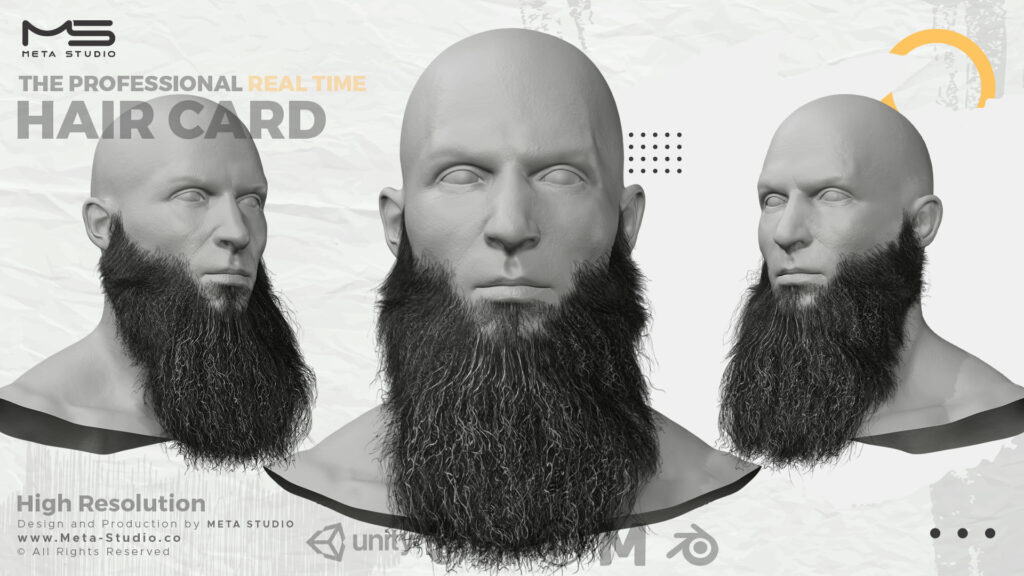
Hair cards are flat polygonal mesh strips with hair textures, including alpha transparency, applied to simulate hair in a performance-efficient manner for real-time game environments. They replace thousands of individual hair particle strands with a few hundred textured planes to represent hair locks, significantly reducing geometry from millions of polygons to under 20,000 triangles for a full hairstyle. This efficiency makes hair cards the industry standard for games, offering a balance of visual realism and low computational cost suitable for real-time rendering.
They allow convincing hair visuals from a distance, support animation, and are easily portable across software and game engines via formats like FBX or OBJ, unlike Blender’s particle hair systems. Advanced techniques, such as physically based shading and anisotropic highlights, enhance their realism, making them comparable to high-end offline hair rendering. Proper texture creation and card placement are critical to avoid a flat, “cardboard” appearance, but with careful layering and high-quality textures, hair cards achieve impressive results seen in AAA game titles.

Tools and Workflows for Creating Hair Cards in Blender
Blender offers multiple approaches for creating hair cards, ranging from manual to automated methods, each suited to different needs:
- Manual Modeling with Meshes or Curves: Artists can manually craft hair cards using polygon planes or Bézier curves, shaping them to follow hair flow and converting curves to mesh strips for export. Curves allow intuitive control over strand shapes, ideal for simpler hairstyles, while planes can be subdivided and shaped with proportional editing or modifiers for custom designs.
- Geometry Nodes Setups: Using Geometry Nodes, artists can procedurally generate hair cards along guide curves, such as in Daniel Bystedt’s setup, which instances and deforms card meshes along curves attached to the head surface. This automates card placement, twist alignment, and tapering, enabling non-destructive edits and speeding up complex hairstyle creation.
- Blender Add-ons (Hair Tool): Add-ons like Hair Tool enhance efficiency by providing tools to draw strands, convert them to cards, and bake textures. They include grooming brushes for cards and utilities for randomization or mirroring, streamlining workflows for long hair, braids, or short fuzz, leveraging geometry nodes for professional results.
- External Hair Texture Generators (FiberShop Integration): FiberShop, a standalone tool, creates realistic hair textures (diffuse, alpha, normal maps) procedurally, allowing quick iteration on strand patterns and colors. Artists model cards in Blender and apply FiberShop textures, benefiting from non-destructive tweaks without altering card geometry.
- Hybrid Workflows (Baking Particle Hair to Cards): Blender’s particle hair system can be groomed to resemble real hair, then baked into texture maps for cards. This involves styling particle hair, rendering it onto a plane to capture strand visuals, and applying the resulting textures to modeled cards, combining Blender’s grooming strengths with card efficiency.
Beginners may prefer manual methods to learn card placement and texturing, while advanced users combine particle hair baking with geometry nodes or add-ons for complex styles, adapting workflows to project requirements.
Step-by-Step Workflow: Modeling Hair Cards in Blender
Creating hair cards involves crafting mesh strips and applying textures with alpha transparency. The process includes:
- Design or Obtain Hair Textures (Hair Card Strands):
- Bake from Blender’s Particle Hair: Set up a plane, emit dense particle hair, comb into a lock shape, and bake using Cycles to create diffuse and alpha maps, capturing realistic hair clumps. Vary textures for thick and wispy strands, baking normal maps for lighting if needed.
- Use FiberShop or Similar Tools: Generate procedural hair textures in FiberShop, adjusting strand count, waviness, and color to produce albedo, normal, AO, and depth maps, exportable for Blender material application, offering speed and flexibility.
- Hand-Paint or Photo-Montage: Create stylized textures in Photoshop or use photo-based hair images, cutting them out for alpha transparency, suitable for specific artistic looks but less common for realism.
- Model the Hair Card Meshes:
- Start with a Plane: Add a vertical plane in Blender, scaling it to match a hair lock’s dimensions (e.g., centimeters wide, hairstyle length), forming a narrow rectangle.
- UV Map the Plane: Unwrap the plane to a specific hair strip in the texture atlas, enabling real-time preview with alpha blending in Material Preview mode to confirm texture alignment.
- Add Curvature: Subdivide the plane with loop cuts and apply a gentle curve using proportional editing, a Bend modifier, or vertex adjustments to mimic natural hair flow, avoiding overly flat geometry.
- Use Curves or Modifiers: Apply a Curve modifier with a Bézier curve to shape cards smoothly for curls or bangs, applying the modifier for export or retaining it for adjustments.
- Create Variations: Duplicate the plane to create multiple card types (wide for dense areas, medium, thin for stray strands), tapering some ends and mapping each to different atlas sections for visual diversity.
- Arrange and Place Hair Cards on the Character:
- Layering from Bottom Up: Build hair in layers, starting with base cards close to the scalp for broad coverage, followed by mid-layers for depth, and outer layers for fine strands, mimicking an onion-like structure.
- Follow Hair Flow: Place cards along the hairstyle’s natural flow (e.g., from a part line downward), using Snap to Face with an offset to align roots slightly above or intersecting the scalp.
- Use Guides: Reference particle hair or guide curves to position cards, manually placing or instancing them via geometry nodes or particle instancing for precision.
- Vary Angles: Adjust card angles to avoid uniformity, with hairline cards at sharper angles and inner layers flatter, introducing slight random rotations to break patterns.
- Proportional Adjustments: In Edit Mode, tweak card shapes with proportional editing (connected mode) to fit specific areas, adjusting tips or roots to avoid scalp penetration.
- Cluster Cards: Group 2–3 cards into tent-like clusters for volume, combining a wide opaque card with thinner, semi-transparent ones, placing clusters in dense areas like the crown.
Arranging Hair Cards for Realistic Hair Flow and Layering
Effective hair card arrangement ensures a natural, voluminous look through strategic layering and orientation:
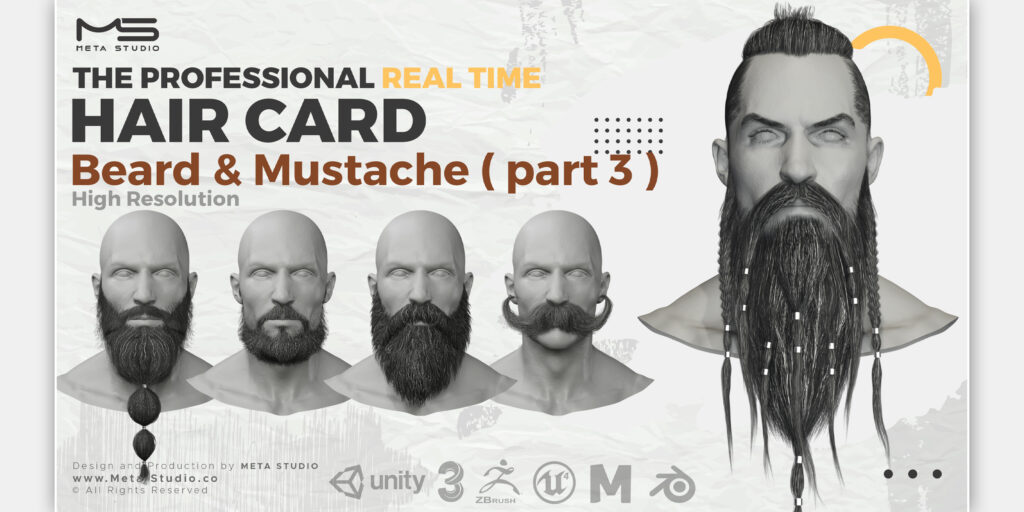
- Layering Hair Cards: Construct hair in layers, starting with a base layer of thick, opaque cards to cover the scalp and define the hairstyle’s shape. Add a secondary layer of thinner cards for depth, breaking up planar areas, and a final flyaway layer with fine or single-strand cards for wispy details, enhancing realism through complexity.
- Texture Transparency: Use fully opaque textures for base layer cards to prevent scalp visibility, with progressively transparent textures in outer layers to reveal underlying cards, creating a volumetric illusion while optimizing performance by minimizing transparency overlaps.
- Directional Flow: Align cards with the hair’s natural grain, ensuring consistent flow from scalp roots outward, using long cards for flowing sections and shorter ones for hairlines or parts, overlapping like shingles to avoid gaps.
- Tent/Fan Clusters: Arrange 3–5 cards in a tent-like cross-section (one flat, others angled outward) for bulky areas like curls or crowns, using an opaque central card and transparent sides to maintain volume from all angles.
- Hairline and Parting: Place fine, staggered cards at the hairline to mimic irregular growth, aligning cards along part lines to meet naturally. Consider a low-poly hair cap with a fuzzy texture beneath cards to mask root gaps, especially for short hairstyles.
Careful arrangement, guided by real hairstyle references, ensures cards blend seamlessly, with iterative adjustments to achieve natural flow and coverage while maintaining visual coherence under movement.
Optimizing Hair Cards for Real-Time Performance
Optimizing hair cards ensures efficient rendering in game engines like Unreal Engine or Unity:
- Polygon Count and LOD:
- Maintain a triangle budget of 10,000–30,000 for main character hair, reducing subdivisions on cards or removing excess cards if counts are too high. Manual simplification or joining cards for decimation preserves shape better than automated reduction.
- Create Level of Detail (LOD) models, such as LOD0 (full detail), LOD1 (50% fewer cards), and LOD2 (base layer only), to swap lower-poly versions at a distance, ensuring subtle transitions via engine cross-fading.
- Transparency and Overdraw:
- Minimize overlapping transparent layers by using an opaque base layer and trimming card meshes to hug the hair strand shapes, reducing empty alpha areas to lower overdraw and prevent sorting issues.
- Prefer alpha test (masked) over alpha blend for most cards, using Alpha Clip in Blender to simulate, as it’s faster and avoids sorting problems, with engines applying alpha-to-coverage or temporal AA for smooth edges. Reserve alpha blending for soft, wispy effects.
- Normals and Shading:
- Merge all cards into one object and apply smooth shading to average normals, or use a Normal Edit/Data Transfer modifier to project normals from the head mesh, creating a volumetric lighting effect that conceals the flat card nature.
- Enable two-sided shading in the engine to view cards from both sides, avoiding the need for duplicated, flipped meshes in Blender that increase poly count.
- UVs and Materials:
- Allow overlapping UVs for cards sharing the same texture atlas to save memory, ensuring consistent texel density across cards for uniform detail, mapping different cards to distinct atlas sections for variety.
- Use a single material for all hair cards to minimize draw calls, incorporating variations via texture masks rather than multiple materials, with optional packed maps (e.g., RGB for AO, root, ID) for advanced engine features.
These optimizations ensure hair cards perform efficiently in real-time, balancing visual quality with minimal computational cost, ready for export to game engines.

Exporting Hair Cards from Blender to Unreal Engine and Unity
Exporting hair cards follows a process similar to exporting other game models, with specific attention to hair materials and mesh preparation. To export, apply all modifiers (e.g., Curve or Array) to convert hair cards into mesh geometry. Join all cards into a single mesh or logical groups (e.g., “HairFront,” “HairBack”) for organization. Use File -> Export -> FBX (preferred for Unreal and Unity), enabling “Apply Transform” if the hair’s orientation differs and disabling “Embed Textures” to import textures separately. Hair typically doesn’t require an armature unless rigged for physics, which is a separate process.
- Importing into Unreal Engine: Import the FBX as a static mesh, enabling Import Normals to preserve Blender’s normals and Import Materials if a material exists (though a new Unreal material is often created). Create a material with Blend Mode set to Masked (alpha clip) or Translucent, enabling Two-Sided rendering to ensure backfaces are visible. Connect the hair texture to Base Color, alpha to Opacity Mask (masked) or Opacity (translucent), and Normal map to Normal, setting Roughness to ~0.2 for shininess. Use Unreal’s Hair Shading Model for anisotropic highlights, optionally incorporating Flow or Root color maps for advanced effects. Without the Hair model, a Directional Light vector can simulate anisotropy, though the built-in model is simpler. Assign the material to the mesh.
- Setting up in Unreal Engine (Physics, LOD, etc.): Import LOD meshes during FBX import or add them in the mesh editor, setting appropriate screensize values for LOD transitions (e.g., LOD0 for close-ups). For physics, rig cards with bones and a physics asset or use Unreal’s Chaos cloth simulation, adjusting material settings like Responsive AA or Cast Shadows as Masked to handle transparency and shadowing issues effectively.
- Importing into Unity: Import the FBX for HDRP or URP, creating a material with the HDRP Lit shader set to Hair (Approximate Kajiya-Kay) for controls like strand tint and anisotropy, or use Cutout mode for standard shaders. Assign textures (Color, alpha, Normal) and enable Double-Sided Global Illumination for baked lighting, adjusting backface brightness if needed. Unity’s hair shader darkens backfaces for realism.
- Verify in Engine: Place the hair mesh in a test scene, ensuring transparency shows individual strands, not rectangular cards. Fix white outlines by checking alpha inversion or pre-multiplying alpha. Ensure two-sided rendering is enabled and normals produce a banded anisotropic highlight. Adjust UV orientation if highlights misalign, as Unreal uses Flow maps and Unity relies on UV direction. Test with engine-specific hair shading features (e.g., Unreal’s Hair Cards Groom plugin, Unity’s HDRP hair shader) and address sorting issues with masked materials or alpha-to-coverage for translucency, ensuring mipmaps preserve alpha at a distance.
Lighting and Rendering Hair Cards (Blender & Engine)
Proper lighting and shader settings enhance hair card appearance in Blender and game engines:
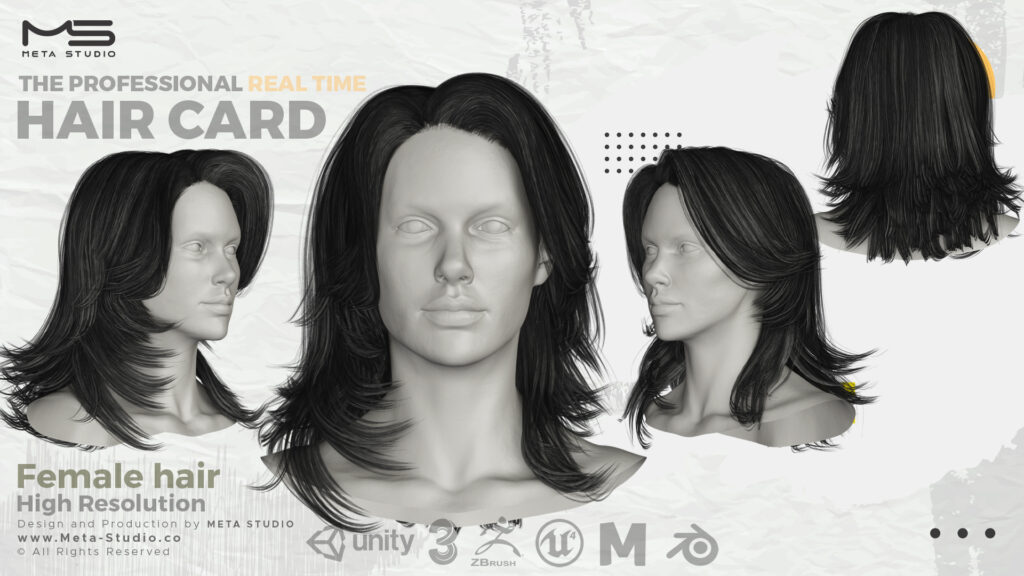
- In Blender (Eevee/Cycles): Use Cycles for accurate lighting previews or Eevee with tweaks. Apply the Principled BSDF shader with Alpha enabled, connecting textures, and set Anisotropy to ~0.8 with Anisotropic Rotation aligned to UVs for highlights along hair length. Alternatively, use the Principled Hair BSDF (Melanin or Simple mode) for hair-specific rendering, though it’s less optimized for cards. Set Roughness to 0.3–0.5 for shininess and use an HDRI for ambient lighting to simulate environment reflections. Test with a sun or area light at a glancing angle to verify anisotropic highlights.
- Specular and Roughness: Hair requires elongated, shiny highlights. Use a specular map (darker roots, brighter tips) or a constant Roughness (~0.3) with high anisotropy. Principled Hair handles this via melanin settings for realistic tint variation.
- Ambient Lighting: Hair reflects environment light strongly. Use an HDRI in Blender and reflection probes or cubemaps in engines to ensure natural lighting, checking for odd dark patches indicating normal issues.
- Backlighting and Transmission: Simulate light passing through hair with Unreal’s dual scattering or Unity HDRP’s hair shader. In Blender, use Principled Hair’s transmission or fake it in Eevee with subsurface/translucency for edge glow in backlit scenarios.
- Shadows: Use alpha clip for crisp, strand-shaped shadows in engines, enabling Unreal’s masked shadows or Unity’s Transparent Depth Prepass. Disable shadows for fine cards to avoid artifacts, and set Blender’s material shadow mode to Alpha Clip.
- Performance Settings: In Unity HDRP, enable Transparent Depth Prepass and Write for proper depth interaction. In Unreal, Masked materials write depth naturally, and Depth Sorting or pixel depth offset can mitigate translucency sorting issues. Test under varied lighting (outdoor, indoor, backlit) to ensure consistent realism.
Common Mistakes and Troubleshooting Hair Cards
Hair card creation can encounter several issues, with solutions to ensure quality:
- Visible Card Edges or “Paper” Look: Large, flat cards or poor alpha cause visible outlines. Use alpha clip with a proper threshold, orient cards at glancing angles, add more cards for silhouette breakup, and ensure textures taper without hard edges, using clusters for volume.
- Hair Looks Too Thin or Scalp Showing: Sparse cards reveal gaps. Add more base layer cards, use a textured hair cap to hide scalp, or adjust textures for denser strand coverage in the base layer to ensure opacity.
- Normals Lighting Looks Wrong: Inconsistent lighting across cards suggests normal issues. Recalculate normals outward, apply smooth shading, or use a Data Transfer modifier to project normals from a spherical mesh for unified, volumetric lighting.
- Z-Fighting or Flickering: Overlapping cards cause flickering. Offset or angle cards slightly to avoid coplanar geometry, adjust Unreal’s Opacity Mask Clip Value, or use Unity’s Alpha Cutoff dithering to reduce shimmering.
- Alpha Sorting Issues: Translucent materials may render incorrectly. Prefer alpha clip to write depth, or use alpha-to-coverage/dithering for soft transparency, splitting materials into masked and translucent parts for complex effects.
- Texture Mipmap Issues: Mipmaps blurring strands at a distance cause hair to vanish. Set Unreal’s texture alpha to Binary Alpha or adjust Mip Gen Settings, or in Unity enable Alpha is Transparency and tweak mipmaps to preserve strand visibility.
- UV or Texture Issues: Incorrect UVs cause mapping errors. Ensure consistent UV orientation for hair flow, avoid compression artifacts with high-quality formats (BC7/BC4), and check for flipped UVs on mirrored cards affecting anisotropy.
- Export/Import Gotchas: Incorrect scale, missing alpha, or inverted normals disrupt imports. Apply scale in Blender, use PNG/TGA for alpha, and enable two-sided rendering or flip normals if hair appears inside-out.
- Hair Physics Issues: Clipping during animation indicates poor physics setup. Weight cards to head bones for simple movement, use limited bone chains or cloth simulation with proper collisions, and apply damping to mimic hair clump behavior.
- Too Much Uniformity: Uniform cards look unnatural. Introduce slight randomness in card angles, lengths, and color via vertex paint or texture variants to add lifelike variation.

Frequently Asked Questions (FAQs)
- How many hair cards do I need for a character’s head?
For realistic long hairstyles, use 50–200 cards (~10,000–20,000 triangles), fewer (20–40) for short hair. Minimize cards for mobile/VR, using LODs to reduce count at distance for performance while maintaining visual quality. - Can I use Blender’s particle hair directly in a game engine?
No, particle hair doesn’t export directly. Bake particle hair to textures for cards or convert to mesh cards. Unreal’s Groom system supports Alembic strands, but cards are standard for most game applications. - What is the best way to create hair textures in Blender?
Style a dense particle hair patch on a plane, bake diffuse and alpha maps in Cycles for realistic strand textures, using fill lighting for variation. Alternatively, use Hair Tool or geometry nodes for automated baking, or FiberShop for quick procedural textures. - How do I integrate FiberShop with Blender?
Export FiberShop textures (PNG/TGA) and apply them to a Blender material using Principled BSDF with alpha blending/clipping. Update textures by re-exporting from FiberShop and reloading in Blender’s Image Editor, as there’s no live link. - Should I use alpha clip or alpha blend for hair in Unreal/Unity?
Alpha clip (masked) is preferred for performance, writing to depth and avoiding sorting issues, with temporal AA or dithering to smooth edges. Use alpha blend for soft effects like wispy edges, but manage sorting with alpha-to-coverage or split materials. - How can I make the hair shine like real hair in the engine?
Use Unreal’s Hair shading model or Unity HDRP’s Hair material (Kajiya-Kay) for anisotropic highlights. Ensure UVs align with hair flow for correct highlight direction, using tangent maps or anisotropy sliders for a silky, strand-aligned shine. - My hair cards poke through the character’s body when animating. How to fix?
Weight cards to head bones for basic movement or use bone chains/cloth simulation (e.g., Unreal’s Chaos, Unity’s cloth) with collisions and damping to prevent clipping, designing hair to minimize intersections where possible. - What about using the new Blender hair curves with the Hair Shape Type “Strip”?
Blender’s hair curves (3.3+) can generate strip geometry via Geometry Nodes, resembling hair cards. Convert these to mesh for game export, or use Unreal’s groom-to-cards addon, though manual tweaking is often needed for polished results. - Do I need to model each hair card separately or can I use particles to scatter them?
Particles or geometry nodes can scatter cards for initial placement, but manual tweaking ensures precision, especially for silhouette and face-framing areas. Use scattering for filler cards and refine by hand for a polished groom. - How do I ensure my hair card UVs don’t produce seams?
Map each card’s UV island to a texture patch without seams, ensuring consistent vertical alignment for hair flow and directional maps. Avoid UV flips on mirrored cards to maintain anisotropy, checking for consistent shading across cards.

Conclusion
Hair cards are still the most practical “real-time-friendly” way to ship believable hair in games because they trade millions of strand polygons for a controlled amount of textured geometry that engines can render fast. What makes or breaks hair cards is not just the mesh count, but the relationship between three things: strong textures (especially alpha), smart card shapes, and disciplined layering. When those line up, the viewer stops seeing “planes” and starts reading the hairstyle as volume, direction, and breakup.
That’s why the workflow always comes back to the same loop: design or bake a texture set that has clear strand structure, map it cleanly to a small set of reusable card meshes, then build the groom in layers so the silhouette holds up from every angle. The base layer’s job is coverage and mass, mid-layers add depth, and the final pass is all about flyaways and edge detail so the hairline and silhouette don’t look like cardboard.
Optimization is where game-ready hair cards become production-ready. Alpha-heavy hair can explode overdraw and sorting problems, so using alpha clipping/masking wherever possible is usually the safest default, and it also gives you predictable depth and shadows. Shading matters just as much: anisotropic highlights are what sell “hair” under motion and changing lights, so previewing in Blender with anisotropy gives you an early read before you recreate the same intent in Unreal or Unity’s hair shaders.
Finally, exporting is only “done” when it looks correct in-engine: verify normals, two-sided rendering, mip behavior on alpha, and LOD transitions under gameplay lighting and camera distance. If you want to speed up your texture iteration or benchmark quality, tools like FiberShop are commonly used alongside Blender so you can iterate hair atlases faster and keep the card mesh workflow consistent.
Sources and Citations
- Unity (HDRP)
- Hair Shader (HDRP 10.5)
- https://docs.unity3d.com/Packages/com.unity.render-pipelines.high-definition@10.5/manual/hair-shader.html
- Hair Master Stack Reference (HDRP 16.0)
- https://docs.unity3d.com/Packages/com.unity.render-pipelines.high-definition@16.0/manual/hair-master-stack-reference.html
- Alpha Clipping (HDRP 15.0)
- https://docs.unity3d.com/Packages/com.unity.render-pipelines.high-definition@15.0/manual/Alpha-Clipping.html
- Blender
- Principled BSDF
- https://docs.blender.org/manual/en/latest/render/shader_nodes/shader/principled.html
- Eevee Material Settings (Blender 3.0)
- https://docs.blender.org/manual/en/3.0/render/eevee/materials/settings.html
- FBX Export/Import
- https://docs.blender.org/manual/en/latest/addons/import_export/scene_fbx.html
- Cycles Material Settings
- https://docs.blender.org/manual/en/latest/render/cycles/material_settings.html
- Unreal Engine
- Material Blend Modes
- https://dev.epicgames.com/documentation/en-us/unreal-engine/material-blend-modes-in-unreal-engine
- Shading Models
- https://dev.epicgames.com/documentation/en-us/unreal-engine/shading-models-in-unreal-engine
- Photorealistic Character (UE 4.27)
- https://dev.epicgames.com/documentation/en-us/unreal-engine/photorealistic-character?application_version=4.27
- Other
- FiberShop
- https://cgpal.com/fibershop/
Recommendations
- Life Is Strange TV Show Adds a Veteran Emmy-Nominated Director: Karyn Kusama to Helm Prime Video’s First Episodes
- Amazon Is Experimenting With Playable Game Demos on Twitch: Game Lift Feature Explained, How It Works, and What It Means for Cloud Gaming
- The State Duma Has Proposed to Restrict Loot Box Sales in Games to Minors in Russia
- MoCap Online: Top Motion Capture Resources, Tools, and Animation Packs for Game Developers and Animators
- Forza Horizon 6 Is Every Japanese Driving Fantasy Rolled into One: Why Japan Feels Like the Perfect Setting
- TIGA Reports 29% of UK Game Studios Still Face Skill Shortages: Key Findings from the Skills, Training and Education in the Games Industry 2026 Report
- Directive 8020 Review: Is Supermassive’s Sci-Fi Horror Worth Playing?
- The Dungeon Crawler RPG Crowdfunding Campaign Just Launched and Has Already Decimated Its Goals – Everything You Need to Know
- Mass Effect Andromeda Was “Done Dirty” by EA, Actor Says: What Happened, What Fans Missed, and Where the Series Goes Next
- Star Fox Returns in New Remake for Switch 2: Rumors, Gameplay Details, and Everything We Know



































































































