






In This Article (8 sections)
How VALORANT’s Hush Was Animated With Spine 2D and After Effects
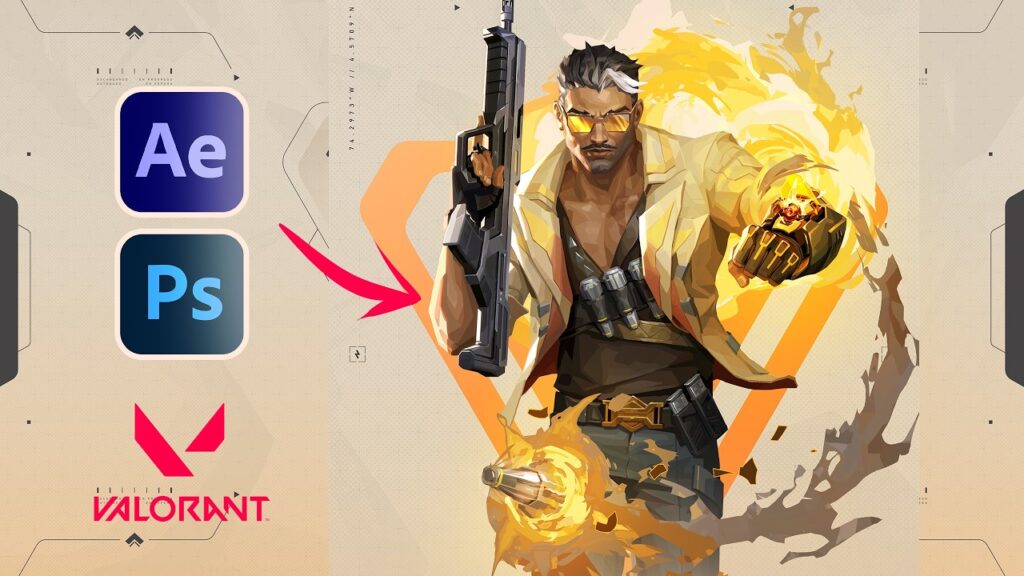
VALORANT’s Hush key art animation develops SuKe’s illustration into a moving promotional piece, with Seter MD responsible for the art animation. Seter MD’s October 31, 2026 post identifies his contribution and confirms that Spine 2D handled character movement while After Effects handled weapon and background effects. SuKe’s portfolio entry, “Valorant Hush Key art & Sketches,” presents the underlying illustration alongside development sketches. It also credits Joshua Smith and Nancy Kim for the character concept. These credits distinguish the design, illustration, and animation stages rather than assigning the entire production to one artist. The software split describes this project’s workflow without implying that either application is limited to those tasks.
Seter MD published the Hush breakdown on November 5, 2026, and 80 Level embedded it in its November 6 coverage. The coverage describes the presentation as moving from character rigging to the assembled animation. His October 31 animation post supplies related discussion about his role, software, and effects. Seter MD said the visual effects required considerable refinement and identified their texture and appearance as the difficult part. That points to a visual development challenge beyond simply making an effect move. The published material establishes the production’s main components, while general explanations of the software should not be mistaken for a reconstruction of unpublished project settings.
The original illustration already establishes pose, expression, lighting, and composition. Animation introduces decisions about timing, movement, and where viewers direct their attention. Changing the relationships between these elements can alter the character’s apparent confidence, weight, or energy. The animator therefore develops an existing visual performance while preserving the qualities that make the still image effective. Giving the character presence does not necessarily require a large movement, especially when the original pose already provides a strong focus.
Preserving painted lighting places another limit on how far a pose can change. In a flat illustration, a highlight on a cheek or a shadow beneath a collar is already part of the image. Bending that image moves the painted lighting with it; it does not automatically calculate how a new surface orientation would respond to a light source. A restrained turn can keep those relationships believable, while a larger turn may expose contradictions between the apparent form and its shading. For an animation built from SuKe’s artwork, this makes the original painting an important reference throughout the process, including when individual movements look convincing in isolation.
Preparing artwork for animation begins with deciding which elements need independent control, such as the character, an accessory, or the surrounding atmosphere. It does not require every painted feature to become a separate image. Seter MD said the illustrations he receives are generally cut into relatively few parts, but he did not publish Hush’s complete layer inventory. A hypothetical sleeve overlapping a torso illustrates the preparation problem: moving the sleeve can reveal an area that was previously hidden. The animator must account for that through preparation, overlapping artwork, or a deliberately restricted range of motion. Understanding which relationships can change convincingly, and which depend on the original viewpoint, is therefore part of animation planning.
The edges of the composition also need attention during preparation. A still image can comfortably crop a sleeve, a strand of hair, or a background shape because nothing moves beyond that boundary. Once movement begins, an element may reveal an unfinished edge or leave an empty area behind it. In a comparable production, checking the widest intended pose and the furthest planned shift early would show where extra painted coverage is needed. This also helps establish how much freedom the animator has to adjust the composition later. The movement range and the available artwork have to support each other before small details are polished.
An initial movement test can therefore answer practical questions before the effects become elaborate. Does the pose remain readable at its largest change? Does the face retain the expression established in the illustration? Does a moving accessory cross an important contour? Comparing a few broad poses makes these problems easier to isolate than reviewing a finished composition in which lighting and effects constantly change. For someone studying Hush’s breakdown, this provides a useful distinction between building controls and deciding what those controls should achieve. The production becomes clearer when each technical choice is connected to a visible artistic need.

Bringing the Character Illustration to Life in Spine 2D
Spine provides tools for controlling relationships within an illustrated character. Its bones form a hierarchy in which moving a parent can affect its children, with the arm and hand relationship offering a straightforward example. Mesh attachments add flexibility by allowing an image to bend instead of behaving only as a rigid cutout. Esoteric Software describes a mesh as an image mapped onto a polygon whose vertices can be manipulated. These controls can distinguish a picture sliding across the screen from a character appearing to adjust a pose or shift their weight. They explain Spine’s usefulness for illustrated motion, although Seter MD has not published a detailed comparison explaining his choice over other software.
Spine’s setup pose provides the reference arrangement for this work. Esoteric Software explains that bone transform keys are stored relative to that pose, meaning a later change to the setup can also change existing animation poses. Establishing suitable attachment placement and bone positions before detailed animation therefore helps keep revisions predictable. The reference arrangement does not have to be a neutral anatomical stance; for illustrated promotional work, it can be organized around the supplied pose. The useful goal is a stable starting point that preserves the painting and gives the animator understandable controls for the movement that follows.
Mesh vertices can receive weighted influence from multiple bones. Those weights determine how strongly each bone affects a point, allowing movement to blend across an image instead of creating a hard division. As a general example, one point near a shoulder might follow an upper body control strongly while another responds more closely to an arm control. Balancing those influences can make a painted shape bend smoothly. However, a deformation that suits broad clothing may distort an eye or a rigid accessory, so mathematical smoothness alone does not guarantee a convincing result. The available written material does not establish Hush’s complete bone structure, constraints, or weight values, and these examples should not be treated as her documented setup.
Mesh layout, often called topology, determines how that deformation spreads through the artwork. Spine divides the mesh into triangles, and manually placed edges can control how its vertices connect. Esoteric Software demonstrates that changing those connections can allow a feature to deform without pulling unwanted portions of the surrounding image. Applied as a general rigging principle, this means placing vertices around meaningful painted boundaries rather than distributing them uniformly. A mouth, collar edge, or sharp clothing fold may need more deliberate separation than a broad area of fabric. Weights control how bones influence the mesh, while its structure helps determine which parts of the painted surface bend together.
Flat artwork already suggests depth through shading, overlap, proportion, and perspective. Spine can strengthen those cues by moving different regions by different amounts, while its draw order system determines which attachments appear in front independently of the bone hierarchy. A slight shift between a face, surrounding hair, and a shoulder can, for example, suggest a change in orientation. That describes a general principle of apparent depth rather than a confirmed arrangement of Hush’s controls. An illustration painted from one viewpoint does not automatically contain the information needed to reveal an unseen side of the head. A small tilt and a complete rotation therefore have different requirements, with volume, facial identity, and silhouette taking priority over maximizing the apparent angle.
Once suitable controls exist, a rig lets the animator test restrained movement, exaggerate it, and reduce it again without rebuilding the illustration. This flexibility is useful when the strongest promotional movement is subtle enough to preserve a compelling pose. Spine’s graph editor displays animation values against time, helping artists refine acceleration, slowing, and transitions between keys. The starting and ending positions are only part of the performance because the way movement develops between them changes its character. Testing these adjustments against the artwork helps reveal whether a motion adds presence or weakens the original image. A technically elaborate rig is valuable only when its controls produce clear, appealing movement.
Spine’s dopesheet offers another way to refine the performance by displaying the timing of keys across multiple properties. Keys can be moved together or spread across a different duration, making it easier to coordinate several parts of a pose. This is useful for secondary motion: in an illustrative movement, the torso might begin a shift before a loose accessory responds, with that accessory settling slightly later. Small timing differences can suggest that the parts belong to one physical action. If every region starts, stops, and reverses simultaneously, the character may appear mechanically synchronized even when each individual deformation is smooth.
The frames between the strongest poses deserve equal attention. A shoulder can look correct at the beginning and end of a movement yet narrow awkwardly halfway through it. Similarly, a painted facial feature may briefly stretch as several controls reach different points in their transitions. Reviewing the full interval helps distinguish a weighting problem from a timing problem: adjusting the influence of a bone changes the shape, while moving a key changes when that shape appears. A practical review would include both normal playback and slower inspection of difficult transitions. Smoothness is most useful when the drawing remains convincing throughout the motion.
Seter MD’s earlier Act 5 home screen animations featured Clove, Jett, Phoenix, Omen, and Gekko. According to 80 Level, their apparent three dimensional tilts were created through two dimensional image warping in Spine, with individual animations taking approximately 15 to 30 minutes. That timing applies to those earlier examples and does not establish Hush’s production duration or an identical rig.
Image warping changes the arrangement of existing features, allowing modest adjustments to suggest depth when their relationships remain plausible. Spine supports both bone driven deformation and directly keyed mesh changes. Its documentation generally recommends favoring weighted bones and using deform keys selectively because the choice affects control and animation data. The connection to Hush is the broader approach of choosing movement that adds presence while preserving the illustration.
Developing Weapon and Background Effects in After Effects
After Effects handled Hush’s weapon and background treatments, allowing those elements to be developed alongside the character animation. Adobe’s documentation explains that alpha channels store transparency, while masks and mattes control which regions remain visible. These capabilities are useful when an effect needs to surround an object, remain within a selected area, or pass behind another part of a composition.
In a hypothetical weapon treatment, a bright region might follow an outline while leaving another area clear, requiring control over visibility as well as movement. Separate effects controls allow the animator to revise shape or intensity while judging the result against the character. The weapon still needs a readable silhouette and a clear role in the pose, since excessive surrounding detail can obscure the object the effect is intended to support.
Spatial coordination becomes especially important when an effect belongs to a moving object. After Effects supports parenting, allowing a child layer to follow a parent’s position, rotation, and scale, and invisible null objects can serve as shared controls. In a comparable weapon treatment, an animated control could keep several effect layers positioned around the same object while their internal textures change independently. However, parenting to a rendered character image does not automatically follow a weapon moving inside that image. The control still needs motion that matches the object. This distinction helps explain why effects assembly involves careful alignment as well as attractive individual elements.
Seter MD identified Fractal Noise, vector blur, and Cartoon as the background’s base effects, with published coverage naming the blur as CC Vector Blur. These are confirmed ingredients, but their names do not establish every setting or the complete order of operations. The background still requires decisions about scale, placement, contrast, texture, and its relationship to the foreground. An evenly busy field can compete with the character, while a selective arrangement can provide both activity and areas of rest. After Effects also supports nested compositions that group related elements so they can be treated together, reused, and updated through a shared composition. That is a general capability relevant to complex backgrounds, not confirmation of Hush’s exact project organization.
Fractal Noise generates grayscale patterns that can function as visible textures or information for other effects. Adobe documents uses including organic backgrounds and displacement maps, while Evolution controls allow the pattern’s internal structure to change smoothly over time. This differs from moving an unchanged texture across the screen. A cloud shaped pattern might retain its outline while sliding behind a portrait, whereas internal evolution can make its bright and dark regions appear to form and dissolve. Both approaches create movement, but they give the artist different ways to shape its character. Fractal Noise is confirmed in Hush’s background, while its exact pattern settings remain unspecified, leaving the artist’s choices about density, energy, and visual distraction central to the result.
CC Vector Blur uses map values to determine the directions along which blurring occurs. Cycore’s documentation explains that it can blur different regions in different directions according to another layer’s values and identifies animated Fractal Noise as a possible map source. That documented compatibility does not confirm how Seter MD connected the effects in Hush’s project.
Compared with uniform softening, directional stretching can suggest flow or energy as features extend along changing contours. The effect includes controls for the vector field and softness, but Hush’s selected mode, map channel, and numerical values are not established by the published material. Excessive stretching can remove useful structure, while too little can leave the pattern looking unchanged, making the balance dependent on the illustration and intended pace.
Cartoon can simplify shading and color variation while adding or emphasizing edges. Adobe allows its fill and edge treatments to be controlled separately, so using the effect does not necessarily produce thick outlines around every shape. Reducing small tonal changes into broader forms can help procedural material sit more comfortably beside painted or graphic artwork.
The useful questions concern how it changes detail, contrast, and boundaries rather than what its name suggests. Adobe also identifies temporal coherence as a strength, meaning similar consecutive frames tend to receive a consistent treatment. That consistency matters when stylization is applied to a texture already changing over time. Cartoon’s inclusion is confirmed for Hush, but matching the background to the illustration still requires judgment about color relationships and visual emphasis.
The order of the effects also changes their result. Adobe documents that effects within a group are processed from top to bottom, so a later effect receives the output produced by the earlier operations. As an illustrative example, simplifying a softened texture can produce different boundaries from softening a texture after its tones have been simplified. This makes the arrangement of the effects an artistic decision alongside their settings. Someone experimenting with Hush’s confirmed ingredients would therefore need to compare the resulting shapes and transitions, rather than assuming the three effect names describe a complete preset that reproduces the finished background.
Texture also has a rhythm that can be judged independently of its overall direction. A broad shape moving slowly may still feel restless if its internal details change rapidly, while a faster moving shape can remain readable when its internal structure stays relatively stable. For an illustrated promotional composition, comparing those two kinds of change helps identify what is attracting attention. If a background repeatedly distracts from the face, reducing the speed of its internal evolution may be more useful than simply making the entire layer darker. This is one way to interpret the challenge Seter MD described: the texture must maintain an appropriate visual character across time.
Clean transparency is another part of making separate elements belong together. Adobe distinguishes straight and premultiplied alpha through the way color information is stored alongside transparency. Interpreting footage incorrectly can introduce unwanted color around partially transparent edges, including a dark halo where the source artwork appeared clean. Checking a rendered character against both light and dark backgrounds can help reveal these problems around hair, clothing, and soft effects. The correction concerns how the imported material is interpreted, rather than necessarily requiring the illustration to be repainted. In a composition with strong contrasts, even a narrow fringe can make an otherwise well aligned element appear detached from its surroundings.
Fractal Noise also provides cycle controls for repeatable evolution, but that capability alone does not establish a seamless animation loop. Other animated transforms and effects must return coherently as well. A repeating texture is therefore only one possible component of a looping composition. In the October 31 discussion, Seter MD said no looping version was available at that time. Viewers seeking a ready made looping wallpaper should retain that date specific qualification rather than assuming the published animation was prepared for seamless repetition.
Coordinating and Studying Hush’s Promotional Animation
Character movement and effects share responsibility for directing attention. If they compete at the wrong moment, the viewer can miss the pose or action the composition is meant to emphasize. In a comparable promotional animation, an effect might build before a gesture, peak during it, and settle afterward, although this is an illustrative strategy rather than Hush’s documented keyframe timing.
Contrast provides another way to coordinate the elements, allowing restrained background movement to support a quiet character performance before a stronger effect changes the rhythm. Seter MD’s comments about texture and appearance reinforce that an effect must belong visually with the character as well as occupy the right place. The aim is one coherent presentation, even when its components require different tools, controls, and revision processes.
Moving from Spine into compositing requires a dependable transfer of the rendered motion. Spine supports image sequences, video, and animation data, and its PNG export preserves transparency without lossy image compression. A transparent image sequence is therefore one supported way to place animated artwork over a separately developed background, although Hush’s exact transfer format has not been published. Spine’s Maximum bounds option keeps exported frames at the same dimensions. Consistent framing provides a predictable reference when aligning the character with additional layers. It also makes later replacements easier to evaluate because the new render can be compared within the same composition boundaries.
Playback timing must remain consistent during that transfer. Adobe explains that an imported image sequence receives a frame rate that can be changed through Interpret Footage. As a simple example, 48 images played at 24 frames per second last two seconds, while the same images played at 30 frames per second last 1.6 seconds. An unintended change would alter the relationship between the character’s motion and effects animated to a separate timeline. These figures illustrate the issue rather than identify Hush’s settings. Agreeing on timing before detailed compositing helps preserve the intended acceleration, pauses, and points of emphasis across both applications.
Preview quality affects what can be assessed during finishing. Adobe’s Full resolution setting renders every composition pixel, while reduced resolution previews contain less detail. A lighter preview can help evaluate the broad rhythm, but close inspection at full resolution is useful for thin contours, mask boundaries, and small changes in procedural textures. The composition should also be viewed at a size similar to its intended presentation. A detail that seems prominent when enlarged may disappear at normal size, while several individually subtle effects may combine into distracting activity. These checks connect the technical quality of the composite to the way an audience will actually read it.
A useful review can separate three questions without losing sight of the complete image: whether the character’s drawing remains stable, whether effects stay correctly placed, and whether their combined timing directs attention as intended. If a bright treatment obscures a hand, the answer may be a change in opacity or timing rather than a new character pose. If the pose itself loses clarity, adjusting the effects alone may conceal the symptom without improving the movement. This approach keeps revisions focused on the element responsible for the problem. It also explains why a convincing finished shot depends on repeated comparisons between isolated components and their assembled result.
Seter MD clarified that his VALORANT work concerns art animations, making Hush’s project an example of promotional illustration work rather than evidence about playable character or combat ability animation. Gameplay has additional requirements because it communicates information while players move, react, and make decisions. Autodesk’s October 2026 account of Riot’s weapon animation work describes the need to preserve recognizable timing during actions such as equipping, firing, and reloading.
Players need to understand when an action has finished or a weapon is usable, even while enemies, environments, and other abilities compete for attention. A flourish that works within a carefully arranged promotional composition may therefore need substantial adjustment during a competitive match. Both forms can express the same character identity, but Hush’s key art animation does not establish the software, rig, or rendering methods used for every other representation of her in VALORANT.
The available breakdown and artist discussions become more informative when viewed alongside SuKe’s still artwork and sketches. Studying the painting first helps distinguish its original composition from the qualities added through motion. On a first viewing, concentrate on changes to the character’s silhouette and the relationships between features. Then examine how the weapon and foreground effects interact before watching the background on its own. This separates changes in position and shape from changes in brightness, texture, or visibility, making their timing easier to assess. The purpose is to understand what the controls accomplish and how the elements support one another, rather than treating the number of visible controls or named effects as the explanation for the finished result.
Hush’s animation brings these decisions together around an existing piece of character art. SuKe’s illustration supplies the visual foundation, Spine provides controls for developing its performance, and After Effects supports the surrounding motion and visual treatments. The most transferable lesson is the relationship between those stages: artwork preparation defines the available movement, rigging makes that movement controllable, and compositing gives it context. Understanding those connections makes the breakdown useful beyond identifying its software, while keeping attention on the specific artistic choices that turn a strong still image into a coherent animated presentation.

Frequently Asked Questions (FAQs)
- Who animated VALORANT’s Hush key art?
Seter MD created the art animation for Hush’s key artwork. SuKe produced the underlying illustration and presented it alongside development sketches in a portfolio entry. That portfolio also credits Joshua Smith and Nancy Kim for the character concept. The concept established the character’s design, the illustration shaped the promotional image, and the animation added movement and timing. The finished piece therefore reflects distinct contributions rather than one creator handling every stage. - Which software was used for the Hush animation?
Spine 2D and After Effects are the confirmed applications used for the animated illustration. Spine handled character movement, while After Effects handled the weapon and background effects. Spine’s rigging and mesh tools can control relationships between different parts of painted artwork. After Effects provides controls for combining visual elements and adjusting their visibility, texture, and intensity. This division describes Hush’s promotional animation workflow and does not establish which tools were used for her in-game representation. - Is the Hush artwork a fully modeled 3D character?
The documented project is an animated illustration, and the published material does not establish that it was rebuilt as a complete 3D model. Rigging allows different regions of a flat image to move in relation to one another. Changes in overlap, shape, and relative position can suggest depth or a small turn. Those effects work with the shading and perspective already painted into the image. They do not automatically provide the unseen surfaces needed to show the character convincingly from every angle. - What does rigging contribute to an animated illustration?
Rigging creates controls for changing the artwork’s pose, shape, or internal relationships. For example, connecting an arm and hand can help them move together without requiring every adjustment to be made separately. Where meshes are used, painted shapes can also bend instead of behaving only as rigid cutouts. These controls let the animator test and refine movement without rebuilding the underlying illustration each time. A useful rig supports that flexibility while preserving proportions, recognizable features, and the intended silhouette. - What is the difference between bones and mesh weights?
Bones provide the controls that drive movement within a rig. Mesh weights specify how strongly each bone affects a vertex, or point, in the image’s mesh. A vertex can receive influence from more than one bone, allowing movement to blend between controls. For example, points around a shoulder might respond partly to an upper-body control and partly to an arm control. This lets different regions bend or shift by different amounts instead of forcing the entire image to move as one rigid piece. - Which effects were used for Hush’s background?
Seter MD named Fractal Noise, vector blur, and Cartoon as the background’s base effects. The available coverage identifies the blur specifically as CC Vector Blur. Fractal Noise supplies adjustable grayscale patterns, while CC Vector Blur can give texture directional shaping. Cartoon can simplify shading and color variation while controlling the treatment of edges. These names identify the main ingredients but do not provide a complete preset or confirm every setting, connection, or processing step. - Why was the effects work challenging?
Seter MD identified the effects’ texture and appearance as the difficult part. The challenge was developing a treatment that belonged visually with the illustration. That requires attention to details such as contrast, shape, density, and intensity. An effect can move convincingly yet still compete with the character or obscure the weapon. Refinement therefore involves judging the effect within the full composition rather than assuming that applying a filter produces the intended look. - Did the Hush animation take 15 to 30 minutes?
Hush’s production time has not been established in the published material. The 15 to 30-minute estimate concerns Seter MD’s earlier VALORANT Act 5 home-screen animations. Those examples used two-dimensional image warping in Spine to create apparent three-dimensional tilts. Their shared use of Spine does not establish equal complexity, identical rigs, or the same amount of effects work. The earlier estimate should therefore remain attached to those animations rather than being presented as Hush’s production duration. - Does the breakdown explain Hush’s gameplay animation?
The breakdown covers a promotional art-animation project. Its focus is adding movement to an existing illustration and combining that movement with visual effects. Gameplay animation must also help players understand actions and recognize when a weapon is usable while they move and react. This creates additional requirements for readable timing during actions such as equipping, firing, and reloading. The promotional breakdown therefore does not establish the complete software, rigging, or rendering process used for Hush inside matches. - Can beginners learn from the breakdown?
Yes, beginners can use it to understand how separate components form one coherent animated image. Start by studying SuKe’s still artwork and identifying which qualities change when motion is added. Then watch the character’s silhouette, weapon effects, and background separately rather than trying to follow everything at once. Ask which controls affect position and shape, which affect texture or visibility, and how those changes are timed together. Understanding those purposes provides a stronger foundation before attempting to reproduce the finished effects or build a similarly detailed rig.

Conclusion
VALORANT’s Hush animation shows how a finished illustration can gain movement and atmosphere while retaining its visual identity. SuKe’s artwork establishes the character presentation and composition, while Seter MD develops that foundation through timing, controlled deformation, and carefully refined effects. Rigging provides useful control when it preserves the drawing’s proportions, recognizable features, and silhouette.
Weapon and background effects must support that same image through their texture, intensity, and timing, which explains the significance of Seter MD’s comments about refining their appearance. A software list identifies the tools involved, but the breakdown’s greater value lies in showing how different kinds of work contribute to one coherent presentation. For artists studying the piece, the strongest lesson is to judge every movement and effect by what it adds to the illustration, allowing technical choices to serve the character and composition.
Sources and Citations
- Seter MD, November 5, 2026, Hush animation breakdown: The artist’s breakdown post and discussion of the effects’ texture and appearance.
https://x.com/SeterMD/status/2118434336936460705 - Seter MD, October 31, 2026, Hush art animation: Artist comments confirming the software split, background effects, and scope of his VALORANT work.
https://x.com/SeterMD/status/2116579411478659284 - SuKe, “Valorant Hush Key art & Sketches”: Original illustration, development sketches, and character-concept credits.
https://sukeart.artstation.com/projects/rzzrma - 80 Level, November 6, 2026: Coverage of the Hush animation and Seter MD’s earlier VALORANT home-screen work.
https://80.lv/articles/how-valorant-s-hush-was-animated-using-spine-2d-after-effects - Esoteric Software, “Bones”: Spine’s bone hierarchy, transforms, and connected animation controls.
https://esotericsoftware.com/spine-bones - Esoteric Software, “Mesh attachments”: Image deformation through mesh vertices and weighted bones.
https://en.esotericsoftware.com/spine-meshes - Esoteric Software, “Weights view”: Bone influence, mesh binding, and deformation refinement.
https://esotericsoftware.com/spine-weights - Esoteric Software, “Slots”: Attachment visibility and draw-order controls.
https://esotericsoftware.com/spine-slots - Esoteric Software, “Graph”: Editing animation timing, keyed values, and interpolation curves.
https://esotericsoftware.com/spine-graph - Esoteric Software, “Keys”: Deform keys and their relationship to weighted animation.
https://en.esotericsoftware.com/spine-keys - Adobe, “Noise and Grain effects”: Fractal Noise generation, Evolution, and cycle controls.
https://helpx.adobe.com/after-effects/desktop/apply-effects-and-animation-presets/list-of-effects/noise-grain-effects.html - Cycore Systems, “CycoreFX HD 1.8.1 Manual”: CC Vector Blur’s vector maps and directional behavior.
https://www.cycorefx.com/downloads/cfx_hd_std/CycoreFX%20HD%201.8.1%20Manual.pdf - Adobe, “Stylize effects”: Cartoon’s shading simplification, edge treatment, and temporal coherence.
https://helpx.adobe.com/after-effects/desktop/apply-effects-and-animation-presets/list-of-effects/stylize-effects.html - Adobe, “Alpha channels and masks”: Transparency, masks, and mattes in compositing.
https://helpx.adobe.com/after-effects/desktop/work-with-transparency-and-compositing/work-with-alpha-channels-and-masks/alpha-channels-masks-mattes.html - Adobe, “Precomposing, nesting, and pre-rendering”: Organizing and updating related visual elements within compositions.
https://helpx.adobe.com/il_en/after-effects/desktop/work-with-compositions/precomposing-and-nesting/precomposing-nesting-pre-rendering.html - Autodesk, October 20, 2026: Riot animator Brendan Russert’s explanation of VALORANT weapon animation and gameplay timing requirements.
https://blogs.autodesk.com/media-and-entertainment/2026/10/20/riot-games-animates-valorant-with-autodesk-maya/
Recommendations
- Will Ever Get a Cyberpunk-Style Renaissance? What the Latest Updates, DLC, and Modding Scene Say
- How to Save Time in Blender Animations with The View Keeper: A Comprehensive Guide
- Rhythm Heaven Groove Review: Gameplay, Minigames, Multiplayer, and Everything You Need to Know
- Toy Story 5 Explodes at the Box Office While Disclosure Day Struggles to Keep Momentum
- Elta: Defy All Gods Demo and Gameplay Trailer Revealed at Galaxies Autumn Showcase 2026
- Can They Win the Match While Breaking the Laws of Physics? Shaolin Soccer Spinoff Kung Fu Soccer Heads to North American Theaters
- Schedule 1 Update V0.4.3 (Schedule I): Storage Closets Patch Notes and Changes
- The Duskbloods Online Network Test Confirmed for Summer 2026, But FromSoftware Still Has No Release Date
- Clawed: Release Date, Dinosaur Survival Horror Gameplay, and Everything We Know
- How Mega Cat Studios Adapted God of War Into a Retro Pixel Art Game



































































































