









In This Article (13 sections)
Landscape Made in Blender: Terrain Creation, Sculpting, and Procedural Workflows
Landscape Made in Blender is a flexible way to create realistic or stylized outdoor environments for games, animation, concept art, cinematic shots, architectural visualization, and worldbuilding. Blender supports several terrain creation methods, including manual mesh modeling, sculpting, procedural displacement, Geometry Nodes, texturing, particle based scattering, and tools such as A.N.T. Landscape. Because Blender includes modeling, shading, lighting, rendering, simulation, and compositing in one application, an entire outdoor scene can be created without leaving the software.
The best beginner approach is to build the environment in layers rather than trying to create everything at once. A convincing landscape comes from the relationship between terrain shape, scale, erosion, materials, foliage, water, lighting, atmosphere, and camera composition. A simple environment can look believable when these elements work together, while a highly detailed scene can still feel artificial if the terrain has weak structure or the materials do not match the biome and lighting.
Start by deciding what the landscape is for. A game level needs optimized geometry and controlled paths, while a cinematic render depends more heavily on framing, lighting, and camera visible detail. A background environment needs strong silhouettes more than microscopic surface information, while a close forest floor may require roots, moss, leaves, stones, and detailed material variation.
The terrain itself should begin with broad forms. Add a plane or grid, establish the correct scale, and create the major hills, valleys, plateaus, cliffs, river paths, and flat areas before adding small detail. Beginners often subdivide too heavily or add foliage too early, but a better workflow is to make sure the landscape reads correctly from a distance first.
Scale is especially important. A small meadow may only span tens of meters, while a mountain valley may represent several kilometers. Trees, rocks, grass, water, buildings, and characters must feel proportional to the terrain or the environment can appear miniature. Real world references are useful for checking these relationships.
Terrain Shaping Methods and Workflows
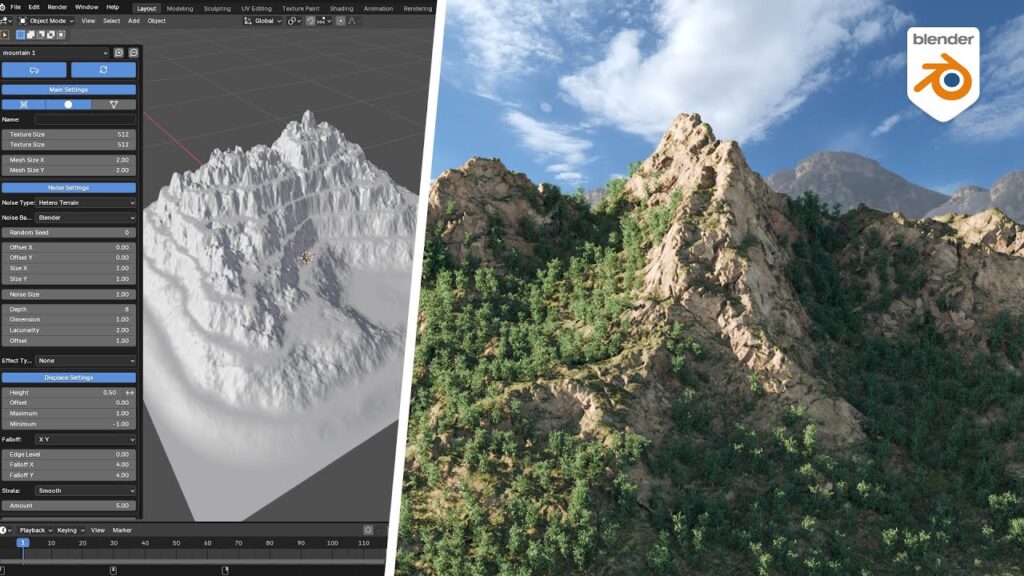
Terrain can be shaped in several ways. Manual modeling and proportional editing are useful when roads, villages, pathways, or gameplay routes need precise control. Sculpting is better for organic mountains, valleys, ridges, and erosion channels. Procedural displacement and Geometry Nodes can create broad variation quickly, while A.N.T. Landscape can generate an initial mountain, hill, crater, or planet style terrain using noise based controls.
A.N.T. Landscape is most useful as a starting point rather than a finished solution. Its terrain size, subdivision, height, noise, and falloff controls can quickly establish broad forms, but generated terrain usually needs further sculpting, material work, vegetation, lighting, and composition. Too much noise creates chaotic landforms, while too little produces soft terrain without enough structure.
Sculpting should begin with primary forms. Raise the main mountain masses, then develop ridges, slopes, and valleys before adding cracks or small surface features. Valleys should connect naturally and usually follow lower drainage paths rather than appearing as isolated depressions. Ridges should flow away from higher areas, while riverbeds should sit below surrounding land.
Secondary and tertiary details should come later. Secondary forms include smaller ridges, cliff breaks, ledges, and erosion channels. Tertiary detail includes cracks, stones, bumps, and fine surface breakup. Smoothing should be used carefully because too much can make terrain look like melted clay, while too little leaves noisy surfaces. Natural environments usually combine softer sediment areas with sharper rock breaks.
Geometry Nodes provides another powerful approach because it lets artists create procedural systems that remain editable. A landscape setup can use a grid with noise driven height, slope and height masks, object scattering, paths, and instancing. Grass can be restricted to flatter areas, rocks can appear more frequently on steep slopes or exposed ridges, and trees can be prevented from growing on cliffs or inside riverbeds.
Combining Techniques for Best Results
The strongest workflows often combine several techniques. A terrain might begin with A.N.T. Landscape or procedural displacement, receive manual sculpting to establish believable forms, use layered materials for surface variation, and rely on Geometry Nodes to distribute foliage and rocks. This hybrid method combines procedural speed with artistic control.

Blender Landscape Materials, Foliage, Water, Lighting, and Cinematic Environments
A realistic Landscape Made in Blender is more than a terrain mesh. It should feel like an ecosystem in which landforms, materials, vegetation, water, weather, and lighting belong together. Choosing a biome early helps guide these decisions. A desert requires dry rock, sand, erosion, sparse vegetation, and strong sunlight, while a forest needs layered foliage, moss, roots, fallen leaves, and filtered light. Snowy landscapes need soft accumulation, exposed rock, cold lighting, and atmospheric haze.
The environment should also have a story. A worn path suggests regular movement, broken trees may imply storms, mossy stones can suggest moisture and age, while a dry riverbed can hint at changing climate. These details are more convincing when they support the larger terrain rather than being scattered randomly.
Landscape materials should be layered rather than uniform. Grass, soil, rock, mud, moss, sand, and snow should appear according to slope, height, moisture, and artistic masks. Steep slopes can reveal rock, flat ground can hold grass or soil, mountain peaks can receive snow, and low areas can become wet mud or moss.
Base color should include variation because natural surfaces are rarely one flat color. Grass can contain green, yellow, brown, and darker areas, while rock may contain mineral streaks, dirt, weathering, and cracks. Roughness is equally important. Wet mud reflects more strongly than dry soil, while different rock surfaces can vary depending on moisture and erosion.
Displacement, bump, and normal information can add additional relief. True displacement works well for close shots where uneven ground and rocks need physical depth, while bump and normal maps are often enough for distant terrain. Excessive displacement should be avoided because too much surface breakup can make the scene noisy.
Foliage Distribution, Instancing, and Water Integration
Vegetation should follow environmental logic rather than being scattered evenly. Grass can be denser on flatter terrain and thinner on rocky slopes, paths, and dry areas. Trees should have believable ground contact and should vary in size, rotation, spacing, and density. Forests benefit from clearings, younger trees, fallen branches, and undergrowth rather than repeating identical assets.
Instancing is the best way to handle repeated foliage. Geometry Nodes, collection instances, and other instancing methods can distribute trees, grass, rocks, and shrubs without treating every object as unique geometry. Foreground vegetation can use more detailed assets, while background forests can rely on simpler trees, cards, or silhouettes.
Foliage should also interact visually with the ground. Roots, moss, fallen leaves, rocks, contact shadows, and changes in grass density help connect trees and plants to the terrain. Leaves and grass often need material settings that allow them to catch or transmit light convincingly, especially when viewed against strong sunlight.
Water must follow the landscape rather than simply sit on top of it. Rivers should travel through low areas, with sculpted banks and riverbeds that guide the flow. The surrounding terrain can include darker soil, pebbles, reeds, roots, and denser vegetation. Lakes should sit at a consistent height, but their shorelines should remain irregular unless they are artificial.
Water materials need appropriate roughness, transparency or transmission depending on the render setup, and normal information for ripples. Calm lakes can produce cleaner reflections, while rivers need more directional surface movement. Animated normal maps can suggest flowing water without requiring a full simulation.
Lighting, Atmosphere, Camera, and Rendering
Lighting reveals the terrain and helps establish scale. The sun is usually the main outdoor light. Lower sun angles create long shadows that emphasize ridges, cliffs, grass, and surface relief, while high noon lighting can appear flatter and may require stronger material and atmospheric detail.
World lighting can provide sky color and ambient illumination through a fixed color, procedural sky, or HDRI. A blue sky can produce cooler shadows, sunset lighting can introduce warm highlights, and overcast skies can create soft natural illumination.
Atmosphere is essential for large scenes because distant objects should not have the same contrast, saturation, and sharpness as foreground objects. Mist, haze, fog, and volumetric effects help separate foreground, midground, and background, making mountains, forests, and valleys feel much larger.
Cinematic landscapes depend on camera placement as much as terrain quality. Low camera angles make mountains and trees feel imposing, while high viewpoints reveal the overall terrain structure. Wide lenses can exaggerate depth, while longer lenses compress distant landscape layers and make mountains appear larger.
Composition should guide the viewer through paths, ridgelines, rivers, lighting, foreground shapes, and contrast. A cinematic environment should have a clear focal point and visual hierarchy rather than equal detail everywhere. Foreground elements establish depth, midground shapes define the main scene, and atmospheric backgrounds create scale.
Cycles can be used when physically rich final rendering is the priority, while Eevee is useful for faster previews and real time style output. Whichever renderer is chosen, materials, lighting, atmosphere, samples, denoising, resolution, and color management should be adjusted according to the final camera and delivery requirements.

Blender Landscape Optimization, Natural Detail, and Common Mistakes to Avoid
Landscape optimization becomes especially important when environments are intended for games or animation. A still render may tolerate heavy geometry if the machine can handle it, but interactive and multi frame projects need careful control over polygons, textures, foliage, and repeated objects.
Mesh density should vary according to importance. Foreground terrain can contain more geometry, while distant sections can be simplified. Decimation, retopology, displacement, and level of detail planning can reduce unnecessary polygons without removing important visual forms.
Texture memory should also be controlled. Large landscapes can become expensive if every surface relies on unique high resolution maps. Tiling textures, masks, procedural variation, packed maps, and baked normal or roughness information can maintain detail without excessive memory use.
Instancing is especially important for trees, rocks, grass, and other repeating natural assets. Geometry Nodes and collection instances can reduce memory compared with creating thousands of unique objects. The destination engine or renderer should still be considered because not every instancing workflow transfers in exactly the same way.
Camera based optimization is useful for animation and cinematic scenes. Areas that never appear in the frame do not need the same detail as important foreground sections. Background forests may use low detail trees or billboard style representations, while distant mountains can use simplified geometry and strong materials.
The same approach improves composition. A common mistake is placing equal detail across the entire landscape. Natural environments benefit from visual hierarchy, with more detail near the focal point and camera while background areas rely more on silhouette and atmosphere.
Common Mistakes in Landscape Creation
Another common mistake is adding foliage before the main terrain forms work. Grass, rocks, and trees cannot compensate for weak mountains, valleys, rivers, or paths. The broad terrain should look convincing before environmental dressing begins.
Uniform materials are another problem. Covering an entire environment with one grass or rock texture immediately reduces realism. Surface materials should change according to slope, height, moisture, climate, and erosion.
Random placement can also make scenes look artificial. Rocks tend to collect around cliffs and slopes, grass is more likely to grow on suitable soil, and trees cluster according to terrain conditions. Randomness should support natural rules rather than replace them.
Ignoring scale is another major issue. Grass that is too tall, trees that are too small, or mountains that are too close together can make the whole environment feel like a miniature model. Comparing terrain elements with real world measurements or known object sizes helps prevent this.
Overusing procedural noise is equally damaging. Noise can generate convincing variation, but pure noise rarely creates believable geological structure on its own. Mountains need directional ridges, valleys should connect logically, and erosion should appear to move downhill. Procedural generation should be shaped by artistic and natural rules.
Flat lighting can weaken even a strong environment. Sun direction, ambient illumination, atmosphere, shadows, and color temperature should reveal the terrain rather than make every surface equally bright. A landscape with good geometry can still look lifeless if the lighting does not create depth.
Poor optimization is another common problem. Excessive subdivisions, heavy foliage, large textures, and unnecessary geometry can slow Blender dramatically. Detail should be placed where the camera and final output actually benefit from it.
Composition and Final Scene Integration
The final mistake is ignoring composition. A Landscape Made in Blender should direct the eye through the scene using ridges, roads, rivers, vegetation, contrast, light, and atmosphere. Strong landscapes are not simply collections of realistic assets. They are designed environments in which terrain, materials, foliage, water, lighting, performance, and camera placement all support the same visual goal.

Frequently Asked Question (FAQs)
- What is the best way to start a Landscape Made in Blender?
The best way to start is by blocking out the largest terrain forms before worrying about small details. Create the main mountains, hills, valleys, flat areas, river paths, and other major shapes first. Once the overall silhouette and scale feel believable, you can move on to materials, foliage, rocks, water, and smaller surface details. - Can beginners create realistic landscapes in Blender?
Yes, beginners can create realistic landscapes in Blender by following a simple layered workflow. Start with a basic terrain mesh, shape the land, add materials based on slope and height, place foliage according to natural logic, then use lighting and camera composition to bring the scene together. Realism depends more on consistency between these elements than on using extremely complex tools. - Is A.N.T. Landscape good for terrain creation?
Yes, A.N.T. Landscape is useful for quickly generating terrain bases such as hills, mountains, craters, and planet like surfaces. It gives artists a fast starting point through adjustable noise and height settings. However, the generated terrain usually needs additional sculpting, materials, vegetation, water, and lighting before it looks like a finished environment. - Should I use sculpting or Geometry Nodes for landscapes?
Both are useful, but they serve different purposes. Sculpting is better when you want direct control over mountains, valleys, ridges, cliffs, and erosion shapes. Geometry Nodes is better for procedural generation, scattering grass and rocks, creating masks, and keeping the workflow editable. Many strong landscape setups combine both methods. - How do I make Blender terrain look less flat?
Add more variation at several levels. Start with large height differences such as hills, valleys, and cliffs, then introduce smaller features through sculpting, displacement, bump maps, rocks, and vegetation. Slope based materials, strong directional lighting, shadows, and atmospheric depth also help reveal the terrain’s shape instead of making it look like a flat surface. - How can I add realistic grass in Blender?
Use instanced grass clumps or Geometry Nodes rather than creating every blade as unique geometry. Vary the scale, rotation, density, and color so the grass does not form obvious repeating patterns. Distribution should also follow the environment, with less grass on steep cliffs, worn paths, exposed rock, or very dry areas unless the biome suggests otherwise. - What render engine is best for landscapes in Blender?
Cycles is often preferred for high quality final renders because it can produce realistic global illumination, shadows, and material response. Eevee is useful when faster previews or real time style rendering are more important. The better choice depends on whether the priority is maximum realism, faster iteration, or a stylized visual direction. - How do I make mountains look realistic in Blender?
Focus on large silhouettes first, then build directional ridges, connected valleys, erosion channels, cliff breaks, and smaller surface details. Steep slopes should often expose more rock, while flatter areas can collect soil, grass, or snow. Avoid random spikes and perfectly smooth hills because natural mountains usually show clear geological structure. - How do I optimize Blender landscapes for games?
Reduce geometry where it does not contribute visible detail, instance repeated objects such as trees and rocks, bake fine details into textures, and simplify distant terrain and vegetation. Level of detail planning and camera based optimization are also useful so the highest quality assets are concentrated in areas the player or camera actually sees. - Why does my Blender landscape look artificial?
The scene may feel artificial if the terrain lacks natural structure, materials are too uniform, vegetation is scattered randomly, object scale is inconsistent, or the lighting is too flat. Missing atmospheric depth can also make distant mountains and foreground objects feel equally close. Improving the relationships between terrain, materials, foliage, lighting, scale, and composition usually makes the biggest difference.
Conclusion
Landscape Made in Blender is a complete environment creation workflow that combines terrain modeling, sculpting, procedural tools, materials, foliage, lighting, water, rendering, and optimization. The most realistic results come from understanding how natural environments are formed and then using Blender’s tools to recreate those patterns with artistic control.
A strong landscape begins with believable landforms. Mountains need ridges. Valleys need flow. Rivers need low paths. Materials need variation. Trees and grass need environmental logic. Lighting needs direction and atmosphere. Rendering needs composition. Optimization needs planning.
Blender gives artists many ways to build outdoor worlds, from manual modeling and sculpting to A.N.T. Landscape and Geometry Nodes. The best workflow depends on the project, but the principles remain the same. Build the big forms first, add details with purpose, use materials that match the biome, place foliage naturally, light the scene with intention, and optimize based on the final use.
A realistic Landscape Made in Blender is not created by one tool. It is created by the careful combination of shape, surface, detail, light, atmosphere, and storytelling.
Sources and Citation
- Blender Manual, Geometry Nodes Introduction: Describes the system for modifying geometry through nodes and a Geometry Nodes Modifier. (Blender 4.3 Manual)
- Blender Manual, Sculpting and Sculpt Brush Assets: Covers sculpting tools and brush assets for shaping mesh surfaces. (Blender 5.1 Manual)
- Blender Manual, A.N.T. Landscape: Documents the landscape and planet generator, including its different noise types. This link points to the Blender 4.0 manual. (Blender Manual)
- Blender Manual, World Environment: Explains background and environment lighting using fixed colors, sky models and HDRI textures. (Blender 5.0 Manual)
- Blender Manual, EEVEE: Provides documentation for Blender’s real time rendering engine and its lighting, world, material and rendering settings. (Blender 5.1 Manual)
Recommended
- Bulgarian Government Rejects Proposal to Tighten Online Gambling Regulation
- World Humanoid Robot Games in Beijing: Robot Fire and Fortnite Emotes
- Dungeons & Dragons Icons Teases Bold Modern-Day Settings
- Stronghold 4 Surpasses 250,000 Wishlists Ahead of Release
- The Best Nioh 3 Skills for Samurai and Ninja: Must-Have Unlocks, Combos, and Builds (2026 Guide)
- Clue: Murder By Death Walkthrough & Guide (2026): Time Limit Tips, Suspects, Endings, and Platforms
- How To Complete Sparkling Skylands In Pokemon Pokopia (Full Walkthrough, Quests, Materials, and Rewards)
- Stranger than Heaven: Yakuza Prequel Game Release Date, Star-Studded Cast, Story Details, and Everything We Know About the 2026 Winter Launch
- Silver Palace, Official Beta Test Gameplay Showcase Trailer: Everything You Need to Know About the New Victorian Open-World RPG



































































































