










Logitech G512 X gaming keyboard features and specifications explained
The Logitech G512 X is a new gaming keyboard available in 75% and 98-key layouts (without or with arrow/number cluster). It is part of Logitech’s G5 Series ecosystem (matching the G502 X Plus mouse and G522 headset). Notably, the G512 X introduces Dual Swap switch sockets: 39 switch positions that can accept either a standard mechanical switch or a magnetic analog switch.
The keyboard comes with nine Gateron KS-20 TMR magnetic analog switches included, giving players flexibility to install additional analog switches in those slots. The G512 X uses high-quality double-shot PBT keycaps on a sturdy plate-mount/gasket-mount frame (with ~37% PCR recycled plastic in its build) and supports per-key LIGHTSYNC RGB illumination. It also includes two assignable metal dials, programmable via Logitech G Hub, for media controls or other functions. Underneath, the keyboard has built-in storage: dedicated slots on the back for spare switches, keycap pullers (which double as removable feet), and up to five SAPP (Second Actuation Pressure Point) rings for advanced actuation mapping.
Key specifications and features include:
- Dual-Swap Switch Beds: 39 hybrid TMR switch sockets can be hot-swapped between mechanical or analog switches. This lets you, for example, install analog switches on gaming keys (like “WASD”) while keeping the rest tactile mechanical for typing.
- Built-in Analog Support: Ships with 9 Gateron KS-20 analog switches (linear, 1.3mm actuation with magnetic TMR sensing). The board is compatible with most 3-pin or 5-pin mechanical and analog switches, providing massive DIY customization.
- True 8KHz Polling: Wired USB-C connection with an 8000 Hz polling and reporting rate (0.125 ms end-to-end latency) for ultra-low input delay. (Logitech claims “Zero Delay” performance via its TMR sensor + 8K technology.)
- Per-Key RGB & Lightbar: Each key is individually RGB-lit, and a bold PVD-coated LED strip runs along the front (33 segments) for dramatic underglow. Effects are synchronized and configured in software.
- Build & Layout: Available in black or white, with a choice of compact 75% or full-featured 98-key arrangement. The keyboard’s chassis is lightly textured with angular “slash” motifs, and height adjustment feet can double as pullers.
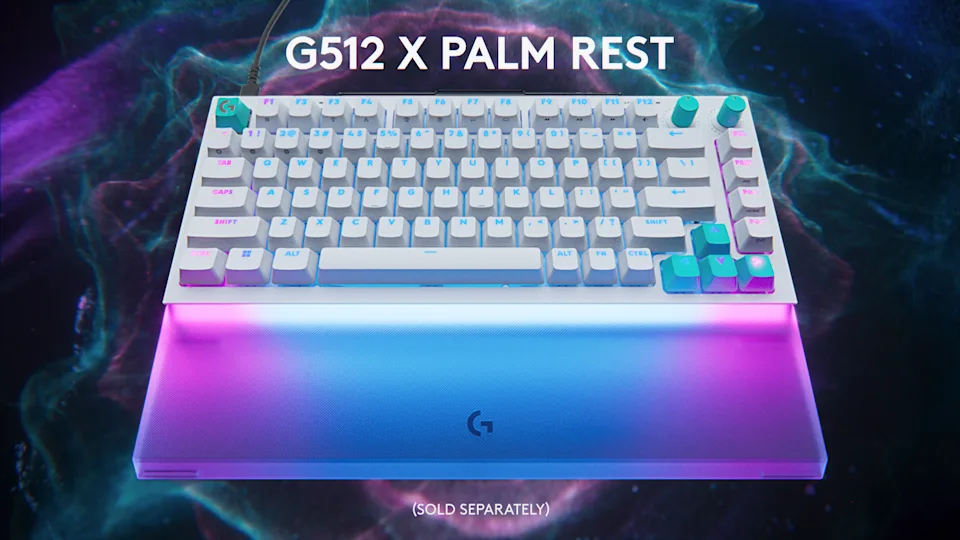
- Onboard Tools and Accessories: The board stores a keycap & switch puller in its feet, and an optional acrylic palm rest (sold separately) that snaps below the lightbar. Two metal dials on the top-right are fully assignable (volume control by default).
All lighting, macros, and analog profiles are managed through Logitech G Hub software. Using G Hub, users can create custom LIGHTSYNC lighting effects, program the dual dials, and map multiple actions or multi-stage triggers to each key (depth-sensitive mapping).

What makes the Logitech G512 X the most customizable gaming keyboard
The G512 X is designed as a modder’s keyboard with customization built into its core. Unlike fixed designs, every user-accessible element has been engineered for easy swapping or tuning. The Dual Swap switch bays mean you can replace any of the 39 switch positions with your favorite mechanical or analog switches; Tom’s Guide notes this “addictive” tinkering potential where feet double as pullers and everything is in one place (extra switches and SAPP rings are conveniently stashed on-board). Logitech openly calls this a “love letter” to keyboard enthusiasts.
Lighting and macros are fully customizable too: the G512 X’s LIGHTSYNC RGB per-key lighting and two programmable dials can be tuned in Logitech G Hub to match your preferences or game events. The large RGB lightbar serves as a “mood amplifier” in games, and the software even includes game-inspired effects. In short, customizability on the G512 X spans from hardware (hot-swappable switches, configurable actuation, swappable rings) to software (per-key RGB, macros, analog mapping). This level of modularity and personalization is what makes reviewers call the G512 X the “most customizable” Logitech keyboard to date.
Logitech G512 X analog vs mechanical switches: how dual swap works
A standout feature of the G512 X is its hybrid switch layout. Underneath each key is a TMR-based switch module that can function in two modes. By default it holds a mechanical (MX-compatible) switch, but you can remove that and insert a magnetic analog switch instead. This Dual Swap system allows on-the-fly swapping of switches without soldering or special tools. In practice, you might populate “WASD” and spacebar with the included Gateron KS-20 analog switches (for analog depth or rapid actuation), while keeping the rest of the keys with standard Logitech mechanical switches for normal typing feel.
Logitech even provides a small “Scan” button: pressing it tells the keyboard to detect which positions have analog vs mechanical switches, and it highlights those keys via RGB to help you remember the setup. According to PC Gamer, it works seamlessly – you can pull out a keycap/switch assembly easily (feet double as pullers) and snap in the new switch, then resume using the keyboard immediately. The board is compatible with most common 3-pin or 5-pin switches, whether clicky, tactile, linear, or analog. In short, Dual Swap is Logitech’s way of giving you two keyboards in one – mechanical for typing, analog for gaming – in the same board.

Logitech G512 X TMR technology and analog input explained
The G512 X uses Tunnel Magneto Resistance (TMR) sensors beneath each switch to detect keypress depth. This is the same underlying tech used in some high-end Hall-effect keyboards (like those from Wooting or Cherry), but Logitech’s implementation is magnetic rather than purely optical. What this means is that each analog switch can measure how far down you press a key, not just on/off. The press release explains that TMR lets the keyboard “move beyond binary on/off inputs,” so actions can be mapped to intermediate depths. For example, you could set your throttle or yaw in a flight sim to correlate with key depth, or have one key “half-press” to walk and full-press to sprint in a shooter.
Compared to a normal keyboard, this gives finer analog control in games. The included Gateron KS-20 analog switches have a linear feel and use magnets to sense press distance – Logitech says these were chosen to give “a competitive edge in gaming”. In practice, reviewers note that using analog switches with TMR makes movement feel more precise and controllable. In Tom’s Guide’s testing, analog keys “made me a better gamer” by allowing smoother speed control. Of course, you can always switch back to regular mechanical MX switches (logitech’s own tactile/dampened line) by hot-swapping, since each slot supports both.
How SAPP rings enable dual-action keypress on the G512 X
Another unique feature is the inclusion of SAPP (Second Actuation Pressure Point) rings. These are small rubber rings that you can insert beneath an analog switch. The ring creates a tactile “bump” or extra resistance at a defined travel distance (2mm by default), enabling two distinct actuation points on a single key. In effect, one keypress can trigger two different actions: an initial press (e.g. “walk”) at a shallow depth, and a full press (e.g. “sprint”) after the ring’s bump. Logitech’s press materials describe tapping lightly vs pressing deeper for two mapped actions (equip grenade vs throw it).
In practice, PC Gamer confirmed this works well: for example, the W key could be split into “walk” (0.1–2.0mm) and “sprint” (2mm+) by combining analog sensing with a SAPP ring. This is a niche but powerful tool for competitive gamers who want ultra-fast dual inputs. The keyboard ships with five SAPP rings stored onboard, and inserting them is easy (simply place the ring around the stem of a key). You then configure the two actuation depths in Logitech G Hub, assigning each depth a separate macro or action. This “deep press mastery” feature essentially doubles the key count for advanced users, enabling novel gameplay tricks.
Logitech G512 X 8K polling rate and ultra-low latency performance
Logitech touts the G512 X’s True 8K performance as a major innovation. In USB mode, it can poll at 8,000 Hz (reports every 0.125 ms) end-to-end. The press release emphasizes a “near-instant 0.125ms” reaction time. This is the fastest polling rate available (typical gaming keyboards use 1000 Hz/1ms), and it matches the new G502 X mouse’s rapid trigger capability. In real terms, this ultra-low latency means keypresses register nearly instantaneously.
Reviewers confirmed that in fast-paced games, the difference is noticeable. PC Gamer noted that every key has a max 8000 Hz polling rate and that the TMR switches plus 8K allow “hitting the most important keys even quicker”. In Counter-Strike 2 testing, the author could stop walking instantly on key release (due to analog + high polling) which helped aim.
For most games, 8K polling provides headroom beyond what standard keyboards do, which competitive players value for micro-improvements in response time. It’s worth noting that wireless operation is not supported (and likely not feasible at 8K), so the G512 X is a wired-only keyboard. But for wired use, the 8KHz rate delivers the lowest possible input lag short of optical-mechanical hybrids.

Logitech G512 X RGB lighting customization and G Hub software guide
The G512 X offers extensive RGB lighting control via Logitech’s G Hub software. Per-key RGB allows each key to be individually lit in 16.8 million colors. Additionally, a wide LED lightbar runs along the bottom edge (33 addressable zones). Reviewers praised the keyboard’s lighting: PC Gamer describes it as a “lovely look,” noting that one of the two media dials is by default mapped to control RGB brightness. Through G Hub, users can craft custom lighting sequences or use preset effects (even synchronized with in-game audio or system events via LIGHTSYNC). For example, one preset in G Hub is themed on 2001: A Space Odyssey, showing the playful variety of effects available.
All the G512 X’s features integrate with G Hub. This includes:
- Mapping RGB profiles and syncing them with games/software.
- Programming the two dials (e.g. one for volume, one for adjusting lighting brightness or cycling profiles).
- Creating multi-action macros or adaptive lighting tied to analog inputs or game states.
- Defining the behavior of SAPP rings and analog actuation depths (G Hub lets you set the two press points and assign an action to each).
In short, the G512 X’s hardware customization is unlocked through G Hub’s software interface. This gives gamers a software “guide” to dialing in exactly how the keys behave and glow, making it accessible even to those new to modding keyboards.
Logitech G512 X build quality, design, and modular features breakdown
Physically, the G512 X is well-built and thoughtfully designed. PC Gamer found no issues with durability: it’s not as heavy as some full-metal enthusiast boards, but it’s solid and not flimsy. The top case is polymer (with significant recycled content) and it sits on a sturdy internal frame. Reviewers note the keyboard’s aesthetic is “smart” and “striking” – angular ridges around the edges give it an industrial, edgy look, and the overall feel is premium. All keys are covered with thick PBT double-shot caps, which resist wear and feel comfortable (the author typed 82 WPM with 95% accuracy in testing).
The design is also very modular by intent. The underside has a flush compartment that holds nine spare KS-20 switches; beneath that are slots for five SAPP rings. The flip-out feet themselves are keycap/switch pullers, so you never have to hunt for tools. The keyboard supports adjustable tilt (4–8° angles via feet). In use, the typing angle felt ergonomic, and the G512 X “sits around the middle of the pile” of keyboards for pure typing comfort.
Additional build notes: The keyboard is wired only (with USB-C) and works on Windows and macOS. A minor convenience is a scan button on the back to detect swapped switches, as mentioned earlier. No wireless or rechargeable models are available (Logitech and reviewers noted 8K polling isn’t compatible with wireless at this power level). The included cables are braided and routed through a rear channel. Overall, the G512 X’s design balances gamer flair (RGB lightbar, bold lines) with practical mod-friendly touches (on-board storage, hot-swap support).
How to customize switches on the Logitech G512 X keyboard
Customizing the G512 X’s switches is straightforward, thanks to its hot-swappable design. Step 1: Place the keyboard on a flat surface. Use one of the keyboard’s feet (which doubles as a switch puller) to remove a keycap and the underlying switch. All switch wells have PCB-mounted hot-swap sockets. Step 2: Pull out the stock switch (or analog switch) by the base.
Step 3: Insert a new switch (mechanical or analog) into the empty socket, pressing firmly until it clicks into place. The G512 X supports standard 3-pin or 5-pin MX-style switches, including Logitech’s own GX or Cherry MX types, as well as third-party analog switches. Step 4: Replace the keycap. If you changed an analog switch, press the rear “Scan” button (or reconnect the keyboard) so the firmware recognizes the new switch type. The keyboard will highlight analog-equipped keys with a distinct RGB pattern (purple glow) for confirmation.
Logitech provides nine KS-20 analog switches in the box, but you can customize beyond that by purchasing more (the hot-swap sockets are universal). You can also do this on-the-fly without unplugging: the keyboard’s firmware detects swaps immediately, letting you plug switches in and out during use. As Tom’s Guide notes, this built-in organization (with pullers and storage) makes tinkering “addictive”. In summary, to customize switches: use the included tool/feet to pull switches, swap in your chosen switch, and use G Hub or the scan button to finalize the configuration.

Logitech G512 X review: real gaming performance and typing experience
Hands-on testing confirms that the G512 X performs well both in gaming and typing. Typing experience: With a deep 4mm travel on its keycaps and tactile feedback (for mechanical switches), the board felt comfortable. Reviewers achieved high typing speeds (over 80 WPM) with good accuracy. The PBT caps and stable build gave a pleasing “thock” sound. There were no reported issues like chattering; overall, the switch actuation felt reliable. The RGB backlighting also improved key visibility in low light.
Gaming performance: The analog features and high polling rate proved beneficial. In PC Gamer’s competitive shooter tests, the author noted the ability to instantly stop movement (thanks to analog input and 8K polling) which aided precise aiming. Rapid Trigger (the instant re-trigger feature made possible by TMR) let the user press keys in games faster than with a normal switch. Reviewers reported “notable” improvements in reaction speed and gaming stats after switching to G512 X, especially when properly mapping movement keys with analog switches. Single-player and RPG games were noted to be enjoyable for long sessions with little fatigue, thanks to the keyboard’s comfort and feel.
In summary, the G512 X offers excellent real-world performance. It feels like a well-made keyboard for daily use, but with the bonus that it can be fine-tuned (analog sensitivity, SAPP depth) for whatever game you play. As one reviewer put it, the keyboard is “comfortable to type on… nothing wrong” on that front, while in gaming it “truly shines in competitive games” thanks to its precision features.
Is the Logitech G512 X worth it for competitive gamers in 2026
For serious gamers, the G512 X provides several competitive advantages. The analog sensing and 8K polling can give fraction-of-a-frame improvements in responsiveness and control. In esports titles (FPS, racing sims, flight sims), being able to modulate movement or actions by key depth can yield better precision. The dual-stage SAPP triggers allow high-level players to squeeze more actions per key in split-second scenarios. On the other hand, these gains may be subtle for casual play. The keyboard is fairly high-end (starting around $180 for the 75-key), so budget-minded players might find it pricy.
However, when compared to other premium analog keyboards, it is competitively priced. PC Gamer concluded you’re “getting a competitive package”. They advise: “Buy if … you want a customizable keeb” with hardware and software modding, as the G512 X is “accessible” even to newcomers. The only real downsides for competitive use are the lack of wireless (not surprising) and that some analog features (like the optimal switch layout) require setup time. The included analog switches were found sufficient for key movement (WASD+space).
Overall, if you’re a competitive gamer who wants the latest input tech for every advantage – and you don’t mind tinkering – then the G512 X is a strong candidate in 2026. Its innovations (8K polling, analog dual-swap, SAPP rings) push beyond mainstream keyboards, aligning well with high-end competition gear.
Logitech G512 X vs other analog keyboards like Wooting and Keychron
The G512 X enters a growing field of analog-capable keyboards. Wooting keyboards (like the Wooting 80HE) use Hall-effect switches and also boast true 8K polling and analog input. Unlike Wooting’s fully analog boards, however, the G512 X uses TMR analog only on its left-side switch banks (39 keys) and leaves the right-side fully mechanical.
This hybrid approach means G512 X has fewer analog keys than a Wooting (which has analog on every key), but offers the flexibility of mixing and the comfort of mechanical where you prefer it. Wooting’s 80HE is priced around $200 with a robust aluminum body, whereas the G512 X comes in at $179/199 (75/98-key). Both hit 8K polling, but Wooting uses Hall-effect and Keychron uses similar magnetic analog (Keychron’s “HE” line uses Halls).
Keychron recently released analog-capable models (e.g. the K2 HE 75% wireless, or the Q1 Ultra 8K wired). Keychron’s analog boards offer full-board analog input with Hall-effect switches and often also support wireless modes. Tom’s Guide notes that a board like the Keychron K2 HE (roughly $130–140) gives analog switches across the entire layout, whereas G512 X only on a portion. Keychron’s advantage is price and sometimes wireless use, but Logitech’s advantage is build design (modular storage, RGB implementation) and arguably better software support (Logitech G Hub). In side-by-side usage, reviewers found G512 X to be more “appealing” in aesthetics and feel than older Cherry/analog boards, and priced competitively.
In summary: if you want a full analog keyboard and can live with Hall-effect, Wooting/Keychron may be options (Wooting for wired e-sports use, Keychron for budget/wireless). If you want a hybrid approach with easy swapping, plus big RGB lighting and Logitech ecosystem, the G512 X stands out. Logitech’s price point undercuts some all-analog competitors, making it a compelling middle-ground.
Logitech G512 X pros and cons: what reviewers are saying
- Pros: Reviewers praise the customizability and smart design. The built-in switch and keycap pullers, on-board storage, dual media dials, and modern aesthetic (industrial ridges, vibrant RGB) are frequently cited as highlights. The typing feel and analog switches themselves are noted to be very good – Tom’s Guide says “great, tactile keypress feel” and that using analog switches “made me a better gamer”. The hardware is solid for its price, with Logitech delivering 8K polling and features that match or exceed some niche competitors.
- Cons: The main criticisms revolve around scope and small flaws. Only the left-side 39 keys support analog mode; some competitors put analog on every key, so mixing a “half-analog” layout can feel inconsistent. The supplied SAPP rings were noted to be loose (Tom’s Guide said they “fall out easily”). Also, the $199 high-end model and $179 base model are not cheap – PC Gamer’s advice “Don’t buy if you’re on a budget” (though it’s still a good value for its features). Other cons: no wireless option and the palm rest costs extra. In brief, most reviewers conclude the G512 X solves many keyboard puzzles but isn’t perfect: it excels at customization, though its SAPP ring mechanism and partial analog coverage could be better.
Logitech G512 X price, release date, and availability worldwide
The G512 X launched April 28, 2026 on Logitech’s website, with a global rollout at retailers starting May 2, 2026. Pricing is $179.99 USD for the 75-key model and $199.99 USD for the full 98-key. (As of mid-2026, prices in other regions are roughly £169–£199 in the UK.) A separate acrylic palm rest is available as an accessory ($39 for 75-key, $45 for 98-key). The keyboard is sold through LogitechG.com and major retailers worldwide (North America, Europe, Asia). Its availability in 2026 ensures it competes with the current crop of gaming keyboards, sitting between premium analog boards and traditional high-end mechanical boards in price.

Who should buy the Logitech G512 X gaming keyboard in 2026
The G512 X is ideal for PC gaming enthusiasts and modders who want cutting-edge input control. If you enjoy customizing your hardware and want both analog precision and mechanical feel in one board, the G512 X is a strong fit. It’s suited to competitive gamers who want every advantage (high polling, dual-actuation, rapid trigger) and don’t mind investing time to tweak settings in software. It’s also a good pick for newcomers to analog keyboards, since Logitech simplifies the process with on-board tools and G Hub support.
For pure typists or casual users, a full analog keyboard is less critical. Likewise, if budget (<$150) is a priority, there are cheaper boards available (though often without the same feature set). In PC Gamer’s words, “Buy if… you want a customizable keeb” – if customizing and modding gear excites you, the G512 X delivers accessibility without steep learning curves. In short, its target audience is gamers who also tinker: those who want an advanced, adaptive keyboard they can personalize deeply.
Frequently Asked Questions (FAQs)
- What is the Logitech G512 X?
It’s a 75% (no numpad) or 98-key gaming keyboard introduced in April 2026. It’s designed as a “performance-driven” keyboard for PC gaming, notable for its dual-mechanical/analog switches and rapid 8K polling. - What is Dual Swap?
Dual Swap refers to the G512 X’s hot-swap switch sockets that accept both mechanical and magnetic analog switches. You can install an analog switch in any of 39 designated positions (e.g. on WASD keys) or use standard mechanical switches in the same sockets. The keyboard ships with nine analog switches included. - What are TMR analog switches?
TMR stands for Tunnel Magneto Resistance. On the G512 X, TMR sensors beneath each switch measure how far you press a key (not just on/off). This lets you assign actions to partial keypresses for analog input (like gradual movement in racing games). In practice, it means the board can detect two distinct depths on one key when used with an analog switch (especially with a SAPP ring installed). - What are SAPP rings?
SAPP (Second Actuation Pressure Point) rings are small rubber rings placed under a keycap. They add a tactile “bump” so you effectively get two trigger points: one light press and one deep press. This enables dual-action keys (for example, walk vs sprint on the same key). The G512 X includes five SAPP rings and slots to store them. - What does 8K polling mean?
8K polling means the keyboard reports its status to the PC 8000 times per second (every 0.125 ms). This is four times faster than the common 2000 Hz mode and eight times faster than 1000 Hz. In effect, it minimizes input lag so that key presses are registered almost instantaneously, which is beneficial in fast-paced games. - What layouts are available?
The G512 X comes in a 75% layout (compact TKL with no numpad) and a 98-key layout (adds arrow keys and a small nav cluster on the right). Both versions have the same features aside from the extra keys. - What’s in the box?
It includes the keyboard (pre-installed with mechanical switches except for the 9 included analog ones), a braided USB-C cable, 9 extra Gateron KS-20 analog switches, 5 SAPP rings, and a keycap/switch puller (built into a detachable foot). The kit lets you immediately start swapping switches. A palm rest is not included but sold separately. - Is the G512 X wireless?
No – it is a wired keyboard only. It connects via a USB-C cable. Logitech did not offer a wireless version, likely because 8K polling and analog sensing require a stable wired connection. - What software is needed?
Logitech G Hub software (free for Windows and macOS) is used to configure the G512 X. In G Hub you can program the RGB lighting effects, macros, and the analog/SAPP behaviors. It detects analog switches and lets you set the two actuation depths for SAPP rings, as well as customize the dual dials and any onboard functions. - How much and when?
The G512 X launched April 28, 2026. MSRP is USD $179.99 for the 75-key and $199.99 for the 98-key. It is sold through Logitech’s store and global retailers from May 2026. In the UK, prices are about £169–£199. The palm rest is $39 (75-key) or $45 (98-key) separately.

Conclusion
The Logitech G512 X brings together high-end gaming keyboard innovations in one package. With its hybrid analog/mechanical switch design, ultra-fast 8K polling, and deep customization (via SAPP rings and G Hub), it represents one of the most flexible keyboards on the market. It’s clearly built for enthusiasts: modders will appreciate the on-board storage and built-in tools, while competitive gamers will value the precision controls.
Reviewers agree it feels like a cut above ordinary boards in terms of design and functionality. While not perfect (limited analog coverage and some small quibbles), it pushes the industry forward in user-customizable hardware. In 2026, the G512 X legitimately challenges the question posed in its name – it is among the most advanced, adaptable gaming keyboards yet made.
Sources and Citations
- Logitech official press release
https://news.logitech.com/press-releases/news-details/2026/Introducing-the-Logitech-G512-X-Gaming-Keyboard-Designed-to-be-Tuned-Tweaked-and-Mastered-for-Personalized-Performance/default.aspx - Logitech G512 X 75 product page
https://www.logitechg.com/en-us/shop/p/g512-x-75-gaming-keyboard - Logitech G512 X 98 product page
https://www.logitechg.com/en-us/shop/p/g512-x-98-gaming-keyboard - Logitech G HUB documentation
https://www.logitechg.com/en-us/software/ghub - PC Gamer review
https://www.pcgamer.com/hardware/gaming-keyboards/logitech-g512-x-review/ - Tom’s Guide review
https://www.tomsguide.com/computing/keyboards/logitech-g-g512-x-review - Wooting 80HE official specs
https://wooting.io/wooting-80he - Engadget hands-on/summary
https://www.engadget.com/gaming/pc/the-g512-x-is-logitechs-most-advanced-and-customizable-gaming-keyboard-yet-070100610.html - The Verge coverage
https://www.theverge.com/news/919517/logitech-g512x-gaming-keyboard-hall-effect-tmr-mechanical-swap - PCWorld coverage
https://www.pcworld.com/article/3125117/logitech-new-g512-x-keyboard-could-sell-me-on-adjustable-actuation.html
Recommended
- Jazzy Stealth Action Game Thick as Thieves Hits PC on May 20: Release Date, Gameplay, and What to Expect
- The Boys Returns for Season 5: Release Date, Cast, Trailer, Episode Schedule, and Final Season Story Details
- Sega’s Stranger Than Heaven Will Headline Xbox Partner Event This Week – Date, Time, Games, and What to Expect
- War Machine Review (2026): Netflix’s Alan Ritchson vs Alien Killer Robot Sci-Fi Action Movie
- How to Make Gen Z Slang Meme Videos with MetaHuman: Brainrot, Sigma, and Gooning-Style Content for Social Media
- Canceled Star Wars FPS Is Playable Again – Why “First Assault” Feels Amazing and Sad at the Same Time
- The View Keeper Add-on: Tips for Seamless Camera Switching in Blender
- How do I set a camera to render in orthographic mode in Blender?






















































































