






Redshift 2026.4: Redshift Live and Key Updates
Maxon has released Redshift 2026.4, a major update that introduces Redshift Live—a new real-time rendering mode—while officially discontinuing the older Redshift RT. This update focuses on accelerating look development and visualization for 3D artists.
What is Redshift Live?
Redshift Live is a real-time GPU rendering engine integrated directly into Redshift. It serves as the successor to Redshift RT, built on new technology to provide near-instant visual feedback.
- Purpose: Designed for interactive look development, lighting setups, and architectural visualization.
- Integration: It is not a separate product; it is a toggleable mode within supported applications (Cinema 4D, Maya, Houdini, 3ds Max, etc.).
- Platform Support: Unlike its predecessor, Redshift Live supports both Windows and macOS (including Apple Silicon) from day one.
- Workflow: Artists can switch between “Live” for speed and “Production” for final high-quality renders.
New Features in Redshift 2026.4
The 2026.4 update expands Redshift’s capabilities across several areas:
- Vectorworks 2026 Support: Integration with Vectorworks 2026 (Update 4) allows architects to use Redshift Live for real-time CAD visualization.
- Dome Light Shader Support: Dome lights can now use procedural textures (noises, gradients, OSL shaders) instead of just HDRI maps.
- Cinema 4D Exclusive: Procedural Night Sky: A physically-based system within the Sun & Sky rig that generates stars, the moon (with phases), and the Milky Way.
- OpenPBR Support (Cinema 4D): A new converter allows Redshift Standard Materials to be transformed into the universal OpenPBR standard.
- Texture Displacement Improvements:
- Support for Per-Polygon Materials, allowing different displacement maps on a single object.
- Support for UV ranges outside 0-1, improving compatibility with UDIM workflows.
- Fixes for hardware ray tracing artifacts and low-poly mesh “holes.”
- Light Normalization: A new mode for Physical Sun & Sky that balances sun and moon intensity relative to camera exposure.
Redshift Live vs. Redshift Production
While both share the same DNA, they serve different stages of the 3D pipeline:
Feature Comparison Table
| Feature | Redshift Live (Real-Time) | Redshift Production (Final) |
| Primary Goal | Speed & Interactivity | Accuracy & Full Quality |
| Hardware | GPU Only | GPU and CPU (Hybrid) |
| Subsurface Scattering | Not Supported | Supported |
| Volumetrics/Fog | Not Supported | Supported |
| Motion Blur/DoF | Not Supported | Supported |
| AOVs/Render Passes | Not Supported | Supported |
| Displacement | Bump mapping only | Full Tessellation/Displacement |
| Hair and Fur | Not Supported | Supported |
Key Differences Explained
- Rendering Technology: Redshift Live uses hardware-accelerated path tracing combined with AI upscaling (NVIDIA DLSS, Apple MetalFX, or Intel OIDN) to achieve real-time speeds.
- Asynchronous Loading: Live mode uses “asset streaming,” showing placeholder clay shaders or low-res textures immediately while high-res assets load in the background.
- Accuracy: Live omits complex calculations like specular refractions (glass) and secondary GI bounces to maintain performance. Production mode handles the full light transport physics.
- Stability: Redshift Live is a core production feature with improved stability over the experimental “Beta” nature of the former Redshift RT.

Real-Time Improvements
The shift to Redshift Live signifies Maxon’s commitment to making interactive rendering a “first-class citizen.” By leveraging modern GPU ray-tracing cores and AI denoising, it reduces the “feedback gap,” allowing artists to see near-final lighting and materials as they move the camera, regardless of whether they are on Windows or Mac
Whether to upgrade:
For most users – from motion designers to VFX artists to archviz professionals – the upgrade to Redshift 2026.4 is strongly beneficial:
- It will make your workflow faster and more interactive with Redshift Live.
- It provides new tools to achieve looks (dome light textures, night skies, etc.) that you either couldn’t before or would need external compositing.
- It fixes annoying bugs and ensures compatibility with the latest 3D software and OS updates.
Redshift 2026.4 Upgrade Recommendations
Upgrading to Redshift 2026.4 is highly recommended for most users to access the new real-time Redshift Live engine and various performance improvements.
- Mid-Project Considerations: For short-term projects, sticking to the current version ensures total consistency. For long-term projects, upgrading is beneficial but requires testing a few frames to verify that results match, particularly regarding displacement and volumetrics.
- Subscription Value: Since Redshift is a subscription service, Redshift Live is included at no additional cost.
- Future-Proofing: Upgrading ensures compatibility with upcoming incremental updates aimed at achieving feature parity between the Live and Production engines.

Redshift Live Limitations and Known Issues
While Redshift Live provides fast interactive feedback, it currently lacks several features available in the Production renderer.
- Shading and Materials:
- No Subsurface Scattering (SSS): Effects for materials like skin or wax will not render; objects will appear more opaque.
- No Hair Rendering: Hair, fur, and primitives (such as XGen or C4D hair) are invisible in Live mode.
- No Point Clouds: Direct rendering of particle or point cloud data is not supported.
- Thin-Walled Refraction: Single-sided transparent surfaces (like window panes) do not render correctly.
- Lighting and Effects:
- No Volume Rendering: Smoke, fire, and fog effects are invisible.
- No Motion Blur or Depth of Field (DOF): All objects remain in sharp focus with no motion streaks.
- No Specular Caustics/Refractions in GI: Light passing through glass or water will not create caustic patterns or colored light on other surfaces.
- No Soft Shadows: Area lights ignore the “Spread” parameter, resulting in hard shadows in the Live preview.
- Advanced Rendering Features:
- No Light Linking or Trace Sets: All lights affect all objects uniformly; custom inclusion/exclusion rules are ignored.
- No Ray Switch Shader: Nodes used to provide different shaders for camera, reflection, or GI rays will not function.
- No AOV Output: Live mode only displays the “beauty” composite and cannot output individual passes like Cryptomatte or Specular.
Given these limitations, how to work around or handle them:
- For hair/SSS/volumes: use Redshift Production IPR when focusing on those. You can still do 90% with Live (e.g., light the scene without hair, then for hair lighting, do small region final renders).
- For DOF/Motion blur: compose your shot and lighting in Live without DOF/MB, then do a test final render to ensure the effects of DOF/MB are as desired (sometimes you might need to adjust light brightness if motion blur brightens streaks, etc.).
- Accept that final quality check is needed. Redshift Live gets you close, but before delivering frames to client, do a quick final-render check (which you’d do anyway) to ensure no surprises from these unsupported features.
- Light linking: if you heavily use linking, you can either temporarily disable links to see effect on everything in Live (to roughly gauge power), or just tune linked lights via production region renders. This is a niche advanced scenario typically in complex scenes or product shoots where you exclude lights from backgrounds etc.
- If doing a creative look dev and you absolutely need to see something like caustics, you might temporarily switch to production progressive rendering for that portion. Or at least be aware that “this glass isn’t casting caustic now, but it will later.”
Given PixelHair was likely included by user, not by Redshift context, I’d incorporate it as a side suggestion in context of hair limitations: since Redshift Live can’t preview hair, one workflow might be to design hair using PixelHair assets (which come with their own preview methods or via Unreal) and then apply them for final render in Redshift.
PixelHair ensures you have a high-quality groom ready, so you don’t need to manually groom and constantly test render hair (which is slow because hair doesn’t show in Live; you’d be rendering hair in final often). By using PixelHair’s proven assets, you kind of skip a lot of trial and error, and can trust the hair will look good in final Redshift render with minimal adjustments. Also note Yelzkizi’s upcoming geometry nodes integration – in future, maybe PixelHair will make it easier to get hair into Redshift pipeline by exporting as geometry/curves nicely.
Recap Known Issues:
- Redshift Live is new; known limitations are being worked on, as Maxon said (they want feature parity soon). So these issues are not permanent, but current.
- For now, approach Redshift Live as an amazing preview tool for primary lighting, shading, composition, but not a final pixel-perfect match for certain effects. Always do that last mile check with production render especially if those special effects are in your scene.
- No output passes means you also won’t get noise AOV in live, but you can gauge noise with your eyes in beauty and since it denoises, that’s fine.
While Redshift Live has several limitations in its initial release (no SSS, hair, volumes, motion blur, DOF, etc.), these are expected first-release constraints and Maxon is actively working to close those gaps. Being aware of them means you can plan accordingly: use production render for those aspects, and don’t be misled by any differences in the interactive view. Even with these limitations, Redshift Live is extremely useful, but you must rely on final rendering for full validation of those advanced effects. PixelHair and other tools can complement your workflow, especially in areas where Live doesn’t help (like hair creation), by providing ready-made quality assets that you then simply render in Redshift for final output.
Lastly, always keep an eye on release notes of subsequent updates – many of these missing features (hair, SSS, etc.) may get added in the next few releases, gradually eroding the limitations list and making Redshift Live even more powerful.
Frequently Asked Questions (FAQs)
- What is Redshift Live and is it part of Redshift 2026.4?
Redshift Live is a new real-time rendering mode introduced in Redshift 2026.4. It provides near-instant feedback for look development, lighting, and layout. It is included in the 2026.4 update at no extra cost; users simply switch the render mode from “Production” to “Live” within their settings. - How do I enable and use Redshift Live mode in Cinema 4D (or other 3D apps)?
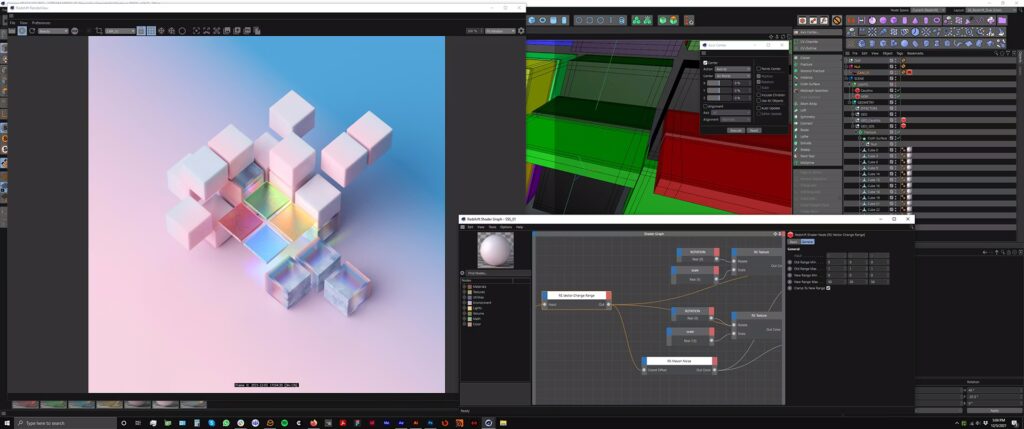
- Cinema 4D: Set Redshift as the renderer, switch the mode from Production to Live in Render Settings, and start an Interactive Preview Render (IPR) in the Redshift RenderView.
- Maya: Navigate to Render Settings > Redshift > Rendering Mode and select “Live,” then initiate a Maya IPR.
- 3ds Max: Assign Redshift as the ActiveShade renderer and start an ActiveShade session. Selecting “Live” makes the interactive rendering faster and more responsive than a standard IPR.
- Which features are not supported in Redshift Live (what are its limitations)?
The initial release of Redshift Live does not support:- Subsurface scattering, hair/fur, and volume effects (smoke/fog/fire).
- Motion blur and depth of field.
- Refractive/reflective caustics and specular GI.
- Light linking and trace sets (all lights affect all objects).
- Shading nodes like the Ray Switch.
- Soft shadows from area lights (rendered without spread).
- AOV/pass output. Maxon intends to address these limitations in future updates.
- Can I use Redshift Live for final rendering or is it only for previews?
It is primarily intended for interactive previews and look development. While users could render a quick sequence in Live mode for non-critical internal previews, final production renders should be done in “Production” mode. This ensures all high-quality features, such as hair and motion blur, are included and that the full range of AOVs/passes is exported. - Does Redshift Live work on macOS and Apple hardware (M1/M2)?
Yes. Redshift 2026.4 integrates Apple’s Metal API and MetalFX upscaling, allowing Redshift Live to run on Apple Silicon (M1/M2/M3) and Intel-based Macs with AMD GPUs. It requires macOS 12 or newer for MetalFX support. This provides Mac users with real-time rendering capabilities previously unavailable in the older Redshift RT mode. - What kind of GPU do I need for Redshift Live to perform well?
While it works on any Redshift-supported GPU, a modern card with hardware ray tracing and at least 8 GB of VRAM is recommended.- Windows/Linux: NVIDIA RTX 3080 or higher is suggested to utilize RTX ray cores and Tensor cores for DLSS. High-end AMD RDNA2 cards (Radeon 6800 XT+) also perform well.
- Mac: M1 Max/Ultra or M2 chips provide good results. Up-to-date drivers and multiple GPUs can further enhance performance.
- How does Redshift Live compare to using Unreal Engine for real-time rendering?
Redshift Live is an interactive mode within a high-quality offline renderer, providing physically accurate ray-traced results directly inside DCC apps without the need for asset exporting. Unreal Engine is a standalone game engine optimized for ultra-high frame rates and interactive experiences (VR, games) using approximations. Redshift Live is better for look development within a standard workflow, while Unreal is superior for fully interactive end-user applications. - How does Redshift Live compare to Octane’s interactive rendering?
Both offer interactive GPU previews. Redshift Live uses a hybrid approach with AI upscaling (DLSS/MetalFX) and denoising, which often feels more responsive and clears images faster than Octane’s unbiased path-tracing. While Octane previews everything (including SSS and hair) because it is brute-force, Redshift Live is generally more performant on modern RTX hardware and more tightly integrated with DCC features like deforming motion blur. - Will Redshift Live support features like SSS, volumes, and hair in the future?
Yes. Maxon’s ultimate goal is feature parity between the Live and Production engines. Updates following the 2026.4 release are expected to gradually introduce support for subsurface scattering, hair, volumetrics, motion blur, and depth of field. - How can I handle hair rendering in my workflow since Redshift Live doesn’t show hair?
Strategies include:- Proxy Geometry: Display hair as coarse tubes or geometry guides in the viewport to judge placement and lighting.
- Preset Assets: Use libraries like PixelHair, which offers nearly 200 realistic 3D groom assets, to reduce manual grooming time.
- Hybrid Workflow: Use Live for overall scene lighting, then perform small region renders in Production mode to fine-tune hair-specific rim lights or highlights.
- Specialized Tools: Utilize Blender-specific tools like The View Keeper to manage camera angles during lookdev before final rendering.

Conclusion
Maxon’s Redshift 2026.4 update is a game-changer in the world of GPU rendering. By introducing Redshift Live, Maxon has bridged the gap between real-time interactivity and high-end final image quality. Artists no longer have to endure long test renders or rely on less-accurate viewport previews – with Redshift Live, you get a near-instant, ray-traced view of your scene right inside your DCC application, vastly accelerating look development and decision-making.
It’s important to acknowledge that Redshift Live, in its debut, has some limitations (no hair, SSS, volumes in live view, etc.), but Maxon’s clear commitment to rapid development suggests these will be addressed in upcoming releases. Even with these current constraints, the benefits far outweigh the drawbacks – artists can adapt their workflows (using production mode for those few effects, or leveraging asset libraries like PixelHair for pre-made grooms) and still reap huge time-savings and quality improvements.
In summary, Redshift 2026.4 is a must-have update for anyone using Redshift. It modernizes the rendering pipeline with real-time capabilities that keep you creative and iterative, rather than waiting and guessing. Whether you’re a VFX artist needing to iterate on lighting, a motion designer building intricate scenes in Cinema 4D, or an archviz professional wanting instantaneous visual feedback for design decisions, this release has something impactful for you. By upgrading, you’re not just getting new features – you’re fundamentally changing the way you work with 3D, making it more interactive, intuitive, and enjoyable. Maxon has effectively future-proofed Redshift with this release, setting the stage for an even more powerful and feature-complete real-time rendering workflow in the near future.
Sources:
- Maxon, Redshift 2026.4 Release Notes – support.maxon.net (March 17, 2026).
https://support.maxon.net/hc/en-us/articles/8814051767964-Redshift-2026-4-0-2026-03-March-17-2026 - Jim Thacker, “Maxon adds real-time renderer Redshift Live to Redshift 2026.4,” CG Channel (Mar 19, 2026).
https://www.cgchannel.com/2026/03/maxon-adds-real-time-renderer-redshift-live-to-redshift-2026-4/ - Bela Beier, “Redshift 2026.4 adds Redshift Live and expands support for Vectorworks,” Digital Production (Mar 24, 2026).
https://digitalproduction.com/2026/03/24/redshift-2026-4-adds-redshift-live-and-expands-support-for-vectorworks/ - Maxon, Redshift | GPU-Accelerated 3D Renderer – product page.
https://www.maxon.net/en/redshift - Redshift Documentation – Redshift Live Overview.
https://help.maxon.net/r3d/maya/en-us/Content/html/Redshift%2BLive.html - CG Channel, “Maxon announces Redshift RT public beta” / “Maxon releases public beta of Redshift RT” (Sept 2021).
https://www.cgchannel.com/2021/09/maxon-announces-redshift-rt-public-beta/ - GarageFarm, “Redshift vs Octane: A broad comparison of render engines for Cinema 4D” (matching page found; the version I could verify is dated Nov. 6, 2023, not 2025).
https://garagefarm.net/blog/redshift-vs-octane-a-broad-comparison-of-render-engines-for-cinema-4d
Recommended
- GodotCon In Amsterdam This April: Dates, Tickets, Venue & Call for Speakers (2026)
- How to Create Warhammer Sisters of Battle Characters with MetaHuman in Unreal Engine 5
- Best 10 Water Simulation Add-ons in Blender: Everything You Need to Know Before You Install
- How to Add Texture to a 3D Model in Blender: A Step-by-Step Guide to Creating Stunning Materials
- The Devil In Me Game Dev Celebrates Star’s Win At The Oscars: Jessie Buckley’s Best Actress Victory Explained
- How to Retarget Mixamo Animations to Metahuman in Unreal Engine Using the IK Retargeter
- How do I make the camera orbit around an object in Blender?
- How do I align the camera to an object’s surface in Blender?
- How to Get the Perfect Hair Roughness for a Realistic Look
- How To Create Hexagon Fans Blender: Step-by-Step Hexagon Fan Grill (Honeycomb Fan Cover) Tutorial































































































