








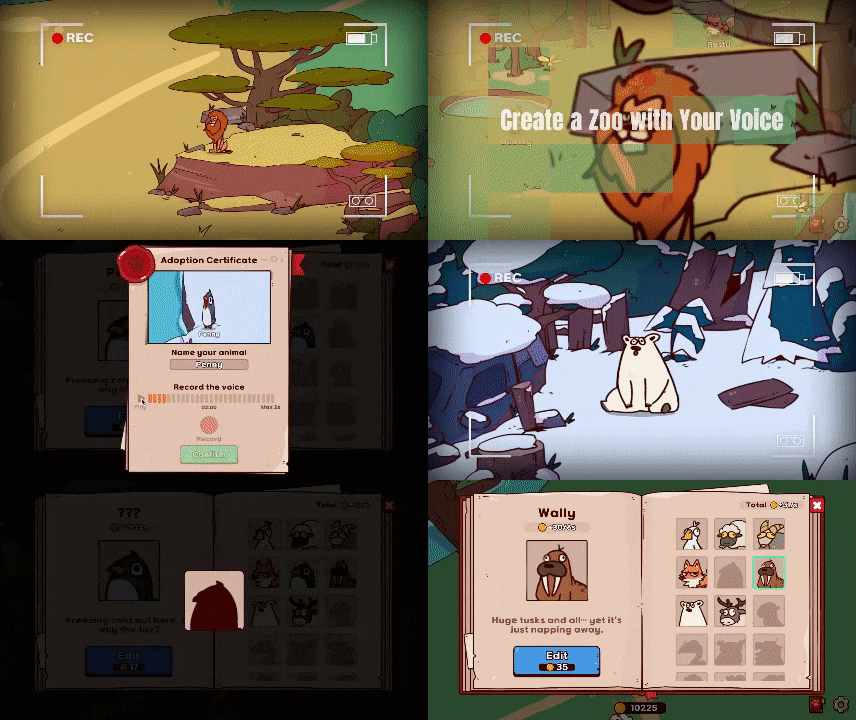
My Voice Zoo is a small but notable voice-powered idle zoo game whose verified official release, in the sources reviewed here, is the PC version published by TRUSO on Steam. Its core idea is simple and unusual: the player records sounds into a microphone, assigns those recordings to animals, and then uses the animals’ playback to generate income and unlock more content. That clean concept is also why search results are messy. As of May 5, 2026, official creator statements on X and Reddit say there is no official mobile release, even though multiple similarly named mobile apps and at least one browser portal now exist online.
What is My Voice Zoo
My Voice Zoo is a casual, indie, single-player simulation game built around a microphone mechanic instead of pre-made animal sounds. The official Steam page describes it as an idle zoo game where the player’s own voice becomes each animal’s cry, and it lists TRUSO as both developer and publisher. Steam also shows the game supports Steam Achievements, Steam Cloud, Family Sharing, and 15 interface languages, which positions it as a lightweight but fully released PC title rather than a prototype or demo.

My Voice Zoo Gameplay Explained
The gameplay loop is intentionally simple. Players record a sound for an animal, hear that sound replay when the animal “cries,” earn in-game income from those cries, and then spend that income to adopt more animals and expand the zoo. Post-launch updates added systems that deepen the loop without changing its core: special zones, singing camps, freer animal placement, faster progression balance, and later a costume system plus additional animals. In practice, that means My Voice Zoo is less about traditional zoo management spreadsheets and more about light collection, sound-based comedy, and idle growth.
How Does My Voice Zoo Voice Recording Work
The official Steam description says the game requires a microphone and lets the player create animal cries directly with their own voice. The same animal-voice assignment model appears again on the browser portal that markets a web-play version: record a sound, attach it to an animal, and hear that sound replay as part of the zoo’s activity. Public sources reviewed for this article do not show evidence of advanced AI voice conversion or automatic pitch transformation in the official PC game; the documented mechanic is straightforward microphone capture, assignment, and playback, with rerecording treated as part of the fun rather than a one-time permanent choice.
Does My Voice Zoo Save Recordings Locally or Online
The clearest public evidence points to both local storage and some form of cloud-assisted syncing on PC. Steam lists Steam Cloud as a feature, while community reset instructions tell players to navigate to C:\Users\[name]\AppData\LocalLow\DefaultCompany\MyVoiceZoo and temporarily disable cloud sync before replacing or deleting local data. That confirms the game keeps data locally and that Steam Cloud can sync or overwrite save-related files.
What the public sources do not clearly document is whether raw voice clips are stored as separate local audio files, bundled into the save structure, or selectively synced. The safest evidence-based summary is that My Voice Zoo definitely stores local game data and may also sync that data through Steam Cloud, but its exact recording-file architecture is not publicly documented in the reviewed sources.

My Voice Zoo Steam Release Date and Reviews
The official Steam release date is September 26, 2025. Review sentiment is strong: Steam shows the game as Very Positive overall, with recent reviews around 90% positive and lifetime sentiment above 92%, depending on which store snapshot is viewed. The central praise is consistent across official store summaries and curator commentary: the concept is funny, charming, and immediately understandable. The main criticism is also consistent: players often want more content, more animals, and a longer endgame because the game’s best joke can wear thin once most unlocks are finished.
My Voice Zoo Android Download and Google Play Listing
No verified official Android release from TRUSO appears in the reviewed sources. Instead, multiple unrelated listings on Google Play use the My Voice Zoo name or the official PC description. One listing is published by BlockVerse Games and presents a “My Animal Voice Zoo” variant with ads, in-app purchases, and data-safety language saying it may share location, app activity, and device or other IDs. Another exact-title listing is published by CLEAN UP PRIVATE LIMITED, shows 500K+ downloads in the viewed storefront, says data is not encrypted, and uses support contacts unrelated to TRUSO.
Against that backdrop, the official creator publicly stated that no mobile version had been released and that unauthorized copies were being distributed. That means Android searchers should not assume a Play listing is official simply because it uses the same name or copied store text.
My Voice Zoo Ios App Store Listing
The iPhone situation is similarly confusing. On the App Store, one listing appears as MyVoiceZoo Game by Elena Vasileva with SLN Games copyright, Music as the category, and privacy labels covering tracking, coarse location, identifiers, usage data, and diagnostics. A second listing appears as My Voice Zoo App by Jessica Nascimento/JESSAPPS, also categorized as Music, and describes a different hand-painted forest game with 25 animals while claiming that voice recordings are stored locally on the device.
Those are materially different app identities, privacy disclosures, and product descriptions under nearly the same search term. When those listings are read alongside the creator’s public statements that no official mobile version exists, the safest conclusion is that iOS storefront results should be treated as unverified lookalikes unless TRUSO links them directly.

My Voice Zoo System Requirements for Pc
The official PC requirements are light. Steam lists a 64-bit processor and operating system, Windows 7 or later, an Intel Core i3, 2 GB of RAM, Intel HD Graphics 4000 or better, DirectX 10, 300 MB of storage, any sound card, and, most importantly, a microphone. Both the minimum and recommended specs are effectively the same. There is one practical caveat: the page also notes that since January 1, 2024, the Steam client itself only supports Windows 10 and later. So while the game listing says Windows 7 or later, real-world Steam usage means Windows 10 or newer is the safer baseline. No official Mac or Linux requirements are listed on the reviewed store page.— ×2
My Voice Zoo Animals List and How Unlocking Works
A full official public animal roster was not found in the reviewed sources, so any “complete list” circulating online should be treated cautiously. What is confirmed is that the official store uses lion, duck, sheep, and penguin as examples, while the December 2025 update added 10 more animals to the zoo. A Steam discussion reply estimated the total count at around 30, but that number was a community answer, not a developer-published roster.
The part that is fully documented is the unlock logic: animals produce income when they cry, that income is used to adopt additional animals, and later updates layered in camps, special zones, and placement tools that make progression feel broader even if the core loop stays the same.
How to Make Better Animal Sounds in My Voice Zoo (funny Voice Ideas)
Because the game repeatedly replays short user-recorded clips, the best results usually come from sounds that are clear, short, and instantly recognizable. For birds or ducks, high-pitched one-syllable clips tend to land better than long sentences; for larger animals, a lower chesty sound or exaggerated growl usually reads more clearly on playback. Quiet recording conditions matter because the game mechanic is built on your mic input, not on a polished editor. The sources also indicate that rerecording is part of the experience, so experimentation is not a penalty, it is the joke.
Funny voice ideas that fit the mechanic well include fake documentary narration, cartoon villain whispers, squeaky toy sounds, dramatic opera notes, or one clean catchphrase per animal instead of an entire spoken monologue.— ×1
My Voice Zoo Tips for Faster Progress and More Coins
The fastest evidence-based way to progress is to lean into the idle loop the game itself documents: adopt new animals quickly, because more animals means more cries and therefore more income over time. Special zones and camps matter because official updates added unique environmental effects, choruses, and placement flexibility, while the October 2025 update explicitly adjusted balance so players could meet new animals faster. In plain terms, early expansion beats perfectionism. It is usually better to keep unlocking and placing than to overthink every recording. Letting the zoo run, returning to harvest progress, and using newly added spaces as soon as they open is more aligned with the official design than micromanaging for an ideal layout.

My Voice Zoo Microphone Not Working (common Fixes)
The most repeated PC fix in Steam discussions is to verify the correct Windows input device and then check Steam’s app-specific audio routing under App Volume and Device Preferences.
One player reported that this solved the problem immediately, while another noted a connected controller had overridden the desired microphone. Separate threads also show that some players still experience silence, delayed recording, or microphones that work elsewhere in Windows but not in the game, so the issue is not always fully resolved by one fix. There is another easily misunderstood behavior worth knowing: if every animal suddenly uses the same sound, that may not be a mic failure. The official December update says costumes can intentionally replace all zoo sounds with the costume’s assigned sound.
Is My Voice Zoo Safe for Kids (privacy and Microphone Permissions)
The official PC version presents itself as cute, cozy, noncompetitive, and family-shareable, so its tone is broadly child-friendly. The main caution is not graphic content but user-generated audio: because the entire gimmick is that animals repeat whatever the player records, the experience is only as child-friendly as the recordings themselves.
Privacy is where caution increases. On PC, public sources confirm local save storage and Steam Cloud support but do not spell out a raw-audio privacy architecture. On mobile lookalikes, privacy labels are much more explicit and often include ads, identifiers, app activity, diagnostics, and in some cases location-related data. For families, the safest route is the verified Steam version from TRUSO, paired with adult oversight of microphone permissions and recorded content, while unofficial mobile variants should be avoided.
My Voice Zoo Online Version (play in Browser Without Download)
A browser portal at myvoicezoo.com markets “Play Online Without Download” and has a dedicated play page for My Voice Zoo, but the sources reviewed do not establish that site as an official TRUSO platform.
The site is ad-supported, sits alongside many unrelated casual games, and presents generic descriptive copy rather than a clear developer verification trail. Since the reviewed official channels establish Steam as the known release platform and the creator has already warned that unauthorized off-platform copies exist in the mobile space, the correct evidence-based description is that a browser version is available online but not officially verified in the reviewed sources. Anyone trying it should treat it as an unverified third-party portal, avoid unnecessary permissions, and avoid assuming save portability or account safety.

My Voice Zoo vs Myvoicezoo vs Voicezoo (are They the Same Game)
Not necessarily. The official Steam product page stylizes the title as MyVoiceZoo, while the store description repeatedly uses My Voice Zoo in sentence form. Search results and app stores then expand that confusion with titles such as “My Voice Zoo,” “MyVoiceZoo Game,” “Funny VoiceZoo,” and other “voice zoo” variants. Some of those third-party listings even explicitly say they were inspired by “my voice zoo,” which is a strong sign they are adjacent or derivative products rather than the same official game. The safest authenticity check is simple: the official PC release is the TRUSO title on Steam with the September 26, 2025 release date and the official social links attached there. Similar wording alone is not proof of identity.
Frequently Asked Questions (FAQs)
- Is there an official Android or iPhone version of My Voice Zoo?
The reviewed creator statements say no. TRUSO publicly said no mobile version had been officially released and described some mobile copies as unauthorized. - Where is the official version available?
The verified official version in the reviewed sources is the Steam PC release by TRUSO. - Do you need a microphone to play?
Yes. The official Steam requirements explicitly say a microphone is required to record animal voices. - Can you play My Voice Zoo without constant active input?
Yes. The official description frames it as an idle loop where animal cries generate income over time and the zoo grows gradually. - Can animal sounds be changed after recording?
Publicly reviewed descriptions indicate that recordings can be replaced or rerecorded, and community commentary treats rerecording as a normal part of play. - Is My Voice Zoo multiplayer?
The official Steam features list shows single-player, not a verified multiplayer mode. - How many animals are in the game?
A full official roster was not found in the reviewed sources. Official materials confirm example species and a December 2025 update that added 10 more animals; one community estimate suggested around 30 total, but that figure is not an official roster count. - Why do all animals sometimes make the same sound?
That can happen by design if a costume is active, because the official update notes say certain costumes replace all animal sounds with the costume’s assigned sound. - Are saves only local, or are they synced online too?
Public evidence shows both local save storage and Steam Cloud support. What is not publicly documented in the reviewed sources is whether raw voice clips sync separately from general save data. - Is the game safe for children?
The official PC game’s tone is cute and noncompetitive, but the microphone mechanic means animals repeat whatever the player records. That makes supervision, permission control, and avoiding unofficial ad-heavy mobile copies the key safety rules.

Conclusion
My Voice Zoo is best understood as an official PC idle game on Steam with a memorable voice-recording hook, light technical demands, and strong user sentiment for humor and charm. The biggest practical risks around the game are not its core design but the surrounding ecosystem: unofficial mobile copies, inconsistent store listings, and an unverified browser portal that can mislead searchers into thinking the game is everywhere. The highest-confidence takeaway is straightforward: the authentic release documented in the reviewed sources is the TRUSO Steam version, while mobile and browser search results should be treated with caution unless the creator links them directly through official channels.
Sources and Citations
- Official Steam store page for MyVoiceZoo by TRUSO
https://store.steampowered.com/app/4015530/MyVoiceZoo/ - Official Steam news and update history
https://store.steampowered.com/news/app/4015530 - Steam update: New Animals & Costumes Added
https://store.steampowered.com/news/app/4015530/view/535495308456493378 - Steam update: The Singing Camp is Now Open
https://store.steampowered.com/news/app/4015530/view/588409432234263483 - Steam community discussions
https://steamcommunity.com/app/4015530/discussions/ - Steam community mic fix discussion
https://steamcommunity.com/app/4015530/discussions/0/757303296993060567/ - Steam community save location and Steam Cloud discussion
https://steamcommunity.com/app/4015530/discussions/0/682986810375210351/ - Creator statement on X
https://x.com/TRUSO_LEE - Creator statement on Reddit
https://www.reddit.com/r/IndieGaming/comments/1nnfkxg/i_made_an_idle_zoo_game_powered_by_your_own_silly/ - Google Play listing for My Voice Zoo
https://play.google.com/store/apps/details?id=com.fm.cat.mouse.game - App Store listing for MyVoiceZoo Game
https://apps.apple.com/us/app/myvoicezoo-game/id6760120612 - Browser portal page at myvoicezoo.com
https://myvoicezoo.com/ - Browser play page at myvoicezoo.com
https://myvoicezoo.com/my-voice-zoo/
Recommended
- Tamga Released: Minimalist 3D Sculpting App That’s Free on the Web (No Accounts or Subscriptions)
- Players Keep Finding Veronica Easter Eggs In Resident Evil Requiem as Code: Veronica Remake Rumors Grow
- Wanderstop Developer Ivy Road Is Shutting Down: Why the Studio Closed
- Ex-Fortnite Player D4vd Arrested on Murder Charges: 15 Key Facts
- How to Get the Perfect Hair Roughness for a Realistic Look
- Bloodborne: R-Rated Animated Movie in Development With JackSepticEye Producing — Release Updates, Studio Details, and What We Know So Far
- A Star Wars Expansion Is Coming to PowerWash Simulator 2: Everything You Need to Know About the Galactic Cleaning Adventure
- Why Tomodachi Life Doesn’t Support Switch 2 Handheld Mode Boost Despite 1080p Handheld Resolution
- Substance 3D Painter’s Role in Modern Pipelines: Why It Still Matters
- Sin & Siege, a New Heaven-Vs.-Hell Strategy Game, Revealed for PC



























































































