












In This Article (17 sections)
Roblox Build AI Framework, Features, and Natural-Language Game Generation
Roblox introduced Build on July 16, 2026, as an AI-assisted framework intended to make game development accessible to people who have ideas for interactive experiences but little or no experience with programming, 3D modelling, sound design, or professional development software. The mobile-first feature is integrated into the main Roblox application and converts natural-language descriptions into basic playable projects that creators can test, refine, share, and eventually publish. Instead of beginning with an empty scene and manually constructing every object, script, character, sound, and gameplay rule, users can explain what they want in ordinary language and receive a working foundation.
Build expands Roblox’s existing creator strategy rather than replacing Roblox Studio. Studio remains the company’s full desktop development environment, offering visual editing tools, imported assets, detailed object properties, multiplayer testing, and the Luau programming language. Build introduces a simpler entry point inside the mobile application, using artificial intelligence to perform selected tasks that previously required several specialised skills. A creator could describe a forest adventure containing environmental obstacles, characters, sound, and a particular visual style, then receive a playable version that can be modified through further instructions.
The process begins by interpreting a prompt as a collection of game-design requirements. Build must identify information such as the intended genre, setting, objective, player activity, characters, hazards, visual direction, sound, and progression structure. Roblox says the framework uses a broad collection of artificial intelligence systems, including proprietary Roblox models and open-source technologies. Its internal models have been trained with gaming-specific and three-dimensional information, helping them reason about interactive environments and functional objects rather than treating the requested world as a static picture.
Dividing Prompts Across AI Generation Models
The natural-language request can then be divided into tasks handled by different models and platform services. One system may help determine the layout, while others can create or select suitable 3D assets, establish gameplay logic, add characters, arrange environmental details, produce sound, or define the presentation. Roblox has not publicly documented every stage of this generation pipeline, so Build should be understood through its announced capabilities rather than assumptions about the exact internal model architecture.
Functionality is a central part of Roblox’s wider AI development. A generated image of a vehicle only needs to look like a car, but a usable game vehicle needs separate components, collision properties, movement behaviour, scripts, and interaction with the player. Roblox’s 4D generation work uses schemas to define the pieces needed for functional objects. Its Car-5 schema, for example, specifies a vehicle body and four separately named wheels, allowing the wheels to turn and steer through scripts. Roblox ultimately wants its schema system to support thousands of interactive object types, while Build extends the same principle from individual objects toward complete playable starting points.
The framework is designed to assist with several parts of a basic Roblox game:
- Gameplay mechanics and objectives
- Environments, terrain, and scene layouts
- Characters and interactive objects
- Visual style and presentation
- Sound and atmosphere
- Obstacles, collectibles, and hazards
- Basic progression and game rules
- Playtesting, sharing, and publication preparation
This broad feature set could support obstacle courses, exploration games, small adventures, racing concepts, survival challenges, social spaces, puzzle experiences, collection games, basic simulators, and multiplayer prototypes. Its strongest early use may be rapid prototyping. A developer could generate several versions of one concept, compare a cooperative structure with a competitive version, test different session lengths, or determine whether an idea is enjoyable before committing substantial development time.
Limitations and Human Refinement Needed
The quality and complexity of the result will depend on the supported models, available templates, prompt clarity, and the amount of human refinement applied afterward. Build should not be assumed to create every genre or advanced system perfectly, especially during its public alpha. Large role-playing games, competitive shooters, persistent economies, complex multiplayer systems, and sophisticated artificial intelligence still require extensive scripting, balancing, security work, optimisation, and live operations.
A generated project may be technically playable without being polished. Its controls may function while the objective remains unclear, or its environment may look attractive without guiding players toward important areas. Progression can operate correctly while still feeling unrewarding or unbalanced. Build is therefore an AI-assisted creation framework, not a system that guarantees an original, commercially successful game from one prompt. Human judgement remains necessary for design, pacing, balance, progression, safety, monetisation, visual consistency, and long-term player engagement.

How to Create, Refine, and Continue Roblox Build Projects in Studio
Because Build had not yet entered its first public alpha as of July 24, 2026, Roblox had not released a final universal tutorial covering every button, supported prompt, restriction, or publishing step. The interface may change as the company tests the system, collects feedback, and expands access. Based on the workflow announced by Roblox, creation begins by opening the Build tab inside the main mobile application once the feature becomes available to the user’s account and region.
The creator then describes the intended experience through a natural-language prompt. A useful first request should define more than a broad genre. It should identify the environment, objective, player activity, visual style, major obstacles, and any distinctive mechanic that should shape the result. Asking Build to “make a fun game” provides little direction, while requesting a cooperative treasure-hunting game set on floating islands, where players solve environmental puzzles, avoid storms, and collect artefacts before a timer expires, gives the framework clearer constraints.
A practical Build workflow follows several connected stages:
- Describe the concept: Identify the game type, setting, objective, visual direction, characters, hazards, and important player actions.
- Generate a playable starting point: Allow Build to assemble the basic scene, mechanics, assets, and presentation.
- Playtest the result: Check whether the controls work, the goal is understandable, all required locations are reachable, and the experience is enjoyable.
- Request focused revisions: Ask for specific changes based on problems discovered during testing.
- Repeat generation and testing: Continue refining the design instead of treating the first version as complete.
- Share privately when appropriate: Let friends or collaborators test the experience and provide feedback.
- Move the project into Roblox Studio: Use the desktop environment for exact scripting, asset editing, interfaces, multiplayer systems, and optimisation.
- Review the complete game before publication: Remove unintended content, verify safety, inspect monetisation, and test every major system.
Refining with Revision Prompts and Playtesting
Specific revision prompts are likely to produce better results than asking the AI to “improve everything.” A creator could request brighter lighting, shorter stages, additional checkpoints, clearer instructions, moving platforms, different enemy behaviour, more collectibles, an easier opening section, a stronger final objective, or a different audio atmosphere. Each prompt should address an identifiable issue found during testing.
Playtesting is essential because a visually complete scene can still fail as a game. Creators need to confirm that players understand what they are expected to do, that important objects respond correctly, that no route becomes impossible to complete, and that difficulty develops at a reasonable pace. Generated scripts and systems should also be tested under unexpected conditions rather than only through the intended path. Players may interact with objects in an unusual order, leave an area early, join during an active round, or attempt actions the creator did not anticipate.
Roblox presents the workflow as prompt, refine, playtest, and share, which makes clear that the first generated version is only a foundation. The creator remains responsible for determining what the game should become. Build can implement requested changes, but it cannot independently decide whether those changes support the project’s identity, audience, or long-term design goals.
Connecting Build to Studio and MCP
Build and Roblox Studio are designed to operate as connected parts of one development environment. Roblox says they share a back end, AI models, project information, and chat history. A creator can begin experimenting on a phone or tablet, then open the same project in Studio for more detailed production without recreating the original concept. Roblox also envisions creators launching AI agents through Studio and later monitoring their progress from a mobile device.
Build is primarily suited to rapid creation, learning, experimentation, and early prototypes. Studio remains the appropriate environment for advanced production because it provides direct access to the project hierarchy, scripts, services, interfaces, animations, terrain, object properties, data systems, multiplayer tests, monetisation features, and performance tools. Experienced teams can create specialised mechanics and secure server-side systems that may be difficult to define or maintain entirely through prompts.
Roblox Studio also supports the Model Context Protocol, or MCP, allowing compatible AI clients to interact with an open Studio session. Supported actions include:
- Reading and editing scripts
- Running Luau code
- Exploring the game hierarchy
- Generating meshes and materials
- Inserting assets
- Interacting with scene objects
- Launching specialised playtesting agents
These capabilities show that Roblox’s AI strategy is not confined to Build’s simplified mobile interface. Build lowers the initial barrier, while Studio and MCP provide deeper control for developers who need precise implementation and project management.
Comparing Build to Traditional and Hybrid Workflows
The difference between Build and traditional development is mainly the speed and accessibility of the earliest stages. Traditional production requires creators to coordinate programming, art, animation, sound, design, testing, publishing, and marketing. Build can compress some of that work by generating a basic combination of assets, mechanics, environments, characters, and audio from a description.
Faster creation does not eliminate difficult design problems. Traditional development gives creators a deeper understanding of why every component exists and how it interacts with the rest of the project. That knowledge is valuable when diagnosing unusual bugs, securing multiplayer logic, optimising performance, or implementing systems that do not resemble common templates. Prompt-based creation exchanges some direct control for speed, making it useful for experimentation while leaving advanced production to Studio.
The likely long-term workflow is a hybrid one. Human creators will define the vision, evaluate generated material, make critical design choices, and polish the experience. AI systems will handle selected implementation tasks, create alternatives, generate temporary assets, run tests, examine analytics, and suggest possible improvements. Build is most valuable when it helps creators reach a playable prototype faster without encouraging them to stop refining the game once that prototype exists.
Roblox Build Release Date, Eligibility, Publishing, Monetisation, and Safety
Roblox announced Build on July 16, 2026. Its first public alpha was scheduled to begin in New Zealand on July 28, 2026, with a selection of features that included the ability to publish games. July 28 was not presented as a worldwide release date. It marked the beginning of controlled testing in one market, allowing Roblox to evaluate the interface, generation quality, safety systems, publishing process, and server demand before expanding the framework.
Roblox said it planned to make Build available to additional creators and regions over the following months. The company did not announce one confirmed date for a complete global launch. Access could depend on a user’s region, account status, age verification, device compatibility, application version, testing capacity, and the specific features enabled during each phase.
During the New Zealand public alpha, Build was expected to be available to age-checked users aged nine and older. Being eligible to create or test a project should not be confused with unrestricted public access to published Build games. Roblox said experiences created during the alpha, published successfully, and approved through its safety systems would be globally available to age-checked users aged 16 and older.
A base-level version of Build will be available without cost to creators. Roblox also plans paid options for power users, although it had not published complete pricing, generation limits, subscription details, or comparisons between free and paid capabilities when the framework was announced. The feature’s commercial structure may change during testing as Roblox learns how frequently people generate projects and which advanced tools professional creators require.
Publishing, Discovery, and Monetisation
Build allows creators to refine, playtest, share privately, and publish experiences, but publication does not guarantee visibility. Build-created projects must pass the extended safety review process applied to Roblox games before entering the platform’s catalogue. Approval only makes the game eligible to appear. It does not automatically place it on the homepage or provide immediate access to a large audience.
After review, a Build experience enters the same candidate pool and retention-focused discovery system used for other Roblox games. Roblox has argued that low-quality mass-generated content will not automatically dominate discovery because experiences that fail to attract or retain players should not receive sustained visibility. A creator still needs to produce effective onboarding, enjoyable gameplay, consistent performance, meaningful progression, and reasons for players to return.
Publication should therefore be treated as the beginning of continued development. Creators need to monitor feedback, analytics, technical performance, retention, safety reports, and monetisation behaviour after launch. Problems that were not visible during private testing may become apparent once a wider audience begins using the experience in unexpected ways.
Build-created games can participate in Roblox’s existing creator economy, subject to eligibility requirements and platform policies. Potential monetisation systems may include paid access, in-experience purchases, subscriptions, avatar commerce, engagement-based rewards, and other supported methods. Reducing the cost and technical difficulty of making a prototype could help more people test commercial ideas, but Build does not guarantee revenue.
A generated game is unlikely to earn meaningful income without a strong concept, fair monetisation, effective onboarding, regular updates, reliable performance, and sustained player retention. Creators should avoid manipulative design, misleading purchases, unauthorised intellectual property, and systems that violate Roblox’s rules. AI-assisted speed does not remove responsibility for how purchases are presented or how younger players are treated.
Creator Opportunities and Safety Considerations
The strongest opportunities may belong to creators who combine prompt-based efficiency with original design knowledge. Build can help them test more ideas, discard weak concepts earlier, and dedicate more time to the projects showing the greatest potential. Future analytics and experiment agents could also make performance information more accessible to small teams by helping them understand player behaviour and test different approaches to onboarding, rewards, progression, or monetisation.
Safety is especially important because Build reduces the technical barrier to producing and publishing content on a platform used by children and teenagers. Roblox says generated experiences must satisfy its safety systems and the review requirements applied to other games. Moderation must examine more than the original prompt because inappropriate or unintended material can appear in generated environments, scripts, sounds, dialogue, characters, and interactions.
Creators remain responsible for reviewing everything Build produces. AI-generated content should not be assumed to be original, appropriate, secure, or compliant simply because it came from an official creation tool. Areas requiring particular attention include:
- Copyrighted characters, logos, music, or other protected material
- Inappropriate themes or visual content
- Unsafe scripts and exploitable systems
- Impersonation or misleading representations
- Harmful social interactions
- Manipulative or exploitative purchases
- Attempts to bypass age restrictions
- Personal or sensitive information
- Unfiltered generated dialogue
Roblox’s natural-language development systems already impose safety requirements in certain areas. Creator Hub documentation states that generated text used for dynamic dialogue must pass through Roblox’s filtering systems. Similar safeguards will remain necessary as Build begins producing more complete scenes, interactions, and scripts.
Parents and guardians should review age-check settings, communication permissions, spending controls, and the projects created by younger users. Build makes creation more accessible, but it does not remove the need for digital literacy, supervision, or discussion about copyright, privacy, online behaviour, and responsible monetisation.

How Roblox AI is Transforming Game Development and What Comes Next
Artificial intelligence has gradually expanded throughout Roblox’s development ecosystem. Existing Creator Hub tools can generate meshes, procedural objects, textures, materials, and functional interactive assets from text. Code Assist can suggest Luau code, while Studio Assistant and MCP connections can help developers inspect projects, modify scripts, insert assets, and test behaviour. Build combines several of these ideas into a simpler consumer-facing workflow, accepting a broad description and coordinating multiple systems to produce a playable result.
This could significantly increase the number of people experimenting with game creation. Many Roblox users have ideas but never begin because Studio, scripting, modelling, and 3D development appear intimidating. A conversational interface gives those users an immediate object they can explore and modify. Students and younger creators can experiment with storytelling, objectives, player feedback, environmental design, and interactive logic before learning every technical part of Studio.
Build is also relevant to experienced creators. Professional developers can use it for rapid concept testing, temporary assets, prototype levels, early scripts, or alternative versions of a design. Writers who lack programming experience could test an interactive story, educators could develop simple learning activities, artists could turn visual ideas into explorable environments, and community organisers could create social spaces without assembling every technical system from the beginning.
Agentic Tools and Scene Generation Roadmap
Roblox has announced several agentic tools expected to work across Build and Studio:
- Playtesting agent: Searches for bugs and gameplay failures before players encounter them.
- Analytics agent: Allows creators to ask questions about game performance in ordinary language.
- Experiment agent: Suggests tests intended to improve engagement, retention, and monetisation.
- Scene-generation model: Produces complete editable and playable 3D scenes from a single prompt.
- Cube Foundation Model tools: Generate game-ready objects and support Roblox’s broader 3D creation systems.
- Procedural models: Let creators restructure and refine generated assets through adjustable parameters.
The playtesting agent could attempt objectives, examine scripts, run through gameplay situations, and identify conditions overlooked during manual testing. Its effectiveness will depend on whether it can recognise not only crashes and blocked progression but also less obvious problems such as confusing instructions, poor pacing, or unreliable multiplayer behaviour.
The analytics agent is intended to make performance information easier to understand. Instead of manually navigating several dashboards, a creator might ask why new players leave during the tutorial, which stage causes the most failures, or where users abandon a progression sequence. The experiment agent could then recommend changes to test, although creators will still need to decide whether those suggestions fit the game’s identity and treat players fairly.
Roblox is also developing technology capable of generating complete scenes from a prompt. The company’s Cube Foundation Model already supports game-ready object generation, while procedural systems allow generated assets to be modified instead of remaining fixed outputs. The long-term objective is an environment where creators can use natural language to generate scenes, objects, scripts, animations, behaviours, and interactive systems, then iterate, debug, and collaborate without leaving the broader Roblox ecosystem.
Conversational Development, Responsibilities, and Hybrid Workflows
Changing game development into a conversational process is more significant than simply generating assets faster. Creators may increasingly describe desired outcomes while specialised agents perform implementation, testing, analysis, and revision tasks within an active project. The human role shifts toward direction, evaluation, curation, and final decision-making rather than disappearing.
That shift also creates new responsibilities. A creator who does not understand the generated systems may struggle to repair them when unusual problems appear. Dependence on automated suggestions can produce experiences that resemble existing patterns rather than developing a distinctive identity. Easier generation may increase the volume of published games, making originality, quality, and retention even more important for discovery.
Build’s greatest importance lies in shortening the distance between an idea and a working prototype. It provides newcomers with an accessible route into interactive creation and gives experienced developers a faster way to explore concepts. Roblox Studio remains necessary for exact control, secure logic, extensive debugging, optimisation, and sophisticated production, while AI tools increasingly assist with repetitive or specialised tasks.
The framework is therefore part of a wider hybrid development model. AI can generate possibilities, perform implementation work, identify bugs, and interpret performance data. Creators still need to determine what is worth building, what should be changed, what is safe to publish, and why players would choose to spend time in the resulting experience.

Frequently Asked Questions (FAQs)
- What is Roblox Build AI?
Roblox Build AI is a mobile-first creation framework that turns natural-language descriptions into basic playable Roblox experiences. A creator can describe the desired setting, objective, mechanics, characters, visual style, obstacles, and sound, then use the generated result as a starting point. The project can be playtested, refined through additional prompts, shared privately, transferred to Roblox Studio for advanced editing, and potentially published after review. - When is Roblox Build AI being released?
The first public alpha is scheduled to begin in New Zealand on July 28, 2026. This is a limited regional test rather than a worldwide release. Roblox plans to expand Build to more creators and regions over the following months while gathering feedback, improving generation quality, and testing its publishing and safety systems. A confirmed date for full global availability has not been announced. - Is Roblox Build AI free?
Roblox says a base-level version of Build will be available without cost, allowing eligible creators to experiment with prompt-based game generation. Additional paid options are planned for power users who may need greater capacity or more advanced features. Roblox has not yet disclosed the prices, generation limits, subscription structure, or exact differences between the free and paid versions. - Can Roblox Build create a complete game from one prompt?
Build can produce a functional playable starting point from one prompt, but that result should not automatically be treated as a finished game. Creators will generally need to test the controls, clarify objectives, correct errors, adjust difficulty, improve progression, review generated assets, and refine the presentation. Additional prompts and Roblox Studio can then be used to turn the initial prototype into a more polished and reliable experience. - Does Roblox Build replace Roblox Studio?
No. Build is intended as a simpler mobile-first entry point for rapid creation and experimentation, while Roblox Studio remains the advanced desktop development environment. Studio provides detailed control over Luau scripts, interfaces, animations, object properties, multiplayer systems, data storage, monetization, testing, and optimization. Because Build and Studio share project information, AI models, and chat history, creators can begin on mobile and continue developing the same project in Studio. - Can children use Roblox Build?
During the New Zealand alpha, Build is expected to be available to age-checked users aged nine and older. However, the ability to create or privately test a game is separate from access to publicly released Build experiences. Roblox initially plans to make approved published Build games available globally to age-checked users aged 16 and older. These restrictions may change as Roblox evaluates safety and feedback during testing. - Can games made with Roblox Build be published?
Yes. Select publishing features will be included in the public alpha, allowing eligible creators to submit Build-generated projects for release. A game will not become publicly available simply because it was generated successfully. It must pass Roblox’s safety checks and extended experience-review process, and creators remain responsible for examining generated scripts, assets, text, audio, interactions, and monetization before submitting the project. - Can creators make money from Roblox Build games?
Eligible creators may be able to use Roblox’s supported monetization systems, including in-experience purchases, subscriptions, paid access, avatar commerce, and other available options. Build does not guarantee income, visibility, or a large audience. A game still needs an original concept, clear onboarding, fair monetization, stable performance, regular improvements, and enough long-term value to attract and retain players. - What types of games can Roblox Build generate?
Roblox says Build can assist with mechanics, environments, characters, visual styles, sound, obstacles, objectives, and other parts of a basic game. This could support simple adventures, obstacle courses, racing concepts, puzzle games, social spaces, collection games, survival challenges, and small simulators. More complicated projects involving persistent economies, advanced multiplayer logic, highly customized systems, or competitive balancing will probably require substantial editing in Roblox Studio. - Will Roblox Build automatically promote AI-generated games?
No. Build-created games will enter the same discovery candidate pool used for other Roblox experiences and will be evaluated through the platform’s retention-focused recommendation system. Using Build does not provide automatic homepage placement or preferential promotion. Games that fail to attract players, keep them engaged, or provide a dependable experience are unlikely to receive sustained visibility simply because they were created with Roblox’s AI tools.
Conclusion
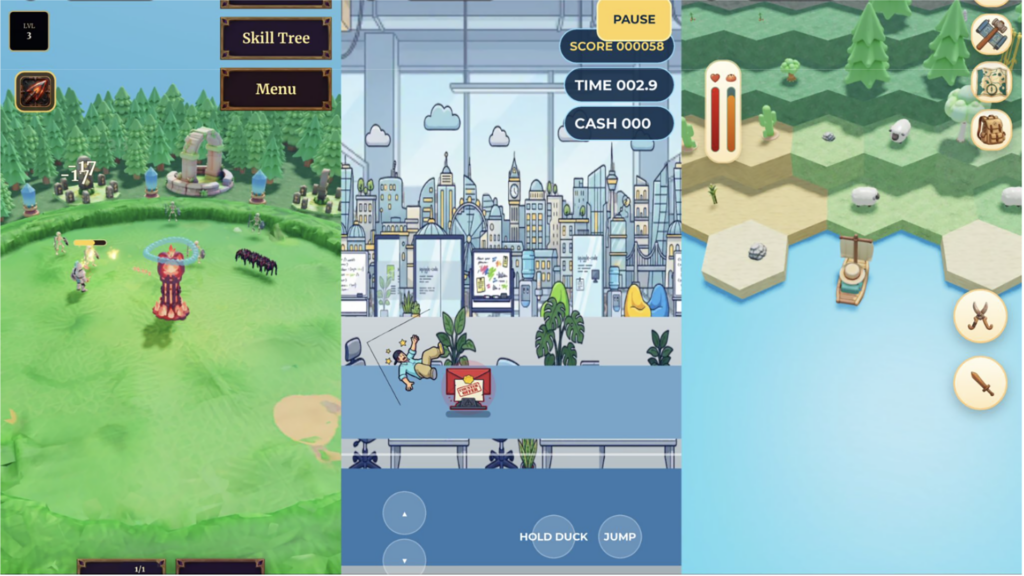
Roblox has introduced Build, an AI framework for game development via text prompts, at a moment when generative technology is beginning to change how interactive content is designed, tested, and published. Build’s central promise is straightforward: a person should be able to describe a game idea in ordinary language and receive a playable version that can be refined without leaving the Roblox ecosystem.
The framework could significantly reduce the technical barriers that prevent many users from experimenting with game development. It also offers professional creators a faster route from concept to prototype. Its connection with Roblox Studio ensures that simplified mobile creation can lead into a more advanced desktop workflow rather than remaining isolated as a limited novelty.
Build should not be interpreted as a replacement for creativity, design knowledge, programming, or careful testing. Artificial intelligence can assemble components and perform delegated tasks, but it cannot guarantee that a game will be original, balanced, safe, enjoyable, or commercially successful. Human creators must still establish the vision, evaluate every result, understand their audience, and make responsible decisions.
The July 28, 2026 New Zealand public alpha will provide the first meaningful evidence of how well Build performs outside controlled demonstrations. Its long-term effect will depend on output quality, safety protections, pricing, regional availability, Studio integration, and whether creators can transform generated starting points into experiences that players genuinely want to revisit.
Sources and Citations
- Roblox Newsroom, “Build Without Limits on Roblox,” July 16, 2026 : Roblox’s official announcement introducing Build, its mobile-first AI game creation tool. It explains how users can turn text prompts into playable game starting points, move projects between the Roblox app and Studio, and use AI agents for playtesting, analytics and experimentation.
- Citation: Roblox Newsroom – Build Without Limits on Roblox Roblox
- Roblox Investor Relations, “Roblox Introduces Build: A New Way to Create on the Platform,” July 16, 2026 : The corporate announcement describing Build as a new mobile-first creation experience, including its text-to-game workflow, AI-powered tools, safety checks and planned availability. I found the press release through Nasdaq and its original Business Wire distribution; I could not verify a separate page on Roblox’s Investor Relations website.
- Roblox Newsroom, “Accelerating Creation, Powered by Roblox’s Cube Foundation Model,” February 4, 2026 : Roblox’s technical announcement of 4D generation, which builds on Cube to generate interactive 3D objects with working behaviors, such as vehicles that can be driven. It also discusses the longer-term goal of generating complete scenes and gameplay elements through natural-language prompts.
- Roblox Creator Hub, “AI on Roblox” : The official documentation hub for Roblox AI creation tools. It covers AI-assisted scripting, asset and mesh generation, interactive 3D models, Assistant, Studio MCP integration, and creator workflows.
- Citation: Roblox Creator Hub – AI on Roblox Documentation – Roblox Creator Hub
- Roblox Creator Hub, “Connect to the Roblox Studio MCP Server” : The technical setup guide for connecting AI clients to Roblox Studio through the Model Context Protocol. It explains how connected tools can read and edit scripts, generate meshes, run Luau code, simulate player input and playtest experiences.
- Citation: Roblox Creator Hub – Connect to the Roblox Studio MCP Server Documentation – Roblox Creator Hub
- PocketGamer.biz, “Roblox Unveils Mobile-First AI Game Creation With New Build Tool,” July 17, 2026 : Independent coverage of Build’s launch, explaining how users can generate basic games from text prompts, continue development in Roblox Studio and access upcoming AI agents for playtesting, analytics and experimentation.
- Citation: PocketGamer.biz – Roblox Unveils Mobile-First AI Game Creation With New Build Tool Pocket Gamer
- Reuters, “Roblox Launches AI Tech That Generates Functioning Models With Natural Language,” February 4, 2026 : Reuters’ coverage of Roblox’s 4D creation beta. It explains how natural-language prompts can generate functional in-game models, including vehicles with interactive doors and realistic driving physics, and discusses Roblox’s broader investment in AI development.
- Roblox Foundation AI Group, “Cube: A Roblox View of 3D Intelligence” : Roblox’s research publication describing its approach to building a 3D foundation model. It covers 3D shape tokenization, text-to-shape generation, shape-to-text generation and text-to-scene generation, explaining the research foundations behind Cube.
Recommendations
- Dead or Alive 6 Last Round, 3D fighting game is back with five brand-new characters among the 29 available
- inZOI New Gameplay at Galaxies Autumn Showcase 2026: Trailer, Features, and Early Access Update
- Parkour Game MOTORSLICE Recoups Its Investment Within Hours of Launch: How the Indie Title Achieved Instant ROI
- Fortnite’s Most Revealing Skin Yet: Why Players Can’t Stop Talking About It
- Iron Nest: Heavy Turret Simulator Complete Turret Firing Guide
- Capcom Showcase March 2026: Start Time, Where to Watch the Capcom Spotlight, and What to Expect (Pragmata, Monster Hunter Stories 3, Mega Man, Street Fighter 6)
- The 1994 Live-Action Flintstones Flick is Getting a “Stonebook” 4K Blu-Ray: Release Date, Preorders, and Bonus Features
- Pokémon Pokopia Limited-Time Pokémon Trick Works Without Changing Switch 2 Settings
- Dynamic Weather Systems in Games: Unreal, Unity, and the Best Examples
- Hull Rupture Launches November 4, 2026: Spaceship Survival and Tower Defense



































































































