










The game development industry is entering a new era of AI-assisted production, and Unity is positioning itself at the center of that transformation with the launch of Unity AI Beta. The new suite of tools introduces contextual AI assistance, automation systems, asset generation capabilities, and integrations that allow developers to create games faster directly inside the Unity Editor.
Unity AI Beta represents one of the company’s biggest platform shifts in recent years. Instead of treating artificial intelligence as an external add-on, Unity has integrated AI directly into core workflows used by game developers every day. This includes coding assistance, debugging support, scene generation, rapid prototyping tools, automation systems, and AI-powered asset creation.
The announcement has generated widespread discussion across the gaming industry because Unity powers millions of games across mobile, PC, console, VR, and indie development ecosystems. Developers are now evaluating whether AI-assisted workflows can meaningfully reduce development time without compromising creativity or quality.
The release also arrives at a time when AI competition in game development is accelerating rapidly. Epic Games, Nvidia, OpenAI integrations, and independent AI workflow tools are all competing to redefine how games are built. Unity’s approach stands out because its AI system is deeply integrated into project context and the Unity Editor itself.
According to Unity, the AI tools are designed to automate tedious tasks while keeping creators in full control of the development process. The company emphasizes that Unity AI is not intended to replace developers, artists, or designers, but instead help teams iterate faster and focus more on creativity and gameplay design.
What is Unity AI Beta and How Does it Change Game Development Workflows
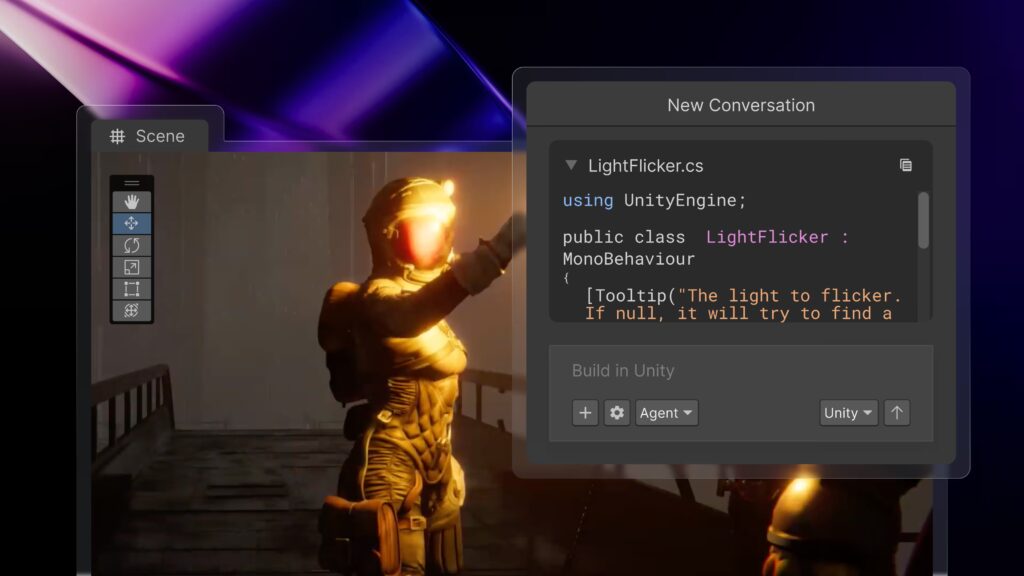
Unity AI Beta is a suite of AI-powered development tools integrated directly into Unity 6 and newer versions of the Unity Editor. The platform introduces intelligent assistance systems capable of understanding project context, automating repetitive tasks, generating assets, assisting with code, and accelerating iteration cycles.
Traditional game development workflows often involve switching between multiple tools and platforms. Developers frequently move between IDEs, asset editors, scripting environments, documentation websites, AI chatbots, and debugging tools. Unity AI Beta attempts to centralize these workflows directly inside the editor.
The key workflow transformation comes from contextual awareness. Unlike generic AI chatbots, Unity AI can understand:
- Current scenes
- Game objects
- Assets
- Scripts
- Hierarchy structures
- Project architecture
- Development environment data
- Gameplay systems
- Existing codebase context
This means developers can request actions like:
- “Create a driving system for this vehicle”
- “Generate placeholder textures for this environment”
- “Fix the collision problems in this scene”
- “Optimize this lighting setup”
- “Write a health management script for enemies”
- “Create a UI menu matching this art style”
The AI system can then generate outputs specifically tailored to the active Unity project.
One major change is the reduction of friction during iteration. Instead of manually creating every prototype element, developers can quickly generate placeholders, systems, or scripts and then refine them later. This significantly speeds up early-stage experimentation.
Unity AI also changes onboarding for beginners. New developers often struggle with Unity documentation, scripting syntax, project setup, and editor navigation. AI assistance lowers the barrier to entry by allowing creators to ask natural-language questions directly inside the editor.
Industry observers view this as part of a broader shift toward “agentic development,” where AI systems actively participate in production workflows instead of serving as passive chat assistants.
Unity AI Suite Overview: AI Assistant, Asset Generators, and Automation Tools
Unity AI Beta includes several major components that work together to streamline development workflows.
The most important parts of the suite include:
- Unity AI Assistant
- Asset Generators
- AI Gateway
- MCP Server
- Workflow automation systems
- Contextual coding assistance
- Scene generation tools
The Unity AI Assistant acts as the central intelligence layer. It provides contextual support inside the editor and can interpret project structure, scripts, assets, and user intent.
The Asset Generators focus on creating development-ready resources such as:
- Sprites
- Textures
- Materials
- 3D objects
- Placeholder art
- Cubemaps
- Environmental assets
- Scene components
These generators help teams rapidly prototype ideas without waiting for finalized art pipelines.
The AI Gateway is another major component. It enables developers to connect external AI models and tools directly into Unity workflows. Instead of being locked into one proprietary AI system, developers can integrate preferred models and services.
Unity’s MCP Server extends these capabilities beyond the editor itself. MCP stands for Model Context Protocol, and it allows external AI systems and IDEs to communicate with Unity projects more effectively.
Automation tools handle repetitive production tasks, including:
- Scene setup
- Asset organization
- Component configuration
- Batch operations
- Workflow scripting
- Testing support
- Project management actions
Unity emphasizes that these tools are modular. Developers can choose which AI features they want to enable and how much autonomy the AI systems should have.

How Unity AI is Integrated Directly into the Unity Editor
One of the defining features of Unity AI Beta is its native integration inside the Unity Editor itself.
Rather than forcing developers to copy and paste information into external AI platforms, Unity AI operates directly within the development environment. This creates a more seamless workflow and reduces interruptions.
The AI interface appears as part of the editor experience and can interact with project elements in real time. Developers can:
- Reference scene objects
- Analyze scripts
- Access project hierarchies
- Generate editor actions
- Modify components
- Trigger automation tasks
Because the system is integrated at the editor level, it can observe project context continuously. This allows more accurate recommendations and fewer hallucinations compared to general-purpose AI chatbots.
Unity AI can also perform contextual operations tied to specific editor states. For example:
- Understanding selected objects
- Reading active scene configurations
- Interpreting project dependencies
- Identifying missing components
- Analyzing rendering systems
Another important advantage is workflow continuity. Developers no longer need to constantly switch between browser tabs, documentation pages, AI websites, and external tools. Everything remains inside the Unity ecosystem.
Unity also highlights several control features designed to protect developers:
- Undo functionality
- Asset tagging
- Permission systems
- AI action transparency
- User approval workflows
These controls ensure that developers remain in charge of final decisions and modifications.
Key Features of Unity AI Beta for Faster Game Creation
Unity AI Beta includes multiple productivity-focused features designed to reduce development time and accelerate game creation.
Some of the most significant features include:
Contextual AI Assistance
The AI assistant can understand the current project state and provide project-aware support rather than generic advice.
Natural Language Commands
Developers can describe tasks using plain English instead of manually configuring every editor operation.
Automated Code Generation
Unity AI can generate C# scripts, gameplay systems, helper functions, and boilerplate code structures.
Intelligent Debugging
The assistant can identify errors, explain bugs, and suggest fixes based on project context.
Asset Generation
AI tools can generate textures, placeholder art, sprites, and environmental assets directly inside workflows.
Scene Creation
Developers can generate playable scenes using prompts and existing project assets.
Workflow Automation
Repetitive editor tasks can be automated through AI-driven systems.
Third-Party AI Integration
AI Gateway allows external AI services and models to connect with Unity workflows.
MCP Integration
External IDEs and AI tools can interact with Unity projects through the MCP Server.
Faster Prototyping
Rapid iteration tools reduce the time required to test gameplay ideas.
These features collectively aim to compress production cycles while increasing experimentation and creative flexibility.

Unity AI Smart Assistant: How it Understands Your Project Context
The contextual awareness system is arguably the most important aspect of Unity AI Beta.
Traditional AI chatbots lack deep understanding of project structure. Developers usually need to manually explain project setups, share code snippets, describe scene architecture, and provide extensive context.
Unity AI changes this by directly accessing project information inside the editor.
The smart assistant can interpret:
- Game objects
- Scene hierarchies
- Scripts
- Asset folders
- Component relationships
- Rendering settings
- Gameplay systems
- Physics setups
- UI elements
This allows much more accurate responses and task execution.
For example, if a developer selects an enemy object and asks the AI to “add a patrol system,” the assistant can analyze existing components, determine project architecture patterns, and generate compatible scripts.
The contextual system also improves debugging. Instead of requiring pasted error messages, Unity AI can inspect the actual environment causing problems.
Unity claims this project-aware approach leads to:
- Better relevance
- Fewer retries
- More accurate outputs
- Improved workflow efficiency
Developers and industry analysts view this contextual understanding as one of Unity AI’s strongest competitive advantages over external AI coding assistants.
AI-Powered Asset Generation in Unity: Sprites, Textures, and 3D Models
Asset creation remains one of the most time-consuming parts of game development, especially for indie teams and small studios with limited art resources.
Unity AI Beta addresses this challenge through integrated asset generation systems.
Developers can generate:
- Sprites
- Textures
- Materials
- Placeholder characters
- Environmental props
- Concept assets
- Cubemaps
- Visual references
- Scene decorations
The goal is not necessarily to replace professional artists but to accelerate iteration and prototyping.
During early development stages, teams often require temporary placeholder assets before final production art is ready. AI generation dramatically reduces the time needed to populate scenes and test gameplay concepts.
Unity AI can also use visual references and prompts to guide generation workflows. Developers may provide descriptions, style references, or existing assets as input.
Examples include:
- “Generate a sci-fi corridor texture”
- “Create low-poly medieval crates”
- “Produce cartoon grass textures”
- “Generate placeholder enemy models”
Another major advantage is workflow speed. Instead of leaving the editor to use external image-generation tools, developers can create assets directly inside Unity.
The AI-generated content can then be reviewed, modified, tagged, or replaced later in production.
However, AI-generated assets remain controversial within the industry. Concerns include:
- Copyright issues
- Art quality consistency
- Ethical sourcing of training data
- Over-reliance on automation
- Homogenized visual styles
Unity has emphasized transparency and data controls as part of its AI strategy.
How Unity AI Helps Developers Automate Repetitive Game Development Tasks
Game development contains countless repetitive tasks that consume time but add little creative value.
Unity AI Beta focuses heavily on automation to reduce this workload.
Common repetitive tasks include:
- Component setup
- Folder organization
- Asset importing
- Naming conventions
- Scene configuration
- Batch editing
- Script scaffolding
- UI wiring
- Testing procedures
- Environment population
Unity AI can automate many of these processes using contextual understanding and natural-language commands.
For example, developers can ask the system to:
- “Set up a standard FPS controller”
- “Populate this scene with environmental props”
- “Configure lighting for an outdoor level”
- “Generate inventory system boilerplate”
- “Create navigation meshes”
- “Assign colliders to all environment objects”
Automation significantly improves production efficiency, particularly for small teams.
Indie developers benefit especially because they often handle programming, art, design, and technical setup simultaneously. AI automation reduces workload pressure and allows creators to focus more on gameplay and creativity.
Automation tools may also reduce burnout associated with repetitive production work.
At the same time, some developers worry that excessive automation could encourage low-quality game production or reduce craftsmanship standards. Critics argue that easier workflows could flood marketplaces with rushed AI-assisted projects.
Despite those concerns, automation is increasingly viewed as inevitable across modern game development pipelines.
Unity AI Gateway Explained: Connecting Third-Party AI Tools Inside Unity
Unity AI Gateway is one of the platform’s most technically important features.
Rather than locking developers into one AI ecosystem, Unity AI Gateway allows integration with external AI services and tools.
This open architecture provides several advantages:
- Flexibility
- Model choice
- Workflow customization
- Enterprise integration
- Future scalability
Developers can connect preferred AI systems directly into Unity workflows without leaving the editor environment.
This approach contrasts with more closed AI ecosystems that restrict users to proprietary models only.
AI Gateway can potentially support:
- External LLMs
- Asset generation services
- Custom AI pipelines
- Enterprise AI systems
- Specialized development models
Unity describes the system as focused on performance, security, and control.
For larger studios, this flexibility matters significantly. Enterprise developers often require custom workflows, internal tools, or specialized AI models tailored to studio pipelines.
The Gateway architecture also future-proofs Unity AI to some extent. As AI technology evolves rapidly, developers can integrate newer systems without waiting for Unity to rebuild its own infrastructure.
This strategy positions Unity less as a standalone AI provider and more as a platform orchestrator for AI-assisted development ecosystems.

What is the Unity MCP Server and Why it Matters for Developers
The Unity MCP Server is another foundational technology introduced with Unity AI Beta.
MCP stands for Model Context Protocol.
The server acts as a bridge between Unity projects and external AI systems, IDEs, and applications.
This means AI workflows are not restricted to the Unity Editor itself. External tools can communicate with project context more intelligently through standardized protocols.
Potential benefits include:
- IDE integrations
- Advanced automation
- Remote AI workflows
- Multi-tool collaboration
- External AI agent control
- Workflow orchestration
The MCP Server allows AI systems to understand Unity projects more deeply and perform context-aware operations.
This is important because traditional external AI tools often lack visibility into real project state.
Unity claims its MCP implementation is more performant than open-source alternatives and optimized for Unity workflows.
The MCP ecosystem may become increasingly important as AI agents evolve into more autonomous development assistants capable of coordinating across multiple tools simultaneously.
For developers, this could eventually enable workflows where AI systems:
- Build scenes automatically
- Configure gameplay systems
- Run tests
- Optimize performance
- Generate documentation
- Coordinate production pipelines
The MCP Server effectively expands Unity AI beyond a simple editor assistant into a broader AI development ecosystem.
Unity AI Beta vs Traditional Game Development Workflows
Traditional game development workflows rely heavily on manual production.
Developers typically:
- Write code manually
- Configure scenes manually
- Search documentation manually
- Build placeholder assets manually
- Debug through trial and error
- Switch between multiple applications constantly
Unity AI Beta introduces a more collaborative workflow model where AI assists during many stages of production.
Traditional workflows emphasize:
- Direct manual control
- Technical expertise
- Specialized pipelines
- Slower iteration cycles
AI-assisted workflows prioritize:
- Speed
- Rapid experimentation
- Automation
- Natural-language interaction
- Assisted production
The most immediate difference is iteration speed.
Tasks that previously required hours may now take minutes during prototyping stages.
For example:
- Creating placeholder assets
- Building basic systems
- Testing gameplay mechanics
- Configuring environments
- Generating code scaffolding
However, AI-assisted workflows also introduce new challenges.
Potential downsides include:
- Overdependence on automation
- Reduced technical learning
- AI-generated bugs
- Generic gameplay systems
- Quality inconsistency
- Ethical concerns
Experienced developers may still prefer manual workflows for advanced systems and polished production environments.
Most industry analysts expect hybrid workflows to become standard, combining AI acceleration with traditional craftsmanship and human creativity.
How Unity AI Improves Prototyping and Rapid Game Iteration
Rapid prototyping is one of the clearest use cases for Unity AI Beta.
Game development depends heavily on experimentation. Developers constantly test mechanics, environments, UI systems, enemy behavior, progression loops, and gameplay ideas.
Traditional prototyping can be slow because even rough implementations require substantial manual work.
Unity AI accelerates this process by reducing setup friction.
Developers can quickly:
- Generate scenes
- Create temporary assets
- Build gameplay scripts
- Configure interactions
- Prototype mechanics
- Iterate on ideas
This faster iteration cycle may significantly improve creative experimentation.
Instead of spending days building a test environment, teams can produce playable prototypes within hours or even minutes.
Unity CEO Matthew Bromberg previously suggested future AI systems could eventually allow developers to create casual games entirely through natural-language prompts.
While current systems are not fully autonomous game creators, they already reduce many barriers associated with prototyping.
This benefits:
- Indie developers
- Students
- Small studios
- Designers without coding expertise
- Rapid-production teams
Fast iteration is particularly important in game development because gameplay quality often depends on repeated experimentation and refinement.
The ability to test ideas quickly may become one of Unity AI’s strongest long-term advantages.
Unity AI and Code Generation: Debugging and C# Assistance Features
Programming assistance is another central pillar of Unity AI Beta.
The AI assistant can help developers:
- Write C# scripts
- Generate boilerplate systems
- Explain errors
- Debug problems
- Optimize code
- Refactor scripts
- Suggest improvements
Unity AI’s contextual understanding provides an important advantage here because it can interpret existing project architecture and Unity-specific workflows.
Traditional AI coding assistants sometimes hallucinate APIs or generate incompatible code. Unity AI attempts to reduce this problem by grounding outputs in Unity project context.
Examples of supported tasks include:
- Character controllers
- Inventory systems
- Enemy AI
- Health management
- UI interactions
- Physics systems
- Input handling
- Save systems
Debugging support is especially valuable for beginners.
Instead of manually searching forums and documentation, developers can receive contextual explanations tailored to their project.
AI-assisted debugging may reduce development bottlenecks and shorten troubleshooting cycles significantly.
However, many experienced programmers remain cautious.
Concerns include:
- Poor code optimization
- Technical debt
- Insecure practices
- Dependency on generated solutions
- Reduced understanding of core systems
Most experts believe AI coding systems are best used as assistants rather than replacements for engineering expertise.

How Unity AI Supports Scene Building and Level Design Automation
Scene building is another area where Unity AI Beta aims to reduce manual workload.
Developers can use prompts and contextual commands to:
- Populate environments
- Arrange props
- Configure lighting
- Generate layouts
- Build terrains
- Create placeholder worlds
- Organize level structures
This dramatically accelerates early-stage level design.
Instead of manually placing every environmental element, developers can establish foundational layouts quickly and refine them afterward.
Unity AI can also leverage existing project assets while constructing scenes.
For example:
- “Create a cyberpunk alley using current project assets”
- “Build a desert combat arena”
- “Populate this forest with rocks and vegetation”
- “Generate a horror-themed interior level”
This contextual generation system allows more relevant results than generic external AI tools.
Scene automation is particularly useful during concept development and gameplay testing phases.
Level designers can rapidly evaluate pacing, navigation, combat flow, and environmental storytelling without waiting for complete art passes.
The technology may also help non-technical creators experiment with game environments more easily.
However, professional level design still requires significant human judgment regarding:
- Gameplay balance
- Visual composition
- Player guidance
- Narrative flow
- Exploration design
- Difficulty progression
AI currently functions more effectively as an accelerator than a replacement for experienced design work.
Developer Reactions to Unity AI Beta and Industry Impact
Developer reactions to Unity AI Beta have been mixed.
Many creators are excited about the productivity improvements and workflow simplification.
Positive reactions focus on:
- Faster prototyping
- Reduced repetitive work
- Easier onboarding
- Workflow integration
- Improved experimentation
- Lower technical barriers
Some developers describe Unity AI as a major shift in how games may be built going forward.
Supporters argue the technology democratizes development and empowers smaller creators to compete more effectively.
However, criticism and skepticism remain widespread.
Concerns include:
- AI-generated content flooding marketplaces
- Reduced artistic originality
- Ethical training-data concerns
- Job displacement fears
- Quality degradation
- Increased low-effort projects
Some experienced developers worry that over-automation could weaken technical craftsmanship and encourage dependency on AI-generated systems.
The game development industry is entering a new era of AI-assisted production, and Unity is positioning itself at the center of that transformation with the launch of Unity AI Beta. The new suite of tools introduces contextual AI assistance, automation systems, asset generation capabilities, and integrations that allow developers to create games faster directly inside the Unity Editor.
Unity AI Beta represents one of the company’s biggest platform shifts in recent years. Instead of treating artificial intelligence as an external add-on, Unity has integrated AI directly into core workflows used by game developers every day. This includes coding assistance, debugging support, scene generation, rapid prototyping tools, automation systems, and AI-powered asset creation.
The announcement has generated widespread discussion across the gaming industry because Unity powers millions of games across mobile, PC, console, VR, and indie development ecosystems. Developers are now evaluating whether AI-assisted workflows can meaningfully reduce development time without compromising creativity or quality.
The release also arrives at a time when AI competition in game development is accelerating rapidly. Epic Games, Nvidia, OpenAI integrations, and independent AI workflow tools are all competing to redefine how games are built. Unity’s approach stands out because its AI system is deeply integrated into project context and the Unity Editor itself.
According to Unity, the AI tools are designed to automate tedious tasks while keeping creators in full control of the development process. The company emphasizes that Unity AI is not intended to replace developers, artists, or designers, but instead help teams iterate faster and focus more on creativity and gameplay design.
What is Unity AI Beta and How Does it Change Game Development Workflows
Unity AI Beta is a suite of AI-powered development tools integrated directly into Unity 6 and newer versions of the Unity Editor. The platform introduces intelligent assistance systems capable of understanding project context, automating repetitive tasks, generating assets, assisting with code, and accelerating iteration cycles.
Traditional game development workflows often involve switching between multiple tools and platforms. Developers frequently move between IDEs, asset editors, scripting environments, documentation websites, AI chatbots, and debugging tools. Unity AI Beta attempts to centralize these workflows directly inside the editor.
The key workflow transformation comes from contextual awareness. Unlike generic AI chatbots, Unity AI can understand:
- Current scenes
- Game objects
- Assets
- Scripts
- Hierarchy structures
- Project architecture
- Development environment data
- Gameplay systems
- Existing codebase context
This means developers can request actions like:
- “Create a driving system for this vehicle”
- “Generate placeholder textures for this environment”
- “Fix the collision problems in this scene”
- “Optimize this lighting setup”
- “Write a health management script for enemies”
- “Create a UI menu matching this art style”
The AI system can then generate outputs specifically tailored to the active Unity project.
One major change is the reduction of friction during iteration. Instead of manually creating every prototype element, developers can quickly generate placeholders, systems, or scripts and then refine them later. This significantly speeds up early-stage experimentation.
Unity AI also changes onboarding for beginners. New developers often struggle with Unity documentation, scripting syntax, project setup, and editor navigation. AI assistance lowers the barrier to entry by allowing creators to ask natural-language questions directly inside the editor.
Industry observers view this as part of a broader shift toward “agentic development,” where AI systems actively participate in production workflows instead of serving as passive chat assistants.
Unity AI Suite Overview: AI Assistant, Asset Generators, and Automation Tools
Unity AI Beta includes several major components that work together to streamline development workflows.
The most important parts of the suite include:
- Unity AI Assistant
- Asset Generators
- AI Gateway
- MCP Server
- Workflow automation systems
- Contextual coding assistance
- Scene generation tools
The Unity AI Assistant acts as the central intelligence layer. It provides contextual support inside the editor and can interpret project structure, scripts, assets, and user intent.
The Asset Generators focus on creating development-ready resources such as:
- Sprites
- Textures
- Materials
- 3D objects
- Placeholder art
- Cubemaps
- Environmental assets
- Scene components
These generators help teams rapidly prototype ideas without waiting for finalized art pipelines.
The AI Gateway is another major component. It enables developers to connect external AI models and tools directly into Unity workflows. Instead of being locked into one proprietary AI system, developers can integrate preferred models and services.
Unity’s MCP Server extends these capabilities beyond the editor itself. MCP stands for Model Context Protocol, and it allows external AI systems and IDEs to communicate with Unity projects more effectively.
Automation tools handle repetitive production tasks, including:
- Scene setup
- Asset organization
- Component configuration
- Batch operations
- Workflow scripting
- Testing support
- Project management actions
Unity emphasizes that these tools are modular. Developers can choose which AI features they want to enable and how much autonomy the AI systems should have.

How Unity AI is Integrated Directly into the Unity Editor
One of the defining features of Unity AI Beta is its native integration inside the Unity Editor itself.
Rather than forcing developers to copy and paste information into external AI platforms, Unity AI operates directly within the development environment. This creates a more seamless workflow and reduces interruptions.
The AI interface appears as part of the editor experience and can interact with project elements in real time. Developers can:
- Reference scene objects
- Analyze scripts
- Access project hierarchies
- Generate editor actions
- Modify components
- Trigger automation tasks
Because the system is integrated at the editor level, it can observe project context continuously. This allows more accurate recommendations and fewer hallucinations compared to general-purpose AI chatbots.
Unity AI can also perform contextual operations tied to specific editor states. For example:
- Understanding selected objects
- Reading active scene configurations
- Interpreting project dependencies
- Identifying missing components
- Analyzing rendering systems
Another important advantage is workflow continuity. Developers no longer need to constantly switch between browser tabs, documentation pages, AI websites, and external tools. Everything remains inside the Unity ecosystem.
Unity also highlights several control features designed to protect developers:
- Undo functionality
- Asset tagging
- Permission systems
- AI action transparency
- User approval workflows
These controls ensure that developers remain in charge of final decisions and modifications.
Key Features of Unity AI Beta for Faster Game Creation
Unity AI Beta includes multiple productivity-focused features designed to reduce development time and accelerate game creation.
Some of the most significant features include:
Contextual AI Assistance
The AI assistant can understand the current project state and provide project-aware support rather than generic advice.
Natural Language Commands
Developers can describe tasks using plain English instead of manually configuring every editor operation.
Automated Code Generation
Unity AI can generate C# scripts, gameplay systems, helper functions, and boilerplate code structures.
Intelligent Debugging
The assistant can identify errors, explain bugs, and suggest fixes based on project context.
Asset Generation
AI tools can generate textures, placeholder art, sprites, and environmental assets directly inside workflows.
Scene Creation
Developers can generate playable scenes using prompts and existing project assets.
Workflow Automation
Repetitive editor tasks can be automated through AI-driven systems.
Third-Party AI Integration
AI Gateway allows external AI services and models to connect with Unity workflows.
MCP Integration
External IDEs and AI tools can interact with Unity projects through the MCP Server.
Faster Prototyping
Rapid iteration tools reduce the time required to test gameplay ideas.
These features collectively aim to compress production cycles while increasing experimentation and creative flexibility.

Unity AI Smart Assistant: How it Understands Your Project Context
The contextual awareness system is arguably the most important aspect of Unity AI Beta.
Traditional AI chatbots lack deep understanding of project structure. Developers usually need to manually explain project setups, share code snippets, describe scene architecture, and provide extensive context.
Unity AI changes this by directly accessing project information inside the editor.
The smart assistant can interpret:
- Game objects
- Scene hierarchies
- Scripts
- Asset folders
- Component relationships
- Rendering settings
- Gameplay systems
- Physics setups
- UI elements
This allows much more accurate responses and task execution.
For example, if a developer selects an enemy object and asks the AI to “add a patrol system,” the assistant can analyze existing components, determine project architecture patterns, and generate compatible scripts.
The contextual system also improves debugging. Instead of requiring pasted error messages, Unity AI can inspect the actual environment causing problems.
Unity claims this project-aware approach leads to:
- Better relevance
- Fewer retries
- More accurate outputs
- Improved workflow efficiency
Developers and industry analysts view this contextual understanding as one of Unity AI’s strongest competitive advantages over external AI coding assistants.
AI-Powered Asset Generation in Unity: Sprites, Textures, and 3D Models
Asset creation remains one of the most time-consuming parts of game development, especially for indie teams and small studios with limited art resources.
Unity AI Beta addresses this challenge through integrated asset generation systems.
Developers can generate:
- Sprites
- Textures
- Materials
- Placeholder characters
- Environmental props
- Concept assets
- Cubemaps
- Visual references
- Scene decorations
The goal is not necessarily to replace professional artists but to accelerate iteration and prototyping.
During early development stages, teams often require temporary placeholder assets before final production art is ready. AI generation dramatically reduces the time needed to populate scenes and test gameplay concepts.
Unity AI can also use visual references and prompts to guide generation workflows. Developers may provide descriptions, style references, or existing assets as input.
Examples include:
- “Generate a sci-fi corridor texture”
- “Create low-poly medieval crates”
- “Produce cartoon grass textures”
- “Generate placeholder enemy models”
Another major advantage is workflow speed. Instead of leaving the editor to use external image-generation tools, developers can create assets directly inside Unity.
The AI-generated content can then be reviewed, modified, tagged, or replaced later in production.
However, AI-generated assets remain controversial within the industry. Concerns include:
- Copyright issues
- Art quality consistency
- Ethical sourcing of training data
- Over-reliance on automation
- Homogenized visual styles
Unity has emphasized transparency and data controls as part of its AI strategy.
How Unity AI Helps Developers Automate Repetitive Game Development Tasks
Game development contains countless repetitive tasks that consume time but add little creative value.
Unity AI Beta focuses heavily on automation to reduce this workload.
Common repetitive tasks include:
- Component setup
- Folder organization
- Asset importing
- Naming conventions
- Scene configuration
- Batch editing
- Script scaffolding
- UI wiring
- Testing procedures
- Environment population
Unity AI can automate many of these processes using contextual understanding and natural-language commands.
For example, developers can ask the system to:
- “Set up a standard FPS controller”
- “Populate this scene with environmental props”
- “Configure lighting for an outdoor level”
- “Generate inventory system boilerplate”
- “Create navigation meshes”
- “Assign colliders to all environment objects”
Automation significantly improves production efficiency, particularly for small teams.
Indie developers benefit especially because they often handle programming, art, design, and technical setup simultaneously. AI automation reduces workload pressure and allows creators to focus more on gameplay and creativity.
Automation tools may also reduce burnout associated with repetitive production work.
At the same time, some developers worry that excessive automation could encourage low-quality game production or reduce craftsmanship standards. Critics argue that easier workflows could flood marketplaces with rushed AI-assisted projects.
Despite those concerns, automation is increasingly viewed as inevitable across modern game development pipelines.
Unity AI Gateway Explained: Connecting Third-Party AI Tools Inside Unity
Unity AI Gateway is one of the platform’s most technically important features.
Rather than locking developers into one AI ecosystem, Unity AI Gateway allows integration with external AI services and tools.
This open architecture provides several advantages:
- Flexibility
- Model choice
- Workflow customization
- Enterprise integration
- Future scalability
Developers can connect preferred AI systems directly into Unity workflows without leaving the editor environment.
This approach contrasts with more closed AI ecosystems that restrict users to proprietary models only.
AI Gateway can potentially support:
- External LLMs
- Asset generation services
- Custom AI pipelines
- Enterprise AI systems
- Specialized development models
Unity describes the system as focused on performance, security, and control.
For larger studios, this flexibility matters significantly. Enterprise developers often require custom workflows, internal tools, or specialized AI models tailored to studio pipelines.
The Gateway architecture also future-proofs Unity AI to some extent. As AI technology evolves rapidly, developers can integrate newer systems without waiting for Unity to rebuild its own infrastructure.
This strategy positions Unity less as a standalone AI provider and more as a platform orchestrator for AI-assisted development ecosystems.
What is the Unity MCP Server and Why it Matters for Developers
The Unity MCP Server is another foundational technology introduced with Unity AI Beta.
MCP stands for Model Context Protocol.
The server acts as a bridge between Unity projects and external AI systems, IDEs, and applications.
This means AI workflows are not restricted to the Unity Editor itself. External tools can communicate with project context more intelligently through standardized protocols.
Potential benefits include:
- IDE integrations
- Advanced automation
- Remote AI workflows
- Multi-tool collaboration
- External AI agent control
- Workflow orchestration
The MCP Server allows AI systems to understand Unity projects more deeply and perform context-aware operations.
This is important because traditional external AI tools often lack visibility into real project state.
Unity claims its MCP implementation is more performant than open-source alternatives and optimized for Unity workflows.
The MCP ecosystem may become increasingly important as AI agents evolve into more autonomous development assistants capable of coordinating across multiple tools simultaneously.
For developers, this could eventually enable workflows where AI systems:
- Build scenes automatically
- Configure gameplay systems
- Run tests
- Optimize performance
- Generate documentation
- Coordinate production pipelines
The MCP Server effectively expands Unity AI beyond a simple editor assistant into a broader AI development ecosystem.
Unity AI Beta vs Traditional Game Development Workflows
Traditional game development workflows rely heavily on manual production.
Developers typically:
- Write code manually
- Configure scenes manually
- Search documentation manually
- Build placeholder assets manually
- Debug through trial and error
- Switch between multiple applications constantly
Unity AI Beta introduces a more collaborative workflow model where AI assists during many stages of production.
Traditional workflows emphasize:
- Direct manual control
- Technical expertise
- Specialized pipelines
- Slower iteration cycles
AI-assisted workflows prioritize:
- Speed
- Rapid experimentation
- Automation
- Natural-language interaction
- Assisted production
The most immediate difference is iteration speed.
Tasks that previously required hours may now take minutes during prototyping stages.
For example:
- Creating placeholder assets
- Building basic systems
- Testing gameplay mechanics
- Configuring environments
- Generating code scaffolding
However, AI-assisted workflows also introduce new challenges.
Potential downsides include:
- Overdependence on automation
- Reduced technical learning
- AI-generated bugs
- Generic gameplay systems
- Quality inconsistency
- Ethical concerns
Experienced developers may still prefer manual workflows for advanced systems and polished production environments.
Most industry analysts expect hybrid workflows to become standard, combining AI acceleration with traditional craftsmanship and human creativity.
How Unity AI Improves Prototyping and Rapid Game Iteration
Rapid prototyping is one of the clearest use cases for Unity AI Beta.
Game development depends heavily on experimentation. Developers constantly test mechanics, environments, UI systems, enemy behavior, progression loops, and gameplay ideas.
Traditional prototyping can be slow because even rough implementations require substantial manual work.
Unity AI accelerates this process by reducing setup friction.
Developers can quickly:
- Generate scenes
- Create temporary assets
- Build gameplay scripts
- Configure interactions
- Prototype mechanics
- Iterate on ideas
This faster iteration cycle may significantly improve creative experimentation.
Instead of spending days building a test environment, teams can produce playable prototypes within hours or even minutes.
Unity CEO Matthew Bromberg previously suggested future AI systems could eventually allow developers to create casual games entirely through natural-language prompts.
While current systems are not fully autonomous game creators, they already reduce many barriers associated with prototyping.
This benefits:
- Indie developers
- Students
- Small studios
- Designers without coding expertise
- Rapid-production teams
Fast iteration is particularly important in game development because gameplay quality often depends on repeated experimentation and refinement.
The ability to test ideas quickly may become one of Unity AI’s strongest long-term advantages.
Unity AI and Code Generation: Debugging and C# Assistance Features
Programming assistance is another central pillar of Unity AI Beta.
The AI assistant can help developers:
- Write C# scripts
- Generate boilerplate systems
- Explain errors
- Debug problems
- Optimize code
- Refactor scripts
- Suggest improvements
Unity AI’s contextual understanding provides an important advantage here because it can interpret existing project architecture and Unity-specific workflows.
Traditional AI coding assistants sometimes hallucinate APIs or generate incompatible code. Unity AI attempts to reduce this problem by grounding outputs in Unity project context.
Examples of supported tasks include:
- Character controllers
- Inventory systems
- Enemy AI
- Health management
- UI interactions
- Physics systems
- Input handling
- Save systems
Debugging support is especially valuable for beginners.
Instead of manually searching forums and documentation, developers can receive contextual explanations tailored to their project.
AI-assisted debugging may reduce development bottlenecks and shorten troubleshooting cycles significantly.
However, many experienced programmers remain cautious.
Concerns include:
- Poor code optimization
- Technical debt
- Insecure practices
- Dependency on generated solutions
- Reduced understanding of core systems
Most experts believe AI coding systems are best used as assistants rather than replacements for engineering expertise.

How Unity AI Supports Scene Building and Level Design Automation
Scene building is another area where Unity AI Beta aims to reduce manual workload.
Developers can use prompts and contextual commands to:
- Populate environments
- Arrange props
- Configure lighting
- Generate layouts
- Build terrains
- Create placeholder worlds
- Organize level structures
This dramatically accelerates early-stage level design.
Instead of manually placing every environmental element, developers can establish foundational layouts quickly and refine them afterward.
Unity AI can also leverage existing project assets while constructing scenes.
For example:
- “Create a cyberpunk alley using current project assets”
- “Build a desert combat arena”
- “Populate this forest with rocks and vegetation”
- “Generate a horror-themed interior level”
This contextual generation system allows more relevant results than generic external AI tools.
Scene automation is particularly useful during concept development and gameplay testing phases.
Level designers can rapidly evaluate pacing, navigation, combat flow, and environmental storytelling without waiting for complete art passes.
The technology may also help non-technical creators experiment with game environments more easily.
However, professional level design still requires significant human judgment regarding:
- Gameplay balance
- Visual composition
- Player guidance
- Narrative flow
- Exploration design
- Difficulty progression
AI currently functions more effectively as an accelerator than a replacement for experienced design work.
Developer Reactions to Unity AI Beta and Industry Impact
Developer reactions to Unity AI Beta have been mixed.
Many creators are excited about the productivity improvements and workflow simplification.
Positive reactions focus on:
- Faster prototyping
- Reduced repetitive work
- Easier onboarding
- Workflow integration
- Improved experimentation
- Lower technical barriers
Some developers describe Unity AI as a major shift in how games may be built going forward.
Supporters argue the technology democratizes development and empowers smaller creators to compete more effectively.
There are also concerns about Unity’s strategic direction. Some critics believe the company may be prioritizing accessibility and no-code workflows over traditional professional development pipelines.
Performance issues and beta limitations have also been discussed by users experimenting with the open beta.
Despite these concerns, most analysts agree AI-assisted development tools will continue expanding across the gaming industry.
Unity’s position as one of the world’s largest game engines means its AI adoption could significantly influence broader industry standards.
The launch also intensifies competition with:
- Unreal Engine
- Nvidia AI workflows
- AI coding assistants
- Procedural generation systems
- External development tools
The industry impact could be enormous if AI-assisted workflows become standard practice over the next several years.

Future of Game Development: Will Unity AI Replace Manual Game Design?
The question of whether AI will replace manual game development remains highly controversial.
Current evidence suggests Unity AI is more likely to augment developers rather than fully replace them.
Game creation involves many deeply human elements, including:
- Creativity
- Emotional storytelling
- Artistic direction
- Player psychology
- Game balance
- Narrative design
- Worldbuilding
- Creative experimentation
AI systems can accelerate workflows, but they still struggle with originality, nuanced design decisions, and holistic creative vision.
Unity itself emphasizes that developers remain in control of production decisions.
Most likely, the future of game development will involve hybrid workflows where:
- AI handles repetitive tasks
- Humans direct creativity
- Automation accelerates iteration
- Designers refine experiences
- Artists finalize visual quality
- Programmers oversee architecture
This mirrors trends already seen in other industries using AI-assisted tools.
However, AI will almost certainly reshape job roles.
Developers who effectively integrate AI into workflows may gain significant productivity advantages.
At the same time, foundational technical skills will likely remain valuable because AI systems still require oversight, debugging, refinement, and strategic direction.
The biggest long-term impact may be democratization.
AI tools could enable millions of new creators to experiment with game development even without traditional programming expertise.
Unity appears to be betting heavily on this future.
Frequently Asked Questions (FAQs)
- What is Unity AI Beta?
Unity AI Beta is a suite of AI-powered development tools integrated into Unity 6 and newer versions of the Unity Editor. It includes AI assistants, asset generators, automation systems, AI Gateway integrations, and MCP Server functionality. - Is Unity AI built directly into the Unity Editor?
Yes. Unity AI is integrated directly into the Unity Editor, allowing developers to access contextual AI assistance without leaving their workflows. - What can Unity AI generate?
Unity AI can generate sprites, textures, placeholder assets, scripts, scenes, materials, environmental objects, and gameplay systems depending on the workflow and available features. - Does Unity AI support C# code generation?
Yes. Unity AI includes C# code assistance, debugging support, script generation, and contextual programming help for Unity-specific workflows. - What is the Unity AI Gateway?
Unity AI Gateway allows developers to connect third-party AI tools and models directly into Unity workflows instead of relying on a single AI ecosystem. - What does the Unity MCP Server do?
The MCP Server enables external AI systems, IDEs, and applications to interact with Unity project context using Model Context Protocol integrations. - Can Unity AI automate repetitive tasks?
Yes. Unity AI can automate repetitive development tasks such as scene setup, component configuration, asset organization, and workflow scripting. - Is Unity AI replacing game developers?
No. Unity states that the tools are designed to assist developers and accelerate workflows rather than replace human creativity and professional development expertise. - What version of Unity supports Unity AI Beta?
Unity AI Beta currently requires Unity 6.3 or newer versions according to Unity documentation. - Why is Unity AI important for the gaming industry?
Unity AI represents a major shift toward AI-assisted game development workflows, potentially reducing development time, lowering barriers to entry, and transforming how games are created.

Conclusion
Unity AI Beta marks one of the most important changes to the Unity ecosystem in years. By integrating contextual AI assistance, asset generation, automation systems, and intelligent development workflows directly into the Unity Editor, Unity is attempting to redefine how modern games are created.
The platform’s biggest strength lies in contextual awareness. Unlike standalone AI chatbots, Unity AI can understand active projects, scenes, scripts, and assets directly inside the editor. This allows more relevant assistance, better automation, and faster iteration.
The inclusion of AI Gateway and MCP Server technology also demonstrates that Unity is thinking beyond simple chatbot integration. The company appears to be building a broader AI-powered development ecosystem capable of connecting external models, IDEs, and automation systems into game production workflows.
For developers, the benefits could be substantial:
- Faster prototyping
- Reduced repetitive work
- Easier onboarding
- Accelerated iteration
- Improved experimentation
- Simplified workflows
At the same time, concerns about over-automation, AI-generated content quality, artistic originality, and industry disruption remain significant.
The long-term future of AI-assisted game development will likely depend on balance. Developers still provide the creativity, judgment, storytelling, and design expertise that define successful games. AI tools may accelerate workflows, but human direction remains essential.
Unity AI Beta ultimately represents the beginning of a broader transition toward collaborative AI-assisted game creation. Whether that future empowers creators or overwhelms the industry with automation-driven content will depend on how developers, studios, and platforms choose to use these tools in the years ahead.
Sources and Citations
- Unity Support – Getting Started with Unity AI Open Beta User Guide:
- Unity Official AI Product Page:
- Unity AI Features Overview:
- PocketGamer.biz – Unity Launches Open Beta for Unity AI:
- Unity Discussions – Unity AI Open Beta Announcement:
- Unity Discussions Post:
- GamesBeat – Unity Launches Unity AI Into Open Beta:
Recommendations
- Next-Gen Xbox 2027: Microsoft May Ship New Hardware Next Year — Everything We Know
- In 2025, Vietnam Residents Spent $825 Million on Mobile Games: Key Market Trends and 2026 Outlook
- Square Enix Is Putting an AI Chatbot in Dragon Quest X: Google Gemini “Chatty Slimey” Companion Details, Beta, and How It Works
- Superman Sequel Man of Tomorrow Adds Matthew Lillard to Cast in Mystery Role
- How to Create Your Alter Ego with Metahuman for the Metaverse: A Guide to Building Digital Identity in Unreal Engine 5
- Assassin’s Creed Hexe will be a “darker” installment “set during a pivotal moment in history” — what Ubisoft has revealed so far
- The Audience for the Silent Hill 2 Remake Has Surpassed 5 Million People: What Konami Announced and What It Means
- The Fate of Rocket 3F 3D Modeling Software
- Riot Games Downsizing the 2XKO Development Team: February 2026 Layoffs, Official Update, and What’s Next































































































