








In This Article (20 sections)
What’s New in Maxon ZBrush 2027.0 and When Was the Update Released?
Maxon’s ZBrush 2027.0 update expands two important areas of the digital sculpting workflow: preparing desktop assets for production and giving iPad artists more control over image based work and sculpting revisions. The desktop release introduces a UV Editor and Selection Sets, while ZBrush for iPad 2027.0 adds Spotlight and 3D Layers. Together, these improvements make ZBrush 2027.0 and ZBrush for iPad an important update for artists working across desktop and mobile sculpting environments.
These additions address different tasks but share a practical purpose: helping artists develop, organize, and revise assets while preserving more of their creative decisions. For character artists, collectible sculptors, game developers, and other digital sculpting professionals, the significance depends on their production requirements. UV tools become important when a sculpt needs organized texture coordinates, stored mesh states simplify repeated revisions, image projection supports surface detailing, and layers allow changes to be evaluated without immediately committing them to the underlying model.
The official release date is October 14, 2026, when Maxon announced its Fall 2026 ecosystem update, introducing version 2027.0 across several applications, including ZBrush. Although October 15 appears in subsequent coverage, it should be distinguished from the date of Maxon’s announcement and desktop technical release notes. The 2027.0 designation refers to the software version rather than the calendar year in which the update became available. For users following ZBrush 2027.0 and ZBrush for iPad, this distinction helps clarify the release timeline. The desktop release notes also distinguish ZBrush 2027.0.0 from version 2027.0.1, which addresses a specific UV Editor issue involving Cinema 4D file associations. This maintenance correction should not be confused with another major feature release.
The desktop and iPad editions receive different headline improvements. ZBrush desktop gains the UV Editor and Selection Sets, while ZBrush for iPad introduces Spotlight and 3D Layers. Maxon’s product overview separates these additions by platform, meaning the update does not deliver every new feature to both applications. This platform-specific approach is central to understanding ZBrush 2027.0 and ZBrush for iPad.
Evaluating the Update in Production Workflows
The desktop changes primarily address texture preparation and the management of alternative mesh states, allowing artists to preserve different arrangements of a sculpt for posing, surface editing, and UV preparation. The iPad improvements concentrate on visual references, image projection, and adjustable sculpting contributions, supporting workflows in which artists experiment with surface treatments, expressions, and other details without repeatedly rebuilding their work.
The practical importance of these additions becomes clearer when following an asset through production. A character, prop, or collectible typically begins with shape development before moving into surface detailing, color, texture preparation, and eventual delivery. The new tools influence several of these stages, but they do not eliminate the need to inspect topology, texture quality, or compatibility with the intended destination application. Similarly, an update is most valuable when it addresses a recurring production obstacle. Artists who frequently leave ZBrush to organize UVs may benefit differently from those whose primary challenge is managing expression variations or maintaining alternative sculpting states. Evaluating ZBrush 2027.0 and ZBrush for iPad against these production requirements helps establish which additions are most useful.
For existing production pipelines, evaluating the update through a representative project provides a more meaningful assessment than examining the features in an empty scene. A suitable test could involve a character, prop, or collectible containing the kinds of SubTools, subdivision levels, and texture requirements used in actual work. This makes it easier to determine whether the new capabilities improve everyday tasks, reduce repeated preparation, or provide more dependable ways to preserve creative decisions. The update’s overall value therefore depends on how effectively its tools fit the work being performed rather than the number of new features introduced in ZBrush 2027.0 and ZBrush for iPad.
ZBrush 2027.0 Desktop UV Editor, Selection Sets and Production Workflows
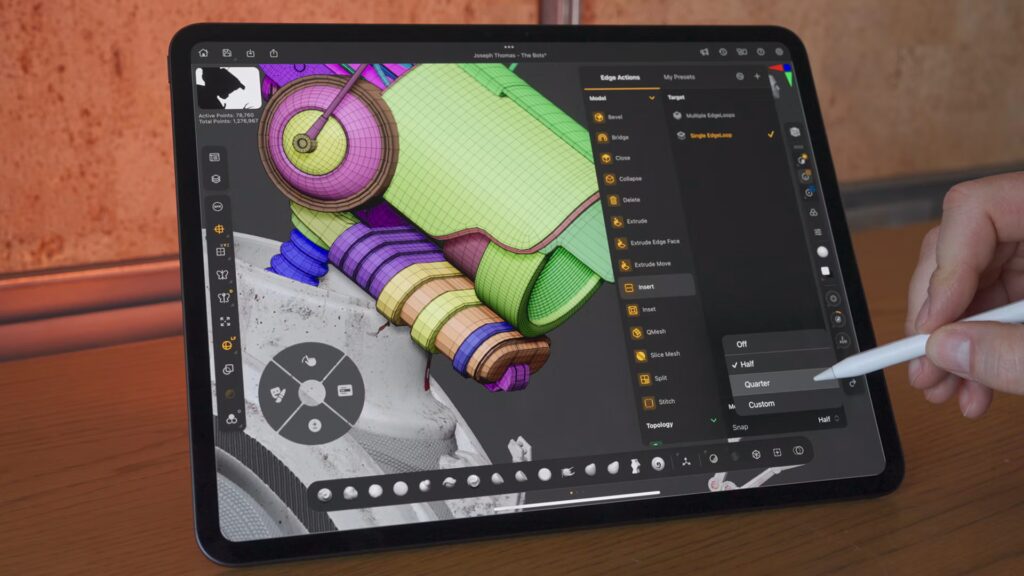
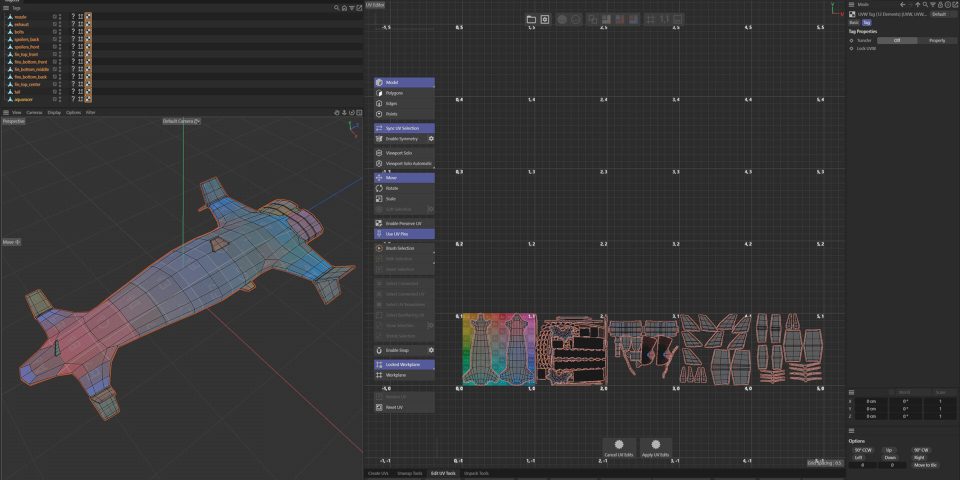
The new ZBrush 2027.0 UV Editor introduces several capabilities intended to improve texture coordinate preparation within the desktop sculpting workflow. Maxon lists support for UDIMs, texel density workflows, trim sheets, automatic unwrapping, packing, manual UV editing, and a customizable interface. Together, these features provide additional options for organizing the relationship between a three dimensional model and the flat images used to texture it. UV coordinates describe how a two dimensional image corresponds to the surface of a model, making them essential when a sculpt must move beyond shape development into texturing or final asset delivery. A model may look excellent as a sculpt but still require careful UV preparation to avoid uneven texture resolution, difficult editing, or conspicuous seams.
Texel density is particularly relevant because different parts of an asset may require different amounts of texture detail. A character’s face, for example, may justify a greater allocation than a region rarely visible on screen. UDIM layouts provide another organizational approach when an asset requires multiple texture tiles, while trim sheets can support workflows that reuse texture information across different surfaces.
Automatic unwrapping and packing can accelerate the creation of UV layouts, although the results still need to be evaluated for stretching, island organization, seam placement, and suitability for the intended production requirements. Efficiently filling texture space is useful, but a tightly packed layout is not automatically a good layout if it compromises readability, padding, or the distribution of detail.
Dedicated UV Editor Launch and Polygroup Prep
An important implementation detail is that the UV Editor operates as a dedicated application launched from ZBrush rather than simply appearing as another sculpting palette. It uses Cinema 4D technology, and ZBrush remains locked while the editing session is open. This arrangement provides an integrated route for preparing UVs without requiring artists to manually export a model before beginning the documented workflow, although the separate editing environment remains an important distinction. The editor can be opened through Tool > UV Map, where the adjacent All, Visible, and Selected options determine which SubTools enter the session. Once editing is complete, Apply UV Edits returns the changes to ZBrush, while Cancel UV Edits closes the session without applying them.
For an initial evaluation, working with a single uncomplicated SubTool makes the relationship between seams, flattened UV islands, and the original surface easier to understand. A prop with clearly defined surfaces can provide a more manageable starting point than a complete character containing numerous components. Maxon organizes the UV Editor into Create UVs, Unwrap Tools, Edit UV Tools, and Packing Tools, allowing artists to approach the process through several stages. One notable feature is Unwrap by PolyGroup, which uses Polygroup boundaries to establish UV islands. Unlike UV Master’s Polygroup based approach, this command does not introduce additional seams beyond those boundaries, giving artists greater control over where cuts occur when their existing Polygroup structure has been prepared appropriately.
This behavior makes Polygroup organization especially important before unwrapping. An arrangement originally created for posing, masking, or anatomical editing may not provide suitable boundaries for flattening a curved surface. Artists should therefore inspect the resulting UVs for distortion, island proportions, and seam placement before accepting them. A checker pattern can help reveal stretching that might not be immediately apparent on a plain shaded model. Packing should also reflect the asset’s intended destination, with sufficient consideration given to texture padding, readability, and consistent detail. The new editor expands ZBrush’s ability to prepare texture coordinates, but the final quality of a UV layout still depends on informed decisions about the model and its production requirements.
Selection Sets and Multi-Morph State Management
Selection Sets represent the other major desktop addition, providing a way to preserve alternative versions of important SubTool data. Unlike a simple saved selection of polygons or points, Selection Sets can store Polygroups, masks, Polypaint, UVs, and morph targets for later recall. This allows artists to preserve different organizational states of the same mesh, making it easier to return to arrangements created for specific tasks. A character artist might use one Polygroup structure for anatomical sculpting, another for clothing boundaries, and a different arrangement for UV preparation. Without a reliable way to preserve these states, repeatedly reconstructing them can create additional work and increase the possibility of inconsistencies during revisions.
The Selection Sets interface organizes supported data into separate rows under Tool > Selection Sets. A mask, for example, can be stored using the add control on the Masking row and recalled through that row’s stored sets. This approach makes it possible to preserve useful working arrangements before changing direction. However, Selection Sets depend on the topology of the relevant SubTool, meaning significant topology changes can invalidate previously stored data. Maxon identifies operations such as DynaMesh, ZRemesher, and Sculptris Pro as examples of processes that can break stored sets. This dependency makes the timing of state management important because early sculpting often involves substantial topology changes, while detailed organizational states become more dependable once the mesh structure has stabilized.
Naming, Morph Blending, and Project Backup Limits
Meaningful naming also plays an important role in making Selection Sets useful. A stored arrangement identified as Face UV Groups communicates its purpose more clearly than a generic name such as Version 4. Mask names can distinguish protected facial areas from selections intended for accessories, while Polygroup names can identify whether an arrangement supports sculpting or texture preparation. Morph targets should similarly describe the variation they represent rather than relying exclusively on the order in which they were created. Clear names become particularly important when another artist needs to inspect or revise the project, reducing the time required to understand its organization.
The update also supports storing multiple morph targets and blending between them, expanding the options for maintaining alternative shapes on desktop. A character artist can preserve a clean baseline before experimenting with a stronger jaw, revised silhouette, or different expression, then compare those variations against the original state. This makes artistic evaluation more objective because changes can be assessed relative to a clearly identified reference rather than memory. Selection Sets also encourage more deliberate experimentation by allowing artists to preserve masks, colors, and other arrangements that may become useful later in production.
However, the convenience of stored states does not replace a broader project saving strategy. Dated working versions, approved delivery archives, and records of significant decisions serve different purposes, particularly when an asset moves between applications or undergoes extensive changes. Selection Sets provide a way to recall specific mesh data within a project, but they should not be confused with independent project backups or complete revision histories. Their usefulness depends on appropriate topology management, clear naming, and an understanding of which states remain valid throughout the workflow.
Desktop vs. iPad Production Pipeline Impact
Taken together, the UV Editor and Selection Sets address related production challenges. UV editing improves the preparation of texture coordinates, while Selection Sets allow artists to preserve working arrangements that might otherwise need to be recreated during repeated revisions. A character artist could maintain one set of Polygroups for sculpting and another for UV preparation, then use the editor to organize the texture layout before continuing with other production tasks. These capabilities do not remove the need for careful inspection or compatible downstream workflows, but they provide additional ways to manage asset preparation within the desktop ZBrush environment.
The distinction between ZBrush 2027.0 and ZBrush for iPad is particularly important when planning a production pipeline because the desktop and mobile applications do not receive identical tools. Understanding which features belong to each edition helps artists choose the most suitable environment for sculpting, UV preparation, image projection, and revision management.
ZBrush for iPad 2027.0 Spotlight, 3D Layers, Platform Differences and Installation
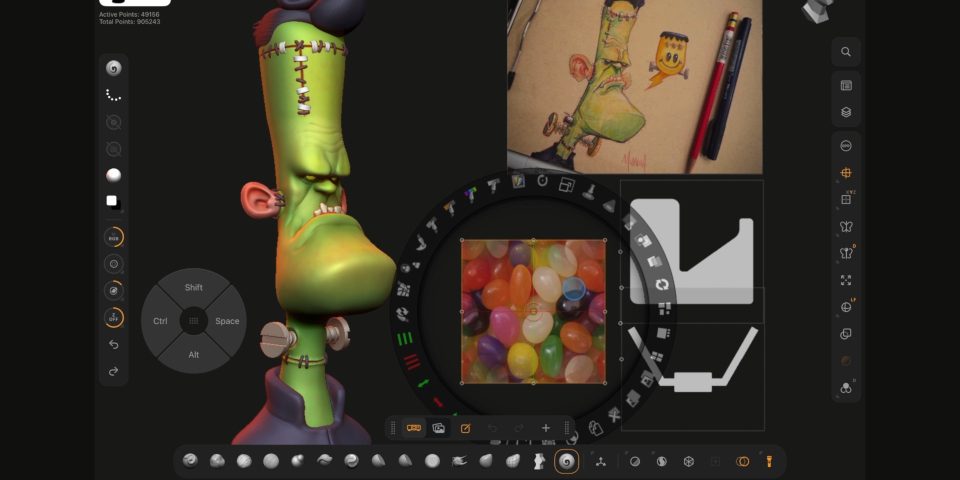
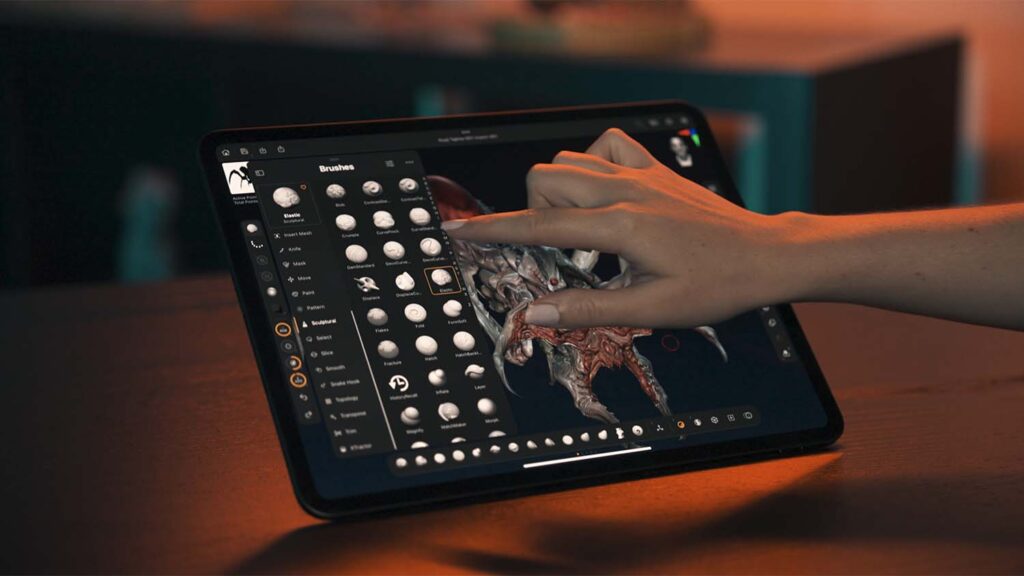
ZBrush for iPad 2027.0 introduces Spotlight and 3D Layers, expanding the tools available for image reference, projection, sculpting revisions, and character variation. These are major parts of the iPad improvements in ZBrush 2027.0 and ZBrush for iPad, giving mobile artists additional ways to work with visual references and adjustable sculpting changes. Spotlight provides image based reference, painting, sculpting, and mesh creation workflows, while 3D Layers allow sculpting, Polypaint, and masking contributions to be recorded and adjusted independently.
These additions address different aspects of the creative process. Reference images help establish how a surface should appear, projection allows image information to influence the model, and layers make it possible to evaluate changes before permanently incorporating them into the underlying geometry. For an artist developing a creature with scales, scars, and several expressions, these tools provide ways to treat each visual decision separately rather than repeatedly rebuilding earlier work.
Spotlight Reference and Image Projection Painting
Spotlight is accessed through the flashlight control on the Bottom Toolbar. Images can be loaded from textures, alphas, Files, Photos, or the iPad camera, giving artists several options for bringing reference material into the sculpting environment. The feature distinguishes between Reference mode and Projection mode, which serve different purposes. Reference mode allows images to remain visible for observation while working, whereas Projection mode supports transferring image information through painting or sculpting strokes. Establishing the purpose of an image before using it helps prevent confusion between studying a reference and directly applying its contents to a model. These image-based options are among the notable additions to ZBrush 2027.0 and ZBrush for iPad.
For reference work, images should remain readable without unnecessarily obscuring the sculpt. Several related views can provide more useful information than a crowded collection of unrelated images, particularly when evaluating anatomy, proportions, or surface characteristics. Clear silhouettes and consistent lighting can make visual comparisons easier, while changes in camera perspective should be considered when interpreting photographic references. The reference image supports observation, but it does not replace the need to assess the model from multiple angles. A convincing image cannot compensate for a weak silhouette or unresolved proportions, making broad form evaluation an important part of the workflow before smaller surface details are introduced.
Projection Mode Painting and Polypaint Considerations
Image projection painting allows information from a selected image to influence the model’s surface color or sculpted detail. In Spotlight’s Projection mode, RGB enabled strokes apply color, while Z ADD or Z SUB enables sculpting effects. Brush settings influence how the projected information affects the surface, giving artists control over the strength and appearance of their work. The main artistic challenge is distinguishing the actual color or material characteristics of a subject from the lighting captured in the source image. A photograph may contain shadows, reflections, or color casts that appear convincing from one viewpoint but become inconsistent when transferred directly to a model viewed under different lighting conditions.
For materials such as skin, fabric, or weathered surfaces, smaller controlled projection passes can be easier to evaluate than immediately covering the entire model. Rotating the object frequently helps reveal whether neighboring applications blend naturally, while reviewing the overall color balance prevents projected details from overwhelming the intended design.
Polypaint quality also depends on the amount of surface geometry available because extremely fine image details cannot remain equally sharp when the mesh lacks sufficient resolution to represent them. Establishing broad color relationships before adding distinctive marks and smaller variations provides a more manageable process for evaluating the result. The intended presentation also matters, since a character viewed closely may require different levels of surface detail from one that occupies only a small portion of the final image. These considerations help artists make effective use of the image projection capabilities in ZBrush 2027.0 and ZBrush for iPad.
Image-Driven Geometry Generation on iPad
Spotlight also introduces image driven geometry creation on iPad. Maxon describes using alpha images to generate topology, alongside the ability to project sculpted detail onto an existing surface. This is an image based modeling process rather than a method for reconstructing a complete, physically accurate three dimensional object from an arbitrary photograph. A source image can guide the creation of shape, but hidden surfaces, thickness, and structural requirements still need attention. Controlled images with clear silhouettes are particularly suitable for ornaments, symbols, decorative motifs, and similar forms whose appearance can be described effectively through a flat source.
An ornamental badge, for example, benefits from a clearly defined outer boundary and readable internal shapes. Unwanted marks in the source may become unwanted geometry, requiring additional cleanup after creation. The resulting mesh should be examined from the front, sides, and back because a convincing frontal view does not establish suitable thickness, clean transitions, or compatibility with later deformation. The intended destination determines how much additional work is required. A background decoration, printable component, and deforming character accessory have different structural needs, meaning image driven creation can accelerate initial shape development without replacing the production judgment required to make the geometry usable.
3D Layers, Memory Limits, and Facial Blend Shapes
The other major iPad addition is 3D Layers, which allows sculpting, Polypaint, and masking changes to be recorded as adjustable contributions. The controls are located in the Tool palette, and layers belong to the selected SubTool. New layers begin in Record mode, while their contributions can later be adjusted through visibility and strength settings.
The key benefit is the ability to separate a change from the underlying form, allowing artists to evaluate whether additional detail improves a sculpt without relying entirely on undoing later work. A wrinkle pass, scar treatment, decorative pattern, or proposed expression can be adjusted independently, making revisions more manageable when different aspects of the design are still being evaluated. This functionality is another reason the iPad edition of ZBrush 2027.0 and ZBrush for iPad is relevant to artists who prefer a more adjustable sculpting process.
Managing Layers, Baking, and Memory
Layer organization becomes more effective when each layer represents a meaningful decision that might change independently. Surface damage, age related details, and expression studies are useful examples because a reviewer may approve one contribution while requesting changes to another. Descriptive names such as Forehead Wrinkles communicate the purpose of a layer more clearly than a sequence of unnamed entries. This reduces the time required to identify the correct contribution and helps prevent accidental edits. It is also useful to review the sculpt with optional details reduced or hidden, since fine surface information can make a model appear more complete while concealing unresolved proportions or weak underlying forms.
The layer system supports a more flexible approach to sculpting and Polypaint, but it still requires decisions about when changes should become permanent. Maxon includes Bake Current and Bake All, allowing a selected layer or the entire stack to be incorporated into the model. Baking changes affects what remains independently adjustable, making it important to understand the consequences before committing a major variation. For character work, broad proportions should generally be evaluated before dense surface detailing, while color changes should be considered in relation to lighting, viewing distance, and the overall design. Maintaining separate contributions during exploration makes comparison easier, but not every minor adjustment needs its own permanent layer.
Memory consumption is another practical consideration. Maxon notes that large numbers of layers, especially on models with high polygon counts, can consume substantial iPad memory and reduce the available undo history. This makes purposeful organization preferable to accumulating every experiment indefinitely. Retaining useful alternatives, identifying important milestones, and removing redundant work after its value has been assessed can help keep a project manageable. The objective is to maintain enough separation for confident revisions without creating an unnecessarily complicated layer stack that becomes difficult to operate. Artists evaluating ZBrush 2027.0 and ZBrush for iPad should therefore consider memory use alongside the creative benefits of 3D Layers.
Facial Blend Shapes and Topology
The 3D Layers system also supports poses and expressions for blend shape work. A layer can preserve a facial variation and allow its effect to be evaluated at different strengths, helping artists compare expressions against a neutral character. A dependable expression workflow begins with a clearly defined baseline, particularly around sensitive areas such as the eyelids, lips, and regions where surfaces approach contact. A smile involves more than changing the position of the mouth corners because the cheeks, lower eyelids, and surrounding tissue also contribute to the expression. Similarly, a blink requires careful attention to eyelid contact rather than simply moving the upper eyelid downward.
Topology consistency remains essential when these variations are intended for an external animation pipeline. The receiving application requires a dependable relationship between the base mesh and its targets, meaning remeshing between expression creation and delivery can introduce compatibility problems. Sculpting an expression is also different from delivering a completed facial rig, since animation controls, corrective shapes, and export requirements depend on the destination application. Testing a neutral mesh and one target before developing an extensive expression library can help reveal naming, scale, or topology issues while they remain manageable.
Desktop vs. iPad Feature Comparison
The desktop and iPad editions have different feature priorities in the 2027.0 release. The new UV Editor and Selection Sets are desktop additions, while Spotlight and 3D Layers are the major iPad features. This distinction is essential when comparing ZBrush 2027.0 and ZBrush for iPad because the applications do not share every headline feature. Maxon’s UV Editor documentation specifically identifies the tool as unavailable in ZBrush for iPad, making the platform distinction important for artists planning texture preparation. Feature names alone do not establish complete parity between the applications because interface design, available device resources, licensing, and supported workflows all influence practical use.
The main platform differences can be summarized as follows:
- ZBrush desktop UV Editor: Provides UV creation, editing, unwrapping, packing, UDIM support, and related texture preparation tools.
- ZBrush desktop Selection Sets: Stores alternative Polygroups, masks, Polypaint, UVs, and morph targets for later recall.
- ZBrush for iPad Spotlight: Supports reference images, image projection, painting, sculpting, and image driven mesh creation.
- ZBrush for iPad 3D Layers: Allows sculpting, Polypaint, masking, and expression variations to be adjusted through independent layers.
- Platform availability: The new UV Editor is not available in the iPad edition, while Spotlight and 3D Layers appear among the headline iPad additions.
- iPad subscription access: Maxon lists Spotlight and 3D Layers under its paid iPad offering rather than unrestricted access through the free plan.
These differences matter when deciding where particular stages of production should take place. An artist may prefer an iPad for direct sculpting, concept exploration, and surface studies while retaining desktop access for UV preparation or another delivery requirement. A self contained sculpting study also has different needs from a character intended for a studio animation pipeline. For artists using both editions, maintaining a clear understanding of which device contains the current working version, when transfers occur, and where final verification takes place can help prevent confusion during revisions. Understanding these distinctions is important when planning a workflow around ZBrush 2027.0 and ZBrush for iPad.
Installation Routes and Project Compatibility
Maxon identifies the Maxon App and standalone installers as desktop installation routes, with the appropriate method depending on the account and deployment arrangement. ZBrush for iPad is distributed through Apple’s App Store. Before updating either application, active projects should be saved and recoverable copies retained outside application installation folders.
Maxon has previously documented update related concerns involving files stored within those directories, making ordinary project storage a more dependable location for working assets. On desktop, users can check the available installer or update in the Maxon App, complete installation, and verify the installed version. On iPad, the available update can be checked through the App Store before confirming the installed version within the application. These installation routes apply to the respective editions of ZBrush 2027.0 and ZBrush for iPad.
Successful installation should also be distinguished from successful project compatibility. Opening the application confirms that it launches, but a representative project provides a more useful test of whether SubTools, saved data, and expected visual results remain intact. For desktop UV work, a small edit can be applied and inspected after returning to ZBrush. On iPad, a simple layer contribution can be created and adjusted to confirm that the feature behaves as expected. Version verification is particularly relevant because the desktop release notes identify the 2027.0.1 maintenance correction, making the exact installed build useful when investigating problems or comparing results.
Overall, ZBrush 2027.0 expands the options available for managing digital sculpting work across desktop and iPad. The desktop UV Editor provides additional texture preparation capabilities, while Selection Sets improve the management of alternative mesh states and revisions. On iPad, Spotlight introduces image reference and projection workflows, and 3D Layers support more adjustable sculpting and color contributions.
Together, ZBrush 2027.0 and ZBrush for iPad address different production needs, but each contributes to a workflow in which artists can preserve important decisions, compare alternatives, and prepare assets more deliberately. Their practical value depends on the complexity of the work, the platform being used, and the requirements of the final asset.arly prepare assets for texturing or game production may find this addition particularly relevant because it brings more UV preparation capabilities directly into the desktop ZBrush workflow.
Frequently Asked Questions (FAQs)
- When was ZBrush 2027.0 released?
Maxon officially announced ZBrush 2027.0 on October 14, 2026, as part of its Fall 2026 software updates. The desktop technical release notes also identify October 14 as the release date, while October 15 appears in subsequent reporting. Despite the 2027.0 version number, the update was released during the 2026 calendar year. The release introduced new desktop and iPad capabilities, with version 2027.0.1 subsequently addressing a specific UV Editor maintenance issue involving Cinema 4D file associations. - What are the main new ZBrush 2027.0 desktop features?
The two headline desktop features are the new UV Editor and Selection Sets. The UV Editor expands texture preparation through UV unwrapping, packing, UDIM support, texel density workflows, trim sheets, and manual editing. Selection Sets allow artists to preserve alternative versions of Polygroups, masks, Polypaint, UVs, and morph targets. The release also includes smaller improvements, such as Bake Current for 3D Layers and an additional Spotlight deletion option. Together, these changes improve asset preparation and revision management within the desktop application. - Does the UV Editor require manually exporting a model first?
No. The documented workflow allows artists to launch the UV Editor directly from ZBrush through Tool > UV Map without first performing a separate manual export. The editor opens as a dedicated application using Cinema 4D technology, while ZBrush remains locked during the editing session. Artists can work on the selected SubTools and return their changes through Apply UV Edits. Choosing Cancel UV Edits closes the session without applying the modifications. This provides an integrated process while keeping UV editing separate from the main sculpting interface. - Does ZBrush 2027.0 support UDIM workflows?
Yes. ZBrush 2027.0 introduces UDIM support through its new desktop UV Editor. Maxon also lists texel density workflows, trim sheets, flexible packing, automatic unwrapping, and manual UV editing among its capabilities. UDIM layouts are useful when complex assets require multiple texture tiles rather than a single UV space. These tools provide artists with more options for organizing texture coordinates, although careful attention to seams, stretching, padding, and texture resolution remains necessary when preparing assets for production. - How does Unwrap by PolyGroup differ from UV Master?
Unwrap by PolyGroup uses existing Polygroup boundaries to establish UV seams and does not introduce additional seams beyond those boundaries. UV Master, by comparison, can create extra seams when its calculations determine that doing so will reduce stretching. The difference gives artists more direct control over seam placement when using Unwrap by PolyGroup, but it also makes the original Polygroup arrangement particularly important. Boundaries created for sculpting or posing may not always produce suitable UV islands, so the resulting layout should be inspected for distortion and organization. - Can Selection Sets survive every topology change?
No. Selection Sets depend on the topology of the SubTool on which they were created. Operations such as DynaMesh, ZRemesher, and Sculptris Pro can change the mesh structure and invalidate previously stored sets. This means Selection Sets are most dependable when the topology remains sufficiently stable for the relevant production stage. Artists working through major shape changes should consider that dependency before relying on stored masks, Polygroups, UVs, or morph targets. Selection Sets are useful for preserving mesh states, but they do not replace independent project backups. - Is Spotlight available in ZBrush for iPad 2027.0?
Yes. Spotlight is one of the major additions to ZBrush for iPad 2027.0. It allows artists to load images from several sources, including textures, alphas, Files, Photos, and the iPad camera. The tool supports visual references, image projection painting, sculpting effects, and image driven mesh creation. Its Reference and Projection modes serve different purposes, allowing artists either to observe source material while sculpting or to transfer image information onto a model. Maxon lists Spotlight among the features available through its paid iPad offering. - Can Spotlight images be displayed without projecting them?
Yes. Spotlight includes a Reference mode that allows images to remain visible while an artist works on the model without transferring their information onto the surface. This is useful for studying anatomy, proportions, textures, and other visual details. Projection mode performs a different function by allowing image information to influence Polypaint or sculpting through brush strokes. Separating these modes helps artists distinguish between using an image as a visual guide and actively applying its contents to the mesh. - Can iPad layers help create facial expressions?
Yes. ZBrush for iPad 2027.0 introduces 3D Layers that can preserve sculpting variations, including facial expressions and poses intended for blend shape workflows. Artists can create a variation, adjust its strength, and compare it with the underlying model without immediately committing the change. This is useful for experimenting with expressions such as smiles or blinks while maintaining a neutral baseline. However, preparing those shapes for animation still requires attention to topology consistency, export requirements, and compatibility with the destination rigging or animation system. - Are Spotlight and 3D Layers included in the free iPad plan?
No. Maxon lists Spotlight and 3D Layers among the features available through its paid ZBrush for iPad offering. The free application and subscription version provide different levels of access, meaning installing the application does not automatically unlock every available tool. Artists who want to use Spotlight for image projection or 3D Layers for adjustable sculpting and expression work should check the applicable subscription and feature availability. These additions are specifically associated with the expanded capabilities of ZBrush for iPad 2027.0.
Conclusion
ZBrush 2027.0 and ZBrush for iPad 2027.0 introduce improvements across different stages of digital sculpting. The desktop version expands UV preparation and Selection Sets, while the iPad edition adds Spotlight and 3D Layers for image based workflows and adjustable sculpting. Maxon officially announced the update on October 14, 2026.
These improvements simplify certain tasks, but UV inspection, meaningful naming, image interpretation, and pipeline validation remain essential. Testing the update with a representative project helps artists evaluate its practical benefits and determine how the new features fit their existing production workflows.
Sources and Citations
- Source: Maxon Fall 2026 Release Announcement: Confirms the October 14, 2026 announcement date, the Fall 2026 ecosystem update, and the introduction of ZBrush 2027.0 across Maxon’s software products.
- Citation: Maxon, “The Maxon Fall 2026 Release Delivers Bigger Worlds, Faster Workflows, and More Creative Control,” October 14, 2026. Official announcement.
- Source: ZBrush 2027.0 Technical Release Notes: Documents the desktop UV Editor, Selection Sets, Polygroup improvements, Spotlight changes, and Bake Current functionality.
- Citation: Maxon, “ZBrush: What’s New – 2027.0.” Official technical release notes.
- Source: ZBrush UV Editor Documentation: Explains UV creation, automatic unwrapping, manual editing, packing, the Cinema 4D-based editing environment, and the workflow for returning UV changes to ZBrush.
- Citation: Maxon, “UV Editor – ZBrush User Guide.” Official UV Editor documentation.
- Source: ZBrush Unwrapping and Packing UVs Documentation: Explains Unwrap by PolyGroup, UV island creation, seam placement, UV packing, and the differences between PolyGroup-based unwrapping and UV Master.
- Citation: Maxon, “Unwrapping and Packing UVs – ZBrush User Guide.” Official documentation.
- Source: ZBrush Selection Sets Documentation: Details how Selection Sets store Polygroups, masks, Polypaint, UVs, and morph targets, including recalling saved states and blending between morph targets.
- Citation: Maxon, “Selection Sets – ZBrush User Guide.” Official Selection Sets documentation.
- Source: ZBrush for iPad 2027.0 New Features Documentation: Confirms the introduction of Spotlight and 3D Layers in version 2027.0, including image projection, image-based mesh creation, sculpting contributions, and layer adjustments.
- Citation: Maxon, “ZBrush for iPad: New Features – 2027.0.” Official iPad release documentation.
- Source: ZBrush for iPad 3D Layers Documentation: Explains how 3D Layers record sculpting, Polypaint, and masking, and how artists can adjust, hide, blend, and bake layer contributions.
- Citation: Maxon, “3D Layers – ZBrush for iPad User Guide.” Official documentation.
- Source: Maxon ZBrush for iPad Product Page: Provides product information about ZBrush for iPad, its supported features, Spotlight, 3D Layers, and workflows connecting desktop and iPad editions.
- Citation: Maxon, “ZBrush for iPad – Official Product Page.” Maxon.
- Source: Maxon ZBrush Subscription and Plan Comparison: Establishes the differences between the free iPad plan, paid iPad subscription, and desktop ZBrush feature availability.
- Citation: Maxon, “ZBrush Plan Options and Feature Comparison.” Official plan comparison.
- Source: Maxon ZBrush Downloads: Provides the official desktop and iPad 2027.0 downloads and identifies the available ZBrush 2027.0.1 desktop installer.
- Citation: Maxon, “Downloads – ZBrush.” Official download page.
Recommendations
- The Christophers Review (2026): Cast, Plot, Ending Explained & Why Steven Soderbergh’s Art Drama Is a Must-Watch
- 007 First Light Cost $200 Million and Took Seven Years to Develop
- Hot Wheels: Infinity Rush Leak Explained, Release Date, Gameplay Details, Platforms, and What to Expect From the September 24 Launch Rumor
- Fortnite Striker Sprite Location Guide: Where to Find the Soccer Pitch
- PEAK: How to Ring 5 Belltowers in the GLOOM in a Single Expedition
- 1X Unveils Neo’s Five-Fingered Hands with 25 Degrees of Freedom for More Human-Like Robotics
- Lou’s Lagoon Launches August 27, 2026 on PS5, Xbox, Switch and PC: Release Date, Gameplay and Features
- Hokubu Evolving World Car Meet Location In Forza Horizon 6
- VisionQuest Disney+ Release Date Finally Confirmed: Marvel Reveals Major MCU Return
- Forza Horizon 6 Autumn Takashiro region treasure hunt location (Oct 15)



































































































