










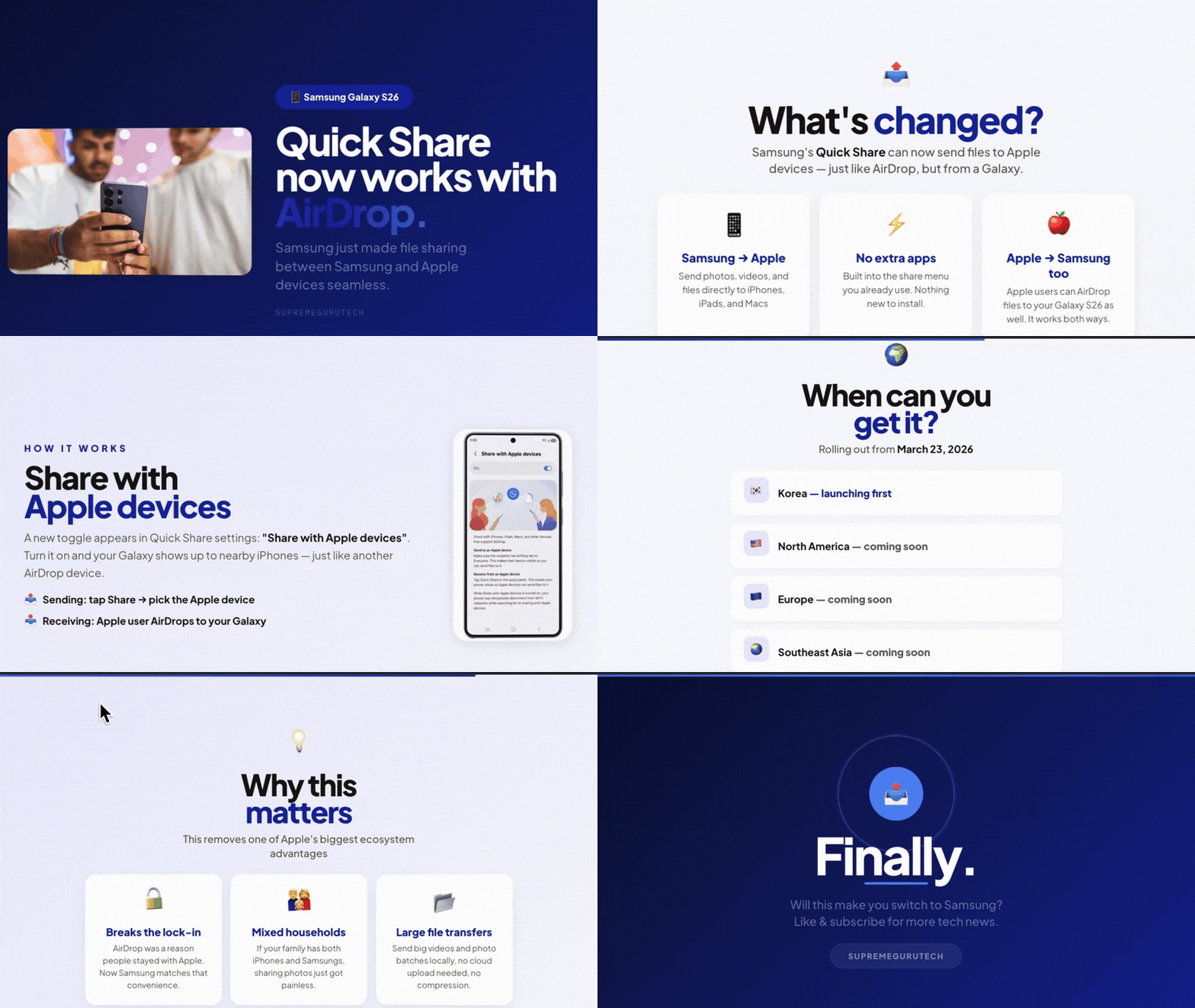
Samsung’s Galaxy S26 series is breaking down the barrier between Android and Apple devices when it comes to AirDrop-style file sharing. Soon, Galaxy S26 owners will be able to seamlessly share files with iPhones, iPads, and Macs using Samsung’s built-in Quick Share feature. This major update means you can “AirDrop” files from a Galaxy S26 to Apple devices (and vice versa) without any third-party apps or cumbersome workarounds. In this comprehensive guide, we’ll explain everything about the Galaxy S26’s new AirDrop support – what it is, how it works, when and where it’s rolling out, how to use it, and what it means for privacy and compatibility. Let’s dive into how Samsung is bringing AirDrop-like functionality to the Galaxy ecosystem.

Samsung Galaxy S26 AirDrop support explained
In March 2026, Samsung announced that the Galaxy S26, S26+, and S26 Ultra are the first Samsung devices to natively support Apple’s AirDrop via an updated Quick Share feature. This allows Galaxy S26 users to share photos, videos, and files directly with iPhones, iPads, and Macs without using third-party apps or cloud services. While AirDrop and Quick Share were historically proprietary and siloed, Samsung is now the second Android manufacturer to bridge this gap, following Google’s Pixel 10 implementation in late 2025. This update makes cross-platform sharing a built-in feature for the Galaxy ecosystem.
AirDrop over Quick Share on Galaxy S26: what it is and how it works
AirDrop over Quick Share functions as a two-way wireless pipeline. It uses Bluetooth for device discovery and Wi-Fi Direct (specifically AWDL technology) for encrypted, peer-to-peer data transfers. For discovery to work, both the Galaxy S26 and the Apple device must be set to “Everyone” visibility mode. Once active, the Galaxy S26 appears in the Apple AirDrop menu, and Apple devices appear in the Samsung Quick Share interface. Sending files requires the recipient to “Accept” the transfer, and since it is a local connection, it requires no internet. Google developed this interoperability by reverse-engineering AirDrop protocols using the Rust programming language, meaning no official partnership with Apple was required.
Galaxy S26 AirDrop update release date and rollout countries
The software update was officially announced on March 22, 2026. Rolling out sequentially via Over-the-Air (OTA) updates, it debuted in South Korea on March 23, 2026. Expansion to North America, Europe, Asia, and other regions was scheduled for late March and early April 2026. The feature was not available at the February launch of the S26 series, so users must manually check for updates in Settings. Initially limited to the S26 lineup, Samsung plans to expand support to more devices in the future.

How to enable AirDrop on Samsung Galaxy S26 in Quick Share settings
To enable the feature, users must first update their Galaxy S26 to the latest firmware. Users then enable Quick Share in the Quick Settings panel and set “Who can share with you” to “Everyone” (or “Everyone for 10 minutes”). On the Apple side, AirDrop must also be set to “Everyone for 10 minutes” and have Bluetooth and Wi-Fi active. Once both are configured, users can select a file, tap the Share icon, choose Quick Share/AirDrop, and select the target device. After the transfer is complete, it is recommended to turn off “Everyone” visibility to maintain privacy.
Can Samsung Galaxy S26 AirDrop files to iPhone and iPad without an app
Yes, the Galaxy S26 can AirDrop to Apple devices natively without any additional apps like Snapdrop or SHAREit. The functionality is built directly into the system software of both platforms. Samsung’s Quick Share handles the Android side while AirDrop handles the Apple side, allowing the two systems to communicate directly for a seamless, offline experience.
Does Galaxy S26 AirDrop work with Mac computers
The Galaxy S26 is fully compatible with Mac computers (generally 2012 models and newer). By opening the AirDrop window in Finder on a Mac and setting it to “Everyone,” Galaxy users can send files directly to the Mac’s Downloads folder. Conversely, Mac users can drag and drop files onto the Galaxy S26 icon in the AirDrop window to send them to the phone.
AirDrop visibility settings “Everyone” on iPhone and Galaxy S26: what to choose
“Everyone” mode is currently required for cross-platform sharing because “Contacts Only” mode does not work between the two different ecosystems. Apple, Google, and Samsung have all adopted a “10-minute” limit for “Everyone” visibility to prevent unsolicited files and AirDrop spam. Users should only enable this mode when they are ready to transfer files and switch back to “Contacts” or “No one” afterward to remain secure in public spaces.
AirDrop vs Quick Share: what’s different on Samsung phones
While both features use similar Bluetooth and Wi-Fi tech for fast, local transfers within a ~30-foot range, there are key differences. Quick Share allows sending to up to five Samsung devices at once, whereas AirDrop is typically one-to-one. Quick Share also supports native sharing to Windows PCs, which AirDrop does not. In the Samsung ecosystem, “Contacts” mode often requires a Samsung account login, whereas Apple uses iCloud. For cross-platform transfers, the experience is nearly identical: both require manual acceptance and appear as generic device names rather than contact photos.
Which Samsung Galaxy phones will get AirDrop over Quick Share next
The Galaxy S26 series is the launch platform for native AirDrop support, but Samsung plans to expand this feature to other devices. It is speculated that the One UI 8.5 update, expected later in 2026, will bring AirDrop compatibility to older flagship models, including the Galaxy S22, S23, S24, and S25 series. Recent foldables like the Galaxy Z Fold 4, 5, 6 and Z Flip 4, 5, 6 are also expected to receive the update. Mid-range phones, such as the Galaxy A33, A34, A35, A53, A54, A55, and A73, along with Galaxy Tab S8, S9, and S10 tablets, are likely candidates for One UI 8.5 or subsequent updates.
Google is facilitating this expansion by turning the Quick Share extension into a standalone module updateable via the Play Store, which may bring AirDrop interoperability to various Android manufacturers like Nothing, Oppo, OnePlus, Xiaomi, and Motorola. Qualcomm is also integrating support at the chipset level. While a specific timeline is pending, most Samsung devices from 2022 onwards that are still within their software support window are expected to eventually gain this feature.

Galaxy S26 Quick Share AirDrop requirements: Wi-Fi, Bluetooth, and account settings
To use AirDrop via Quick Share, both the Galaxy S26 and the Apple device must have Wi-Fi and Bluetooth enabled. While an internet connection is not required, the devices must be within approximately 30 feet (10 meters) of each other. Personal hotspots must be turned off on both devices, and the Galaxy S26 should not be actively casting or using Wi-Fi Direct for other tasks.
The Galaxy S26 requires the March 2026 software update, while the Apple device should ideally run iOS 15 or later. Both devices must be set to “Everyone” visibility (or “Everyone for 10 minutes”). A Samsung account or Apple ID is not required for sharing in “Everyone” mode, though a Samsung account is necessary for “Contacts Only” mode on Galaxy devices. Recognizable device names are recommended to avoid confusion during discovery. While Ultra-wideband (UWB) can enhance discovery on the S26 Ultra, it is not a strict requirement for the feature to function.
Galaxy S26 AirDrop not working: common fixes and troubleshooting steps
If AirDrop is not working, users should first verify that both devices are updated and that “Everyone” visibility is active on both sides. Toggling Bluetooth, Wi-Fi, or Airplane mode can refresh the connection. It is often helpful to keep the Quick Share or AirDrop discovery screens open and active on both devices during the process.
Other troubleshooting steps include restarting both devices, turning off VPNs or hotspots, and ensuring the recipient hasn’t accidentally dismissed the acceptance prompt. For persistent issues, clearing the Quick Share app cache on the Galaxy or checking the Mac firewall settings to ensure incoming connections aren’t blocked may help. If large files fail, users should ensure the devices stay awake and within range for the duration of the transfer.
Galaxy S26 AirDrop privacy and security: what gets shared and what doesn’t
The connection between Galaxy and Apple devices is encrypted using TLS over AWDL, and Samsung’s implementation uses the Rust programming language to prevent memory vulnerabilities. Transfers are purely peer-to-peer; no data is sent to internet servers or logged in the cloud. During discovery, only the device name is visible to nearby users.
While a thumbnail preview of images may appear on the recipient’s screen before they accept, no files are saved without explicit manual approval. Personal contact information, emails, and account details are not exchanged. File metadata, such as GPS location, is transferred by default unless the sender uses Samsung’s “Auto Blocker” or similar tools to strip it. Once the transient connection ends, the devices do not remain linked.

Galaxy S26 software update details for AirDrop over Quick Share
The AirDrop feature arrived for the Galaxy S26 series via a firmware update released at the end of March 2026, likely associated with One UI 8.1.1 or the March security patch. The update is delivered Over-the-Air (OTA) and its size may vary by region and carrier. The rollout followed a phased approach, starting in South Korea on March 23, 2026, before expanding to Europe, Asia, and North America.
This functionality is a permanent addition and will be included in all future versions of One UI, such as 8.5 and 9.0. Future updates may enforce a 10-minute limit on “Everyone” visibility to align with Apple and Google’s security standards. Users can verify the update by checking their software information in Settings or looking for the “Everyone for 10 minutes” option in Quick Share settings. The update has no negative impact on battery life as the feature remains dormant when not in use.
Frequently Asked Questions (FAQs)
- Does the Galaxy S26 support AirDrop out of the box?
No, the Galaxy S26 did not have AirDrop compatibility at launch. This feature was added shortly after launch via a software update in late March 2026. Once you install the latest update, your S26’s Quick Share will gain the ability to share with AirDrop on Apple devices. So be sure to update your phone to enable it. - What Apple devices can the Galaxy S26 share files with using Quick Share?
The Galaxy S26 can share files with any Apple device that supports AirDrop – this includes iPhones, iPads, and Mac computers. For iPhones and iPads, it works on models running iOS/iPadOS that have AirDrop (iPhone 5 or later, iPad 4th gen or later, etc. – practically all modern ones). For Macs, any Mac from 2012 onward with AirDrop capability (running OS X Yosemite or later) will work. Essentially, if the Apple device has AirDrop, your S26 can send to or receive from it after the update. - Do I need to install a special app on my iPhone or Galaxy S26 to share files?
No. You don’t need any extra apps on either device. The functionality is built into the system on both sides – the Galaxy uses its native Quick Share feature, and the iPhone/iPad/Mac uses AirDrop. They now communicate directly. Just update your S26’s software; then use the regular Share menu on the S26 and choose Quick Share, and on the iPhone use the normal AirDrop – no third-party apps or downloads required. - How do I make my Galaxy S26 visible to an iPhone for AirDrop sharing?
On your Galaxy S26, enable Quick Share and set your visibility to “Everyone” (this is done via Quick Settings or in Connections > Quick Share settings). On the iPhone, make sure AirDrop receiving is set to “Everyone for 10 Minutes” in Control Center. This allows the devices to see each other. Once you initiate sharing (from either device), you’ll see the other device’s name pop up. Don’t forget to switch back off Everyone mode afterwards for security. - Why can’t my Galaxy S26 find my friend’s iPhone (or vice versa) on Quick Share?
If the devices aren’t seeing each other, the most common reason is the visibility settings. Ensure your friend’s iPhone has AirDrop set to **Everyone (not Contacts Only)】 and your S26’s Quick Share is on Everyone as well. Also verify Bluetooth and Wi-Fi are enabled on both. If it still doesn’t work, have both of you toggle AirDrop/Quick Share off and on, and make sure you’re within a few feet. As a last resort, restarting both devices can help. Usually, switching to Everyone mode on both devices resolves discovery issues. - Can I AirDrop from an iPhone to a Galaxy S26 as well (two-way)?
Yes. The sharing is fully two-way. An iPhone user can AirDrop files to the Galaxy S26 just as they would to another iPhone. The S26 will appear in the AirDrop list (when discoverable), and the Galaxy will prompt you to accept the incoming file. Likewise, the Galaxy can send to the iPhone. Both sending and receiving work in both directions with photos, videos, documents, etc. Just remember, the Galaxy needs to be set to Everyone mode for the iPhone to see it. - Will older Samsung Galaxy phones get this AirDrop via Quick Share feature?
Samsung has indicated that after the S26 series, they plan to roll it out to many other Galaxy models. Likely candidates include recent flagships (Galaxy S22, S23, S24, S25 series, and Z Fold/Flip models) when they receive forthcoming One UI updates (such as One UI 8.5). Many mid-range phones from 2023 onward may get it too as part of their OS upgrades. The exact timeline isn’t confirmed, but if your Galaxy phone is eligible for the latest Android/One UI updates in 2026, it will probably receive AirDrop support as part of that. For now, only the S26 series has it immediately, with others to follow via updates later in 2026. - Do I need an internet connection or Wi-Fi network for Quick Share AirDrop to work?
No internet connection is required. The transfers are done directly via Bluetooth and Wi-Fi between the devices (peer-to-peer). You do not need to be on the same Wi-Fi network; in fact, you don’t need any network at all – it works offline. Just keep Wi-Fi enabled (for direct connection) but you don’t have to be connected to a router or use mobile data. The file won’t use your data plan. Even if you’re outdoors with no Wi-Fi, an S26 and iPhone can AirDrop to each other just fine. - Can I send large files or videos using Galaxy S26 Quick Share with AirDrop?
Yes, you can send large files, including high-resolution videos. There’s no strict size limit for a single AirDrop/Quick Share transfer beyond practical considerations. Samsung notes you can send up to 1GB at once and 2GB per day via Quick Share, but that typically applies to their internet-based sharing; local transfers usually aren’t capped, and people routinely AirDrop multi-gigabyte files. Keep in mind that very large files will take longer – both devices should stay nearby and awake during the transfer. For example, a 100MB video might transfer in under a minute, whereas a 2GB file might take a few minutes. If a file is extremely large, ensure the receiving device has enough storage space and patience for the transfer. - Is it safe and private to use Quick Share (AirDrop) between Galaxy S26 and Apple devices?
Yes, it’s designed with security in mind. The connection is direct and encrypted end-to-end, so other devices cannot intercept your file. Nothing is uploaded to any server – it’s local device-to-device, and shared files are not logged online. You always have to approve a transfer before it happens, so you won’t receive unexpected files without consent. For privacy, it’s best to use the “Everyone” visibility only when needed (to avoid random people sending you stuff). The feature has undergone extensive security reviews and uses robust protocols to keep transfers safe. In short, as long as you only accept AirDrop transfers from people you trust, it’s a secure and private way to share files.

Conclusion
The Galaxy S26’s native AirDrop compatibility via Quick Share marks a significant milestone in cross-platform interoperability. By enabling encrypted, peer-to-peer sharing between Samsung and Apple devices, Samsung has removed long-standing ecosystem barriers. This secure and fast update simplifies workflows for both casual and professional users, with expansion to older Galaxy models expected throughout 2026. This development signals a broader trend toward a more connected, platform-agnostic experience.
Sources and Citations
- SamMobile – Asif Iqbal Shaik, “Which Galaxy devices are getting AirDrop support via Quick Share?” (March 23, 2026).
https://www.sammobile.com/news/which-galaxy-devices-support-airdrop-quick-share/ - Samsung Newsroom – “Samsung Brings AirDrop Support to Quick Share with Galaxy S26 Series” (March 22, 2026).
https://news.samsung.com/us/samsung-airdrop-quick-share-galaxy-s26-series - 9to5Google – Abner Li, “Android Quick Share now works with AirDrop on iPhone, starting on Pixel 10” (Nov. 20, 2025).
https://9to5google.com/2025/11/20/android-quick-share-airdrop-pixel-10/ - Android Central – Sanuj Bhatia, “Samsung confirms Galaxy S26 will ‘soon’ support iPhone AirDrop via Quick Share” (March 20, 2026).
https://www.androidcentral.com/phones/samsung-galaxy/galaxy-s26-quick-share-to-airdrop-support-coming-soon - Bitdefender HotforSecurity – Filip Truță, “Android ‘Quick Share’ Now Supports iOS ‘AirDrop’ – Here’s How to Use It Securely” (Nov. 24, 2025).
https://www.bitdefender.com/en-us/blog/hotforsecurity/android-quick-share-supports-ios-airdrop-how-to-use-it-securely - SamMobile – Asif Iqbal Shaik, “Quick Share could get AirDrop-like limitation for better security” (Feb. 27, 2026).
https://www.sammobile.com/news/quick-share-airdrop-like-limitation-better-security/ - Samsung Support (US) – “Send and receive files with Quick Share on your Galaxy phone.”
https://www.samsung.com/us/support/answer/ANS10007268/ - Samsung Support (Philippines) – “How to use Quick Share feature on Galaxy device.”
https://www.samsung.com/ph/support/mobile-devices/how-to-use-quickshare-feature-on-galaxy-mobile-device/ - MacRumors – Tim Hardwick, “AirDrop-Quick Share Interoperability Expanding to More Android Phones” (Feb. 11, 2026).
https://www.macrumors.com/2026/02/11/airdrop-quick-share-interoperability-more-phones/ - Android Central – same article as your final note on rollout context and Choi Won-jun’s comments.
https://www.androidcentral.com/phones/samsung-galaxy/galaxy-s26-quick-share-to-airdrop-support-coming-soon
Recommended
- Can you zoom the camera in Blender?
- The Internet Reacts To The First Photo Of Amazon’s God Of War: Ryan Hurst’s Kratos First Look Sparks Memes, Backlash, and Debate
- Resident Evil Requiem is likely the series’ biggest launch ever — 5 million units sold in under a week
- How to Bake High Poly to Low Poly in Substance Painter: A Complete Workflow Guide
- FBC: Firebreak just got its last ever major update (Open House), plus a permanent price drop and free Friend’s Pass
- Musgrave Texture Removed in Blender 4.1 – Workarounds and Alternatives
- How to Make a Character Follow a Path in Blender: A Complete Beginner’s Guide
- Unlocking Cinematic Power: The Best 5 Blender Camera Add-ons to Elevate Your Workflow
- Mesh to Metahuman: How to Scan Yourself and Create a Realistic Digital Double in Unreal Engine 5
- Creating Smooth Camera Transitions in Blender Using The View Keeper
























































































