









Roblox agentic AI tools explained: how to build a game with a single prompt
Roblox’s new agentic AI tools promise that creators can build entire game experiences using nothing more than a natural-language prompt. In practice, this means integrating powerful AI assistants into Roblox Studio and the Roblox Assistant interface so that a user’s description of a game is transformed into a playable project. Official announcements emphasize that nearly half of the top developers already use AI tools, and the new agentic features are meant to “accelerate every step of the plan, build, test loop”.
In effect, a user can type something like “make a fantasy RPG with a castle and a dragon,” and the system will plan out tasks, generate scripts and 3D assets, and even automatically test the game. In short, the agentic AI shifts Roblox creation from manual coding toward a conversational workflow where “creators can use AI to accelerate every step” of development.
What “agentic AI” means in Roblox and why it matters for creators
In Roblox’s context, “agentic AI” refers to an AI that acts as an autonomous agent in the development process, carrying out multiple steps of game creation without constant human intervention. Unlike a simple autocomplete or code-suggestion tool, an agentic AI can digest a high-level instruction and execute a sequence of tasks to implement it. Roblox describes the AI assistant as a “collaborative development partner” that examines the current project, asks clarifying questions, and designs an approach before coding. In other words, the AI doesn’t just generate a single piece of script on demand; it understands the intent behind the prompt and manages the workflow from planning to execution just like a junior developer would.
This agentic approach is important because it potentially lowers the barrier for new creators (who may not know how to script) and speeds up development for veterans by automating routine tasks.
How Roblox Studio’s new AI assistant can plan, build, and test games automatically
Roblox’s agentic AI assistant is designed to handle the full game-development pipeline in three phases: planning, building, and testing. First, the AI uses Planning Mode to break down a high-level prompt into a structured game plan. It analyzes any existing code and project data, asks follow-up questions to clarify vague instructions, and then produces a step-by-step action plan essentially a mini game design document. Next comes the building phase, where the AI generates assets and scripts.
Using new mesh and procedural-generation tools, the assistant can create textured 3D objects or parametric models from text and image prompts (e.g. “make a blue car” or “create a staircase” with adjustable dimensions). Finally, in the testing phase, an automated playtesting agent runs through the game using a simulated player character. This agentic loop allows the AI to verify that the game behaves as intended, report bugs or issues, and even feed results back into the plan for further refinement. By combining these phases, Roblox’s system can take a user prompt and iteratively construct and polish a working game almost hands-free.
Roblox Planning Mode AI: turning ideas into full game development workflows
Screenshot: Roblox Studio with the AI Assistant in Planning Mode. The AI has parsed the user’s prompt and created a structured list of development steps (right panel).
Roblox’s Planning Mode is the linchpin of the agentic workflow.
When a creator enters a prompt, the assistant doesn’t jump straight into coding. Instead, it formulates a plan by analyzing the existing project and asking clarifying questions, ensuring it understands the creator’s vision. In official demos, the assistant will present an editable plan a sequence of tasks and milestones for the user to review before any code is written. For example, if you prompt “build a medieval village,” the AI might break this into steps like generating a terrain, placing houses, adding NPCs, and scripting interactions, all laid out in order.
Creators can then adjust the plan (adding details or correcting misunderstandings) before the AI proceeds. This iterative planning ensures that the AI’s multi-step process stays aligned with the user’s intent. In short, Planning Mode transforms a vague idea into a detailed game development roadmap, bridging the gap between concept and execution.
How to create a Roblox game using AI prompts step by step
To build a game with Roblox’s agentic AI, a creator might follow these general steps:
- Open Roblox Studio and start a new project. Ensure the Roblox Assistant (AI chat interface) is enabled in Studio.
- Invoke the AI assistant and type your game prompt. For example, “Create a 3D platformer in a jungle with enemies and treasures.” The AI begins by planning.
- Review and refine the AI’s plan. The assistant’s Planning Mode will output a task list (e.g. “Generate terrain,” “Add player character,” etc.). Adjust or confirm this plan to capture your vision.
- Let the AI generate assets and code. With the plan approved, the assistant proceeds to build. It can use Mesh Generation to place fully textured models and Procedural Generation to create parametric objects. For instance, it might generate a jungle scene and a treasure chest by prompting on the user’s instructions. Simultaneously, it writes scripts to control gameplay (movement, enemy behavior, scoring, etc.) behind the scenes.
- Interact and adjust. As the AI builds, you can pause and tweak specific assets or scripts. All generated content is reviewable and editable.
- Run the AI playtester. After building, trigger the new Playtesting Agent. The AI will control a test avatar through your game, checking for bugs, navigation errors, or logic flaws. It reads the game’s logs and raises any issues.
- Incorporate feedback. Based on the playtest results, the assistant can refine the game: fixing broken code, adjusting asset placement, or balancing mechanics. This loop of planning-building-testing can repeat as needed until you’re satisfied.
Using these steps, a user effectively converses with the AI to assemble the game. Demo videos show a creator typing a description and watching as levels, enemies, and items populate the world in real time, with the assistant even guiding the player character to test the setup.

Roblox AI game development tools vs traditional scripting methods
Roblox’s agentic AI tools represent a shift from the traditional code-centric workflow to a natural-language-driven process. Normally, developers would manually script game logic, import assets, and iteratively test everything by hand. With the new AI assistant, much of that work can be automated. Instead of writing Lua code line-by-line, you describe what you want and let the AI generate it. As The Next Web puts it, the assistant moves from a “code-suggestion tool” to a “junior development partner” that can examine a project, ask questions, and implement features end-to-end.
This doesn’t mean scripting skills are obsolete: the AI may not handle very complex or highly customized systems yet, and experienced devs will still want to fine-tune logic for performance or originality. However, for many tasks (level layout, basic enemy AI, item placement), the AI can do in seconds what might otherwise take hours of manual work.
For beginners, the difference is even starker: someone with a game idea but no coding background can now potentially generate a playable prototype, whereas before they would need to learn scripting. Conversely, veteran developers can use the AI to speed up mundane parts of building (like boilerplate code or repetitive asset creation) and focus their time on high-level design and polish. In summary, the AI tools complement traditional methods they automate routine work and brainstorming, but creators still guide the process and refine the output.
Benefits of Roblox agentic AI for beginner and professional developers
The agentic AI tools offer several clear advantages. For new or non-programming creators, the biggest benefit is accessibility: Roblox’s own analysis shows most developers have limited coding experience, so these tools “lower the barrier between a creative idea and a playable game”. Someone who can imagine a game can now describe it in words instead of having to master scripting. Even for seasoned developers, AI assistance speeds up prototyping and iteration. Roblox emphasizes that AI can help “close the gap between creative vision and execution” letting creators ship ambitious games faster. By generating assets, code, and even testing automatically, the AI lets teams focus on creativity and gameplay rather than routine tasks.
Other benefits include brainstorming assistance (AI might suggest novel ideas or solutions), built-in QA (the automated playtester can catch bugs early), and educational value (beginners can learn how games are structured by examining the AI’s outputs). As one analysis notes, Roblox positions these tools as empowering “creators who have ideas but lack technical skills”. The overall promise is that instead of being blocked by lack of coding knowledge, more people can create and innovate on Roblox. In practice, this could lead to a more vibrant creator community with a lower entry threshold.
Roblox procedural generation tools and dynamic 3D asset creation explained
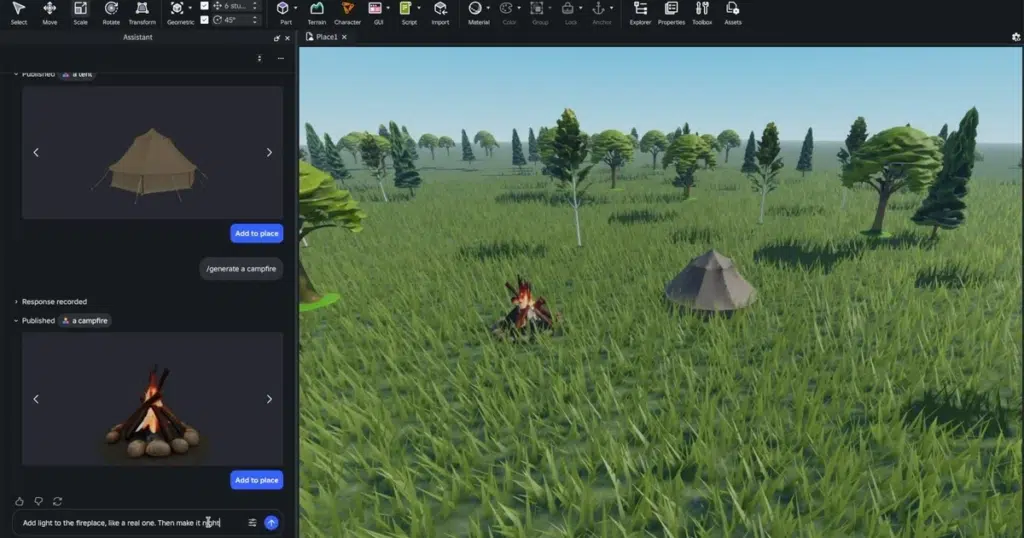
Image: Conceptual visualization of procedural 3D content generation. Roblox’s new tools let creators use text or image prompts to spawn fully interactive 3D models (e.g. adjustable furniture, vehicles, buildings) without manual modeling.
A core part of the agentic toolkit is procedural and mesh generation for 3D assets. Roblox introduced two related features: Mesh Generation and Procedural Models. Mesh Generation, powered by Roblox’s open-source “Cube” model, allows users to place a fully textured 3D object into the game world by simply describing it.
For example, you might prompt “a red racing car” and the system will generate and place a detailed car mesh. In early tests, over 160,000 objects were produced using this method, and games using 4D (interactive) generated assets saw a 64% increase in player engagement on average.
Procedural Models take this further by making objects editable and parametric. Introduced as a future feature, Procedural Models are geometry defined by code rather than static meshes. A user can prompt the AI to “create a bookcase,” and then adjust attributes like the number of shelves, book heights, colors, or materials on the fly. For example, an AI-generated staircase will automatically size its steps relative to its total height, because the objects “understand” their physical relationships. This parametric approach means the generated assets are smarter building blocks that designers can easily tweak and reuse.
Combined, mesh and procedural generation let creators populate worlds with rich, dynamic 3D content from simple instructions, drastically cutting down the time normally spent in 3D modeling software.
AI playtesting in Roblox: how automated agents test your game design
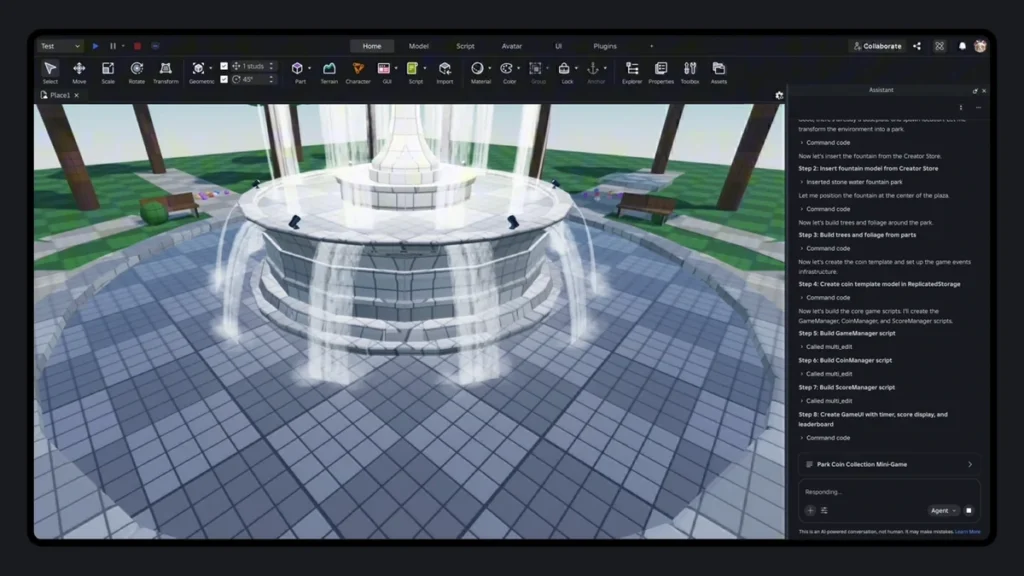
Screenshot: An AI playtesting agent navigates a built game, testing interactions. The assistant (right panel) logs each action and its outcome for review.
Roblox’s agentic tools include a sophisticated AI playtesting agent that serves as an automated quality-assurance tester. Once a prototype is built, you can have the AI control a player avatar and go through the game, just as a human would. The agent examines the game’s behavior: it moves the character, interacts with objects, and monitors the results. According to Roblox, the playtesting agent analyzes the game against the original plan and checks the code and data model for issues.
It reads system logs, identifies broken mechanics or logical errors, and reports them back to the developer. Over time, this creates a “self-correcting loop” where the AI can cycle through planning, execution, testing, and refinement with minimal human input.
The benefit is twofold: designers get rapid feedback on bugs or balance issues without having to play the entire game themselves, and the AI assistant learns from these tests to improve future outputs. For example, if the playtester finds that an enemy character is stuck or a script crashes, the assistant will highlight and even attempt to fix these problems. This automated QA process is especially valuable for large games where manual testing is tedious. In effect, Roblox’s AI acts like an embedded tester that verifies, “Did the game do what we asked it to?” making development more robust and iterative.
Roblox AI tools integration with third-party systems and MCP server explained
Roblox is building its AI so that creators aren’t locked into a single provider. The platform now surfaces project context to external tools via its built-in Model Context Protocol (MCP) server. MCP is an open standard that lets different AI services access the game’s data. Roblox has added an MCP client inside Studio’s Assistant, enabling it to connect with popular models like Anthropic’s Claude, ByteDance’s Cursor, and OpenAI’s Codex. In practice, this means you could use the same project context (code and assets) with multiple AI assistants interchangeably. For instance, if you prefer Claude’s writing style for planning and Codex for coding, Studio can bridge to those models.
This third-party integration provides flexibility: creators can leverage specialized tools or future AI models without waiting for Roblox’s internal engine to support every feature. In summary, Roblox’s agentic platform not only uses its own AI (like the Cube model) but also links up with the broader AI ecosystem through MCP.
Can AI really build a full Roblox game from a single prompt?
The claim that AI can build a complete game from one sentence is ambitious, and the reality is more nuanced. In theory, Roblox’s vision is to let a developer “describe a game in natural language and have AI generate the assets, environments, code, animations, and interactive behavior to make it real”. The new tools are early steps toward that goal. In practice today, the AI can generate large portions of a game automatically, but it still relies on human guidance and review. Developers typically start the workflow with a prompt, but they then refine the AI’s plan, adjust or approve generated assets, and run playtests.
External experts caution against expecting a polished game from a single-shot prompt. For example, industry leaders note that Google’s AI world-builder “Genie” (which creates virtual environments) is not a game engine and currently produces something closer to a procedurally generated “interactive video” than a full-featured game. Likewise, Roblox’s agentic AI is powerful but not a magic wand: it accelerates many tasks, but complex games with unique mechanics often need detailed human fine-tuning.
In short, yes you can start building a game with a single prompt, but the best results come from treating the AI as a partner: adjusting its plan, reviewing content, and iterating on its work. The tools dramatically shortcut many steps, but they do not completely eliminate the need for developer oversight.
Roblox AI tools impact on game development speed and creator economy
Roblox’s agentic AI is poised to speed up development significantly and reshape its vast creator economy. By automating planning, asset creation, and testing, games can be prototyped and shipped much faster. Roblox states that AI is “accelerating workflows” for creators so they can close the gap between vision and execution. In practical terms, projects that once took weeks to build (placing levels, coding interactions) might be done in days or hours with AI assistance. Early data hints at this impact: during testing Roblox saw generated assets drive higher player engagement, suggesting more polished experiences reaching audiences.
Economically, these tools affect the creator marketplace. Roblox has over 380 million monthly active users and $4.9 billion in revenue in 2025, so it can absorb the substantial compute costs of AI at scale. Many competing platforms lack that capacity, giving Roblox a temporary advantage. For creators, the lowered technical barrier means a larger pool of potential game-makers. More people can create, which could translate to a surge in new games and revenue opportunities. In fact, analysis predicts that the daily output of creator-made games could “balloon” as more developers test these agentic tools.
However, this growth comes with challenges. A massive uptick in new games could worsen Roblox’s long-standing discovery and moderation problems. As one analyst notes, a huge flood of automatically generated content could strain content curation and safety systems. Roblox’s investors and community are watching carefully how quality is maintained. In summary, expect faster development cycles and more creator income opportunities, but also a need for new strategies in moderation and game discovery as AI greatly multiplies the volume of content.
Pros and cons of Roblox agentic AI tools for game quality and creativity
The agentic AI tools have clear pros and cons for game quality and creativity:
- Pros: Faster iteration and democratization of creation. By lowering technical barriers, more creators (especially young or inexperienced ones) can bring ideas to life. The AI’s structured planning mode can also produce more coherent game designs than a random single prompt. Automated testing can catch bugs early, improving quality. Developers can explore creative variations quickly for instance, asking the AI to re-skin levels or try different mechanics in seconds. Overall, AI assistance encourages experimentation and can help creators focus on the fun parts of game design.
- Cons: Risk of content glut and homogenization. Critics warn that if everyone can generate games instantly, the Roblox platform could be flooded with low-effort or derivative experiences. The ease of generation might favor quantity over quality: many new games may be algorithmically produced without careful design. This could make it harder for truly polished, unique games to stand out. There is also concern about creative stagnation; if users rely too much on AI, certain ideas or styles might get repeated en masse. Finally, there are safety and moderation downsides: more automated content means more to screen for inappropriate or copyrighted material, and Roblox will need robust filters to handle that surge. In summary, while agentic AI can spur creativity by making development easier, it also poses a challenge to maintain high-quality and original games on the platform.

How Roblox AI compares to other game-building AI like Google Genie
Roblox’s approach is unique compared to other recent AI game tools. A notable example is Google’s Project Genie (Genie 3) a research world-model AI that can generate large interactive environments from text prompts. While Genie impressively simulates worlds in real-time, industry experts stress that it is not a full game engine. As Take-Two’s president noted, “Genie is not a game engine” and cannot replace the creative process involved in game development. In practice, Genie can produce an explorable scene (e.g. an open field or dungeon layout) but doesn’t handle game rules, UI, or scoring logic on its own.
By contrast, Roblox’s agentic AI is integrated with an actual game engine (Roblox Studio) and includes code, assets, and game-logic generation. That means Roblox’s tools can do things Genie cannot: they write scripts that make the game interactive, and they include a playtesting loop to verify behavior. In other words, Genie is more like an experimental sandbox for generating worlds, whereas Roblox’s system is an end-to-end game development platform. Other game-building AIs (like experimental prototypes or Unity’s ML-based tools) similarly focus on environments or specific tasks, but Roblox is among the first to offer a cohesive, single-prompt-to-playable-game pipeline.
Ultimately, each tool has its niche: Genie showcases cutting-edge research in world modeling, while Roblox’s agentic AI focuses on practical game creation and production. The two approaches will likely influence each other over time, but for now Roblox’s system is tuned to the needs of creators within its ecosystem.
Future of AI-generated games on Roblox and what creators should expect
The launch of agentic AI tools is just the beginning. Roblox’s official roadmap and investor communications hint at even more advanced features coming soon. The company plans to introduce multi-agent parallel workflows, where multiple AI “workers” can tackle different tasks in the cloud simultaneously. They are also exploring smarter in-game agents and NPCs, visual workflow editors (node graphs), and deeper integrations with external AI. At the 2026 Developer Conference (RDC) in September, Roblox is expected to demo these next steps, including cloud-based AI collaboration and possibly running entire AI teams on a project.
Creators should also anticipate that Roblox will continuously refine these tools. As the platform grapples with AI-generated content, expect more AI-based moderation and quality filters to emerge. In the broader gaming industry, generative AI is a rapidly evolving field Roblox’s announcement follows trends like “vibe coding” which led to Apple tightening its App Store policy. On Roblox, future updates may emphasize iterative and structured generation (to avoid “one-shot” fluff) and give creators more control over style and content.
In summary, the future likely holds more powerful, more integrated AI in Roblox Studio, making it increasingly possible to go from idea to game with minimal manual work. But creators should be ready for continuous changes and focus on how to blend AI with their own creativity responsibly. As one Roblox executive put it, these advances are meant to help “close the gap between creative vision and execution,” so expect that gap to narrow even more in the coming years.
Frequently Asked Questions (FAQs)
- What are Roblox’s “agentic AI” tools?
They are new AI-powered features built into Roblox Studio and the Roblox Assistant that can interpret a high-level prompt and manage multiple development steps. Instead of just generating code snippets, the agentic AI can plan the game, create assets, write scripts, and even test the game acting as a collaborative co-creator. - How does Roblox’s Planning Mode work?
Planning Mode takes your text prompt and existing game project, analyzes them, and produces a detailed action plan. The AI may ask follow-up questions to clarify your intent, then break the project into steps (like terrain creation, character setup, scripting events). You review and adjust this plan before any code is written. This ensures the AI executes your vision more accurately. - Can a full game really be created from one text prompt?
In principle, yes that’s the goal but in practice the AI performs an iterative process. You start with a single prompt, but the AI will generate intermediate plans, ask for feedback, and allow you to refine the result. The end-to-end system can assemble large parts of a game automatically, but creators typically still review and guide its work. These tools are first steps toward letting a developer simply “describe a game” and have it built, but they don’t yet replace the need for review and tweaking. - Do I need to know how to code to use these tools?
No – the tools are designed for users of all skill levels. Many existing Roblox creators aren’t professional programmers, so these AI features “lower the barrier” between an idea and a playable game. Beginners can describe a game concept and let the assistant handle code generation. That said, coding knowledge can still be useful for understanding or customizing complex behavior beyond what the AI provides. - What are Procedural Models and Mesh Generation?
These are two new asset-creation tools. Mesh Generation lets the AI place fully textured 3D objects in your game just from text prompts for example, you could generate a vehicle or a piece of furniture without modeling it yourself. Procedural Models are parameterized objects defined by code; for instance, you might create a bookshelf and then dynamically adjust its number of shelves, material, or dimensions using natural language or simple sliders. They allow on-the-fly editing of generated assets. - How does the AI Playtesting Agent work?
After your game world is built, you can run the Playtesting Agent, an automated QA tester. It controls a Roblox player character and simulates playing the game. As it plays, it “reads” game logs, checks whether systems are working, and identifies bugs or design issues. It then reports these findings so you can fix problems. Over time, this enables the AI to self-correct parts of the game by feeding issues back into the planning phase. - When will these agentic AI features be available to all developers?
Roblox is rolling out these features gradually. Initially, they are available to select creators (e.g. top developers or beta testers) in Roblox Studio. Roblox has not announced an exact timeline for a full public release. We expect broader availability to expand over months as the tools are tested and refined. - Are there other game engines with similar AI builders?
Not yet at the same level of integration. Research projects like Google’s Project Genie (Genie 3) can generate interactive 3D worlds from text, but industry experts stress that Genie is “not a game engine” and doesn’t include scripting or full game logic. Unity and Unreal have experimenting with AI-assisted tools (like autocompletion or art generation), but Roblox’s agentic AI is among the first to offer an end-to-end single prompt game builder. In short, Roblox’s solution is unique in combining planning, asset creation, and playtesting in one package. - Could using AI-generated content violate Roblox rules?
All content on Roblox (even if AI-generated) must follow the platform’s Community Standards and safety guidelines. Creators should review any AI-generated assets or scripts to ensure they are appropriate, non-infringing, and safe for Roblox’s mostly young audience. Currently, Roblox has not explicitly forbidden AI content, but the surge of generated content will likely increase the need for moderation checks. In practice, you should treat AI outputs just like any other user-generated content and use Roblox’s moderation tools as usual. - What are the limitations of these AI tools?
The AI may not handle very complex or highly customized game mechanics out of the box. It works best for common game types and templates. Also, the quality of the output depends on the prompt clarity vague instructions may lead to incorrect or generic designs. Some users also note that an “one-click” pipeline could flood the platform with similar low-effort games, so uniqueness may require extra effort. Finally, the AI tools currently require internet connectivity and (for now) are free to use on Roblox, but the platform reserves the right to adjust access or costs as the tech evolves. Overall, while impressively powerful, the AI assistant is a tool to aid developers, not a complete replacement for game design expertise.

Conclusion
Roblox’s new agentic AI tools mark a significant evolution in game development. By allowing creators to plan, build, and test games using natural language, these features transform Roblox Studio into a more accessible, AI-augmented environment. In practice, a single prompt can kickstart an entire game design workflow from generating a design plan to spawning 3D assets and debugging code greatly accelerating development. For beginners, this could democratize game creation; for experienced developers, it offers speed and creative assistance. However, this automation also brings challenges: maintaining quality and originality among the surge of AI-generated content will be crucial.
Compared to other AI efforts (like Google’s Genie), Roblox’s approach is tailored to actual game production within a robust engine. The long-term vision is that one day developers might truly describe a game and see it fully realized by AI. We are not there yet, but Roblox’s announcement represents a major step. In the near future, we can expect even tighter AI integration (multi-agent cloud workflows, intelligent NPCs, etc.) and continuous improvements to balance automation with creative control.
For now, creators should experiment with these tools to see how they can enhance their workflow, while staying mindful of their limits and the importance of human creativity. With responsible use, agentic AI has the potential to expand what’s possible in Roblox game design, speeding up development and inspiring new kinds of interactive experiences.
Sources and Citations
- Roblox Newsroom
https://about.roblox.com/newsroom/2026/04/roblox-studio-going-agentic - Tom’s Guide
https://www.tomsguide.com/ai/roblox-adds-agentic-ai-to-roblox-studio-now-creators-can-use-it-to-make-games-with-a-single-prompt - The Next Web
https://thenextweb.com/news/roblox-ai-assistant-agentic-tools-planning-procedural-models - Games.gg
https://games.gg/news/roblox-agentic-ai-tools-studio/ - WindowsReport
https://windowsreport.com/roblox-studio-gets-planning-mode-ai-and-automated-playtesting-tools/ - GamesHub
https://www.gameshub.com/category/game-development/ - GameDeveloper
https://www.gamedeveloper.com/business/-genie-is-not-a-game-engine-take-two-president-says-google-s-world-model-cannot-replace-creative-process
Recommended
- The Witcher Comics Comes to WEBTOON: Release Date, Where to Read, and What to Expect
- Nipsey Hussle’s Braids: A Symbol of His Legacy
- Huge Spoilers Leaked for 007 First Light and Other Games After Ratings Board Breach
- How to Make Metahumans Look Realistic in Unreal Engine 5: Complete Guide for Artists and Developers
- The second-best year in CD PROJEKT’s history — key takeaways from the 2025 annual report
- Advanced Camera Switching Techniques with The View Keeper in Blender
- Double Dragon, River City Creator Yoshihisa Kishimoto Passes Away at 64
- Ray Gunn: Sam Rockwell, Scarlett Johansson and Tom Waits Join Brad Bird’s Animated Sci-Fi Noir Film – Cast, Plot, Release Date & Everything We Know
- All Free Mystery Gifts in Pokémon Legends: Complete List of Codes, Rewards & How to Redeem in 2026
- Substance Painter vs Mari: Which 3D Texturing Tool Is Best for You?




























































































