










In This Article (18 sections)
Adobe After Effects 26.3 Release Notes, Features, Rollout Status, and Comparison with 26.2
Adobe After Effects 26.3 represents a meaningful continuation of Adobe’s 2026 redesign of the application’s 3D and motion design stack, but it also arrives with an unusual documentation gap that matters for analysts, technical directors, and creative teams. As of June 18, 2026, Adobe’s publicly indexed HelpX release notes and “What’s New” pages still identified versions 26.2.1 and 26.2 as the latest fully documented public releases, while Adobe-linked release communications and community rollout discussions pointed to 26.3 introducing Advanced 3D Depth of Field, a faster Vector Mask Tracker, Copy Frame to Clipboard, Curl Noise, and clipboard-based Illustrator and SVG pasting as native shape layers.
The safest way to understand the release is therefore to separate confirmed rollout signals from documentation that had not yet caught up. Adobe HelpX release notes last updated in late April 2026 still listed 26.2.1 as the newest version, while the main “What’s New” page continued to present 26.2 as the latest feature release. At the same time, Adobe-linked public discussions on June 17 reported that 26.3 was available and identified the same major additions that had appeared through the public beta program.
The development timeline supports the conclusion that After Effects 26.3 is a genuine feature release rather than an unverified version reference. Adobe Community beta posts documented Advanced 3D Depth of Field in February 2026, a redesigned Effect Controls panel in early April, Copy Frame to Clipboard and Curl Noise in mid-April, an updated Vector Mask Tracker in late April, and clipboard-based Illustrator and SVG pasting as native shape layers during the same period. After Effects 26.0 had already introduced native parametric meshes, Substance 3D materials, shadow-casting lights, and variable font axes, while version 26.2 added displacement support for 3D materials on parametric meshes.
Version 26.3 appears to be the point at which camera-based realism, particularly in-engine Depth of Field, begins making that Advanced 3D stack feel more complete for everyday production. For research, procurement, and enterprise deployment, the practical takeaway is that 26.3 should be treated as a real rollout with temporary documentation latency, while organizations should still verify compatibility and deployment details carefully until Adobe’s primary documentation fully reflects the release.
Major After Effects 26.3 Features
The 2026 release cycle can be summarized through several major milestones:
- September 10, 2024: Adobe outlines broader 3D and motion-design upgrades for After Effects.
- January 21, 2026: After Effects 26.0 documentation is published for parametric meshes, Substance 3D materials, shadow-casting lights, and variable font axes.
- February 26, 2026: AE Beta 26.2.033 introduces Advanced 3D Depth of Field.
- April 15, 2026: After Effects 26.2 releases with Object Matte, displacement for 3D materials on parametric meshes, Quick Apply, Proportional Scrubbing, and SVG import options.
- April 15, 2026: Beta 26.3×46 adds Copy Frame to Clipboard and Curl Noise.
- April 19, 2026: Beta 26.3×47 updates the Vector Mask Tracker with up to a fivefold speed improvement.
- April 20, 2026: Beta 26.3×51 adds clipboard pasting of Illustrator and SVG artwork as native shape layers.
- June 17, 2026: Public rollout discussions report After Effects 26.3 features arriving in the release version.
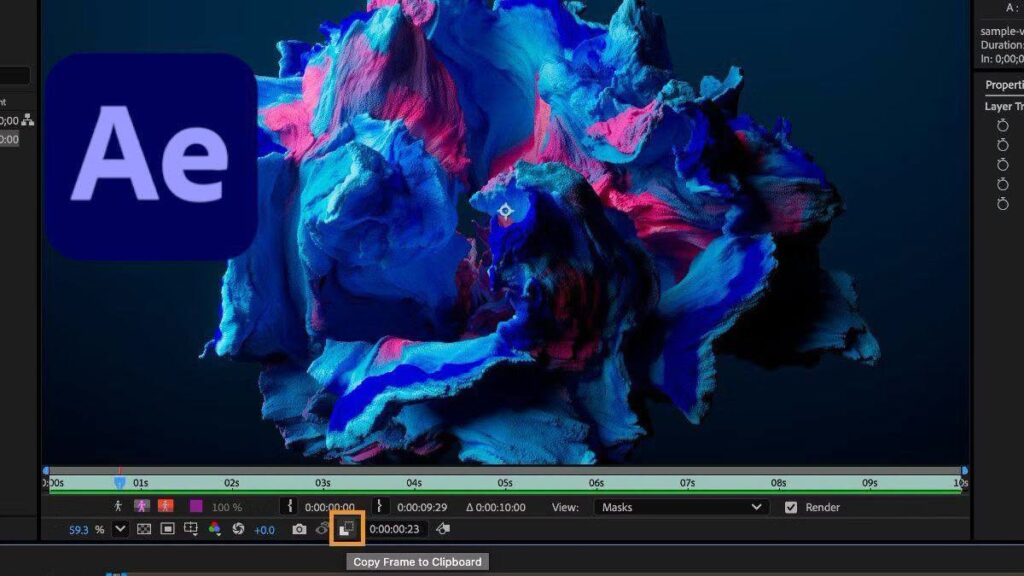
The best-supported After Effects 26.3 feature set includes five major additions. Advanced 3D Depth of Field adds realistic in-engine camera focus within the Advanced 3D renderer, strengthening the usefulness of models, parametric meshes, text, shapes, and materials inside the same compositing environment. The updated Vector Mask Tracker offers up to five times faster tracking performance, improved accuracy, and Timeline-integrated controls, while Copy Frame to Clipboard allows the current rendered frame to be copied directly as a color-managed PNG.
Curl Noise introduces a procedural option for generating smooth, organic flowing motion, and clipboard-based Illustrator and SVG pasting allows vector artwork to become editable native shape layers without a longer import workflow. Together, these features show that Adobe is not only expanding the application’s 3D capabilities but also removing production bottlenecks around tracking, review, procedural animation, and vector asset transfer.
For motion designers, the upgrade case is strongest when the work involves title sequences, product visualization, stylized 3D typography, interface promos, logo animation, or hybrid 2D and 3D compositing directly inside After Effects. Advanced 3D Depth of Field improves camera realism, while Curl Noise expands procedural animation options and Illustrator or SVG clipboard pasting makes vector-heavy design workflows more immediate. Copy Frame to Clipboard also reduces friction during reviews and approvals by allowing a rendered frame to be shared without a separate export step.
For VFX artists, the release is more mixed because the faster mask tracker and improved 3D integration can accelerate compositing tasks, focus pulls, material look development, and quick visual integration. It still does not turn After Effects into a replacement for a full DCC pipeline with mature UV, simulation, or rigging workflows, which is consistent with Adobe’s positioning of Advanced 3D as a GPU-based, physically based rendering option built into the application rather than a complete general-purpose 3D production environment.
Comparing After Effects 26.2 and 26.3
Compared with After Effects 26.2, version 26.3 shifts the emphasis from building and automating scenes toward improving realism, tracking speed, asset movement, and day-to-day production flow. Version 26.2 strengthened the application through Object Matte, displacement support for Substance-powered parametric meshes, Quick Apply, Proportional Scrubbing, and SVG import options.
Version 26.3 builds on that foundation with Advanced 3D Depth of Field, faster Vector Mask Tracking, Copy Frame to Clipboard, Curl Noise, and native shape creation from pasted Illustrator and SVG artwork. In practical terms, 26.2 expanded scene construction and automation, while 26.3 makes those scenes easier to refine, review, and integrate into production. The two releases therefore complement one another, with 26.2 establishing more of the geometry and compositing foundation and 26.3 improving the realism and workflow surrounding it.
The difference is especially clear in the Advanced 3D renderer. Version 26.2 improved the way parametric meshes could use Substance materials by adding displacement, allowing designers to give surfaces greater geometric and visual depth. Version 26.3 adds camera-based focus control across those same kinds of scenes, giving designers more control over how foreground and background elements separate visually. That makes the 3D environment feel more cinematic without requiring the scene to leave After Effects for another application just to achieve a basic depth-of-field treatment.
The addition also strengthens the value of features introduced in 26.0 because meshes, materials, lights, and variable typography now sit inside a renderer with a more complete camera model. As a result, the 2026 release sequence increasingly resembles a connected production stack rather than a collection of isolated 3D experiments.
Tracking and Workflow Improvements
The tracking and compositing comparison is similarly important. Version 26.2 introduced Object Matte as an AI-assisted compositing tool, while version 26.3 improves the more traditional Vector Mask Tracker with up to five times faster performance and better integration into the Timeline. These tools serve different but complementary workflows because automatic object isolation and manually controlled mask tracking do not solve every shot in the same way. Artists can use Object Matte where automatic segmentation is appropriate and rely on the updated mask tracker when they need more controlled or predictable shape-based tracking. That combination makes 26.3 valuable even for users who are not heavily invested in Advanced 3D.
Workflow improvements may ultimately matter as much as the headline rendering feature. Copy Frame to Clipboard simplifies review and approval by turning the current rendered frame into a color-managed PNG that can be pasted elsewhere immediately. Illustrator and SVG clipboard support reduces the time required to move vector artwork into After Effects and converts that artwork directly into editable native shape layers. Curl Noise fills a procedural motion-design need by generating smooth, organic movement without requiring the same manual setup that similar effects might otherwise demand.
These additions are smaller individually than Advanced 3D Depth of Field, but together they reduce the repeated friction that accumulates across everyday motion-design work. That is why After Effects 26.3 is best understood as both a rendering upgrade and a workflow-focused release.
Documentation Lag and Deployment Caution
The documentation difference between 26.2 and 26.3 remains the main caveat. Version 26.2 was fully represented in Adobe’s HelpX documentation, while 26.3 was rolling out at a point when the official stable-release pages had not yet caught up. That gap matters for teams that depend on formal release notes to approve software deployments, prepare training material, validate plug-in compatibility, or document production environments.
The beta history and June rollout discussions provide a consistent picture of the feature set, but organizations with strict deployment requirements should still distinguish between features observed in the release and information formally documented on Adobe’s stable HelpX pages. Until those pages are fully updated, After Effects 26.3 is best treated as a real and substantial production release whose public documentation temporarily lags behind its rollout.
Camera Realism, Depth of Field, 3D Text, and Parametric Mesh Workflow in After Effects 26.3
The biggest advancement in After Effects 26.3 is the introduction of native Depth of Field for the Advanced 3D renderer, filling one of the largest realism gaps in Adobe’s modern 3D workflow. Rather than relying on Classic 3D camera blur or depth-map effects applied later in compositing, Adobe has implemented an in-engine solution that calculates focus directly within the renderer. This allows Depth of Field to work naturally across 3D scene elements rather than being treated as a separate post-production effect.
Adobe’s implementation supports 3D models, parametric meshes, Substance 3D materials, 3D text, shape layers, solids, precomps, and other native 3D elements. It also handles multiple levels of overlapping transparency, making it more reliable for scenes containing glass, translucent objects, or layered foreground elements.
This improvement builds on capabilities already present in the Advanced 3D renderer rather than introducing an entirely new rendering system. Advanced 3D is a GPU-accelerated renderer that shares technology with other Adobe applications and uses Adobe Standard Material for physically based rendering. It already supports native 3D model import, parametric meshes, image-based lighting, animated environment lights, shadow-casting lights, Substance material assignment, and the conversion of solids, precomps, text, and shape layers into 3D scene elements.
Adding native Depth of Field therefore extends an existing pipeline that has been steadily becoming more complete throughout the 26.x release cycle. In practical production work, the feature makes it easier to combine 2D and 3D elements inside After Effects while reducing the need to move a project into external 3D software solely to achieve convincing camera focus.
Enabling Depth of Field in Advanced 3D
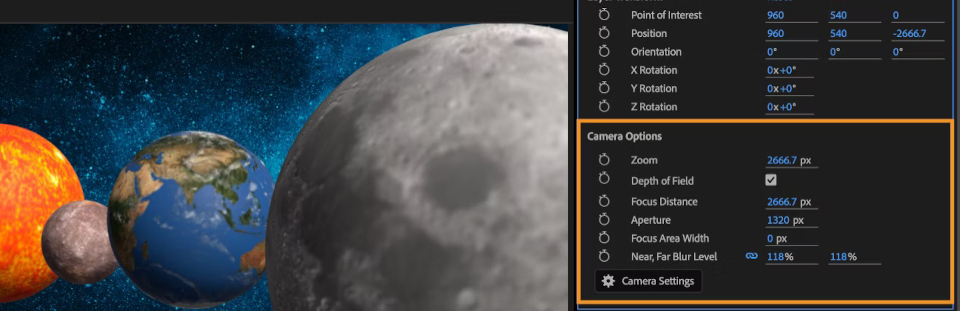
Using Depth of Field in After Effects 26.3 begins by switching the composition renderer to Advanced 3D and adding the required 3D content. The user then creates a Camera layer and enables Depth of Field through Camera Settings, Camera Options, the Timeline, or the Properties panel. The main controls are Focus Distance, Aperture, Focus Area Width, Near Blur Level, and Far Blur Level. Focus Distance can also be linked directly to another layer or to the camera’s Point of Interest, making rack-focus animations easier to create without manually keyframing Z-depth values. The workflow can be summarized as follows:
- Set the composition renderer to Advanced 3D.
- Add or import 3D models, meshes, text, shape layers, or Substance 3D materials.
- Create a Camera layer.
- Enable Depth of Field.
- Set the Focus Distance.
- If target-based focus is needed, link Focus Distance to a layer or Point of Interest.
- Otherwise, set the focus distance manually.
- Adjust the Aperture.
- Fine-tune the Focus Area Width.
- Refine the Near Blur Level and Far Blur Level.
- If ripple artifacts appear, increase Render Quality.
- Preview the animation and continue refining the camera settings.
Focus Area Width is particularly useful because it allows artists to control how broad the in-focus region remains instead of forcing strictly physical camera behavior. This makes it possible to keep important objects or 3D text readable while still creating a shallow-depth cinematic appearance. Near Blur Level and Far Blur Level provide additional creative control by allowing foreground and background blur to be adjusted independently. This gives artists room to prioritize visual style rather than optical accuracy alone. Because Depth of Field is calculated directly by the Advanced 3D renderer, its image quality is tied to the composition’s Render Quality setting.
Adobe notes that ripple artifacts during focus animation can often be reduced by raising Render Quality. Higher values can improve the appearance of transitions between focused and blurred regions, but they also increase rendering time. The setting should therefore be balanced against the performance and quality requirements of the project rather than automatically pushed to its maximum value. This matters most in complex scenes containing several transparent objects, detailed materials, or multiple layers at different depths. The new Depth of Field system gives artists more direct control, but it still requires the same production judgment applied to other rendering-quality settings.
3D Text and Camera Focus Integration
The same camera system also improves 3D typography. After Effects 26.3 does not introduce a completely redesigned 3D text engine, but 3D text now participates directly in the Advanced 3D Depth of Field system. Titles and text layers can blur or sharpen naturally according to camera focus alongside models, meshes, materials, and shape layers. This makes 3D typography more useful for cinematic title design, promotional graphics, motion branding, interface animation, and mixed 2D and 3D compositions. Instead of treating text as a separate visual element that needs a workaround for focus effects, it can now behave as part of the same scene.
Earlier 26.x improvements also contribute to the usefulness of 3D text in version 26.3. After Effects 26.2 fixed an issue in which extruded 3D text could display incorrect geometry when fonts contained overlapping outlines. Version 26.0 introduced variable font axes, giving designers live control over properties such as weight, width, slant, and other font variations. When combined with Advanced 3D lighting, materials, and Depth of Field, these earlier changes make it easier to create polished typography with consistent visual treatment throughout a scene. The cumulative effect is more significant than any single text feature because it improves reliability, flexibility, and integration across the 3D workflow.
One of the more technically significant additions associated with the 26.3 cycle is the introduction of parametric mesh scripting APIs. According to the current After Effects Scripting Guide, the 26.3 beta adds LayerCollection.addParametricMesh(), the ParametricMeshLayer object, and related mesh type, mesh options, and bevel options objects. The documentation also states that ParametricMeshLayer inherits from AVLayer, allowing scripted meshes to behave like familiar After Effects layers instead of creating an entirely separate object system. This makes the new API more accessible to technical artists and developers already familiar with the application’s scripting model. It also creates a foundation for procedural scene construction that extends beyond manual mesh editing.
Parametric Mesh Scripting APIs and Automation
These APIs allow scripts to generate native geometry such as spheres, cubes, cones, toruses, cylinders, and planes before applying transforms, materials, layout logic, and relationships with other scene elements. A script could create a group of meshes, position them according to a predefined layout, assign materials, connect them to text, and prepare the entire arrangement for animation.
This opens possibilities for automated branding templates, repeatable motion graphics systems, product animation pipelines, and other studio workflows where consistency and speed are more important than manually creating every element. Instead of treating parametric meshes only as artist-created objects, After Effects can now expose them to procedural production logic. That makes the Advanced 3D environment more useful for scalable workflows as well as one-off compositions.
The scripting capabilities should still be treated with some caution because Adobe identifies them as beta features introduced during the 26.3 development cycle. Studios, technical directors, and plugin developers should verify behavior against the specific build installed in their production environment rather than assuming every 26.3 installation exposes identical API functionality. Adobe’s release-period documentation was still being updated, which means the scripting interface should be regarded as functional but evolving. Compatibility testing is especially important for tools that will be shared across multiple workstations or integrated into automated production pipelines. The documented addParametricMesh() method and ParametricMeshType enum demonstrate the intended direction of the API, but production use should account for the possibility of changes as the 26.3 rollout stabilizes.

After Effects 26.3 Workflow, Performance, System Requirements, Update Process, and Known Issues
After Effects 26.3 continues Adobe’s broader push toward making native 3D production more capable while also improving everyday motion design workflows and production efficiency. Substance 3D material support was introduced before version 26.3, but it remains important to understanding the release because the new Advanced 3D Camera Depth of Field works directly with Substance-treated objects. Adobe describes Substance Materials as dynamic, customizable .sbsar files that can be applied to 3D models and parametric meshes, allowing artists to create photorealistic or highly stylized surfaces through exposed controls rather than rebuilding materials from scratch.
Version 26.2 made that workflow more spatially convincing by adding displacement support for 3D materials on parametric meshes, which physically pushes mesh surfaces into 3D space using height data rather than simply changing their appearance. In version 26.3, those materials benefit from native Depth of Field, allowing camera focus, lighting, physically based materials, and displaced geometry to work together inside the Advanced 3D renderer.
Viewed as a progression, Adobe’s 2026 releases build directly on one another. Substance Materials in 26.0 established native material support, displacement in 26.2 added more physical depth to the geometry, and Depth of Field in 26.3 gives those scenes more photographic realism. The result is not a single isolated 3D feature but a more complete native rendering workflow. Motion designers can continue using familiar shape layers, text animation, precompositions, and compositing while adding realistic lighting, materials, meshes, and camera focus without immediately moving the project into a dedicated 3D application. This makes the release especially useful for title sequences, broadcast idents, social media promos, UI presentations, packaging visualization, logo animation, product renders, and abstract motion graphics.
Workflow Additions and Faster Mask Tracking
Several workflow additions reinforce that broader production focus. Curl Noise adds a procedural option for flowing backgrounds and atmospheric motion, clipboard-based SVG and Illustrator pasting reduces the friction of bringing vector artwork into After Effects, and Copy Frame to Clipboard allows artists to share a current frame without first rendering a still image to disk.
According to Adobe’s beta documentation, Copy Frame to Clipboard copies a PNG directly from the Composition, Footage, or Layer panel, preserves color-managed output that matches the viewer, and can include up to 16-bit image data depending on the operating system and composition settings. The feature does not reduce final render time, but it can shorten review and approval cycles by eliminating unnecessary export steps. Combined with the new Depth of Field and vector workflow improvements, these additions make 26.3 valuable for both visual quality and routine production speed.
The updated Vector Mask Tracker is another important performance improvement. Adobe states that it can track up to five times faster while also improving accuracy and making the controls easier to access from the Timeline panel. Since mask tracking is repeated frequently in both motion graphics and visual effects workflows, this improvement can save substantial time across a project rather than simply improving a benchmark that users rarely encounter. The Advanced 3D renderer itself remains GPU-based and designed for performance, but more complex scenes still require artists to balance image quality against rendering speed. Depth of Field quality is controlled through the Render Quality setting, and increasing that value can improve visual results while also raising render times.
Performance, Limitations, and System Requirements
Adobe therefore recommends evaluating performance on a shot-by-shot basis rather than assuming the maximum quality setting is always appropriate. Users can benchmark representative compositions and use the Composition Profiler to identify bottlenecks in heavier scenes. This becomes particularly important when Depth of Field, displacement, complex materials, several 3D elements, and high-resolution footage are combined in one composition. Better hardware can help, but production efficiency also depends on how scenes are structured and where expensive effects are used. After Effects 26.3 gives artists more native 3D capability, but those capabilities also place greater demands on the system than standard 2D editing or simpler motion graphics work.
The release is still less suited to teams requiring advanced UV workflows, sophisticated rigging, cloth or particle simulations, extensive scene management, or mature interoperability with full 3D content creation applications. Adobe continues to position Advanced 3D as an additional renderer inside After Effects rather than as a complete replacement for specialized DCC software. That distinction is important when evaluating whether 26.3 can replace another tool in an established production pipeline.
It is strongest when artists want to combine 2D and 3D assets quickly inside After Effects, create polished motion graphics, or add more convincing camera and material behavior without leaving the application. It is not intended to replace the deeper modeling, simulation, and character-animation systems found in dedicated 3D packages.
At the time of writing, Adobe had not published a dedicated system requirements page specifically for After Effects 26.3, so the best reference remained the official requirements for versions 26.2.1, 26.2, and 26.0. On Windows, those requirements specify Windows 11 v24H2, an AVX2-capable processor, at least 16 GB of RAM, and a supported GPU with at least 4 GB of VRAM.
Hardware Recommendations and Update Process
Adobe recommends stronger hardware for demanding workflows, including 8 GB of GPU memory, 32 GB or more of RAM for 4K and higher-resolution work, a fast internal SSD for the application and cache, and additional high-speed storage for media. For CPUs, the recommended Windows baseline includes Intel 11th Gen or newer with Quick Sync, or AMD Ryzen 3000 and Threadripper 3000-class processors or newer. These stronger specifications are more realistic for users working heavily with Advanced 3D, displacement, Substance materials, and Depth of Field.
On macOS, Adobe’s current baseline includes macOS Sonoma 14 or later and either a supported Intel processor or Apple silicon. Adobe recommends Apple silicon systems such as M1 Pro, M1 Max, M1 Ultra, or newer for stronger performance. Rosetta is no longer supported for Adobe video applications under the current guidance. Storage recommendations are similar to Windows, with at least 8 GB of installation space and a fast internal SSD, while additional high-speed drives are recommended for media and cache-heavy workflows. Although the minimum requirements may allow the software to launch and operate, complex 3D scenes are far more likely to benefit from the recommended CPU, GPU, memory, and storage specifications.
The practical hardware guidance for version 26.3 can be summarized as follows:
- Windows CPU: Intel 6th Gen or AMD Ryzen 1000 with AVX2 as the minimum baseline, with Intel 11th Gen or newer, Ryzen 3000, or Threadripper 3000-class hardware recommended.
- Windows OS: Windows 11 v24H2 as the official minimum, with Windows 10 no longer listed as the supported baseline.
- Windows RAM: 16 GB minimum, with 32 GB or more recommended for 4K and complex 3D compositions.
- Windows GPU: At least 4 GB of VRAM on a supported NVIDIA, AMD, or Intel discrete GPU, with 8 GB recommended for heavier Advanced 3D work.
- macOS CPU: Intel 6th Gen or Apple silicon as the baseline, with M1 Pro, M1 Max, M1 Ultra, or newer recommended.
- macOS OS: macOS Sonoma 14 or later.
- Storage: At least 8 GB for installation plus fast media storage, with an internal SSD and additional high-speed drives recommended for previews, cache, and larger projects.
Updating to After Effects 26.3 follows Adobe’s normal Creative Cloud process. Users can open the Creative Cloud desktop application and check the Updates section, or use Help > Check for Updates inside After Effects. If version 26.3 does not appear immediately, the reason may be a phased rollout or documentation lag rather than the absence of the update. Before upgrading, users should duplicate important projects, verify compatibility for third-party plugins, and test representative compositions that depend on Advanced 3D, SBSAR materials, complex typography, or other production-critical features. Organizations that prioritize stability over immediate access to new functionality should also note that Adobe designates After Effects 25.6 as the long-term supported version through October 2026.
Known Issues and Testing Guidance
Because Adobe’s public release notes still primarily covered version 26.2.1 at the time of writing, the latest official Known Issues page remained the best reference for problems that might still affect 26.3 users. Several documented issues are particularly relevant because they involve Advanced 3D, Draft 3D, caching, graphics drivers, and Substance materials. After Effects 26.0 and 26.2 were documented as potentially crashing when Compressed Disk Caching was enabled, with Adobe recommending that users disable Enable Compressed Frames (Lossless) in Disk Cache preferences. Intel Mac systems on macOS 14 with an AMD GPU could encounter crashes when using Transmit and Draft 3D, with disconnecting the Transmit device or moving to a newer macOS version serving as a workaround.
Windows systems using hybrid Intel and NVIDIA graphics could also experience cases where the Composition panel failed to render visual content. Adobe’s documented workaround involved temporarily switching the Intel UHD driver to Microsoft Basic Display Adapter. macOS Sequoia could produce repeated permission prompts affecting Adobe video applications, while SBSAR materials could appear offline after reopening projects. For the latter issue, Adobe recommended using Reload Footage on the SBSAR asset in the Project panel. These issues were documented for earlier 26.x releases rather than specifically for 26.3, but they remain relevant until Adobe confirms that they have been resolved in a version-specific release note.
The combination of new 3D capabilities and these inherited issues makes careful testing important before adopting 26.3 across a production environment. Teams should verify the exact build installed, confirm plugin and hardware compatibility, open representative projects, and test the features most likely to affect delivery. That is especially important for organizations relying on Advanced 3D, Depth of Field, Substance materials, displacement, Draft 3D, or hardware-specific workflows. After Effects 26.3 offers meaningful performance and workflow improvements, but its strongest benefits come when the hardware, plugins, cache configuration, and project structure are tested together rather than evaluated in isolation.
Frequently Asked Questions (FAQs)
- What is the biggest 3D change in Adobe After Effects 26.3?
The most important 3D addition is in-engine Depth of Field in the Advanced 3D renderer. Unlike previous workflows that often required external rendering or workarounds, this feature works directly inside After Effects across 3D models, parametric meshes, Substance 3D materials, 3D text, and shape layers. Adobe also states that it can correctly handle overlapping transparent objects, such as focusing through glass, making it easier to create realistic cinematic depth effects without leaving the application. - Is After Effects 26.3 fully documented on Adobe HelpX yet?
Not completely in the publicly indexed pages available at the time of writing. Adobe’s main release notes and “What’s New” pages still publicly list versions 26.2.1 and 26.2 as the latest documented releases, while rollout discussions on June 17, 2026 confirmed that 26.3 features had begun rolling out. As a result, some features are available in the software before comprehensive official documentation has been published. - Does the new Depth of Field work with 3D text?
Yes. Adobe explicitly states that the new Depth of Field feature supports 3D text along with 3D models, parametric meshes, Substance 3D materials, and shape layers when using the Advanced 3D renderer. This allows motion designers to create more realistic title sequences and typography with natural camera focus effects without relying on third-party plugins or external 3D software. - How does After Effects 26.3 compare to 26.2?
Version 26.2 focused primarily on workflow improvements such as Object Matte, displacement support for 3D materials on parametric meshes, Quick Apply, Proportional Scrubbing, and enhanced SVG import options. In contrast, After Effects 26.3 shifts more attention toward 3D realism and creative workflows with features like native Depth of Field, a faster mask tracker, Copy Frame to Clipboard, the new Curl Noise effect, and direct clipboard pasting from Illustrator or SVG content. - Are the Parametric Mesh scripting APIs stable?
The currently documented APIs were introduced through the 26.3 beta documentation and are still labeled as beta-era functionality. While they provide useful automation opportunities for developers and production pipelines, Adobe notes that these APIs may still change. Studios and plugin developers should thoroughly test scripts against each build before relying on them in production environments. - Does After Effects 26.3 replace Cinema 4D or Blender for 3D work?
No. Although After Effects 26.3 significantly improves native 3D capabilities, Adobe still positions Advanced 3D as a rendering system within After Effects rather than a complete 3D content creation application. Programs like Cinema 4D and Blender remain better suited for advanced modeling, sculpting, animation, simulations, and complex scene creation, while After Effects excels at compositing and motion graphics. - What hardware is realistically needed for the new 3D features?
Adobe lists 16 GB of RAM and a supported GPU with at least 4 GB of VRAM as the minimum requirements for Windows systems. However, for smooth editing of complex 3D scenes, higher-resolution projects, or demanding motion graphics, 32 GB or more of RAM and a GPU with at least 8 GB of VRAM provide a much better experience with faster previews, rendering, and overall responsiveness. - Is Curl Noise part of the 26.3 feature set?
Yes. Based on Adobe’s beta feature documentation and the June 17 rollout discussion, Curl Noise is included as part of the 26.3 feature set. It generates smooth, flowing procedural motion that resembles natural phenomena such as smoke, ink, water currents, or drifting particles, making it useful for creating more organic animations than traditional static noise effects. - What is the safest upgrade path for studios?
Studios that prioritize reliability should keep their primary production systems on the Long-Term Support (LTS) 25.6 release while testing After Effects 26.3 on representative projects. During testing, teams should verify plugin compatibility, scripts, templates, and existing workflows before rolling out the new version more broadly. Adobe’s support policy keeps After Effects 25.6 as the LTS version through October 2026, making it the safer choice for mission-critical production. - Is After Effects 26.3 worth it for motion designers specifically?
Yes. Motion designers who regularly combine 2D and 3D elements are likely to benefit the most from this release. The addition of native Depth of Field improves visual quality, while workflow enhancements such as faster mask tracking, direct vector pasting from Illustrator or SVG content, Copy Frame to Clipboard, and the Curl Noise effect help reduce repetitive tasks and speed up day-to-day project work.

Conclusion
Adobe After Effects 26.3 is best understood as the release where Adobe’s 2026 3D strategy begins to feel production-shaped rather than merely feature-rich. Parametric meshes, Substance materials, displacement, and physically based Advanced 3D rendering were already significant. What 26.3 adds is a more convincing camera model, stronger day-to-day workflow speed, and a clearer bridge between vector design inputs and cinematic 3D finishing inside the same application. That combination is why the release matters.
The only real caution is operational rather than creative. Public Adobe documentation was still visibly catching up with the release at the time of writing, and the latest official known-issues pages still point primarily to 26.2-era risk areas. For solo creators and fast-moving motion teams, that is manageable. For enterprise and plugin-heavy environments, it is a reason to test methodically. Even with that caveat, the trajectory is unmistakable. After Effects is no longer merely gaining isolated 3D conveniences. It is assembling a native 3D design system piece by piece, and 26.3 is one of the clearest signs yet that Adobe intends to keep pushing in that direction.
Sources and Citations
- Adobe HelpX – After Effects Technical Documentation
- Source: Adobe After Effects – What’s New
- Additional sources:
- After Effects Release Notes
- Enable Depth of Field in Advanced 3D
- Apply Materials to 3D Text and Shapes
- Use Layers as Material Sources
- Composition Profiler
- Fixed and Known Issues
- After Effects System Requirements
- Citation: Adobe, “What’s New in After Effects”, Adobe Help Center, updated November 10, 2026. Adobe Help Center+5
- Adobe Community – After Effects Beta Features and Release Announcements
- Source: Adobe After Effects Community – Announcements
- Additional sources:
- After Effects 26.3 Is Here!
- New in Beta: Depth of Field in Advanced 3D Renderer
- New in Beta: Copy Frame to Clipboard
- New in Beta: Copy and Paste Illustrator and SVG Content as Native Shape Layers
- New in Beta: Parametric Mesh Scripting APIs
- Citation: Adobe, “After Effects 26.3 Is Here!”, Adobe Community, 2026. Community+4
- After Effects Scripting Guide – docsforadobe.dev
- Source: After Effects Scripting Guide
- Additional sources:
- LayerCollection – addParametricMesh()
- ParametricMeshLayer Object
- After Effects Scripting Changelog
- Citation: docsforadobe.dev, “After Effects Scripting Guide”, including the 26.3 scripting API documentation. After Effects Scripting Guide+2
- Adobe Blog – 3D and Motion Design Upgrades
- Source: Adobe Blog – Adobe Introduces 3D and Motion Design Upgrades for After Effects
- Citation: Jason Druss, “Adobe Introduces 3D and Motion Design Upgrades for Adobe After Effects”, Adobe Blog, September 10, 2024. Adobe Blog
- ProVideo Coalition – 2026 After Effects Coverage
- Source: ProVideo Coalition – After Effects Portal June 2026
- Additional sources:
- After Effects Portal July 2026
- After Effects Portal September 2026
- After Effects Portal October 2026
- Citation: Rich Young, “After Effects Portal June 2026”, ProVideo Coalition, June 30, 2026. ProVideo Coalition+3
- Creative Bloq – After Effects Coverage
Recommendations
- Grounded 2 Gets Into the Abyss: Everything in Its Biggest Update Yet
- Pokémon Pokopia: Bubbly Basin (How to Get Windup Inkay)
- Is Blender CPU or GPU Intensive? A Complete Guide to Performance in Blender
- Lego Rumored To Be Releasing A $260 Poké Ball Display: 72154 Set Details, Release Date, Piece Count, and What’s Inside
- The Boroughs Trailer: Duffer Brothers’ New Netflix Sci-Fi Series Is “Stranger Things for Senior Citizens” (Release Date, Cast, Plot)
- Shiva Baby Leaving Netflix: Why Rachel Sennott’s 77 – Minute Anxiety Thriller Is a Must Watch Breakout Before It Disappears
- Yakuza Creator’s Gang Of Dragon Game Reportedly In Danger As NetEase Cuts Funding To Nagoshi Studio
- Slitherine Software Buys Blood Bowl IP from Nacon: What it Means for the Future of the Franchise
- After an Hour of New Gameplay, Attack on Titan 3 Looks Like One of the Best Anime Games in Years
- HEXED Official Trailer (2026) Breakdown: Hailee Steinfeld Leads Disney’s Magical New Animated Movie Revealed



































































































