






AutoAutograph 2026.1 New Features and Workflow Improvements Explained
Autograph 2026.1 is a feature and reliability update that significantly expands the capabilities of Maxon’s free GPU accelerated motion design and compositing application. Released on August 12, 2026, the update introduces native vertical text layout, Japanese character support, right to left column flow, glyph based animation ranges, improved handling of mixed Chinese, Japanese, Korean, and Latin text, a new Edge Smoother modifier, and a Forward method for Vector Blur.
It also enhances procedural animation with new loop evolution options for Autograph Noise, makes Voronoise animatable, adds selectable breadcrumbs for easier interface navigation, and delivers a wide range of production focused fixes. Rather than being a collection of unrelated additions, these improvements work together to make Autograph more practical for multilingual typography, anime finishing, broadcast graphics, digital signage, visual effects, and everyday motion design workflows.
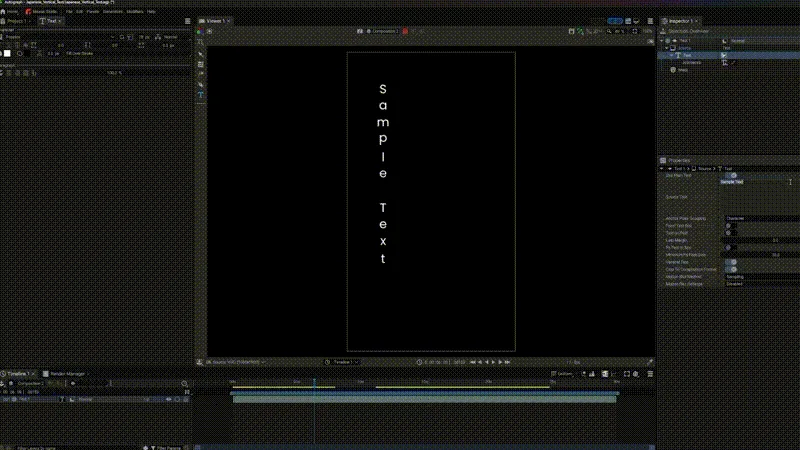
The most noticeable advancement is the expansion of the text system beyond traditional horizontal Latin typography. Native vertical layout and Japanese character support allow artists to create designs that follow the established reading conventions of East Asian writing systems instead of manually arranging individual characters. Vertical text columns can flow from right to left, while the new glyph based animation range option provides finer control over text animation. Autograph also improves the way compositions handle mixed Chinese, Japanese, Korean, and Latin characters, making it better suited for anime titles, Japanese credits, multilingual advertising, social media campaigns, information displays, and broadcast graphics.
Another major addition is the Edge Smoother modifier, which is designed to clean up stair stepped or visibly aliased edges without simply blurring an entire image. This is especially useful in anime compositing, where artwork often begins with solid colors and intentionally hard, low fidelity edges before being refined for final delivery. Vector Blur also receives a new Forward warp method that creates more realistic motion blur by using external motion vector data. This approach is particularly valuable when compositing matted elements or computer generated imagery with motion vector passes, as it extends pixels along their actual direction of movement instead of estimating blur solely from visible image changes.
Procedural animation tools also receive meaningful upgrades. Autograph Noise now includes three new loop evolution options, making seamless looping textures easier to create, while Voronoise can now be animated to provide greater control over evolving organic textures, displacement effects, atmospheric layers, transitions, and abstract motion graphics. Selectable breadcrumbs further improve usability by allowing artists to select hierarchy items directly from the breadcrumb trail, making navigation through complex panel structures faster and reducing the effort required to move between nested elements.
Alongside these new features, Maxon has addressed a large number of production issues that improve the application’s overall reliability. Fixes include viewer and export mismatches, command line rendering, Render Manager operations, subcomposition output, cache invalidation, adaptive subdivision for 3D text, layer visibility, 3D selection, gizmos, clipping, USD material imports, Illustrator imports, spline behavior, paths, shape parenting, and keyframe interpolation. While these changes may not be as immediately visible as the new typography or Edge Smoother tools, they play an important role in making Autograph more dependable for daily production work.

In This Article (8 sections)
Vertical Text and CJK Typography in Autograph 2026.1
Autograph 2026.1 introduces native vertical text and improved CJK typography support, allowing designers to work with Chinese, Japanese, and Korean text as editable layouts instead of manually stacking or rotating individual characters. The update provides a proper vertical writing model that controls character placement, column direction, alignment, spacing, and animation within a single text object. While Maxon highlights Japanese production workflows, the release establishes a broader foundation for CJK typography and mixed CJK and Latin text without claiming to replicate every advanced publishing feature found in dedicated desktop publishing software.
To use vertical text, begin by creating or selecting a text layer, entering the required copy, and choosing a font that supports all necessary characters. Activating the vertical layout changes the writing direction so glyphs flow from top to bottom. When multiple columns are needed, Autograph arranges them from right to left, matching the traditional reading order used in Japanese publishing and many East Asian designs. The composition size should be finalized before detailed styling so margins and column lengths suit the intended output, whether it is a mobile advertisement, broadcast graphic, theatrical credit sequence, or digital signage.
Choosing the correct font is essential because CJK fonts contain much larger character sets than typical Latin fonts, and not every typeface supports every Chinese, Japanese, or Korean character. Missing glyphs may appear as replacement symbols or empty boxes. Designers should verify character coverage early, especially when using names, regional character variants, punctuation, Latin abbreviations, or numerals. Even when a Unicode character exists, Japanese, Simplified Chinese, Traditional Chinese, and Korean fonts may display different glyph forms, so selecting language appropriate fonts should be treated as part of localization rather than a purely technical requirement.
After entering the text, adjust size, tracking, line or column spacing, and alignment while viewing the design at its intended display size. Vertical typography requires more than rotating horizontal text because punctuation, brackets, prolonged sound marks, Latin characters, and numerals may require different orientations or spacing. Native support provides the structural foundation, but designers should still review the final layout for linguistic and typographic quality.
Japanese typography benefits particularly from the update. Instead of relying on separate text layers, manual line breaks, rotated text blocks, or graphics created in external applications, artists can now work with a single editable vertical text object. Characters flow downward while columns advance from right to left, making the feature suitable for anime titles, manga inspired layouts, posters, packaging, vertical credits, and traditional Japanese designs. Because the text remains editable, wording can be revised without rebuilding dozens of independent layers, making late localization and content changes much easier.
The right to left column flow is especially valuable in longer layouts. Characters are read from top to bottom within each column, while additional columns extend progressively to the left. This preserves authentic reading order for traditional Japanese layouts and allows designers to reveal columns sequentially in animation while maintaining readability. Since translated text may require additional columns, designers should leave sufficient space on the left side of the composition to prevent collisions with logos, artwork, or frame boundaries. When Latin text appears alongside CJK content, its orientation should be chosen according to the project’s creative direction and target audience, as native vertical flow provides the structure but not every stylistic decision.
The new typography tools support a wide range of projects. Chinese workflows benefit from improved handling of vertical titles, promotional graphics, signage, and branding. Japanese projects gain native support for anime credits, commercial typography, and traditional layouts. Although Korean is most commonly written horizontally today, CJK capable text handling remains useful for Hangul titles, mixed language branding, historical layouts, and designs incorporating Hanja. Regardless of the language, important public facing text should be proofread by fluent speakers or localization specialists because the software cannot determine whether translations, line breaks, or font choices are culturally or linguistically appropriate.
Text Animation and Glyph Based Workflows in Autograph 2026.1
Autograph 2026.1 also improves multilingual animation through better handling of mixed CJK and Latin text and the introduction of glyph based range selection. A glyph represents the visual form produced by a font and does not always correspond directly to an encoded character because fonts may substitute, combine, or reposition glyphs depending on the writing system. By allowing animation ranges to target visible glyphs instead of simple character counts, the software provides more accurate control for multilingual typography.
A recommended workflow begins by finalizing the text and selecting a compatible font before creating animations. Once the layout is approved, designers can animate properties such as opacity, position, scale, rotation, color, or spacing using text animators. Separating layout approval from animation helps avoid problems because later text edits can change glyph order and affect index based selections, requiring important timing and ranges to be checked again.
To use glyph based animation, apply a text animator to the desired property and set the range basis to glyphs. The range can then move across the text over time to create sequential reveals, waves, scaling effects, rotations, color transitions, or positional offsets. For example, a clean reveal can begin with glyphs hidden through zero opacity or positional offsets before gradually restoring their normal appearance. More energetic title sequences can combine position, scale, and rotation while staggering glyph timing, with easing generally producing smoother and more polished motion than constant linear animation.
The improvements are especially valuable when CJK and Latin scripts appear together. A bilingual title might animate the CJK portion one glyph at a time while an English subtitle fades in as a complete phrase. Designers can also animate the entire text block with one animator while applying separate timing controls where different writing systems require different pacing. Because Latin words are often perceived as complete word shapes while CJK text is commonly read as individual glyphs or meaningful groups, applying identical timing to every visible element can make one script appear natural and the other unnecessarily fragmented.
Animation should always be tested after copy revisions because even small wording changes can alter the number and order of glyphs, affecting range selections and timing. Short preview renders are also recommended because real time playback may not accurately represent final motion blur, sampling, or exported results. Designers should judge animations at normal playback speed since effects that look impressive when scrubbed frame by frame may move too quickly for viewers to read, particularly with vertical text where the eye follows a different reading path than horizontal English layouts.
Although glyph based animation provides more precise technical control, it is not an automatic localization solution. Designers remain responsible for selecting meaningful animation boundaries, creating readable pacing, reviewing punctuation placement, brackets, small kana, Latin orientation, numeric groups, spacing around symbols, and maintaining a balanced relationship between columns. Native typography and glyph based animation remove many mechanical obstacles, allowing artists to focus on editorial quality, readability, and culturally appropriate motion design.

Using Edge Smoother in Autograph 2026.1 to Fix Aliased Edges
The Edge Smoother modifier in Autograph 2026.1 is designed to reduce visible aliasing on graphic boundaries without relying on conventional blur effects. Aliasing appears as stair stepped or jagged edges when diagonal lines and curves are displayed on a limited pixel grid. It can result from low resolution artwork, hard masks, deliberately unfiltered animation assets, scaling operations, or renders created with insufficient antialiasing. Unlike a standard blur, which softens an entire image and can reduce the sharpness of textures, type, and interior details, Edge Smoother focuses its processing on object boundaries to produce cleaner transitions while preserving the rest of the image.
To use the modifier, apply it to the layer or graphic element containing the problematic edge and evaluate the result at 100 percent display scale, since viewer zoom interpolation can either hide or exaggerate aliasing. Adjust the settings until jagged edges are reduced without noticeably softening the artwork. The modifier should be used carefully, as excessive smoothing can blur line art, reduce the crispness of shapes, or create halos where colors meet. The goal is to improve edge quality rather than erase the boundary altogether.
Anime compositing is one of the strongest use cases for Edge Smoother because production often relies on artwork with hard color regions and crisp line work. Maxon describes a workflow where pure color artwork is kept free of antialiasing during editing because clean color regions are easier to select, key, recolor, mask, and process. Controlled edge smoothing is then applied closer to the end of the pipeline to create a polished final image. This makes the modifier useful for character cels, graphic overlays, speed lines, stylized shadows, painted masks, and other elements where diagonal or curved edges reveal visible pixel stepping. It can also improve the integration of lower resolution animation with higher resolution backgrounds or effects.
The modifier is generally most effective after operations that benefit from hard, unblended color regions but before final output transforms that could alter edge appearance. However, the exact placement depends on the shot. Significant scaling after smoothing may introduce new artifacts, while color corrections performed afterward can affect the newly generated edge pixels. Line art often requires separate treatment because settings that improve broad color boundaries may produce inconsistent results on thin strokes. Separate passes or masks may therefore be necessary, making Edge Smoother a precise finishing tool rather than a universal filter.
The source of the aliasing should also be considered before applying the modifier. If the problem originates from a low resolution raster image, Edge Smoother can improve its appearance but cannot recreate missing detail. If severe scaling caused the issue, replacing the source with a higher resolution image or vector artwork is usually the better solution. Likewise, if aliasing comes from rendering settings, increasing sampling quality during rendering remains preferable whenever possible. Edge Smoother is most valuable when rerendering is impractical or when hard edges are intentionally maintained during production before final finishing.
When multiple elements share the same aliasing characteristics, they can be grouped or composited and processed together, provided their edges require similar treatment. A foreground character, logo, and background plate may each need different settings, so they should not automatically share one modifier. Processed and unprocessed frames should be compared on high contrast diagonals, circles, hair outlines, thin strokes, and small text, while animated sequences should also be inspected for temporal flicker.
Since Edge Smoother improves spatial edge quality rather than motion stability, it should not be expected to eliminate every form of temporal instability or subpixel crawl. Final judgment should always be made using exported test frames at the intended delivery resolution because downscaling from 4K to HD may naturally smooth edges, while enlarging low resolution sources for 4K output can make defects more noticeable.
Autograph 2026.1 Vector Blur, Procedural Animation, and Workflow Improvements
Autograph 2026.1 introduces several workflow improvements beyond typography and edge processing, including a new Forward method for Vector Blur, enhanced procedural animation controls for Noise and Voronoise, and selectable breadcrumbs for easier project navigation.
The new Forward method for Vector Blur uses motion vector data to simulate the streaking that occurs during a camera’s exposure. Instead of relying on traditional approaches, it projects pixels in the direction defined by their motion vectors, producing more realistic blur on matted elements and computer generated imagery that includes external vector passes. This approach is particularly useful for fast moving objects, animated masks, and separately rendered CG elements. Accurate results depend on the correct interpretation of the vector data because direction, magnitude, coordinate systems, channel assignments, frame conventions, and normalization vary between rendering pipelines.
Incorrect vector orientation or scaling can produce blur in the wrong direction or create streaks that are either far too long or barely visible. Image, alpha or matte, and vector passes must remain perfectly aligned because cropping, resizing, or transforming only one of them can introduce edge tearing or misplaced blur. Since different shots may respond differently, the Forward method should be tested against the existing Vector Blur option on representative frames instead of being adopted automatically.
Procedural animation also receives significant improvements. Autograph Noise gains three new loop evolution options that allow animated procedural textures to cycle seamlessly. This is valuable because ordinary procedural evolution rarely returns to its exact starting state, often creating an obvious jump where a looping animation repeats. The new controls make it easier to produce continuous cycles for ambient backgrounds, smoke like graphics, title textures, displacement effects, energy fields, projected patterns, and looping social media content without manually crossfading unrelated sections.
Voronoise is now fully animatable as well. By combining cell like Voronoi structures with smoother procedural noise, it can generate evolving organic patterns, abstract surfaces, dissolves, stylized distortions, and procedural mattes. Successful looping requires matching the procedural cycle to the composition length, since a cycle designed for 100 frames will not loop correctly in a 96 frame export unless its timing is adjusted. Artists should also avoid duplicating the final frame in looping formats, as this can create a noticeable pause. Full speed previews are recommended because fine, high contrast procedural details may shimmer or flicker after compression. Reducing detail, slowing the animation, or applying subtle filtering can improve playback stability.
Autograph 2026.1 also improves navigation through selectable breadcrumbs in the panel interface. Breadcrumbs display the hierarchy from a parent container to the currently selected element, and each level can now be clicked directly to move back through nested structures. While simple projects may not benefit significantly, this becomes increasingly valuable in larger productions containing nested compositions, shape groups, generators, modifiers, materials, paths, and imported 3D assets. Clickable hierarchy navigation helps users understand where the current item exists within the project while allowing quick movement to parent or intermediate levels without losing context. Although the feature does not add new creative capabilities, reducing the time spent navigating complex project structures can significantly improve day to day workflow efficiency.

Frequently Asked Questions[FAQs]
- Should existing users update to Autograph 2026.1?
The update is particularly worthwhile for users who need CJK typography, better edge finishing, improved vector blur, loopable procedural animation, or the many reliability fixes included in the release. Production teams can also benefit from the interface improvements and bug fixes, even if they do not immediately need the new typography features.s should test duplicated projects before changing the version used for active work. - What is new in Autograph 2026.1?
Autograph 2026.1 introduces native vertical text, CJK typography support, Japanese character support, right to left vertical column flow, glyph based text animation ranges, improved mixed CJK and Latin animation, the Edge Smoother modifier, a Forward method for Vector Blur, three new loop evolution options for Autograph Noise, animatable Voronoise, selectable panel breadcrumbs, and numerous rendering, 3D, USD, shape, cache, and interface fixes. Together, these additions make the application more capable for multilingual motion graphics, compositing, broadcast graphics, and visual effects work. - When was Autograph 2026.1 released?
Maxon released Autograph 2026.1.0 on August 12, 2026. This version is a feature update that combines new creative tools with workflow improvements, performance enhancements, and a wide range of stability and bug fixes. - Does Autograph 2026.1 support vertical Japanese text?
Yes. The update provides native vertical text layout and Japanese character support, including vertical columns that progress from right to left. This allows designers to create Japanese layouts without relying on manual character positioning or external applications. - Can Autograph 2026.1 work with Chinese, Japanese, and Korean text?
The release adds CJK typography support and improves mixed CJK and Latin text animation. Artists should still select language appropriate fonts and verify that every required glyph is present, but the updated text engine is designed to handle multilingual projects more accurately and consistently. - What is the glyph based range option used for?
It lets text animators target rendered glyphs as the range unit instead of relying only on characters. This is useful for reveals, waves, color changes, scaling, rotation, and other animation effects that need to work correctly across multilingual or mixed script typography. - What does the Edge Smoother modifier do?
Edge Smoother reduces visible stair stepping on aliased graphic boundaries. It is particularly useful for hard edged artwork, masks, and anime compositing pipelines that preserve pure colors during intermediate processing, helping create cleaner looking edges without excessive blurring. - Does Edge Smoother restore missing image detail?
No. It can improve the appearance of pixelated boundaries, but it cannot recreate detail that was never present in a very low resolution source image. For the best results, it should be used with higher quality artwork whenever possible. - What is the new Forward method in Vector Blur?
Forward is a new warp method that projects image information according to motion vector data. It is designed to produce more realistic motion blur on matted elements and computer generated imagery that uses external vector passes, helping moving objects blend more naturally into a scene. - Is Autograph 2026.1 free?
Yes. Maxon presents Autograph as a free 2D and 3D motion graphics and compositing application. Users can download, install, and manage licensing through the Maxon App while receiving access to the features included in the 2026.1 release.

Conclusion
Autograph 2026.1 adds vertical text, CJK support, and Edge Smoother capabilities that address real limitations in multilingual motion design and hard-edged compositing. Native vertical layout removes the need to construct East Asian typography through manual character placement, while right-to-left column flow and glyph-based animation provide a more appropriate foundation for Japanese titles, credits, anime graphics, broadcast packages, digital signage, and vertical advertising.
Edge Smoother strengthens finishing workflows by targeting aliased boundaries without relying solely on broad image blur. The new Forward method for Vector Blur improves the options available for external motion-vector passes, while loop-evolution controls and animatable Voronoise broaden procedural-animation possibilities. Selectable breadcrumbs and extensive reliability fixes make complex projects easier to navigate and more predictable to render.
The release is therefore more significant than its version number may suggest. It expands Autograph’s creative range, addresses specialized international typography needs, and improves several everyday production systems. For artists seeking a free, GPU-accelerated application that unifies motion graphics, compositing, and 3D content, Autograph 2026.1 is a strong update worth testing in a real project.
Sources and Citations
- Maxon Autograph 2026.1.0 August 12, 2026 Official Release Notes
https://support.maxon.net/hc/en-us/categories/4405723856402-Release-Notes - Maxon Autograph 2026.0.0 April 15, 2026 Official Release Notes and Supported Devices
https://support.maxon.net/hc/en-us/articles/26689114527388-Autograph-2026-0-0-April-15-2026 - Maxon Autograph Motion Design and Visual Effects Tool Official Product Page
https://www.maxon.net/en/autograph - Maxon Autograph Installation Official Documentation
https://help.maxon.net/ag/en-us/Content/html/Autograph_Installation.html - Maxon Motion Graphics Software and Autograph Overview
https://www.maxon.net/en/solutions/motion-graphics - Maxon Official Release Notes Archive for Autograph
https://support.maxon.net/hc/en-us/categories/4405723856402-Release-Notes - CG Channel New CG Software You May Have Missed 16 August 2026
https://www.cgchannel.com/?s=2026 - CG Channel Motion Graphics Coverage Including Autograph 2026.1
https://www.cgchannel.com/tag/motion-graphics/
Recommendations
- God of War Laufey Spin-Off May Not Reveal Who Blew the Horn Mystery Explained
- GTA VI Pre-Orders Reportedly Favor PS5 By A 6-To-1 Ratio
- Remedy new CEO former EA VP Jean-Charles Gaudechon: start date, background, and Remedy’s self-publishing plans
- 007 First Light Sells 2.2 Million Copies and Hits $150M Revenue – But Still Faces Major Break-Even Gap Despite Strong Launch Performance
- Battlefield 6: Season 4 Weapons Unlock Guide for Every Gun
- All Playable Characters in Marathon: Bungie’s New FPS – Community Reactions, Developer Insights, and Unique Visual Style
- Gears of War E-Day Chainsaw Lancer Origin Story Explained
- Zangyou Horror Game Explained: Everything We Know About the Deserted Tokyo Skyscraper Nightmare
- Invincible VS Global Release Times Confirmed: Full Launch Schedule by Time Zone (PDT, EDT, BST, CEST, UTC)
- Live-Action Moana Flop Fears Grow as Dwayne Johnson Confirms Moana 3



































































































