


Meta Title: Beeble Presents Background Remover, a Tool for Isolating Subjects in Videos & Images, AI Rotoscoping Tool
Meta Description: Learn about the new Beeble Background Remover, an AI-powered rotoscoping tool for isolating subjects in video and images. Explore its features, workflows, and how it compares to traditional methods in post-production.
Executive Summary: Beeble’s latest AI-driven feature, Background Remover, enables users to quickly isolate subjects and generate clean foreground mattes from video, images, or image sequences. Launched around NAB 2026, the tool addresses the traditionally time-consuming task of rotoscoping by automating the process with advanced machine learning. It supports batch processing (up to 20 files or 2,000 frames) and outputs professional-grade results (10-bit RGBA video, PNG sequences, and alpha-only formats) compatible with VFX pipelines. This article provides an in-depth overview of Beeble Background Remover’s capabilities, features, workflows (including mermaid flowcharts), comparisons to other methods/tools, FAQs, and latest news.
In This Article (19 sections)
Beeble Background Remover Overview
Beeble Background Remover is a new AI-powered rotoscoping feature in Beeble’s cloud-based VFX platform (Beeble Web App) designed to automate background removal in video and images. It “extracts clean alpha mattes from your footage using AI, producing background-free results ready for compositing and VFX work”. Announced in early April 2026 (ahead of NAB 2026), it quickly generates high-quality foreground masks, even on complex, motion-filled scenes. The tool complements Beeble’s suite of AI-driven post-production tools (such as the SwitchLight relighting system) within a unified workflow. Unlike consumer-level background removers, Beeble’s solution is aimed at professional workflows and integrates directly with compositing and editing pipelines.
Beeble Background Remover is only available as a cloud service (Beeble Web App) and is not part of the local Beeble Studio desktop app. This ensures all heavy processing is handled on Beeble’s servers, requiring no local GPU. According to the official product page, Background Remover is “available exclusively on Beeble (Cloud app)” and appears under “Available Features” marked as cloud-exclusive. In summary, Beeble Background Remover is a specialized AI tool that automates subject isolation for videos and images, aimed at speeding up post-production rotoscoping tasks.
What is Beeble Background Remover
Beeble Background Remover is a standalone tool within the Beeble cloud platform that extracts foreground mattes (alpha masks) from media. In Beeble’s documentation, it is described as an “alpha extraction tool” that uses AI models to produce a precise foreground mask for any uploaded footage. Users can upload single images (PNG, JPG), video files (MP4, MOV), or sequences of images, and the tool automatically generates a high-quality mask for the subject. It focuses purely on background removal; for full sets of VFX passes (depth, normals, etc.), Beeble offers a separate “VFX Pass Generator” tool.
In practice, after upload, the AI analyses the frames to distinguish the subject from the background, even through challenges like motion blur, occlusion, and fine details (hair, edges). It then outputs either an RGBA sequence (video or images with transparent background) or an alpha-only matte. Because Beeble Background Remover is cloud-based, it fits into a flexible online workflow, users simply log into the Beeble Web App and start processing. It is part of Beeble’s broader AI toolset, complementing features like SwitchLight (relighting) and VFX Pass Generator. In summary, it is a specialized AI rotoscoping service for removing backgrounds from images and videos, designed for professional compositing and editing tasks.

How Beeble Background Remover Works for Video and Image Rotoscoping
Beeble’s Background Remover uses an AI-powered pipeline tailored for both videos and stills. The workflow (handled via the Beeble Web App) typically follows these steps:
- Upload Footage: The user uploads media (single image, video clip, or image sequence). The tool supports PNG/JPG images, MP4/H.264 and MOV (ProRes/H.265) videos.
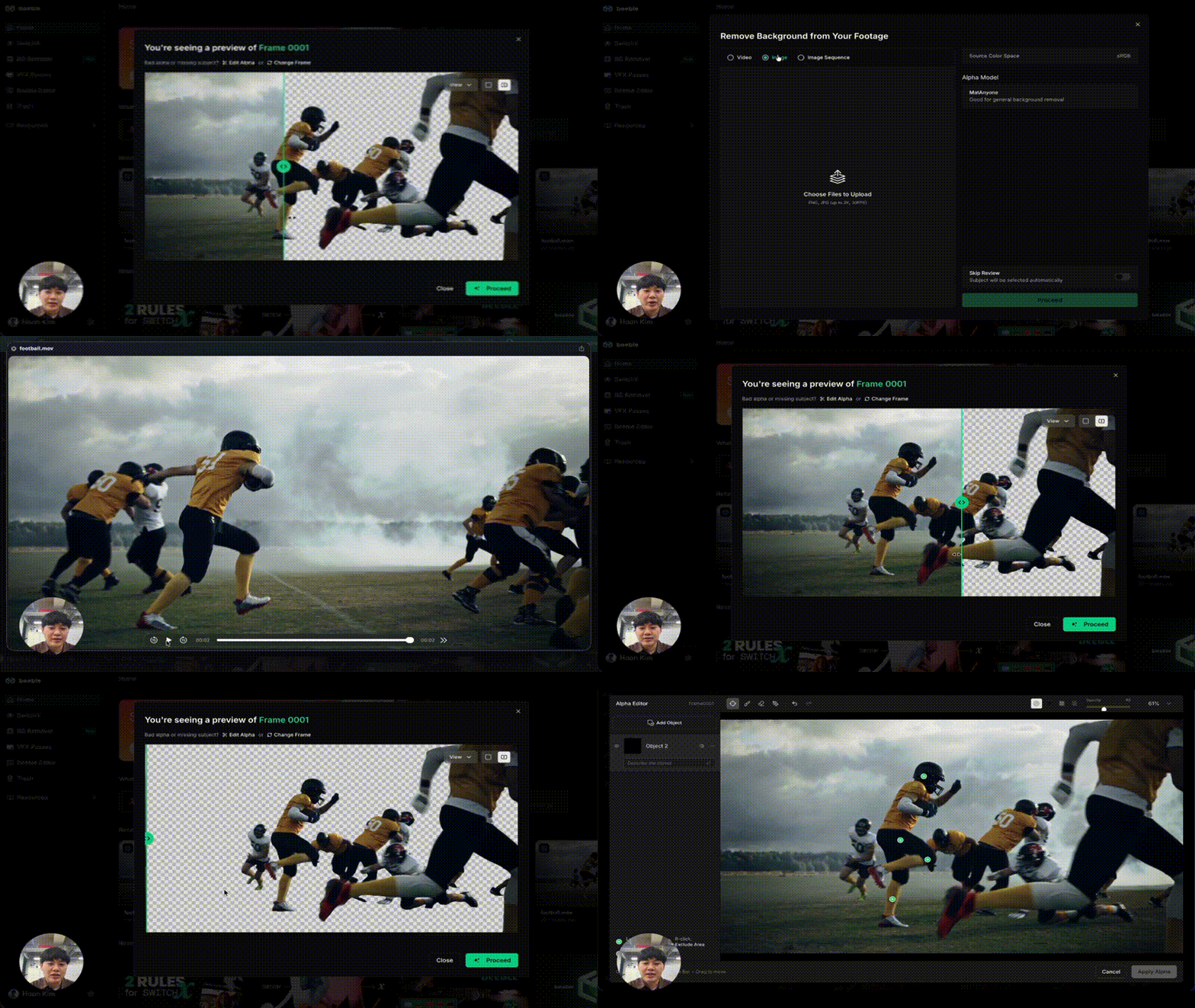
- Preview Frames (Optional): The service quickly generates a small set of preview frames with a rough alpha mask overlaid. This allows the user to check if the subject is correctly identified before processing the entire clip. Fine edge details (e.g. hair) may be imperfect in preview.
- Refinement (Optional): If needed, an interactive masking interface lets the user adjust the preview mask. By clicking “Edit Alpha,” one can refine the selection on any preview frame. This ensures precise control over which subjects or parts are included.
- Full Extraction: After approval (or if “Skip Review” is selected), the AI processes all frames or images, producing final high-quality masks. Skip Review bypasses previews for simpler shots, running extraction immediately.
- Download Results: Once complete, the user can download the outputs. Results include an RGBA video (or PNG sequence) with the background removed, and a separate grayscale alpha matte if desired.
The AI models behind the tool handle complex motion and details automatically. In testing, Beeble claims that using advanced AI models, the tool produces “high-quality foreground masks from video, images, or image sequences” while managing motion blur and occlusions. For example, in Newsshooter’s report, the tool is said to “generate high-quality foreground masks” and “handle complex motion, occlusion, and fine detail such as hair and motion blur” automatically. Thus, Beeble Background Remover effectively performs rotoscoping (frame-by-frame subject isolation) with minimal manual effort, thanks to its machine-learning pipeline.
Beeble Background Remover Features and Export Formats
Beeble Background Remover offers a range of professional features and outputs. Key features include:
- AI-Powered Extraction: Uses neural networks to automatically separate foreground from background at high quality, suitable for production use.
- Multi-Format Input: Accepts single images, image sequences, and video clips (up to 2K resolution, 60 seconds, 30 fps on Beeble).
- Batch Processing: Can process up to 20 files at once or image sequences up to 2,000 frames, enabling efficient workflows.
- Preview & Interactive Masking: Offers a quick preview stage and an interactive editor for fine-tuning masks before full extraction.
- Complex Scene Handling: Capable of isolating subjects in scenes with complex motion, occlusion, hair, and motion blur.
- Output Control: Users get control over exactly which parts remain in frame via refinements, giving precise results.
For export, the tool generates production-ready formats:
- RGBA Video (MOV) 10-bit: A video file with an embedded alpha channel (4 channels). This 10-bit output is ideal for high-fidelity compositing.
- RGBA PNG Sequence: A series of 8-bit RGBA PNG frames (with transparency) for frame-by-frame compositing in any editor.
- Alpha-Only (Video or Images): A grayscale matte sequence or movie (8-bit) representing the foreground mask. Useful for import into compositing or editing software.
These formats ensure compatibility with industry pipelines. As noted, exports include “10-bit RGBA video files with embedded alpha channels, RGBA PNG sequences for frame-by-frame compositing, and alpha-only outputs in both video and image sequence formats”. The flexibility allows the isolated subject to be moved directly into NLEs or compositors (e.g. Nuke, After Effects) without reformatting. The table below summarizes key features and outputs of Beeble Background Remover compared to traditional and other AI approaches:
| Aspect | Beeble Background Remover | Traditional (Manual Rotoscoping) | Other AI Rotoscoping Tools (e.g. Runway, Unscreen) |
|---|---|---|---|
| Input Types | Videos, images, or image sequences (PNG/JPG, MP4, MOV) | Any footage/images (via software like After Effects, Silhouette) | Often single images or short clips (varies by tool) |
| Processing | AI-powered automatic matting with optional user refinement | Frame-by-frame manual masking; labor-intensive | AI-based, but may be limited (some require greenscreen) |
| Batch Capacity | Up to 20 files or 2,000 frames concurrently | Typically one shot at a time | Usually one sequence at a time (few support large batches) |
| Speed | Fast (instant preview; seconds per frame) | Slow (hours of artist time per shot) | Fast (real-time preview), but quality varies |
| Edge Detail | High fidelity on hair/motion blur | Artist-adjusted (can be very precise but slow) | Varies; some tools struggle with fine edges |
| Output Formats | 10-bit RGBA MOV, RGBA PNGs, alpha-only sequences | Mask sequences (often EXR/PNG), or keyed video frames | Mostly PNG/alpha images; some video outputs (lower bit-depth) |
| Workflow | Cloud-based (Beeble Web App) with interactive UI | Desktop NLE/VFX software workflows | Typically online or plugins; may lack compositing integration |
| Control | Preview/refinement UI; credits-based usage | Full manual control; time-consuming | Limited control (few interactive refinements) |
| Cost | Subscription (Beeble Creator/Pro plans) | Personnel and software costs | Subscription or pay-per-use (e.g. Runway credits) |
Each approach has trade-offs. Beeble’s AI tool stands out for professional integration (10-bit output, batch processing, interactive masks) at the expense of requiring a cloud subscription, whereas traditional rotoscoping offers ultimate control but very high labor cost. Other AI tools may be easier for consumers but often lack Beeble’s precision and pipeline features. Overall, Beeble Background Remover provides a feature-rich, export-friendly solution specifically tuned for post-production workflows.

How to Isolate Subjects in Videos with Beeble Background Remover
To isolate a subject in a video using Beeble Background Remover, you simply upload the video to the web app and follow the prompts. The AI engine will detect the foreground subject automatically. For optimal results, ensure your video is within supported specs (up to 2K resolution, H.264 or ProRes formats, etc.). After upload, the system generates a preview frame with a rough mask overlay. If the mask looks good, you proceed to full extraction. If not, click the Edit Alpha button to fine-tune the mask on the preview frame. This could involve erasing or adding regions to exclude or include certain objects.
Once confirmed, Beeble processes each frame with the refined mask logic. Within seconds or minutes (depending on clip length), it delivers an output clip where the background is transparent and only the isolated subject remains. Because the output includes both an RGBA video and a standalone alpha channel, you can drop the subject into a new scene or composite it with effects. In essence, Beeble automates a task that would normally require manual rotoscoping: it identifies the subject in each frame, cuts it out, and provides a clean matte without the artist having to paint masks by hand.
For example, a user could isolate a talking person from a news clip: upload the clip, review the subject’s mask in the preview, adjust hair edges if needed, and download the final alpha matte. The result might be a high-quality cutout of the person walking onto a new background in another editor. According to Beeble’s sources, this process handles “complex motion, occlusion, and fine detail such as hair and motion blur” automatically. Thus, isolating moving subjects in video with Beeble is largely a matter of trusting the AI pipeline and making only minor corrections if necessary.
How to Remove Backgrounds from Images with Beeble
Removing backgrounds from single images in Beeble’s cloud app is similar but even simpler. When you upload a standalone photo (PNG/JPG), the AI creates an alpha matte for the subject in that image. The process skips the video-specific steps; essentially, the preview/refine stages still apply (you preview the mask on the image), then run the final extraction. The output is typically an RGBA image or PNG with transparency and an alpha mask.
For instance, photographers or marketers can use Background Remover on image stills to cut out people or objects from photos. The tool’s same intelligent models that handle video will separate the foreground object from the backdrop, preserving details like hair or semi-transparent fabrics. According to the documentation, the supported file size is up to 100 MB and resolution up to 2K for images. Once completed, you download a PNG with alpha or the extracted subject on a transparent background. This can then be used in any design or compositing application. In short, the workflow for images is a simplified version of the video case: upload, let the AI mask the subject, optionally tweak the mask, then save the isolated subject.

Beeble Background Remover for Image Sequences and Alpha Mattes
Beeble fully supports image sequences (batch of frames) as inputs, which is valuable for 3D and VFX workflows. You can upload a numbered sequence of PNG/JPG frames (up to 2K resolution each) and Beeble will process them as one clip. This is ideal when you have already rendered out frames from a 3D scene and need just the alpha. The tool will treat the sequence just like a video: it will generate preview frames from the sequence, allow refinements, then output a new sequence of masked images.
When processing sequences, Beeble outputs two types of assets: an RGBA sequence (frames with the subject and transparency) and/or an alpha-only sequence (grayscale mask per frame). This explicit alpha matte per frame can be imported into compositing software as a mask layer. The ability to output both RGBA and alpha means you can either directly replace backgrounds (with the RGBA sequence) or use the alpha sequence as a mask in comp software to merge the subject over any background. This versatility aligns with professional VFX workflows. In fact, Beeble’s documentation highlights that the tool was “producing background-free results ready for compositing and VFX work”. Thus, whether you need a mask for a whole image sequence or separate alpha mattes for each frame, Beeble handles it.
Beeble Background Remover File Limits and Processing Capacity
Beeble imposes certain limits on input size and length to ensure fast processing. According to the official specs and news reports, the key limits are:
- Resolution: Up to 2K (2048 px) width or height for both images and video. Larger videos/images will be downscaled or rejected.
- Video Length: Maximum 60 seconds per clip. The system supports up to 30 FPS (frame rate will be reduced if higher).
- File Size: Single images or frames up to 100 MB each. For video, up to 2 GB per file.
- Batch/Frames: Users can queue up to 20 files at once (images or video clips) or sequences up to 2,000 frames.
- Color Space: Rec.709/sRGB is recommended; log or HDR color spaces may degrade accuracy.
In practice, this means you can upload e.g. a 45-second 1080p clip or a set of 1,000 PNG frames in one job. The Beeble Web App may reject or downscale inputs that exceed these limits. For example, a 4K video will be downscaled to 2K, and clips longer than 60s will be truncated. On the output side, all results are matched to the input resolution (up to 2K) and encoded as specified formats. News sources confirm the 2K frame limit, noting that sequences “currently seem to be limited to up to 2K resolution”.
Beeble’s capacity is designed for typical short clips and shots, not feature-length files. The 20-file/2,000-frame limit is fairly generous for most scenes (e.g. a 2-minute 30fps shot is 3600 frames, so you’d break it into parts). If you have longer scenes, you would process in segments. The cloud infrastructure handles the heavy lifting, and users pay by credits or subscription (see FAQs). But as far as capability, Beeble can handle the bulk of common rotoscoping tasks quickly within these limits.
Beeble Web App Background Remover Workflow
The Beeble Background Remover workflow in the Web App is streamlined for ease of use. The overall process can be visualized as follows:
mermaidCopyflowchart LR
    A[Select & Upload Footage (image, video, or sequence)] --> B[Generate Preview Frames and Rough Alpha];   B --> C{Satisfied with Mask?};
    C -- No --> D[Use Interactive Editor to Refine Mask];
    C -- Yes --> E[Run Full Extraction];
    D --> E;
E --> F[Download Outputs (RGBA video/PNG & Alpha sequence)];- Upload: The user starts by dragging or selecting their media file(s) in the Beeble Web App. Supported formats are listed (PNG, JPG, MP4, MOV).
- Preview: The system quickly extracts sample frames from the footage and applies a preliminary AI-generated alpha mask. The user can preview these frames to verify coverage.
- Refine (if needed): If the preview mask is imperfect, clicking Edit Alpha enters an interactive mask editor. Here, the user can add or subtract areas on the mask for those frames.
- Full Extraction: Once the mask is approved (or if the user skips review), Beeble runs the AI on all frames, producing the final high-quality alpha for every frame.
- Download: After processing, the app shows download options. The user can get an RGBA video (or PNG sequence) and/or the raw alpha matte frames.
This workflow emphasizes speed and control: previews allow catching errors early, and the optional refinement step ensures precision. It mirrors traditional roto workflows (preview, iterate, finalize) but compresses hours of manual work into seconds of AI computation. As one user guide notes, this two-phase process (preview + full extraction) “allows results to be assessed before committing to full processing”. The mermaid chart above summarizes this interactive cycle from upload to result.

Beeble Background Remover vs Traditional Rotoscoping
Traditional rotoscoping (as done in software like Adobe After Effects, Nuke/Silhouette, or Fusion) is a manual process where artists paint or refine masks frame by frame. It is extremely time-intensive and laborious cited as a “time and resource suck”. In contrast, Beeble Background Remover automates most of this work. Instead of manually tracing a subject for hundreds of frames, the AI handles that task, delivering a mask in seconds.
For example, where a compositor might spend hours on a 10-second shot, Beeble produces a usable matte almost immediately. Beeble’s sources explicitly note that Background Remover “addresses rotoscoping, one of the most time-intensive tasks in post-production”, making it far faster than doing it all by hand. However, traditional rotoscoping tools still offer very fine control and can handle any shot given enough artist effort. In practice, Beeble can greatly accelerate the roto process, but very complex cases may still require a touch of manual cleanup. Overall, this AI tool complements traditional methods by removing the bulk of repetitive work.
Beeble Background Remover vs Other AI Rotoscoping Tools
Beeble’s Background Remover is part of a growing field of AI-powered rotoscoping and background removal tools. Popular alternatives include Runway ML’s AI segmentation, Unscreen (for short videos/GIFs), and various research prototypes. Compared to these, Beeble focuses on professional quality and integration. For instance, many consumer AI tools only handle static images or require green-screen-style separation. Beeble explicitly supports arbitrary footage and complex scenes.
Key distinctions:
- Quality and Precision: Beeble outputs 10-bit RGBA for compositing, whereas many simpler tools output 8-bit images. It also offers an interactive refinement step, which most consumer apps lack.
- Batch and Length: Few consumer tools let you process many video files or long sequences easily. Beeble’s 20-file/2000-frame batch capacity surpasses typical alternatives (which often do one clip at a time).
- Professional Workflow: Beeble integrates with VFX pipelines, supporting formats like ProRes and allowing downloads of alpha channels for each frame. Other tools may not support professional codecs or bit-depth.
- Credit Efficiency: A notable advantage is cost: Beeble reports only 1 credit per second of video for Background Remover, compared to 3 credits for its full VFX pass. This token-efficiency can make it cheaper per shot than a more general tool.
On the downside, Beeble requires a subscription and internet access, whereas some tools (like Adobe’s Roto Brush 3) run locally. Also, very few other AI tools provide the exact same feature set, so comparisons are somewhat like comparing apples and oranges. In summary, Beeble Background Remover stands out among AI rotoscoping tools by emphasizing high-quality, compositing-ready outputs and a streamlined production workflow.

Best Use Cases for Beeble Background Remover in Post-Production
Beeble Background Remover shines in post-production tasks where subjects must be isolated quickly for compositing or effects. Typical use cases include:
- VFX Compositing: Extracting actors from plates to place them in CG environments or different backgrounds. The clean alpha mattes and 10-bit outputs mean comps can be done with high precision.
- Video Editing and Marketing: Quick removal of background from interviews, commercials, or product videos, enabling easier background swaps or graphic overlays.
- Documentary and News: Fast isolation of subjects for on-screen graphics or virtual sets, saving field production time.
- Animation and Game Cinematics: Turning rendered image sequences into assets with alpha channels for further FX or layering in engines.
- Visual Effects Prep: Using the alpha outputs as masks for keying, color correction, or depth-based effects.
- Relighting and Compositing Pipelines: Combined with Beeble SwitchLight, one can isolate a subject and then relight it separately, as part of advanced VFX workflows.
In general, any scenario that previously required a dedicated roto artist can now leverage Background Remover to speed up the process. As No Film School notes, the tool was designed for production work and can “support a range of export formats” for seamless integration. Its rapid preview-and-extract cycle makes it ideal for quick turnarounds where time is of the essence. Industry testimonials on Beeble’s site also suggest it’s being used widely in compositing and VFX pipelines for these purposes.
Beeble SwitchLight and Background Remover Workflow
Beeble’s ecosystem includes SwitchLight (formerly SwitchX) an AI relighting and PBR pass generator which can be used alongside Background Remover. A common workflow is:
mermaidCopyflowchart LR
    A[Original Footage] --> B[Beeble Background Remover (extract alpha matte)];
    A --> C[SwitchLight / VFX Pass Generator (generate PBR, depth passes)];
    B --> D[Foreground with alpha mask];
    C --> D;
D --> E[Composite / Relight as needed];- Extract Alpha (Background Remover): Use Background Remover to isolate the subject, obtaining an accurate alpha matte for the foreground.
- Generate VFX Passes (SwitchLight): Run Beeble’s SwitchLight (Video-to-PBR) on the same clip to get depth, normal, and material passes. SwitchLight also produces its own alpha, but Background Remover’s matte can be cleaner for comp.
- Composite: Combine the outputs: you have an isolated subject (with alpha) and detailed scene information (depth, normals) from SwitchLight. This lets you relight the background or foreground independently, replace skies, or apply effects with physical accuracy.
- Relighting: For example, you could remove the original background (using the alpha), relight the subject under new virtual lights (using SwitchLight’s outputs), and then composite them on a different environment.
This synergistic approach is supported by Beeble’s design: SwitchLight’s documentation explicitly mentions creating “full PBR passes with alpha and depth maps for seamless relighting, background removal, and advanced compositing”. In practice, users might first run SwitchLight to break down a shot into its lighting components, then run Background Remover to cleanly isolate the talent. The two sets of outputs together give maximum flexibility in post-production. The chart above illustrates this combined pipeline.

Is Beeble Background Remover Good for VFX and Compositing
Yes. Beeble Background Remover was explicitly built for VFX/compositing scenarios. It produces professional-grade alpha channels and supports workflows common in compositors. Key points:
- Quality: The generated mattes are high-quality enough for professional use, handling tricky edges and semi-transparencies. The 10-bit RGBA video output (with alpha) ensures that detailed composites maintain color precision.
- Formats: Since it can output an alpha channel and RGB data separately, it fits seamlessly into compositing nodes. Compositors can use the alpha from Beeble directly for layer masks, avoiding manual tracing.
- Pipeline Integration: The Web App downloads and file formats (MOV, PNG, EXR from related tools) are all standard in VFX. Beeble even offers plugins for Nuke, Blender, and Unreal (via SwitchLight), which underscores its compatibility.
- Complementary to Passes: For advanced VFX, Background Remover’s mattes can be combined with SwitchLight’s PBR passes for full CG-quality relighting and compositing.
- User Control: The option to refine masks and choose output bit-depth means artists can fine-tune composites, not just rely on a “black box” result.
In short, the tool’s outputs are designed for VFX use. As Beeble states, Background Remover yields “background-free results ready for compositing and VFX work”. Compared to ad-hoc background removal, this is a production-ready solution. It may not entirely replace a seasoned roto artist for every shot, but it significantly streamlines the process. Many early reviewers note its usefulness in speeding up VFX workflows by automating a formerly manual step. Thus, for VFX and compositing tasks, Beeble’s Background Remover is a strong tool in the artist’s toolkit.
Beeble Background Remover Release Date and Latest News
Beeble Background Remover was publicly announced in April 2026, coinciding with the NAB Show. Multiple outlets reported on its launch in the first week of April: for example, Televisual and No Film School published articles on April 8, 2026, and ProVideo Coalition on April 9, 2026. The 80.lv news piece was dated April 8, 2026. All sources indicate the tool is already “available now” on the Beeble Web App at that time.
Since its release, Beeble has continued to focus on integration and credit efficiency. According to RedShark, Background Remover “is listed at 1 credit per second of video, and 1 credit per image” in Beeble’s credit system. It was rolled out as part of the existing Creator and Professional subscription plans (US$19/month Creator, $75/month Professional). The feature “builds on its recognition as a Webby Award nominee” and is part of a “cohesive, production-ready pipeline” strategy.
There have been no major updates reported beyond the initial launch; Beeble’s focus remains on expanding its AI toolset. The company hinted at future improvements in integration and processing. For instance, RedShark noted that Background Remover is more credit-efficient than the full VFX Pass (built on the SwitchLight 3.0 model). Future news might cover higher-resolution support or even a Beeble Studio local version of the feature, but as of spring 2026 the tool is a new addition to Beeble’s web platform. In summary, the release was April 2026 (NAB), and the tool is now live, the latest developments involve user adoption and possible iterative enhancements.

Frequently Asked Questions (FAQs)
- What inputs does Beeble Background Remover accept?
It accepts single images (PNG/JPG), image sequences (frame series), and video clips (MP4 H.264 or MOV ProRes/H.265). The max resolution is 2K (larger files are downscaled or rejected). - What output formats can I get?
You get two main types of outputs: a RGBA result (video or PNG frames with transparency) and an alpha-only matte (grayscale mask). Specifically, it can produce 10-bit RGBA MOV video, 8-bit RGBA PNG sequences, and alpha-only video or image sequences. - How many files or frames can I process in one job?
You can process up to 20 files simultaneously, or an image sequence up to 2,000 frames in one job. - Does it handle fine details like hair and motion blur?
Yes. Beeble’s AI is trained to handle complex edges. The documentation and reviews note it can manage hair, motion blur, and occlusions automatically. For very fine details, you can use the interactive editor to polish the mask. - Do I need a green screen or special setup?
No. Beeble’s tool works on ordinary footage without special backgrounds. It uses AI segmentation, not chroma-keying, to separate subjects from any background. - How do I refine the mask if the AI makes a mistake?
Use the Preview Frames step. After upload, click Edit Alpha on a frame to manually add or subtract from the mask. This ensures precise control over what the AI has selected. - How much does it cost to use Background Remover?
It’s included with Beeble’s paid plans (Creator and Professional). Processing costs credits: about 1 credit per second of video or per image. The Creator plan (540 credits/month) starts at $19/mo, Professional at $75/mo. It’s not available on the free tier. - Where do I access Background Remover?
From the Beeble Web App (cloud portal). Go to the Beeble dashboard online; you’ll find “Background Remover” listed under features (cloud-exclusive). It runs in your browser, no downloads needed. - Can I separate multiple moving subjects individually?
The tool produces a single mask covering all detected subjects in a shot. However, you can refine the mask to isolate individual objects. For example, a demo showed it separating two players in a frame as needed. - Is there a local (on-premise) version?
Not currently. Background Remover is only in Beeble’s cloud app. For offline workflows, Beeble Studio offers SwitchLight for relighting, but background removal remains cloud-only as of 2026.

Conclusion
Beeble Presents Background Remover, a Tool for Isolating Subjects in Videos & Images, is a significant addition to the VFX toolkit. It automates and accelerates rotoscoping by using AI to generate precise foreground masks from videos, images, or sequences. With batch processing (20 files/2000 frames), professional export formats (10-bit RGBA, PNG, alpha), and interactive refinement, it bridges the gap between manual roto and simple consumer tools. The tool is especially compelling for post-production workflows: it saves time, integrates with compositing pipelines, and outputs results ready for VFX use.
In practice, Background Remover can replace many hours of tedious work, letting artists focus on creative tasks. Its release at NAB 2026 and inclusion in Beeble’s AI suite (alongside SwitchLight) underscores a trend toward end-to-end AI-driven pipelines. While it requires a cloud subscription, the professional-grade quality and flexible outputs make it a valuable asset for editors, compositors, and VFX artists. As one reviewer put it, this AI tool “could be helpful for those looking to avoid time sucks and improve their VFX workflows”. In summary, Beeble’s Background Remover offers a fast, accurate way to isolate subjects fully living up to its promise as an “AI-powered tool for isolating subjects in videos and images” with “speed, precision, and full creative control”.
Sources and Citations
- Beeble Documentation – Background Remover (official user guide)
https://docs.beeble.ai/beeble/bg-removal (Beeble Documentation) - 80.lv (April 8, 2026) – “Beeble Presents Background Remover, a Tool for Isolating Subjects in Videos & Images”
https://80.lv/articles/beeble-presents-background-remover-a-tool-for-isolating-subjects-in-videos-images/ (80 Level) - ProVideo Coalition (April 9, 2026) – “Beeble announces Background Remover ahead of NAB 2026”
https://www.provideocoalition.com/beeble-announces-background-remover-ahead-of-nab-2026/ (ProVideo Coalition) - Newsshooter (April 7, 2026) – “Beeble Background Remover Rotoscoping Tool”
https://www.newsshooter.com/2026/04/07/beeble-background-remover-rotoscoping-tool/ (Newsshooter) - Televisual (April 8, 2026) – “NAB: Beeble launches AI rotoscoping tool”
https://www.televisual.com/news/nab-beeble-launches-ai-rotoscoping-tool/ (Televisual) - No Film School (April 8, 2026) – “This New AI-Powered Rotoscoping Tool Can Deliver Clean, Detailed Alpha Mattes in Seconds”
https://nofilmschool.com/beeble-background-remover-tool (No Film School) - RedShark News (Apr 2026) – “Beeble Background Remover: AI rotoscoping tool for fast token-friendly alpha mattes”
https://www.redsharknews.com/beeble-background-remover-ai-rotoscoping (RedShark News) - Beeble.ai – Beeble Studio and SwitchLight pages (product details)
https://beeble.ai/ (beeble.ai)
Recommended
- Crimson Desert Players Really Hate Yann: Why This NPC Is Driving Fans Crazy in Pearl Abyss’ RPG
- 99 Nights in the Forest Is Coming to the Big Screen: Another Wildly Popular Roblox Game Is Becoming a Movie
- Assassin’s Creed Hexe will be a “darker” installment “set during a pivotal moment in history” — what Ubisoft has revealed so far
- Hazbin Hotel Confirmed to End With Season 5 Before Season 3 Even Has a Release Date
- Resident Evil: Requiem Sold 5 Million Copies in Five Days — Capcom Confirms Record-Breaking Launch
- Zach Galifianakis Rules Out Between Two Ferns Return as He Says the Show “Wouldn’t Work Anymore” in Today’s Climate
- Subnautica 2: Where to Find Salt, Best Locations, Farming Guide, and Early Game Tips
- Tamga Released: Minimalist 3D Sculpting App That’s Free on the Web (No Accounts or Subscriptions)
- Primer Animated Series Rumors: Co-Creator Teases a DC Studios Project Under James Gunn
- Pragmata: The Kotaku Review — Release Date, Gameplay, Length, and Verdict



































































































