










In This Article (25 sections)
Blender 5.1 release date when did it come out?
Blender 5.1 was officially released on March 17, 2026. This launch comes about four months after Blender 5.0 (released in November 2025), following the usual development cycle of the Blender Foundation. The release was dedicated to Blender developer Germano Cavalcante (as noted in the release notes), and it arrived right on schedule in the Blender 5.x series. As of its release date, Blender 5.1 became available for download on Windows, macOS, and Linux via the official Blender website and mirrors. The community celebrated the update with an open movie “Singularity” splash screen showcasing a cute alien character, symbolizing the new version’s creative potential.
Being a point release, Blender 5.1 focuses on polish and incremental improvements rather than huge paradigm shifts. Still, it introduces several noteworthy features and performance boosts that make it a significant upgrade from 5.0. In the sections below, we’ll explore what’s new in Blender 5.1, including highlights of new features, how it improves performance, and guidance on upgrading. We’ll also address common questions (in the FAQ), compare it with Blender 5.0, and consider its stability for production use.
What’s new in Blender 5.1 overview of highlights
Blender 5.1 focuses on performance boosts, quality-of-life refinements, and stability. Key highlights include:
- Major performance boosts: Animation playback is up to 3× faster on heavy rigs. Cycles rendering performance improved by 5–10% on GPUs and 5–20% on Windows CPUs. Viewport responsiveness is enhanced via Vulkan updates.
- Raycast node for shading: A new node for Cycles and Eevee materials allows shaders to cast rays for effects like X-ray visuals, custom shadows, and NPR rendering.
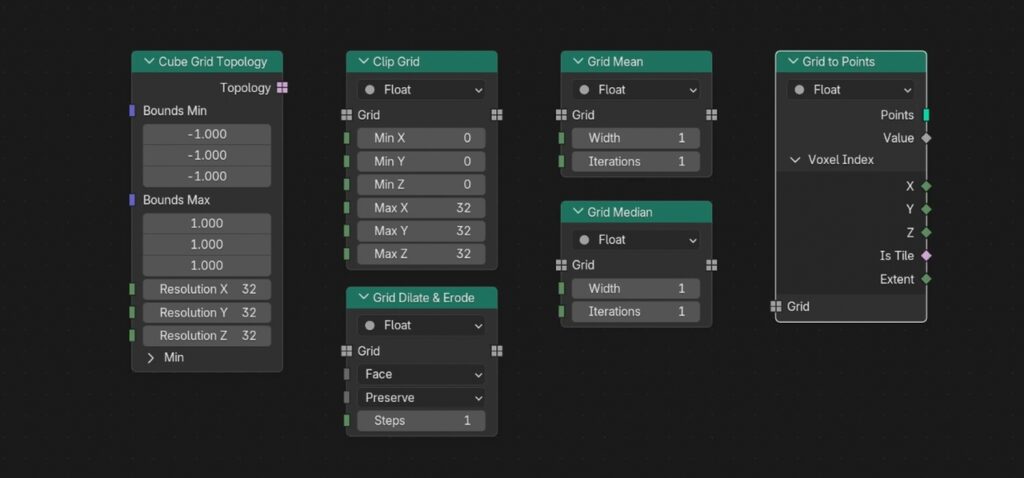
- Geometry Nodes expansion: Includes a new Bone Info node to access armature transforms and six new Volume Grid nodes for voxel manipulation (clipping, dilating/eroding, etc.).
- Grease Pencil overhaul: Features a revamped Fill tool with support for holes and a workflow no longer tied strictly to materials.
- Cycles and Eevee improvements: AMD HIP-RT is enabled by default. Eevee features Vulkan performance parity with OpenGL, faster shader compilation, and texture pooling to reduce VRAM usage.
- Compositor & VSE integration: New nodes allow the Compositor to fetch VSE strip attributes, syncing effects directly with edited footage.
- “Winter of Quality” bug fixes: Over 350 issues were resolved. The codebase now uses C++20 and Python 3.13, aligning with VFX Platform 2026 standards.
Blender 5.1 Raycast node explained how it works and use cases
The Raycast shader node enables materials to perform ray-tracing operations by taking an origin point and direction to return data about hit positions, normals, and materials.
- Use cases: Ideal for non-photorealistic (NPR) rendering, X-ray effects, dynamic outlines, and rim shading. It can also be used for contact shadows or planar reflections in Eevee.
- Functionality: Performs true ray intersections in world space for Cycles and screen-space ray tracing for Eevee.
- Creative applications: Enables dynamic wear and tear, portal effects, and custom subsurface scattering without custom code.
How to upgrade to Blender 5.1 (step-by-step)
- Download Blender 5.1: Obtain the installer or archive for Windows, macOS, or Linux from the official site, Steam, or the Microsoft Store.
- Install or unzip: Run the installer or extract the portable .zip/.tarball. Portable versions allow for side-by-side installations with older versions.
- Copy user settings: Use the “Load Previous Settings” option on the first launch to migrate preferences and keymaps from Blender 5.0.
- Verify add-on compatibility: Check that third-party add-ons are enabled; many have been updated for Python 3.13.
- Open your projects: Files from older versions are compatible, though 5.1 files may not open correctly in versions below 4.5.
- Learn the changes: Review the release notes to understand specific behavior changes in tools like Grease Pencil and the VSE.
Blender 5.1 Cycles performance improvements GPU and CPU gains
Cycles sees performance gains through optimized thread scheduling, texture sampling, and a new memory allocator (TBB’s malloc proxy).
- GPU gains: Approximately 5–10% faster across various scenes.
- CPU gains: Windows users see 5–20% improvements due to platform-specific optimizations and new compiler toolchains.
- Viewport: Improved responsiveness in Rendered view with smoother denoiser transitions.
- Memory: Eevee uses a new texture pool to reuse textures and reduce VRAM consumption.
AMD GPU ray-tracing (HIP-RT) enabled by default in Blender 5.1
Hardware ray tracing via the HIP-RT API is now active by default for AMD Radeon RX 6000-series (RDNA2) and newer GPUs.
- Performance: HIP-RT can nearly double render speeds in complex scenes compared to the standard HIP path.
- Compatibility: No manual activation is required, though users should ensure they have the latest drivers.
- Features: Includes improved support for motion blur, volumes, and subsurface scattering on AMD hardware.
- Other Hardware: Continued support for NVIDIA (OptiX/CUDA) and Intel (oneAPI) remains.

Geometry Nodes in Blender 5.1 new nodes and topology tools
- Bone Info Node: Allows Geometry Nodes to retrieve location, rotation, and scale from armature bones, bridging rigging and procedural effects.
- Expanded Volume Nodes: Six new nodes for voxel manipulation, including Grid Cube Topology, Grid Clip, Grid Dilate/Erode, Grid Mean/Median, and Grid to Points.
- String to Curves: Now features input sockets for font, alignment, and spacing, plus a Word Index output for per-word control.
- Topology & mesh tools: Adds Snap to Face Center, loop select delimiters, and a 35% speed increase for the Exact Boolean solver.
- Delaunay fill: A new algorithm for text and curves provides more even triangle distribution for cleaner beveled and extruded geometry.
Blender 5.1 String to Curves and motion graphics improvements
The String to Curves node is now more procedural and flexible for motion graphics:
- Input Sockets: Parameters like font size, alignment, and character spacing can now be driven by other nodes or keyframes.
- Word-level control: The Word Index output allows for staggered animations or randomized effects on a per-word basis.
- Improved Topology: The Delaunay triangulation method for text fills reduces shading artifacts and improves the reliability of boolean operations on text.
Video Sequence Editor updates in Blender 5.1 ripple cut and retime fixes
The VSE received several workflow enhancements:
- Ripple Cut/Editing: The Blade tool now supports click-and-drag to cut and ripple delete automatically. Holding Shift preserves the gap.
- Retime tool: Retimed strips now display a clock icon. The UI is cleaner, and the Speed Control strip supports negative values for one-click clip reversal.
- General fixes: Snapping (Shift+S) now maintains relative offsets for multiple strips. The preview transform tools support incremental snapping with Ctrl.
- Metastrips: Gained a master volume control to adjust overall gain without changing individual strips.
- Audio effects: New Pitch and Echo modifiers allow for direct audio manipulation within the VSE.

Blender 5.1 animation and rigging quality-of-life changes
Animators and riggers benefit from significant performance improvements and workflow refinements in this version:
- Animation Playback: Evaluation of F-Curves, shape keys, and drivers is much faster, with shape key evaluation on dense meshes seeing gains up to 300%.
- Smooth (Gaussian) F-Curve Modifier: A new non-destructive modifier in the Graph Editor helps smooth out jittery animation or mocap data.
- Visual Feedback: The Dope Sheet and Timeline now feature color-coded interpolation lines, allowing artists to distinguish between Bezier, linear, and constant interpolation at a glance.
- Replace Action Operator: Allows users to swap animation data-blocks across multiple objects or bones simultaneously.
- Apply to Basis: A new one-step operation for shape keys that bakes a deformation into the base mesh and removes the shape key.
- Weight Painting: Now supports edge loop selection when using vertex selection masking, streamlining weight adjustments.
- Constraint Blending: Improvements to Copy Rotation and IK constraints ensure smoother transitions when animating influence or space switches.
- Driver Caching: Optimized viewport playback for rigs with heavy use of bone drivers and constraints.
Grease Pencil and fill workflow updates in Blender 5.1
The 2D animation system features a significant architectural shift in how colors and shapes are handled:
- Revamped Fill Tool: Fills now support holes (donut shapes) and are properties of the strokes themselves rather than being strictly tied to materials.
- Stroke Attributes: Artists can toggle strokes between being boundaries (outlines) or interiors (fills) after they are drawn.
- Vector Import: Improved support for holes makes importing SVG and PDF files much more reliable, maintaining complex shapes correctly.
- Simplified Workflow: The need for “holdout” materials to create transparent holes is removed, making the drawing process more intuitive.
- Performance: Long stroke drawing is faster, and the ability to parent Grease Pencil objects to a lattice has been restored.
- UI Improvements: The “Move to Layer” menu now includes a search function for better management of complex layers.
Blender 5.1 system requirements and recommended hardware
Hardware requirements remain largely consistent with the 5.0 generation, with a focus on modern APIs:
- Operating Systems: 64-bit Windows 10/11, macOS 11.0+ (Universal binary for Intel and Apple Silicon), and Linux (glibc 2.28+).
- CPU: 64-bit dual-core minimum, though a quad-core with SSE4.2 support is recommended.
- RAM: 8 GB minimum, with 16 GB to 32 GB+ recommended for professional scenes and sculpting.
- Graphics Card: Requires OpenGL 4.3 compatibility. A GPU with at least 4 GB VRAM is recommended for basic work, while 8 GB+ is ideal for heavy Cycles rendering.
- Render Backends: Fully supports NVIDIA (CUDA/OptiX), AMD (HIP/HIP-RT), Intel (oneAPI), and Apple (Metal).
- Software: Bundled with Python 3.13; users are encouraged to use the latest drivers (e.g., NVIDIA Studio or AMD Adrenalin).
Is Blender 5.1 stable for production? (bugs, LTS considerations)
Stability is a primary focus for this release following a dedicated bug-fixing initiative:
- Winter of Quality: Over 350 bugs were resolved, addressing various glitches, crashes, and “papercuts” found in previous versions.
- LTS Versions: While 5.1 is highly stable, studios in the middle of critical projects may prefer the 4.5 LTS version for long-term consistency.
- Production Use: Individual artists and small teams can generally upgrade safely, provided they keep backups and verify add-on compatibility.

Blender 5.1 vs Blender 5.0 what changed between versions
While 5.0 introduced major architectural changes, 5.1 focuses on making those features more powerful and efficient:
- Feature Additions: 5.1 introduces the Raycast shader node and Bone Info node, which were not present in 5.0.
- Rendering Speed: Cycles is roughly 5-10% faster on GPUs and up to 20% faster on Windows CPUs compared to 5.0.
- AMD Support: Hardware ray tracing (HIP-RT) is now enabled by default, whereas it was experimental in 5.0.
- Eevee Improvements: Restoration of features like planar reflections and faster parallel shader compilation.
- Animation Performance: 5.1 offers a significant boost in playback FPS over 5.0 for heavy character rigs.
How Blender 5.1 improves node-based workflows (copy/paste nodes)
Node-based editing is now much more flexible across different scenes and editors:
- Cross-Instance Copy/Paste: Nodes can be copied from one Blender window and pasted into another, maintaining all connections.
- Cross-Editor Pasting: Common utility nodes (Math, Mix, Color Ramp) can be copied between different systems, such as from Geometry Nodes to the Shader Editor.
- Node Tools Unique IDs: New requirements for node-based tools ensure they have unique identifiers, facilitating better integration for shared pipelines.
- Search Enhancements: Improved search functionality within Preferences and node editors for finding settings and warnings.
Tips for getting best Cycles performance in Blender 5.1
Users can maximize rendering efficiency by leveraging new 5.1 optimizations:
- GPU Selection: Ensure the correct backend (OptiX for NVIDIA, HIP-RT for AMD) is active in the System Preferences.
- Denoising: Use OptiX or OpenImageDenoise (OIDN) to achieve clean results with lower sample counts.
- Persistent Data: Enable this setting for animations to skip redundant shader compilation and BVH building between frames.
- Adaptive Sampling: Use this to allow Cycles to focus processing power on noisy areas of the image.
- Simplify Panel: Use global settings to limit subdivision levels or particle counts for faster viewport iteration.
Common issues after upgrading to Blender 5.1 and how to fix them
Upgrading may result in minor technical hurdles that are easily addressed:
- Add-on Incompatibility: Some add-ons may require updates to support Python 3.13. Check for developer updates if an add-on fails to load.
- Preferences Migration: Use the “Load Previous Settings” option on the splash screen to bring over 5.0 configurations.
- File Down-saving: Avoid saving Grease Pencil or Node Tool projects in 5.1 if you intend to reopen them in 5.0, as data structures have changed.
- Startup Crashes: If Blender fails to launch, update GPU drivers or try a factory reset via the command line.

How Blender 5.1 affects existing add-ons and pipelines
Studios and technical artists should note changes to library standards and compatibility:
- VFX Platform 2026: Alignment with this standard means updates to Python (3.13), USD, OpenEXR, and Alembic libraries.
- Binary Modules: Add-ons containing compiled C/C++ extensions must be recompiled for the new Python version.
- Pipeline Integration: Improved USD support enhances compatibility with other software like Houdini and Maya.
- Backward Incompatibility: Files saved in Blender 5.x are generally not compatible with the 4.x series.
- Node Tool Identifiers: Custom tools should be re-saved in 5.1 to generate necessary unique operator IDs.
Blender 5.1 for game asset creation export and workflow notes
Blender 5.1 remains a powerful tool for game developers, offering refinements to export processes and asset creation workflows:
- FBX and glTF Support: Built-in exporters received bug fixes for improved compatibility with material nodes and shape keys. For Unreal Engine, the FBX exporter maintains a default scale of 0.01 to match Unreal’s centimeter-based units.
- HIP-RT and Light Baking: Cycles performance gains, specifically on AMD GPUs, allow for faster baking of lightmaps, normal maps, and ambient occlusion. The new Raycast node can also be used for unique stylized texture baking.
- Geometry Nodes: Artists can use expanded node sets to create procedural variations for foliage or rocks. The Bone Info node allows for procedural rigging adjustments, such as auto-placing armor based on bone transforms.
- PixelHair Integration: This library of groomed 3D hair assets is designed for Blender and Unreal Engine MetaHumans. The developer plans to move toward Blender’s geometry node-based hair system for better procedural control. These assets are optimized for export as mesh cards or curves.
- Export Pipeline: Official pipelines for Unity, Unreal, and Godot remain compatible. While USD support is improving, FBX and glTF are still the standard for engine interchange.
- Asset Optimization: Tools like the Decimate modifier and Atlas UV Packing help manage high-poly sculpts more efficiently due to underlying performance improvements.
- Viewport Preview: Eevee Next allows for more accurate PBR previews with reflection planes and SSR. A fix for the Shader to RGB node restores transparency functionality for toon shading workflows.
Blender 5.1 feature demo videos and tutorials to watch next
To master the new features, several community and official resources are available:
- Official Highlights: Jonathan Lampel presents a summary of headline features like the Raycast node and Grease Pencil updates on the Blender YouTube channel.
- Quick Summaries: Channels like Default Cube and CGMatter provide rapid bullet-point recaps of the update.
- Animation and Rigging: CGDive offers specialized tutorials on the Bone Info node and F-Curve smoothing.
- Grease Pencil: Blender Studio and developer Falk David demonstrate the revamped fill tool and hole support.
- Raycast Node: Various YouTubers showcase creative setups for X-ray shaders and dynamic outlines.
- Technical Insights: Phoronix and Linux-focused channels cover Vulkan parity and memory allocation optimizations.
- Asset Guides: Yelzkizi provides tutorials on integrating PixelHair and using The View Keeper for camera management.

Frequently Asked Questions (FAQs)
- When was Blender 5.1 released and where can I get it?
Blender 5.1 was released on March 17, 2026. It is available for free on the official Blender website, Steam, and the Microsoft Store. The splash screen features artwork from the film “Singularity.” - Is Blender 5.1 a Long Term Support (LTS) version?
No, it is a stable regular release. Blender 4.5 is the current LTS version for users requiring multi-year support. - Will my files from Blender 5.0 work in 5.1? And vice versa?
5.1 can open files from 5.0 and 4.x. While forward compatibility is strong, backward compatibility is not guaranteed; 5.1-specific data like Grease Pencil holes or new node IDs may not function in older versions. - What are the major new features in Blender 5.1?
Headline features include the Raycast shader node, a new Grease Pencil fill system with hole support, significant animation playback speed boosts, default AMD HIP-RT, the Bone Info node, cross-instance node copy/paste, and VSE ripple editing. - Did system requirements change for Blender 5.1?
Requirements are consistent with 5.0: 64-bit OS, SSE4.2 CPU, and OpenGL 4.3 compatible GPU. It supports Apple Silicon natively. - How can I update my existing Blender to 5.1?
Download the 5.1 installer or portable version. Upon the first launch, use the “Load Previous Settings” prompt to migrate configurations from 5.0. - Are add-ons from Blender 5.0 compatible with 5.1?
Most Python-based scripts are compatible, but add-ons with compiled components may require updates for Python 3.13. - I heard Blender 5.1 is faster. How much improvement can I expect?
Animation playback can be 2x faster, GPU rendering is 5–10% faster, and Windows CPU rendering is up to 20% faster. Eevee shader compilation is also significantly quicker. - Is there anything major removed or deprecated in Blender 5.1?
No major removals occurred, though the Grease Pencil material-based fill workflow was replaced by an attribute-based system. - How does Blender 5.1 compare to Blender 4.5 LTS? Should I upgrade?
5.1 offers better performance and more tools (Raycast, Bone Info), whereas 4.5 LTS offers long-term consistency. Upgrade if you need the latest features and improved speed.
Where to download Blender 5.1 and official release notes
Blender 5.1 can be obtained from the following sources:
- Official Blender website for Windows, macOS, and Linux installers or portable zip files.
- Steam and the Microsoft Store for automated updates.
- Linux package managers via Snap (latest/stable channel) or Flatpak on Flathub.
Official release documentation is available through:
- The main release highlights page on blender.org.
- The “What’s New” section in the Blender Manual.
- The Blender Development blog for technical write-ups.
- The Help menu within Blender 5.1, which links directly to the manual.
Blender 5.1 is dedicated to the memory of developer Germano Cavalcante.
Conclusion
Blender 5.1 is a refinement of the 5.x series, balancing new creative tools like the Raycast node with massive performance boosts in animation and rendering. The “Winter of Quality” initiative resulted in over 350 bug fixes, ensuring a stable environment for professional pipelines. By aligning with industry standards like Python 3.13 and VFX Platform 2026, Blender 5.1 solidifies its position as a leading DCC tool. Whether for 2D animation, procedural world-building, or game asset creation, the 5.1 update provides a faster, more integrated, and artist-friendly experience.

Sources and Citations
- Link: Blender Foundation – Blender 5.1 Release Notes
Citation: Blender Foundation. “Blender 5.1 Release Notes.” March 17, 2026. - Link: Steam Community – Blender 5.1 Released Announcement
Citation: Steam Community. “Blender 5.1 Released.” March 17, 2026. - Link: Phoronix – Blender 5.1 Released With Raycast Nodes, AMD GPU Ray-Tracing By Default
Citation: Michael Larabel. “Blender 5.1 Released With Raycast Nodes, AMD GPU Ray-Tracing By Default.” Phoronix, March 2026. - Link: Heise Online – Blender 5.1: Audio, Text, and Ray Effects
Citation: André Kramer. “Blender 5.1: Audio, Text, and Ray Effects.” Heise Online, March 2026. - Link: 80 Level – Blender 5.1 Now Available
Citation: Amber Rutherford. “Blender 5.1 Now Available.” 80 Level, March 2026. - Link: LinkedIn – Arti Sergeev Blender 5.1 Breakdown
Citation: Arti Sergeev. “Blender 5.1 Breakdown.” LinkedIn, March 2026. - Link: CG Cookie – Everything New in Blender 5.1
Citation: Jonathan Lampel. “Everything New in Blender 5.1.” CG Cookie, March 2026. - Link: Blender Artists Forum – Pixelhair for Blender
Citation: Daniel I. (Yelzkizi). “Pixelhair for Blender.” Blender Artists Forum. - Link: Blender Developer Blog
Citation: Blender Development Blog. Blender 5.1 developer commentary and release-related notes. - Link: Blender DevTalk Forums
Citation: Blender DevTalk. Blender 5.1 release discussions, node tools changes, Grease Pencil updates, and pipeline notes. - Link: Steam Community – Blender 5.1 Released
Citation: Blender Foundation. “Blender 5.1 Released.” Steam Community News Post, March 17, 2026. - Link: 9to5Linux – Blender 5.1 Open-Source 3D Graphics Software Released with Many New Features
Citation: Marius Nestor. “Blender 5.1 Open-Source 3D Graphics Software Released with Many New Features.” 9to5Linux, March 17, 2026. - Link: Yelzkizi – PixelHair Collection Overview
Citation: Yelzkizi. “PixelHair Collection.” Overview of ready-made 3D hairstyles for Blender and Unreal Engine. - Link: Superhive Marketplace – PixelHair Collection
Citation: Superhive Marketplace. PixelHair asset collection product page.
Recommended
- Logitech G512 X Gaming Keyboard: Is This the Most Advanced and Customizable Keyboard Yet?
- White House Correspondents’ Dinner Shooting Suspect Reportedly Linked to Indie Game Development: What We Know So Far
- Invincible VS Review: is the 3v3 Tag Fighter Worth Buying? Combat, Roster, Story Mode, and Rollback Netcode Breakdown
- The Weekend Messing up His Persona 5 Royal Romance: the Tae Takemi “Rank 9” Fumble Explained
- Roblox Releases Agentic AI Tools for Creators: Build a Game With a Single Prompt Explained
- Stranger Things Creators Admit Steve Fake-Out Death Was “F**king with the Audience”: Duffer Brothers Reveal Why They Keep Teasing Steve Harrington’s Death
- Tyrant: The World’s Greatest Dinosaur Comic Returns in New Hardcover Collection as Stephen R. Bissette’s Classic Roars Back
- How to Modify MetaHuman: A Comprehensive Guide
- EA Sets a New $8 Billion Sales Record Just Months After Laying Off Battlefield 6 Developers: FY26 Net Bookings Explained and What It Means Next
- Poxel.io: Complete Guide to the Pixel FPS .io Game (How to Play, Weapons, Modes, Maps, Skins, and Settings)



































































































