









In This Article (19 sections)
Blender 5.2 Alpha Cloth Tearing Feature Overview
Blender 5.2 Alpha introduces one of the most requested simulation features in modern procedural workflows: cloth tearing inside the Geometry Nodes cloth system. The feature represents a major shift in how artists approach destruction, damage, ripped fabric, and stress-based material simulation in Blender. Instead of relying on manual mesh cuts, fracture modifiers, or heavily customized hacks, artists can now create procedural tearing directly within the Geometry Nodes simulation framework.
The new cloth tearing implementation is tightly integrated with Blender’s node-based simulation architecture. This means artists can combine cloth tearing with fields, attributes, constraints, collisions, procedural animation systems, and custom geometry operations without leaving Geometry Nodes. The result is a far more flexible workflow compared to Blender’s older cloth modifier pipeline.
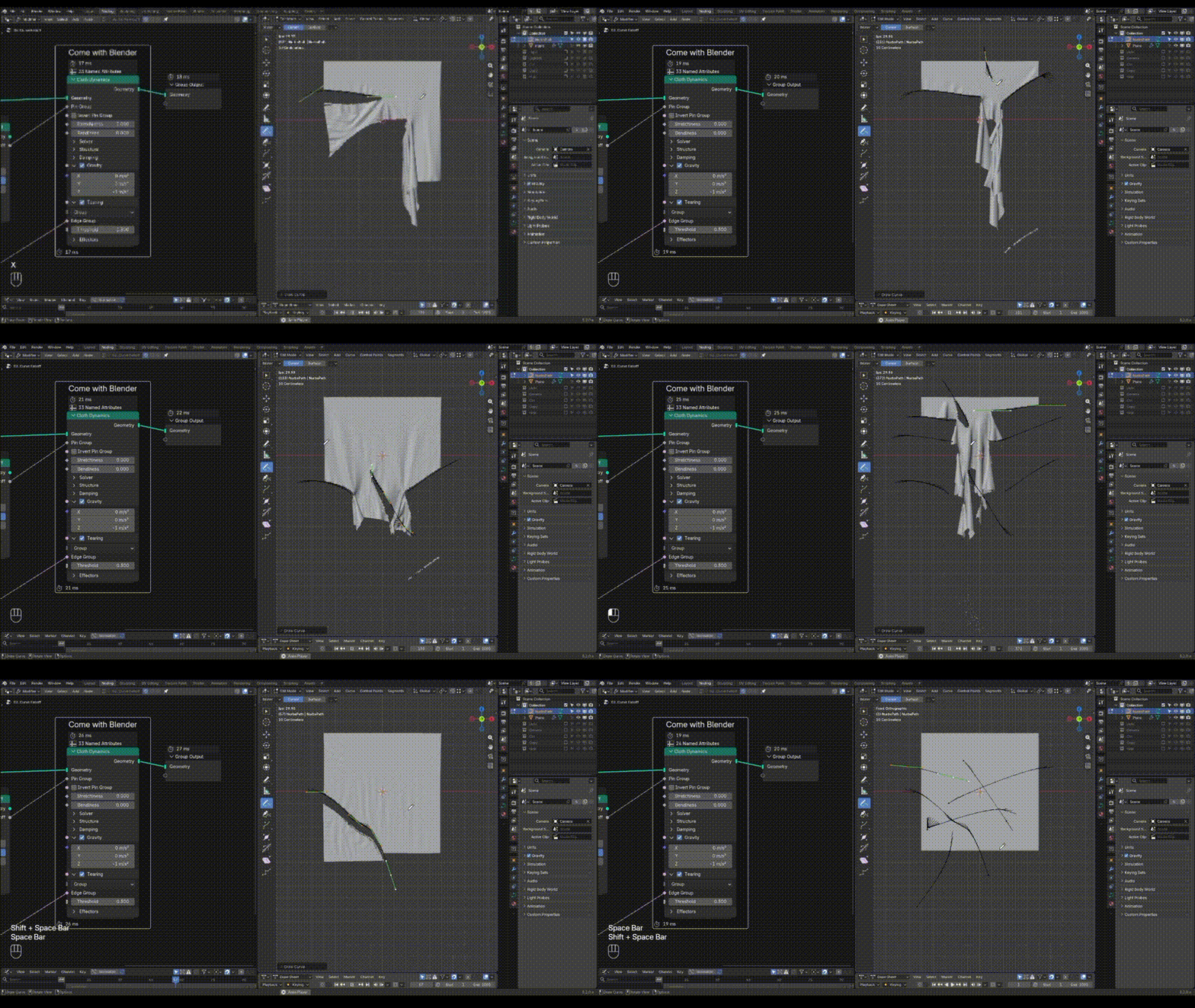
Cloth tearing in Blender 5.2 Alpha works by allowing edges within the simulated cloth mesh to break once stress thresholds are exceeded. During simulation playback, constraints between vertices can snap dynamically, creating visible rips and splits in the fabric. Because the tearing behavior happens during the simulation process itself, the resulting damage patterns appear more natural and less repetitive than manually pre-cut geometry.
This feature is especially important for cinematic VFX artists, destruction specialists, game trailer creators, and technical animators who need believable fabric damage during explosions, crashes, combat scenes, or environmental destruction sequences. Torn flags, ripped clothing, shredded tarps, damaged sails, and collapsing fabric structures can now be generated procedurally with significantly less setup time.
Another important aspect of Blender 5.2 Alpha’s tearing workflow is its compatibility with simulation zones and node-based control systems. Artists can procedurally define where tearing happens, how strong certain regions are, and how different materials respond under stress. This creates a scalable workflow for both stylized and photoreal simulations.
The Geometry Nodes cloth solver itself has also seen broader improvements beyond tearing support. Stability improvements, collision enhancements, better solver consistency, and more advanced attribute handling all contribute to more believable cloth behavior. The tearing feature is therefore part of a larger evolution of Blender’s node-based simulation ecosystem rather than an isolated addition.
Because the feature is still in Alpha, Blender developers continue refining solver stability, edge break calculations, collision reliability, and performance optimization. However, even at this stage, the new system already demonstrates how Blender’s future cloth workflows will become increasingly procedural and simulation-driven.
How to Enable Blender 5.2 Experimental Features for Cloth Tearing
Because cloth tearing is currently part of Blender 5.2 Alpha, users must enable experimental functionality before the tearing system becomes accessible. The feature is not fully exposed in stable Blender builds and may still change before final release.
The first step is downloading Blender 5.2 Alpha from the experimental development branch or official alpha builds. Users running Blender 4.x stable releases will not have access to the Geometry Nodes cloth tearing system.
Once Blender 5.2 Alpha is installed, artists need to open the Preferences menu and navigate to the Experimental section. Several simulation-related features may need activation depending on the specific build version. In most alpha builds, Geometry Nodes simulation functionality is enabled by default, but tearing-related experimental toggles may remain hidden behind developer settings.
Users should also enable the Geometry Nodes simulation tools if they are disabled. Some builds may require activating advanced node simulation support under experimental features.
After enabling the experimental functionality, artists can create a Geometry Nodes setup containing a cloth simulation zone. Inside this simulation framework, tearing-related parameters become accessible through the cloth solver nodes and constraint controls.
Because Alpha builds evolve rapidly, feature names and locations may shift between daily builds. Artists testing the system should regularly update Blender to access the latest solver improvements and bug fixes.
It is also recommended to enable auto-save and versioned project backups while working with experimental simulations. Alpha cloth tearing systems can occasionally produce crashes, corrupted caches, or unstable playback during heavy simulations.
Viewport performance may also vary significantly depending on GPU drivers, CPU threading, mesh density, and collision complexity. Using simplified viewport previews during testing is often necessary for maintaining responsive workflows.

Geometry Nodes Cloth Simulation Tearing Setup in Blender
The tearing setup process in Blender 5.2 Alpha begins with creating a cloth mesh that will be simulated inside Geometry Nodes. Typically, artists start with a subdivided plane or garment mesh containing evenly distributed topology.
After adding a Geometry Nodes modifier, users create a simulation zone that contains the cloth solver nodes. The cloth object is then converted into a simulation-ready state where physical constraints determine how vertices interact during motion.
Tearing behavior relies heavily on edge constraints. Each edge within the cloth mesh acts like a virtual structural connection. During simulation playback, these constraints calculate stress values generated by stretching, collision impact, gravity, and motion forces.
Artists can define threshold values controlling when constraints break. Once the force applied to an edge exceeds the allowed stress limit, the edge disconnects and creates a tear in the fabric.
Pin groups are especially important during setup. These groups determine which vertices remain anchored during simulation. For example, a hanging flag may use pinned vertices along its top edge while allowing the remaining fabric to move freely.
Proper tearing setups often involve combining pin groups with weight maps. Different regions of the cloth can receive different tear resistance values, allowing artists to simulate weak seams, reinforced stitching, or damaged material zones.
Subdivision density also plays a major role in tearing realism. Low-density meshes produce blocky, unrealistic tears, while higher-density geometry allows more natural rip propagation patterns. However, extremely dense meshes dramatically increase simulation cost.
Collision objects should be configured early during setup because tearing behavior changes significantly depending on impact forces and collision friction. Fast-moving colliders can create highly dynamic ripping effects when combined with stress-based tearing thresholds.
Simulation playback usually requires multiple iterations to refine the final result. Artists often adjust stiffness, damping, tearing thresholds, collision thickness, and substeps repeatedly until the cloth behaves correctly.
Cloth Tearing Constraints and Pin Groups in Blender
Constraints form the foundation of Blender’s cloth tearing system. Every cloth simulation depends on structural relationships between vertices, and tearing occurs when these relationships fail under stress.
Structural constraints define how strongly edges resist stretching. Bend constraints determine how much the cloth can fold or crease. Shear constraints help maintain overall surface integrity during motion. Tearing calculations evaluate these relationships continuously throughout the simulation.
When a stress value exceeds the assigned limit, the solver removes the edge connection responsible for maintaining the surface continuity. This creates visible mesh separation that propagates naturally based on force direction and surrounding topology.
Pin groups provide localized control over cloth behavior. These groups allow artists to anchor specific regions while leaving others free to deform and tear. Pinning can simulate attachment points such as nails, hooks, ropes, buttons, seams, or rigid clothing sections.
Weight painting is frequently used to define pin influence strength. Partial pinning allows subtle movement near attachment zones while still preventing complete detachment.
Artists can also create procedural pinning systems using Geometry Nodes attributes. This enables dynamic pin behaviors based on proximity, vertex color masks, material assignments, or animated field inputs.
Constraint balancing is critical for stable tearing simulations. Excessively rigid constraints can cause explosive behavior, while overly weak constraints may result in unrealistic stretching before tearing occurs.
The new Geometry Nodes workflow makes it easier to combine procedural masking systems with simulation logic. This procedural flexibility represents one of the biggest advantages over Blender’s older modifier-based cloth workflow.

Creating Realistic Ripped Fabric in Blender 5.2
Realistic ripped fabric depends heavily on mesh structure, material behavior, and simulation timing. The tearing system itself only generates structural separation. Believable visual results require careful artistic preparation.
One of the most important factors is topology direction. Cloth meshes with evenly distributed quads produce cleaner and more natural tear propagation patterns than irregular triangulated geometry. Edge flow can also influence the direction in which tears travel.
Fabric scale matters as well. Small cloth objects with overly aggressive gravity settings often produce unrealistic tearing behavior. Simulations become more believable when real-world scale measurements are maintained throughout the scene.
Material stiffness strongly affects visual realism. Heavy canvas behaves differently from silk or denim. Artists can simulate these differences by adjusting stretch resistance, damping, mass distribution, and tearing thresholds.
Adding thickness improves realism significantly. Infinitely thin cloth surfaces often produce unnatural intersections and visual artifacts. Slight thickness values help preserve volume during tearing events.
Secondary motion also contributes heavily to realism. Wind forces, turbulence, and directional motion fields help create organic tear movement after structural failure occurs.
Collision timing is another major factor. Sudden high-speed impacts produce aggressive explosive tearing, while gradual force buildup creates slower material stress and controlled ripping patterns.
Lighting and shading complete the illusion. Torn fabric edges benefit from visible fraying, displacement details, and roughness variation. Many artists combine simulation results with procedural shaders to enhance the appearance of ripped fibers.
Blender Cloth Tearing Collision Settings and Troubleshooting
Collision settings are among the most sensitive parts of Blender 5.2 Alpha’s cloth tearing system. Incorrect collision values can easily destabilize the simulation and create exploding geometry or jittering artifacts.
Collision thickness is especially important. Very small thickness values can allow geometry penetration, while excessively large values create unrealistic floating gaps between surfaces.
Substeps improve solver accuracy during fast motion or heavy impacts. Increasing simulation substeps reduces clipping and improves collision consistency, although it also increases simulation time significantly.
Friction settings affect how cloth slides across collision objects. Low friction produces smoother gliding motion, while high friction can create sticking effects that increase tear stress dramatically.
Self-collision remains computationally expensive but necessary for many advanced tearing scenarios. Without self-collision, torn fabric sections may intersect unrealistically during violent motion.
One common issue involves exploding simulations caused by unstable constraints or collision overlap at frame one. Artists should ensure cloth meshes begin without intersecting collision objects before playback starts.
Scale mismatches also create solver instability. Applying transforms before simulation setup helps maintain accurate physics calculations.
Non-manifold geometry frequently causes tearing artifacts. Artists should clean meshes carefully before simulation to avoid disconnected vertices, duplicate edges, or overlapping polygons.
Another common issue occurs when tearing thresholds are too low. In these cases, the cloth disintegrates instantly rather than tearing naturally under stress. Gradual threshold adjustment usually solves the problem.
Preventing Cloth Sim Exploding in Blender 5.2 Alpha
Simulation explosions are one of the biggest challenges when working with experimental cloth systems. Blender 5.2 Alpha introduces improvements to stability, but tearing simulations still require careful optimization.
The most important prevention method involves proper mesh preparation. Clean topology with evenly spaced quads greatly reduces instability.
Applying transforms before simulation is essential. Unapplied scale values frequently distort solver calculations and generate unpredictable movement.
Increasing solver substeps improves stability during fast motion. Additional iterations allow the solver to resolve collisions and edge constraints more accurately between frames.
Reducing initial collision overlap is equally important. Cloth meshes intersecting collision objects at the beginning of playback often trigger violent physics reactions immediately.
Constraint stiffness should be increased gradually rather than maxed out instantly. Extremely rigid settings can produce impossible force calculations that destabilize the simulation.
Using moderate simulation speeds during testing helps isolate issues more effectively. Once stable behavior is achieved, artists can gradually increase complexity and motion intensity.
Cache resets are also important during troubleshooting. Corrupted simulation caches sometimes preserve unstable data even after settings are adjusted.
Viewport subdivision levels should remain low during early testing phases. Excessively dense meshes dramatically amplify solver instability and slow debugging.

Cloth Tearing Thickness and Material Stretch Settings
Thickness settings help preserve believable cloth volume during tearing simulations. Without thickness, torn surfaces can collapse visually and produce unrealistic paper-thin results.
The Geometry Nodes cloth solver calculates thickness during collision evaluation. Proper thickness values prevent fabric from clipping through itself and nearby objects during aggressive movement.
Stretch resistance controls how much fabric deforms before tearing occurs. High stretch resistance creates rigid materials such as leather or reinforced canvas, while low resistance simulates softer fabrics like cotton or silk.
Balancing stretch resistance with tearing thresholds is crucial. If stretch resistance is too low, the cloth deforms excessively before tearing. If it is too high, the material may explode under sudden force.
Damping settings influence how quickly cloth motion settles after impacts. Higher damping reduces chaotic oscillation and creates heavier fabric behavior.
Mass distribution also affects tearing realism. Heavier materials generate stronger momentum during motion and often produce more violent tearing patterns.
Combining multiple material zones within one cloth object creates more advanced effects. Reinforced seams can remain intact while surrounding material tears apart under stress.
Blender 5.2 Cloth Tearing Performance Tips
Cloth tearing simulations are computationally demanding, especially when using dense geometry and self-collision systems. Performance optimization is therefore critical for practical workflows.
The most effective optimization strategy involves controlling mesh density. Artists should use only enough subdivision to achieve believable tearing detail.
Proxy simulation workflows can improve efficiency dramatically. Low-resolution simulations can drive higher-resolution meshes through deformation transfer techniques.
Disabling unnecessary viewport overlays improves playback responsiveness during heavy simulations.
Collision object simplification is another important optimization method. Highly detailed collision geometry slows calculations significantly without necessarily improving visible results.
Caching simulations to disk prevents repeated recalculation during playback. This becomes especially important for cinematic shots involving long simulations.
GPU acceleration benefits viewport interaction but many cloth calculations remain CPU dependent. Faster multi-core processors generally improve simulation performance more than gaming-oriented GPUs alone.
Selective self-collision usage also helps. Not every tearing shot requires full self-collision accuracy across the entire cloth mesh.
Artists working on large productions often separate simulations into layers. Background cloth may use simplified settings while hero assets receive full-quality calculations.
Baking Cloth Tearing Simulations in Blender
Baking converts procedural cloth simulations into cached data that can be replayed consistently without recalculating physics every frame.
In Blender 5.2 Alpha, baking cloth tearing simulations is especially important because tearing calculations can vary during unstable playback sessions.
The bake process stores vertex motion, edge break events, collision interactions, and simulation timing into cache files. Once baked, playback becomes faster and more predictable.
Artists should finalize collision settings, tearing thresholds, and solver iterations before baking. Major changes after baking usually require cache regeneration.
Disk cache location management is also important for large simulations. High-resolution tearing sequences can generate extremely large cache files depending on simulation length and mesh density.
Versioning baked caches is recommended during production work. Experimental simulations may occasionally produce corrupted results after software updates or node modifications.
Viewport playback after baking becomes significantly smoother because Blender no longer recalculates physics continuously.
Many VFX artists bake simulations in stages. Initial low-resolution bakes are used for timing approval, while final high-resolution bakes generate production-ready results.

Using Cloth Tearing for Destruction VFX Shots
Destruction VFX represents one of the most powerful applications of Blender 5.2 Alpha’s tearing system. Fabric destruction appears frequently in explosions, environmental collapse scenes, combat cinematics, vehicle crashes, and disaster sequences.
Torn banners, collapsing tents, ripped sails, shredded curtains, damaged clothing, and broken tarps all benefit from procedural tearing systems.
Geometry Nodes integration makes it possible to combine cloth tearing with particle systems, rigid body destruction, smoke simulations, and procedural animation logic. This creates highly scalable cinematic workflows.
Artists can trigger tearing using animated force fields, collision objects, or scripted motion events. This procedural control enables repeatable destruction setups suitable for production pipelines.
Combining tearing with wind simulation creates highly dynamic debris movement after structural failure occurs.
Game trailer production especially benefits from the system because realistic cloth damage enhances cinematic intensity dramatically.
The procedural nature of Geometry Nodes also allows non-destructive iteration. Artists can refine tearing behavior without rebuilding the entire simulation from scratch.
Exporting Cloth Sim Results to Alembic from Blender
Alembic export is one of the most common methods for transferring cloth simulations between DCC applications, rendering pipelines, and game cinematic workflows.
After baking a tearing simulation, artists can export the animated geometry as an Alembic cache. This preserves vertex animation data frame-by-frame.
Alembic exports are particularly useful for transferring Blender simulations into Houdini, Unreal Engine cinematic pipelines, Maya, or external rendering environments.
Before export, artists should apply necessary modifiers and verify that the simulation cache is fully baked.
Large cloth tearing simulations can generate massive Alembic files because every frame stores updated vertex positions. Compression and mesh optimization therefore become important considerations.
Frame consistency should also be checked carefully. Missing frames or cache corruption can break Alembic playback in external software.
Export testing inside separate Blender scenes helps verify that the baked geometry behaves correctly before pipeline integration.
Cloth Tearing vs Old Blender Cloth Workflow Differences
The Geometry Nodes cloth tearing workflow differs fundamentally from Blender’s older cloth modifier system.
Traditional cloth modifiers relied on object-level settings with limited procedural flexibility. Artists often needed external add-ons or destructive mesh editing workflows to simulate tearing.
The older system also struggled with advanced procedural control. Custom tearing patterns required complicated workarounds involving vertex groups, animated cuts, or mesh swapping techniques.
Geometry Nodes introduces a fully node-based simulation framework where cloth behavior becomes part of a procedural data flow system. This dramatically expands customization possibilities.
Artists can now combine simulation logic with procedural attributes, field systems, dynamic masking, and custom geometry operations directly inside the node graph.
The new workflow is also more scalable for technical artists building reusable simulation tools.
Another major difference involves integration with Blender’s broader procedural ecosystem. Geometry Nodes cloth simulations work more naturally alongside procedural scattering, instancing, animation systems, and simulation zones.
The tearing system itself is more physically dynamic than older manual workflows because edge break behavior emerges naturally from stress calculations rather than pre-defined cuts.

Best Topology for Cloth Tearing in Blender
Topology quality has a massive impact on tearing realism and solver stability.
Evenly distributed quad topology generally produces the best results. Regular edge spacing allows stress calculations to propagate smoothly across the cloth surface.
Long thin triangles should be avoided because they create uneven force distribution during simulation.
Subdivision density should remain balanced. Too little geometry creates blocky tears, while too much geometry increases simulation cost dramatically.
Edge flow direction can influence tear propagation visually. Artists sometimes intentionally design topology to encourage tearing along specific directions.
Non-manifold geometry should always be cleaned before simulation. Duplicate vertices, overlapping faces, and disconnected edges frequently destabilize tearing behavior.
UV seams can also influence tearing artifacts if not managed carefully. Consistent topology organization improves both simulation stability and shading quality.
For cinematic cloth destruction, many artists use higher-density topology only in areas expected to tear while keeping surrounding regions lighter for better performance.
Known Limitations of Blender 5.2 Alpha Cloth Tearing
Because Blender 5.2 cloth tearing remains in Alpha development, several limitations still affect production usage.
Solver instability can occur during extremely violent simulations or high-speed collisions. Certain edge cases may still produce exploding geometry or corrupted caches.
Performance remains demanding for dense self-collision simulations involving complex tearing behavior.
Some workflows may also lack compatibility with older Blender cloth setups because the Geometry Nodes architecture differs significantly from traditional modifier pipelines.
Tear edge detailing remains relatively basic compared to specialized destruction software. Additional shading and geometry processing are often necessary for highly realistic fabric fibers.
Viewport playback performance can degrade heavily with large meshes or long simulations.
Cross-version compatibility between Alpha builds is another concern. Simulation behavior may change as Blender developers continue refining the solver.
Certain collision edge cases still require manual troubleshooting, especially when multiple cloth objects interact simultaneously.
Despite these limitations, the Blender 5.2 Alpha tearing system already demonstrates major progress toward modern procedural cloth destruction workflows.

Frequently Asked Questions (FAQs)
- What is Blender 5.2 Alpha cloth tearing?
Blender 5.2 Alpha cloth tearing is an experimental Geometry Nodes simulation feature that allows cloth meshes to rip dynamically when stress thresholds are exceeded during simulation playback. - Does Blender’s old cloth modifier support tearing?
The older cloth modifier did not support true procedural tearing in the same way as Blender 5.2 Alpha’s Geometry Nodes system. Artists previously relied on manual mesh cuts, fracture tricks, or external workflows to fake tearing effects. - How do you enable cloth tearing in Blender 5.2 Alpha?
Users must install Blender 5.2 Alpha, open Preferences, enable experimental simulation functionality if required, and create a Geometry Nodes cloth simulation setup using the new cloth solver framework. - Why does cloth simulation explode in Blender 5.2 Alpha?
Exploding cloth simulations are usually caused by overlapping collision geometry, excessive stiffness values, unapplied transforms, unstable topology, or insufficient simulation substeps. - What topology works best for cloth tearing?
Evenly spaced quad topology produces the best tearing behavior because force distribution remains more stable across the cloth mesh during simulation. - Can Blender 5.2 cloth tearing be used for VFX production?
Yes. The system is especially useful for cinematic destruction shots, ripped fabric simulations, environmental damage sequences, torn clothing, and procedural cloth-based VFX. - Does cloth tearing work with self-collision?
Yes, but enabling self-collision significantly increases computational cost. High-density tearing simulations with self-collision can become performance intensive. - Can cloth tearing simulations be baked?
Yes. Blender allows artists to bake cloth tearing simulations into cache data for stable playback and rendering consistency. - Can Blender export cloth tearing simulations to Alembic?
Yes. After baking the simulation, artists can export animated cloth geometry as Alembic cache files for use in external software pipelines. - What are the biggest limitations of Blender 5.2 Alpha cloth tearing?
The biggest limitations currently include solver instability in certain edge cases, high performance costs for dense simulations, evolving feature behavior across Alpha builds, and limited fiber-detail generation on torn edges.

Conclusion
Blender 5.2 Alpha’s Geometry Nodes cloth tearing system represents a major evolution in Blender’s procedural simulation workflow. Instead of relying on destructive mesh editing or complicated workaround techniques, artists can now generate physically driven cloth damage directly inside a fully procedural node environment.
The integration of tearing into Geometry Nodes dramatically expands what technical artists, VFX creators, cinematic animators, and destruction specialists can accomplish using Blender alone. Dynamic fabric ripping, stress-driven material failure, procedural destruction setups, and simulation-based cinematic effects are now significantly more accessible inside Blender’s native toolset.
Although the feature remains experimental and still has limitations involving stability, performance, and workflow refinement, the foundation already demonstrates Blender’s long-term direction toward unified procedural simulation systems. As development continues, the Geometry Nodes cloth solver is likely to become one of the most powerful cloth simulation workflows available in open-source 3D production software.
For artists creating destruction sequences, game cinematics, ripped fabric effects, environmental storytelling shots, or advanced procedural simulations, Blender 5.2 Alpha’s cloth tearing system offers a glimpse into a far more flexible future for cloth simulation workflows.
Sources and Citations
- Blender Developer Documentation: Geometry Nodes Simulation Framework
- Blender Experimental Builds and Release Notes
- Blender Developers Blog
- Blender Artists Community Discussions
- Geometry Nodes Simulation Design Discussions
- Alembic Workflow Documentation
- Procedural Destruction and Cloth Simulation References
- Blender Manual: Cloth Simulation Fundamentals
- Open Source VFX Workflow References
- Simulation Stability and Physics Solver References
Recommendations
- Marathon Open Beta Announced: Everything We Know About the Server Slam Dates, How to Join, Rewards, and Launch Details
- How Do I Create a Cinematic Camera Shot in Blender?
- Advanced Camera Switching Techniques with The View Keeper in Blender
- Castlevania: Belmont’s Curse is a New Castlevania Game Coming in 2026 — Release Date, Trailer, Platforms, Story & Gameplay
- Blizzard’s Overwatch (Previously Overwatch 2) Switch 2 Version Explained
- Closure of Midsummer Studios: What Happened to Jake Solomon’s Burbank Life Sim
- How to Make Hair Cards in Blender for Real-Time Rendering and Animation
- Blender vs Maya: A Comprehensive Comparison Across Industries
- Dirty Hands Official Trailer: Everything We Know About the 2026 Crime Thriller
- Lego Batman: Legacy Of The Dark Knight Samurai Armor Explained



































































































