









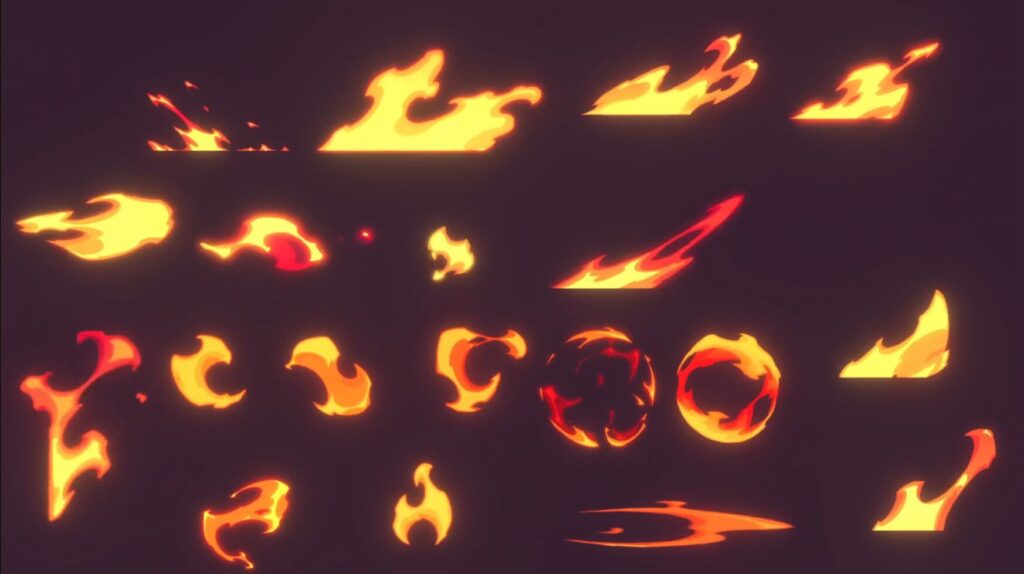
Stylized fire has become one of the most recognizable visual effects in modern game art, animated shorts, cinematic motion graphics, and indie VFX workflows. Unlike realistic fluid simulations that attempt to mimic real-world combustion physics, stylized fire focuses on readability, exaggerated motion, clean silhouettes, and artistic color design. Cartoon flames are designed to feel expressive and visually appealing while remaining lightweight enough for real-time rendering, mobile platforms, and fast iteration.
Blender has evolved into one of the strongest tools for creating stylized visual effects thanks to Geometry Nodes, procedural shaders, Eevee real-time rendering, and flexible animation workflows. Artists can now create cartoon flames entirely procedurally without depending on heavy smoke simulations or external plugins. This allows for highly optimized fire effects suitable for games, cinematics, motion design, and stylized animation.
Modern stylized fire workflows in Blender generally fall into two major categories. The first is procedural mesh-based fire using Geometry Nodes and shader effects. The second is sprite-based or flipbook animation commonly used in game engines. Each approach has strengths depending on whether the target is cinematic rendering, mobile optimization, or real-time gameplay.
This guide explains how to create stylized fire from scratch in Blender using Geometry Nodes and shaders while covering animation techniques, rendering settings, optimization strategies, and common mistakes that artists encounter.
In This Article (19 sections)
Stylized Fire in Blender Tutorial for Beginners
For beginners, stylized fire is one of the best procedural VFX projects to learn because it combines modeling, animation, shading, procedural workflows, and rendering fundamentals into one manageable system. Unlike realistic fire simulations that require domain settings, resolution tuning, cache baking, and fluid physics, cartoon flames can be built with lightweight geometry and animated textures.
The core principle behind stylized fire is shape language. Realistic fire behaves chaotically, but stylized flames rely on controlled curves and predictable silhouettes. Most cartoon fire designs use upward motion, tapered forms, rounded edges, and looping motion patterns.
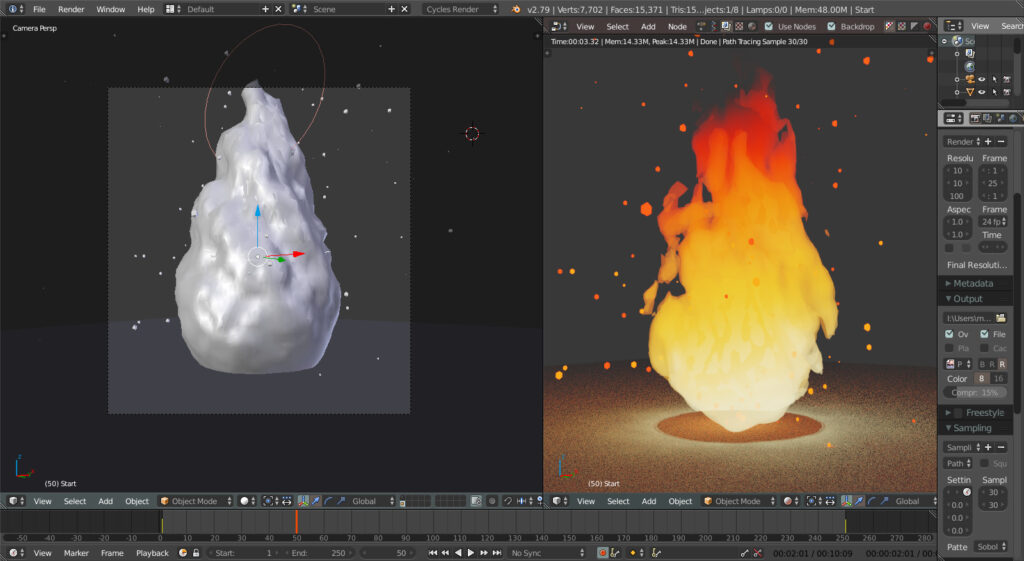
A beginner-friendly workflow starts with a simple mesh object such as a subdivided plane or cylinder. This base mesh becomes the foundation for procedural deformation. Artists can then use Geometry Nodes to distort the mesh vertically using noise textures and sine-wave offsets.
The second major component is the material setup. Stylized flames rely heavily on emissive shaders, gradient ramps, and transparency blending. Instead of simulating actual combustion, the shader creates the illusion of heat through color transitions and animated noise.
The third component is animation. Rather than physically simulating flames, procedural fire loops are typically driven using animated mapping coordinates or time-based wave motion. This makes the effect extremely lightweight and easy to reuse.
One reason stylized fire is popular among indie developers is scalability. The same setup can work for tiny torch flames, large fantasy explosions, magic attacks, campfires, or environmental hazards.

Stylized Flame Mesh Modeling in Blender
The mesh itself plays a massive role in stylized fire readability. Many beginners rely too heavily on shaders while ignoring the importance of strong silhouettes. In cartoon VFX, the outline often matters more than internal detail.
A common workflow starts with a vertically stretched UV sphere or cone. Artists then sculpt or procedurally deform the shape into curved flame layers. Stylized flames typically include multiple stacked sections that taper toward the top.
One effective method involves duplicating overlapping flame shapes of different sizes. Smaller inner flames create visual depth while larger outer layers produce readable silhouettes.
Subdivision Surface modifiers are commonly used to smooth flame geometry. However, too much subdivision can make stylized fire appear overly realistic or difficult to control. Maintaining intentional shapes is important.
Another strong approach is using curves. Artists can create Bezier curves that define the motion path of flames and then generate geometry around those curves procedurally. This technique works especially well for magical fire streams or anime-style energy effects.
Many professional stylized VFX artists exaggerate asymmetry. Perfectly symmetrical flames often feel static and artificial. Small directional variations create more believable motion while still maintaining a cartoon aesthetic.
Cartoon Fire Blender Geometry Nodes Setup
Geometry Nodes dramatically improved procedural VFX workflows inside Blender. Instead of manually animating every flame shape, artists can create procedural systems that automatically generate movement and variation.
A typical stylized fire Geometry Nodes setup begins with a base mesh connected to deformation nodes. Noise textures are used to offset vertices upward and sideways. The effect becomes more dynamic when combined with time-driven animation.
Artists often use a Position node connected to a Noise Texture node, then route the result into Set Position. This allows the mesh to pulse and shift procedurally.
The key to successful cartoon fire deformation is directional control. Fire naturally rises upward, so vertical stretching should dominate the effect. Excessive horizontal distortion can make flames appear watery or unstable.
Many setups combine several layers of noise at different scales. Large noise patterns create overall motion while smaller patterns introduce flickering detail.
Geometry Nodes also allow artists to instance sparks and smoke automatically. Small particles can spawn from vertex positions and animate upward using randomized offsets.
Another useful technique is controlling deformation using vertex groups. Artists can anchor the base of the flame while allowing only the upper regions to distort. This prevents the entire flame from wobbling unnaturally.
Procedural workflows also make iteration significantly faster. Artists can quickly change flame size, movement speed, noise scale, or intensity without rebuilding the effect manually.
Blender Stylized Fire Material Nodes Breakdown
Materials are the heart of stylized fire rendering. Even simple geometry can appear visually impressive when paired with strong shader design.
Most stylized fire materials rely on Emission shaders rather than Principled BSDF setups. Emission allows flames to glow naturally inside Eevee and Cycles without requiring complicated lighting.
A common node structure starts with a Gradient Texture connected to a ColorRamp. This creates the core flame color transition. Artists typically use darker reds or oranges near the base and brighter yellows or whites toward the center.
Noise textures add variation and flickering. By animating mapping coordinates, the noise pattern scrolls upward, creating the illusion of flowing heat.
Transparent shaders are also important. Cartoon flames usually have soft edges rather than hard mesh outlines. Mixing transparency with emission helps the fire blend naturally into scenes.
Many stylized materials use Fresnel or Layer Weight nodes to emphasize edges. This creates glowing rims that enhance readability from a distance.
Shader complexity should remain balanced. Overcomplicated node trees can make stylized effects harder to control and optimize. Simplicity often produces cleaner results.
Artists frequently separate inner and outer flame materials. Inner flames may use intense white-yellow emission while outer flames use softer orange gradients with transparency.

Blender Emissive Fire Shader with Gradients
Gradient-based emissive shaders are among the most effective techniques for stylized fire because they mimic heat transitions without physical simulation.
The most common workflow involves using a vertical gradient mapped along object coordinates. The bottom of the flame receives darker colors while the center transitions into brighter tones.
ColorRamp nodes provide precise artistic control. Small shifts in gradient positioning can dramatically change the visual style. Softer gradients create painterly flames while sharp gradients produce anime-style energy effects.
Artists often use three primary color zones. The outer region contains darker reds or oranges. The middle region transitions into bright yellows. The hottest center becomes nearly white.
Noise textures can distort the gradient dynamically. This creates flickering motion without requiring frame-by-frame animation.
Bloom settings in Eevee amplify emissive effects dramatically. Excessive bloom can wash out stylized flames, so controlled intensity is important.
Another advanced method involves using blackbody-style gradients inspired by temperature shifts. While not physically accurate, these gradients can produce visually appealing fantasy fire.
Opacity gradients are equally important. Fading the top edges of flames helps avoid rigid silhouettes and improves stylization.
2d-Looking Fire in Blender Without Simulation
Many stylized productions intentionally create flames that resemble hand-drawn 2D animation. Blender can achieve this aesthetic without using fluid simulations.
One approach uses flat planes with animated shaders. The illusion of depth comes from scrolling textures and layered transparency rather than actual volume.
Artists frequently use billboarding techniques where flame planes always face the camera. This is especially common in game development because it minimizes polygon count.
Grease Pencil can also be combined with procedural shading to produce anime-inspired flames. Hand-drawn outlines layered over emissive materials create strong hybrid aesthetics.
Another technique involves using toon shading combined with stepped gradients. Instead of smooth color transitions, artists intentionally use abrupt color bands to mimic cel animation.
2D-looking fire often depends more on timing than detail. Snappy movement, rhythmic scaling, and exaggerated shape transitions create the illusion of hand-crafted animation.
Because these effects avoid expensive simulation systems, they are extremely efficient for mobile platforms and stylized indie games.
Blender Fire Color Ramp and Noise Texture Settings
Color ramps and noise textures are the foundation of procedural stylized fire animation.
Noise scale determines how detailed the flame motion appears. Large scales create broad flowing movement while small scales create jittery flickering.
For stylized fire, medium-scale noise generally works best because it maintains readability. Extremely detailed noise patterns can make flames appear muddy.
Distortion settings should remain controlled. Overly chaotic distortion often breaks the cartoon aesthetic.
ColorRamp interpolation mode also matters significantly. Linear interpolation produces smooth transitions while Constant interpolation creates sharp anime-style bands.
Artists commonly animate noise textures vertically using Mapping nodes. This creates continuous upward motion without requiring complex physics.
Wave textures are another powerful tool. Combining wave patterns with noise can create rhythmic pulsation effects ideal for magical flames.
Procedural setups often use multiple layered ColorRamps. One controls emission intensity while another controls transparency falloff.
Strong stylized fire usually prioritizes clear contrast. If all colors have similar brightness values, the flame loses visual impact.
Stylized Smoke and Sparks in Blender VFX
Stylized smoke should complement the fire rather than overpower it. Many beginners make smoke too realistic, which clashes with cartoon flames.
Simple mesh-based smoke often works better than volumetric simulations for stylized projects. Soft rounded shapes animated upward can create convincing results while remaining lightweight.
Transparency gradients are essential for smoke materials. Smoke should gradually fade rather than abruptly disappear.
Sparks add energy and motion to stylized fire. Geometry Nodes can scatter small glowing particles upward procedurally.
Artists often use elongated spark shapes rather than realistic embers. This creates a more exaggerated animated look.
Sparks usually move faster than flames themselves. Quick upward acceleration adds perceived heat intensity.
Adding slight randomness to spark size and timing prevents repetitive motion.
Many stylized VFX setups also include secondary distortion effects such as heat haze or glowing particles surrounding the flame core.
Looping Fire Animation in Blender (Seamless)
Looping animation is critical for games, motion graphics, and reusable VFX assets. A seamless fire loop allows the effect to play infinitely without visible popping.
Procedural animation makes looping much easier because movement is mathematically driven.
One common technique involves animating noise textures in cyclical patterns. Using sine-wave motion instead of linear motion helps create perfect loops.
Artists also use modulo functions or cyclical drivers to reset animation timing smoothly.
When building loops, timing consistency matters. Randomized movement may look realistic initially but often creates visible discontinuities during looping.
Stylized fire loops generally range between two and six seconds depending on complexity.
Another strong approach is layering multiple looping animations with different durations. This creates the illusion of infinite variation even though each component loops individually.
Flipbook textures are another popular solution for seamless fire loops, especially for game engines.
Blender Stylized Fire Flipbook vs Procedural
Flipbook animation and procedural fire each offer unique advantages.
Flipbooks use pre-rendered image sequences arranged inside texture atlases. Game engines then animate these textures frame by frame.
Procedural fire uses real-time geometry deformation and shaders directly inside Blender or game engines.
Flipbooks are generally more performance-friendly because they rely primarily on texture playback. This makes them ideal for mobile games or large-scale particle systems.
Procedural fire provides greater flexibility. Artists can change color, movement, size, or timing dynamically without rebaking textures.
Stylized games often combine both techniques. Large environmental fires may use procedural shaders while smaller effects use flipbooks.
Flipbooks excel when artists want hand-crafted animation frames. Anime-style flames often benefit from this approach because each frame can be carefully stylized.
Procedural systems excel in interactive environments where fire intensity or direction changes dynamically.
Choosing between them depends heavily on the target platform and production pipeline.

Eevee Settings for Glowing Stylized Fire
Eevee is particularly well suited for stylized fire because of its real-time rendering speed and bloom capabilities.
Bloom is one of the most important Eevee settings for emissive fire. Controlled bloom creates soft glowing edges that enhance readability.
However, excessive bloom can destroy shape clarity. The best stylized fire effects maintain visible silhouettes even during bright emission.
Screen Space Reflections are generally less important for stylized fire unless reflective surfaces exist nearby.
Volumetrics should be used carefully. While they can enhance atmosphere, they often reduce rendering speed significantly.
Transparent materials require correct blend mode settings. Alpha Blend or Alpha Hashed modes usually work best depending on scene complexity.
Color Management settings also impact fire appearance heavily. Filmic contrast settings can dramatically alter brightness and saturation.
Artists frequently increase emission intensity in Eevee compared to Cycles because real-time rendering handles glow differently.
Cycles Render Tips for Stylized Flames
Cycles offers more physically accurate lighting than Eevee, but stylized fire requires artistic control rather than realism alone.
Emission noise can become problematic in Cycles. Lower sample counts often produce grainy glowing effects.
Denoising helps clean up renders significantly, especially for bright emissive materials.
Light Paths settings can improve rendering speed. Reducing unnecessary bounce counts prevents excessive calculation overhead.
Stylized flames often benefit from slightly exaggerated emission values in Cycles because physically accurate brightness may appear less vibrant artistically.
Transparent shadows should usually remain enabled to preserve soft edges.
Using adaptive sampling improves efficiency for complex scenes containing multiple glowing VFX elements.
Cycles is particularly useful when stylized fire must interact naturally with environments through lighting and shadowing.
Adding Stylized Fire to Game Assets (Blender to Unity/Unreal)
Game engine integration is one of the most important considerations when designing stylized fire.
For Unity and Unreal Engine, optimization becomes critical. Real-time projects must balance visual quality with rendering cost.
Many artists export stylized flames as mesh animations, sprite sheets, or flipbook textures.
Unity’s Shader Graph and Unreal Engine’s Material Editor both support emissive gradients, scrolling noise textures, and procedural distortion similar to Blender.
When exporting from Blender, artists should ensure UV consistency and texture compatibility.
Overly dense geometry should be avoided. Most game-ready stylized fire effects use surprisingly low polygon counts.
Billboard-based flames remain extremely common because they scale efficiently across many platforms.
Niagara in Unreal Engine and VFX Graph in Unity allow artists to recreate Blender procedural effects directly inside game engines.
Stylized fire for games often prioritizes readability at a distance. Strong silhouettes and exaggerated glow help effects remain visible during gameplay.

Low Poly Stylized Fire Effect for Mobile Games
Mobile games require aggressive optimization. Stylized fire is ideal for mobile platforms because it relies more on artistic illusion than simulation complexity.
Low poly flames typically use minimal geometry combined with emissive textures.
Artists often limit fire effects to a handful of polygons while relying on shaders for motion.
Texture atlases are heavily used in mobile workflows because they reduce draw calls.
Transparency should be used carefully on mobile hardware because overlapping alpha layers can become expensive.
Stylized flames for mobile games usually prioritize bold color separation and simple movement.
Complex volumetric smoke is generally avoided entirely.
Looping flipbooks remain one of the most efficient mobile-friendly fire solutions.
Performance testing is essential because even simple-looking effects can become expensive when repeated many times onscreen.
Common Stylized Fire Mistakes in Blender and Fixes
One of the most common mistakes is making stylized fire too realistic. Artists often add excessive turbulence, simulation detail, or smoke complexity that clashes with cartoon aesthetics.
Another major issue is poor silhouette design. Flames with weak shapes become unreadable from a distance.
Overusing bloom is another frequent problem. Excessive glow destroys color contrast and removes shape clarity.
Beginners also tend to animate flames too slowly. Stylized fire generally benefits from energetic upward motion and rhythmic flickering.
Color choices can also weaken effects. Using overly similar orange tones creates flat-looking flames. Strong contrast between bright cores and darker outer edges improves readability significantly.
Many artists ignore scale consistency. Sparks, smoke, and flame movement should all feel connected to the same energy level.
Shader complexity is another issue. Overengineered node trees often produce unstable or difficult-to-edit effects.
Looping errors frequently appear in procedural animation. Visible timing resets immediately break immersion.
Finally, artists sometimes forget the target platform. A cinematic-quality fire effect may perform poorly in a game engine or mobile environment.
Frequently Asked Questions (FAQs)
- What is the easiest way to make stylized fire in Blender?
The easiest method is using a simple mesh combined with emissive shaders and animated noise textures. This avoids expensive fluid simulations while still creating convincing cartoon flames. - Can Geometry Nodes create animated fire in Blender?
Yes. Geometry Nodes can procedurally deform meshes using animated noise, wave textures, and positional offsets to simulate stylized flame movement. - Is Eevee or Cycles better for stylized fire?
Eevee is usually better for real-time glowing effects and fast previews, while Cycles is stronger for cinematic lighting accuracy and environmental interaction. - How do you make fire look 2D in Blender?
Artists typically use flat planes, toon shading, stepped gradients, billboard techniques, or Grease Pencil overlays to create 2D-looking fire. - What colors work best for cartoon fire?
Strong contrast between reds, oranges, yellows, and bright white cores usually creates the best stylized results. - Should stylized fire use simulations?
Not necessarily. Most stylized fire effects rely on procedural deformation and shaders rather than expensive fluid simulations. - What is a fire flipbook texture?
A flipbook texture is a sprite sheet containing sequential animation frames that can loop inside game engines efficiently. - Can stylized fire work on mobile games?
Yes. Stylized fire is highly suitable for mobile platforms because it can be created with very lightweight geometry and efficient shaders. - How do you optimize stylized fire for games?
Optimization involves reducing polygon count, minimizing transparency layers, using texture atlases, and relying on emissive shaders instead of simulations. - Why does stylized fire sometimes look muddy?
Poor color contrast, excessive noise detail, and overused bloom effects often reduce readability and create muddy-looking flames.
Conclusion
Stylized fire in Blender combines artistic direction with procedural efficiency. Instead of relying on physically accurate simulations, cartoon flames focus on shape language, strong silhouettes, emissive gradients, looping motion, and readability. Geometry Nodes and procedural shaders have transformed Blender into an exceptionally powerful platform for stylized VFX creation, allowing artists to build reusable fire systems suitable for games, cinematics, animation, and motion graphics.
Whether creating low poly mobile effects, anime-inspired magic flames, cinematic environmental fire, or stylized game assets for Unity and Unreal Engine, the key principles remain the same. Clean shapes, controlled motion, optimized shaders, and intentional color design matter far more than raw simulation complexity. Artists who master procedural workflows, gradient-based materials, and seamless looping techniques can create stylized fire effects that are visually striking while remaining efficient enough for modern real-time applications.

Sources and Citations
- Blender Official Documentation
- Blender Official Documentation: Geometry Nodes, Shader Editor, Eevee, and Cycles rendering documentation
- Geometry Nodes: https://docs.blender.org/manual/en/latest/modeling/geometry_nodes/index.html
- Shader Editor: https://docs.blender.org/manual/en/latest/editors/shader_editor.html
- Eevee: https://docs.blender.org/manual/en/latest/render/eevee/index.html
- Cycles: https://docs.blender.org/manual/en/latest/render/cycles/index.html
- Blender Artists Community Discussions: Stylized VFX workflows and procedural fire techniques
- Blender Artists Forum: https://blenderartists.org/
- Stylized VFX discussions: https://blenderartists.org/search?q=stylized%20vfx
- Procedural fire discussions: https://blenderartists.org/search?q=procedural%20fire
- Unreal Engine Documentation: Niagara VFX systems and emissive material optimization pipelines
- Niagara Visual Effects: https://dev.epicgames.com/documentation/en-us/unreal-engine/niagara-visual-effects-in-unreal-engine
- Niagara Overview: https://dev.epicgames.com/documentation/en-us/unreal-engine/overview-of-niagara-effects-for-unreal-engine
- Emissive Material Input: https://dev.epicgames.com/documentation/en-us/unreal-engine/using-the-emissive-material-input-in-unreal-engine
- Unreal Engine Materials: https://dev.epicgames.com/documentation/en-us/unreal-engine/unreal-engine-materials
- Unity Documentation: VFX Graph, Shader Graph, and mobile optimization workflows
- Visual Effect Graph: https://docs.unity3d.com/Packages/com.unity.visualeffectgraph@latest
- Shader Graph: https://docs.unity3d.com/Packages/com.unity.shadergraph@latest
- Optimizing Graphics Performance: https://docs.unity3d.com/Manual/OptimizingGraphicsPerformance.html
- Unity Manual: https://docs.unity3d.com/Manual/index.html
- GDC Talks and VFX Artist Presentations: Stylized real-time effects pipelines for games and animation
- GDC Vault: https://www.gdcvault.com/
- Search: Stylized VFX: https://www.gdcvault.com/search.php#&keyword=stylized%20vfx
- GDC YouTube Channel: https://www.youtube.com/@Gdconf
- GDC YouTube Search: Real-time VFX: https://www.youtube.com/@Gdconf/search?query=real-time%20vfx
- Stylized Station Tutorials and Workshops: Cartoon shader development and stylized VFX theory
- Stylized Station: https://stylizedstation.com/
- Stylized Station YouTube: https://www.youtube.com/@StylizedStation
- Search: Shader: https://www.youtube.com/@StylizedStation/search?query=shader
- Search: VFX: https://www.youtube.com/@StylizedStation/search?query=vfx
- CG Cookie Blender Training Resources: Procedural animation and material node workflows
- CG Cookie Blender Training: https://cgcookie.com/categories/blender
- Search: Geometry Nodes: https://cgcookie.com/search?query=geometry%20nodes
- Search: Procedural: https://cgcookie.com/search?query=procedural
- Search: Materials: https://cgcookie.com/search?query=materials
- Game Developer Conference Research: Real-time stylized rendering and low poly VFX optimization
- GDC Vault: https://www.gdcvault.com/
- Search: Real-time Rendering: https://www.gdcvault.com/search.php#&keyword=real-time%20rendering
- Search: Stylized Rendering: https://www.gdcvault.com/search.php#&keyword=stylized%20rendering
- Search: VFX Optimization: https://www.gdcvault.com/search.php#&keyword=vfx%20optimization
- Technical artist community breakdowns on Geometry Nodes procedural deformation systems
- Tech-Artists.org: https://www.tech-artists.org/
- Search: Geometry Nodes: https://www.tech-artists.org/search?q=geometry%20nodes
- Search: Procedural Deformation: https://www.tech-artists.org/search?q=procedural%20deformation
- 80 Level Technical Art Articles: https://80.lv/articles/technical-art/
- Polycount Artist Discussions: Game-ready fire effects, flipbook workflows, and shader optimization
- Polycount Forum: https://polycount.com/
- Polycount Technical Talk: https://polycount.com/categories/technical-talk
- Search: Fire Effects: https://polycount.com/search?Search=fire%20effects
- Search: Flipbook Shader: https://polycount.com/search?Search=flipbook%20shader
- Search: Shader Optimization: https://polycount.com/search?Search=shader%20optimization
Recommendations
- How to Export Metahuman to Maya and Back: Complete Workflow for Unreal Engine and Autodesk Maya
- Mina the Hollower Has a New Release Date and an Aggressively Low Price: May 29 Launch and $19.99 Cost Explained
- Hellblade 2 Trailer and Unreal Engine: How Ninja Theory Showcased Next-Gen Cinematics
- Super Mario Bros. Wonder – Nintendo Switch 2 Edition + Meetup in Bellabel Park Review: Is the Switch 2 Upgrade Worth It?
- Star Fox Price Confirms It’s the Second Nintendo‑Published Switch 2 Title Sold Cheaper Digitally in the US (Digital vs Physical Explained)
- The Boys Spin-Off Teaser Explained: Vought Origins, First Supes, and What the Prequel Reveals About the VCU Timeline
- Hell Let Loose: Vietnam Preview — No Hand-Holding in This Hardcore 50v50 Milsim (Helicopters, Tunnels, Boats, Beta Details)
- Valor Mortis Preview: A First-Person Soulslike Where You Die Again and Again in Napoleon’s Army
- EVE Online Studio Goes Indie in “New Era” Rebrand: Fenris Creations, Google DeepMind AI Partnership, and What It Means for EVE Online



































































































